Hi guys! As member of the Celestia community I use tS to make some 3D models to be insert into the program, both for personal fun and for sharing with the other members. Celestia is a freeware realtime 3D space simulator which allows the insertion of 3D models, either in 3ds format or in its proprietary CMOD format.
This preamble to say that CMOD format does manage the point cloud and the point sprite, a tecnique that tS is lacking to work with. Thus I'd realized a vertex exporter in order to get Celestia's sprites. To such vertex exporter now I've add further the OBJ-PTS-XYZ formats.
pointcloudtsx.png (3.44 KiB) Viewed 6310 times
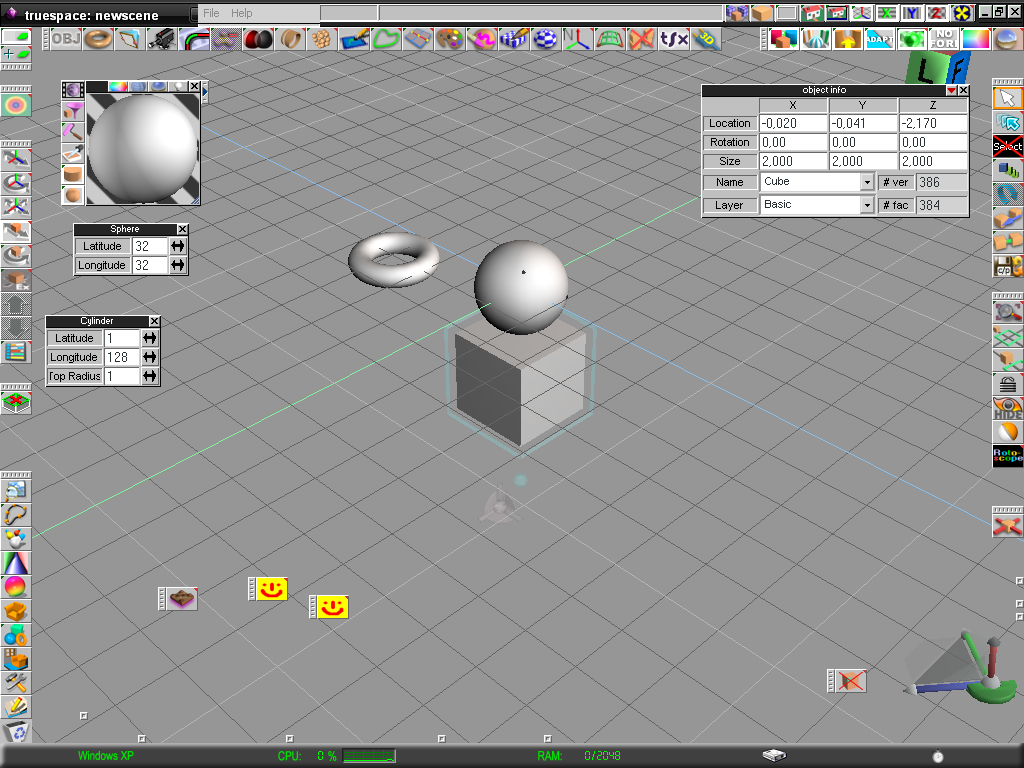
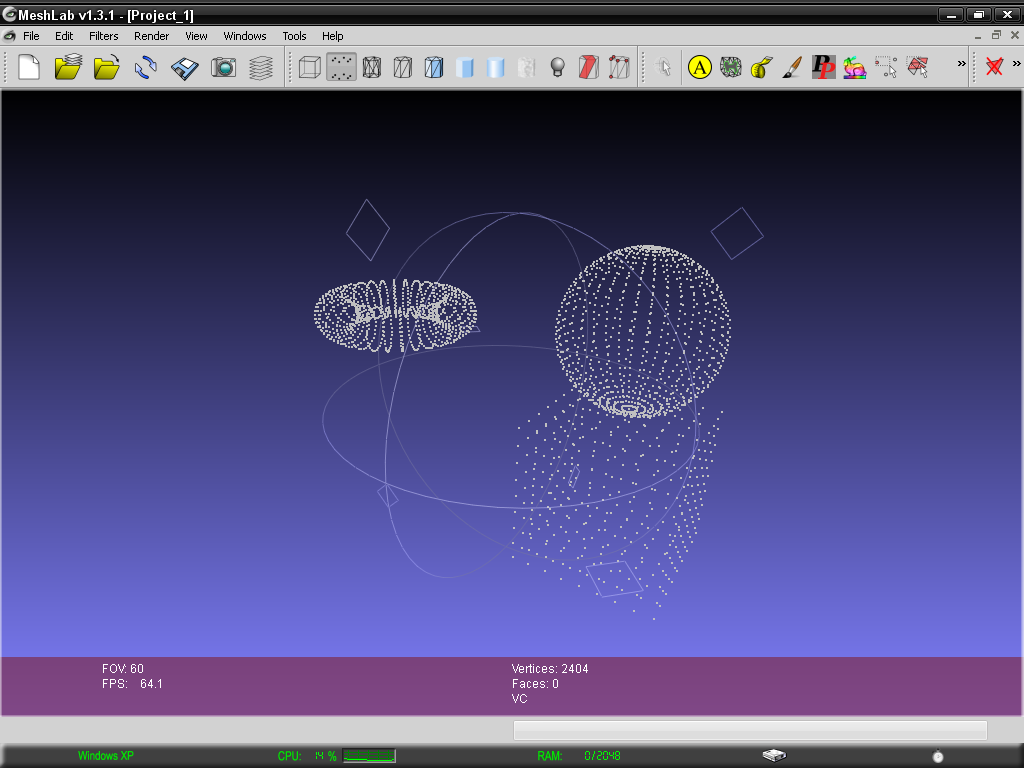
Below there is an image of the point cloud of few mesh exported from tS and imported in Meshlab:
Meshes in tS
the meshes in Meshlab as points
Fenerit
Senior Chief Petty Officer
Posts:173
Joined: 21 Nov 2011, 19:19
Type the number ten into the box: 9
Re: Plugin: point cloud exporter tSx
Postby Fenerit »
For what concern CMOD, below there are images of a fictional "impact" modelled in tS and then inserted in Celestia.
Notice how the modelling in tS is really coarse; to the sphere vertex point is then assigned a blob texture through the manual editing of the CMOD sprites text file. The position on the object is left to Celestia; tS serves only to model, no deals with astrometrics stuffs. This was the original meaning of the plug-in: to export points from tS. Of course they cannot be re-imported. See the readme.txt for more informations.
Thanks for sharing !
Good to have a bridge to Meshlab
Fenerit
Senior Chief Petty Officer
Posts:173
Joined: 21 Nov 2011, 19:19
Type the number ten into the box: 9
Re: Plugin: point cloud exporter tSx
Postby Fenerit »
Because unstable connection, I was too rapid to post; thus I take up more explication about the plug-in directly from the "readme.txt"
FEATURES:
- OBJ and XYZ format exports either xyz orientation (trueSpace) or xzy orientations (Lightwave);
- PTS has xyz orientation as default;
- OBJ(s) always exports normals;
- CMOD export with the xzy orientation, (default in Celestia's framework);
KNOW LIMITATIONS:
- tS vertex colors are not exported; because the fact they are mandatory for PTS and CMOD, in this case have been assigned through the converter;
- objects must be unglued before exporting. Use glue just for modelling purposes, since the tSx always export as children all objects on scene, no matter whether just one object is selected. Exporting object(s) as main scene node requires either a single object on scene or polyhedrons' combine (through the poly combiner, a free tSx by Clinton Reese). However, the way in which children are exported is conform to the relevant files' format specifications and has been enough tested in Meshlab (apart PTS, see below).
- Like I said, PTS point size and color are assigned in seat of conversion (default: size 0.1, color 192 192 192), no matter what polyhedron's color is used. This export option is based upon the Autodesk PTS file format as mentioned within the "file_16461.pdf" (Point Cloud Technology Preview, user guide v3.0) and through the analysis of a free PTS Ascii file downloaded from the Autodesk site. (I do not have done real tests on this format since I do not have 3ds MAX and its point cloud plug-in; thus use it at your own risk. Feedbacks about PTS' behaviour will be appreciates, of course).
- once converted, point/sprite Ascii CMOD(s) needs the manual editing of the sprite texture (user-defined), of the default point color and of opacity, a business that Celestians are supposed to know well.
- Being the way in which points are got from tS not the pure point cloud's "fashion", the cloud is limited to the 3D mesh's surface points; fulfilled "volumetric" point meshes needs a modeler's trick (scaled object's recursion within itself). Anyway, they will be undifferently exported too.
ABOUT CELESTIA CMOD MODELLING:
For completeness, a typical Celestia's .SSC directive (the text file which load the model into the framework) showing a surface point cloud resembling impact, plumes o whatelse sprites cloud posit, i.e, on the Sahara desert (or elsewhere, even on fictional solar systems), should be as below:
####################IOF#################################
SurfaceObject "my_mesh" "Sol/Earth"
{
Class "diffuse"
Mesh "my_mesh.cmod"
Radius 1000 #km
FixedPosition { Planetographic [ 20.73 11.27 0 ] }
# Earth's coordinates; the third value is the 3D model's altitude from the soil
in which the "Radius" and the "FixedPosition"'s directives supersedes the scale/radius and the world/object of the trueSpace's object. In such a case, only the shape of the object and its proper axis are held. For example, the relevant "impact" above can be modeled on a fictitius sphere in whatever Earth's place at the same latitude of the Sahara; mostly for the same axial issues. (the object's axis is assumed to be hortogonal with the latitude and the longitude, but can be skewed like one want it be). Truespace object's radius is thus not important, and once estabilished the object's inclination, the cloud can be shaped at centre of the scene without to have nothing around, if only with the aid of the particle system.
Fenerit
Senior Chief Petty Officer
Posts:173
Joined: 21 Nov 2011, 19:19
Type the number ten into the box: 9
Re: Plugin: point cloud exporter tSx
Postby Fenerit »
P.S.
Read "scaled object's recursion within itself" as: "subdivide faces (Div. Tools) made within".
Fenerit
Senior Chief Petty Officer
Posts:173
Joined: 21 Nov 2011, 19:19
Type the number ten into the box: 9
Re: Plugin: point cloud exporter tSx
Postby Fenerit »
P.P.S.
Maybe SLICE is the right word.
bitkar
Captain
Posts:2089
Joined: 16 Mar 2010, 07:14
Type the number ten into the box: 0
Location: Czech Republic
Re: Plugin: point cloud exporter tSx
Postby bitkar »
cool bro!
Michal aka bitkar
tS freak since tS2 (1998) and forever (tS7.61 modeler)
v3rd3
Lieutenant Commander
Posts:1191
Joined: 21 May 2009, 20:04
Re: Plugin: point cloud exporter tSx
Postby v3rd3 »
Thank you for this... I may use this in an old 6.6 project I am trying to revitalize.
Prodigy
Site Admin
Posts:957
Joined: 21 May 2009, 14:46
Type the number ten into the box: 0
Location: Uruguay
Re: Plugin: point cloud exporter tSx
Postby Prodigy »
Very nice.. Thanks for sharing
๑۩۞۩๑ prodigy ๑۩۞۩๑
BNG
Chief Warrant Officer
Posts:684
Joined: 16 Oct 2009, 03:26
Type the number ten into the box: 0
Location: Texas
Re: Plugin: point cloud exporter tSx
Postby BNG »
Very cool and thank you Fenerit. I especially love the fact that it can export in several different formats.