My goal for this is two people on a balcony on a very tall building with a landscape beyond including mountains, ocean, forest, and other very tall buildings. It all positive and pretty. I'll put Elegant Bridge in it some day.
- People: DAZ
- Clothes: TS import to DAZ, fit, and rig
- Landscape: Bryce
- Buildings: TS import to Bryce
- Props: TS
- Render: Bryce or TS not sure yet. If TS then I'll make and HDRI with Bryce to use in TS.
These future people will look young and athletic. I started a woman in DAZ. I'll make a man too if there is time. It takes some work to make a DAZ female be feminine with muscle definition. Combinations of Bodybuilder, Thin, and Body Volume have worked well. She has slight abs, which I want to show fitness, but that took so much Bodybuilder that some other areas are too pumped (I envy her shoulders). I'll slim those independently. I found that there is no control for making a DAZ character taller and the scale tool only presents the general scale for them.
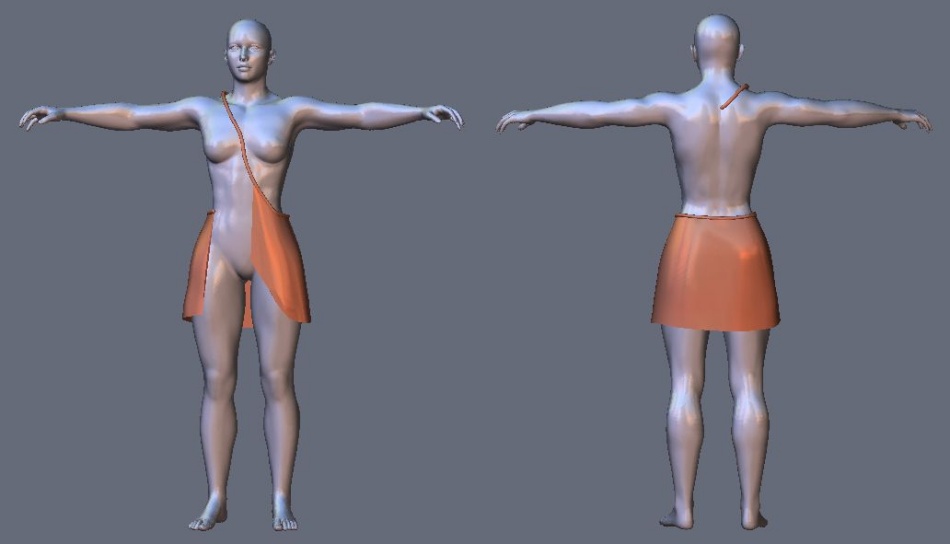
After watching tutorials on making clothes for DAZ people I created the fashion masterpiece shown. This should start my career as fashion designer. It is surprisingly easy to attach clothes to figures in DAZ. Now to model some in TS. I plan to give the lady a short skirt plus a thing that wraps from her shoulder, around back, and becomes a longer half skirt (like the red thing here). Her top should be classy but show her abs ... challenging.
DAZ tutorials:
Transfer utility rigs clothes to move with character.
Smoothing and collision helps stop poke through.
Weight maps.
Interesting tool for 3D clothes.
U3DAC Jan. 2014 Sci-Fi World - Golden Age
-
Finis

- Captain
- Posts: 5410
- Joined: 21 May 2009, 18:26
- Type the number ten into the box: 0
- Location: America!
U3DAC Jan. 2014 Sci-Fi World - Golden Age
- Attachments
-

I prefer dangerous freedom over peaceful servitude. -- Thomas Jefferson/Jean Jacques Rousseau
-
Finis
- Captain
- Posts: 5410
- Joined: 21 May 2009, 18:26
- Type the number ten into the box: 0
- Location: America!
Re: U3DAC Jan. 2014 Sci-Fi World - Golden Age
Fashion designing is harder than I thought. SciFi-ish, show some abs and skin, not slutty. Yeah that's easy. Looking at Indian Sari's for ideas. I'll have to use the pig tails hair from Daz because it is hard to make hair and that is the only free one that is long. Moded that some but I'll try to do hair if all else is done and there is time.
I prefer dangerous freedom over peaceful servitude. -- Thomas Jefferson/Jean Jacques Rousseau
-
Dragneye

- Lieutenant
- Posts: 906
- Joined: 02 Sep 2009, 22:09
Re: U3DAC Jan. 2014 Sci-Fi World - Golden Age
Cool idea.
(I really like Elegant Bridge btw)
(I really like Elegant Bridge btw)
-
Finis
- Captain
- Posts: 5410
- Joined: 21 May 2009, 18:26
- Type the number ten into the box: 0
- Location: America!
Re: U3DAC Jan. 2014 Sci-Fi World - Golden Age
Thanks Dragneye.
It looks like I need Hexagon to model the clothes. Must be why it is the modeler from Daz, it is good for that ... except it wouldn't save my work so it got the death penalty. I guess I'll bring it back and use it for this. Maybe I won't have trouble this time since this is what it is good at.
If I new Blender and its cloth simulation I'd model the clothes and then use that. Cloth simulation and gravity are missing from the Daz products. Those would fit well with their products.
It looks like I need Hexagon to model the clothes. Must be why it is the modeler from Daz, it is good for that ... except it wouldn't save my work so it got the death penalty. I guess I'll bring it back and use it for this. Maybe I won't have trouble this time since this is what it is good at.
If I new Blender and its cloth simulation I'd model the clothes and then use that. Cloth simulation and gravity are missing from the Daz products. Those would fit well with their products.
I prefer dangerous freedom over peaceful servitude. -- Thomas Jefferson/Jean Jacques Rousseau
-
Finis
- Captain
- Posts: 5410
- Joined: 21 May 2009, 18:26
- Type the number ten into the box: 0
- Location: America!
Re: U3DAC Jan. 2014 Sci-Fi World - Golden Age
Using Hexagon for the clothes. So far I have learned for clothes:
- Work with flat surfaces not volumes. That is, use surfaces with no depth. The displacement brush is great for fitting a "sheet" to a figure but it will move the near surface of a volume object like a sphere but not the far side. So the thickness of cloth gets distorted. Simpler wire frames too.
- Make curves as guides for surface tools. The ruled surface tool is especially useful for clothes.
- After making the clothes from surfaces, not volumes, use the thickness tool to give the cloth thickness.
- Daz will fit the clothes to the figure so consider that when modeling.
- Daz will handle the clothes model better if it is one piece.
- Give each part that gets a different texture its texture in the modeler or somewhere other than Daz. Then it will have "surfaces" in Daz for textures.
This skirt will be redone using what I've learned.
This is part of the female's clothes. The main dress is based on the wrap-around tube/belt thing. Cloth is always attached somewhere to the wrap-around. There will be another section of the skirt in front. It will be behind the other skirt parts. Cloth coming off of the wrap-around will cover her chest going around her left shoulder and under the right. If I have time I'll add something like the half skirt (see link in first post) on her right.
Not sure about colors yet. Most futuristic pictures have a sterile color scheme and things are too uniform. This should have some color and if I can make a male figure his style should be different.
A slightly less pumped figure will get the final design.
Better go catch up on work.
- Work with flat surfaces not volumes. That is, use surfaces with no depth. The displacement brush is great for fitting a "sheet" to a figure but it will move the near surface of a volume object like a sphere but not the far side. So the thickness of cloth gets distorted. Simpler wire frames too.
- Make curves as guides for surface tools. The ruled surface tool is especially useful for clothes.
- After making the clothes from surfaces, not volumes, use the thickness tool to give the cloth thickness.
- Daz will fit the clothes to the figure so consider that when modeling.
- Daz will handle the clothes model better if it is one piece.
- Give each part that gets a different texture its texture in the modeler or somewhere other than Daz. Then it will have "surfaces" in Daz for textures.
This skirt will be redone using what I've learned.
This is part of the female's clothes. The main dress is based on the wrap-around tube/belt thing. Cloth is always attached somewhere to the wrap-around. There will be another section of the skirt in front. It will be behind the other skirt parts. Cloth coming off of the wrap-around will cover her chest going around her left shoulder and under the right. If I have time I'll add something like the half skirt (see link in first post) on her right.
Not sure about colors yet. Most futuristic pictures have a sterile color scheme and things are too uniform. This should have some color and if I can make a male figure his style should be different.
A slightly less pumped figure will get the final design.
Better go catch up on work.
- Attachments
-
I prefer dangerous freedom over peaceful servitude. -- Thomas Jefferson/Jean Jacques Rousseau
-
Finis
- Captain
- Posts: 5410
- Joined: 21 May 2009, 18:26
- Type the number ten into the box: 0
- Location: America!
Re: U3DAC Jan. 2014 Sci-Fi World - Golden Age
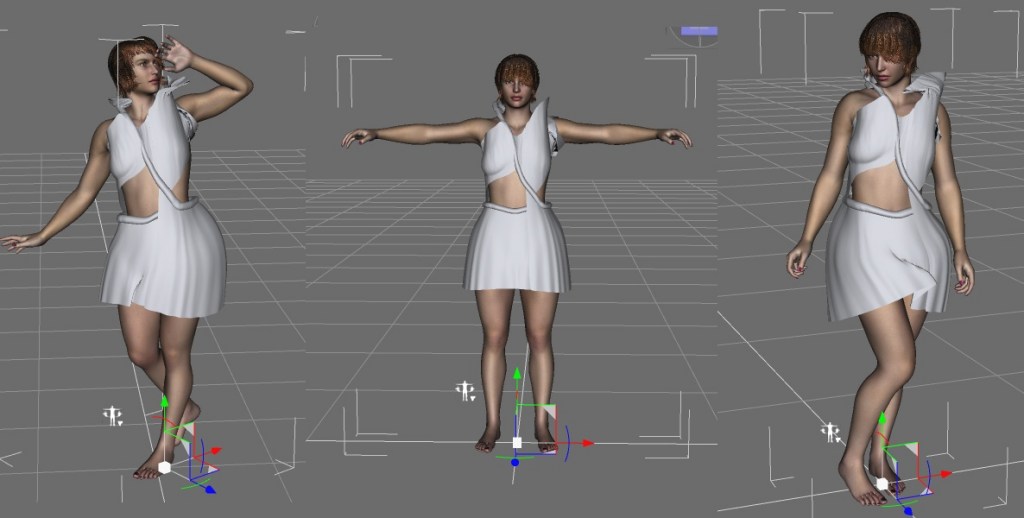
Here is the simple form of the dress. There is no hole for her left arm yet. Before fitting and detailing it I tried using it in Daz. I scaled it up for Daz to shrink but Daz's fitting doesn't shrink the clothes to the figure the way I thought. I think the scaled up dress is too big for the rigging to transfer properly. Some distortions happen with different poses.
I'll fit it better and try some Daz options.
It is made with ruled surfaces and much point editing.
I'll fit it better and try some Daz options.
It is made with ruled surfaces and much point editing.
- Attachments
-
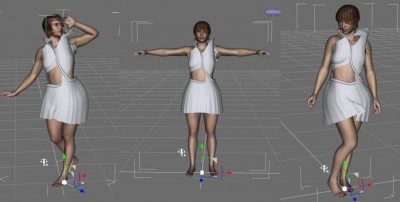
- SDS, rig transfer, poses in Daz
-
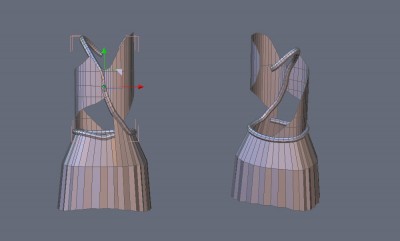
- Simple dress form in Hexagon

I prefer dangerous freedom over peaceful servitude. -- Thomas Jefferson/Jean Jacques Rousseau
-
Finis
- Captain
- Posts: 5410
- Joined: 21 May 2009, 18:26
- Type the number ten into the box: 0
- Location: America!
Re: U3DAC Jan. 2014 Sci-Fi World - Golden Age
Tedious point editing for the clothes. Most tutorials for modeling clothes for Daz start with a cylinder or extract and modify part of an exported figure. That is easier but may be one reason most Daz clothes are are tight or simple. I could make the dress easier but I'm trying use the tools to make what I want not make what the tools are good at. I've found ways to get better results in Daz. Finishing dress now.
I might work on this more after the challenge as a continuing project. When I learn Blender I'll try using the cloth simulation on this.
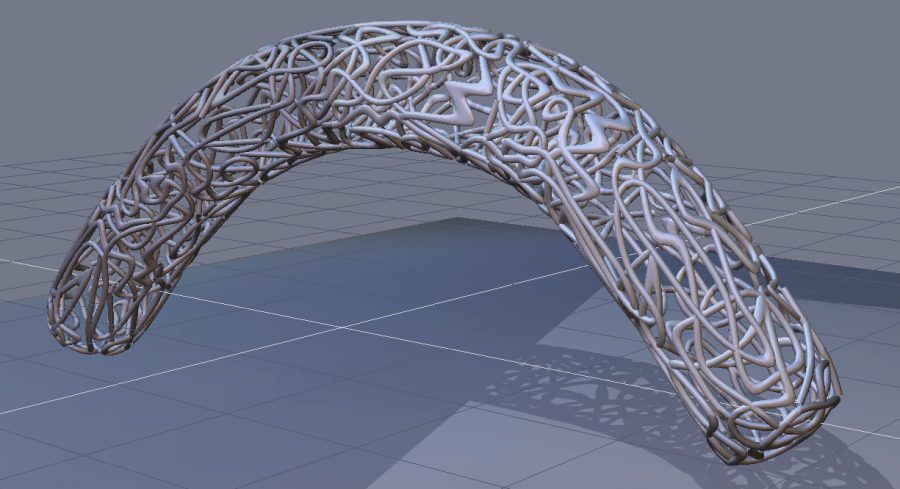
Here is an experimental shape made in Hexagon by applying SDS (Hexagon has several SDS methods), applying decimation (polygon reduction) to get a non-uniform mesh, extracting the lines/segments, applying thickness, welding, applying smoothing (like TS's smooth quad divide) which gives the curves. The buildings and many things in this sci-fi world are grown and have aspects similar to biological things. Structures like this could work for that effect.
I might work on this more after the challenge as a continuing project. When I learn Blender I'll try using the cloth simulation on this.
Here is an experimental shape made in Hexagon by applying SDS (Hexagon has several SDS methods), applying decimation (polygon reduction) to get a non-uniform mesh, extracting the lines/segments, applying thickness, welding, applying smoothing (like TS's smooth quad divide) which gives the curves. The buildings and many things in this sci-fi world are grown and have aspects similar to biological things. Structures like this could work for that effect.
- Attachments
-
I prefer dangerous freedom over peaceful servitude. -- Thomas Jefferson/Jean Jacques Rousseau
-
MikomDude

- Captain
- Posts: 1930
- Joined: 04 Oct 2010, 11:12
- Type the number ten into the box: 0
- Location: The Hague, Netherlands
Re: U3DAC Jan. 2014 Sci-Fi World - Golden Age
Cool idea! It could be modern art come to life and starting to take over the world 
-
Finis
- Captain
- Posts: 5410
- Joined: 21 May 2009, 18:26
- Type the number ten into the box: 0
- Location: America!
Re: U3DAC Jan. 2014 Sci-Fi World - Golden Age
Art taking over the world. There has to be a surreal movie plot there.
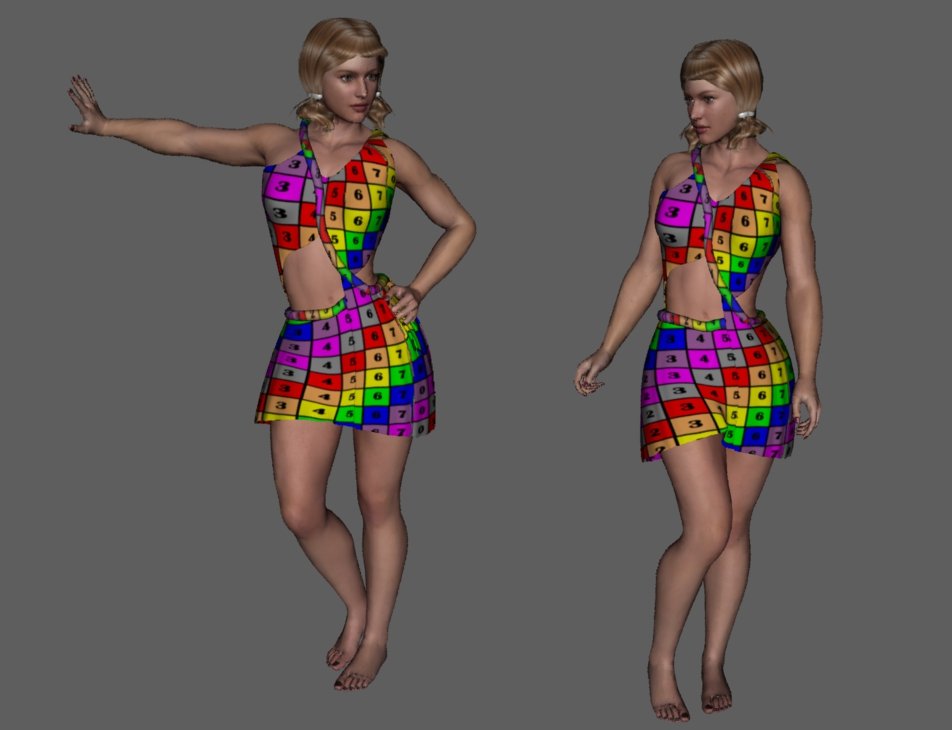
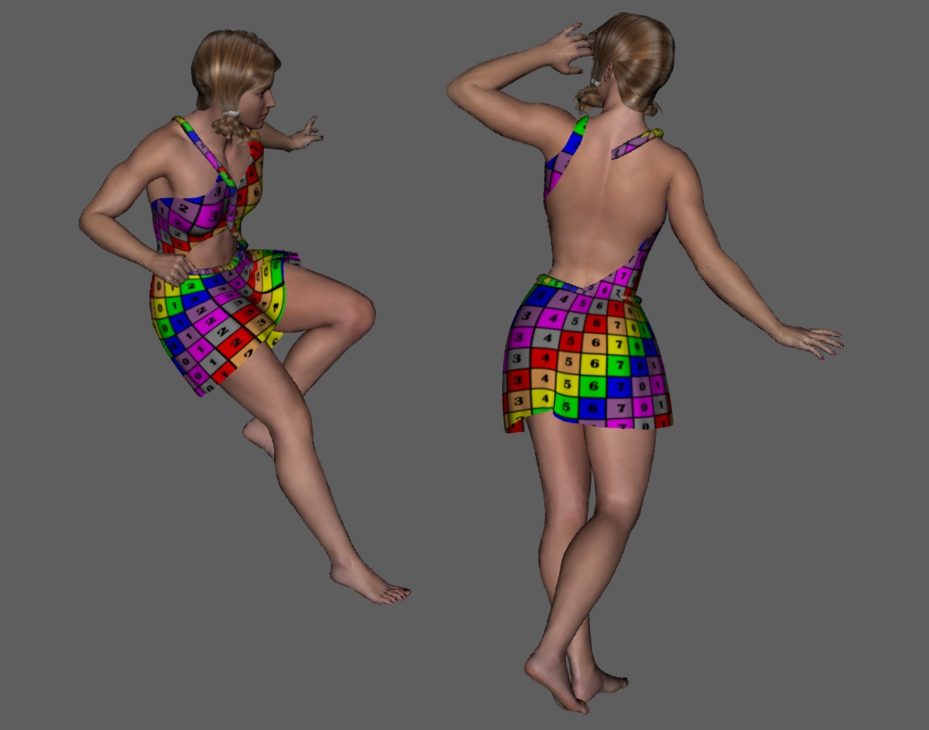
I got the clothes to work well enough in Daz. The top is tight but I want a lose draping fit. That can wait for Blender. Here is the model with a stylish UV test pattern in Daz renders. The skirt doesn't shrink to fit her hips but that could be settings. The half skirt will wait.
A little more work on the clothes and then on to the landscape, buildings, and surroundings.
I got the clothes to work well enough in Daz. The top is tight but I want a lose draping fit. That can wait for Blender. Here is the model with a stylish UV test pattern in Daz renders. The skirt doesn't shrink to fit her hips but that could be settings. The half skirt will wait.
A little more work on the clothes and then on to the landscape, buildings, and surroundings.
- Attachments
-
-
I prefer dangerous freedom over peaceful servitude. -- Thomas Jefferson/Jean Jacques Rousseau
-
Finis
- Captain
- Posts: 5410
- Joined: 21 May 2009, 18:26
- Type the number ten into the box: 0
- Location: America!
Re: U3DAC Jan. 2014 Sci-Fi World - Golden Age
Female figure and clothes imported into Bryce. Test render of moderate quality with TA (global illumination, light bouncing) and sky as HDRI light took under 3 minutes. So rendering the whole scene should take an acceptable time. Starting on landscape etc.
Since the challenge deadline has been extended I might have time for a male character. Any suggestions for his clothes?
Since the challenge deadline has been extended I might have time for a male character. Any suggestions for his clothes?
I prefer dangerous freedom over peaceful servitude. -- Thomas Jefferson/Jean Jacques Rousseau
-
MikomDude
- Captain
- Posts: 1930
- Joined: 04 Oct 2010, 11:12
- Type the number ten into the box: 0
- Location: The Hague, Netherlands
Re: U3DAC Jan. 2014 Sci-Fi World - Golden Age
Maybe something sleek and stylish yet that looks functional. I think the type of cloth should be something light-weight and soft to stick with the futuristic theme. 
-
Finis
- Captain
- Posts: 5410
- Joined: 21 May 2009, 18:26
- Type the number ten into the box: 0
- Location: America!
Re: U3DAC Jan. 2014 Sci-Fi World - Golden Age
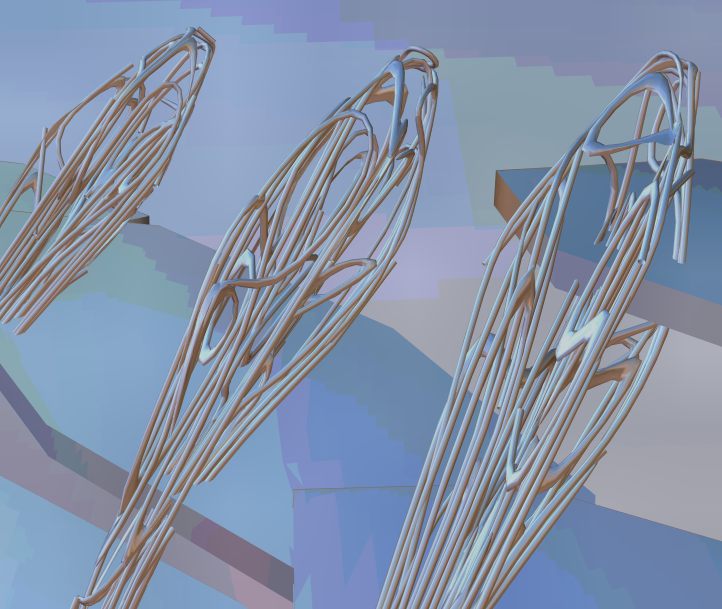
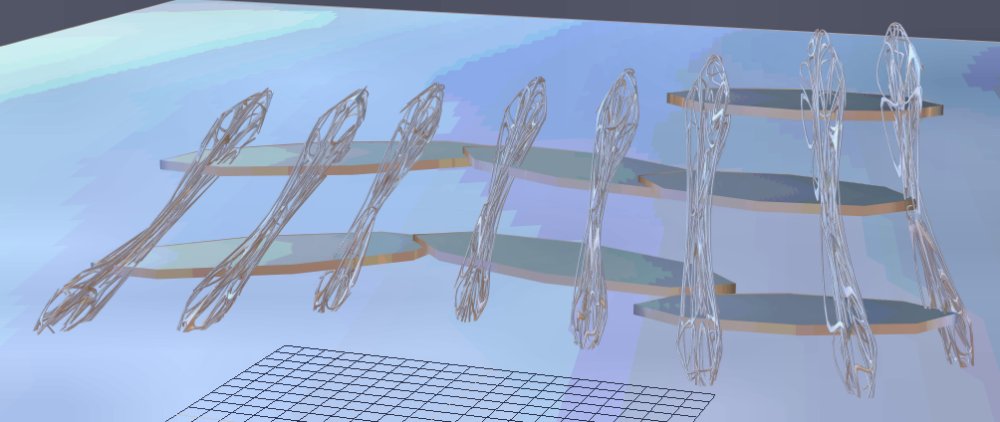
Here is a giant structure. It is 5400 ft high. The platforms are temporary markers to compose where the real ones will go. There will be buildings, trees, etc. on the platforms. I made the slanted supports in Hexagon by making bent cylinders, triangulating, applying bezier interpolation SDS, decimating, extracting curves from the edges, give curves thickness, weld, apply smoothing (gives twisty artistic curves). The bezier SDS made the bulges on the ends of the supports. That looked good so I kept it.
I'll change the layout of the supports to curve the building more for a better view of it.
I'll change the layout of the supports to curve the building more for a better view of it.
- Attachments
-
-
-

I prefer dangerous freedom over peaceful servitude. -- Thomas Jefferson/Jean Jacques Rousseau
-
Draise

- Captain
- Posts: 3200
- Joined: 21 Sep 2009, 19:33
- Type the number ten into the box: 0
- Location: Bogota, Colombia
Re: U3DAC Jan. 2014 Sci-Fi World - Golden Age
wow, cool, growing technology. =) Looking good!
-
Finis
- Captain
- Posts: 5410
- Joined: 21 May 2009, 18:26
- Type the number ten into the box: 0
- Location: America!
Re: U3DAC Jan. 2014 Sci-Fi World - Golden Age
Thanks Draise.
I think the male character, if I have time for one, will be an artist who is drawing her. He will have mostly traditional art stuff, that's is his thing, actual handmade art. They'll be outside in a shopping and recreation part of town. Each giant structure is a town or city. The few big cities have several.
So if the male is an artist what will his clothes be like? Mikom's suggestion could work. Any others?
If I don't have time for another character then suggestions for what she is doing there? That could determine the pose, props, etc. even if it isn't obvious.
I think the male character, if I have time for one, will be an artist who is drawing her. He will have mostly traditional art stuff, that's is his thing, actual handmade art. They'll be outside in a shopping and recreation part of town. Each giant structure is a town or city. The few big cities have several.
So if the male is an artist what will his clothes be like? Mikom's suggestion could work. Any others?
If I don't have time for another character then suggestions for what she is doing there? That could determine the pose, props, etc. even if it isn't obvious.
I prefer dangerous freedom over peaceful servitude. -- Thomas Jefferson/Jean Jacques Rousseau
-
jamesmc
- Captain
- Posts: 1776
- Joined: 08 Jul 2009, 15:35
Re: U3DAC Jan. 2014 Sci-Fi World - Golden Age
looking good in the neighborhood...
Walk by faith, not by sight.
-
Finis
- Captain
- Posts: 5410
- Joined: 21 May 2009, 18:26
- Type the number ten into the box: 0
- Location: America!
Re: U3DAC Jan. 2014 Sci-Fi World - Golden Age
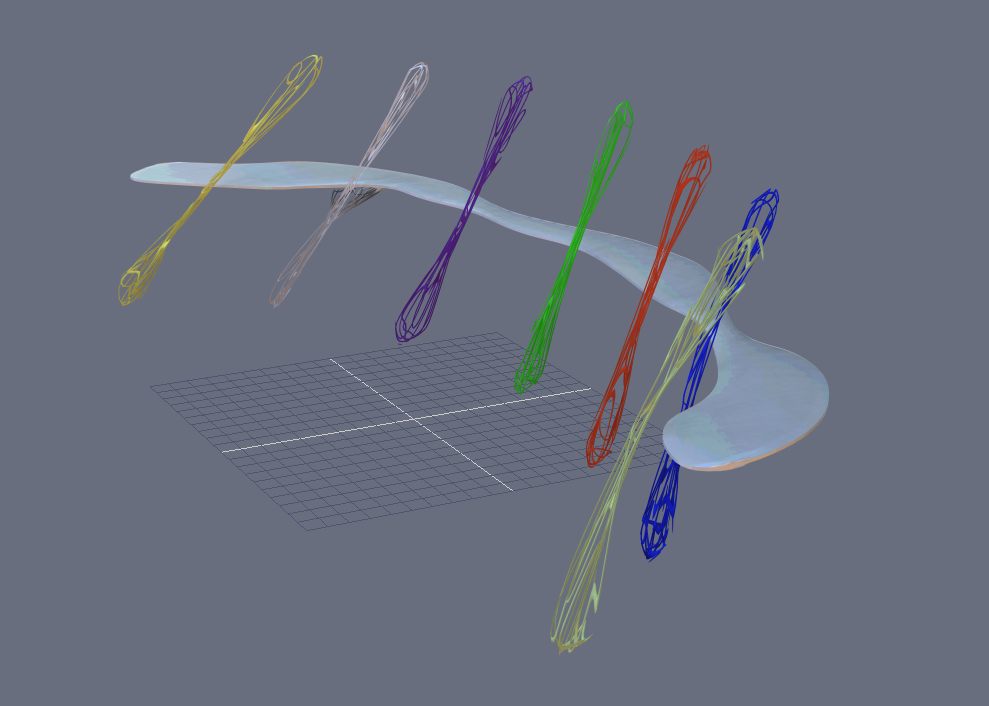
Thanks! I'm spending too much time on this building so I'll simplify it some. I redid the supports so they are simpler and I made a 5K and 21K poly version of each for close up or far viewing. That's to save render time. I want to have supports for the platforms that grow from the main ones. I made one, on the white column, but I haven't been able to fit it to the main support elegantly. I might duplicate this one but I'll probably do something easier for the challenge picture.
Here's some pictures from Hexagon. The colors are place holders. Each part has a different texture in case I want to make them different for the render.
I'll put Bryce hills on the platforms. How to give the terrain the outline of the platform? Bryce has an interesting non-destructive Boolean tool. To Boolean subtract make two objects. In their attributes make one positive and one negative. Group them. Render. The negative will remove part of the positive but the geometry isn't changed, just grouped. Then I'll spread trees and buildings on them with Bryce's instancing.
Saw this on a cup and thought, "Ah, the previous golden age."
Here's some pictures from Hexagon. The colors are place holders. Each part has a different texture in case I want to make them different for the render.
I'll put Bryce hills on the platforms. How to give the terrain the outline of the platform? Bryce has an interesting non-destructive Boolean tool. To Boolean subtract make two objects. In their attributes make one positive and one negative. Group them. Render. The negative will remove part of the positive but the geometry isn't changed, just grouped. Then I'll spread trees and buildings on them with Bryce's instancing.
Saw this on a cup and thought, "Ah, the previous golden age."
- Attachments
-
-

I prefer dangerous freedom over peaceful servitude. -- Thomas Jefferson/Jean Jacques Rousseau
-
Finis
- Captain
- Posts: 5410
- Joined: 21 May 2009, 18:26
- Type the number ten into the box: 0
- Location: America!
Re: U3DAC Jan. 2014 Sci-Fi World - Golden Age
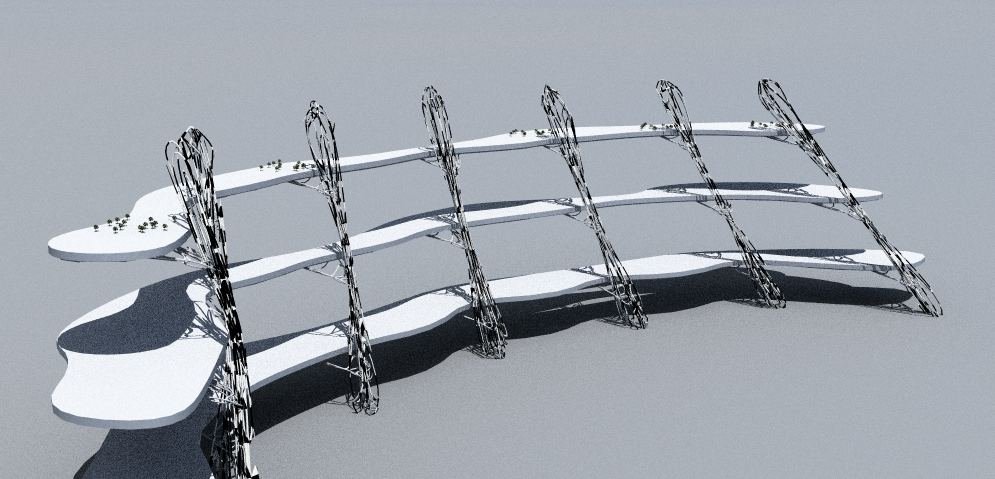
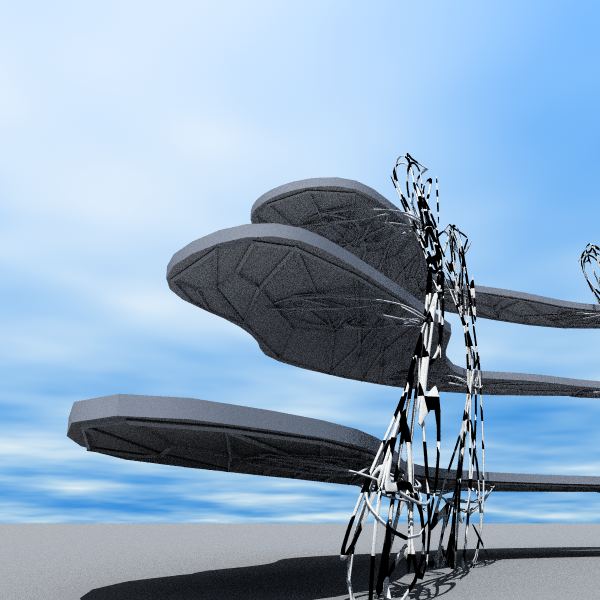
Platform structure almost done. Still need UV (just cubical or cylindrical) and preliminary textures. Here's test renders from Bryce. The building is 3000 ft high now since the trees and buildings on its platforms would hardly be visible with the larger one. I got the instancing thing to put trees on a platform but I have to experiment and learn more. About 8 minutes with TA (GI) render at lower quality. 647K polys including tree instances.
Bryce tip: set priority to high in the render options. It is much faster.
The character is a little bigger, thicker, in Bryce renders. I'll fix that in Daz and resend to Bryce using the Daz-Bryce connection.
Bryce tip: set priority to high in the render options. It is much faster.
The character is a little bigger, thicker, in Bryce renders. I'll fix that in Daz and resend to Bryce using the Daz-Bryce connection.
- Attachments
-
-
I prefer dangerous freedom over peaceful servitude. -- Thomas Jefferson/Jean Jacques Rousseau
-
Steinie

- Captain
- Posts: 2958
- Joined: 21 May 2009, 17:38
- Type the number ten into the box: 10
Re: U3DAC Jan. 2014 Sci-Fi World - Golden Age
Starting to take shape Finis. I can't wait to read about the purpose of the wing shaped objects.
-
Finis
- Captain
- Posts: 5410
- Joined: 21 May 2009, 18:26
- Type the number ten into the box: 0
- Location: America!
Re: U3DAC Jan. 2014 Sci-Fi World - Golden Age
Thanks! The giant structure is a town of about 3 to 4 thousand people. There will be some more typical giant SF super-skyscrapers too. Also each a city. The platforms, wings, have plants, buildings, ponds, parks on top. The interior of the platforms, 40 to 60 ft thick, also contain housing, businesses, and technical aspects of the town.
I don't have a story. It is a pleasant futuristic scene and the viewer can create his own story for it.
I don't have a story. It is a pleasant futuristic scene and the viewer can create his own story for it.
I prefer dangerous freedom over peaceful servitude. -- Thomas Jefferson/Jean Jacques Rousseau
-
marcel

- Captain
- Posts: 2247
- Joined: 21 May 2009, 19:52
- Type the number ten into the box: 0
- Location: paris - France
Re: U3DAC Jan. 2014 Sci-Fi World - Golden Age
I love the organic side. One can imagine a living structure that can change the shape of the city. For example, to follow the path of the sun like plants.
Design - illustration - Animation
http://www.crea-vision.fr
http://www.crea-vision.fr
-
Finis
- Captain
- Posts: 5410
- Joined: 21 May 2009, 18:26
- Type the number ten into the box: 0
- Location: America!
Re: U3DAC Jan. 2014 Sci-Fi World - Golden Age
Great idea Marcel! See, viewers using their own imaginations!
Bryce materials don't look the same when the terrain is scaled to large size. Rescaling everything to fit the default size terrain.
Bryce materials don't look the same when the terrain is scaled to large size. Rescaling everything to fit the default size terrain.
I prefer dangerous freedom over peaceful servitude. -- Thomas Jefferson/Jean Jacques Rousseau
-
Finis
- Captain
- Posts: 5410
- Joined: 21 May 2009, 18:26
- Type the number ten into the box: 0
- Location: America!
Re: U3DAC Jan. 2014 Sci-Fi World - Golden Age
Bryce. Working to position, scale, and texture the items. 6.4 million polygons. Much is the extensive terrain. I'll delete most of that after I know which parts will be seen. Textures are becoming a problem. Things like the trees blend into the terrain.
The scale of the building is a problem. I need the trees and later buildings to show its size but they just shrink to dots in the distance.
There will be more ocean and two super skyscrapers in the distance. It is hard to position the camera in Bryce plus all those polys create a strobe effect when moving the view.
An earlier much lower poly scene estimated 10 hours to render with GI at decent quality. Too slow so I'll use a light sphere for fill and the sun and sky for main lighting.
Edit: Changing the scene so there is more water and less land. That will have far fewer polys and easier to arrange land. It is not the scene I first imagined but it looks good. It is really hard to place the camera in Bryce. Without the high poly strobe effect it is still hard. It likes to move in increments that are too large. I think I have to scale differently. I'm using a scale of 1 Bryce unit = 100 feet (about 33 meters). The character is 5' 11' (about 180 cm) or 0.059 Bryce units. I'll try a scale of 1 Bryce unit = 10 feet.
Edit: The character's texture looks good, not like in Daz but good, when I send it to Bryce via the, ahem, bridge but not with export/import obj. For some reason I have an aversion to the word "bridge". The dress crashes Bryce through the bridge.
The scale of the building is a problem. I need the trees and later buildings to show its size but they just shrink to dots in the distance.
There will be more ocean and two super skyscrapers in the distance. It is hard to position the camera in Bryce plus all those polys create a strobe effect when moving the view.
An earlier much lower poly scene estimated 10 hours to render with GI at decent quality. Too slow so I'll use a light sphere for fill and the sun and sky for main lighting.
Edit: Changing the scene so there is more water and less land. That will have far fewer polys and easier to arrange land. It is not the scene I first imagined but it looks good. It is really hard to place the camera in Bryce. Without the high poly strobe effect it is still hard. It likes to move in increments that are too large. I think I have to scale differently. I'm using a scale of 1 Bryce unit = 100 feet (about 33 meters). The character is 5' 11' (about 180 cm) or 0.059 Bryce units. I'll try a scale of 1 Bryce unit = 10 feet.
Edit: The character's texture looks good, not like in Daz but good, when I send it to Bryce via the, ahem, bridge but not with export/import obj. For some reason I have an aversion to the word "bridge". The dress crashes Bryce through the bridge.
- Attachments
-

I prefer dangerous freedom over peaceful servitude. -- Thomas Jefferson/Jean Jacques Rousseau
-
Finis
- Captain
- Posts: 5410
- Joined: 21 May 2009, 18:26
- Type the number ten into the box: 0
- Location: America!
Re: U3DAC Jan. 2014 Sci-Fi World - Golden Age
She'll lean on a post that is part of a bench to the right. No time for an artist character so there will be an easel, paper, pencils or charcoal in the foreground with a drawing on it. The cylinder in the distance is a place holder for a skyscraper. Some more land, textures, instances for plants and buildings on the platforms, getting there.
I'll paint shop a simple render from the artist's view for the drawing.
I learned enough about Bryce material to customize the terrain. Antialiasing hid her teeth. The smile took work in Daz. I'll see how the finer antialiasing does and if needed maybe change the smile.
I'll paint shop a simple render from the artist's view for the drawing.
I learned enough about Bryce material to customize the terrain. Antialiasing hid her teeth. The smile took work in Daz. I'll see how the finer antialiasing does and if needed maybe change the smile.
- Attachments
-

I prefer dangerous freedom over peaceful servitude. -- Thomas Jefferson/Jean Jacques Rousseau
-
Finis
- Captain
- Posts: 5410
- Joined: 21 May 2009, 18:26
- Type the number ten into the box: 0
- Location: America!
Re: U3DAC Jan. 2014 Sci-Fi World - Golden Age
Frustrating. I can't move objects or the camera except in large increments unless I use the numerical locations. My scale of 1 Bryce unit = 10ft is the problem and scaling everything up makes it easier to move things but at 1bu = 1ft strange things happen, objects reverse direction etc. At 1b = 5ft moving through the scene becomes tedious as the mouse must move a mile on my desk to move the scene a little. Ctrl, shift, alt, plus mouse don't seem to change the movement rate other than I think alt + mouse makes it finer ... and slower.
Well, I have to place the camera and postition smaller objects and 1bu=5ft does give enough accuracy so that will be it. Upscaling moves objects too so I'll have to redo some work.
I made a "lacework" bench, like the big q-tip supports, with ivy from Ivy Generator. The character will lean on that.
It is difficult to find a view that shows the pond on the first level and has everything else arranged nicely. I wanted a view looking down the platform for perspective but everything I want want work together.
The character needs a a big smile from Daz to have a subtle one in Bryce. Not enough pixels for teeth otherwise. The fancier anti alias methods help too. Her skin looks like a mannequin without Daz's sss etc. I'll give it a little sheen or spectacularity instead so it is not so matte.
I barely used TS on on this. Hexagon, Daz, Bryce. Learning too much about these for a guy whose going to Blender.
Edit 2-11-14: There is grass and a post-bench now. The zillions of grass instances make the file 86mb. Better lighting now. Estimated render time over an hour. Next to add trees and buildings on the platforms and a skyscraper in the background. Tinker with details and it should be done.
Well, I have to place the camera and postition smaller objects and 1bu=5ft does give enough accuracy so that will be it. Upscaling moves objects too so I'll have to redo some work.
I made a "lacework" bench, like the big q-tip supports, with ivy from Ivy Generator. The character will lean on that.
It is difficult to find a view that shows the pond on the first level and has everything else arranged nicely. I wanted a view looking down the platform for perspective but everything I want want work together.
The character needs a a big smile from Daz to have a subtle one in Bryce. Not enough pixels for teeth otherwise. The fancier anti alias methods help too. Her skin looks like a mannequin without Daz's sss etc. I'll give it a little sheen or spectacularity instead so it is not so matte.
I barely used TS on on this. Hexagon, Daz, Bryce. Learning too much about these for a guy whose going to Blender.
Edit 2-11-14: There is grass and a post-bench now. The zillions of grass instances make the file 86mb. Better lighting now. Estimated render time over an hour. Next to add trees and buildings on the platforms and a skyscraper in the background. Tinker with details and it should be done.
I prefer dangerous freedom over peaceful servitude. -- Thomas Jefferson/Jean Jacques Rousseau
-
Finis
- Captain
- Posts: 5410
- Joined: 21 May 2009, 18:26
- Type the number ten into the box: 0
- Location: America!
Re: U3DAC Jan. 2014 Sci-Fi World - Golden Age
Modeling almost done. Rendering is a problem. It takes too long and anti aliasing changes the character's expression. AA also takes a very long time. These small images took about a minute to render but then at least 4 minutes to AA. I think I'll render a little oversize, around 1400 x something, without AA and shrink to 1024 x something post process. That will smooth the jaggies a little but not take forever.
When I put trees and buildings on the platforms the render time will probably go up.
I was nearly impossible to get her eyes and teeth to show. I finally add enormous amounts of ambiance to them. I tried a light that only lit them but that feature apparently does not work.
When I put trees and buildings on the platforms the render time will probably go up.
I was nearly impossible to get her eyes and teeth to show. I finally add enormous amounts of ambiance to them. I tried a light that only lit them but that feature apparently does not work.
- Attachments
-

- Smile after AA
- TEMP_IMG.jpg (6.27 KiB) Viewed 4179 times
-

- Smile
- TEMP_IMG2.jpg (6.15 KiB) Viewed 4179 times
I prefer dangerous freedom over peaceful servitude. -- Thomas Jefferson/Jean Jacques Rousseau
-
Finis
- Captain
- Posts: 5410
- Joined: 21 May 2009, 18:26
- Type the number ten into the box: 0
- Location: America!
Re: U3DAC Jan. 2014 Sci-Fi World - Golden Age
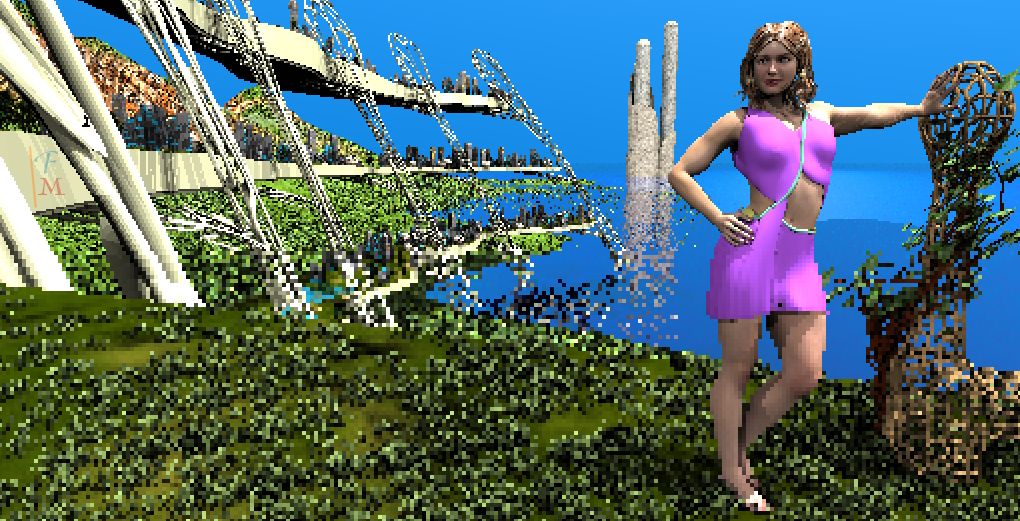
8.9 million polygons. Mostly in the trees and grass. This is about 15min of rendering. Need to add the artist's drawing.
The large structure (2400' high) has plants, ponds, parks, and buildings on the three platforms. She is on the level two platform in a park and leans on a bench while an artist draws her. A pond is visible on level one below. A giant building (14000') is visible in the distance.
Her dress doesn't fit right under the right arm. It is not apparent that she is on a platform of the building. Maybe I'll work on that sometime.
I found that anti aliasing takes about as long as the render. It should take about 2 hours to render including AA.
The large structure (2400' high) has plants, ponds, parks, and buildings on the three platforms. She is on the level two platform in a park and leans on a bench while an artist draws her. A pond is visible on level one below. A giant building (14000') is visible in the distance.
Her dress doesn't fit right under the right arm. It is not apparent that she is on a platform of the building. Maybe I'll work on that sometime.
I found that anti aliasing takes about as long as the render. It should take about 2 hours to render including AA.
- Attachments
-
I prefer dangerous freedom over peaceful servitude. -- Thomas Jefferson/Jean Jacques Rousseau
-
Finis
- Captain
- Posts: 5410
- Joined: 21 May 2009, 18:26
- Type the number ten into the box: 0
- Location: America!
Re: U3DAC Jan. 2014 Sci-Fi World - Golden Age
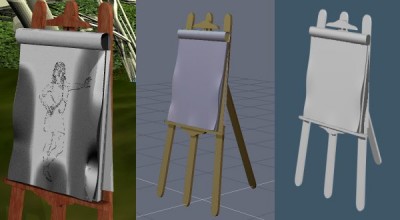
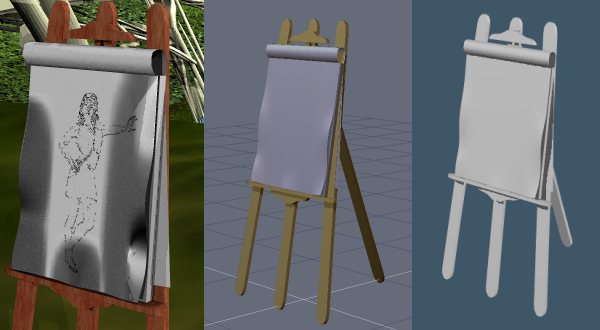
Trouble with the art paper. I gave the edges of the sheet of paper a little shape. In Bryce the shadows are incredible. Changing lighting and material has no helped so far. Hexagon and TS do resonable renders.
Any Bryce users know how to fix this? I'll try it with a flat sheet but I wanted the shaped one.
Any Bryce users know how to fix this? I'll try it with a flat sheet but I wanted the shaped one.
- Attachments
-
- Paper shadows Bryce, Hexagon, tureSpace
I prefer dangerous freedom over peaceful servitude. -- Thomas Jefferson/Jean Jacques Rousseau
-
MikomDude
- Captain
- Posts: 1930
- Joined: 04 Oct 2010, 11:12
- Type the number ten into the box: 0
- Location: The Hague, Netherlands
Re: U3DAC Jan. 2014 Sci-Fi World - Golden Age
Is it a flat surface or does it have some thickness to it? Maybe making the paper thicker and adding a subdivision layer on top of that will give you the results you are looking for.
-
Finis
- Captain
- Posts: 5410
- Joined: 21 May 2009, 18:26
- Type the number ten into the box: 0
- Location: America!
Re: U3DAC Jan. 2014 Sci-Fi World - Golden Age
That fixed it Mikom. Thanks!
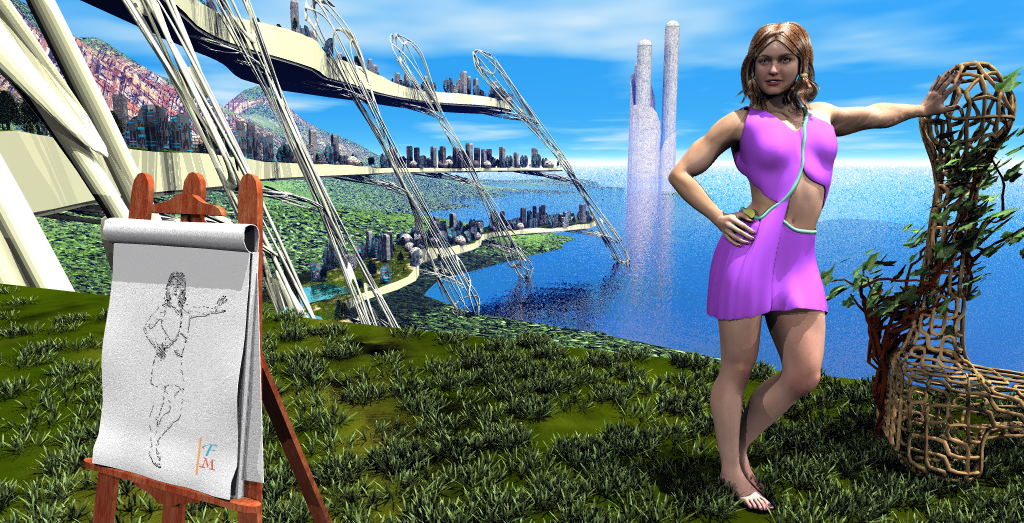
5 hours render time. 4 hours was the anti aliasing. I changed the AA to less aggressive settings and got a good effect for the smile but there are still some jaggies. Other than Paint Shop to fix a few artifacts and add my logo this is straight from Bryce.
Lighting is a spherical light array (sphere dome light) for fill and the sun. No IBL from the sky. I like to use GE (in TS) or IBL or a light sphere without shadows for fill but that lacked contrast in Bryce so there are some crisp shadows from the sphere lights. Soft shadows turned render time into eons.
I spent too much time on this but I'm happy with the result.
Modeling: Hexagon. Character made and posed with Daz. Terrain and trees in Bryce. Ivy Generator 2012. Dress modeled in Hexagon imported to Daz.
Texturing: Bryce
Rendering: Bryce
Drawing: Paint Shop filters of a render.
5 hours render time. 4 hours was the anti aliasing. I changed the AA to less aggressive settings and got a good effect for the smile but there are still some jaggies. Other than Paint Shop to fix a few artifacts and add my logo this is straight from Bryce.
Lighting is a spherical light array (sphere dome light) for fill and the sun. No IBL from the sky. I like to use GE (in TS) or IBL or a light sphere without shadows for fill but that lacked contrast in Bryce so there are some crisp shadows from the sphere lights. Soft shadows turned render time into eons.
I spent too much time on this but I'm happy with the result.
Modeling: Hexagon. Character made and posed with Daz. Terrain and trees in Bryce. Ivy Generator 2012. Dress modeled in Hexagon imported to Daz.
Texturing: Bryce
Rendering: Bryce
Drawing: Paint Shop filters of a render.
- Attachments
-
I prefer dangerous freedom over peaceful servitude. -- Thomas Jefferson/Jean Jacques Rousseau
-
Finis
- Captain
- Posts: 5410
- Joined: 21 May 2009, 18:26
- Type the number ten into the box: 0
- Location: America!
Re: U3DAC Jan. 2014 Sci-Fi World - Golden Age
Arrrg! The toes! The nuclear apocalypse brightness of the toes. Should have done something to put them in shadow too.
Wire frame and details.
Wire frame and details.
- Attachments
-

- Wire frame.
-

- The dress.
-
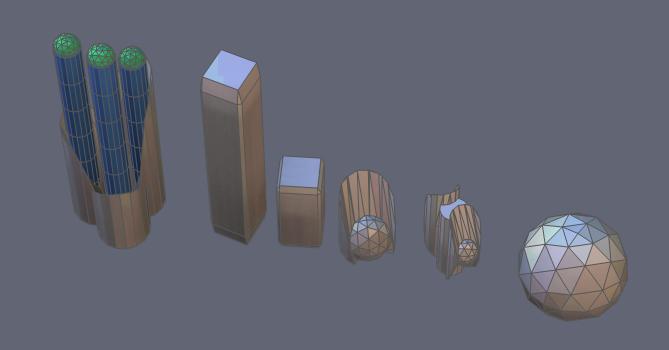
- The buildings.
- SFworldGA_Bldgs.jpg (11.23 KiB) Viewed 4133 times
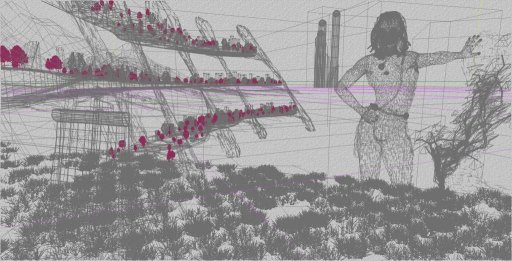
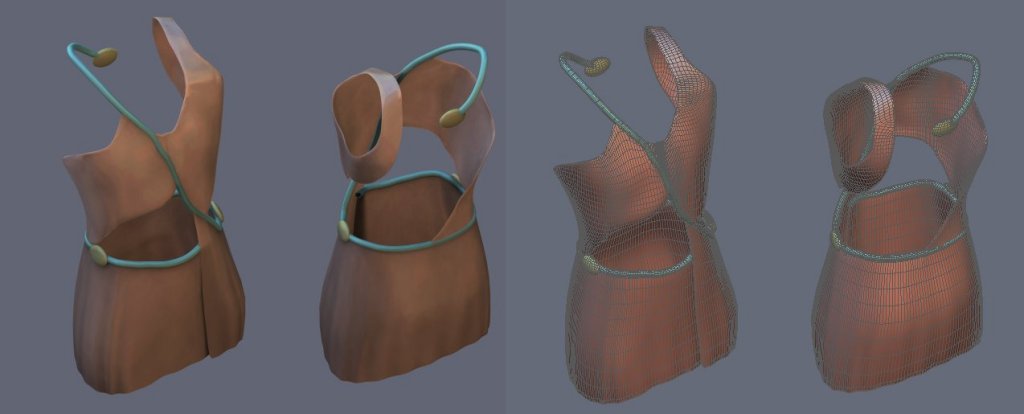
I prefer dangerous freedom over peaceful servitude. -- Thomas Jefferson/Jean Jacques Rousseau
-
Finis
- Captain
- Posts: 5410
- Joined: 21 May 2009, 18:26
- Type the number ten into the box: 0
- Location: America!
Re: U3DAC Jan. 2014 Sci-Fi World - Golden Age
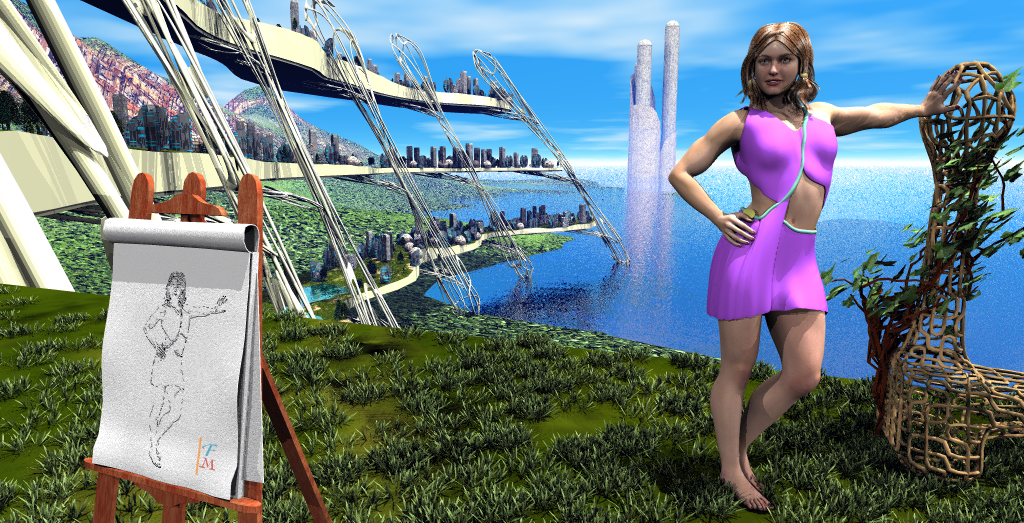
There. De-brightened toes. Rendered just the needed portion of the screen (plop render in Bryce). Turning the sun off took the brightness off but also changed the grass. So I made a mask to show just her and post processed with original, mask, and new part in Paint Shop.
- Attachments
-
I prefer dangerous freedom over peaceful servitude. -- Thomas Jefferson/Jean Jacques Rousseau
-
Finis
- Captain
- Posts: 5410
- Joined: 21 May 2009, 18:26
- Type the number ten into the box: 0
- Location: America!
Re: U3DAC Jan. 2014 Sci-Fi World - Golden Age
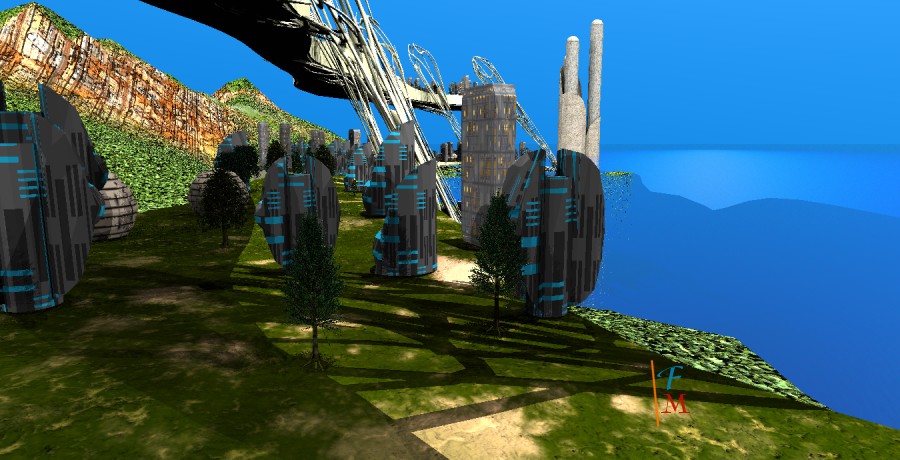
A view from in town. I rendered this at 1.5x desired size and shrunk in Paint Shop. That did as well as regular AA in Bryce and was much faster.
- Attachments
-

I prefer dangerous freedom over peaceful servitude. -- Thomas Jefferson/Jean Jacques Rousseau
-
Draise
- Captain
- Posts: 3200
- Joined: 21 Sep 2009, 19:33
- Type the number ten into the box: 0
- Location: Bogota, Colombia
Re: U3DAC Jan. 2014 Sci-Fi World - Golden Age
Hehe, I do that with the WS in truespace also. Works nicely. Clever little trick. I use Faststone Image resizer if I have image sequences to resize. Very handy.
-
Finis
- Captain
- Posts: 5410
- Joined: 21 May 2009, 18:26
- Type the number ten into the box: 0
- Location: America!
Re: U3DAC Jan. 2014 Sci-Fi World - Golden Age
Tested my new computer with this. Rendered in 20-something minutes vs. 5 hours. All cores pegged at 100%. CPU reached 168 F. Is that too hot? The indicators were green. The mobo has an auto shutdown feature for overheating cpu. It cruises at about 95 F.
I prefer dangerous freedom over peaceful servitude. -- Thomas Jefferson/Jean Jacques Rousseau