Color Picker
-
clintonman
- Captain
- Posts: 5659
- Joined: 21 May 2009, 21:08
- Type the number ten into the box: 0
- Location: California
Color Picker
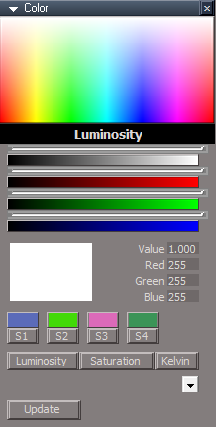
A general color picker based on the Unofficial Updates(UU) Lights color picker. The goal was to make a color picker that didn't have the undo issues of the UU lights based colorpicker. I wasn't able to solve that. This script has it's own undo issues, but it mostly works. On occasion it runs out of undos or it may be too aggressive and over-undo it.
To try it out, some version of the UU should be installed. Download from the link and copy into /Scripts/CustomCommands.
Select some scene item and press the open panel button. The color picker will not run if the color picker is selected.
The controls from top to bottom:
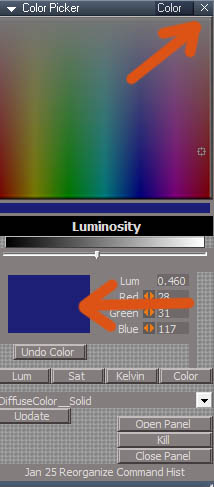
Main area that has the clickable hue-saturation
The color bar below is a preview for the final color.
The slider is for luminosity.
The color box is the system based color picker with red,green,blue controls to the right.
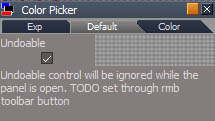
The color picker can run in 2 modes. Undo and no undos. When undo is enabled use the Undo button on the panel instead of the shortcut or the toolbar undo button. When undo is disabled the color changes are immediate and fully interactive. The "Undoable" control is in another panel aspect and must be set before opening the panel. Any changes when the panel is open are ignored.
Only "Lum", luminosity is setup at this time. Sat, Kelvin and Color are disabled.
When you select an item all it's color attributes are added to a dropdown list. In the image above the torus is selected and I chose the Points Color of the Object Render Attributes node and set the color to blue. The dropdown will default to the material color for meshes and to the light color for lights.
Press the Update button after making a selection.
The last 3 buttons are temporary testing buttons that can be used to open and close the panel. And a button to kill it if the scripts get out of hand.
To try it out, some version of the UU should be installed. Download from the link and copy into /Scripts/CustomCommands.
Select some scene item and press the open panel button. The color picker will not run if the color picker is selected.
The controls from top to bottom:
Main area that has the clickable hue-saturation
The color bar below is a preview for the final color.
The slider is for luminosity.
The color box is the system based color picker with red,green,blue controls to the right.
The color picker can run in 2 modes. Undo and no undos. When undo is enabled use the Undo button on the panel instead of the shortcut or the toolbar undo button. When undo is disabled the color changes are immediate and fully interactive. The "Undoable" control is in another panel aspect and must be set before opening the panel. Any changes when the panel is open are ignored.
Only "Lum", luminosity is setup at this time. Sat, Kelvin and Color are disabled.
When you select an item all it's color attributes are added to a dropdown list. In the image above the torus is selected and I chose the Points Color of the Object Render Attributes node and set the color to blue. The dropdown will default to the material color for meshes and to the light color for lights.
Press the Update button after making a selection.
The last 3 buttons are temporary testing buttons that can be used to open and close the panel. And a button to kill it if the scripts get out of hand.
- Attachments
-
- Color Picker2fff.RsObj
- (539.09 KiB) Downloaded 156 times
-
trueBlue
- Captain
- Posts: 5548
- Joined: 06 Jul 2009, 22:50
- Type the number ten into the box: 10
Re: Color Picker
Really impressive Clinton!
I am using a Blank DX Material from the Materials - DX9 library.
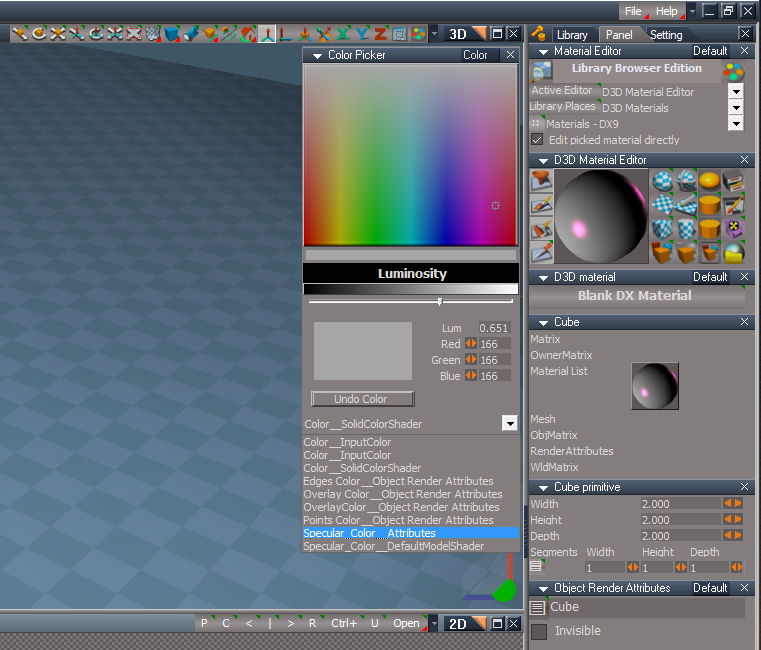
I am seeing Unknown attributes as shown in the screenshot. .
The one highlighted and the two Color_InputColor.
Not sure if this is a bug but the Luminosity bitmap is being replaced with a solid black color when adding Primitives.
Seems to me, that bitmap should never change and works like the Windows Color Picker
Been noticing the Panel X being left open on several occasions.
Edit: Both panels are missing a WinID. I added {F021DF25-F4AA-41DD-86CC-8FF15C2E278A} to both panels
Is there any way to limit the Object Render Attributes from showing in the Drop-down list?
Like adding an Advanced option (Boolean)?
Edit2:
Update button error if nothing is selected
ERR Source object: /Scripts/CustomCommands/Color Picker/UpdateConnChoice Error: Microsoft JScript runtime error Description: 'undefined' is null or not an object Error code: 0x800a138f - (null) Line: 16, Char: 1 Script text: var colorArr = colorStr.split("\t");
UpdateConnChoice script
Add:
I am using a Blank DX Material from the Materials - DX9 library.
I am seeing Unknown attributes as shown in the screenshot. .
The one highlighted and the two Color_InputColor.
Not sure if this is a bug but the Luminosity bitmap is being replaced with a solid black color when adding Primitives.
Seems to me, that bitmap should never change and works like the Windows Color Picker
Been noticing the Panel X being left open on several occasions.
Edit: Both panels are missing a WinID. I added {F021DF25-F4AA-41DD-86CC-8FF15C2E278A} to both panels
Is there any way to limit the Object Render Attributes from showing in the Drop-down list?
Like adding an Advanced option (Boolean)?
Edit2:
Update button error if nothing is selected
ERR Source object: /Scripts/CustomCommands/Color Picker/UpdateConnChoice Error: Microsoft JScript runtime error Description: 'undefined' is null or not an object Error code: 0x800a138f - (null) Line: 16, Char: 1 Script text: var colorArr = colorStr.split("\t");
UpdateConnChoice script
Add:
Code: Select all
var selcount = Node.SelectedCount();
if(selcount == 0) return;-
clintonman
- Captain
- Posts: 5659
- Joined: 21 May 2009, 21:08
- Type the number ten into the box: 0
- Location: California
Re: Color Picker
The script is finding all the color connectors. So it sees the color connectors inside the SolidColorShader and inside the DefaultModelShader. It should skip color connectors if they are exported to a higher level.trueBlue wrote: 26 Jan 2023, 19:17 Really impressive Clinton!
I am using a Blank DX Material from the Materials - DX9 library.
I am seeing Unknown attributes as shown in the screenshot.
Unknown Attributes.png
.
The one highlighted and the two Color_InputColor.
Not sure if this is a bug but the Luminosity bitmap is being replaced with a solid black color when adding Primitives.
Seems to me, that bitmap should never change and works like the Windows Color Picker
Been noticing the Panel X being left open on several occasions.
Edit: Both panels are missing a WinID. I added {F021DF25-F4AA-41DD-86CC-8FF15C2E278A} to both panels
Is there any way to limit the Object Render Attributes from showing in the Drop-down list?
Like adding an Advanced option (Boolean)?
Edit2:
Update button error if nothing is selected
ERR Source object: /Scripts/CustomCommands/Color Picker/UpdateConnChoice Error: Microsoft JScript runtime error Description: 'undefined' is null or not an object Error code: 0x800a138f - (null) Line: 16, Char: 1 Script text: var colorArr = colorStr.split("\t");
UpdateConnChoice script
Add:Code: Select all
var selcount = Node.SelectedCount(); if(selcount == 0) return;
Black when add primitive is correct for the way it's working, which is different from my earlier tests that used compiled d3d materials. So it needs to be fixed to use the actual material color by default for node based materials. Also will need to check vray and yafaray materials to see how they come up.
There's some weirdness to the x close panel. I made adjustments for it but may have missed something by using compiled materials. The weirdness I refer to is that before I "fixed it", the x panel would hide behind the color picker if any floating window was open, including any error popups(which I saw a lot of). Just selecting any window would bring it back.
I have an idea to setup a timer so that if the panel is closed but still active, the timer will properly end it and disconnect all the watchdogs etc.
Another case of weirdness that was never fully solved is that opening the system color picker by double click on the color square might cause the luminosity connector to think it has changed and that throws the undo counts off. This is before even using it, opening is all it takes. It's random so pretty much impossible to fix.
Option to turn off ORA in the list sounds good.
-
trueBlue
- Captain
- Posts: 5548
- Joined: 06 Jul 2009, 22:50
- Type the number ten into the box: 10
Re: Color Picker
Since adding the WinID to both panels, I have not seen any issues so far and the X panel now adds SnappedTo, I guess from your OpenPanel script
I found a setting that works pretty good
TheNode
Also added:
if(Node.IsCamera(firstSel)) {
return
}
I found a setting that works pretty good
TheNode
Code: Select all
if(Node.IsRenderable(firstSel)) {
var selstr = colorSource.GetStringAt(4);
i = 1;
colorSource.SetSelectedString(selstr);
}
if(Node.IsCamera(firstSel)) {
return
}
-
clintonman
- Captain
- Posts: 5659
- Joined: 21 May 2009, 21:08
- Type the number ten into the box: 0
- Location: California
Re: Color Picker
Good news about the x panel.trueBlue wrote: 26 Jan 2023, 21:20 Since adding the WinID to both panels, I have not seen any issues so far and the X panel now adds SnappedTo, I guess from your OpenPanel script
I found a setting that works pretty good
TheNodeAlso added:Code: Select all
if(Node.IsRenderable(firstSel)) { var selstr = colorSource.GetStringAt(4); i = 1; colorSource.SetSelectedString(selstr); }
if(Node.IsCamera(firstSel)) {
return
}
"GetStringAt(4)", that 4 might change for different object types, like is SDS applied, will flattening or point edit change the order... testing will be needed
return if camera will make it not work for the ORA colors - small detail esp since you cant see color changes while the camera is selected
-
trueBlue
- Captain
- Posts: 5548
- Joined: 06 Jul 2009, 22:50
- Type the number ten into the box: 10
Re: Color Picker
Ugh, automatically applying a color is not a very good idea.
Can you make it work like the Windows Color Picker?
Select a Color and press a button that applies the color.
Can you make it work like the Windows Color Picker?
Select a Color and press a button that applies the color.
-
clintonman
- Captain
- Posts: 5659
- Joined: 21 May 2009, 21:08
- Type the number ten into the box: 0
- Location: California
Re: Color Picker
Automatically applying color is an excellent idea. Would be more helpful if you said why its not a very good idea.trueBlue wrote: 26 Jan 2023, 22:25 Ugh, automatically applying a color is not a very good idea.
Can you make it work like the Windows Color Picker?
Select a Color and press a button that applies the color.
Do nothing until press a button option seems doable.
-
trueBlue
- Captain
- Posts: 5548
- Joined: 06 Jul 2009, 22:50
- Type the number ten into the box: 10
Re: Color Picker
Sorry: oops:
I struggled with that statement.
I did not notice it was automatically applying the color until I made that change to theNode script, it was changing an ORA color that was not obvious because the ORA's 'Enable Obj Mode' was not enabled.
Now, after using the Color Picker on an object and selecting a different object, the last used color is applied.
Is that a tiny bit better?
I struggled with that statement.
I did not notice it was automatically applying the color until I made that change to theNode script, it was changing an ORA color that was not obvious because the ORA's 'Enable Obj Mode' was not enabled.
Now, after using the Color Picker on an object and selecting a different object, the last used color is applied.
Is that a tiny bit better?
-
clintonman
- Captain
- Posts: 5659
- Joined: 21 May 2009, 21:08
- Type the number ten into the box: 0
- Location: California
Re: Color Picker
What!? You mean selecting an object is changing it's color. OK, yeah, that's not good. I haven't seen it, but I'll look out for it.trueBlue wrote: 26 Jan 2023, 23:10 Sorry: oops:
I struggled with that statement.
I did not notice it was automatically applying the color until I made that change to theNode script, it was changing an ORA color that was not obvious because the ORA's 'Enable Obj Mode' was not enabled.
Now, after using the Color Picker on an object and selecting a different object, the last used color is applied.
Is that a tiny bit better?![]()
-
trueBlue
- Captain
- Posts: 5548
- Joined: 06 Jul 2009, 22:50
- Type the number ten into the box: 10
Re: Color Picker
Yep!
If you add the following you can see this behavior.
TheNode script
If you add the following you can see this behavior.
TheNode script
Code: Select all
if(Node.IsRenderable(firstSel)) {
var selstr = colorSource.GetStringAt(4);
i = 1;
colorSource.SetSelectedString(selstr);
}
-
clintonman
- Captain
- Posts: 5659
- Joined: 21 May 2009, 21:08
- Type the number ten into the box: 0
- Location: California
Re: Color Picker
OK I notice a problem with your change. Looks like it's based off of :trueBlue wrote: 26 Jan 2023, 23:50 Yep!
If you add the following you can see this behavior.
TheNode scriptCode: Select all
if(Node.IsRenderable(firstSel)) { var selstr = colorSource.GetStringAt(4); i = 1; colorSource.SetSelectedString(selstr); }
Code: Select all
if(Node.IsLight(firstSel)) {
var selstr = colorSource.GetStringAt(0);
i = 1;
colorSource.SetSelectedString(selstr);
}so your i = 1 should be 4 + 1 [GetStringAt(4)]
Try that and see if it works any better.
-
clintonman
- Captain
- Posts: 5659
- Joined: 21 May 2009, 21:08
- Type the number ten into the box: 0
- Location: California
Re: Color Picker
I have an update on the luminosity "changing" from just opening the system color picker. The problem is the slider. If it is not set to update on change then when you 1. change slider 2. open the system color picker, the lum connector will fire and try to run luminosity scripts. When the slider is set to update on change then it doesn't fire the watchdog.
This is totally typical of the craziness of this whole thing.
Wow, just did another test. This time I had a light selected, opened the color picker and changed the luminosity slider. Next I just clicked on the color control on the light, not double click, and the luminosity script fired off. I think trueSpace might be evil
I didn't want to use update on change for luminosity. So time to figure a way around that craziness.
This is totally typical of the craziness of this whole thing.
Wow, just did another test. This time I had a light selected, opened the color picker and changed the luminosity slider. Next I just clicked on the color control on the light, not double click, and the luminosity script fired off. I think trueSpace might be evil
I didn't want to use update on change for luminosity. So time to figure a way around that craziness.
-
clintonman
- Captain
- Posts: 5659
- Joined: 21 May 2009, 21:08
- Type the number ten into the box: 0
- Location: California
Re: Color Picker
I missed your edits.trueBlue wrote: 26 Jan 2023, 19:17 ...
Been noticing the Panel X being left open on several occasions.
Edit: Both panels are missing a WinID. I added {F021DF25-F4AA-41DD-86CC-8FF15C2E278A} to both panels
...
I added that change to the WinID of both panels and it didn't change anything.
If you double click the square color control and cancel will the x button still be visible?
-
trueBlue
- Captain
- Posts: 5548
- Joined: 06 Jul 2009, 22:50
- Type the number ten into the box: 10
Re: Color Picker
I do not know what you mean by Cancelclintonman wrote: 27 Jan 2023, 00:48I missed your edits.trueBlue wrote: 26 Jan 2023, 19:17 ...
Been noticing the Panel X being left open on several occasions.
Edit: Both panels are missing a WinID. I added {F021DF25-F4AA-41DD-86CC-8FF15C2E278A} to both panels
...
I added that change to the WinID of both panels and it didn't change anything.
If you double click the square color control and cancel will the x button still be visible?
First of all, did you press the Kill button?
If so, did you close trueSpace before using your Color Picker?
For me, the Kill button causes this behavior.
Shortcut Runner uses the X close panel and does not have any issues that I am aware of
Maybe the problem is in your OpenPanel script
-
clintonman
- Captain
- Posts: 5659
- Joined: 21 May 2009, 21:08
- Type the number ten into the box: 0
- Location: California
Re: Color Picker
Double click the color control , choose cancel and lose the special XtrueBlue wrote: 27 Jan 2023, 01:28I do not know what you mean by Cancelclintonman wrote: 27 Jan 2023, 00:48I missed your edits.trueBlue wrote: 26 Jan 2023, 19:17 ...
Been noticing the Panel X being left open on several occasions.
Edit: Both panels are missing a WinID. I added {F021DF25-F4AA-41DD-86CC-8FF15C2E278A} to both panels
...
I added that change to the WinID of both panels and it didn't change anything.
If you double click the square color control and cancel will the x button still be visible?
First of all, did you press the Kill button?
If so, did you close trueSpace before using your Color Picker?
For me, the Kill button causes this behavior.
Shortcut Runner uses the X close panel and does not have any issues that I am aware of
Maybe the problem is in your OpenPanel script
-
trueBlue
- Captain
- Posts: 5548
- Joined: 06 Jul 2009, 22:50
- Type the number ten into the box: 10
Re: Color Picker
I had to do that several times before I lost the X Close panel, but yes, confirmed
-
trueBlue
- Captain
- Posts: 5548
- Joined: 06 Jul 2009, 22:50
- Type the number ten into the box: 10
Re: Color Picker
I really think that using RsApp.HistoryLength = 1 in the Clickable Bitmap Control(s) could be a better process
Here is another example.
Aftrer dragging to change the color, you have to press the Set button to restore the HistoryLength
Here is another example.
Code: Select all
RsApp.HistoryLength = 1
util = System.CreateDO("Clintons3D Package/Utility functions")
util.SetNodeValueFloat('%THIS_NAME%/Color Format', 'inR', %COLOR_R%)
util.SetNodeValueFloat('%THIS_NAME%/Color Format', 'inG', %COLOR_G%)
util.SetNodeValueFloat('%THIS_NAME%/Color Format', 'inB', %COLOR_B%)
Code: Select all
history = Node.Value('Preferences/Desktop', 'Undo/Redo')
RsApp.HistoryLength = history
RsApp.Undo()
- Attachments
-
- Color Picker1d29.RsObj
- (104.3 KiB) Downloaded 153 times
-
clintonman
- Captain
- Posts: 5659
- Joined: 21 May 2009, 21:08
- Type the number ten into the box: 0
- Location: California
Re: Color Picker
If you open the other aspect of the color picker there is an undoable checkbox that can be unchecked if you don't want any undos.trueBlue wrote: 27 Jan 2023, 02:16 I really think that using RsApp.HistoryLength = 1 in the Clickable Bitmap Control(s) could be a better process
Here is another example.Aftrer dragging to change the color, you have to press the Set button to restore the HistoryLengthCode: Select all
RsApp.HistoryLength = 1 util = System.CreateDO("Clintons3D Package/Utility functions") util.SetNodeValueFloat('%THIS_NAME%/Color Format', 'inR', %COLOR_R%) util.SetNodeValueFloat('%THIS_NAME%/Color Format', 'inG', %COLOR_G%) util.SetNodeValueFloat('%THIS_NAME%/Color Format', 'inB', %COLOR_B%)Code: Select all
history = Node.Value('Preferences/Desktop', 'Undo/Redo') RsApp.HistoryLength = history RsApp.Undo()
Using this color picker:
1. move object in 3d view
2. drag or click in the color picker
3. undo for object move is gone
-
clintonman
- Captain
- Posts: 5659
- Joined: 21 May 2009, 21:08
- Type the number ten into the box: 0
- Location: California
Re: Color Picker
Quoting myself. I changed the luminosity slider to update on change and it wasn't bad like I thought. I had already lowered the resolution of the image so it updates fast enough to be usable even with update on change active.clintonman wrote: 27 Jan 2023, 00:40 I have an update on the luminosity "changing" from just opening the system color picker. The problem is the slider. If it is not set to update on change then when you 1. change slider 2. open the system color picker, the lum connector will fire and try to run luminosity scripts. When the slider is set to update on change then it doesn't fire the watchdog.
This is totally typical of the craziness of this whole thing.![]()
Wow, just did another test. This time I had a light selected, opened the color picker and changed the luminosity slider. Next I just clicked on the color control on the light, not double click, and the luminosity script fired off. I think trueSpace might be evil
I didn't want to use update on change for luminosity. So time to figure a way around that craziness.
-
trueBlue
- Captain
- Posts: 5548
- Joined: 06 Jul 2009, 22:50
- Type the number ten into the box: 10
Re: Color Picker
This is true, but without using RsApp.HistoryLength = 1, you lose undos while dragging
If a User has 20 undos set in the Desktop, the undos are lost really fast!
-
trueBlue
- Captain
- Posts: 5548
- Joined: 06 Jul 2009, 22:50
- Type the number ten into the box: 10
Re: Color Picker
Humm... just notice something with your Color Picker
Open Command History and your Color Picker
Clear the History
Move an object a few times
Click in your Color Picker
Press the trueSpace Undo icon
The last Undo is removed and added back with each press
No Undos are possible after that
Open Command History and your Color Picker
Clear the History
Move an object a few times
Click in your Color Picker
Press the trueSpace Undo icon
The last Undo is removed and added back with each press
No Undos are possible after that
-
clintonman
- Captain
- Posts: 5659
- Joined: 21 May 2009, 21:08
- Type the number ten into the box: 0
- Location: California
Re: Color Picker
Yes, that's why there is a Undo Color button on the color picker. It is setup to only undo the color changes(ideally).trueBlue wrote: 27 Jan 2023, 03:13 Humm... just notice something with your Color Picker
Open Command History and your Color Picker
Clear the History
Move an object a few times
Click in your Color Picker
Press the trueSpace Undo icon
The last Undo is removed and added back with each press
No Undos are possible after that
-
trueBlue
- Captain
- Posts: 5548
- Joined: 06 Jul 2009, 22:50
- Type the number ten into the box: 10
Re: Color Picker
Oh, I see...
You press the Undo Color button first, then trueSpace's Undo to continue using it to Undo the previous undos
Nice!
You press the Undo Color button first, then trueSpace's Undo to continue using it to Undo the previous undos
Nice!
-
clintonman
- Captain
- Posts: 5659
- Joined: 21 May 2009, 21:08
- Type the number ten into the box: 0
- Location: California
Re: Color Picker
The IsRenderable check won't be needed. After I removed those exported child node color connections from the list the good color is found at index 0 for compiled and d3d materials. The only odd ball was the yafaray materials, I added a TODO note in the codetrueBlue wrote: 26 Jan 2023, 21:20 Since adding the WinID to both panels, I have not seen any issues so far and the X panel now adds SnappedTo, I guess from your OpenPanel script
I found a setting that works pretty good
TheNodeAlso added:Code: Select all
if(Node.IsRenderable(firstSel)) { var selstr = colorSource.GetStringAt(4); i = 1; colorSource.SetSelectedString(selstr); }
if(Node.IsCamera(firstSel)) {
return
}
"shiny diff=3, glossy=5, coated glossy=7, glass=4, rough glass=5, yaf light=0, blend=7"
I already added your selection check for the UpdateConnChoice.
I'm going to see about adding the ORA option now.
-
clintonman
- Captain
- Posts: 5659
- Joined: 21 May 2009, 21:08
- Type the number ten into the box: 0
- Location: California
Re: Color Picker
Here are the latest changes:
new option to not include object render attributes colors in the drop down list - looks nice and clean, option is on the default aspect
removed internal color nodes with exported connectors from the drop down list - now all default mesh colors are good except yafaray materials, still haven't checked other possibilites yet - mesh with hair, sds mesh, nurbs, skeletons, actors... bunch of stuff
changed the luminosity slider to update on change - using the color control won't add another luminosity undo
added a selection check for the update button
TODO list:
yafaray materials
closing x issue
untested object types
new option to not include object render attributes colors in the drop down list - looks nice and clean, option is on the default aspect
removed internal color nodes with exported connectors from the drop down list - now all default mesh colors are good except yafaray materials, still haven't checked other possibilites yet - mesh with hair, sds mesh, nurbs, skeletons, actors... bunch of stuff
changed the luminosity slider to update on change - using the color control won't add another luminosity undo
added a selection check for the update button
TODO list:
yafaray materials
closing x issue
untested object types
- Attachments
-
- Color Picker091c.RsObj
- (544.6 KiB) Downloaded 142 times
-
trueBlue
- Captain
- Posts: 5548
- Joined: 06 Jul 2009, 22:50
- Type the number ten into the box: 10
Re: Color Picker
Great update!
The drop-down list is a huge improvement!
I will test a bunch tomorrow.
The drop-down list is a huge improvement!
I will test a bunch tomorrow.
-
trueBlue
- Captain
- Posts: 5548
- Joined: 06 Jul 2009, 22:50
- Type the number ten into the box: 10
Re: Color Picker
I looked at Shortcut Runner's panel setup in the UU
First of all, I was wrong having both panels WinID the same
The XCoverColorPickerPanelFrame's OwnedBy needs to be the same as the ColorPickerFrame's WinID
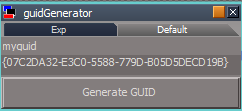
Edit: Random GUID Generator
lowercase or UPPERCASE
I like UPPERCASE
.
Color Picker toolbar icon
First of all, I was wrong having both panels WinID the same
The XCoverColorPickerPanelFrame's OwnedBy needs to be the same as the ColorPickerFrame's WinID
Edit: Random GUID Generator
lowercase or UPPERCASE
I like UPPERCASE
Code: Select all
// guidGenerator
// Called to execute the command
function Execute(params)
{
params.ConValue("myguid") = guid();
}
function S4() {
return (((1+Math.random())*0x10000)|0).toString(16).substring(1);
}
function guid() {
//return ("{" + S4()+S4()+"-"+S4()+"-"+S4()+"-"+S4()+"-"+S4()+S4()+S4() + "}");
return ("{" + S4()+S4()+"-"+S4()+"-"+S4()+"-"+S4()+"-"+S4()+S4()+S4() + "}").toUpperCase();
}
Color Picker toolbar icon
-
trueBlue
- Captain
- Posts: 5548
- Joined: 06 Jul 2009, 22:50
- Type the number ten into the box: 10
Re: Color Picker
Getting a few errors with the Update button
It may be a selection issue, like when you change the color picker's selected object to a different material.
Selecting the color picker's selected object again seems to help.
ERR Source object: /Scripts/CustomCommands/Color Picker/UpdateConnChoice Error: Microsoft JScript runtime error Description: Invalid procedure call or argument Error code: 0x800a0005 - (null) Line: 28, Char: 1 Script text: color = Node.Value(ActiveObject, ActiveConn);
I think you may need to make this script use a try&catch with an Alert "Selection lost."
Getting a lot of Border color attributes in the drop down list
I do not think these are of any value.
Is there any way to bypass a connector name: "Border color"?
It may be a selection issue, like when you change the color picker's selected object to a different material.
Selecting the color picker's selected object again seems to help.
ERR Source object: /Scripts/CustomCommands/Color Picker/UpdateConnChoice Error: Microsoft JScript runtime error Description: Invalid procedure call or argument Error code: 0x800a0005 - (null) Line: 28, Char: 1 Script text: color = Node.Value(ActiveObject, ActiveConn);
I think you may need to make this script use a try&catch with an Alert "Selection lost."
Getting a lot of Border color attributes in the drop down list
I do not think these are of any value.
Is there any way to bypass a connector name: "Border color"?
-
trueBlue
- Captain
- Posts: 5548
- Joined: 06 Jul 2009, 22:50
- Type the number ten into the box: 10
Re: Color Picker
Yay, I did it!
TheNode script
if(connector[1]=="Border color") continue;
TheNode script
if(connector[1]=="Border color") continue;
-
clintonman
- Captain
- Posts: 5659
- Joined: 21 May 2009, 21:08
- Type the number ten into the box: 0
- Location: California
Re: Color Picker
No thanks. try catch is the worst solution to any programming problem.trueBlue wrote: 27 Jan 2023, 19:48 ...
I think you may need to make this script use a try&catch with an Alert "Selection lost."
...
-
trueBlue
- Captain
- Posts: 5548
- Joined: 06 Jul 2009, 22:50
- Type the number ten into the box: 10
Re: Color Picker
Hopefully you can solve the error.
Is the 1dColorData Clickable Bitmap Control being discontinued?
-
clintonman
- Captain
- Posts: 5659
- Joined: 21 May 2009, 21:08
- Type the number ten into the box: 0
- Location: California
Re: Color Picker
Probably, to both.trueBlue wrote: 27 Jan 2023, 20:27 Hopefully you can solve the error.
Is the 1dColorData Clickable Bitmap Control being discontinued?
-
trueBlue
- Captain
- Posts: 5548
- Joined: 06 Jul 2009, 22:50
- Type the number ten into the box: 10
Re: Color Picker
How are you going to get gray scale colors?
-
clintonman
- Captain
- Posts: 5659
- Joined: 21 May 2009, 21:08
- Type the number ten into the box: 0
- Location: California
Re: Color Picker
The 1dColorData Clickable Bitmap Control is replaced by the slider control and remains as a visual guide for the slider.trueBlue wrote: 27 Jan 2023, 20:49 How are you going to get gray scale colors?
-
clintonman
- Captain
- Posts: 5659
- Joined: 21 May 2009, 21:08
- Type the number ten into the box: 0
- Location: California
Re: Color Picker
Found a couple of bugs. One is a truespace bug. For color objects the SetColorHSL command will create a white color if hue is 1. A hue of 1 should be red. This effects the main color picker. If you pick on the far right you get white because the image was not built properly because of the hue bug.
Second thing is that I changed the resolution of the main color picker making it shorter. The control was still square and tS was causing a white selection at the very bottom of the control which should be maximum saturation. I made the control proportional and that fixed the problem.
Another bug is when you select an object with no color and press the Update button you get an null error. Fixed it with an early return. This is not the same error trueBlue found. Haven't been able to reproduce that error without some steps.
- Attachments
-
- Color Pickerbd5f.RsObj
- (545.77 KiB) Downloaded 157 times
-
trueBlue
- Captain
- Posts: 5548
- Joined: 06 Jul 2009, 22:50
- Type the number ten into the box: 10
Re: Color Picker
That null error, that you fixed is the same error that I was getting.clintonman wrote: 01 Feb 2023, 05:36 Another bug is when you select an object with no color and press the Update button you get an null error. Fixed it with an early return. This is not the same error trueBlue found. Haven't been able to reproduce that error without some steps.
I will let you know if I get any other errors.
I am using the same code used in the main bitmap in the Black & White gradient bitmap.
Do you see any reason not to use that?
-
clintonman
- Captain
- Posts: 5659
- Joined: 21 May 2009, 21:08
- Type the number ten into the box: 0
- Location: California
Re: Color Picker
Not off the top of my head.trueBlue wrote: 01 Feb 2023, 14:44That null error, that you fixed is the same error that I was getting.clintonman wrote: 01 Feb 2023, 05:36 Another bug is when you select an object with no color and press the Update button you get an null error. Fixed it with an early return. This is not the same error trueBlue found. Haven't been able to reproduce that error without some steps.
I will let you know if I get any other errors.
I am using the same code used in the main bitmap in the Black & White gradient bitmap.
Do you see any reason not to use that?
-
trueBlue
- Captain
- Posts: 5548
- Joined: 06 Jul 2009, 22:50
- Type the number ten into the box: 10
Re: Color Picker
Couple other observations...
Color aspect
The Lum; Red; Green; Blue right click Reset does not do anything except add Undo entries to the Command History and Undoing them does not do anything. I changed the Link(s) to None.
The Integer2Number script has two OnDefaultValue functions.
The BufferColor does not need to be exposed. The Color attribute updates.
Exp aspect
There are two attributes that should be deleted.
The Icon is a Spotlight bitmap.
Tip: Left click - Iconize
Color aspect
The Lum; Red; Green; Blue right click Reset does not do anything except add Undo entries to the Command History and Undoing them does not do anything. I changed the Link(s) to None.
The Integer2Number script has two OnDefaultValue functions.
The BufferColor does not need to be exposed. The Color attribute updates.
Exp aspect
There are two attributes that should be deleted.
The Icon is a Spotlight bitmap.
Tip: Left click - Iconize
-
trueBlue
- Captain
- Posts: 5548
- Joined: 06 Jul 2009, 22:50
- Type the number ten into the box: 10
Re: Color Picker
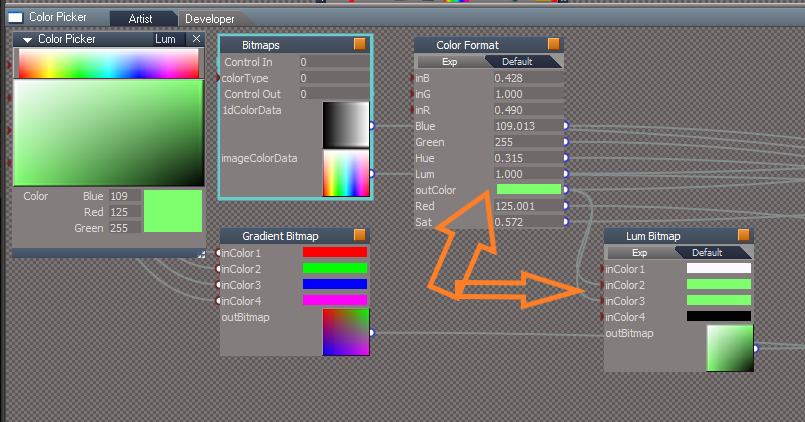
I made a poor man's Lum Channel
Or is it Saturation? .
Lum Bitmap
The first color is a static White color.
The second and third color are both the Picked color.
The fourth color is a static Black color.
.
And a Shortcut
Point Edit also uses SHIFT C
Do you think that will be an issue?
Or is it Saturation? .
Lum Bitmap
The first color is a static White color.
The second and third color are both the Picked color.
The fourth color is a static Black color.
.
And a Shortcut
Code: Select all
<RS_ACC KEY="SHIFT C" GROUP="USERDEFINED" CONTEXT="" DESC="Run Color Picker" COMMAND="Activity.Run("Scripts/CustomCommands/Color Picker/OpenPanel")" />Code: Select all
<RS_ACC KEY="SHIFT C" DESC="Convert Selection" GROUP="VIEW3D" CONTEXT = "PointEdit" COMMAND="MeshModifiers.ConvertSelection('','');" />-
clintonman
- Captain
- Posts: 5659
- Joined: 21 May 2009, 21:08
- Type the number ten into the box: 0
- Location: California
Re: Color Picker
Do you think that will be an issue?trueBlue wrote: 02 Feb 2023, 20:09 I made a poor man's Lum Channel
Lum Channel.png
.
Lum Bitmap
The first color is a static White color.
The second and third color are both the Picked color.
The fourth color is a static Black color.
Gradient Bitmap.png
.
And a ShortcutPoint Edit also uses SHIFT CCode: Select all
<RS_ACC KEY="SHIFT C" GROUP="USERDEFINED" CONTEXT="" DESC="Run Color Picker" COMMAND="Activity.Run("Scripts/CustomCommands/Color Picker/OpenPanel")" />Do you think that will be an issue?Code: Select all
<RS_ACC KEY="SHIFT C" DESC="Convert Selection" GROUP="VIEW3D" CONTEXT = "PointEdit" COMMAND="MeshModifiers.ConvertSelection('','');" />
The only way to know for sure is try it and see.
-
trueBlue
- Captain
- Posts: 5548
- Joined: 06 Jul 2009, 22:50
- Type the number ten into the box: 10
Re: Color Picker
The best I can tell, the Convert Selection is a two-part process.
If you do not do the first part (change the element mode) before using Convert Selection, it does not do anything.
The only thing I can think of, if it is possible, is add code to your OpenPanel script that stops it from opening if tS is in PE Mode
Is that possible?
Or at the very least, add:
If you do not do the first part (change the element mode) before using Convert Selection, it does not do anything.
The only thing I can think of, if it is possible, is add code to your OpenPanel script that stops it from opening if tS is in PE Mode
Is that possible?
Or at the very least, add:
Code: Select all
if(Node.ConExists(Node.FirstSelected(), 'Selection')) {
if(Node.Exists('Project/Windows Manager Space/ColorPickerFrame'))
if(Node.Exists('Scripts/CustomCommands/Color Picker/ClosePanel'))
ScriptObject.Execute('Scripts/CustomCommands/Color Picker/ClosePanel')
return;
}
-
clintonman
- Captain
- Posts: 5659
- Joined: 21 May 2009, 21:08
- Type the number ten into the box: 0
- Location: California
Re: Color Picker
Cleaned connections.trueBlue wrote: 01 Feb 2023, 20:15 Couple other observations...
Color aspect
The Lum; Red; Green; Blue right click Reset does not do anything except add Undo entries to the Command History and Undoing them does not do anything. I changed the Link(s) to None.
The Integer2Number script has two OnDefaultValue functions.
The BufferColor does not need to be exposed. The Color attribute updates.
Exp aspect
There are two attributes that should be deleted.
The Icon is a Spotlight bitmap.
Tip: Left click - Iconize
Color.png
RMB on icon, now it's black, not a light icon.
Removed extra OnDefaultValue stuff
-
clintonman
- Captain
- Posts: 5659
- Joined: 21 May 2009, 21:08
- Type the number ten into the box: 0
- Location: California
Re: Color Picker
I don't know what the Convert Selection is about, or what it has to do with the Color Picker.trueBlue wrote: 02 Feb 2023, 22:00 The best I can tell, the Convert Selection is a two-part process.
If you do not do the first part (change the element mode) before using Convert Selection, it does not do anything.
The only thing I can think of, if it is possible, is add code to your OpenPanel script that stops it from opening if tS is in PE Mode
Is that possible?
Or at the very least, add:Code: Select all
if(Node.ConExists(Node.FirstSelected(), 'Selection')) { if(Node.Exists('Project/Windows Manager Space/ColorPickerFrame')) if(Node.Exists('Scripts/CustomCommands/Color Picker/ClosePanel')) ScriptObject.Execute('Scripts/CustomCommands/Color Picker/ClosePanel') return; }
So the shortcuts didn't work?
-
trueBlue
- Captain
- Posts: 5548
- Joined: 06 Jul 2009, 22:50
- Type the number ten into the box: 10
Re: Color Picker
Shift C works for me to open the Colot Picker and Convert Selection
I added the above code the OpenPanel script
I also added code to TheNode script:
Also, to the function BuildColorConnList
I added the above code the OpenPanel script
I also added code to TheNode script:
Code: Select all
if(Node.FirstSelected() == System.ThisOwner()) {
var colorSource = System.CreateDO("Common Data Package/String Enum Data");
colorSource.Clear();
Node.Value(owner, "ColorSource") = colorSource;
Space.Unselect()
return;
}
if(Node.IsCamera(Node.FirstSelected())) {
var colorSource = System.CreateDO("Common Data Package/String Enum Data");
colorSource.Clear();
Node.Value(owner, "ColorSource") = colorSource;
Space.Unselect()
return;
}
Code: Select all
if(connector[1]=="Border color") continue-
clintonman
- Captain
- Posts: 5659
- Joined: 21 May 2009, 21:08
- Type the number ten into the box: 0
- Location: California
Re: Color Picker
I see, I needed to read back a page to your earlier post.trueBlue wrote: 03 Feb 2023, 23:12 Shift C works for me to open the Colot Picker and Convert Selection
I added the above code the OpenPanel script
I also added code to TheNode script:Also, to the function BuildColorConnListCode: Select all
if(Node.FirstSelected() == System.ThisOwner()) { var colorSource = System.CreateDO("Common Data Package/String Enum Data"); colorSource.Clear(); Node.Value(owner, "ColorSource") = colorSource; Space.Unselect() return; } if(Node.IsCamera(Node.FirstSelected())) { var colorSource = System.CreateDO("Common Data Package/String Enum Data"); colorSource.Clear(); Node.Value(owner, "ColorSource") = colorSource; Space.Unselect() return; }Code: Select all
if(connector[1]=="Border color") continue
So all the extra code is because the shortcuts worked?
-
trueBlue
- Captain
- Posts: 5548
- Joined: 06 Jul 2009, 22:50
- Type the number ten into the box: 10
Re: Color Picker
Nope, just the OpenPanel scriptclintonman wrote: 03 Feb 2023, 23:17I see, I needed to read back a page to your earlier post.trueBlue wrote: 03 Feb 2023, 23:12 Shift C works for me to open the Colot Picker and Convert Selection
I added the above code the OpenPanel script
I also added code to TheNode script:Also, to the function BuildColorConnListCode: Select all
if(Node.FirstSelected() == System.ThisOwner()) { var colorSource = System.CreateDO("Common Data Package/String Enum Data"); colorSource.Clear(); Node.Value(owner, "ColorSource") = colorSource; Space.Unselect() return; } if(Node.IsCamera(Node.FirstSelected())) { var colorSource = System.CreateDO("Common Data Package/String Enum Data"); colorSource.Clear(); Node.Value(owner, "ColorSource") = colorSource; Space.Unselect() return; }Code: Select all
if(connector[1]=="Border color") continue
So all the extra code is because the shortcuts worked?
It only helps and is not full prof.
When the Color Picker is open and you in PE Mode, the Color Picker still works.
You can change the Color of the selected object in PE Mode
-
clintonman
- Captain
- Posts: 5659
- Joined: 21 May 2009, 21:08
- Type the number ten into the box: 0
- Location: California
Re: Color Picker
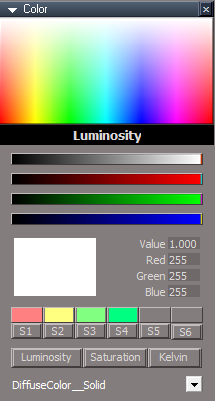
Lots of changes under the hood for this one.
Works with normal undos so removed the special "Undo Color" button and the "Undoable" option.
Replaced the red, green, blue controls with clickable bitmaps
Added dummy sliders as indicators for the values
Removed the "Color" button, "Lum",Sat" and "Kelvin" remain.
Removed the "Kill All" testing button
Added preset colors, just 4 for now.
Improved default behavior for objects that have YafaRay materials.
Added a new option "Include Advanced" which ignores the bitmap shader block (border colors...)
Drop down list not alphabetized - makes it predictable so can have good default color selected
Works with objects that have scene instanced materials.
To save a preset push one of the S1 - S4 buttons
To use the preset click the color.
The sliders don't change anything, they just indicate the current values.
Only the luminosity mode is working. The other 2 will be added soon.
Design Note: Any changes to the size of the clickable bitmap "sliders" may need a small code change. If the built bitmap isn't proportional to the display bitmap, trueSpace will add bad values to the bottom and right edges.
Works with normal undos so removed the special "Undo Color" button and the "Undoable" option.
Replaced the red, green, blue controls with clickable bitmaps
Added dummy sliders as indicators for the values
Removed the "Color" button, "Lum",Sat" and "Kelvin" remain.
Removed the "Kill All" testing button
Added preset colors, just 4 for now.
Improved default behavior for objects that have YafaRay materials.
Added a new option "Include Advanced" which ignores the bitmap shader block (border colors...)
Drop down list not alphabetized - makes it predictable so can have good default color selected
Works with objects that have scene instanced materials.
To save a preset push one of the S1 - S4 buttons
To use the preset click the color.
The sliders don't change anything, they just indicate the current values.
Only the luminosity mode is working. The other 2 will be added soon.
Design Note: Any changes to the size of the clickable bitmap "sliders" may need a small code change. If the built bitmap isn't proportional to the display bitmap, trueSpace will add bad values to the bottom and right edges.
- Attachments
-
- Color Picker627c.RsObj
- (244.42 KiB) Downloaded 146 times
-
trueBlue
- Captain
- Posts: 5548
- Joined: 06 Jul 2009, 22:50
- Type the number ten into the box: 10
Re: Color Picker
Lots of great updates Clinton!
Question...
Do the sliders have to be longer than the color bitmaps? .
The XCoverColorPicker hides behind the main panel when you use the Pick Color Control - "Color".
Question...
Do the sliders have to be longer than the color bitmaps? .
The XCoverColorPicker hides behind the main panel when you use the Pick Color Control - "Color".
-
trueBlue
- Captain
- Posts: 5548
- Joined: 06 Jul 2009, 22:50
- Type the number ten into the box: 10
Re: Color Picker
The Color Pickers; S1, S2, S3, and S4 give errors.
08:15:49.345 WARN Error: Microsoft JScript runtime error Description: Invalid procedure call or argument Error code: 0x800a0005 - (null) Line: 1, Char: 156 Script text: Node.Value(target, conn) = color;Node.Value(owner, 'Color') = color;Node.Value(owner, 'BufferRed') = 59;Node.Value(owner, 'BufferGreen') = 148;Node.Value(owner, 'BufferBlue') = 87;Node.Value(owner, 'lum') = 0.847100019454956;;} 0x80020101 [RsScript.cpp(188)]
08:15:49.345 ERR Source object: /Scripts/CustomCommands/Color Picker/set final color Error: Microsoft JScript runtime error Description: Invalid procedure call or argument Error code: 0x800a0005 - (null) Line: 1, Char: 156 Script text: IMPORTANT - if the above mentioned command is accessing any function set, the error line above may refer to the function set code, instead of command code! 0x80020101 [RcScriptCmd.cpp(1170)]
-
clintonman
- Captain
- Posts: 5659
- Joined: 21 May 2009, 21:08
- Type the number ten into the box: 0
- Location: California
Re: Color Picker
If the sliders are shorter then the indicator doesn't line up with the "color slider".trueBlue wrote: 04 Feb 2023, 16:09 Lots of great updates Clinton!![]()
Question...
Do the sliders have to be longer than the color bitmaps?
Color Picker UI.png
.
The XCoverColorPicker hides behind the main panel when you use the Pick Color Control - "Color".
XCoverColorPicker fixed, thanks.
-
clintonman
- Captain
- Posts: 5659
- Joined: 21 May 2009, 21:08
- Type the number ten into the box: 0
- Location: California
Re: Color Picker
Fixed, thanks.trueBlue wrote: 04 Feb 2023, 16:30 The Color Pickers; S1, S2, S3, and S4 give errors.08:15:49.345 WARN Error: Microsoft JScript runtime error Description: Invalid procedure call or argument Error code: 0x800a0005 - (null) Line: 1, Char: 156 Script text: Node.Value(target, conn) = color;Node.Value(owner, 'Color') = color;Node.Value(owner, 'BufferRed') = 59;Node.Value(owner, 'BufferGreen') = 148;Node.Value(owner, 'BufferBlue') = 87;Node.Value(owner, 'lum') = 0.847100019454956;;} 0x80020101 [RsScript.cpp(188)]
08:15:49.345 ERR Source object: /Scripts/CustomCommands/Color Picker/set final color Error: Microsoft JScript runtime error Description: Invalid procedure call or argument Error code: 0x800a0005 - (null) Line: 1, Char: 156 Script text: IMPORTANT - if the above mentioned command is accessing any function set, the error line above may refer to the function set code, instead of command code! 0x80020101 [RcScriptCmd.cpp(1170)]
-
trueBlue
- Captain
- Posts: 5548
- Joined: 06 Jul 2009, 22:50
- Type the number ten into the box: 10
Re: Color Picker
Is it the RsApp.RunScriptBuffer(cmd) in set final color script?clintonman wrote: 04 Feb 2023, 16:50Fixed, thanks.trueBlue wrote: 04 Feb 2023, 16:30 The Color Pickers; S1, S2, S3, and S4 give errors.08:15:49.345 WARN Error: Microsoft JScript runtime error Description: Invalid procedure call or argument Error code: 0x800a0005 - (null) Line: 1, Char: 156 Script text: Node.Value(target, conn) = color;Node.Value(owner, 'Color') = color;Node.Value(owner, 'BufferRed') = 59;Node.Value(owner, 'BufferGreen') = 148;Node.Value(owner, 'BufferBlue') = 87;Node.Value(owner, 'lum') = 0.847100019454956;;} 0x80020101 [RsScript.cpp(188)]
08:15:49.345 ERR Source object: /Scripts/CustomCommands/Color Picker/set final color Error: Microsoft JScript runtime error Description: Invalid procedure call or argument Error code: 0x800a0005 - (null) Line: 1, Char: 156 Script text: IMPORTANT - if the above mentioned command is accessing any function set, the error line above may refer to the function set code, instead of command code! 0x80020101 [RcScriptCmd.cpp(1170)]
Edit: It looks like there is a mixed use of quotes at beginning and end
Some lines use: '
And other lines use: "
-
clintonman
- Captain
- Posts: 5659
- Joined: 21 May 2009, 21:08
- Type the number ten into the box: 0
- Location: California
Re: Color Picker
You didn't say how you got the errors so I assumed you were pressing the buttons without a valid selection in the dropdown list. I put a check in the script called by the clickable bitmap.trueBlue wrote: 04 Feb 2023, 17:00Is it the RsApp.RunScriptBuffer(cmd) in set final color script?clintonman wrote: 04 Feb 2023, 16:50Fixed, thanks.trueBlue wrote: 04 Feb 2023, 16:30 The Color Pickers; S1, S2, S3, and S4 give errors.
-
trueBlue
- Captain
- Posts: 5548
- Joined: 06 Jul 2009, 22:50
- Type the number ten into the box: 10
Re: Color Picker
As it turns out, ALL of the Clickable Color Controls are giving similar errors by a simple click.
Edit: With nothing selected
-
clintonman
- Captain
- Posts: 5659
- Joined: 21 May 2009, 21:08
- Type the number ten into the box: 0
- Location: California
Re: Color Picker
Got it, put the same fix in the others as well.trueBlue wrote: 04 Feb 2023, 17:15 As it turns out, ALL of the Clickable Color Controls are giving similar errors by a simple click.
Edit: With nothing selected
-
trueBlue
- Captain
- Posts: 5548
- Joined: 06 Jul 2009, 22:50
- Type the number ten into the box: 10
Re: Color Picker
Observation:
Steps...
Select a Shader node like in this example, a DefaultModelShader.
Select a 3D Object
The Combo Ctrl still has the DefaultModelShader's "Specular_Color"
Specular_Color .
Edit: I wonder if it is necessary to append the name of the node?
"_Node Name"
Steps...
Select a Shader node like in this example, a DefaultModelShader.
Select a 3D Object
The Combo Ctrl still has the DefaultModelShader's "Specular_Color"
Specular_Color .
Edit: I wonder if it is necessary to append the name of the node?
"_Node Name"
-
trueBlue
- Captain
- Posts: 5548
- Joined: 06 Jul 2009, 22:50
- Type the number ten into the box: 10
Re: Color Picker
Pick Color Control - "Color"
In the previous version this worked
With nothing selected...
Pick a Color using the Pick Color Control - "Color"
The Lum, Red, Green, and Blue values do not update.
You have to do it twice now.
Edit:
It would be awesome if there was no need for the Update button
In the previous version this worked
With nothing selected...
Pick a Color using the Pick Color Control - "Color"
The Lum, Red, Green, and Blue values do not update.
You have to do it twice now.
Edit:
It would be awesome if there was no need for the Update button
-
clintonman
- Captain
- Posts: 5659
- Joined: 21 May 2009, 21:08
- Type the number ten into the box: 0
- Location: California
Re: Color Picker
The color picker is pretty useless if nothing is selected to make a color change. I'll add an auto close for when nothing is selected.trueBlue wrote: 04 Feb 2023, 18:23 Pick Color Control - "Color"
In the previous version this worked
With nothing selected...
Pick a Color using the Pick Color Control - "Color"
The Lum, Red, Green, and Blue values do not update.
You have to do it twice now.
Edit:
It would be awesome if there was no need for the Update button
-
clintonman
- Captain
- Posts: 5659
- Joined: 21 May 2009, 21:08
- Type the number ten into the box: 0
- Location: California
Re: Color Picker
I don't see it. Unless you are selecting the same object or another object that contains a "Specular_Color"trueBlue wrote: 04 Feb 2023, 18:04 Observation:
Steps...
Select a Shader node like in this example, a DefaultModelShader.
Select a 3D Object
The Combo Ctrl still has the DefaultModelShader's "Specular_Color"
Specular_Color
Clear Combo Control.png
.
Edit: I wonder if it is necessary to append the name of the node?
"_Node Name"
Yep, the names have to be unique to work. If removed the system would fail if there are 2 different nodes with the same connector name.
-
clintonman
- Captain
- Posts: 5659
- Joined: 21 May 2009, 21:08
- Type the number ten into the box: 0
- Location: California
Re: Color Picker
Removed the slider based value indicators and added indicators to the clickable bitmaps for luminosity, red, green, and blue
Fixes mentioned in earlier posts
Fixed some bugs in the presets loader
Added some buffer areas to the sliders so it's possible to reach the lowest and highest values - 0 to 1 and 0 to 255
Panel will close itself if nothing is selected
EDIT: just found a bug I thought I fixed already...
- Attachments
-
- Color Picker395.RsObj
- (252.55 KiB) Downloaded 162 times
Last edited by clintonman on 04 Feb 2023, 23:08, edited 1 time in total.
-
trueBlue
- Captain
- Posts: 5548
- Joined: 06 Jul 2009, 22:50
- Type the number ten into the box: 10
Re: Color Picker
Humm...clintonman wrote: 04 Feb 2023, 22:33The color picker is pretty useless if nothing is selected to make a color change. I'll add an auto close for when nothing is selected.trueBlue wrote: 04 Feb 2023, 18:23 Pick Color Control - "Color"
In the previous version this worked
With nothing selected...
Pick a Color using the Pick Color Control - "Color"
The Lum, Red, Green, and Blue values do not update.
You have to do it twice now.
Edit:
It would be awesome if there was no need for the Update button
Please do not do that on my account.
As it is currently, you select an object, and the Color Picker gets the object's Color.
Then if use UnSelect, the Color Picker clears the combo control and the last select object's color remains.
So, it is in this instance, where I tried the Pick a Color using the Pick Color Control - "Color".
I was just pointing out that you have do it twice now, not a big deal, just different from the last version.
I thought maybe you could fix the need to do it twice, is all.
I do not think closing it would be such a great idea.
I do think that a default color fallback would be good though.
-
clintonman
- Captain
- Posts: 5659
- Joined: 21 May 2009, 21:08
- Type the number ten into the box: 0
- Location: California
Re: Color Picker
Fixed an error in the luminosity value
Removed the Update button from the drop down list
Latest changes caused performance issues which could cause the undo stack to fill up.
Now the red, green, blue, luminosity and main color areas don't update while dragging.
Removed the Update button from the drop down list
Latest changes caused performance issues which could cause the undo stack to fill up.
Now the red, green, blue, luminosity and main color areas don't update while dragging.
- Attachments
-
- Color Picker399.RsObj
- (256.24 KiB) Downloaded 150 times
-
clintonman
- Captain
- Posts: 5659
- Joined: 21 May 2009, 21:08
- Type the number ten into the box: 0
- Location: California
Re: Color Picker
I have no idea why you would want a color picker without anything to assign a color too, but I can put it back the way it was easy enough.trueBlue wrote: 04 Feb 2023, 22:51Humm...clintonman wrote: 04 Feb 2023, 22:33The color picker is pretty useless if nothing is selected to make a color change. I'll add an auto close for when nothing is selected.trueBlue wrote: 04 Feb 2023, 18:23 Pick Color Control - "Color"
In the previous version this worked
With nothing selected...
Pick a Color using the Pick Color Control - "Color"
The Lum, Red, Green, and Blue values do not update.
You have to do it twice now.
Edit:
It would be awesome if there was no need for the Update button
Please do not do that on my account.
As it is currently, you select an object, and the Color Picker gets the object's Color.
Then if use UnSelect, the Color Picker clears the combo control and the last select object's color remains.
So, it is in this instance, where I tried the Pick a Color using the Pick Color Control - "Color".
I was just pointing out that you have do it twice now, not a big deal, just different from the last version.
I thought maybe you could fix the need to do it twice, is all.
I do not think closing it would be such a great idea.
I do think that a default color fallback would be good though.
Color default.png
-
trueBlue
- Captain
- Posts: 5548
- Joined: 06 Jul 2009, 22:50
- Type the number ten into the box: 10
Re: Color Picker
It is not that really, it is just the way it works now which is kind of shocking.
When open it with nothing selected, it opens up and then closes.
Windows Color Picker does not do that.
I will test it a bit longer and see how it works out.
When open it with nothing selected, it opens up and then closes.
Windows Color Picker does not do that.
I will test it a bit longer and see how it works out.
-
clintonman
- Captain
- Posts: 5659
- Joined: 21 May 2009, 21:08
- Type the number ten into the box: 0
- Location: California
Re: Color Picker
Looks good. I'll add 2 more color presets. I'm working on the saturation and kelvin now. I think I'll have it all done tonight.trueBlue wrote: 05 Feb 2023, 01:40 It is not that really, it is just the way it works now which is kind of shocking.
When open it with nothing selected, it opens up and then closes.
Windows Color Picker does not do that.
I will test it a bit longer and see how it works out.
Here is your latest version with the UI arranged.
Added two none-working color slots.
Color UI.png
-
trueBlue
- Captain
- Posts: 5548
- Joined: 06 Jul 2009, 22:50
- Type the number ten into the box: 10
Re: Color Picker
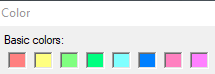
The 4 colors I picked are from the top row of the Windows Color Picker starting from the left.
It would be nice if you could add a total of 8 slots that would fit in one row in your UI.
That is of course if you can make them smaller to fit in one row.
It would be nice if you could add a total of 8 slots that would fit in one row in your UI.
That is of course if you can make them smaller to fit in one row.
-
clintonman
- Captain
- Posts: 5659
- Joined: 21 May 2009, 21:08
- Type the number ten into the box: 0
- Location: California
Re: Color Picker
Ok, I'll add 4 more.trueBlue wrote: 05 Feb 2023, 02:04 The 4 colors I picked are from the top row of the Windows Color Picker starting from the left.
It would be nice if you could add a total of 8 slots that would fit in one row in your UI.
That is of course if you can make them smaller to fit in one row.
Colors.png
-
clintonman
- Captain
- Posts: 5659
- Joined: 21 May 2009, 21:08
- Type the number ten into the box: 0
- Location: California
Re: Color Picker
Those colors are already easily available in the color picker control. We would just be copying what's already there.trueBlue wrote: 05 Feb 2023, 02:04 The 4 colors I picked are from the top row of the Windows Color Picker starting from the left.
It would be nice if you could add a total of 8 slots that would fit in one row in your UI.
That is of course if you can make them smaller to fit in one row.
Colors.png
Is there any other set of 8 colors you would prefer?
-
trueBlue
- Captain
- Posts: 5548
- Joined: 06 Jul 2009, 22:50
- Type the number ten into the box: 10
Re: Color Picker
When I looked at and tried all of the choices, the top row seemed best.
Still not able to get pure White easily from the color pickers.
I am really not sure what would be best.
Would not be very intuitive, but I wonder if you could put the code in the S1 button into its color picker and remove the button(s)?
Still not able to get pure White easily from the color pickers.
I am really not sure what would be best.
Would not be very intuitive, but I wonder if you could put the code in the S1 button into its color picker and remove the button(s)?
-
clintonman
- Captain
- Posts: 5659
- Joined: 21 May 2009, 21:08
- Type the number ten into the box: 0
- Location: California
Re: Color Picker
I'll add some notes to the "SavePreset" node so if you want you can override the random colors currently usedtrueBlue wrote: 05 Feb 2023, 03:06 When I looked at and tried all of the choices, the top row seemed best.
Still not able to get pure White easily from the color pickers.
I am really not sure what would be best.
Would not be very intuitive, but I wonder if you could put the code in the S1 button into its color picker and remove the button(s)?
You're not able to get white. Can you get black?
Not possible to move the code from the button into the clickable bitmap controls. There is a %MOUSE_BUTTON% it gives 1 for the left mouse button. It gives 2 for the right button and also opens a context menu. The middle button is ignored.
-
trueBlue
- Captain
- Posts: 5548
- Joined: 06 Jul 2009, 22:50
- Type the number ten into the box: 10
Re: Color Picker
Okay
Have you ever seen the Lum change to 70110208031775968.000 when clicking in the left-hand side of the main bitmap control?
And the bitmap control turns 98% white?
Have you ever seen the Lum change to 70110208031775968.000 when clicking in the left-hand side of the main bitmap control?
And the bitmap control turns 98% white?
-
clintonman
- Captain
- Posts: 5659
- Joined: 21 May 2009, 21:08
- Type the number ten into the box: 0
- Location: California
Re: Color Picker
Ok I found some stuff.trueBlue wrote: 05 Feb 2023, 03:06 When I looked at and tried all of the choices, the top row seemed best.
Still not able to get pure White easily from the color pickers.
I am really not sure what would be best.
Would not be very intuitive, but I wonder if you could put the code in the S1 button into its color picker and remove the button(s)?
First there was an error in the code. The truespace hsl color has a bug in the hue part and I put the correction on the luminousity part.
Then truespace main clickable bitmap needed buffer zones on the top for the luminosity and both top and bottom for the saturation.
It's better now but still takes some effort so I'm going to try making the clickable bitmap taller, since we need to be able to get to the top and bottom values to get full black and white easily.
Cross posting:
"Okay
Have you ever seen the Lum change to 70110208031775968.000 when clicking in the left-hand side of the main bitmap control?
And the bitmap control turns 98% white?"
Nope, I haven't seen that.
-
trueBlue
- Captain
- Posts: 5548
- Joined: 06 Jul 2009, 22:50
- Type the number ten into the box: 10
Re: Color Picker
Do not know if its tS761StdUU9 or the Color Picker but this is what is happening when clicking on the edges in the main bitmap control.
I rebooted tS but it is the same.
I'll reboot my PC and give it a go in the morning.
I rebooted tS but it is the same.
I'll reboot my PC and give it a go in the morning.
-
trueBlue
- Captain
- Posts: 5548
- Joined: 06 Jul 2009, 22:50
- Type the number ten into the box: 10
Re: Color Picker
Maybe the above is my issue with the Color Picker?clintonman wrote: 05 Feb 2023, 04:43Ok I found some stuff.trueBlue wrote: 05 Feb 2023, 03:06 When I looked at and tried all of the choices, the top row seemed best.
Still not able to get pure White easily from the color pickers.
I am really not sure what would be best.
Would not be very intuitive, but I wonder if you could put the code in the S1 button into its color picker and remove the button(s)?
First there was an error in the code. The truespace hsl color has a bug in the hue part and I put the correction on the luminousity part.
Then truespace main clickable bitmap needed buffer zones on the top for the luminosity and both top and bottom for the saturation.
It's better now but still takes some effort so I'm going to try making the clickable bitmap taller, since we need to be able to get to the top and bottom values to get full black and white easily.
Cross posting:
"Okay
Have you ever seen the Lum change to 70110208031775968.000 when clicking in the left-hand side of the main bitmap control?
And the bitmap control turns 98% white?"
Nope, I haven't seen that.![]()
-
clintonman
- Captain
- Posts: 5659
- Joined: 21 May 2009, 21:08
- Type the number ten into the box: 0
- Location: California
Re: Color Picker
I think the tS clickable bitmap just has issues. I made the bitmap taller and that along with the buffers seems to have done the trick. I'm looking at the saturation display because it's behavior seems a little off. Will look at other color pickers to see if it's misbehaving. I'll upload what I have tonight so you have something to see in the morning.trueBlue wrote: 05 Feb 2023, 05:02Maybe the above is my issue with the Color Picker?clintonman wrote: 05 Feb 2023, 04:43Ok I found some stuff.trueBlue wrote: 05 Feb 2023, 03:06 When I looked at and tried all of the choices, the top row seemed best.
Still not able to get pure White easily from the color pickers.
I am really not sure what would be best.
Would not be very intuitive, but I wonder if you could put the code in the S1 button into its color picker and remove the button(s)?
First there was an error in the code. The truespace hsl color has a bug in the hue part and I put the correction on the luminousity part.
Then truespace main clickable bitmap needed buffer zones on the top for the luminosity and both top and bottom for the saturation.
It's better now but still takes some effort so I'm going to try making the clickable bitmap taller, since we need to be able to get to the top and bottom values to get full black and white easily.
Cross posting:
"Okay
Have you ever seen the Lum change to 70110208031775968.000 when clicking in the left-hand side of the main bitmap control?
And the bitmap control turns 98% white?"
Nope, I haven't seen that.![]()
-
clintonman
- Captain
- Posts: 5659
- Joined: 21 May 2009, 21:08
- Type the number ten into the box: 0
- Location: California
Re: Color Picker
This one has a bigger clickable bitmap control and a white zone at the top of the luminosity display to make it easier to get to white. The value, red, green and blue "sliders" have buffers at the left and right to make it easier to get min and max values.
Fixed a color calculation bug.
It has 8 presets now. They can be resized since they only contain a single color. Random color values are the default and some notes are included in the code if specific default colors are desired.
I found that the saturation display theory isn't 100% compatible with the way the color picker is setup so it has a limit on the saturation value slider to avoid black and white values. Everything in between is good.
Fixed a color calculation bug.
It has 8 presets now. They can be resized since they only contain a single color. Random color values are the default and some notes are included in the code if specific default colors are desired.
I found that the saturation display theory isn't 100% compatible with the way the color picker is setup so it has a limit on the saturation value slider to avoid black and white values. Everything in between is good.
- Attachments
-
- Color Pickered2a.RsObj
- (295.98 KiB) Downloaded 163 times
-
trueBlue
- Captain
- Posts: 5548
- Joined: 06 Jul 2009, 22:50
- Type the number ten into the box: 10
Re: Color Picker
Thanks!
Occasionally, I am getting errors clicking in the Luminosity bitmap.
Then it stops working.
Select the selected object again and try again gives an error.
Now I get the SavePreset script, it gets random colors when you Reset them.
Nice!
The combo control looks like it defaults to the last item in the list.
I seemed to remember that the Color_ was showing more so in the previous version(s?)
TheNode script
Using two underscores kind of makes it look like one whole object name
Specular_Color__DefaultModelShader
What do you think about using:
Specular_Color<- DefaultModelShader
For me, it kind of looks like an InAttribute
Panel Editing is a real pain in trueSpace when the controls are not a certain Grid size.
For instance, the color controls are 192x12
Occasionally, I am getting errors clicking in the Luminosity bitmap.
Code: Select all
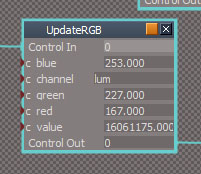
ERR Source object: /Scripts/CustomCommands/Color Picker/RestorePreviousState Error: Microsoft JScript runtime error Description: Overflow Error code: 0x800a0006 - (null) Line: 32, Char: 1 Script text: util.SetNodeValueFloat(owner + "/UpdateRGB", "c_value", colorFS.PrevValue * 255);
Select the selected object again and try again gives an error.
Now I get the SavePreset script, it gets random colors when you Reset them.
Nice!
The combo control looks like it defaults to the last item in the list.
I seemed to remember that the Color_ was showing more so in the previous version(s?)
TheNode script
Using two underscores kind of makes it look like one whole object name
Code: Select all
var connNodeSN = ColorConnList[i].theconn + "__" + Node.ShortName(ColorConnList[i].thenode);What do you think about using:
Code: Select all
var connNodeSN = ColorConnList[i].theconn + "<- " + Node.ShortName(ColorConnList[i].thenode);For me, it kind of looks like an InAttribute
Panel Editing is a real pain in trueSpace when the controls are not a certain Grid size.
For instance, the color controls are 192x12
-
clintonman
- Captain
- Posts: 5659
- Joined: 21 May 2009, 21:08
- Type the number ten into the box: 0
- Location: California
Re: Color Picker
I see it. A crazy big number. For me the number shown isn't big enough to give an error, but that super crazy big number you mentioned would. The error Overflow Error code: 0x800a0006 means "this is too big to handle".trueBlue wrote: 05 Feb 2023, 11:32 Thanks!
Occasionally, I am getting errors clicking in the Luminosity bitmap.Then it stops working.Code: Select all
ERR Source object: /Scripts/CustomCommands/Color Picker/RestorePreviousState Error: Microsoft JScript runtime error Description: Overflow Error code: 0x800a0006 - (null) Line: 32, Char: 1 Script text: util.SetNodeValueFloat(owner + "/UpdateRGB", "c_value", colorFS.PrevValue * 255);
Select the selected object again and try again gives an error.
Now I get the SavePreset script, it gets random colors when you Reset them.
Nice!
The combo control looks like it defaults to the last item in the list.
I seemed to remember that the Color_ was showing more so in the previous version(s?)
TheNode script
Using two underscores kind of makes it look like one whole object nameSpecular_Color__DefaultModelShaderCode: Select all
var connNodeSN = ColorConnList[i].theconn + "__" + Node.ShortName(ColorConnList[i].thenode);
What do you think about using:Specular_Color<- DefaultModelShaderCode: Select all
var connNodeSN = ColorConnList[i].theconn + "<- " + Node.ShortName(ColorConnList[i].thenode);
For me, it kind of looks like an InAttribute
Panel Editing is a real pain in trueSpace when the controls are not a certain Grid size.
For instance, the color controls are 192x12
Color UI.png
Do you have a specific example of an undesirable value defaulting in the combo box?
I'll see about changing the combo underscores. Should be doable.
The 192x12 sliders can be resized now since the picker uses the mouse position instead of the color underneath. The only thing to know is that if they are not long enough it will be more difficult to get to the min and max values.
-
trueBlue
- Captain
- Posts: 5548
- Joined: 06 Jul 2009, 22:50
- Type the number ten into the box: 10
Re: Color Picker
Just wished it went to Color firstDo you have a specific example of an undesirable value defaulting in the combo box?
Example:
Cube1 = Default Material (it only has one Color)
Cube2 = BlankDXMaterial (it has Color and Specular Color)
Now select each one
Cube1 is fine.
Cube2 shows the Specular Color and the main bitmap turns Black.
I think you mentioned you changed it to non-Alphabetized or No Sort.
TheNode:
var CBS_SORT = 256;
Are there different values I can experiment with?
-
trueBlue
- Captain
- Posts: 5548
- Joined: 06 Jul 2009, 22:50
- Type the number ten into the box: 10
Re: Color Picker
If I Reset the c_value it seems to work, so far without errors