I think I see the problem.
The c_value does not change; it ADDS numbers to the existing number.
6267187874667052400000000000000000000.000
This is when it throws an error.
It starts to happen when selecting the Black slider then the main bitmap.
Edit: Actually, it is when selecting any of the V, R, G, or B sliders.
Color Picker
-
trueBlue

- Captain
- Posts: 5548
- Joined: 06 Jul 2009, 22:50
- Type the number ten into the box: 10
Re: Color Picker
-
clintonman

- Captain
- Posts: 5659
- Joined: 21 May 2009, 21:08
- Type the number ten into the box: 0
- Location: California
Re: Color Picker
Fixed the overflow error
Changed the combo text to colorconn <-- sourcenode
Edit: reading previous posts that I missed...
Refreshed the upload based on the default blankdxmaterial issue
Changed the code to favor the default blank dx material. It was working for me because I was testing with a converted material and the order of the nodes was different. Now it will assume the default blank dx material node order.
Edit: removed attachment for one more change
Changed the combo text to colorconn <-- sourcenode
Edit: reading previous posts that I missed...
Refreshed the upload based on the default blankdxmaterial issue
Changed the code to favor the default blank dx material. It was working for me because I was testing with a converted material and the order of the nodes was different. Now it will assume the default blank dx material node order.
Edit: removed attachment for one more change
Last edited by clintonman on 05 Feb 2023, 17:06, edited 2 times in total.
-
trueBlue
- Captain
- Posts: 5548
- Joined: 06 Jul 2009, 22:50
- Type the number ten into the box: 10
Re: Color Picker
Can you just post the whole code for the given script or scripts?clintonman wrote: 05 Feb 2023, 16:18 Fixed the overflow error
Changed the combo text to colorconn <-- sourcenode
Edit: reading previous posts that I missed...
-
clintonman
- Captain
- Posts: 5659
- Joined: 21 May 2009, 21:08
- Type the number ten into the box: 0
- Location: California
Re: Color Picker
There are some notes in the TheNodetrueBlue wrote: 05 Feb 2023, 15:54Just wished it went to Color firstDo you have a specific example of an undesirable value defaulting in the combo box?
Example:
Cube1 = Default Material (it only has one Color)
Cube2 = BlankDXMaterial (it has Color and Specular Color)
Now select each one
Cube1 is fine.
Cube2 shows the Specular Color and the main bitmap turns Black.
I think you mentioned you changed it to non-Alphabetized or No Sort.
TheNode:
var CBS_SORT = 256;
Are there different values I can experiment with?

Code: Select all
// from sdk docs

    //CBS_SIMPLE 0x0001L
    //CBS_DROPDOWN 0x0002L
    //CBS_DROPDOWNLIST 0x0003L

// found in vs 2008 install on winxp vm, WinUser.h file

/*
 * Combo Box styles
 */
//#define CBS_SIMPLE            0x0001L
//#define CBS_DROPDOWN          0x0002L
//#define CBS_DROPDOWNLIST      0x0003L
//#define CBS_OWNERDRAWFIXED    0x0010L
//#define CBS_OWNERDRAWVARIABLE 0x0020L
//#define CBS_AUTOHSCROLL       0x0040L
//#define CBS_OEMCONVERT        0x0080L
//#define CBS_SORT              0x0100L
//#define CBS_HASSTRINGS        0x0200L
//#define CBS_NOINTEGRALHEIGHT  0x0400L
//#define CBS_DISABLENOSCROLL   0x0800L
//#if(WINVER >= 0x0400)
//#define CBS_UPPERCASE         0x2000L
//#define CBS_LOWERCASE         0x4000L
The complete windows list shows sort 100L which is 256
You can translate the numbers using the windows calculator in programmer mode
select hex and type 100 to see 100L is 256
then you can add the numbers together inside colorSource.SetComboCtrlStyle(CBS_DROPDOWNLIST);
default ts sorted list would be
colorSource.SetComboCtrlStyle(3 + 256);
-
clintonman
- Captain
- Posts: 5659
- Joined: 21 May 2009, 21:08
- Type the number ten into the box: 0
- Location: California
Re: Color Picker
If you mean a list of changed nodes or the text, I changed several places to fix the error.trueBlue wrote: 05 Feb 2023, 16:49Can you just post the whole code for the given script or scripts?clintonman wrote: 05 Feb 2023, 16:18 Fixed the overflow error
Changed the combo text to colorconn <-- sourcenode
Edit: reading previous posts that I missed...
-
trueBlue
- Captain
- Posts: 5548
- Joined: 06 Jul 2009, 22:50
- Type the number ten into the box: 10
Re: Color Picker
If it is complicated just post the updated Color Picker.
-
clintonman
- Captain
- Posts: 5659
- Joined: 21 May 2009, 21:08
- Type the number ten into the box: 0
- Location: California
Re: Color Picker
Fixed the overflow error
Changed the combo text to colorconn <-- sourcenode
Changed the code to favor the default blank dx material. It was working for me because I was testing with a converted material and the order of the nodes was different. Now it will assume the default blank dx material node order. This should catch the most common cases, but there is no guarantee since the order of the nodes can change, different nodes can be present or absent and the nodes can have various names. There are too many combinations to handle them all but we can allow for specific cases like the YafaRay materials. Might be able to change the material converter to provide the same order as the default.
If an Object Render Attribute(ORA) node is selected the "Include ORA Connections" option will be ignored. This way if it's off, the list will still populate when directly selecting the ORA.
Changed the combo text to colorconn <-- sourcenode
Changed the code to favor the default blank dx material. It was working for me because I was testing with a converted material and the order of the nodes was different. Now it will assume the default blank dx material node order. This should catch the most common cases, but there is no guarantee since the order of the nodes can change, different nodes can be present or absent and the nodes can have various names. There are too many combinations to handle them all but we can allow for specific cases like the YafaRay materials. Might be able to change the material converter to provide the same order as the default.
If an Object Render Attribute(ORA) node is selected the "Include ORA Connections" option will be ignored. This way if it's off, the list will still populate when directly selecting the ORA.
- Attachments
-
- Color Picker1006.RsObj
- (321.29 KiB) Downloaded 153 times
-
clintonman
- Captain
- Posts: 5659
- Joined: 21 May 2009, 21:08
- Type the number ten into the box: 0
- Location: California
Re: Color Picker
If changing the UI is the issue you can try this untested ideatrueBlue wrote: 05 Feb 2023, 17:18 If it is complicated just post the updated Color Picker.
2D encapsulated everything inside the color picker
download and do the same for the new one
copy the new encapsulated node in
reconnect connectors from the old to the new
delete the old
unencapsulate the new
Edit: I did a test and it mostly works. The added step is you have to reconnect all the blue output connectors after unencapsulate.
-
clintonman
- Captain
- Posts: 5659
- Joined: 21 May 2009, 21:08
- Type the number ten into the box: 0
- Location: California
Re: Color Picker
Here is a replacement for the "Material Editor/D3D Material Converter/D3D material"
This will make it so the converter creates dx materials with the same node order as the default blank dx material, so it will work better with the color picker drop down list.
This will make it so the converter creates dx materials with the same node order as the default blank dx material, so it will work better with the color picker drop down list.
- Attachments
-
- D3D material.RsObj
- (46.04 KiB) Downloaded 154 times
-
trueBlue
- Captain
- Posts: 5548
- Joined: 06 Jul 2009, 22:50
- Type the number ten into the box: 10
Re: Color Picker
Thank you for the adding my requests)clintonman wrote: 05 Feb 2023, 17:30If changing the UI is the issue you can try this untested ideatrueBlue wrote: 05 Feb 2023, 17:18 If it is complicated just post the updated Color Picker.
2D encapsulated everything inside the color picker
download and do the same for the new one
copy the new encapsulated node in
reconnect connectors from the old to the new
delete the old
unencapsulate the new
Edit: I did a test and it mostly works. The added step is you have to reconnect all the blue output connectors after unencapsulate.

Still in the early process of testing but so far looking really well.
Just a few tweaks...
Added two more SavePreset slots.
Left + button Resets 1-5
Right + button Resets 6-10 and RMB Resets 1-10
ToDo: Need to update these to util functions.
TheNode and OpenPanel scripts
Added if Camera selected or con exist "Selection" return.
Changed the width from 218 to 216 in the floating panel and OpenPanel script.
Add title "Color" and do not show floating panel's aspect.
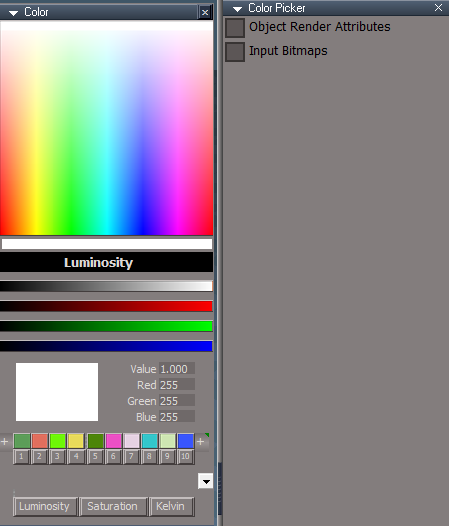
-
clintonman
- Captain
- Posts: 5659
- Joined: 21 May 2009, 21:08
- Type the number ten into the box: 0
- Location: California
Re: Color Picker
The label "Input Bitmaps" will become obsolete as soon as another node is found with color connections most people would not want to see. It's too specific.trueBlue wrote: 05 Feb 2023, 19:21Thank you for the adding my requests)clintonman wrote: 05 Feb 2023, 17:30If changing the UI is the issue you can try this untested ideatrueBlue wrote: 05 Feb 2023, 17:18 If it is complicated just post the updated Color Picker.
2D encapsulated everything inside the color picker
download and do the same for the new one
copy the new encapsulated node in
reconnect connectors from the old to the new
delete the old
unencapsulate the new
Edit: I did a test and it mostly works. The added step is you have to reconnect all the blue output connectors after unencapsulate.
Still in the early process of testing but so far looking really well.
Just a few tweaks...
Added two more SavePreset slots.
Left + button Resets 1-5
Right + button Resets 6-10 and RMB Resets 1-10
ToDo: Need to update these to util functions.
TheNode and OpenPanel scripts
Added if Camera selected or con exist "Selection" return.
Changed the width from 218 to 216 in the floating panel and OpenPanel script.
Add title "Color" and do not show floating panel's aspect.
New Color UI.png
Can you make the bottom buttons more even in size. Maybe change "Kelvin" to "Temperature" would help? or maybe abbreviate them
-
trueBlue
- Captain
- Posts: 5548
- Joined: 06 Jul 2009, 22:50
- Type the number ten into the box: 10
Re: Color Picker
Are there more components that have the hidden SamplerBrick con?
And if so, do they have more color cons other than Border color cons?
if(!IncludeAdvanced && Node.ConExists(currentNode, "SamplerBrick")) continue;//input bitmap node
What does IncludeAdvanced mean?
And if so, do they have more color cons other than Border color cons?
if(!IncludeAdvanced && Node.ConExists(currentNode, "SamplerBrick")) continue;//input bitmap node
What does IncludeAdvanced mean?
-
trueBlue
- Captain
- Posts: 5548
- Joined: 06 Jul 2009, 22:50
- Type the number ten into the box: 10
Re: Color Picker
I googled Temperature, it gave me my weather report. 
It is Helling out!
How about Kelvin Scale?
.
I forgot to mention, I removed all of the Pickers in the Clickable Bitmap Controls except the main bitmap
It is Helling out!
How about Kelvin Scale?

- Kelvin Scale.png (5.59 KiB) Viewed 2183 times
I forgot to mention, I removed all of the Pickers in the Clickable Bitmap Controls except the main bitmap
-
clintonman
- Captain
- Posts: 5659
- Joined: 21 May 2009, 21:08
- Type the number ten into the box: 0
- Location: California
Re: Color Picker
There might be and the SamplerBrick conn isn't hidden.trueBlue wrote: 05 Feb 2023, 19:50 Are there more components that have the hidden SamplerBrick con?
And if so, do they have more color cons other than Border color cons?
if(!IncludeAdvanced && Node.ConExists(currentNode, "SamplerBrick")) continue;//input bitmap node
What does IncludeAdvanced mean?
and if they do exist, they might have other color conns.
As you see from the quoted code, it's not looking at Border color at all. It's looking for a SamplerBrick connection. I'm saying your making an assumption that every node that needs to be filtered out as "Advanced" is known and has been found. If we find another the label will be "Input Bitmaps + another". Find another after that and it changes again.
IncludeAdvanced means show the color connectors that most people would not want to see.
-
clintonman
- Captain
- Posts: 5659
- Joined: 21 May 2009, 21:08
- Type the number ten into the box: 0
- Location: California
Re: Color Picker
Kelvin isn't cowering in the corner anymore sotrueBlue wrote: 05 Feb 2023, 20:08 I googled Temperature, it gave me my weather report.
It is Helling out!
How about Kelvin Scale?
Kelvin Scale.png
Edit: just noticed your 1-10 buttons aren't even, 4 is a little wider than the others
-
trueBlue
- Captain
- Posts: 5548
- Joined: 06 Jul 2009, 22:50
- Type the number ten into the box: 10
Re: Color Picker
All the same size just not touching each other.
What a Bitch Rosetta is!
Fixed
What a Bitch Rosetta is!
Fixed

-
trueBlue
- Captain
- Posts: 5548
- Joined: 06 Jul 2009, 22:50
- Type the number ten into the box: 10
Re: Color Picker
How about Advanced components?clintonman wrote: 05 Feb 2023, 20:12There might be and the SamplerBrick conn isn't hidden.trueBlue wrote: 05 Feb 2023, 19:50 Are there more components that have the hidden SamplerBrick con?
And if so, do they have more color cons other than Border color cons?
if(!IncludeAdvanced && Node.ConExists(currentNode, "SamplerBrick")) continue;//input bitmap node
What does IncludeAdvanced mean?
and if they do exist, they might have other color conns.
As you see from the quoted code, it's not looking at Border color at all. It's looking for a SamplerBrick connection. I'm saying your making an assumption that every node that needs to be filtered out as "Advanced" is known and has been found. If we find another the label will be "Input Bitmaps + another". Find another after that and it changes again.
IncludeAdvanced means show the color connectors that most people would not want to see.
or Advanced shaders?
-
clintonman
- Captain
- Posts: 5659
- Joined: 21 May 2009, 21:08
- Type the number ten into the box: 0
- Location: California
Re: Color Picker
Advanced components sounds more general. Possible we might find one that has nothing to do with materials or shaderstrueBlue wrote: 05 Feb 2023, 22:17How about Advanced components?clintonman wrote: 05 Feb 2023, 20:12There might be and the SamplerBrick conn isn't hidden.trueBlue wrote: 05 Feb 2023, 19:50 Are there more components that have the hidden SamplerBrick con?
And if so, do they have more color cons other than Border color cons?
if(!IncludeAdvanced && Node.ConExists(currentNode, "SamplerBrick")) continue;//input bitmap node
What does IncludeAdvanced mean?
and if they do exist, they might have other color conns.
As you see from the quoted code, it's not looking at Border color at all. It's looking for a SamplerBrick connection. I'm saying your making an assumption that every node that needs to be filtered out as "Advanced" is known and has been found. If we find another the label will be "Input Bitmaps + another". Find another after that and it changes again.
IncludeAdvanced means show the color connectors that most people would not want to see.
or Advanced shaders?
-
trueBlue
- Captain
- Posts: 5548
- Joined: 06 Jul 2009, 22:50
- Type the number ten into the box: 10
-
trueBlue
- Captain
- Posts: 5548
- Joined: 06 Jul 2009, 22:50
- Type the number ten into the box: 10
Re: Color Picker
The more I test this on older scenes, I find that I am running this Color Picker, blindfolded. 
Finding some uncommon uses of color and without digging around in the LE, I do not know what the color is for.
It is really easy to unwantedly change the color and I find that I need to Undo it.
So, it would be convenient to have a tS Undo button on the panel.
If possible, it would be helpful if you could add a button that navigates to the item in the combo control.
And be able to select it and or show the item in the stack.
Edit: I know this is beyond a use of a Color Picker, but if you could show me how to add the Node Owner to an out string, I could add these buttons.
Finding some uncommon uses of color and without digging around in the LE, I do not know what the color is for.
It is really easy to unwantedly change the color and I find that I need to Undo it.
So, it would be convenient to have a tS Undo button on the panel.
If possible, it would be helpful if you could add a button that navigates to the item in the combo control.
And be able to select it and or show the item in the stack.
Edit: I know this is beyond a use of a Color Picker, but if you could show me how to add the Node Owner to an out string, I could add these buttons.
-
clintonman
- Captain
- Posts: 5659
- Joined: 21 May 2009, 21:08
- Type the number ten into the box: 0
- Location: California
Re: Color Picker
Maybe this will help get you started. It doesn't select it just makes an alerttrueBlue wrote: 06 Feb 2023, 01:44 The more I test this on older scenes, I find that I am running this Color Picker, blindfolded.
Finding some uncommon uses of color and without digging around in the LE, I do not know what the color is for.
It is really easy to unwantedly change the color and I find that I need to Undo it.
So, it would be convenient to have a tS Undo button on the panel.
If possible, it would be helpful if you could add a button that navigates to the item in the combo control.
And be able to select it and or show the item in the stack.
Edit: I know this is beyond a use of a Color Picker, but if you could show me how to add the Node Owner to an out string, I could add these buttons.
Don't understand "add the Node Owner to an out string"
- Attachments
-
- SelectColorNode03.RsObj
- (5.39 KiB) Downloaded 169 times
-
trueBlue
- Captain
- Posts: 5548
- Joined: 06 Jul 2009, 22:50
- Type the number ten into the box: 10
Re: Color Picker
Excellent, thank you!clintonman wrote: 06 Feb 2023, 05:14Maybe this will help get you started. It doesn't select it just makes an alerttrueBlue wrote: 06 Feb 2023, 01:44 The more I test this on older scenes, I find that I am running this Color Picker, blindfolded.
Finding some uncommon uses of color and without digging around in the LE, I do not know what the color is for.
It is really easy to unwantedly change the color and I find that I need to Undo it.
So, it would be convenient to have a tS Undo button on the panel.
If possible, it would be helpful if you could add a button that navigates to the item in the combo control.
And be able to select it and or show the item in the stack.
Edit: I know this is beyond a use of a Color Picker, but if you could show me how to add the Node Owner to an out string, I could add these buttons.
Don't understand "add the Node Owner to an out string"
I mis-stated Node.Owner, it was meant for opening the out string in the Link Editor
LE.OpenLocation(Node.Owner(Source))
I added Undo, Open in the Link Editor / Show in Panel buttons.

-
trueBlue
- Captain
- Posts: 5548
- Joined: 06 Jul 2009, 22:50
- Type the number ten into the box: 10
Re: Color Picker
Got this error this morning when opening the Color Picker with nothing selected.
XCover was detached from the parent panel.
I can duplicate the error it by using Node.Delete('') on an object first, then open the Color Picker.
I have been testing this tS Delete bug recently and have found that after you use Node.Delete(''), you should select something.
This makes Node.FirstSelected() active again.
XCover issue:
I suspect the way you are dealing with these floating panels is not working very well as shown above.
Shortcut Runner and Toolbar Manger in the UU9 are setup differently and have not seen this issue.
They both use the parent panel's WinID value in the child panel's OwnedBy value.
XCover was detached from the parent panel.
Code: Select all
ERR Source object: /Scripts/CustomCommands/Color Picker/TheNode Error: Microsoft JScript runtime error Description: Invalid procedure call or argument Error code: 0x800a0005 - (null) Line: 71, Char: 1 Script text: if(Node.ShortName(Node.FirstSelected()) == "Object Render Attributes") {
I have been testing this tS Delete bug recently and have found that after you use Node.Delete(''), you should select something.
This makes Node.FirstSelected() active again.
XCover issue:
I suspect the way you are dealing with these floating panels is not working very well as shown above.
Shortcut Runner and Toolbar Manger in the UU9 are setup differently and have not seen this issue.
They both use the parent panel's WinID value in the child panel's OwnedBy value.
-
clintonman
- Captain
- Posts: 5659
- Joined: 21 May 2009, 21:08
- Type the number ten into the box: 0
- Location: California
Re: Color Picker
Fixed error caused by Node.Delete('')trueBlue wrote: 07 Feb 2023, 14:06 Got this error this morning when opening the Color Picker with nothing selected.
XCover was detached from the parent panel.
I can duplicate the error it by using Node.Delete('') on an object first, then open the Color Picker.Code: Select all
ERR Source object: /Scripts/CustomCommands/Color Picker/TheNode Error: Microsoft JScript runtime error Description: Invalid procedure call or argument Error code: 0x800a0005 - (null) Line: 71, Char: 1 Script text: if(Node.ShortName(Node.FirstSelected()) == "Object Render Attributes") {
I have been testing this tS Delete bug recently and have found that after you use Node.Delete(''), you should select something.
This makes Node.FirstSelected() active again.
XCover issue:
I suspect the way you are dealing with these floating panels is not working very well as shown above.
Shortcut Runner and Toolbar Manger in the UU9 are setup differently and have not seen this issue.
They both use the parent panel's WinID value in the child panel's OwnedBy value.
Changed nodes:
ColorFS
TheNode
UpdateColorMain
UpdateRGB
Update ColorRGB
copied winid to x panel owner - I forgot to do this and test it. The open panel assigns the owner after copying the files, but it seems like ownership has to happen before the copy to get good behavior
commented code in OpenPanel
Code: Select all
	//too late for reliable display of cover X
//WindowsManager.SetFrameOwnerFrame(openedFrame, lastFrame);commented code in ReactivateControls because above fixes
Code: Select all
	//fix hiding x button

	//var WMS = WindowsManager.GetWindowsManagerNodeName();
	//if(Node.Exists(WMS + "/XCoverColorPickerPanelFrame")) {
	//	WindowsManager.ShowWindow(WMS + "/XCoverColorPickerPanelFrame", false);
	//	WindowsManager.ShowWindow(WMS + "/XCoverColorPickerPanelFrame", true);
//}- Attachments
-
- Color Picker1012.RsObj
- (280.97 KiB) Downloaded 169 times
-
trueBlue
- Captain
- Posts: 5548
- Joined: 06 Jul 2009, 22:50
- Type the number ten into the box: 10
Re: Color Picker
Thanks!
Previous versions used to clear the combo ctrl when you choose to unselect.
Is that a side effect of these changes?
Previous versions used to clear the combo ctrl when you choose to unselect.
Is that a side effect of these changes?
-
clintonman
- Captain
- Posts: 5659
- Joined: 21 May 2009, 21:08
- Type the number ten into the box: 0
- Location: California
Re: Color Picker
How do you unselect?trueBlue wrote: 07 Feb 2023, 18:31 Thanks!
Previous versions used to clear the combo ctrl when you choose to unselect.
Is that a side effect of these changes?
-
trueBlue
- Captain
- Posts: 5548
- Joined: 06 Jul 2009, 22:50
- Type the number ten into the box: 10
Re: Color Picker
Esc key shortcut and:
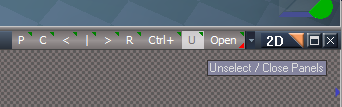
- Unselect.png (10.3 KiB) Viewed 2271 times
-
clintonman
- Captain
- Posts: 5659
- Joined: 21 May 2009, 21:08
- Type the number ten into the box: 0
- Location: California
Re: Color Picker
In TheNode move the code at about line 62trueBlue wrote: 07 Feb 2023, 18:46 Esc key shortcut and:
Unselect.png
Code: Select all
	if(!colorFS.IsValidSelection(Node.FirstSelected())) {
		//Space.Unselect();
		params.SetTerminationFlag();
		return;
}Code: Select all
	if(ColorConnList.length == 0) {
		Node.Value(System.ThisOwner(), "ColorSource") = colorSource;
		params.SetTerminationFlag();
		return;
	}

	if(!colorFS.IsValidSelection(Node.FirstSelected())) {
		//Space.Unselect();
		params.SetTerminationFlag();
		return;
}Link Editor Navigator Toolbar
U : LMB unselect, RMB unselect and close all open object panels
Did you want to add to that to say what it would be used for? Why would I want to unselect?
-
trueBlue
- Captain
- Posts: 5548
- Joined: 06 Jul 2009, 22:50
- Type the number ten into the box: 10
Re: Color Picker
Ugh, doing that brings back the error!
Can something be added to the PreTheNode script?
RMB - Closes the panel in the Stack.
Can something be added to the PreTheNode script?
LMB Unselect - Unselects the selection and does not close the panel in the Stack.Link Editor Navigator Toolbar
U : LMB unselect, RMB unselect and close all open object panels
RMB - Closes the panel in the Stack.
-
clintonman
- Captain
- Posts: 5659
- Joined: 21 May 2009, 21:08
- Type the number ten into the box: 0
- Location: California
Re: Color Picker
Do you want to add a reason why someone would want to unselect?trueBlue wrote: 07 Feb 2023, 20:26 Ugh, doing that brings back the error!
Can something be added to the PreTheNode script?
LMB Unselect - Unselects the selection and does not close the panel in the Stack.Link Editor Navigator Toolbar
U : LMB unselect, RMB unselect and close all open object panels
RMB - Closes the panel in the Stack.
-
trueBlue
- Captain
- Posts: 5548
- Joined: 06 Jul 2009, 22:50
- Type the number ten into the box: 10
Re: Color Picker
I would but cannot think of a greet reason other than it is there if you want to use it.
And it's there so a user does not have to create a script to run the Space.Unselect() command that Caligari supplied.
It has been available in the Link Editor Navigator since 2009.
But since you asked, I going to change the LMB button command so that it does not run unnecessary Command History entries.
if(Node.Selection()){Space.Unselect();}
Also, the Object tool.
if(!Node.Selection()){RsTool.Arrow();}
And it's there so a user does not have to create a script to run the Space.Unselect() command that Caligari supplied.
It has been available in the Link Editor Navigator since 2009.
But since you asked, I going to change the LMB button command so that it does not run unnecessary Command History entries.
if(Node.Selection()){Space.Unselect();}
Also, the Object tool.
if(!Node.Selection()){RsTool.Arrow();}
-
clintonman
- Captain
- Posts: 5659
- Joined: 21 May 2009, 21:08
- Type the number ten into the box: 0
- Location: California
Re: Color Picker
Changed nodes to fix error and so drop down list clears
UpdateConnChoice
TheNode
LoadPreset
Update ColorRGB
UpdateRGB
UpdateColorMain
Changed buttons:
Lum button
Sat button
Kelvin button
UpdateConnChoice
TheNode
LoadPreset
Update ColorRGB
UpdateRGB
UpdateColorMain
Changed buttons:
Lum button
Sat button
Kelvin button
- Attachments
-
- Color Picker.RsObj
- (253.26 KiB) Downloaded 194 times
-
trueBlue
- Captain
- Posts: 5548
- Joined: 06 Jul 2009, 22:50
- Type the number ten into the box: 10
Re: Color Picker
Great update!
Thank you!
params.ConValue('sliderAttr') = "Kelvin Scale"
Thank you!
params.ConValue('sliderAttr') = "Kelvin Scale"
-
trueBlue
- Captain
- Posts: 5548
- Joined: 06 Jul 2009, 22:50
- Type the number ten into the box: 10
Re: Color Picker
Ugh, I notice you can change the BufferColor on the Color Picker UI panel.
I hacked the 4 Color Gradient script from the Objects - Script objects library to create a Buffer Color Gradient Bitmap.
I replaced the BufferColor with this Buffer Color Gradient Bitmap.
Have to admit I am not sure of any unknown consequences and or if this script is correct.
I committed the changes to the 4 Color Gradient script.
But it looks good as far as I can tell.
I hacked the 4 Color Gradient script from the Objects - Script objects library to create a Buffer Color Gradient Bitmap.
I replaced the BufferColor with this Buffer Color Gradient Bitmap.
Have to admit I am not sure of any unknown consequences and or if this script is correct.
I committed the changes to the 4 Color Gradient script.
But it looks good as far as I can tell.
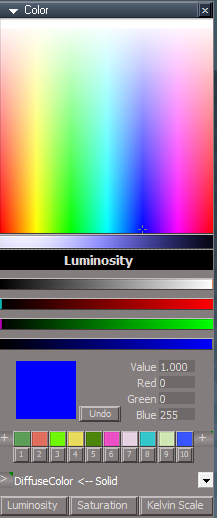
-
clintonman
- Captain
- Posts: 5659
- Joined: 21 May 2009, 21:08
- Type the number ten into the box: 0
- Location: California
Re: Color Picker
It makes it a lot harder to see the color as you drag on the controls. Can only see final result after stop dragging.trueBlue wrote: 08 Feb 2023, 17:35 Ugh, I notice you can change the BufferColor on the Color Picker UI panel.
I hacked the 4 Color Gradient script from the Objects - Script objects library to create a Buffer Color Gradient Bitmap.
I replaced the BufferColor with this Buffer Color Gradient Bitmap.
Have to admit I am not sure of any unknown consequences and or if this script is correct.
I committed the changes to the 4 Color Gradient script.
But it looks good as far as I can tell.
BufferColorGradientBitmap.png
-
trueBlue
- Captain
- Posts: 5548
- Joined: 06 Jul 2009, 22:50
- Type the number ten into the box: 10
-
clintonman
- Captain
- Posts: 5659
- Joined: 21 May 2009, 21:08
- Type the number ten into the box: 0
- Location: California
Re: Color Picker
trueBlue wrote: 08 Feb 2023, 18:02Yes!?
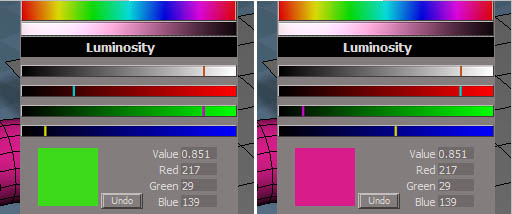
Yes.
Dragging on the left, finished dragging on the right. Can't see final color while dragging and when complete the gradient looks nothing like the final color.
-
trueBlue
- Captain
- Posts: 5548
- Joined: 06 Jul 2009, 22:50
- Type the number ten into the box: 10
Re: Color Picker
I do not know why it is not working for you, it seems to work for me.
I can drag on all of the controls and then the square Color updates to the final color.
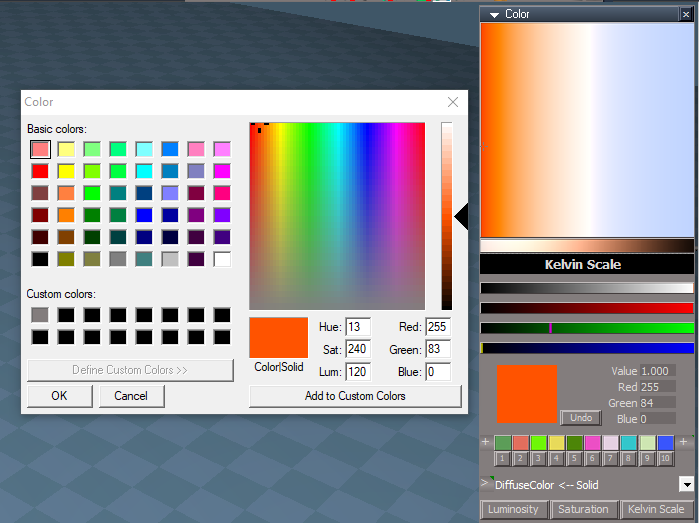
In this example, I compare the Color Picker's picked color with the Windows Color picker.
I notice that Green is off by one number.
I can drag on all of the controls and then the square Color updates to the final color.
In this example, I compare the Color Picker's picked color with the Windows Color picker.
I notice that Green is off by one number.
-
trueBlue
- Captain
- Posts: 5548
- Joined: 06 Jul 2009, 22:50
- Type the number ten into the box: 10

-
clintonman
- Captain
- Posts: 5659
- Joined: 21 May 2009, 21:08
- Type the number ten into the box: 0
- Location: California
Re: Color Picker
trueBlue wrote: 08 Feb 2023, 18:12 I do not know why it is not working for you, it seems to work for me.
I can drag on all of the controls and then the square Color updates to the final color.
In this example, I compare the Color Picker's picked color with the Windows Color picker.
I notice that Green is off by one number.
Green is off by 1.png
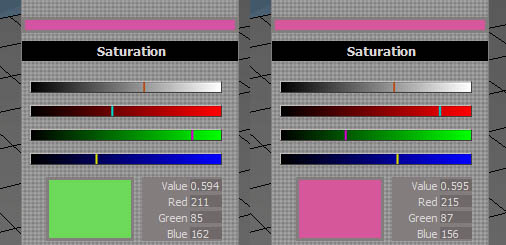
This is what it looked like before. Dragging on left, finished dragging on the right. While dragging I can see the color I will get. After dragging the non-gradient color matches the final color. In the new gradient bar I don't see any portion of the gradient matching the final color.
-
trueBlue
- Captain
- Posts: 5548
- Joined: 06 Jul 2009, 22:50
- Type the number ten into the box: 10
Re: Color Picker
Your Buffer Color looks exactly like the final Color.clintonman wrote: 08 Feb 2023, 18:23ColorVisibleWhileDragging.jpgtrueBlue wrote: 08 Feb 2023, 18:12 I do not know why it is not working for you, it seems to work for me.
I can drag on all of the controls and then the square Color updates to the final color.
In this example, I compare the Color Picker's picked color with the Windows Color picker.
I notice that Green is off by one number.
Green is off by 1.png
This is what it looked like before. Dragging on left, finished dragging on the right. While dragging I can see the color I will get. After dragging the non-gradient color matches the final color. In the new gradient bar I don't see any portion of the gradient matching the final color.
I am not following you on the point you are making.
Have you tried changing the Buffer Color?
What results do you get?
-
clintonman
- Captain
- Posts: 5659
- Joined: 21 May 2009, 21:08
- Type the number ten into the box: 0
- Location: California
Re: Color Picker
The Buffer Color looks exactly like the final Color is the point. While dragging the buffer color is the actual color. When you stop dragging that color is finalized. The gradient changes color but it doesn't at any point show the color you will get. When dragging is done, no color on the gradient matches the final color.trueBlue wrote: 08 Feb 2023, 18:28Your Buffer Color looks exactly like the final Color.clintonman wrote: 08 Feb 2023, 18:23ColorVisibleWhileDragging.jpgtrueBlue wrote: 08 Feb 2023, 18:12 I do not know why it is not working for you, it seems to work for me.
I can drag on all of the controls and then the square Color updates to the final color.
In this example, I compare the Color Picker's picked color with the Windows Color picker.
I notice that Green is off by one number.
Green is off by 1.png
This is what it looked like before. Dragging on left, finished dragging on the right. While dragging I can see the color I will get. After dragging the non-gradient color matches the final color. In the new gradient bar I don't see any portion of the gradient matching the final color.
I am not following you on the point you are making.
Have you tried changing the Buffer Color?
What results do you get?
-
trueBlue
- Captain
- Posts: 5548
- Joined: 06 Jul 2009, 22:50
- Type the number ten into the box: 10
Re: Color Picker
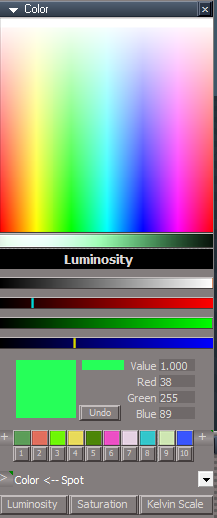
Okay, I see, you want to see the Buffer Color while dragging on the controls.
I guess this Buffer Color Gradient Color Bitmap suffers from the same issue, both open dialogs.
I guess this Buffer Color Gradient Color Bitmap suffers from the same issue, both open dialogs.
-
clintonman
- Captain
- Posts: 5659
- Joined: 21 May 2009, 21:08
- Type the number ten into the box: 0
- Location: California
Re: Color Picker
If it was a clickable bitmap control it wouldn't open a dialog.trueBlue wrote: 08 Feb 2023, 18:50 Okay, I see, you want to see the Buffer Color while dragging on the controls.
I guess this Buffer Color Gradient Color Bitmap suffers from the same issue, both open dialogs.
BufferColor.png
-
trueBlue
- Captain
- Posts: 5548
- Joined: 06 Jul 2009, 22:50
- Type the number ten into the box: 10
Re: Color Picker
I will try that.
I was trying in vain to mimic the Windows Color Picker's Right gradient bar.
When you stop dragging on you controls the final color updates with a little lag.
Example, lmb down drag on a control, stop, without releasing continue dragging, stop...
Another example, starting at the top of the main bitmap, lmb down drag down on all of the controls slowly.
I was trying in vain to mimic the Windows Color Picker's Right gradient bar.
When you stop dragging on you controls the final color updates with a little lag.
Example, lmb down drag on a control, stop, without releasing continue dragging, stop...
Another example, starting at the top of the main bitmap, lmb down drag down on all of the controls slowly.
-
clintonman
- Captain
- Posts: 5659
- Joined: 21 May 2009, 21:08
- Type the number ten into the box: 0
- Location: California
Re: Color Picker
That's on purpose. It has to pause to know if you're done before finalizing the color in an undo-able way. Might be able to make it faster depending on how quickly the various bitmaps update themselves. I'll test on an old pc later to see how fast it can be without failing on older slower machines.trueBlue wrote: 08 Feb 2023, 19:18 I will try that.
I was trying in vain to mimic the Windows Color Picker's Right gradient bar.
When you stop dragging on you controls the final color updates with a little lag.
Example, lmb down drag on a control, stop, without releasing continue dragging, stop...
Another example, starting at the top of the main bitmap, lmb down drag down on all of the controls slowly.
-
trueBlue
- Captain
- Posts: 5548
- Joined: 06 Jul 2009, 22:50
- Type the number ten into the box: 10
Re: Color Picker
I will assume you mean the PauseTime.It has to pause to know if you're done before finalizing the color in an undo-able way. Might be able to make it faster depending on how quickly the various bitmaps update themselves. I'll test on an old pc later to see how fast it can be without failing on older slower machines.
Maybe you can export them to the preferences panel.
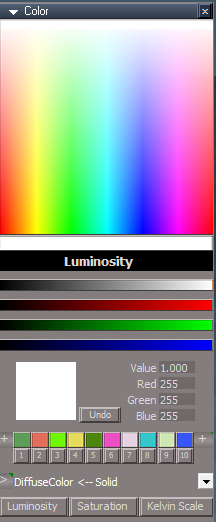
I abandoned the Gradient Bitmap
I added a Buffer Color Bitmap with a Clickable Bitmap Control
This replaces the BufferColor Color Picker Control
-
clintonman
- Captain
- Posts: 5659
- Joined: 21 May 2009, 21:08
- Type the number ten into the box: 0
- Location: California
Re: Color Picker
That's what I was thinking too. If the old pc can't handle it I'll do that, otherwise just pick something that's fast as possible and still reliable. Also I think part of the reason might be undos. It uses several undos during the process, so if it's too quick it could use up all the undos before it recovers.trueBlue wrote: 08 Feb 2023, 20:01I will assume you mean the PauseTime.It has to pause to know if you're done before finalizing the color in an undo-able way. Might be able to make it faster depending on how quickly the various bitmaps update themselves. I'll test on an old pc later to see how fast it can be without failing on older slower machines.
Maybe you can export them to the preferences panel.
I abandoned the Gradient Bitmap
I added a Buffer Color Bitmap with a Clickable Bitmap Control
This replaces the BufferColor Color Picker Control
BufferColorBitmap.png
Looks good. No more click open bitmap stuff.
-
trueBlue
- Captain
- Posts: 5548
- Joined: 06 Jul 2009, 22:50
- Type the number ten into the box: 10
Re: Color Picker
Not a big deal, but I wish that there was a Default Reset
Example:
Select a Light
Open Color Picker
Close Color Picker
Unselect
Open Color Picker
Right click Reset the "Color" Picker
Note the V, R, G, and B values?
Example:
Select a Light
Open Color Picker
Close Color Picker
Unselect
Open Color Picker
Right click Reset the "Color" Picker
Note the V, R, G, and B values?
-
trueBlue
- Captain
- Posts: 5548
- Joined: 06 Jul 2009, 22:50
- Type the number ten into the box: 10
Re: Color Picker
I added an "Open Color Picker" icon to the Spotlight1 for the New Scene, scene light.
LMB - Selects itself and opens the Color Picker.
If I use the Spotlight1's "Color" picker and change the Color, the Color Picker is unaware of this change until you reselect the Spotlight1.
You have to select the Spotlight1's "Open Color Picker" icon again to select it.
LMB - Selects itself and opens the Color Picker.
If I use the Spotlight1's "Color" picker and change the Color, the Color Picker is unaware of this change until you reselect the Spotlight1.
You have to select the Spotlight1's "Open Color Picker" icon again to select it.
- Attachments
-
- Spotlight1.RsObj
- (161.82 KiB) Downloaded 162 times
-
clintonman
- Captain
- Posts: 5659
- Joined: 21 May 2009, 21:08
- Type the number ten into the box: 0
- Location: California
Re: Color Picker
Here are the changes to boost performance. The surprising thing is that reducing the pauses did not save as much time as I thought they would. It's faster than before. It still has a noticeable delay, even when the delay numbers are set low.
I changed the call to the Bitmap2 script to use Activity.Run instead of ScriptObject.Execute - still takes the same amount of time but control seems to be returned to the user faster.
Added an input to set the delay times. This is needed to get good undos when dragging in the controls. I set the default to 65. Running on an old centrino windowsxp machine needed a delay of 100 to get good undos. Decreasing the time made the undos less reliable. When just clicking in the controls, the delay time doesn't matter much and undos are good, but even set to low values there is a small delay. Might be able to work something out with 2 panel aspects, one for dragging and one for clicking where the delay can default automatically for each panel.
Removed the Source node connected to the watchdog and replace with the function set GetTargetNode function. This way there are no extra watchdog connections and the open buttons work without having to first make a selection in the list.
I changed the call to the Bitmap2 script to use Activity.Run instead of ScriptObject.Execute - still takes the same amount of time but control seems to be returned to the user faster.
Added an input to set the delay times. This is needed to get good undos when dragging in the controls. I set the default to 65. Running on an old centrino windowsxp machine needed a delay of 100 to get good undos. Decreasing the time made the undos less reliable. When just clicking in the controls, the delay time doesn't matter much and undos are good, but even set to low values there is a small delay. Might be able to work something out with 2 panel aspects, one for dragging and one for clicking where the delay can default automatically for each panel.
Removed the Source node connected to the watchdog and replace with the function set GetTargetNode function. This way there are no extra watchdog connections and the open buttons work without having to first make a selection in the list.
- Attachments
-
- Color Picker7a4b.RsObj
- (348.69 KiB) Downloaded 149 times
-
trueBlue
- Captain
- Posts: 5548
- Joined: 06 Jul 2009, 22:50
- Type the number ten into the box: 10
Re: Color Picker
ColorDataclintonman wrote: 09 Feb 2023, 05:38 Here are the changes to boost performance. The surprising thing is that reducing the pauses did not save as much time as I thought they would. It's faster than before. It still has a noticeable delay, even when the delay numbers are set low.
I changed the call to the Bitmap2 script to use Activity.Run instead of ScriptObject.Execute - still takes the same amount of time but control seems to be returned to the user faster.
Added an input to set the delay times. This is needed to get good undos when dragging in the controls. I set the default to 65. Running on an old centrino windowsxp machine needed a delay of 100 to get good undos. Decreasing the time made the undos less reliable. When just clicking in the controls, the delay time doesn't matter much and undos are good, but even set to low values there is a small delay. Might be able to work something out with 2 panel aspects, one for dragging and one for clicking where the delay can default automatically for each panel.
Removed the Source node connected to the watchdog and replace with the function set GetTargetNode function. This way there are no extra watchdog connections and the open buttons work without having to first make a selection in the list.
I removed the Red, Green, and Blue attributes because they are not being used.
On the Color panel aspect, I set the Link for Value, Red, Green, and Blue to None because Resetting them did nothing except add entries into the Command History.
Can GetTargetNode be used to set the Final Color, instead of using Node.FirstSelected()?
Just a guess, but I think it may help with the Lights that I posted about in the previous post where the selected node has to be re selected.
If the Selection Change Event could set the selected node's path to a string connector, then it would not be necessary for it to be selected in order to set the Final Color.
In simpler terms, somehow make the Color Picker aware of the selected combo string's color more often and set the Color Picker's Color attribute.
-
trueBlue
- Captain
- Posts: 5548
- Joined: 06 Jul 2009, 22:50
- Type the number ten into the box: 10
Re: Color Picker
Noticed that the Undo button can undo the combo control string(s)
Change:
Undo Button script
For whatever reason, running the above in a jScript does not work, it has to be run from a Button script. 
Example: Undo Button script: Activity.Run('%THIS_NAME/Undo') does not work.
Change:
Undo Button script
Code: Select all
if(Node.Value('%THIS_NAME%/PreUpdate ColorRGB', ' Control Out') == 2) {
RsApp.Undo()
}
Example: Undo Button script: Activity.Run('%THIS_NAME/Undo') does not work.
-
trueBlue
- Captain
- Posts: 5548
- Joined: 06 Jul 2009, 22:50
- Type the number ten into the box: 10
Re: Color Picker
So, when you change the selected nodes Color and you want to update the Color Picker's Color, it is as simple as reselecting the item in the combo control.
Guess I will give up on this one and leave it up to the instructions on how to use this.
Guess I will give up on this one and leave it up to the instructions on how to use this.
-
clintonman
- Captain
- Posts: 5659
- Joined: 21 May 2009, 21:08
- Type the number ten into the box: 0
- Location: California
Re: Color Picker
I dont follow what youre saying. "...It's as simple as...I give up"trueBlue wrote: 09 Feb 2023, 20:53 So, when you change the selected nodes Color and you want to update the Color Picker's Color, it is as simple as reselecting the item in the combo control.
Guess I will give up on this one and leave it up to the instructions on how to use this.
-
trueBlue
- Captain
- Posts: 5548
- Joined: 06 Jul 2009, 22:50
- Type the number ten into the box: 10
Re: Color Picker
It's as simple as, reselect the combo control string.I dont follow what youre saying. "...It's as simple as...I give up"
I gave up trying to supply a script that solved this.