Where do I find it? Went back a few pages and no link to download.trueBlue wrote: 31 Aug 2019, 00:34 ...
I have uploaded the changes for the trueSpace 7.61 Beta 8 Unofficial Update 5 'Beta'
Version 5 - 8/30/2019
Final trueSpace7.61 Beta 8 Std Unofficial Update
-
clintonman

- Captain
- Posts: 5659
- Joined: 21 May 2009, 21:08
- Type the number ten into the box: 0
- Location: California
Re: Final trueSpace7.61 Beta 8 Std Unofficial Update
-
trueBlue

- Captain
- Posts: 5548
- Joined: 06 Jul 2009, 22:50
- Type the number ten into the box: 10
Re: Final trueSpace7.61 Beta 8 Std Unofficial Update
I posted the full version still working on the standalone.I have uploaded the changes for the trueSpace 7.61 Beta 8 Unofficial Update 5 'Beta'
Version 5 - 8/30/2019
The Cube widget disappears when using the primitive tools. Ugh!
-
trueBlue
- Captain
- Posts: 5548
- Joined: 06 Jul 2009, 22:50
- Type the number ten into the box: 10
Re: Final trueSpace7.61 Beta 8 Std Unofficial Update
Now I am getting a error!
Ugh... this took a lot of time to make these changes! 
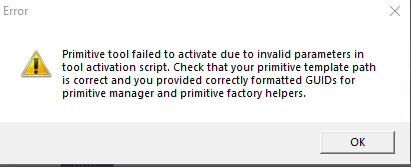
- Capture.PNG (7.37 KiB) Viewed 4237 times
-
clintonman
- Captain
- Posts: 5659
- Joined: 21 May 2009, 21:08
- Type the number ten into the box: 0
- Location: California
Re: Final trueSpace7.61 Beta 8 Std Unofficial Update
Uh, oh
It doesn't look good.
It doesn't look good.
-
trueBlue
- Captain
- Posts: 5548
- Joined: 06 Jul 2009, 22:50
- Type the number ten into the box: 10
Re: Final trueSpace7.61 Beta 8 Std Unofficial Update
After reading that error about proper formatted GUIDs, I wanted to share something I have discovered sometime ago.
If you right click on a toolbar button's ID and Reset it, you will get a new GUID.
If you right click on a toolbar button's ID and Reset it, you will get a new GUID.
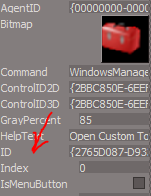
- Capture.PNG (9.69 KiB) Viewed 4239 times
-
clintonman
- Captain
- Posts: 5659
- Joined: 21 May 2009, 21:08
- Type the number ten into the box: 0
- Location: California
Re: Final trueSpace7.61 Beta 8 Std Unofficial Update
Good to know.
-
clintonman
- Captain
- Posts: 5659
- Joined: 21 May 2009, 21:08
- Type the number ten into the box: 0
- Location: California
Re: Final trueSpace7.61 Beta 8 Std Unofficial Update
Good news, installed latest beta full and no problems with primitives interfering with the cube widget and no strange primitive errors (so far).
Edit: problem with my modification of stans vertex widget. It disappears in point edit mode.
Update: installed my modified stan vertex widget and it works as expected. Something must have been lost in translation. Will have to investigate.
Yet another update: Still problems and now the cube widget is disappearing when going into point edit mode. Probably need to revert back to original stan and make cube widget similar.
Edit: problem with my modification of stans vertex widget. It disappears in point edit mode.
Update: installed my modified stan vertex widget and it works as expected. Something must have been lost in translation. Will have to investigate.
Yet another update: Still problems and now the cube widget is disappearing when going into point edit mode. Probably need to revert back to original stan and make cube widget similar.
Last edited by clintonman on 31 Aug 2019, 06:21, edited 2 times in total.
-
trueBlue
- Captain
- Posts: 5548
- Joined: 06 Jul 2009, 22:50
- Type the number ten into the box: 10
Re: Final trueSpace7.61 Beta 8 Std Unofficial Update
I found the problem. Do you have the last full version of the update, tS7.61B8.5 ?
Can you upload a copy of the Lights.RsObj from the preobjects folder?
I need the ones that have the Synchronize buttons?
Can you upload a copy of the Lights.RsObj from the preobjects folder?
I need the ones that have the Synchronize buttons?
-
clintonman
- Captain
- Posts: 5659
- Joined: 21 May 2009, 21:08
- Type the number ten into the box: 0
- Location: California
Re: Final trueSpace7.61 Beta 8 Std Unofficial Update
This is from fresh install of update.
- Attachments
-
- Lightsa72f.RsObj
- (646.16 KiB) Downloaded 186 times
-
trueBlue
- Captain
- Posts: 5548
- Joined: 06 Jul 2009, 22:50
- Type the number ten into the box: 10
Re: Final trueSpace7.61 Beta 8 Std Unofficial Update
Nope that is not the one. I need the LightsRsObj from the previous tS7.61B8.5 update
From the one you installed to c:\trueSpace761Std_VirginX this morning.
So hope you have that one or even one prior to that, else I just lost a lot of work!
From the one you installed to c:\trueSpace761Std_VirginX this morning.
So hope you have that one or even one prior to that, else I just lost a lot of work!
-
clintonman
- Captain
- Posts: 5659
- Joined: 21 May 2009, 21:08
- Type the number ten into the box: 0
- Location: California
Re: Final trueSpace7.61 Beta 8 Std Unofficial Update
From last beta 5 std
- Attachments
-
- Lights1b1b.RsObj
- (2.31 MiB) Downloaded 233 times
-
trueBlue
- Captain
- Posts: 5548
- Joined: 06 Jul 2009, 22:50
- Type the number ten into the box: 10
Re: Final trueSpace7.61 Beta 8 Std Unofficial Update
Nope that is the Standalone version I need the full version that you downloaded this morning.
-
clintonman
- Captain
- Posts: 5659
- Joined: 21 May 2009, 21:08
- Type the number ten into the box: 0
- Location: California
Re: Final trueSpace7.61 Beta 8 Std Unofficial Update
That one from this morning was the std. I'll see if I can find anything for the full versiontrueBlue wrote: 31 Aug 2019, 06:00 ...
From the one you installed to c:\trueSpace761Std_VirginX this morning.
...
-
trueBlue
- Captain
- Posts: 5548
- Joined: 06 Jul 2009, 22:50
- Type the number ten into the box: 10
Re: Final trueSpace7.61 Beta 8 Std Unofficial Update
Oh right. I should read my own words. 
I looked in the other thread, the last update was Sat Aug 17, 2019 10:56 am
I looked in the other thread, the last update was Sat Aug 17, 2019 10:56 am
-
clintonman
- Captain
- Posts: 5659
- Joined: 21 May 2009, 21:08
- Type the number ten into the box: 0
- Location: California
Re: Final trueSpace7.61 Beta 8 Std Unofficial Update
No Lights.RsObj except the very last one or from an early b5. Cross your fingers and try this. Last chance. From the recycle bin. Downloaded on the 26th I think.
- Attachments
-
- tS7.61B8.5(1).zip
- (34.89 MiB) Downloaded 223 times
-
clintonman
- Captain
- Posts: 5659
- Joined: 21 May 2009, 21:08
- Type the number ten into the box: 0
- Location: California
Re: Final trueSpace7.61 Beta 8 Std Unofficial Update
Some good news, I think I found a solution to the widgets closing when entering point edit mode. When widgets are added they can be overridden by other widgets in the same group.
The Widgets.ToggleWidget has a group parameter and if cube widget group is unique and vertex snap group is unique they don't close each other or get closed by the built in widgets.
The Widgets.ToggleWidget has a group parameter and if cube widget group is unique and vertex snap group is unique they don't close each other or get closed by the built in widgets.
-
trueBlue
- Captain
- Posts: 5548
- Joined: 06 Jul 2009, 22:50
- Type the number ten into the box: 10
Re: Final trueSpace7.61 Beta 8 Std Unofficial Update
You are the Bomb!clintonman wrote: 31 Aug 2019, 06:49 No Lights.RsObj except the very last one or from an early b5. Cross your fingers and try this. Last chance. From the recycle bin. Downloaded on the 26th I think.
Thank you!
Uploaded the change in the other thread.

BURN that last update to the ground!!!
-
trueBlue
- Captain
- Posts: 5548
- Joined: 06 Jul 2009, 22:50
- Type the number ten into the box: 10
Re: Final trueSpace7.61 Beta 8 Std Unofficial Update
Glad you got it sorted.clintonman wrote: 31 Aug 2019, 07:00 Some good news, I think I found a solution to the widgets closing when entering point edit mode. When widgets are added they can be overridden by other widgets in the same group.
The Widgets.ToggleWidget has a group parameter and if cube widget group is unique and vertex snap group is unique they don't close each other or get closed by the built in widgets.
From the reset.js
Code: Select all
    Widgets.SetWidgetGroupDependency('{5C9008D4-B6B3-4359-9E63-18D2FC228A6E}','{E8913C00-9A2A-43cf-8238-27B4BFB50A1F}');
    Widgets.SetWidgetGroupDependency('{5C9008D4-B6B3-4359-9E63-18D2FC228A6E}','{88839603-7F98-41f0-96AC-BE94E801CFF3}');
Widgets.SetWidgetGroupDependency('{E8913C00-9A2A-43cf-8238-27B4BFB50A1F}','{88839603-7F98-41f0-96AC-BE94E801CFF3}');A widget is activated by the activation command or from a script. Command parameters directly specify widget prototype to activate, the anchor node, and the controlled objects. This type of widget is not au tomatically deactivated. Currently, it is used to activate ViewNav and Background widgets. To activate widgets from a script, write
Code: Select all
Widgets.ActivateWidget(‘widgetPath’,’Aspect,’Objects’,’Anchor’); To activate widget into specified group, you can use Widgets.ReplaceWidget(‘groupId’,’widgetPath’,’Aspect’,’Anchor’,’Objec ts’); where meaning of parameters is similar to above. groupId specifies GUID of widget group. Currently, there are three widget groups defined.
• Unmanaged, with ID
Code: Select all
{1ED6A591-1DF7-4e2c-9333-41216D589C27} Code: Select all
{5C9008D4-B6B3-4359-9E63-18D2FC228A6E} • Toolbar tools with ID
Code: Select all
{88839603-7F98-41f0-96AC-BE94E801CFF3}You can add as many groups as you wish.
Also this seems really important:
For a material we use D3DMaterial Simple from DX/D3DView Library. We also put Active widget controller into Arrow node. This way we tell the D3D renderer that it should not render shapes inside, but it should treat the node as a widget.
-
clintonman
- Captain
- Posts: 5659
- Joined: 21 May 2009, 21:08
- Type the number ten into the box: 0
- Location: California
Re: Final trueSpace7.61 Beta 8 Std Unofficial Update
Here's the updated Cube widget button and Vertex snap button each using unique groups via the ToggleWidget method. Solves the problem of default widgets closing them, especially the point edit widget.
And the Vertex Snap with the shortcuts node removed to get rid of the error.
Code: Select all
Widgets.ToggleWidget('{43ec2ce1-88d5-9696-84a6-ce04703bc7c0}','/Widgets/Tools/Vertex Snap','Default','','');
Widgets.ToggleWidget('{eb1473db-3c61-f968-e739-d37518cbc263}','/Widgets/Tools/CubeWidget','Default','','');- Attachments
-
- Vertex Snap.RsObj
- (112.49 KiB) Downloaded 181 times
-
- cubeWidgetButton.RsObj
- (44.71 KiB) Downloaded 191 times
-
- Vertex Snap button.RsObj
- (45.56 KiB) Downloaded 225 times
-
stan
- Master Chief Petty Officer
- Posts: 584
- Joined: 21 May 2009, 17:20
Re: Final trueSpace7.61 Beta 8 Std Unofficial Update
Here is as version with ESC shortcut working with an empty widget to replace the vertex snap. I have used this method before. If you hookup the shortcut node in the No Snap Widget then it even opens the vertex snap using ESC. Not sure if you use ESC else where though. Basically it leaves the empty widget in Active Widgets Layer2 when not on. See if you like it. Just put both of them in /Widgets/Tools/ .
- Attachments
-
- Vertex Snap290e.RsObj
- (60.86 KiB) Downloaded 207 times
-
- No Snap Widget.RsObj
- (18.04 KiB) Downloaded 234 times
-
stan
- Master Chief Petty Officer
- Posts: 584
- Joined: 21 May 2009, 17:20
Re: Final trueSpace7.61 Beta 8 Std Unofficial Update
Got all original shortcuts working. A new key replacing panel will still need to be made if you want to be able to change the key values.
- Attachments
-
- Vertex Snap6188.RsObj
- (63.33 KiB) Downloaded 218 times
-
clintonman
- Captain
- Posts: 5659
- Joined: 21 May 2009, 21:08
- Type the number ten into the box: 0
- Location: California
Re: Final trueSpace7.61 Beta 8 Std Unofficial Update
Vertex Snap Widget and Scripts
Stan's original shortcut keys
Widget: removed the call to Close
Preferences: removed the Close script and cleaned out unused nodes including the keyboard shortcuts editor
reason for removing keyboard shortcuts editor:
stan, "A new key replacing panel will still need to be made if you want to be able to change the key values."
paraphrase trueBlue, "I don't use them, remove them if you like"
me, "Was never interested in the shortcut keys"
The Close script was removed because it was setting user preferences, taking control away from the user.
Note that stans No Snap Widget is also needed for the esc key shortcut
Stan's original shortcut keys
Widget: removed the call to Close
Preferences: removed the Close script and cleaned out unused nodes including the keyboard shortcuts editor
reason for removing keyboard shortcuts editor:
stan, "A new key replacing panel will still need to be made if you want to be able to change the key values."
paraphrase trueBlue, "I don't use them, remove them if you like"
me, "Was never interested in the shortcut keys"
The Close script was removed because it was setting user preferences, taking control away from the user.
Note that stans No Snap Widget is also needed for the esc key shortcut
- Attachments
-
- Vertex Snap widget.RsObj
- (61.46 KiB) Downloaded 217 times
-
- Vertex Snap pref.RsObj
- (96.89 KiB) Downloaded 234 times
-
trueBlue
- Captain
- Posts: 5548
- Joined: 06 Jul 2009, 22:50
- Type the number ten into the box: 10
Re: Final trueSpace7.61 Beta 8 Std Unofficial Update
If you are not aware, I have added:
to the init.js and reset.js files
Is this Okay? This is different from the button command.
Problem with your button command creates duplicate CubeWidget(S)
Code: Select all
Widgets.ActivateWidget('/Widgets/Tools/CubeWidget','Default', '', '');Is this Okay? This is different from the button command.
Problem with your button command creates duplicate CubeWidget(S)
-
clintonman
- Captain
- Posts: 5659
- Joined: 21 May 2009, 21:08
- Type the number ten into the box: 0
- Location: California
Re: Final trueSpace7.61 Beta 8 Std Unofficial Update
I can run this command several times and only one widget will be created.trueBlue wrote: 31 Aug 2019, 17:00 If you are not aware, I have added:to the init.js and reset.js filesCode: Select all
Widgets.ActivateWidget('/Widgets/Tools/CubeWidget','Default', '', '');
Is this Okay? This is different from the button command.
Problem with your button command creates duplicate CubeWidget(S)
Code: Select all
Widgets.ToggleWidget('{eb1473db-3c61-f968-e739-d37518cbc263}','/Widgets/Tools/CubeWidget','Default','','');It could be that the init and reset behave differently than running from inside trueSpace.
My theory is that the widgets are created inside different groups, the default group for the ActivateWidget and a specified group for the ToggleWidget. That's why you get a duplicate.
The way you have it now, 2 cube widgets are created if the cube button is pressed. When both widgets are closed only 1 will appear with the button press, no matter how many times it is pressed. I think it's unlikely someone will press the cube button when the cube widget is already open. So don't think it's really any problem that init and reset use the ActivateWidget.
-
trueBlue
- Captain
- Posts: 5548
- Joined: 06 Jul 2009, 22:50
- Type the number ten into the box: 10
Re: Final trueSpace7.61 Beta 8 Std Unofficial Update
Can you give me the steps and objects that need to be updated?clintonman wrote: 31 Aug 2019, 16:51 Vertex Snap Widget and Scripts
Stan's original shortcut keys
Widget: removed the call to Close
Preferences: removed the Close script and cleaned out unused nodes including the keyboard shortcuts editor
reason for removing keyboard shortcuts editor:
stan, "A new key replacing panel will still need to be made if you want to be able to change the key values."
paraphrase trueBlue, "I don't use them, remove them if you like"
me, "Was never interested in the shortcut keys"
The Close script was removed because it was setting user preferences, taking control away from the user.
Note that stans No Snap Widget is also needed for the esc key shortcut
-
clintonman
- Captain
- Posts: 5659
- Joined: 21 May 2009, 21:08
- Type the number ten into the box: 0
- Location: California
Re: Final trueSpace7.61 Beta 8 Std Unofficial Update
The Vertex Snap widget goes into /Widgets/Tools
The No Snap widget also goes into /Widgets/Tools
The Vertex Snap pref goes into /Preferences/Snapping
The No Snap widget also goes into /Widgets/Tools
The Vertex Snap pref goes into /Preferences/Snapping
-
trueBlue
- Captain
- Posts: 5548
- Joined: 06 Jul 2009, 22:50
- Type the number ten into the box: 10
Re: Final trueSpace7.61 Beta 8 Std Unofficial Update
Yep!
The duplication of the CubeWidget only happens after a context reset.
So my thought is not to include it in the reset.js file
Hence the Default state.
If a user opens the CubeWidget and exits tS7 the widget is present after reopening tS7.
If a user closes the CubeWidget and exits tS7 the widget is not present after reopening tS7.
Cool!
End results no duplication!
The duplication of the CubeWidget only happens after a context reset.
So my thought is not to include it in the reset.js file
Hence the Default state.
If a user opens the CubeWidget and exits tS7 the widget is present after reopening tS7.
If a user closes the CubeWidget and exits tS7 the widget is not present after reopening tS7.
Cool!
End results no duplication!
-
trueBlue
- Captain
- Posts: 5548
- Joined: 06 Jul 2009, 22:50
- Type the number ten into the box: 10
Re: Final trueSpace7.61 Beta 8 Std Unofficial Update
To be on the same page I reset the Vertex Snap button ID as I explained previously, just to be on the safe side.clintonman wrote: 31 Aug 2019, 18:06 The Vertex Snap widget goes into /Widgets/Tools
The No Snap widget also goes into /Widgets/Tools
The Vertex Snap pref goes into /Preferences/Snapping
Removed due to update
-
clintonman
- Captain
- Posts: 5659
- Joined: 21 May 2009, 21:08
- Type the number ten into the box: 0
- Location: California
Re: Final trueSpace7.61 Beta 8 Std Unofficial Update
Sounds good to me.trueBlue wrote: 31 Aug 2019, 19:26To be on the same page I reset the Vertex Snap button ID as I explained previously, just to be on the safe side.clintonman wrote: 31 Aug 2019, 18:06 The Vertex Snap widget goes into /Widgets/Tools
The No Snap widget also goes into /Widgets/Tools
The Vertex Snap pref goes into /Preferences/Snapping
-
trueBlue
- Captain
- Posts: 5548
- Joined: 06 Jul 2009, 22:50
- Type the number ten into the box: 10
Re: Final trueSpace7.61 Beta 8 Std Unofficial Update
trueSpace Beta 7.61 Standalone Unofficial Update
This trueSpace Beta 7.61 Standalone Unofficial Update is for the "Standalone Version" only.
Important: This Update should not be used with the "Full Version" of trueSpace7.61 with Workspace, Model, and the Bridge!
Revisions:
July 06, 2009
February 21, 2010
November 01, 2012
May 23, 2019
August 5, 2019
:: Layouts Old
4View, Default, Floating, Expanded, and trueSpace6
* These layouts have been fixed to prevent the Main toolbars from showing on the Desktop when tS is Minimized by merging the bottom two Workspace toolbars together into one toolbar and docked with the Status panel.
* Removed the duplicated tSMainWnd nodes.
* Removed all of the RS...toolbar Frame Windows
* Set the OwnedBy attribute for most of the toolbar's Frame Window which stops the toolbars from showing through newly opened Views.
* Included a WinGUID_Bar toolbar in the Default layout main window's title bar
:: Layouts
4View, Default, Floating, Expanded, trueSpace6, Workspace, and YafaRay4tS
* All Layouts include the new WorkspaceMain2, Main2, WinGUID_Bar, and LENavigatorBar toolbars
* WorkSpace layout with new expanded Horizontal toolbars and YafaRay4tS layout
* 4View layout has 3 new WinGUID_Bar toolbars set to their WinID for the ortho views
Note: Both the Old and New layouts exist in the Library.
Presently the 'Layouts - Configurations' is being used which is the new layouts.
I discovered tS761 only works with one name, as in 'Layouts - Configurations'
To load the OLD layouts you have to rename them in the Library Browser.
1.) Rename 'Layouts - Configurations' to 'Layouts - ConfigurationsNEW'
2.) Rename 'Layouts - ConfigurationsOLD' to 'Layouts - Configurations'
3.) In Workspace, Select the Default layout tab
Note: You can also tell the differences of the layouts by their icons in the Library Browser.
:: Widgets
Object Move, Rotate, and Scale widgets
* Shift + LMB select in empty space deactivates each tool.
Camera Move, Rotate, FOV, and Rectangle Zoom widgets
* Shift + LMB select in empty space deactivates each tool
* FOV - RMB select in empty space resets FOV
* Rectangle Zoom - RMB select in empty space resets FOV
Background widget
* Updated the Zoom to Selection version 1/14/2018 - Author Clinton Reese 'Updated 9/21/2019'
Additional controls:
* MMB click zooms the view to the current selection or Point Edit selection
* Ctrl + MMB click Moves the view to the current selection or Point Edit selection
* Shift + MMB click - Moves the view to all objects in the scene
* Shift + RMB Drag - Resets the View
* Coma + LMB Drag - Hides All (Except selection) and Moves to the current selection or Point Edit selection
* Coma + RMB Drag - Moves the view to the next object and Hides All except that object
* Period + LMB Drag - Hides All (Except selection)
* Period + RMB Drag - Shows All.
* I + LMB Drag in empty space - Opens Widget Help panel
Object Navigation Widget 1, 2, 3, 4, 5, and 6
* 4, 5, and 6 include the Cage widget. - Author Clinton Reese
Additional controls:
Sphere
* LMB + Drag = Move selected object in X and Y
* MMB + Drag = Move widget
* RMB Select = Close Widget
* Ctrl + RMB select = Show Widget's advance settings
Bars, Triangles, Cubes, & Arcs
* Ctrl + LMB Select = Show their Mouse settings
* RMB + Drag on Arcs to rotate from the Pivot. - Author Clinton Reese
* MMB select the Bars, Triangles, and Sphere activates the Object Move tool
* MMB select the Arcs activates the Object Rotate tool
* MMB select the Cubes activates the Object Scale tool
* Alt + LMB select the Bars activates the X, Y, and Z Axis locks. Toggles On/Off
* I + LMB select the widget opens Widget Help panel.
* Shift + LMB select the widget switches the Object Navigation Widgets
* Ctrl + RMB select the widget switches to the Selector Cage Widget
Selector Cage widget
Additional controls:
* Ctrl + RMB select on widget switches to the Object Navigation Widget
* Ctrl + LMB select on the widget activates the widget's Mouse Settings panel
Point Edit widget 1, 2, and 3
* PE Pivot Snap - Author Clinton Reese
* P + LMB select any part of the Widget and release to set the Pivot on selected element
* P + RMB select the widget moves and rotates the Pivot to the selected Face
* P + MMB select the widget moves and rotates the Pivot to the object's Center
* RMB + Drag on rotation Arcs to rotate from set pivot.
Sphere
* LMB + Drag = Move selected object in X and Y
* MMB + Drag = Move widget
* Ctrl + RMB select = Show Point Edit preference panel
* Reset Default PE selection settings button on the preference panel
Bars, Triangles, Cubes, & Arcs
* Ctrl + LMB Select = Show their Mouse settings
* MMB select the Bars, Triangles, and Sphere activates the Object Move tool
* MMB select the Arcs activates the Object Rotate tool
* MMB select the Cubes activates the Object Scale tool
* Alt + LMB select the Bars activates the X, Y, and Z Axis locks. Toggles On/Off
* Shift + LMB select the widget switches the Point Edit Widgets
* I + LMB select the widget opens Widget Help panel
Camera1 widget
The Camera's Shape was modified so that the mesh does not show when viewing from any camera in some instances
Additional controls:
* Shift + LMB select on camera widget switches to Camera Widget 1 or 2
Camera2 widget
* Changed the coloring of the camera and the mouse commands list below:
FOV
* LMB = View from Camera
* LMB + Drag = Adjust Field of View
* Shift + LMB = Exit Camera View
Rotate (Sides)
* LMB = Spin Left & Right
* LMB + Alt = Orbit 360 degrees
* RMB - Tilt Up & Down
* RMB + Alt = Tilt Left & Right
Move (Back)
* LMB = Move X & Y
* LMB + Alt = Forward & Reverse
* RMB = Move X & Z
Stand (Legs)
* LMB = Move Left & Right
* LMB + Alt = Move X & Z
* RMB = Move Up & Down
* Shift + LMB select the widget, switches the camera
* CTRL + LMB opens the Camera panel
* I + LMB select the widget opens Widget Help panel
View widget
Encircle 'Green'
* Ctrl + LMB click Rotates the Perspective view and Isometric view
* Shift + LMB select Resets the View.
* Shift + RMB select Opens the 3D View Widget
Skeleton tool widget
* Added missing X-Ray brick
Material Inspect widget
* LMB + Drag - Selects object
* Left click to Inspect object and then LMB + Drag to select it
* RMB + Drag - Opens the material in the Link Editor
* Left click to Inspect object and then RMB + Drag to open in the Link Editor
* Cancel - Right click in 3D Space cancels the Inspect widget and Unselects last selected object
Axis widget
* LMB click on the widget to enter into Point Editing, select an element and use the buttons on the panel to Target and Snap the Axis. Select the Snap button again to dismiss the widget.
:: Panels
* Character Editor Preferences/Skeleton tool - Joint Placement to Center
Primitives - Added the Object Render Attributes to each primitive.
* Tube primitive. Does not have a widget
* Object Render Attributes - Added an attribute for the owner's path and name, and Exported the Default aspect. The Default aspect has been moved to the Settings aspect.
* Snapping - Exported the 'Snap Radius' attribute on the Grid aspect.
* Soft Selection
Installed a gradient image
* Brush Displacement
Installed a gradient image
* Windows Settings panel
Fixed it so it works.
Desktop
* Added customized Desktop panel exposing all aspects to the Default aspect.
Dialog View button. Added the Dialog settings panel to Preferences.
* Added a Workspace title, and Rename scene name button.
Scene panel - Changed the command for the "Show Object Attribs" to the new Show script.
Postprocess panel
* Added Edit Boxes.
Preferences
* UV Editor preferences
Lightened the color of the Background bitmap control.
Animation Preferences
* Shrink Range button script. Author Clinton Reese
* Scrubbers for Start and End 'Play Range'
* Bake Keyframes, and Automatic Keyframing. Author Clinton Reese
* Mesh Editor Settings
* Mirror button scripts. Author Clinton Reese
Material Editor
* Material Editor with Library Browser Edition
Note: To enable the Library Browser, right click the Library Places or select the Update Library Places icon in the Material Editor.
In the Library Places -> Combo Control, select the Main Library Place.
In the next Combo Control, select which library you would like to open.
Note: At any time your libraries are not showing, select the Update Library Places icon again to update the Library Places.
To use the D3DMaterials, select the D3DMaterials in the Library Places -> Combo Control.
In the next Combo Control, select the Materials - DX9 and press your Enter key.
Active Editor button - Right click to Reset.
D3D Material Editor
* Includes the UV tools, Offline Render Scene, Render to File, Edit material in Link Editor, Update Library Browser, and Convert D3D materials - Author Clinton Reese.
Vray Material Editor
* Includes the Offline Render icons - Render Scene, Render Area, Render Object and Render Animation buttons, enabling them to resize the Vray render window using the Vray - Width and Height values, UV tools, and Update Library Browser.
:: Lights
* All Lights have a new UI with all of their aspects showing in the Stack/Panel and include an Intensity attribute for their Solid Color. Default = 1 which equals no Intensity.
* Spot and Projector's Preferences have button scripts that change their Attenuation to No Falloff, Linear Falloff with distance, and Inverse Square Falloff with distance. RMB command resets to trueSpace's Default.
* Color picker for the light's color and Color aspect for advance color settings. - Author Clinton Reese.
Note: The Default light setup is the only library item that was modified with the new lights. Unfortunately all preexisting lights, scenes, libraries, and Light setups will have the original lights.
* Added a Cylinder primitive to the Spot and Projector lights and its radius is hooked up to the light's Angle attribute.
* Modified the shapes for Infinite, Directional, Sky, and Omni.
* Projector - Added a Square spot light bitmap, camera, and a Sequence aspect enabling a user to load and animate a sequence of images.
* Reset Rotations and a View On/Off to the Spot and Projector lights panels.
:: Workspace Shortcuts
Redefined and Added additional shortcuts, included a backup, and a Shortcut list.
* Window.Shortcuts.default
* tS761 Workspace Shortcut List.rtf
* Workspace shortcuts XML.
Object Move and Rotate shortcuts
3DView - 'Window in focus with object selected'
:: Toolbars
jScript Record toolbar
* Added a Stop all Activities icon
VBScript Record toolbar
Added a Stop all Activities icon
3D Record toolbar
* Added RMB command to the 3D Record toolbar button which opens its preference panel in the Stack/Settings.
WorkspaceMain, WorkspaceMain2, BottomBar, and BottomBar2 toolbars
* 2D Unencapsulate icon - Added a button to Unencapsulate selected objects.
* 3D UnEncapsulate script - Author Clinton Reese
* 3D Encapsulate icon / RMB - 3D Unencapsulate
* 2D Encapsulate icon
* Copy - Changed the RMB command to include multiple selections and insert the copied objects to any opened Link Editor view at X = 600 and Y = 600 and offset each copied object horizontally by 60.
* Reset Default Context - Changed the LMB command to a Question dialog giving you option to cancel. RMB command does not include the Question dialog.
* Default Context Backup
* Scene - Added RMB command to navigate to the scene level in the Link Editor.
* 3D Record toolbar - Modified its placement.
* jScript Macro toolbar - Modified its placement. RMB - Inserts a jScript Command.
* VBScript Macro toolbar - Modified its placement. RMB - Inserts a VBScript Command
Unlook At - Added button that removes the Look At.
* Look At - RMB command 'Unselect'.
* Show - LMB shows all the selected objects and RMB Shows the new Object Render Attributes panel for the selected object.
* Hide - LMB Hides all the selected objects and RMB Shows the new Object Render Attributes panel for the selected object.
* Show All - LMB Shows any objects that have an Object Render Attributes panel.
* Hide All - LMB Hides any objects that have an Object Render Attributes panel.
Note: Encapsulated objects are not supported with ShowAll and HideAll unless you use Hide or Show first.
* All toolbars that have Object render modes and Grid modes, have a RMB command that sets their render mode for all windows.
Workspace Navigation toolbar
* Select by Painting icon - RMB = Reset Default PE selection settings
* Set Default Pose icon - Added a dialog to cancel setting the Default Pose if one is already present.
* Added the missing Flatten Axis button which is used to store the pivot into mesh for procedural animations.
* Fixed the Weight Paint tool's wrong command.
* Fixed the Animation Editor toolbar's Reset function by adding a prototype.
* Changed the tooltip for the Axis - Normalize Orientation to Reset Axis
* Added MeshModifiers.ConvertSelection('','') command to the Shrink and Grow buttons. Author Clinton Reese
* Added the missing Transfer Skinning Weights button which is used to transfer the Skin Weights from one Character to another.
* Added an Unselect command to the Object tool.
* Added RMB command to the Axis tool button which toggles the Axis Widget to show In Front.
* Added Vertex Snap widget, Face Snap, and Fix Bad Geometry. Updated 9/2/2019 - Author Clinton Reese
Custom Toolbars - Red, Gold, and Blue toolbars.
* Red = Cut & Paste, trueSpace ToolBars, and Cube Widget - Author 'Clinton Reese'
* Blue = Camera tools, 3D View Widget, and Transform Objects icons.
RMB command opens Custom Toolbars preferences panel to Open and Save all toolbars.
Note: Open = Synchronizes all trueSpace toolbars and opens the custom toolbar in a Link Editor window, where you can modify it and Save it.
* Gold = Opens the Clinton toolbar 'C3D Persistent Install v2' - Author Clinton Reese
Includes:
Align and Distribute
Grid Array
Radial Array
Point Clone 'Updated 5/24/2019'
Plane Loop
Static Sweep
Normal Move
Freeze Transforms
Parent - Unparent
CTRL Selection
Interpolation toolbar
Nurbs toolbar 'Updated 5/23/2019'
Toolbar Manager toolbar
LoadRAPreset 'New 8/17/2019'
Axis Snap
Note: Modified reset.js file 'Reset to Default Context' that reloads the above scripts.
Workspace File Menu
* Added Help - United 2D Artist (Web Link), Updates (Web Link)
* Save As - Object, Recording, and Scene
WinGUID_Bar toolbar
Uses the main 3D window's WinGUID in the commands for the Views, Ground, Scene render attributes, Reset view, and Look at Selection icons. Which means the window does not have to have focus in order to work.
* Added to the main view's title bar in all layouts.
* Includes a Material Editor icon.
* Set Camera - LMB = Set Camera / RMB = Eye view.
* Look at Selection - LMB = Look a selection / RMB = Look at next object.
* Perspective - RMB Rotates the View.
* Isometric - RMB Rotates the View.
* Camera Move, Camera Rotate, Camera FOV, and Rectangle Zoom - RMB opens current active Eye Camera panel in the Stack/Panels.
* Camera FOV and Rectangle Zoom - RMB in 3D Space resets FOV.
* Zoom to Selection - LMB = Zoom to Selection / RMB = Zoom to next object.
* Zoom to next Object - LMB = Zoom to next Object / RMB = Zoom to All.
* View icon opens a 3D Window with a NewViewBar toolbar set to its WinID.
* View 3D Window toolbar's Save New View icon. Saves current size and placement.
LENavigatorBar
* Ctrl+ button - Toggle On/Off for LMB selecting/deselecting Objects - Author Clinton Reese
* Open button, RMB = Current Scene.
* Scene button, LMB = Scene 2D / RMB = Scene 3D.
Buttons - Offline Render icons
Updated all of the Offline Render icons commands.
Additional Library items
* My Anim Clips includes a camera animation demo
* My Objects
* My Scenes
* My Scene.RsScn includes Save RsScn Incrementally that opens on Load
* My Backup.RsScn includes Save RsScn that opens on Load
My Recordings:
* Modified Underwater - Original Author - Matthew J. Collins (Délé)
* trueSpace with a modified Earth object - Original Author Clinton Reese
* Happy Fourth of July - Original Author -Johny Tho
* Earth Wind and Fire - Original Author - Noko
Materials - DX9:
* Auto Scale Bump, Auto Scale Bump2 (modified version with stones)
* Fog materials. Author - Matthew J. Collins (Délé), and Ultimate Mapped Material.
* Alphabetized the library index.
* Components - Compositing - Author Clinton Reese
Lights library
* Fog Spot and Fog Omni lights. Author - Matthew J. Collins (Délé)
Bitmaps - Base
* 5 Gradients for use in Soft selection profiles. - Original Author Clinton Reese
Objects - Script objects libray
* Camera Deluxe installer.RsObj - Author Gord Stanton
Updated the Camera Deluxe's weight to 3.00
Objects - tS7.61 Update objects library
This library includes several objects to further enhance trueSpace.
* Updated and improved all objects with several newly added objects.
* Send Status Messages script that demonstrates a new Status Message object installed in System.
* Status Message is a modified ClearStatus Immediate script. - Original Author Clinton Reese
Enables a user to send a Status Message for a determined amount of seconds with a Notify sound and or have the text read out loud.
Misc
Script Commands
* Unglue.xml Added 3D UnEncapsulate script - Author Clinton Reese
* UnLookAt.xml Updated to include Lights. - Author Clinton Reese Updated 8/13/2019
* onenewscene.xml Updated to fix missing Status Line string and renamed Camera1 to Camera.
* ShowAll, HideAll, Hide, and Show.xml scripts for the Workspace Main toolbars.
Note: Encapsulated objects are not supported with ShowAll and HideAll unless you use Hide or Show first.
* Cam2Eye.xml that transfers all of the settings from a selected camera to the Eye Camera.
* Added Cam2Eye icon to the camera tools in the Red Custom Toolbar.
* Included a modified ts76_manual.html that links to an included modified tS6help.chm, New in 6.5.PDF, ch30_NewInTrueSpace66.PDF, ch27_PhysicalSimulation.pdf, tS76_MS_Animation.pdf, tS7_AG_3.17.pdf, tS7_AG_Ch_4_NormalMapping.pdf, tS7_DG_chapt1_chapt2.pdf, and UsingBonesToVertex.pdf files.
* Image Folder and Animation Folder added to the main directory for rendering images.
* D3DView.RenderToFile.Settings.xml added that is set to the Image Folder.
* Included RsAnimPlugin.rsx and RsAnimPlugin.pdf to /trueSpace761
Note: If wanted you can Install and Load from the Package Manager.
* Included Clintons3dPlugin.rsx v.1638413 to /trueSpace761Std and Plugins.xml to /Scripts - Author Clinton Reese
Note: The Plugins.xml file has the Clintons3dPlugin, Installed and Loaded to the default path:
C:\trueSpace761Std
CAUTION: This will overwrite any installed plugins, so you will have to reinstall them using the Package Manager!
YafaRay4tSv0.9.5 is fully integrated into trueSpace. - Author Clinton Reese 'Updated 9/21/2019'
Note: Modified reset.js file 'Reset to Default Context' that runs the C3DReset script 'C3D Persistent Install v2' which will reload the YafaRay Folder.
Instructions:
It is recommend that you completely Uninstall and Install trueSpace7.61 Standalone to a clean directory.
Install the PDF Manual for trueSpace.
1.) Run the tS7.61B8Std.5.exe
2.) Browse [...] to where you installed C:\trueSpace761Std, select its folder and then the Extract button
3.) Select the Yes to All button.
4.) Open trueSpace and select the Reset to Default Context icon.
5.) In Workspace select the Default layout tab.
YafaRay4tS users:
1.) Download the YafaRay v3.3.0 render engine from one of these sites:
YafaRay Standalone https://github.com/YafaRay/Core/releases
YafaRay for Blender https://github.com/YafaRay/Blender-Exporter/releases
Unzip the file and copy the ‘yafaray_v3’ folder to:
Examples:
Standalone
C:\Program Files\yafaray_v3
C:\trueSpace761\tS\yafaray_v3
C:\trueSpace761Std\yafaray_v3
Note: If you install the YafaRay v3.3.0 render engine after installing this update:
From Workspace in the Stack/Panel - YafaRay4tS/Setup aspect
Set the 'YafaRay Installation Path' to the yafaray-xml.exe file where you have installed YafaRay v3.3.0
Select the 'Save Settings' button.
In Workspace, open the YafaRay4tS layout.
Open a new YafaRay4tS scene from the YafaRay Settings toolbar icon.
Optionally, but recommend you install the iOptDetector plugin http://rs.siprogs.sk/p/iOptDetectorsPage
Recommend that you install it to your C:/ drive so that it can be shared with different versions of trueSpace.
The OptDetector.dll must be Installed and Loaded from the Workspace's Package Manager.
Special thanks to Clinton Reese for all his help and contributions in this update.
http://www.clintons3d.com
Steps for the easiest installation:
1.) Install YafaRay (Optional)
2.) Install trueSpace 7.61 Standalone
3.) Install iOptDetector (Optional)
4.) Install Vray (Optional)
5.) Install the PDF Manual for Caligari trueSpace (Optional but required before installing the Update 5)
6.) Extract the tS7.61B8Std.5.exe
7.) Open trueSpace Install/Load iOptDetector from the Package Manager and Reset the Default Context (Required after Update 4)
The included Plugins.xml file has the Clintons3dPlugin, Installed and Loaded to the default path:
C:\trueSpace761Std
CAUTION: This will overwrite any installed plugins, so you will have to reinstall them using the Package Manager!
CAUTION: If the reset.js file is deleted or modified you will have to extract the tS7.61B8Std.5.exe again!
Removed due to update
This trueSpace Beta 7.61 Standalone Unofficial Update is for the "Standalone Version" only.
Important: This Update should not be used with the "Full Version" of trueSpace7.61 with Workspace, Model, and the Bridge!
Revisions:
July 06, 2009
February 21, 2010
November 01, 2012
May 23, 2019
August 5, 2019
:: Layouts Old
4View, Default, Floating, Expanded, and trueSpace6
* These layouts have been fixed to prevent the Main toolbars from showing on the Desktop when tS is Minimized by merging the bottom two Workspace toolbars together into one toolbar and docked with the Status panel.
* Removed the duplicated tSMainWnd nodes.
* Removed all of the RS...toolbar Frame Windows
* Set the OwnedBy attribute for most of the toolbar's Frame Window which stops the toolbars from showing through newly opened Views.
* Included a WinGUID_Bar toolbar in the Default layout main window's title bar
:: Layouts
4View, Default, Floating, Expanded, trueSpace6, Workspace, and YafaRay4tS
* All Layouts include the new WorkspaceMain2, Main2, WinGUID_Bar, and LENavigatorBar toolbars
* WorkSpace layout with new expanded Horizontal toolbars and YafaRay4tS layout
* 4View layout has 3 new WinGUID_Bar toolbars set to their WinID for the ortho views
Note: Both the Old and New layouts exist in the Library.
Presently the 'Layouts - Configurations' is being used which is the new layouts.
I discovered tS761 only works with one name, as in 'Layouts - Configurations'
To load the OLD layouts you have to rename them in the Library Browser.
1.) Rename 'Layouts - Configurations' to 'Layouts - ConfigurationsNEW'
2.) Rename 'Layouts - ConfigurationsOLD' to 'Layouts - Configurations'
3.) In Workspace, Select the Default layout tab
Note: You can also tell the differences of the layouts by their icons in the Library Browser.
:: Widgets
Object Move, Rotate, and Scale widgets
* Shift + LMB select in empty space deactivates each tool.
Camera Move, Rotate, FOV, and Rectangle Zoom widgets
* Shift + LMB select in empty space deactivates each tool
* FOV - RMB select in empty space resets FOV
* Rectangle Zoom - RMB select in empty space resets FOV
Background widget
* Updated the Zoom to Selection version 1/14/2018 - Author Clinton Reese 'Updated 9/21/2019'
Additional controls:
* MMB click zooms the view to the current selection or Point Edit selection
* Ctrl + MMB click Moves the view to the current selection or Point Edit selection
* Shift + MMB click - Moves the view to all objects in the scene
* Shift + RMB Drag - Resets the View
* Coma + LMB Drag - Hides All (Except selection) and Moves to the current selection or Point Edit selection
* Coma + RMB Drag - Moves the view to the next object and Hides All except that object
* Period + LMB Drag - Hides All (Except selection)
* Period + RMB Drag - Shows All.
* I + LMB Drag in empty space - Opens Widget Help panel
Object Navigation Widget 1, 2, 3, 4, 5, and 6
* 4, 5, and 6 include the Cage widget. - Author Clinton Reese
Additional controls:
Sphere
* LMB + Drag = Move selected object in X and Y
* MMB + Drag = Move widget
* RMB Select = Close Widget
* Ctrl + RMB select = Show Widget's advance settings
Bars, Triangles, Cubes, & Arcs
* Ctrl + LMB Select = Show their Mouse settings
* RMB + Drag on Arcs to rotate from the Pivot. - Author Clinton Reese
* MMB select the Bars, Triangles, and Sphere activates the Object Move tool
* MMB select the Arcs activates the Object Rotate tool
* MMB select the Cubes activates the Object Scale tool
* Alt + LMB select the Bars activates the X, Y, and Z Axis locks. Toggles On/Off
* I + LMB select the widget opens Widget Help panel.
* Shift + LMB select the widget switches the Object Navigation Widgets
* Ctrl + RMB select the widget switches to the Selector Cage Widget
Selector Cage widget
Additional controls:
* Ctrl + RMB select on widget switches to the Object Navigation Widget
* Ctrl + LMB select on the widget activates the widget's Mouse Settings panel
Point Edit widget 1, 2, and 3
* PE Pivot Snap - Author Clinton Reese
* P + LMB select any part of the Widget and release to set the Pivot on selected element
* P + RMB select the widget moves and rotates the Pivot to the selected Face
* P + MMB select the widget moves and rotates the Pivot to the object's Center
* RMB + Drag on rotation Arcs to rotate from set pivot.
Sphere
* LMB + Drag = Move selected object in X and Y
* MMB + Drag = Move widget
* Ctrl + RMB select = Show Point Edit preference panel
* Reset Default PE selection settings button on the preference panel
Bars, Triangles, Cubes, & Arcs
* Ctrl + LMB Select = Show their Mouse settings
* MMB select the Bars, Triangles, and Sphere activates the Object Move tool
* MMB select the Arcs activates the Object Rotate tool
* MMB select the Cubes activates the Object Scale tool
* Alt + LMB select the Bars activates the X, Y, and Z Axis locks. Toggles On/Off
* Shift + LMB select the widget switches the Point Edit Widgets
* I + LMB select the widget opens Widget Help panel
Camera1 widget
The Camera's Shape was modified so that the mesh does not show when viewing from any camera in some instances
Additional controls:
* Shift + LMB select on camera widget switches to Camera Widget 1 or 2
Camera2 widget
* Changed the coloring of the camera and the mouse commands list below:
FOV
* LMB = View from Camera
* LMB + Drag = Adjust Field of View
* Shift + LMB = Exit Camera View
Rotate (Sides)
* LMB = Spin Left & Right
* LMB + Alt = Orbit 360 degrees
* RMB - Tilt Up & Down
* RMB + Alt = Tilt Left & Right
Move (Back)
* LMB = Move X & Y
* LMB + Alt = Forward & Reverse
* RMB = Move X & Z
Stand (Legs)
* LMB = Move Left & Right
* LMB + Alt = Move X & Z
* RMB = Move Up & Down
* Shift + LMB select the widget, switches the camera
* CTRL + LMB opens the Camera panel
* I + LMB select the widget opens Widget Help panel
View widget
Encircle 'Green'
* Ctrl + LMB click Rotates the Perspective view and Isometric view
* Shift + LMB select Resets the View.
* Shift + RMB select Opens the 3D View Widget
Skeleton tool widget
* Added missing X-Ray brick
Material Inspect widget
* LMB + Drag - Selects object
* Left click to Inspect object and then LMB + Drag to select it
* RMB + Drag - Opens the material in the Link Editor
* Left click to Inspect object and then RMB + Drag to open in the Link Editor
* Cancel - Right click in 3D Space cancels the Inspect widget and Unselects last selected object
Axis widget
* LMB click on the widget to enter into Point Editing, select an element and use the buttons on the panel to Target and Snap the Axis. Select the Snap button again to dismiss the widget.
:: Panels
* Character Editor Preferences/Skeleton tool - Joint Placement to Center
Primitives - Added the Object Render Attributes to each primitive.
* Tube primitive. Does not have a widget
* Object Render Attributes - Added an attribute for the owner's path and name, and Exported the Default aspect. The Default aspect has been moved to the Settings aspect.
* Snapping - Exported the 'Snap Radius' attribute on the Grid aspect.
* Soft Selection
Installed a gradient image
* Brush Displacement
Installed a gradient image
* Windows Settings panel
Fixed it so it works.
Desktop
* Added customized Desktop panel exposing all aspects to the Default aspect.
Dialog View button. Added the Dialog settings panel to Preferences.
* Added a Workspace title, and Rename scene name button.
Scene panel - Changed the command for the "Show Object Attribs" to the new Show script.
Postprocess panel
* Added Edit Boxes.
Preferences
* UV Editor preferences
Lightened the color of the Background bitmap control.
Animation Preferences
* Shrink Range button script. Author Clinton Reese
* Scrubbers for Start and End 'Play Range'
* Bake Keyframes, and Automatic Keyframing. Author Clinton Reese
* Mesh Editor Settings
* Mirror button scripts. Author Clinton Reese
Material Editor
* Material Editor with Library Browser Edition
Note: To enable the Library Browser, right click the Library Places or select the Update Library Places icon in the Material Editor.
In the Library Places -> Combo Control, select the Main Library Place.
In the next Combo Control, select which library you would like to open.
Note: At any time your libraries are not showing, select the Update Library Places icon again to update the Library Places.
To use the D3DMaterials, select the D3DMaterials in the Library Places -> Combo Control.
In the next Combo Control, select the Materials - DX9 and press your Enter key.
Active Editor button - Right click to Reset.
D3D Material Editor
* Includes the UV tools, Offline Render Scene, Render to File, Edit material in Link Editor, Update Library Browser, and Convert D3D materials - Author Clinton Reese.
Vray Material Editor
* Includes the Offline Render icons - Render Scene, Render Area, Render Object and Render Animation buttons, enabling them to resize the Vray render window using the Vray - Width and Height values, UV tools, and Update Library Browser.
:: Lights
* All Lights have a new UI with all of their aspects showing in the Stack/Panel and include an Intensity attribute for their Solid Color. Default = 1 which equals no Intensity.
* Spot and Projector's Preferences have button scripts that change their Attenuation to No Falloff, Linear Falloff with distance, and Inverse Square Falloff with distance. RMB command resets to trueSpace's Default.
* Color picker for the light's color and Color aspect for advance color settings. - Author Clinton Reese.
Note: The Default light setup is the only library item that was modified with the new lights. Unfortunately all preexisting lights, scenes, libraries, and Light setups will have the original lights.
* Added a Cylinder primitive to the Spot and Projector lights and its radius is hooked up to the light's Angle attribute.
* Modified the shapes for Infinite, Directional, Sky, and Omni.
* Projector - Added a Square spot light bitmap, camera, and a Sequence aspect enabling a user to load and animate a sequence of images.
* Reset Rotations and a View On/Off to the Spot and Projector lights panels.
:: Workspace Shortcuts
Redefined and Added additional shortcuts, included a backup, and a Shortcut list.
* Window.Shortcuts.default
* tS761 Workspace Shortcut List.rtf
* Workspace shortcuts XML.
Object Move and Rotate shortcuts
3DView - 'Window in focus with object selected'
Code: Select all
Object Move
4		-X Move Left 0.1
6		+X Move Right 0.1
8		-Y Move Forward 0.1 'Object Space'
2		+Y Move Reverse 0.1 'Object Space'
CTRL+4		-X Move Left 1.000
CTRL+6		+X Move Right 1.000
CTRL+8		-Y Move Forward 1.000 'Object Space'
CTRL+2		+Y Move Reverse 1.000 'Object Space'
Page Up		+Z Move UP 0.1
Page Down	-Z Move Down 0.1
CTRL+Page Up		+Z Move UP 1.000
CTRL+Page Down	-Z Move Down 1.000
5		   Normalize Location
Object Rotate
7		+Z Rotate Left 1.000 degree
9		-Z Rotate Right 1.000 degree
1		-X Rotate Forward 1.000 degree
3		+X Rotate Reverse 1.000 degree
CTRL+7		+Z Rotate Left +45 degrees
CTRL+9		-Z Rotate Right -45 degrees
CTRL+1		-X Rotate Left -45 degrees
CTRL+3		+X Rotate Right +45 degrees
CTRL+5 Normalize RotationjScript Record toolbar
* Added a Stop all Activities icon
VBScript Record toolbar
Added a Stop all Activities icon
3D Record toolbar
* Added RMB command to the 3D Record toolbar button which opens its preference panel in the Stack/Settings.
WorkspaceMain, WorkspaceMain2, BottomBar, and BottomBar2 toolbars
* 2D Unencapsulate icon - Added a button to Unencapsulate selected objects.
* 3D UnEncapsulate script - Author Clinton Reese
* 3D Encapsulate icon / RMB - 3D Unencapsulate
* 2D Encapsulate icon
* Copy - Changed the RMB command to include multiple selections and insert the copied objects to any opened Link Editor view at X = 600 and Y = 600 and offset each copied object horizontally by 60.
* Reset Default Context - Changed the LMB command to a Question dialog giving you option to cancel. RMB command does not include the Question dialog.
* Default Context Backup
* Scene - Added RMB command to navigate to the scene level in the Link Editor.
* 3D Record toolbar - Modified its placement.
* jScript Macro toolbar - Modified its placement. RMB - Inserts a jScript Command.
* VBScript Macro toolbar - Modified its placement. RMB - Inserts a VBScript Command
Unlook At - Added button that removes the Look At.
* Look At - RMB command 'Unselect'.
* Show - LMB shows all the selected objects and RMB Shows the new Object Render Attributes panel for the selected object.
* Hide - LMB Hides all the selected objects and RMB Shows the new Object Render Attributes panel for the selected object.
* Show All - LMB Shows any objects that have an Object Render Attributes panel.
* Hide All - LMB Hides any objects that have an Object Render Attributes panel.
Note: Encapsulated objects are not supported with ShowAll and HideAll unless you use Hide or Show first.
* All toolbars that have Object render modes and Grid modes, have a RMB command that sets their render mode for all windows.
Workspace Navigation toolbar
* Select by Painting icon - RMB = Reset Default PE selection settings
* Set Default Pose icon - Added a dialog to cancel setting the Default Pose if one is already present.
* Added the missing Flatten Axis button which is used to store the pivot into mesh for procedural animations.
* Fixed the Weight Paint tool's wrong command.
* Fixed the Animation Editor toolbar's Reset function by adding a prototype.
* Changed the tooltip for the Axis - Normalize Orientation to Reset Axis
* Added MeshModifiers.ConvertSelection('','') command to the Shrink and Grow buttons. Author Clinton Reese
* Added the missing Transfer Skinning Weights button which is used to transfer the Skin Weights from one Character to another.
* Added an Unselect command to the Object tool.
* Added RMB command to the Axis tool button which toggles the Axis Widget to show In Front.
* Added Vertex Snap widget, Face Snap, and Fix Bad Geometry. Updated 9/2/2019 - Author Clinton Reese
Custom Toolbars - Red, Gold, and Blue toolbars.
* Red = Cut & Paste, trueSpace ToolBars, and Cube Widget - Author 'Clinton Reese'
* Blue = Camera tools, 3D View Widget, and Transform Objects icons.
RMB command opens Custom Toolbars preferences panel to Open and Save all toolbars.
Note: Open = Synchronizes all trueSpace toolbars and opens the custom toolbar in a Link Editor window, where you can modify it and Save it.
* Gold = Opens the Clinton toolbar 'C3D Persistent Install v2' - Author Clinton Reese
Includes:
Align and Distribute
Grid Array
Radial Array
Point Clone 'Updated 5/24/2019'
Plane Loop
Static Sweep
Normal Move
Freeze Transforms
Parent - Unparent
CTRL Selection
Interpolation toolbar
Nurbs toolbar 'Updated 5/23/2019'
Toolbar Manager toolbar
LoadRAPreset 'New 8/17/2019'
Axis Snap
Note: Modified reset.js file 'Reset to Default Context' that reloads the above scripts.
Workspace File Menu
* Added Help - United 2D Artist (Web Link), Updates (Web Link)
* Save As - Object, Recording, and Scene
WinGUID_Bar toolbar
Uses the main 3D window's WinGUID in the commands for the Views, Ground, Scene render attributes, Reset view, and Look at Selection icons. Which means the window does not have to have focus in order to work.
* Added to the main view's title bar in all layouts.
* Includes a Material Editor icon.
* Set Camera - LMB = Set Camera / RMB = Eye view.
* Look at Selection - LMB = Look a selection / RMB = Look at next object.
* Perspective - RMB Rotates the View.
* Isometric - RMB Rotates the View.
* Camera Move, Camera Rotate, Camera FOV, and Rectangle Zoom - RMB opens current active Eye Camera panel in the Stack/Panels.
* Camera FOV and Rectangle Zoom - RMB in 3D Space resets FOV.
* Zoom to Selection - LMB = Zoom to Selection / RMB = Zoom to next object.
* Zoom to next Object - LMB = Zoom to next Object / RMB = Zoom to All.
* View icon opens a 3D Window with a NewViewBar toolbar set to its WinID.
* View 3D Window toolbar's Save New View icon. Saves current size and placement.
LENavigatorBar
* Ctrl+ button - Toggle On/Off for LMB selecting/deselecting Objects - Author Clinton Reese
* Open button, RMB = Current Scene.
* Scene button, LMB = Scene 2D / RMB = Scene 3D.
Buttons - Offline Render icons
Updated all of the Offline Render icons commands.
Additional Library items
* My Anim Clips includes a camera animation demo
* My Objects
* My Scenes
* My Scene.RsScn includes Save RsScn Incrementally that opens on Load
* My Backup.RsScn includes Save RsScn that opens on Load
My Recordings:
* Modified Underwater - Original Author - Matthew J. Collins (Délé)
* trueSpace with a modified Earth object - Original Author Clinton Reese
* Happy Fourth of July - Original Author -Johny Tho
* Earth Wind and Fire - Original Author - Noko
Materials - DX9:
* Auto Scale Bump, Auto Scale Bump2 (modified version with stones)
* Fog materials. Author - Matthew J. Collins (Délé), and Ultimate Mapped Material.
* Alphabetized the library index.
* Components - Compositing - Author Clinton Reese
Lights library
* Fog Spot and Fog Omni lights. Author - Matthew J. Collins (Délé)
Bitmaps - Base
* 5 Gradients for use in Soft selection profiles. - Original Author Clinton Reese
Objects - Script objects libray
* Camera Deluxe installer.RsObj - Author Gord Stanton
Updated the Camera Deluxe's weight to 3.00
Objects - tS7.61 Update objects library
This library includes several objects to further enhance trueSpace.
* Updated and improved all objects with several newly added objects.
* Send Status Messages script that demonstrates a new Status Message object installed in System.
* Status Message is a modified ClearStatus Immediate script. - Original Author Clinton Reese
Enables a user to send a Status Message for a determined amount of seconds with a Notify sound and or have the text read out loud.
Misc
Script Commands
* Unglue.xml Added 3D UnEncapsulate script - Author Clinton Reese
* UnLookAt.xml Updated to include Lights. - Author Clinton Reese Updated 8/13/2019
* onenewscene.xml Updated to fix missing Status Line string and renamed Camera1 to Camera.
* ShowAll, HideAll, Hide, and Show.xml scripts for the Workspace Main toolbars.
Note: Encapsulated objects are not supported with ShowAll and HideAll unless you use Hide or Show first.
* Cam2Eye.xml that transfers all of the settings from a selected camera to the Eye Camera.
* Added Cam2Eye icon to the camera tools in the Red Custom Toolbar.
* Included a modified ts76_manual.html that links to an included modified tS6help.chm, New in 6.5.PDF, ch30_NewInTrueSpace66.PDF, ch27_PhysicalSimulation.pdf, tS76_MS_Animation.pdf, tS7_AG_3.17.pdf, tS7_AG_Ch_4_NormalMapping.pdf, tS7_DG_chapt1_chapt2.pdf, and UsingBonesToVertex.pdf files.
* Image Folder and Animation Folder added to the main directory for rendering images.
* D3DView.RenderToFile.Settings.xml added that is set to the Image Folder.
* Included RsAnimPlugin.rsx and RsAnimPlugin.pdf to /trueSpace761
Note: If wanted you can Install and Load from the Package Manager.
* Included Clintons3dPlugin.rsx v.1638413 to /trueSpace761Std and Plugins.xml to /Scripts - Author Clinton Reese
Note: The Plugins.xml file has the Clintons3dPlugin, Installed and Loaded to the default path:
C:\trueSpace761Std
CAUTION: This will overwrite any installed plugins, so you will have to reinstall them using the Package Manager!
YafaRay4tSv0.9.5 is fully integrated into trueSpace. - Author Clinton Reese 'Updated 9/21/2019'
Note: Modified reset.js file 'Reset to Default Context' that runs the C3DReset script 'C3D Persistent Install v2' which will reload the YafaRay Folder.
Instructions:
It is recommend that you completely Uninstall and Install trueSpace7.61 Standalone to a clean directory.
Install the PDF Manual for trueSpace.
1.) Run the tS7.61B8Std.5.exe
2.) Browse [...] to where you installed C:\trueSpace761Std, select its folder and then the Extract button
3.) Select the Yes to All button.
4.) Open trueSpace and select the Reset to Default Context icon.
5.) In Workspace select the Default layout tab.
YafaRay4tS users:
1.) Download the YafaRay v3.3.0 render engine from one of these sites:
YafaRay Standalone https://github.com/YafaRay/Core/releases
YafaRay for Blender https://github.com/YafaRay/Blender-Exporter/releases
Unzip the file and copy the ‘yafaray_v3’ folder to:
Examples:
Standalone
C:\Program Files\yafaray_v3
C:\trueSpace761\tS\yafaray_v3
C:\trueSpace761Std\yafaray_v3
Note: If you install the YafaRay v3.3.0 render engine after installing this update:
From Workspace in the Stack/Panel - YafaRay4tS/Setup aspect
Set the 'YafaRay Installation Path' to the yafaray-xml.exe file where you have installed YafaRay v3.3.0
Select the 'Save Settings' button.
In Workspace, open the YafaRay4tS layout.
Open a new YafaRay4tS scene from the YafaRay Settings toolbar icon.
Optionally, but recommend you install the iOptDetector plugin http://rs.siprogs.sk/p/iOptDetectorsPage
Recommend that you install it to your C:/ drive so that it can be shared with different versions of trueSpace.
The OptDetector.dll must be Installed and Loaded from the Workspace's Package Manager.
Special thanks to Clinton Reese for all his help and contributions in this update.
http://www.clintons3d.com
Steps for the easiest installation:
1.) Install YafaRay (Optional)
2.) Install trueSpace 7.61 Standalone
3.) Install iOptDetector (Optional)
4.) Install Vray (Optional)
5.) Install the PDF Manual for Caligari trueSpace (Optional but required before installing the Update 5)
6.) Extract the tS7.61B8Std.5.exe
7.) Open trueSpace Install/Load iOptDetector from the Package Manager and Reset the Default Context (Required after Update 4)
The included Plugins.xml file has the Clintons3dPlugin, Installed and Loaded to the default path:
C:\trueSpace761Std
CAUTION: This will overwrite any installed plugins, so you will have to reinstall them using the Package Manager!
CAUTION: If the reset.js file is deleted or modified you will have to extract the tS7.61B8Std.5.exe again!
Removed due to update
-
clintonman
- Captain
- Posts: 5659
- Joined: 21 May 2009, 21:08
- Type the number ten into the box: 0
- Location: California
Re: Final trueSpace7.61 Beta 8 Std Unofficial Update
Installed, no problems found.
Minor - default scene has inside out infinite lights. Same for Yafaray scene.
Minor - default scene has inside out infinite lights. Same for Yafaray scene.
-
trueBlue
- Captain
- Posts: 5548
- Joined: 06 Jul 2009, 22:50
- Type the number ten into the box: 10
Re: Final trueSpace7.61 Beta 8 Std Unofficial Update
Dang it! I guess that update you shared did not include ALL of the Infinite and Directional shape fixes.
Back to the drawing board.
Back to the drawing board.
-
trueBlue
- Captain
- Posts: 5548
- Joined: 06 Jul 2009, 22:50
- Type the number ten into the box: 10
Re: Final trueSpace7.61 Beta 8 Std Unofficial Update
Your RMB command shows multiple preference panels in the stack.trueBlue wrote: 31 Aug 2019, 19:26To be on the same page I reset the Vertex Snap button ID as I explained previously, just to be on the safe side.clintonman wrote: 31 Aug 2019, 18:06 The Vertex Snap widget goes into /Widgets/Tools
The No Snap widget also goes into /Widgets/Tools
The Vertex Snap pref goes into /Preferences/Snapping
This command seems to work better:
Code: Select all
UserInterface.OpenToolPanelViewEx2WithFlag('', '','/Preferences/Snapping/Vertex Snap/Vertex Snap',3,1,0,2);
Also tried the shortcut keys and there seems to be no conflict with other Update shortcuts.
I did notice that "Use the selection as the source" did not work with the shortcut keys though.
-
clintonman
- Captain
- Posts: 5659
- Joined: 21 May 2009, 21:08
- Type the number ten into the box: 0
- Location: California
Re: Final trueSpace7.61 Beta 8 Std Unofficial Update
Don't know what you mean about the Tag Alias.trueBlue wrote: 01 Sep 2019, 13:46 ...
Your RMB command shows multiple preference panels in the stack.
This command seems to work better:Really wish you could figure out the Tag AliasCode: Select all
UserInterface.OpenToolPanelViewEx2WithFlag('', '','/Preferences/Snapping/Vertex Snap/Vertex Snap',3,1,0,2);
Also tried the shortcut keys and there seems to be no conflict with other Update shortcuts.
I did notice that "Use the selection as the source" did not work with the shortcut keys though.
-
trueBlue
- Captain
- Posts: 5548
- Joined: 06 Jul 2009, 22:50
- Type the number ten into the box: 10
Re: Final trueSpace7.61 Beta 8 Std Unofficial Update
Like other Workspace PE icons that are inoperable (grayed out) unless an object(s) are selected or in PE mode.clintonman wrote: 01 Sep 2019, 15:14Don't know what you mean about the Tag Alias.trueBlue wrote: 01 Sep 2019, 13:46 ...
Your RMB command shows multiple preference panels in the stack.
This command seems to work better:Really wish you could figure out the Tag AliasCode: Select all
UserInterface.OpenToolPanelViewEx2WithFlag('', '','/Preferences/Snapping/Vertex Snap/Vertex Snap',3,1,0,2);
Also tried the shortcut keys and there seems to be no conflict with other Update shortcuts.
I did notice that "Use the selection as the source" did not work with the shortcut keys though.
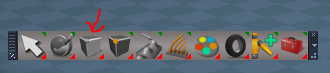
- Capture.PNG (17.3 KiB) Viewed 3981 times
-
clintonman
- Captain
- Posts: 5659
- Joined: 21 May 2009, 21:08
- Type the number ten into the box: 0
- Location: California
Re: Final trueSpace7.61 Beta 8 Std Unofficial Update
Looks like you might be using the old button? To get the grayed out for a widget you have to open a widget with widget commands and point the tag alias to the widget. The polyh# is to limit highlight for when a mesh is selected.trueBlue wrote: 01 Sep 2019, 15:39Like other Workspace PE icons that are inoperable (grayed out) unless an object(s) are selected or in PE mode.clintonman wrote: 01 Sep 2019, 15:14Don't know what you mean about the Tag Alias.trueBlue wrote: 01 Sep 2019, 13:46 ...
Your RMB command shows multiple preference panels in the stack.
This command seems to work better:Really wish you could figure out the Tag AliasCode: Select all
UserInterface.OpenToolPanelViewEx2WithFlag('', '','/Preferences/Snapping/Vertex Snap/Vertex Snap',3,1,0,2);
Also tried the shortcut keys and there seems to be no conflict with other Update shortcuts.
I did notice that "Use the selection as the source" did not work with the shortcut keys though.
Capture.PNG
Command should be.
Code: Select all
Widgets.ToggleWidget('{43ec2ce1-88d5-9696-84a6-ce04703bc7c0}','/Widgets/Tools/Vertex Snap','Default','','');Code: Select all
polyh#/Widgets/Tools/Vertex Snap-
trueBlue
- Captain
- Posts: 5548
- Joined: 06 Jul 2009, 22:50
- Type the number ten into the box: 10
Re: Final trueSpace7.61 Beta 8 Std Unofficial Update
Nope I am using your last version.clintonman wrote: 01 Sep 2019, 15:56Looks like you might be using the old button? To get the grayed out for a widget you have to open a widget with widget commands and point the tag alias to the widget. The polyh# is to limit highlight for when a mesh is selected.trueBlue wrote: 01 Sep 2019, 15:39Like other Workspace PE icons that are inoperable (grayed out) unless an object(s) are selected or in PE mode.clintonman wrote: 01 Sep 2019, 15:14
Don't know what you mean about the Tag Alias.
Capture.PNG
Command should be.Tag should be:Code: Select all
Widgets.ToggleWidget('{43ec2ce1-88d5-9696-84a6-ce04703bc7c0}','/Widgets/Tools/Vertex Snap','Default','','');This is untested since I don't even know which of the many releases are installed on this computer at the moment.Code: Select all
polyh#/Widgets/Tools/Vertex Snap
Command
Code: Select all
Widgets.ToggleWidget('{43ec2ce1-88d5-9696-84a6-ce04703bc7c0}','/Widgets/Tools/Vertex Snap','Default','','');Figured it out! Yeah!

It's a combination of two attributes:
AgentID
Code: Select all
{5B44AED2-C4BF-460B-A1D9-7C83F91B307A}Code: Select all
polyh#/Widgets/Tools/Vertex Snap
- Capture.PNG (15.02 KiB) Viewed 3979 times
-
trueBlue
- Captain
- Posts: 5548
- Joined: 06 Jul 2009, 22:50
- Type the number ten into the box: 10
Re: Final trueSpace7.61 Beta 8 Std Unofficial Update
New buttons:
Removed due to update
Removed due to update
-
trueBlue
- Captain
- Posts: 5548
- Joined: 06 Jul 2009, 22:50
- Type the number ten into the box: 10
Re: Final trueSpace7.61 Beta 8 Std Unofficial Update
Vertex Snap
Respect Axis Lock
Definition?
Does this mean tS7's - XYZ locks?
When I select the keyboard key / shortcut
Results:
Respect Axis Lock
Definition?
Does this mean tS7's - XYZ locks?
When I select the keyboard key / shortcut
Results:
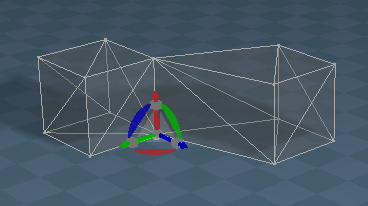
- Capture.PNG (27.35 KiB) Viewed 3961 times
-
clintonman
- Captain
- Posts: 5659
- Joined: 21 May 2009, 21:08
- Type the number ten into the box: 0
- Location: California
Re: Final trueSpace7.61 Beta 8 Std Unofficial Update
Yes, tS7 XYZ locks, so if you lock X and Y it will only move to match the Z value of the target.trueBlue wrote: 02 Sep 2019, 13:58 Vertex Snap
Respect Axis Lock
Definition?
Does this mean tS7's - XYZ locks?
When I select the keyboard key / shortcut
Results:
Capture.PNG
-
trueBlue
- Captain
- Posts: 5548
- Joined: 06 Jul 2009, 22:50
- Type the number ten into the box: 10
Re: Final trueSpace7.61 Beta 8 Std Unofficial Update
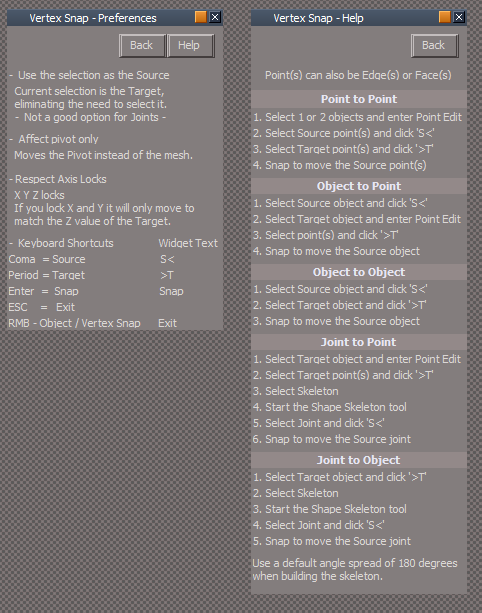
Your Help2 was much better at explaining it's use!
Shown is a modified Preferences / Help
I removed the Panel shortcut key.
Shown is a modified Preferences / Help
I removed the Panel shortcut key.
- Attachments
-
-
clintonman
- Captain
- Posts: 5659
- Joined: 21 May 2009, 21:08
- Type the number ten into the box: 0
- Location: California
Re: Final trueSpace7.61 Beta 8 Std Unofficial Update
Installed ok, no problems so far.
Did you swap the left and right buttons for object rotation in the full version? If so then it's not matching this rosetta update.
Edit: Never mind, just looked at your release notes for full version and it's not mentioned. Must have been one of my experiments.
Did you swap the left and right buttons for object rotation in the full version? If so then it's not matching this rosetta update.
Edit: Never mind, just looked at your release notes for full version and it's not mentioned. Must have been one of my experiments.
-
trueBlue
- Captain
- Posts: 5548
- Joined: 06 Jul 2009, 22:50
- Type the number ten into the box: 10
Re: Final trueSpace7.61 Beta 8 Std Unofficial Update
What Left and Right buttons?clintonman wrote: 05 Sep 2019, 05:04 Installed ok, no problems so far.
Did you swap the left and right buttons for object rotation in the full version? If so then it's not matching this rosetta update.
Edit: Never mind, just looked at your release notes for full version and it's not mentioned. Must have been one of my experiments.
-
clintonman
- Captain
- Posts: 5659
- Joined: 21 May 2009, 21:08
- Type the number ten into the box: 0
- Location: California
Re: Final trueSpace7.61 Beta 8 Std Unofficial Update
Object rotation, left button around object center, right button around the axis.trueBlue wrote: 05 Sep 2019, 05:10What Left and Right buttons?clintonman wrote: 05 Sep 2019, 05:04 Installed ok, no problems so far.
Did you swap the left and right buttons for object rotation in the full version? If so then it's not matching this rosetta update.
Edit: Never mind, just looked at your release notes for full version and it's not mentioned. Must have been one of my experiments.
-
trueBlue
- Captain
- Posts: 5548
- Joined: 06 Jul 2009, 22:50
- Type the number ten into the box: 10
Re: Final trueSpace7.61 Beta 8 Std Unofficial Update
Ah, nope. No touchy.
-
trueBlue
- Captain
- Posts: 5548
- Joined: 06 Jul 2009, 22:50
- Type the number ten into the box: 10
Re: Final trueSpace7.61 Beta 8 Std Unofficial Update
trueSpace Beta 7.61 Standalone Unofficial Update
This trueSpace Beta 7.61 Standalone Unofficial Update is for the "Standalone Version" only.
Important: This Update should not be used with the "Full Version" of trueSpace7.61 with Workspace, Model, and the Bridge!
Revisions:
July 06, 2009
February 21, 2010
November 01, 2012
May 23, 2019
September 5, 2019
Removed due to update
This trueSpace Beta 7.61 Standalone Unofficial Update is for the "Standalone Version" only.
Important: This Update should not be used with the "Full Version" of trueSpace7.61 with Workspace, Model, and the Bridge!
Revisions:
July 06, 2009
February 21, 2010
November 01, 2012
May 23, 2019
September 5, 2019
Removed due to update
-
trueBlue
- Captain
- Posts: 5548
- Joined: 06 Jul 2009, 22:50
- Type the number ten into the box: 10
Re: Final trueSpace7.61 Beta 8 Std Unofficial Update
New Update for trueSpace7.61 Beta 8 Std Unofficial Update
viewtopic.php?t=3731
Everything is included from the trueSpace7.61 Beta 8 Unofficial Update update except for Model items.
viewtopic.php?t=3731
Everything is included from the trueSpace7.61 Beta 8 Unofficial Update update except for Model items.
-
trueBlue
- Captain
- Posts: 5548
- Joined: 06 Jul 2009, 22:50
- Type the number ten into the box: 10
Re: Final trueSpace7.61 Beta 8 Std Unofficial Update
New Update for trueSpace7.61 Beta 8 Std Unofficial Update
viewtopic.php?t=3731
New - YafaRay4tSv0.9.7
viewtopic.php?t=5686#p56121
viewtopic.php?t=3731
New - YafaRay4tSv0.9.7
viewtopic.php?t=5686#p56121
-
trueBlue
- Captain
- Posts: 5548
- Joined: 06 Jul 2009, 22:50
- Type the number ten into the box: 10
Re: Final trueSpace7.61 Beta 8 Std Unofficial Update
New Update for trueSpace7.61 Beta 8 Std Unofficial Update
viewtopic.php?t=3731
YafaRay4tS Setup library
All of the preview lights and Volume object's placement in the scene were changed so they were not stacked on top of each other.
YafaRayBar
YafarayVolume button
RsFileIO.LoadObject(System.GetMainDir() + '\\Rs Main Libraries\\YafaRay4tS Setup\\YafarayVolume.RsObj', Space.CurrentScene())
YafaRay4tS
Reset the Default settings
Python_file attribute
Removed File created time stamp
Anim aspect
Changed 'Enable - Model mesh processing' to 'Model Mesh Processing'
RenderAnim2
Changed the ActiveX Question to match the name on the UI
Model Mesh Processing is unstable and trueSpace must be closed immediately after rendering. \n\nDo you wish to continue?
endAnimation
Changed the ActiveX Question to match the Create Python Script - Alert
Would you like to remove the Assigned python script from the Model scene?
Added 'Save your scene' to the Alert
IMPORTANT! Save you scene and close trueSpace now to avoid crashing!
UpdateStatus
Added 'Rendering Frame'
DoFrameRender
Changed 'External Viewer' to 'Custom Viewer" to match the UI
Note:
YafaRay4tS Scene Utilities
Does not take in account if 'Disable All Viewers' is checked.
Results, all viewers including the above are unchecked.
Restore Default Settings
Does not clear the Python_file attribute
ToDO:
YafaRay4tS
About
Change link to 'YafaRay Scenes for trueSpace7.61' or unknown History document?
YafaRay4tS Help
Decomplie add info to History and steps for Model Mesh Processing
Change above link
viewtopic.php?t=3731
YafaRay4tS Setup library
All of the preview lights and Volume object's placement in the scene were changed so they were not stacked on top of each other.
YafaRayBar
YafarayVolume button
RsFileIO.LoadObject(System.GetMainDir() + '\\Rs Main Libraries\\YafaRay4tS Setup\\YafarayVolume.RsObj', Space.CurrentScene())
YafaRay4tS
Reset the Default settings
Python_file attribute
Removed File created time stamp
Anim aspect
Changed 'Enable - Model mesh processing' to 'Model Mesh Processing'
RenderAnim2
Changed the ActiveX Question to match the name on the UI
Model Mesh Processing is unstable and trueSpace must be closed immediately after rendering. \n\nDo you wish to continue?
endAnimation
Changed the ActiveX Question to match the Create Python Script - Alert
Would you like to remove the Assigned python script from the Model scene?
Added 'Save your scene' to the Alert
IMPORTANT! Save you scene and close trueSpace now to avoid crashing!
UpdateStatus
Added 'Rendering Frame'
DoFrameRender
Changed 'External Viewer' to 'Custom Viewer" to match the UI
Note:
YafaRay4tS Scene Utilities
Does not take in account if 'Disable All Viewers' is checked.
Results, all viewers including the above are unchecked.
Restore Default Settings
Does not clear the Python_file attribute
ToDO:
YafaRay4tS
About
Change link to 'YafaRay Scenes for trueSpace7.61' or unknown History document?
YafaRay4tS Help
Decomplie add info to History and steps for Model Mesh Processing
Change above link
-
trueBlue
- Captain
- Posts: 5548
- Joined: 06 Jul 2009, 22:50
- Type the number ten into the box: 10
Re: Final trueSpace7.61 Beta 8 Std Unofficial Update
New Update for trueSpace7.61 Beta 8 Std Unofficial Update
viewtopic.php?t=3731
YafaRay4tS 'Updated 10/26/2019'
* When rendering d3d materials will look for node named "D3D material, 1" as well as "D3D material"
Changed:
Reset the Default settings
Output Render File - C:\trueSpace761Std\Image Folder\yaf_test.png
YafaRay4tS Scene Utilities 'Updated 10/26/2019'
* Incorporated into the YafaRay4tS panel
* Button for gathering textures was broken - fixed
* Process d3d shaders to copy embedded textures out to disk so the render can see them
if bitmap has no associated file, one will be created so the render can see it during the "gathering textures for sharing"
Changed:
Texture Source Folder - C:\trueSpace761Std\Textures
D3d Material Converter 'Updated 10/26/2019'
* Added a global rename to the convert d3d compiled to shader for old items using an old naming scheme
* Changed status message to use "Workspace" instead of "YafaRay"
* Was hard coded to find the material connected to a specific connector, "Mat Item 0", fixed by general search for "Mat Item X" - this gives better compatibility with lightworks materials which can be plugged into any of the Mat Item connectors
ToDO:
YafaRay4tS
About
Change link to 'YafaRay Scenes for trueSpace7.61' or unknown History document?
YafaRay4tS Help
Decomplie add info to History and steps for Model Mesh Processing
Change above link
viewtopic.php?t=3731
YafaRay4tS 'Updated 10/26/2019'
* When rendering d3d materials will look for node named "D3D material, 1" as well as "D3D material"
Changed:
Reset the Default settings
Output Render File - C:\trueSpace761Std\Image Folder\yaf_test.png
YafaRay4tS Scene Utilities 'Updated 10/26/2019'
* Incorporated into the YafaRay4tS panel
* Button for gathering textures was broken - fixed
* Process d3d shaders to copy embedded textures out to disk so the render can see them
if bitmap has no associated file, one will be created so the render can see it during the "gathering textures for sharing"
Changed:
Texture Source Folder - C:\trueSpace761Std\Textures
D3d Material Converter 'Updated 10/26/2019'
* Added a global rename to the convert d3d compiled to shader for old items using an old naming scheme
* Changed status message to use "Workspace" instead of "YafaRay"
* Was hard coded to find the material connected to a specific connector, "Mat Item 0", fixed by general search for "Mat Item X" - this gives better compatibility with lightworks materials which can be plugged into any of the Mat Item connectors
ToDO:
YafaRay4tS
About
Change link to 'YafaRay Scenes for trueSpace7.61' or unknown History document?
YafaRay4tS Help
Decomplie add info to History and steps for Model Mesh Processing
Change above link
-
trueBlue
- Captain
- Posts: 5548
- Joined: 06 Jul 2009, 22:50
- Type the number ten into the box: 10
Re: Final trueSpace7.61 Beta 8 Std Unofficial Update
New Update for trueSpace7.61 Beta 8 Std Unofficial Update
viewtopic.php?t=3731
YafaRay4tSv0.9.7
Added
Clintons3dPluginExt.rsx, jpeg62.dll, and libtiff3.dll
Plugins.xml includes the Clintons3dPluginExt.rsx Installed and Loaded.
This enables you to render images in the Tiff file format in YafaRay4tS.
YafaRay4tS Setup library
Added
Tiff Loader.RsObj
This object is not necessary to render images in the Tiff file format but is included here for the sole purpose of importing and displaying tiff images in trueSpace.
Window.Shortcuts.xml
Added
<RS_ACC KEY="ESC" DESC="Pause" GROUP="GLOBAL" COMMAND="RsTime.Stop();" />
viewtopic.php?t=3731
YafaRay4tSv0.9.7
Added
Clintons3dPluginExt.rsx, jpeg62.dll, and libtiff3.dll
Plugins.xml includes the Clintons3dPluginExt.rsx Installed and Loaded.
This enables you to render images in the Tiff file format in YafaRay4tS.
YafaRay4tS Setup library
Added
Tiff Loader.RsObj
This object is not necessary to render images in the Tiff file format but is included here for the sole purpose of importing and displaying tiff images in trueSpace.
Window.Shortcuts.xml
Added
<RS_ACC KEY="ESC" DESC="Pause" GROUP="GLOBAL" COMMAND="RsTime.Stop();" />
-
clintonman
- Captain
- Posts: 5659
- Joined: 21 May 2009, 21:08
- Type the number ten into the box: 0
- Location: California
Re: Final trueSpace7.61 Beta 8 Std Unofficial Update
The clintons toolbar has a d3d button that should probably be removed.
-
clintonman
- Captain
- Posts: 5659
- Joined: 21 May 2009, 21:08
- Type the number ten into the box: 0
- Location: California
Re: Final trueSpace7.61 Beta 8 Std Unofficial Update
Actually, now that I think about it, the button shouldn't be removed but the script should be added. That way it's that same toolbar in both. The D3D render can be used without model view for the purpose of rendering command script based animations.clintonman wrote: 31 Oct 2019, 20:38 The clintons toolbar has a d3d button that should probably be removed.
-
trueBlue
- Captain
- Posts: 5548
- Joined: 06 Jul 2009, 22:50
- Type the number ten into the box: 10
Re: Final trueSpace7.61 Beta 8 Std Unofficial Update
Thanks fixed.clintonman wrote: 31 Oct 2019, 23:02Actually, now that I think about it, the button shouldn't be removed but the script should be added. That way it's that same toolbar in both. The D3D render can be used without model view for the purpose of rendering command script based animations.clintonman wrote: 31 Oct 2019, 20:38 The clintons toolbar has a d3d button that should probably be removed.
New Update for trueSpace7.61 Beta 8 Std Unofficial Update
viewtopic.php?t=3731
Please check out the new included YafaRay4tS Help
I copied mostly what you have at your web site and fixed a few web links
Added steps for Model Processing in the Animation page.
-
clintonman
- Captain
- Posts: 5659
- Joined: 21 May 2009, 21:08
- Type the number ten into the box: 0
- Location: California
Re: Final trueSpace7.61 Beta 8 Std Unofficial Update
Will do.trueBlue wrote: 31 Oct 2019, 23:29 ...
Please check out the new included YafaRay4tS Help
I copied mostly what you have at your web site and fixed a few web links
Added steps for Model Processing in the Animation page.
-
clintonman
- Captain
- Posts: 5659
- Joined: 21 May 2009, 21:08
- Type the number ten into the box: 0
- Location: California
Re: Final trueSpace7.61 Beta 8 Std Unofficial Update
The chm help file says that the YafaRay4tS Settings LMB, RMB opens a new YafaRay scene. Is that behavior back in place?
Added the chm file changes to the web help version.
Added the chm file changes to the web help version.
-
trueBlue
- Captain
- Posts: 5548
- Joined: 06 Jul 2009, 22:50
- Type the number ten into the box: 10
Re: Final trueSpace7.61 Beta 8 Std Unofficial Update
No, I did not change the scripts nor the info in the chm file.clintonman wrote: 01 Nov 2019, 05:39 The chm help file says that the YafaRay4tS Settings LMB, RMB opens a new YafaRay scene. Is that behavior back in place?
Added the chm file changes to the web help version.
Edit: I changed it to the way you have it online.
Need to add Scene Utilities Info too
Is this location and or file name going to change?
http://clintons3d.com/plugins/wip/downl ... gamma2.zipTemp download for YafaRay4tS v0.9.7 gamma2 - YafaRay4tSv097_gamma2.zip
I have not tried your installer. Is the Install/Uninstall info correct in the YafaRay4tS Help?
Edit: Your YafaRay4tSv0.9.7.zip download link does not work at your online help
Is this 'Update YafaRay Render Node in your installer?
In the unofficial updates, I removed this from the library.The 'Update YafaRay Render Node' script found in the 'YafaRay4tS Setup' library can be used to update an existing scene.
It will not update the materials.
The extraction will not remove it, so unless you do a clean install it will still be present
-
clintonman
- Captain
- Posts: 5659
- Joined: 21 May 2009, 21:08
- Type the number ten into the box: 0
- Location: California
Re: Final trueSpace7.61 Beta 8 Std Unofficial Update
YafaRay4tSv0.9.7.zip will be the name on final release. YafaRay4tSv097_gamma2.zip is temporary.trueBlue wrote: 01 Nov 2019, 12:23 ...
Is this location and or file name going to change?http://clintons3d.com/plugins/wip/downl ... gamma2.zipTemp download for YafaRay4tS v0.9.7 gamma2 - YafaRay4tSv097_gamma2.zip
I have not tried your installer. Is the Install/Uninstall info correct in the YafaRay4tS Help?
Edit: Your YafaRay4tSv0.9.7.zip download link does not work at your online help
Is this 'Update YafaRay Render Node in your installer?In the unofficial updates, I removed this from the library.The 'Update YafaRay Render Node' script found in the 'YafaRay4tS Setup' library can be used to update an existing scene.
It will not update the materials.
The extraction will not remove it, so unless you do a clean install it will still be present
No Update YafaRay Render Node in the installer.
-
trueBlue
- Captain
- Posts: 5548
- Joined: 06 Jul 2009, 22:50
- Type the number ten into the box: 10
Re: Final trueSpace7.61 Beta 8 Std Unofficial Update
This link in your online Installation.htm does not work.
http://clintons3d.com/plugins/downloads ... tSv097.zip
http://clintons3d.com/plugins/downloads ... tSv097.zip
-
clintonman
- Captain
- Posts: 5659
- Joined: 21 May 2009, 21:08
- Type the number ten into the box: 0
- Location: California
Re: Final trueSpace7.61 Beta 8 Std Unofficial Update
YafaRay4tSv0.9.7.zip will be the name on final release. YafaRay4tSv097_gamma2.zip is temporary.trueBlue wrote: 01 Nov 2019, 16:36 This link in your online Installation.htm does not work.
http://clintons3d.com/plugins/downloads ... tSv097.zip
-
trueBlue
- Captain
- Posts: 5548
- Joined: 06 Jul 2009, 22:50
- Type the number ten into the box: 10
Re: Final trueSpace7.61 Beta 8 Std Unofficial Update
LOL, seems you are not understanding what I am trying to tell you.
This link in your online Installation.htm does not work.
This link in your online Installation.htm does not work.

- Link.PNG (1.76 KiB) Viewed 4476 times
-
clintonman
- Captain
- Posts: 5659
- Joined: 21 May 2009, 21:08
- Type the number ten into the box: 0
- Location: California
Re: Final trueSpace7.61 Beta 8 Std Unofficial Update
How can it be found if it doesn't exists yet? It doesn't exist yet, because it hasn't been released yet.trueBlue wrote: 01 Nov 2019, 17:01 LOL, seems you are not understanding what I am trying to tell you.
This link in your online Installation.htm does not work.
Link.PNG
Capture.PNG
-
trueBlue
- Captain
- Posts: 5548
- Joined: 06 Jul 2009, 22:50
- Type the number ten into the box: 10
Re: Final trueSpace7.61 Beta 8 Std Unofficial Update
New Update for trueSpace7.61 Beta 8 Std Unofficial Update
viewtopic.php?t=3731
YafaRay4tS Help.chm 'Updated 11/01/2019'
D3D Render - Author Clinton Reese 'Updated 10/31/2019'
viewtopic.php?t=3731
YafaRay4tS Help.chm 'Updated 11/01/2019'
D3D Render - Author Clinton Reese 'Updated 10/31/2019'
-
trueBlue
- Captain
- Posts: 5548
- Joined: 06 Jul 2009, 22:50
- Type the number ten into the box: 10
Re: Final trueSpace7.61 Beta 8 Std Unofficial Update
New Update for trueSpace7.61 Beta 8 Std Unofficial Update
viewtopic.php?t=3731
Fixed an issue with the Optimize script
Added a YafaRay4tS Scene Utilities icon
viewtopic.php?t=3731
Fixed an issue with the Optimize script
Added a YafaRay4tS Scene Utilities icon
- tempsnip.png (21.43 KiB) Viewed 4456 times
-
trueBlue
- Captain
- Posts: 5548
- Joined: 06 Jul 2009, 22:50
- Type the number ten into the box: 10
Re: Final trueSpace7.61 Beta 8 Std Unofficial Update
New Update for trueSpace7.61 Beta 8 Std Unofficial Update
viewtopic.php?t=3731
D3D Render 'Updated 11/04/2019'
YafaRay4tS0.9.7 'Updated 11/05/2019'
YafaRay4tS Setup 'Updated 11/05/2019'
YafaRay4tS Help 'Updated 11/05/2019'
viewtopic.php?t=3731
D3D Render 'Updated 11/04/2019'
YafaRay4tS0.9.7 'Updated 11/05/2019'
YafaRay4tS Setup 'Updated 11/05/2019'
YafaRay4tS Help 'Updated 11/05/2019'
-
trueBlue
- Captain
- Posts: 5548
- Joined: 06 Jul 2009, 22:50
- Type the number ten into the box: 10
Re: Final trueSpace7.61 Beta 8 Std Unofficial Update
New Update for trueSpace7.61 Beta 8 Std Unofficial Update
viewtopic.php?t=3731
viewtopic.php?t=3731
-
trueBlue
- Captain
- Posts: 5548
- Joined: 06 Jul 2009, 22:50
- Type the number ten into the box: 10
Re: Final trueSpace7.61 Beta 8 Std Unofficial Update
New Update for trueSpace7.61 Beta 8 Std Unofficial Update
viewtopic.php?t=3731
11/26/2019
Includes all of the updates included in the trueSpace 7.61 Beta 8 Unofficial Update
viewtopic.php?t=3731
11/26/2019
Includes all of the updates included in the trueSpace 7.61 Beta 8 Unofficial Update
-
trueBlue
- Captain
- Posts: 5548
- Joined: 06 Jul 2009, 22:50
- Type the number ten into the box: 10
Re: Final trueSpace7.61 Beta 8 Std Unofficial Update
New Update for trueSpace7.61 Beta 8 Std Unofficial Update
viewtopic.php?t=3731
12/03/2019
Hopefully this is the Final update!
Includes all of the updates included in the trueSpace 7.61 Beta 8 Unofficial Update
Special thanks to Clinton Reese for all his help and contributions in this update.
viewtopic.php?t=3731
12/03/2019
Hopefully this is the Final update!
Includes all of the updates included in the trueSpace 7.61 Beta 8 Unofficial Update
Special thanks to Clinton Reese for all his help and contributions in this update.
-
clintonman
- Captain
- Posts: 5659
- Joined: 21 May 2009, 21:08
- Type the number ten into the box: 0
- Location: California
Re: Final trueSpace7.61 Beta 8 Std Unofficial Update
The YafaRay scripts are an old version.
Attached is the newest plus altered to use then new image in the correct location:
in the OpenView
Attached is the newest plus altered to use then new image in the correct location:
Code: Select all
	// "clear" viewer image
Node.Value(yafNode + "/tSDisplay", "Yaf_RenderFilename") = System.GetMainDir() + "/Textures/YafaRay4tS.png";- Attachments
-
- YafarayScriptsedd0.RsObj
- (53.52 KiB) Downloaded 257 times
-
trueBlue
- Captain
- Posts: 5548
- Joined: 06 Jul 2009, 22:50
- Type the number ten into the box: 10
Re: Final trueSpace7.61 Beta 8 Std Unofficial Update
Will do.
Is it just me?
Workspace
Open a new scene
Verify that the Animation Editor's End Frame is 300
Record a Keyframe on an object
Save the scene
Reload the scene
End Frame is 60
This has to be bug when saving a scene
Is it just me?
Workspace
Open a new scene
Verify that the Animation Editor's End Frame is 300
Record a Keyframe on an object
Save the scene
Reload the scene
End Frame is 60
This has to be bug when saving a scene
-
clintonman
- Captain
- Posts: 5659
- Joined: 21 May 2009, 21:08
- Type the number ten into the box: 0
- Location: California
Re: Final trueSpace7.61 Beta 8 Std Unofficial Update
Truespace is doing some automatic thing.
add object
keyframe at 67
close truespace
open and range is 67-127
add keyframe at 90
set range 0 to 300
close tS
stil 67-127
keyframe at 240
set range 0 to 300
close
open an its 67 to 240
looks like someone at caligari decided to automatically set the timeline based on the keyframe(s), so they basically took that choice away by automating it. that's the reason I'm opposed to automatic stuff, unless it really is the only way to go.
add object
keyframe at 67
close truespace
open and range is 67-127
add keyframe at 90
set range 0 to 300
close tS
stil 67-127
keyframe at 240
set range 0 to 300
close
open an its 67 to 240
looks like someone at caligari decided to automatically set the timeline based on the keyframe(s), so they basically took that choice away by automating it. that's the reason I'm opposed to automatic stuff, unless it really is the only way to go.
-
trueBlue
- Captain
- Posts: 5548
- Joined: 06 Jul 2009, 22:50
- Type the number ten into the box: 10
Re: Final trueSpace7.61 Beta 8 Std Unofficial Update
Very strange!clintonman wrote: 06 Dec 2019, 01:01 Truespace is doing some automatic thing.
add object
keyframe at 67
close truespace
open and range is 67-127
add keyframe at 90
set range 0 to 300
close tS
stil 67-127
keyframe at 240
set range 0 to 300
close
open an its 67 to 240
looks like someone at caligari decided to automatically set the timeline based on the keyframe(s), so they basically took that choice away by automating it. that's the reason I'm opposed to automatic stuff, unless it really is the only way to go.
I am going to call you on
I do not think it's a good idea with your latest YafarayScripts, to start the Animation automatically when using the YafaRay4tS toolbar/Render Animation.that's the reason I'm opposed to automatic stuff, unless it really is the only way to go.
Really think it should open the Render to File! Where the user has the ability to set it up first.
-
clintonman
- Captain
- Posts: 5659
- Joined: 21 May 2009, 21:08
- Type the number ten into the box: 0
- Location: California
Re: Final trueSpace7.61 Beta 8 Std Unofficial Update
And I'm going to call you on that. From the YafaRay4tS thread,trueBlue wrote: 06 Dec 2019, 01:16Very strange!clintonman wrote: 06 Dec 2019, 01:01 Truespace is doing some automatic thing.
add object
keyframe at 67
close truespace
open and range is 67-127
add keyframe at 90
set range 0 to 300
close tS
stil 67-127
keyframe at 240
set range 0 to 300
close
open an its 67 to 240
looks like someone at caligari decided to automatically set the timeline based on the keyframe(s), so they basically took that choice away by automating it. that's the reason I'm opposed to automatic stuff, unless it really is the only way to go.
I am going to call you onI do not think it's a good idea with your latest YafarayScripts, to start the Animation automatically when using the YafaRay4tS toolbar/Render Animation.that's the reason I'm opposed to automatic stuff, unless it really is the only way to go.
Really think it should open the Render to File! Where the user has the ability to set it up first.
"It's up to you, but I personally liked it the way it was.
Anim panel
Animation Render button ran the render and did not open the Render to File.
YafaRay4tS toolbar Animation icon. LMB opens the Render to File. (This is how Vray works.) RMB opens the Anim panel."
I set it up exactly the way I read it. In my mind "ran the render" doesn't mean "open the panel so you can run the render".
If you write up a list of what each render button from the YafRay toolbar and the truespace animation toolbar and the yafaray4ts node render and render animation buttons should do, I'll look at it and we can decide what to do. Otherwise I'm not doing anything because the end goal has not been defined clearly. We won't get anywhere if we're not on the same page.
-
trueBlue
- Captain
- Posts: 5548
- Joined: 06 Jul 2009, 22:50
- Type the number ten into the box: 10
Re: Final trueSpace7.61 Beta 8 Std Unofficial Update
First of all I meant now disrespect!
The Render Animation button and the Render Animation icon were meant to explain their differences.
In pervious YafaRay4tS versions, the Render Animation icon opened the Anim aspect.
Vray and Workspace both open the Render to File to render an Animation without starting the process, and that is why I am suggesting that YafaRay4tS do the same.
I was under the understanding that my suggestion was reasonable.
The current compiled help file:
Animation Render button ran the render and did not open the Render to File.
YafaRay4tS toolbar Animation icon. LMB opens the Render to File. (This is how Vray works.) RMB opens the Anim panel."
Misunderstanding I guess, because I changed the YafarayScripts/Animation to open the Render to FIle prior to the above quote.It's up to you, but I personally liked it the way it was.
The Render Animation button and the Render Animation icon were meant to explain their differences.
In pervious YafaRay4tS versions, the Render Animation icon opened the Anim aspect.
Vray and Workspace both open the Render to File to render an Animation without starting the process, and that is why I am suggesting that YafaRay4tS do the same.
I was under the understanding that my suggestion was reasonable.
The current compiled help file:
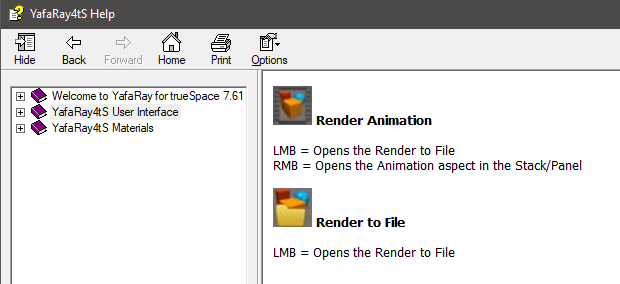
-
trueBlue
- Captain
- Posts: 5548
- Joined: 06 Jul 2009, 22:50
- Type the number ten into the box: 10
Re: Final trueSpace7.61 Beta 8 Std Unofficial Update
New Update for trueSpace7.61 Beta 8 Std Unofficial Update
viewtopic.php?t=3731
12/09/2019
Includes all of the updates included in the trueSpace 7.61 Beta 8 Unofficial Update
Less the Model related updates
Special thanks to Clinton Reese for all his help and contributions in this update.
viewtopic.php?t=3731
12/09/2019
Includes all of the updates included in the trueSpace 7.61 Beta 8 Unofficial Update
Less the Model related updates
Special thanks to Clinton Reese for all his help and contributions in this update.
-
trueBlue
- Captain
- Posts: 5548
- Joined: 06 Jul 2009, 22:50
- Type the number ten into the box: 10
Re: Final trueSpace7.61 Beta 8 Std Unofficial Update
New Update for trueSpace7.61 Beta 8 Std Unofficial Update
viewtopic.php?t=3731
12/11/2019
Includes all of the updates included in the trueSpace 7.61 Beta 8 Unofficial Update
Less the Model related updates
Special thanks to Clinton Reese for all his help and contributions in this update.
viewtopic.php?t=3731
12/11/2019
Includes all of the updates included in the trueSpace 7.61 Beta 8 Unofficial Update
Less the Model related updates
Special thanks to Clinton Reese for all his help and contributions in this update.
-
trueBlue
- Captain
- Posts: 5548
- Joined: 06 Jul 2009, 22:50
- Type the number ten into the box: 10
Re: Final trueSpace7.61 Beta 8 Std Unofficial Update
New Update for trueSpace7.61 Beta 8 Std Unofficial Update
viewtopic.php?t=3731
12/14/2019
YafaRay Materials 'Updated 12/14/2019'
YafaRay4tS Help 'Updated 12/14/2019'
D3D Material Editor
Add
Render Object icon
Render Animation
Changed
RMB - Opens the YafaRay4tS/Anim aspect if the YafaRay4tS panel exist in the scene
Same RMB command as the YafaRay4tS/Render Animation icon
Special thanks to Clinton Reese for all his help and contributions in this update.
viewtopic.php?t=3731
12/14/2019
YafaRay Materials 'Updated 12/14/2019'
YafaRay4tS Help 'Updated 12/14/2019'
D3D Material Editor
Add
Render Object icon
Render Animation
Changed
RMB - Opens the YafaRay4tS/Anim aspect if the YafaRay4tS panel exist in the scene
Same RMB command as the YafaRay4tS/Render Animation icon
Special thanks to Clinton Reese for all his help and contributions in this update.
-
trueBlue
- Captain
- Posts: 5548
- Joined: 06 Jul 2009, 22:50
- Type the number ten into the box: 10
Re: Final trueSpace7.61 Beta 8 Std Unofficial Update
New Update for trueSpace7.61 Beta 8 Std Unofficial Update
viewtopic.php?t=3731
12/15/2019
YafaRay Materials 'Updated 12/15/2019'
YafaRay4tS Help 'Updated 12/15/2019'
Special thanks to Clinton Reese for all his help and contributions in this update.
viewtopic.php?t=3731
12/15/2019
YafaRay Materials 'Updated 12/15/2019'
YafaRay4tS Help 'Updated 12/15/2019'
Special thanks to Clinton Reese for all his help and contributions in this update.
-
trueBlue
- Captain
- Posts: 5548
- Joined: 06 Jul 2009, 22:50
- Type the number ten into the box: 10
Re: Final trueSpace7.61 Beta 8 Std Unofficial Update
New Update for trueSpace7.61 Beta 8 Std Unofficial Update
viewtopic.php?t=3731
12/17/2019
Special thanks to Clinton Reese for all his help and contributions in this update.
YafaRay4tS
AboutBitmap
Change
December 16, 2019
DoFrameRender
Change
Anim
bBatchRender Check Box control "Create XML files and start Batch Render"
Change
Toggle Button control "Start - Batch Render" / "Rendering..."
endAnimation
Add
Render Animation button command
Change
Render to File
Render Animation button command
Change
YafaRay4tS toolbar
Add
Render to File icon
YafaRay4tS Help 'Updated 12/17/2019'
viewtopic.php?t=3731
12/17/2019
Special thanks to Clinton Reese for all his help and contributions in this update.
YafaRay4tS
AboutBitmap
Change
December 16, 2019
DoFrameRender
Change
Code: Select all
if(Node.Exists("/Offline renderers/Yafaray")) {
		var myenum = System.CreateDO("Common Data Package/String Enum Data");
		myenum = Node.Value("/Offline renderers", "Renderer");
		var str = myenum.GetSelectedString();
		myenum.SetSelectedString("Yafaray");
		Node.Value("/Offline renderers", "Renderer") = myenum;
}bBatchRender Check Box control "Create XML files and start Batch Render"
Change
Toggle Button control "Start - Batch Render" / "Rendering..."
Code: Select all
Node.Value(Space.CurrentScene() + "/YafaRay4tS", "Yaf_DeleteTempFiles") = true
if(Node.Exists("/Offline renderers/Yafaray")) {
var myenum = System.CreateDO("Common Data Package/String Enum Data");
myenum = Node.Value("/Offline renderers", "Renderer");
var str = myenum.GetSelectedString();
myenum.SetSelectedString("Yafaray");
Node.Value("/Offline renderers", "Renderer") = myenum;
}
Activity.Run('%THIS_NAME%/RenderAnim2')Add
Code: Select all
Node.Value(Space.CurrentScene() + "/YafaRay4tS", "bBatchRender") = false Change
Code: Select all
if(Node.Exists("/Offline renderers/Yafaray")) {
var myenum = System.CreateDO("Common Data Package/String Enum Data");
myenum = Node.Value("/Offline renderers", "Renderer");
var str = myenum.GetSelectedString();
myenum.SetSelectedString("Yafaray");
Node.Value("/Offline renderers", "Renderer") = myenum;
}
Activity.Run('%THIS_NAME%/RenderAnim2')
Render Animation button command
Change
Code: Select all
if(Node.Exists("/Offline renderers/Yafaray")) {
var myenum = System.CreateDO("Common Data Package/String Enum Data");
myenum = Node.Value("/Offline renderers", "Renderer");
var str = myenum.GetSelectedString();
myenum.SetSelectedString("Yafaray");
Node.Value("/Offline renderers", "Renderer") = myenum;
}
Activity.Run('%THIS_NAME%/RenderAnim2')Add
Render to File icon
YafaRay4tS Help 'Updated 12/17/2019'
-
trueBlue
- Captain
- Posts: 5548
- Joined: 06 Jul 2009, 22:50
- Type the number ten into the box: 10
Re: Final trueSpace7.61 Beta 8 Std Unofficial Update
New Update for trueSpace7.61 Beta 8 Std Unofficial Update
viewtopic.php?t=3731
12/18/2019
Last version did not honor Disable All Viewers
YafaRay4tS
AboutBitmap
Add date to YafaRay4tS_Version
version 0.9.9 - December 18, 2019
DoFrameRender
Add
OfflineRender.OpenView('',0,0)
Anim
Render Animation button
Add
OfflineRender.OpenView('',0,0)
Start - Batch Render toggle button
Add
Script Down
Node.Value("%THIS_NAME%", "bBatchRender") = false;
Render to File
Render Animation button
Add
OfflineRender.OpenView('',0,0)
YafaRay4tS Help 'Updated 12/18/2019'
viewtopic.php?t=3731
12/18/2019
Last version did not honor Disable All Viewers
YafaRay4tS
AboutBitmap
Add date to YafaRay4tS_Version
version 0.9.9 - December 18, 2019
DoFrameRender
Add
OfflineRender.OpenView('',0,0)
Anim
Render Animation button
Add
OfflineRender.OpenView('',0,0)
Start - Batch Render toggle button
Add
Script Down
Node.Value("%THIS_NAME%", "bBatchRender") = false;
Render to File
Render Animation button
Add
OfflineRender.OpenView('',0,0)
YafaRay4tS Help 'Updated 12/18/2019'