I'm trying GI rendering with 3Delight in DAZ Studio Pro 4.5.
So far I found an old post (attached) in a forum about how to to this. I followed the post directions and found that the "indirect light" Camera works.
The photon mapping light did not give good results but I think it needs something done about shadows. Some walls were bright as if there were no shadows.
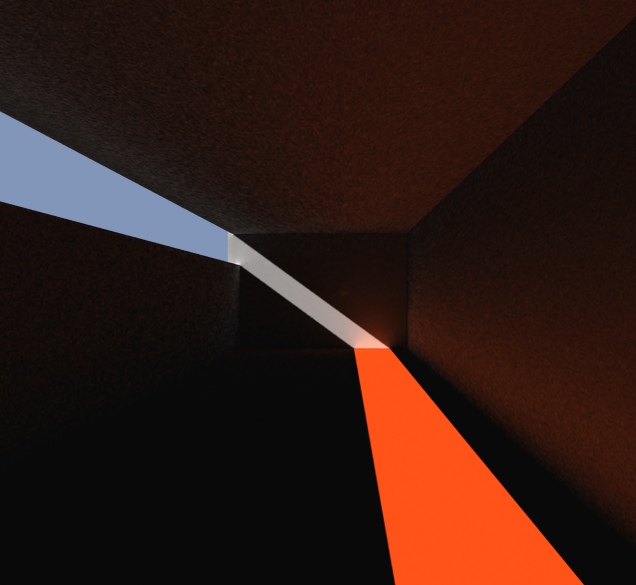
This image used the indirect light camera and a regular distant light. A regular camera makes an image with lit and black areas as would be expected with raytracing.
The graininess is set by the Samples parameter of the camera. Higher settings are less grainy but take longer. Camera parameter Final Gather must be on or you'll get a raytrace.
G.I. rendering with 3Delight via DAZ Studio
-
Finis

- Captain
- Posts: 5410
- Joined: 21 May 2009, 18:26
- Type the number ten into the box: 0
- Location: America!
G.I. rendering with 3Delight via DAZ Studio
- Attachments
-
-
- GI_lighting_in_DAZ.zip
- (1.16 KiB) Downloaded 269 times
Last edited by Finis on 10 Oct 2012, 03:09, edited 1 time in total.
I prefer dangerous freedom over peaceful servitude. -- Thomas Jefferson/Jean Jacques Rousseau
-
Finis
- Captain
- Posts: 5410
- Joined: 21 May 2009, 18:26
- Type the number ten into the box: 0
- Location: America!
Re: GI rendering with 3Delight via DAZ Studio
Test with samples = 250. Less grainy. Earlier one has samples = 64.
Test with samples = 8 and a reflective cone and image textured wall. Also a point light in the room. IDL camera render has reflection and image texture.
The Shader Mixer where the IDL camera was made had a node (like link editor) for caustics. I might try that too someday.
Render times on 2.6 GHz dual core:
DazGI_1 = 7 minutes
DazGI_2 = 30 minutes
DazGI_3 = about 3 minutes
When I finish this camera and learn to save it as a Daz object I'll post it on U3DA.
Test with samples = 8 and a reflective cone and image textured wall. Also a point light in the room. IDL camera render has reflection and image texture.
The Shader Mixer where the IDL camera was made had a node (like link editor) for caustics. I might try that too someday.
Render times on 2.6 GHz dual core:
DazGI_1 = 7 minutes
DazGI_2 = 30 minutes
DazGI_3 = about 3 minutes
When I finish this camera and learn to save it as a Daz object I'll post it on U3DA.
- Attachments
-
-


I prefer dangerous freedom over peaceful servitude. -- Thomas Jefferson/Jean Jacques Rousseau
-
Finis
- Captain
- Posts: 5410
- Joined: 21 May 2009, 18:26
- Type the number ten into the box: 0
- Location: America!
Re: G.I. rendering with 3Delight via DAZ Studio
I got the IDL camera and a photon mapped light to work together. It might render faster that way.
Glass is giving me trouble. I want to try realistic architectural renderings so I want GI and glass. Messiah can probably do this but I don't have time yet for its learning curve. Blender of course but I'll try what I have first.
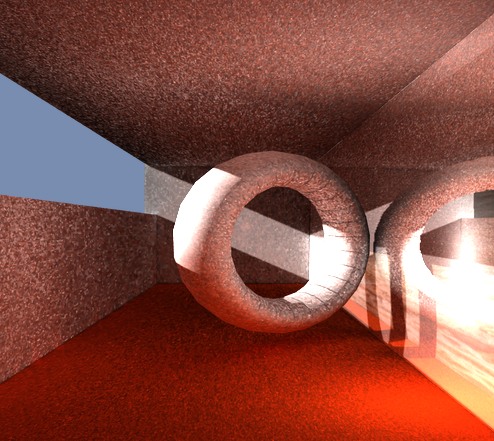
The pictures below have a glass plane as the right wall. Behind it is another wall with an image texture. Daz shaders have Opacity Intensity which is all I can find to use transparency. If the glass is transparent (DazGI_5, 1% Opacity) then there is no refelction and the room is darker than in DazGI_4. Maybe light is not bouncing from the textured wall.
DazGI_4 is the same except that the glass wall has 50% opacity. The reflection is there and the light bounces into the room but the textured wall is obscured. Getting reflections with transparent glass is the goal. Most windows or glass wouldn't have another wall right behind them.
I might post in the DAZ forum. Searches have found little about GI in this program. You'd think that would be a main thing they would want from 3Delight and you wouldn't have to make your own cameras and lights in the equivalent of the link editor.
Edit: There is an example scene for indirect light so I'll look at that and try glass there. There is also one for caustics!
Glass is giving me trouble. I want to try realistic architectural renderings so I want GI and glass. Messiah can probably do this but I don't have time yet for its learning curve. Blender of course but I'll try what I have first.
The pictures below have a glass plane as the right wall. Behind it is another wall with an image texture. Daz shaders have Opacity Intensity which is all I can find to use transparency. If the glass is transparent (DazGI_5, 1% Opacity) then there is no refelction and the room is darker than in DazGI_4. Maybe light is not bouncing from the textured wall.
DazGI_4 is the same except that the glass wall has 50% opacity. The reflection is there and the light bounces into the room but the textured wall is obscured. Getting reflections with transparent glass is the goal. Most windows or glass wouldn't have another wall right behind them.
I might post in the DAZ forum. Searches have found little about GI in this program. You'd think that would be a main thing they would want from 3Delight and you wouldn't have to make your own cameras and lights in the equivalent of the link editor.
Edit: There is an example scene for indirect light so I'll look at that and try glass there. There is also one for caustics!
- Attachments
-
-

I prefer dangerous freedom over peaceful servitude. -- Thomas Jefferson/Jean Jacques Rousseau
-
Finis
- Captain
- Posts: 5410
- Joined: 21 May 2009, 18:26
- Type the number ten into the box: 0
- Location: America!
Re: G.I. rendering with 3Delight via DAZ Studio
Reflections are possible but still troublesome. I set the opacity of the glass wall to 0.5% and the reflection strength to 2000%. In DazGI_8, raytraced, the glass wall has faint reflections and is otherwise invisible.
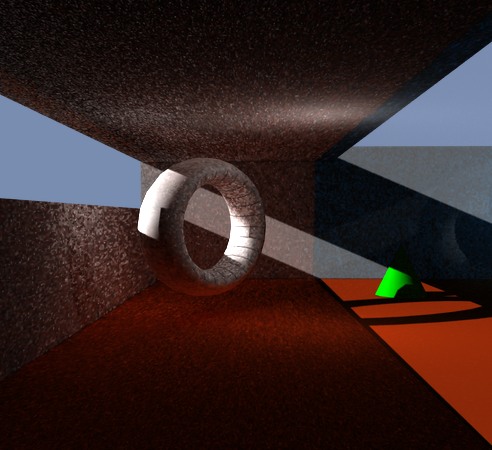
DazGI_6 shows the GI image with 0% opacity glass. Good: direct light from outside and the point light near the torus goes through. Color bleeding occurs on the far wall. Bad: The indirect color bleeding light reflected from the floor doesn't penetrate the glass. See it light the roof outside but stop at the glass.
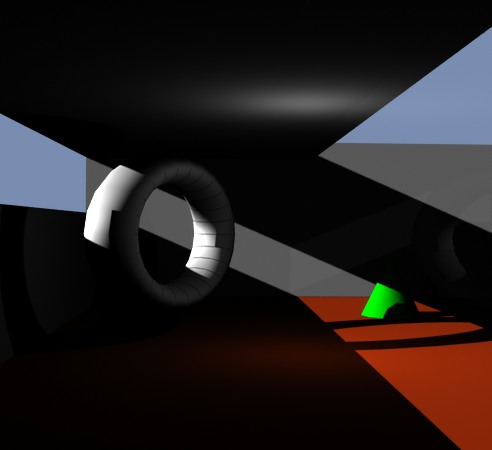
DazGI_7 shows the GI image with 0.5% opacity glass. Good: the glass shows a faint reflection. Bad: color bleeding has disappeared beyond the glass. The glass is too dark. It looks tinted. I want to be able to have the option of untinted almost invisible except reflections glass.
I''m out of ideas, other than try a different renderer or program. I'll post for help on the Daz forum.
DazGI_6 shows the GI image with 0% opacity glass. Good: direct light from outside and the point light near the torus goes through. Color bleeding occurs on the far wall. Bad: The indirect color bleeding light reflected from the floor doesn't penetrate the glass. See it light the roof outside but stop at the glass.
DazGI_7 shows the GI image with 0.5% opacity glass. Good: the glass shows a faint reflection. Bad: color bleeding has disappeared beyond the glass. The glass is too dark. It looks tinted. I want to be able to have the option of untinted almost invisible except reflections glass.
I''m out of ideas, other than try a different renderer or program. I'll post for help on the Daz forum.
- Attachments
-
-
-

I prefer dangerous freedom over peaceful servitude. -- Thomas Jefferson/Jean Jacques Rousseau
-
Finis
- Captain
- Posts: 5410
- Joined: 21 May 2009, 18:26
- Type the number ten into the box: 0
- Location: America!
Re: G.I. rendering with 3Delight via DAZ Studio
Daz folks say there is a bug with the version I have. The beta version has a fix. I'll wait for its release as a regular version.
I prefer dangerous freedom over peaceful servitude. -- Thomas Jefferson/Jean Jacques Rousseau
-
pugman 1
- Captain
- Posts: 1555
- Joined: 21 May 2009, 19:26
- Type the number ten into the box: 0
- Location: Germany
Re: G.I. rendering with 3Delight via DAZ Studio
Now try the same set up in vue the free version .
You will be suprised at the diference
You will be suprised at the diference
-
Finis
- Captain
- Posts: 5410
- Joined: 21 May 2009, 18:26
- Type the number ten into the box: 0
- Location: America!
Re: G.I. rendering with 3Delight via DAZ Studio
Might try Vue free version soon. I remember someone (Rayman?) did a non-landscape render to show its abilities and it was awesome. It's on my to learn list anyway. Will check it out if the free version is permanent (not a 1 month demo etc.), no watermarks, etc. Also, having Bryce now, I'm thinking of scenes with landscapes and plants so why not just go on to Vue?
3Delight is well known as a good renderer and it has the ability I'm trying to use. Daz Studio has the bug in the interface to it. Don't know when the new release will be out. I've found DS easy to learn with a simple interface. Some things aren't apparent or intuitive but they are easy to do once you find out how. 3Delight is also useful for non-realistic renders and I like that versatility.
Edit: Later ... looked at Vue Pioneer free version. Can't import objects. Has a logo watermark.
3Delight is well known as a good renderer and it has the ability I'm trying to use. Daz Studio has the bug in the interface to it. Don't know when the new release will be out. I've found DS easy to learn with a simple interface. Some things aren't apparent or intuitive but they are easy to do once you find out how. 3Delight is also useful for non-realistic renders and I like that versatility.
Edit: Later ... looked at Vue Pioneer free version. Can't import objects. Has a logo watermark.
Last edited by Finis on 14 Oct 2012, 01:34, edited 1 time in total.
I prefer dangerous freedom over peaceful servitude. -- Thomas Jefferson/Jean Jacques Rousseau
-
Finis
- Captain
- Posts: 5410
- Joined: 21 May 2009, 18:26
- Type the number ten into the box: 0
- Location: America!
Re: G.I. rendering with 3Delight via DAZ Studio
The new DS version was released. It looks better. Now I get color bleeding beyond the glass with >0 opacity and reflections. The raytrace depth can be set higher than 2 now and that improves the picture but adds much time to a render. More samples and time will make a good picture. Probably hours for a real scene, larger image, and good quality.
I set several things to speedy amounts at the cost of quality and rendered this picture in 26 minutes. This one has raytrace depth of 2 to save time. I'm satisfied with the rendering ability now.
How many photons to use? The lights and the camera have photon mapping and an attribute for number of photons. That makes sense for the lights but I don't understand the function of camera number of photons. The default was 500K. I set it to 100K and it rendered faster with no noticeable image difference.
I set several things to speedy amounts at the cost of quality and rendered this picture in 26 minutes. This one has raytrace depth of 2 to save time. I'm satisfied with the rendering ability now.
How many photons to use? The lights and the camera have photon mapping and an attribute for number of photons. That makes sense for the lights but I don't understand the function of camera number of photons. The default was 500K. I set it to 100K and it rendered faster with no noticeable image difference.
- Attachments
-

- DazGI_9.jpg (35.02 KiB) Viewed 4723 times
I prefer dangerous freedom over peaceful servitude. -- Thomas Jefferson/Jean Jacques Rousseau
-
Finis
- Captain
- Posts: 5410
- Joined: 21 May 2009, 18:26
- Type the number ten into the box: 0
- Location: America!
Re: G.I. rendering with 3Delight via DAZ Studio
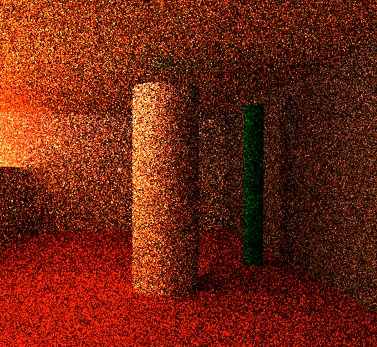
Tested that indirect light makes shadows and that it goes through glass. These have raytrace depth 4 so they took a while to render even at low samples.
DazGI_10_IDLshadows_8min shows shadows from indirect light.
DazGI_11_IDLthroughGlass_10min has a glass plane over the opening where the light comes in. A spotlight illuminates a closed room beyond the glass and light bounces into the column room. There are shadows. So indirect light penetrates partially opaque (0.3%) items.
DazGI_10_IDLshadows_8min shows shadows from indirect light.
DazGI_11_IDLthroughGlass_10min has a glass plane over the opening where the light comes in. A spotlight illuminates a closed room beyond the glass and light bounces into the column room. There are shadows. So indirect light penetrates partially opaque (0.3%) items.
- Attachments
-

- DazGI_10_IDLshadows_8min.jpg (65.93 KiB) Viewed 4706 times
-
- DazGI_11_IDLthroughGlass_10min.jpg (95.09 KiB) Viewed 4707 times
I prefer dangerous freedom over peaceful servitude. -- Thomas Jefferson/Jean Jacques Rousseau
-
spacekdet

- Captain
- Posts: 1810
- Joined: 27 May 2009, 15:00
- Type the number ten into the box: 10
- Location: On the day shift at the Utility Muffin Research Kitchen
Re: G.I. rendering with 3Delight via DAZ Studio
Nice to see you've taken up pointillism.
-
Finis
- Captain
- Posts: 5410
- Joined: 21 May 2009, 18:26
- Type the number ten into the box: 0
- Location: America!
Re: G.I. rendering with 3Delight via DAZ Studio
Pointillism. Not impressionism. It does look like that.
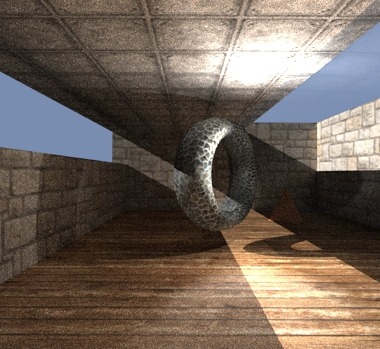
Here is one with textures. Looks like more reflection is needed. The glass could use some sheen too. Glossy floor. The torus has a displacement map. Seventy minutes. Still a little grainy.
Here is one with textures. Looks like more reflection is needed. The glass could use some sheen too. Glossy floor. The torus has a displacement map. Seventy minutes. Still a little grainy.
- Attachments
-
- DazGI_12_textured_70min.jpg (50.83 KiB) Viewed 5799 times
I prefer dangerous freedom over peaceful servitude. -- Thomas Jefferson/Jean Jacques Rousseau
-
Draise

- Captain
- Posts: 3200
- Joined: 21 Sep 2009, 19:33
- Type the number ten into the box: 0
- Location: Bogota, Colombia
Re: G.I. rendering with 3Delight via DAZ Studio
Is that the stock tile texture from TS on the roof??
Interesting seeing you play with the GI. It is interesting seeeing someone troubleshoot and test rendering. Sometimes I dont have the patience to test and test, so I try hope some awesome unbiased render engine becomes available for Softimage.... like Octane or something...
Thanks for the process!
Interesting seeing you play with the GI. It is interesting seeeing someone troubleshoot and test rendering. Sometimes I dont have the patience to test and test, so I try hope some awesome unbiased render engine becomes available for Softimage.... like Octane or something...
Thanks for the process!
-
Finis
- Captain
- Posts: 5410
- Joined: 21 May 2009, 18:26
- Type the number ten into the box: 0
- Location: America!
Re: G.I. rendering with 3Delight via DAZ Studio
Stock tile from TS. Most others from cgtextures. Coral on the torus.
DS has number of tiles, repetitions, for textures but the number is set for the whole texture. TS is better there since the repetitions can be set independently for color, bump, relfection.
I'll try this for a real project. Maybe a banquet hall challenge entry. But I think it is time to learn Messiah (powerful animation and renderer), Hexagon, and Blender (Cycles!). Those should provide almost everything.
Softimage renderers:
Arnold http://www.youtube.com/watch?v=vitdfmISlyQ
3Delight http://www.3delight.com/en/index.php?page=3DFS_overview
Thea http://www.thearender.com/cms/index.php ... lugin.html
Lux http://www.luxrender.net/en_GB/softimage_xsi
DS has number of tiles, repetitions, for textures but the number is set for the whole texture. TS is better there since the repetitions can be set independently for color, bump, relfection.
I'll try this for a real project. Maybe a banquet hall challenge entry. But I think it is time to learn Messiah (powerful animation and renderer), Hexagon, and Blender (Cycles!). Those should provide almost everything.
Softimage renderers:
Arnold http://www.youtube.com/watch?v=vitdfmISlyQ
3Delight http://www.3delight.com/en/index.php?page=3DFS_overview
Thea http://www.thearender.com/cms/index.php ... lugin.html
Lux http://www.luxrender.net/en_GB/softimage_xsi
I prefer dangerous freedom over peaceful servitude. -- Thomas Jefferson/Jean Jacques Rousseau
-
Steinie

- Captain
- Posts: 2958
- Joined: 21 May 2009, 17:38
- Type the number ten into the box: 10
Re: G.I. rendering with 3Delight via DAZ Studio
Blender Cycles:
http://www.blenderguru.com/videos/intro ... to-cycles/"
http://www.blenderguru.com/videos/intro ... to-cycles/"
-
Benji
- Senior Chief Petty Officer
- Posts: 280
- Joined: 22 May 2009, 01:23
Re: G.I. rendering with 3Delight via DAZ Studio
I like these experiments, it's surprising what you can do with daz3d.
I think if you're going to learn messiah, you may want to have a look at the renderer as well. Very underrated, and it has progressive rendering as of version 5 (basically, the big appeal for cycles).
I think if you're going to learn messiah, you may want to have a look at the renderer as well. Very underrated, and it has progressive rendering as of version 5 (basically, the big appeal for cycles).
-
Finis
- Captain
- Posts: 5410
- Joined: 21 May 2009, 18:26
- Type the number ten into the box: 0
- Location: America!
Re: G.I. rendering with 3Delight via DAZ Studio
Thanks Benji. Good to see you around here again!
Thanks Steinie. I've seen cycles before but that is good video. The renderers where for Draise who mentioned GI renderers for Softiamge. Doesn't it come with one?
I got Messiah 5 when there was a super sale for $40. Yeah its renderer looks great. Other than the basics of the interface I'll probably learn its texturing system and renderer before the rigging and animation parts. The GPU fast rendering feature of several renderers is appealing but I probably won't have a super graphics card in the foreseeable future.
I'm trying things for my post TS tool kit. I want to know what the programs I have can do and how hard or easy they are. I'm poor so free or cheap is important. I think Blender/Messiah/Hexagon covers all the bases. Blender will provide the full featured program with everything and will always be free. Messiah for super render and characters. Hexagon for modeling if I like it better than Blender.
I'm surprised that Daz doesn't have a "use GI' switch. So far it is mostly easy for rigging your own characters too. I'm still testing that here vi ... =39&t=3580.
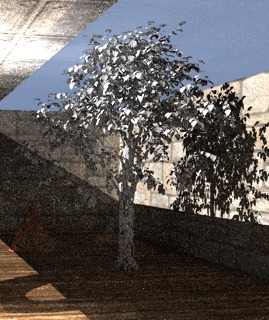
Here is a test with a 70K polygon maple tree made in Bryce, decimated a little in Hexagon, and rendered with GI in Daz. This took 36 minutes.
Thanks Steinie. I've seen cycles before but that is good video. The renderers where for Draise who mentioned GI renderers for Softiamge. Doesn't it come with one?
I got Messiah 5 when there was a super sale for $40. Yeah its renderer looks great. Other than the basics of the interface I'll probably learn its texturing system and renderer before the rigging and animation parts. The GPU fast rendering feature of several renderers is appealing but I probably won't have a super graphics card in the foreseeable future.
I'm trying things for my post TS tool kit. I want to know what the programs I have can do and how hard or easy they are. I'm poor so free or cheap is important. I think Blender/Messiah/Hexagon covers all the bases. Blender will provide the full featured program with everything and will always be free. Messiah for super render and characters. Hexagon for modeling if I like it better than Blender.
I'm surprised that Daz doesn't have a "use GI' switch. So far it is mostly easy for rigging your own characters too. I'm still testing that here vi ... =39&t=3580.
Here is a test with a 70K polygon maple tree made in Bryce, decimated a little in Hexagon, and rendered with GI in Daz. This took 36 minutes.
- Attachments
-
- DazGI_13_WithTree_36min.jpg (41.75 KiB) Viewed 5748 times
I prefer dangerous freedom over peaceful servitude. -- Thomas Jefferson/Jean Jacques Rousseau
-
Draise
- Captain
- Posts: 3200
- Joined: 21 Sep 2009, 19:33
- Type the number ten into the box: 0
- Location: Bogota, Colombia
Re: G.I. rendering with 3Delight via DAZ Studio
Hehehe, ah yes. It does have one with GI, or final gathering and AO and the works, Mentalray, a very powerful render engine, albiet slow.. But it does the trick. I just wish the higher-end 3D authoring software come with unbiased render engines included, like Modo 601 or Blender or something.Finis wrote: The renderers where for Draise who mentioned GI renderers for Softiamge. Doesn't it come with one?
I have tried Thea and Lux renderer before with Softimage, but they are somewhat not that compatible with different elements and animation. Octane neither, so I'm waiting to see what the upcoming plugin for that engine will be like. Arnold looks super promising, but only the exclusive elite have access to it, as it is not released to the public. I am going to play with 3Delight, as I like what you're doing here, but the licensing system based on cores and computer units is turning out to be a little tricky when it comes to render farms and possibly can be very expensive very quickly!! But it looks great! Probably my best bet for Softimage.
I am thinking to change my company policy to go for cheap yet functional software, if not free, switching to Blender and other free software to get the job done. Because, even being in Colombia, to be liable for large sales we need to be legal... and that can get expensive very fast.

But cool experiments that you're doing, looking good!
-
trueBlue

- Captain
- Posts: 5548
- Joined: 06 Jul 2009, 22:50
- Type the number ten into the box: 10
Re: G.I. rendering with 3Delight via DAZ Studio
Quote from Setup Tab a Messiah community forum"Benji wrote:I like these experiments, it's surprising what you can do with daz3d.
I think if you're going to learn messiah, you may want to have a look at the renderer as well. Very underrated, and it has progressive rendering as of version 5 (basically, the big appeal for cycles).
"Arnold was a renderer originally developed by Marcos Fajardo during his University days ( I think). It was going to be a plugin for Max at one point. Pmg saw the potential and wanted its own renderer and licensed (or purchased.not sure) some of the technology from Marcos. This became the basis for what is now Messiah's renderer, although Fori has continued to refine and make major changes since then.
Marcos now works at Sony where he has further developed the Arnold renderer and it has been used on Monster House, and Meatballs as well as other Sony pictures properties."
-
Draise
- Captain
- Posts: 3200
- Joined: 21 Sep 2009, 19:33
- Type the number ten into the box: 0
- Location: Bogota, Colombia
Re: G.I. rendering with 3Delight via DAZ Studio
Oh wow! Didn't know that Arnold's code went into Messiah! And it looks to be a good and cheap package with a decent liscencing system that isnt Renderfarm restrictive.
I did know Sony pictures had Arnold for Meatballs and Monster House though. I was refering them as the "Elite"..
Thanks for the heads up, it seems I am in a browsing mode for new software.
I did know Sony pictures had Arnold for Meatballs and Monster House though. I was refering them as the "Elite"..
Thanks for the heads up, it seems I am in a browsing mode for new software.
-
Finis
- Captain
- Posts: 5410
- Joined: 21 May 2009, 18:26
- Type the number ten into the box: 0
- Location: America!
Re: G.I. rendering with 3Delight via DAZ Studio
trueBlue:  Now Messiah Studio is worth any effort to learn!
Draise: IMHO, for your business "stay the course". Don't change things in the middle of a project. You have a working system that is producing a product. Once that product is successful then you can look at ways to improve your system. Do whatever you want for your own stuff of course but you could "leverage" your hobby activity to also support business or future opportunity. That's one reason I'm looking at rendering for architectural/realistic images ... Rayman's advice that I could try that to make some money.
Surprise! I read at the 3Delight website that it has 3 GI methods. Raytrace, photons( used in this thread), and points (for Softimage only). Raytrace? I saw no Daz interface info about that so I tried an indirect light camera with no photon mapping. It worked! Color bleeding, through glass, everything. Not investigating that further though.
I'll try caustics in Daz and then maybe a challenge entry.
Edit: The caustics example scene does caustic reflection but my efforts to get it through transparent objects didn't work. The nodes in the equivalent of the link editor are a mess and poorly documented. So, Daz's interface to caustics in 3Delight is not mature enough for me to use yet. Looks like Messiah and Blender Cycles are going to be my renderers anyway but I want to investigate the possibilities of various tools.
Now Messiah Studio is worth any effort to learn!Draise: IMHO, for your business "stay the course". Don't change things in the middle of a project. You have a working system that is producing a product. Once that product is successful then you can look at ways to improve your system. Do whatever you want for your own stuff of course but you could "leverage" your hobby activity to also support business or future opportunity. That's one reason I'm looking at rendering for architectural/realistic images ... Rayman's advice that I could try that to make some money.
Surprise! I read at the 3Delight website that it has 3 GI methods. Raytrace, photons( used in this thread), and points (for Softimage only). Raytrace? I saw no Daz interface info about that so I tried an indirect light camera with no photon mapping. It worked! Color bleeding, through glass, everything. Not investigating that further though.
I'll try caustics in Daz and then maybe a challenge entry.
Edit: The caustics example scene does caustic reflection but my efforts to get it through transparent objects didn't work. The nodes in the equivalent of the link editor are a mess and poorly documented. So, Daz's interface to caustics in 3Delight is not mature enough for me to use yet. Looks like Messiah and Blender Cycles are going to be my renderers anyway but I want to investigate the possibilities of various tools.
I prefer dangerous freedom over peaceful servitude. -- Thomas Jefferson/Jean Jacques Rousseau