I discovered that DAZ Studio 4.5 claims to have rigging ability for imported models. That is, you can import your characters modeled in TS, Hexagon, etc. and rig a skeleton for them.
So far I have imported a specially textured model from TS and produced bones in DAZ. I'll post details and what documentation I used later.
You have to activate the Figure Tab from some menu to do this.
TROUBLE POINT 1: Moving, aligning, connecting bones.
Arranging, moving, rotating, aligning, etc. can be done in DAZ with sliders or interactively, so they say. I have not been able to drag/manipulate bones with the mouse except to change their size and the sliders are unintuitive.
SOLUTION 1: Change scale when you import your model so that it is about the size of the Daz base figure. This makes the controls on the bone ends big enough to use. The snap and align tools put ends together and the bone hierarchy connects them.
Does anyone know about using DAZ Studio for this purpose? Feel free to share your knowledge.
Documentation Links so far:
Good starting place. Prepare your model for Daz.
http://docs.daz3d.com/doku.php/public/s ... tion/start
Basic Rigging.
http://docs.daz3d.com/doku.php/public/s ... ging/start
Daz Studio 4.5 Rigging
-
Finis

- Captain
- Posts: 5410
- Joined: 21 May 2009, 18:26
- Type the number ten into the box: 0
- Location: America!
Daz Studio 4.5 Rigging
Last edited by Finis on 23 Aug 2012, 17:24, edited 3 times in total.
I prefer dangerous freedom over peaceful servitude. -- Thomas Jefferson/Jean Jacques Rousseau
-
jamesmc
- Captain
- Posts: 1776
- Joined: 08 Jul 2009, 15:35
Re: Daz Studio 4.5 Rigging
There are some nice instructional videos on Youtube on weight mapping and rigging.
I haven't done rigging in Daz Studio though, just watched the videos. heh
I haven't done rigging in Daz Studio though, just watched the videos. heh
Walk by faith, not by sight.
-
Finis
- Captain
- Posts: 5410
- Joined: 21 May 2009, 18:26
- Type the number ten into the box: 0
- Location: America!
Re: Daz Studio 4.5 Rigging
Thanks James. Videos helped.
Touble point 1, solved. See earlier post. My model (HearO) was much larger than the base Daz figure. I imported mine with a scale to match the Daz figure's size and the controls on the ends of the bones were much larger and could be used. Bones are connected by their parenting heirarchy and the snap and align tools put their ends together.
Touble point 1, solved. See earlier post. My model (HearO) was much larger than the base Daz figure. I imported mine with a scale to match the Daz figure's size and the controls on the ends of the bones were much larger and could be used. Bones are connected by their parenting heirarchy and the snap and align tools put their ends together.
I prefer dangerous freedom over peaceful servitude. -- Thomas Jefferson/Jean Jacques Rousseau
-
Finis
- Captain
- Posts: 5410
- Joined: 21 May 2009, 18:26
- Type the number ten into the box: 0
- Location: America!
Re: Daz Studio 4.5 Rigging
TROUBLE POINT 2: Names of bones. Default bone names, based on textured areas imported via obj from TS 7.6, are not useful. Renaming was not easy. Selecting bones or selection surfaces on the model does not highlight the corresponding items.
SOLUTION 2: Mouse over or select a selection surface on the model and note its name in the popup. Find the bone in the figure editor and change its name.
I have been using the strategy from the documentation linked earlier:
1. Make model in other software.
2. Create selection sets in other software. In TS that means apply textures to model areas for bones (chest, upper arm, lower arm, ...). These will become bones in Daz.
3. Export as obj (in TS export with groups by material).
4. Import model into Daz.
5. Daz Figure Setup tab: import geometry (same model file) and drag to "geometry" line in Figure tab.
6. Rename bones and Parent bones to make hierarchy. Click "Create" when done.
7. Arrange bones with Joint Editor tool and Scene tab.
Note: "Memorize Rigging" is important. Rigging may be lost on saving if you don't.
Note: "reparent bone" in Joint Editor is prone to crashing. Save scene first.
Note: "Node" means "Bone".
With all that done I realized that I'm supposed to be moving to Hexagon, which works with Daz anyway, as my main modeler but working on a TS - Daz workflow here. Also, I believe that it is simpler to just import your mesh and build the skeleton from scratch in Daz than to do the selection set = bone thing.
I think Daz may be useful for quick rigging for hobbyist work and posing them for still images like Splinters' Buddy World. I still intend to learn Messiah Studio.
So, I will suspend this project until I have some ability in Hexagon and then continue learning Daz rigging and posting it here. This end result will not be a tutorial but a getting started guide to whatever workflow I find works. Links to documentation will be provided for details.
It took about 12 hours to learn this much so start with the docs above and video links coming soon and you can do it.
Links to some official Daz video tutorials I found helpful soon.
SOLUTION 2: Mouse over or select a selection surface on the model and note its name in the popup. Find the bone in the figure editor and change its name.
I have been using the strategy from the documentation linked earlier:
1. Make model in other software.
2. Create selection sets in other software. In TS that means apply textures to model areas for bones (chest, upper arm, lower arm, ...). These will become bones in Daz.
3. Export as obj (in TS export with groups by material).
4. Import model into Daz.
5. Daz Figure Setup tab: import geometry (same model file) and drag to "geometry" line in Figure tab.
6. Rename bones and Parent bones to make hierarchy. Click "Create" when done.
7. Arrange bones with Joint Editor tool and Scene tab.
Note: "Memorize Rigging" is important. Rigging may be lost on saving if you don't.
Note: "reparent bone" in Joint Editor is prone to crashing. Save scene first.
Note: "Node" means "Bone".
With all that done I realized that I'm supposed to be moving to Hexagon, which works with Daz anyway, as my main modeler but working on a TS - Daz workflow here. Also, I believe that it is simpler to just import your mesh and build the skeleton from scratch in Daz than to do the selection set = bone thing.
I think Daz may be useful for quick rigging for hobbyist work and posing them for still images like Splinters' Buddy World. I still intend to learn Messiah Studio.
So, I will suspend this project until I have some ability in Hexagon and then continue learning Daz rigging and posting it here. This end result will not be a tutorial but a getting started guide to whatever workflow I find works. Links to documentation will be provided for details.
It took about 12 hours to learn this much so start with the docs above and video links coming soon and you can do it.
Links to some official Daz video tutorials I found helpful soon.
Last edited by Finis on 23 Aug 2012, 18:11, edited 1 time in total.
I prefer dangerous freedom over peaceful servitude. -- Thomas Jefferson/Jean Jacques Rousseau
-
pugman 1
- Captain
- Posts: 1555
- Joined: 21 May 2009, 19:26
- Type the number ten into the box: 0
- Location: Germany
Re: Daz Studio 4.5 Rigging
I would say youd be better off learning blender for everything ,maybe not the modling
-
Finis
- Captain
- Posts: 5410
- Joined: 21 May 2009, 18:26
- Type the number ten into the box: 0
- Location: America!
Re: Daz Studio 4.5 Rigging
Pugman, I'm exploring options.
Blender is certainly on my to-learn list. Partly from poverty and partly since they are good tools, I'm moving to Hexagon/Sculptris/Blender for almost everything.
So far Daz rigging looks easy once learned but not intuitive.
Since I have Messiah Studio (from the super cheap offer) I'll pay the price of its poor docs and steep learning curve to get its power as one option. Probably I'll find that Blender is easier and more than powerful enough for me. Harder than Blender ... Messiah Studio claims a rare honor.
Modo is my dream program. Having that much money is a dream too.
Blender is certainly on my to-learn list. Partly from poverty and partly since they are good tools, I'm moving to Hexagon/Sculptris/Blender for almost everything.
So far Daz rigging looks easy once learned but not intuitive.
Since I have Messiah Studio (from the super cheap offer) I'll pay the price of its poor docs and steep learning curve to get its power as one option. Probably I'll find that Blender is easier and more than powerful enough for me. Harder than Blender ... Messiah Studio claims a rare honor.
Modo is my dream program. Having that much money is a dream too.
I prefer dangerous freedom over peaceful servitude. -- Thomas Jefferson/Jean Jacques Rousseau
-
Finis
- Captain
- Posts: 5410
- Joined: 21 May 2009, 18:26
- Type the number ten into the box: 0
- Location: America!
Re: Daz Studio 4.5 Rigging
Of course, I had to try more rigging. This time I just built the skeleton in Daz and didn't use their "selection sets" become bones feature. That was much easier. It didn't take long to put a few bones from HearO's chest to one foot and assign polygon groups to them. Polygon groups tell the program which bone to move when a user poses a figure. They're like handles. Still learning weight mapping but it seems not too difficult with a few tools.
I prefer dangerous freedom over peaceful servitude. -- Thomas Jefferson/Jean Jacques Rousseau
-
RAYMAN

- Captain
- Posts: 2547
- Joined: 21 May 2009, 18:56
Re: Daz Studio 4.5 Rigging
Once you got the skeleton up running its much easier to control your models inside Daz studio then in most other programs....
As far as I can tell you most people I know also used old versions of Poser with skeleton drag and drop functiomnality... to import
into Daz....
Look into that solution.... there are some old versions on fleebay..Poser models worked well in the older Daz studio versions..
havent used the newest one though...
Peter
As far as I can tell you most people I know also used old versions of Poser with skeleton drag and drop functiomnality... to import
into Daz....
Look into that solution.... there are some old versions on fleebay..Poser models worked well in the older Daz studio versions..
havent used the newest one though...
Peter
-
nigec

- Master Chief Petty Officer
- Posts: 561
- Joined: 21 May 2009, 18:46
Re: Daz Studio 4.5 Rigging
Carrara might be another option, dig around for back issues of 3D world and 3D Artist mags, both had the pro versions for free, probably easier than DAZ to learn and some good tuts
It would be so cool if DAZ could take all the best qualities out of Bryce, Daz Studio, Carrara and Hexagon and make one killer piece of software
Carrara is almost there but its a jack of all trades and master of none
It would be so cool if DAZ could take all the best qualities out of Bryce, Daz Studio, Carrara and Hexagon and make one killer piece of software
Carrara is almost there but its a jack of all trades and master of none
-
Finis
- Captain
- Posts: 5410
- Joined: 21 May 2009, 18:26
- Type the number ten into the box: 0
- Location: America!
Re: Daz Studio 4.5 Rigging
Thanks y'all.
Rayman, good to know that Poser stuff works with Daz. That means there are more possibilities for free clothes. Daz would be good for populating scenes with people like in architectural renderings but regular clothes would be needed. I'll look to Messiah and Blender for real rigging but I hope Daz can be a quick and simple method for simple posing. Now I'm learning how to do it from scratch but just transferring the standard skeleton and modifying would work for humanoid characters.
I have noted the lack of regular clothes as a business niche. You could make them for Daz, add decimated lower poly models, and promote that for more professional use. The semi normal clothes I've seen are still too stylish for that kind of use.
Nigec, Carrera is out since it costs money. It does look like a good deal though. Yeah, best of all those and master of something would make it really good. James has done stuff with Carrera.
Rayman, good to know that Poser stuff works with Daz. That means there are more possibilities for free clothes. Daz would be good for populating scenes with people like in architectural renderings but regular clothes would be needed. I'll look to Messiah and Blender for real rigging but I hope Daz can be a quick and simple method for simple posing. Now I'm learning how to do it from scratch but just transferring the standard skeleton and modifying would work for humanoid characters.
I have noted the lack of regular clothes as a business niche. You could make them for Daz, add decimated lower poly models, and promote that for more professional use. The semi normal clothes I've seen are still too stylish for that kind of use.
Nigec, Carrera is out since it costs money. It does look like a good deal though. Yeah, best of all those and master of something would make it really good. James has done stuff with Carrera.
I prefer dangerous freedom over peaceful servitude. -- Thomas Jefferson/Jean Jacques Rousseau
-
pugman 1
- Captain
- Posts: 1555
- Joined: 21 May 2009, 19:26
- Type the number ten into the box: 0
- Location: Germany
Re: Daz Studio 4.5 Rigging
Blender rigging is so easy for basic poses ,and when you want full animation its also good but harder to learn.
i myself like blender for modling and rigging , rendering in vue .
I will not install another app from daz again i dont like them that goes for carrera to.
i myself like blender for modling and rigging , rendering in vue .
I will not install another app from daz again i dont like them that goes for carrera to.
-
Finis
- Captain
- Posts: 5410
- Joined: 21 May 2009, 18:26
- Type the number ten into the box: 0
- Location: America!
Re: Daz Studio 4.5 Rigging
Thanks Pugman. Glad to know Blender is good for rigging. Now I will have a more positive attitude about learning it.
What was the problem with Daz stuff? If you just don't like the way it works that's fine. Everyone is different about what things suit their ways what does not. But I would like to know about any bugs or areas where it just doesn't work well. Especially with Hexagon.
I'll learn Bryce since I have it but I'd use Vue if I could afford it.
Nigec: It just sunk in that those Carrera versions were free. Might try that then but I think, unless Modo money should ever appear, I'll be using Blender for most things.
What was the problem with Daz stuff? If you just don't like the way it works that's fine. Everyone is different about what things suit their ways what does not. But I would like to know about any bugs or areas where it just doesn't work well. Especially with Hexagon.
I'll learn Bryce since I have it but I'd use Vue if I could afford it.
Nigec: It just sunk in that those Carrera versions were free. Might try that then but I think, unless Modo money should ever appear, I'll be using Blender for most things.
I prefer dangerous freedom over peaceful servitude. -- Thomas Jefferson/Jean Jacques Rousseau
-
Finis
- Captain
- Posts: 5410
- Joined: 21 May 2009, 18:26
- Type the number ten into the box: 0
- Location: America!
Re: Daz Studio 4.5 Rigging
Some quirks in the weight mapping parts but it looks not too difficult after some learning. I am not sure of the correct way to save things in Daz. All save options seem to make a .duf file.
Daz has "TriAx" and "traditional" rigging/mapping. I think TriAx is just for Daz and traditional is portable to other programs. TriAx allows separate maps for X,Y,Z axes and some other things.
Their figures have both a hip and pelvic bone. Hip is the root bone. Root bones seem to effect the whole figure with few other options so I think skeletons need one just to start but that it otherwise is not connected to any poly groups or weight maps.
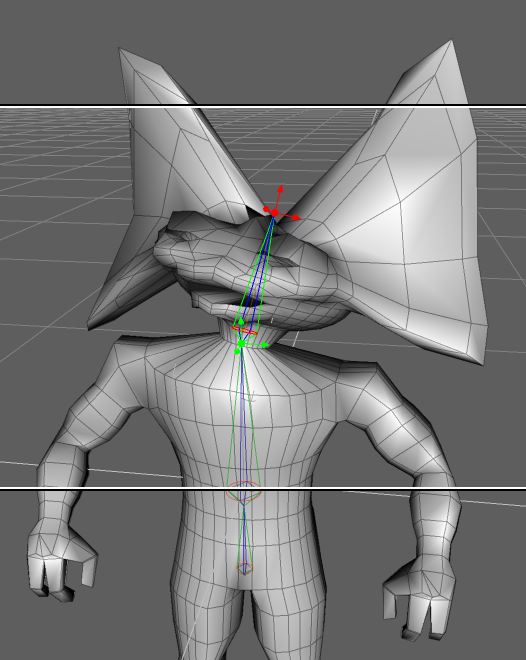
Here is HearO with a head bone and weight mapping. His head is moved in each axis.
Daz has "TriAx" and "traditional" rigging/mapping. I think TriAx is just for Daz and traditional is portable to other programs. TriAx allows separate maps for X,Y,Z axes and some other things.
Their figures have both a hip and pelvic bone. Hip is the root bone. Root bones seem to effect the whole figure with few other options so I think skeletons need one just to start but that it otherwise is not connected to any poly groups or weight maps.
Here is HearO with a head bone and weight mapping. His head is moved in each axis.
- Attachments
-
I prefer dangerous freedom over peaceful servitude. -- Thomas Jefferson/Jean Jacques Rousseau
-
Finis
- Captain
- Posts: 5410
- Joined: 21 May 2009, 18:26
- Type the number ten into the box: 0
- Location: America!
Re: Daz Studio 4.5 Rigging
Not much time for this lately but I have been trying the weight mapping. So far there are unintuitive procedures and it takes practice to learn the tools. Once learned, sometimes as rituals that may not make sense, the procedures are easy enough. Of course a good map will still require knowledge and skill so I won't be producing a good one for some time. No successes to show yet just experiments.
I found one concept that is important. 100% of the mesh is "weighted" to some bone(s) at all times. Adding weight for a mesh area to a bone takes it away from some other bone(s). It starts with the root bone (hip in their models) having all the weight. The entire mesh is 100% weighted to that bone before you do any weight mapping. It starts with all weight and has none when you are done.
Given the above, the most intuitive way to weight map things in Daz, for me, is to always think of adding weight and not think of removing it. Say you accidentally map an elbow to the shin bone. Don't think of removing that weight from the shin bone but rather think of adding it to another bone. (The one the elbow belongs to or the root.) Use the root as a reservoir of weight.
There are abilities linked to Ctrl-click or Alt-click for unmapping mesh but I don't know how they work yet.
A different issue. Although I named the bones the way Daz models are named the animations that came with the program don't work with mine. There must be more to that than bone names. I wasn't planning on using those but they could provide a good test of rigging.
I found one concept that is important. 100% of the mesh is "weighted" to some bone(s) at all times. Adding weight for a mesh area to a bone takes it away from some other bone(s). It starts with the root bone (hip in their models) having all the weight. The entire mesh is 100% weighted to that bone before you do any weight mapping. It starts with all weight and has none when you are done.
Given the above, the most intuitive way to weight map things in Daz, for me, is to always think of adding weight and not think of removing it. Say you accidentally map an elbow to the shin bone. Don't think of removing that weight from the shin bone but rather think of adding it to another bone. (The one the elbow belongs to or the root.) Use the root as a reservoir of weight.
There are abilities linked to Ctrl-click or Alt-click for unmapping mesh but I don't know how they work yet.
A different issue. Although I named the bones the way Daz models are named the animations that came with the program don't work with mine. There must be more to that than bone names. I wasn't planning on using those but they could provide a good test of rigging.
I prefer dangerous freedom over peaceful servitude. -- Thomas Jefferson/Jean Jacques Rousseau
-
Finis
- Captain
- Posts: 5410
- Joined: 21 May 2009, 18:26
- Type the number ten into the box: 0
- Location: America!
Re: Daz Studio 4.5 Rigging
I weight mapped HearO enough to pose his leg. The WM needs work but this is just to learn to do it. It seems better to start with a more detailed mesh. I don't know how to limit bone movements yet. I did create polygon groups in Daz corresponding to the bones. They act as IK handles. Although weight mapping is unintuitive the Daz interface is not bad. It has the universal manipulator like Hexagon and there is no need to use hot keys. The workspace layout you see in the official tutorial videos is called "self serve".
- Attachments
-

I prefer dangerous freedom over peaceful servitude. -- Thomas Jefferson/Jean Jacques Rousseau
-
v3rd3
- Lieutenant Commander
- Posts: 1191
- Joined: 21 May 2009, 20:04
Re: Daz Studio 4.5 Rigging
Keepa goin' Finis... I may have a project later this year that I might use Daz stuff to do.
-
Finis
- Captain
- Posts: 5410
- Joined: 21 May 2009, 18:26
- Type the number ten into the box: 0
- Location: America!
Re: Daz Studio 4.5 Rigging
Will do V3rd3. Probably I'll use Blender for easy stuff and Messiah for power ... if I ever learn all of that. I think Daz is fairly easy so far. I want to learn more than one rigging/posing/animating program so I have a better, broader, knowledge of it.
I've also been thinking about learning Daz's renderer since it is 3Delight. It does decent cartoon renders too.
When I finish experimenting then I'll start over with HearO and try to really rig him. I'll start with a more complex mesh, extracted SDS, and use the "legacy" weight mapping since it is simpler and I think it is more compatible with other software. The "Triax" Daz WM seems powerful but I think it only works with Daz. It allows separate WM's for 3 axes and scale and bulge, etc.
I've also been thinking about learning Daz's renderer since it is 3Delight. It does decent cartoon renders too.
When I finish experimenting then I'll start over with HearO and try to really rig him. I'll start with a more complex mesh, extracted SDS, and use the "legacy" weight mapping since it is simpler and I think it is more compatible with other software. The "Triax" Daz WM seems powerful but I think it only works with Daz. It allows separate WM's for 3 axes and scale and bulge, etc.
I prefer dangerous freedom over peaceful servitude. -- Thomas Jefferson/Jean Jacques Rousseau