I putted in this version a lot of new ideas and technics. The hooks are completly gone. I just use tS callbacks to detect anything what i need (it was a hard work to figure out this). The management of the tree vs. scene is completly rewritten so that i speedup the complete system. It should be possible to handle the most scenes without problems.
The layer system still doesn't work. The possibilitys of the SE are the same as in the last update. That means you can just switch on and of the states of hidden, cast, receive and double sided and rename all objects.
The main aspect to test is:
1. that nothing crashes
2. that everything is updated correctly
Thank.
It seem to work well with vista 32 bits (no problem of crash as i said in my last post). I will try it on XP tomorrow (SE didn't work well with this OS in my other computer).
I've done some animation testing and everything seems all right. The visibility setting can be animated via the SE and it is a good thing !
Perhaps it is not worth to report, but here is a strange thing I just noticed, testing the new SE version :
I've created a hierarchy made of 300 objects (generated with CopyExPlus beta) and found something weird. When collapsed, the tree only shows the first object of the hierarcy (as it should), but when expanded, I get a sort of "backspace" at object #255 : it looks like the "width limit" of the program is reached and object #255 is back to the left border.
This is not a bug though : I get the same in both the KFE and PiSceneTool.
DesignDevil
Master Chief Petty Officer
Posts:500
Joined: 22 May 2009, 08:52
Type the number ten into the box: 0
Location: Neuruppin, Germany, Earth.
Re: Working on new TSX
Postby DesignDevil »
Well, i don't have this PlugIn. But if the KFE and piSceneTool show's it with the same "problem" than i can not change this. In this case it is a CopyExPlus problem (i think).
EDIT:I have now tried this by myself with the CopyExPlus Plugin and you are right. It seem's to be a restriction in the TreeView Control himself that he can not have more than 255 Child Nodes. So i can do nothing against that and btw. To Group objects in this way is not really practicable. The importend note on that is: the Se dosn't crash
The next day's i will build in the layer choose option. This needs also a bit time because normal images (icons) can not included directly into a menu. But not a problem at all - i'm working on the solution.
The next point is glue and unglue (drag'n drop)
And after that i try to build the sort mechanism.
Last but not least all the little other dot's on my ToDo list
I've been testing in tS 6.6 and have had some crashes when working in point edit (PE) mode
when your tsx is loaded. The only other tsx's I'm running are CK's poly tools and Clinton's NURB tsx's.
This crash only happens when Scene Explorer tsx is loaded.
So, the bug comes up just on using the fillet tool - not directly thrue the PE mode. I fixed that bug (hopefully). The reason for the crash was, that tS creates and deletes objects in the background to make this tool working. The deleting of these objects was faster as my plugin could detect this and the refresh function tried to get a object where no object is in the scene (or no more). So it was a timing problem.
BTW. This way of showing a bug (Screen Capture) is really great - so i can directly see what's happen. - Great, Thanks.
The new version is up for download, see on top of this page.
I inserted the unglue feature. This unglue the actual selected object - just this. Anyone spoke about a unglue hierarchie feature. Now i would ask how this should work?
I have tried the newest beta & so far, all seems good!
As for the unglue feature, actual selected object sounds good to me.
It would be handy to have unglue all when the root object
of hierarchy is selected. Since this isn't offered with the basic tS I would
understand if you say it's not possible.
v3rd3
Lieutenant Commander
Posts:1191
Joined: 21 May 2009, 20:04
Re: Working on new TSX
Postby v3rd3 »
My suggestion would be that any unglue feature would remove the relationships of the currently selected level of the hierarchy and below.
My humble 2 pennies.
Thanks for your continued effort on this and the other projects.
DesignDevil
Master Chief Petty Officer
Posts:500
Joined: 22 May 2009, 08:52
Type the number ten into the box: 0
Location: Neuruppin, Germany, Earth.
Re: Working on new TSX
Postby DesignDevil »
ok, thanks for your comments. I will do it in this way:
- You have to select a group object, just in this case you can use "unglue hierarchie".
- All Child objects of this group will be unglued. (I think this transforms a Array object into seperate objects - nice feature btw.)
I uploaded the newest version (see link above).
- Fixed 2 bugs (keyframes could not be deleted).
- Added Keyboard Features. You can now use F2 to rename objects and DEL to delete objects.
- Added Unglue Object Feature
Attention: This is still a beta version. Be prepared for crashes etc. SAVE YOUR WORK. The UNGLUE HIERARCHIE feature from the context menu is still WIP - don't use it!!!
It's also present here (in tS6.6 and 7.6). But it is also present if i don't use the SE. As example i got the same weird behavior with MotionStudio. Thanks for report - i check this out.
DesignDevil wrote:
- You have to select a group object, just in this case you can use "unglue hierarchie".
- All Child objects of this group will be unglued. (I think this transforms a Array object into seperate objects - nice feature btw.)
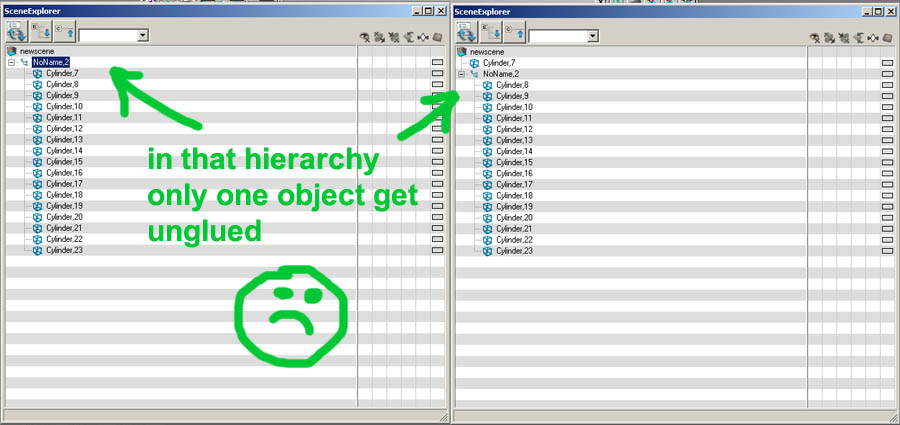
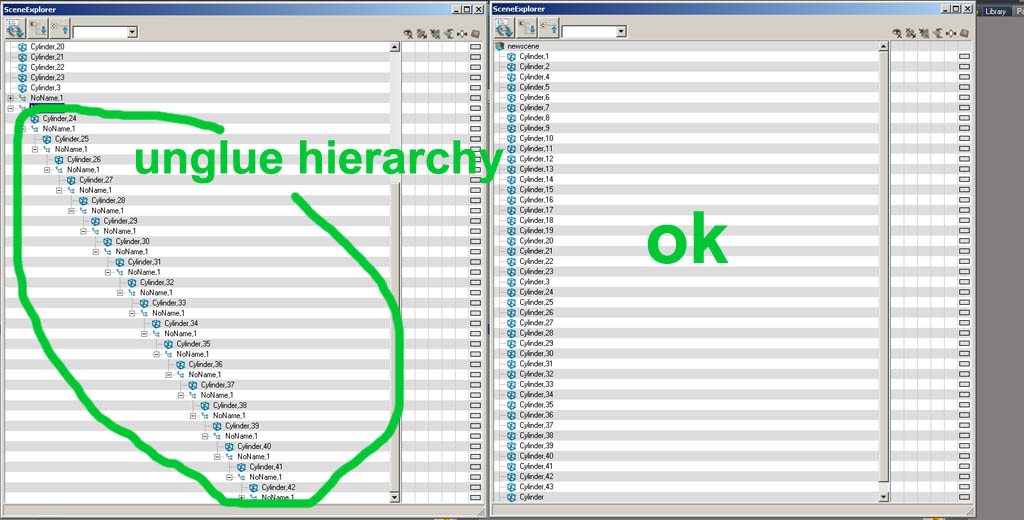
Behavior is different depending on the type of hierarchy : it works if the hierarchy is a "child type". In the case of a selection being glued (select some objects, then clic the glue_as_sibling icon to make the selection a glued object), only one object get extracted.
See below :
Attachments
Emmanuel
Chief Warrant Officer
Posts:670
Joined: 14 Jun 2009, 06:47
Re: Working on new TSX
Postby Emmanuel »
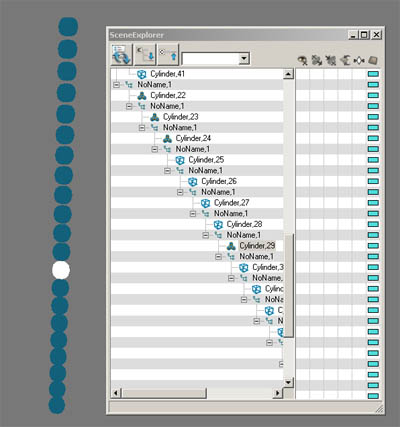
If I turn a hierarchy into a SS object, then SE's icons for each objects keep the polygon shape (the cube icon), until the objects get selected one by one.
Attachments
DesignDevil
Master Chief Petty Officer
Posts:500
Joined: 22 May 2009, 08:52
Type the number ten into the box: 0
Location: Neuruppin, Germany, Earth.
Re: Working on new TSX
Postby DesignDevil »
Yes that's true. It is not directly a bug, it was more a solution to speed up the operation. It is the same as renaming a object.
The idea behind this was that just the actual selected object is "scaned" for this changing. Otherwise i had to scan every 100ms the complete tree. For, let's say 100 object, this is not a problem, but if you have more as 1000 objects in the scene (i.e. a array) than this slows down the refresh and results in massive flickering and you can not longer handle the scene. But i will try if i could scan on type changing also the child objects if you change the type from a group object.
Thanks for report.
About the unglue:
- What you show in image 1 is the conclusion after using UNGLUE OBJECT
- What you show in image 2 is the conclusion after using UNGLUE HIERARCHIE (so as i imagine the function)
- What you show in image 1 is the conclusion after using UNGLUE OBJECT
Well, this is actually the conclusion after using Unglue Hierarchy command on this particular type of hierarchy (several objects glued at the same level).
DesignDevil
Master Chief Petty Officer
Posts:500
Joined: 22 May 2009, 08:52
Type the number ten into the box: 0
Location: Neuruppin, Germany, Earth.
Re: Working on new TSX
Postby DesignDevil »
Well, either i missunderstand or i'm to stupid
I would say: Let me try to get the function to work how i mean it should work. After that try it out and we see what's happen.
i'm a bit sorry but i have to break a little bit. There are some private things that i have to do before i can go forward in developing. So nothing stopped here - just paused