
Links, Tips, and Hints - "Unofficial Update Documentation" by clintonman
Thank you for the great work, Clinton.
 I am considering to start translating your revised document to my mother-language if allowed, and am verifying tS7's basic behaviors described in the Quick Guide (Caligari original and your tS761_UU_Artists_Guide05.pdf Sep.2021).
My question to all is:
Model side NURBS control vertex (CV) handles seem to have many problems (below). Are they well-known bugs? or due to my wrong operation/setting (e.g. bridge, undo setting or such a thing)?
----
Steps to reproduce the problems:
(tS7.6 or tS7.61)
- Enter in "Model" side, Set one of views into Solid Render Display (Open GL or Direct 3D) so that we can recognize colors.
- Create a NURBS cube. (Before/after that, we can R-click the icon to select "one patch" on/off in NURBS cube panel.) Right click the created NURBS cube object to start editing.
- Right click a corner. CV handles (3D arrows and a small sphere) appear. In case of non-one-patch, it has 2 green horizontal arrows and 1 blue vertical arrow. In case of one-patch, it has one more blue diagonal horizontal arrow. In both cases, green arrows are initially separated (unlocked) each other.
(Bug-1 ?) Undoing
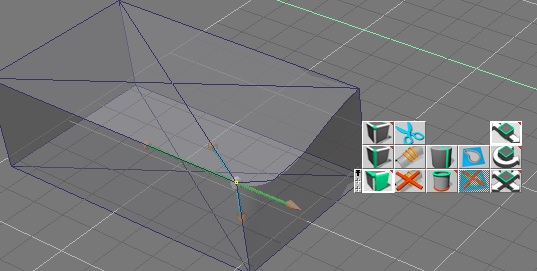
Hover over one of green arrows shaft to have it be highlighted in yellow and click it. Another green arrow is locked (connected) to it immediately, but "undo" don't work at all, the shape of the cube is lost, and it's hard to recover accurately by hand. (Fig. 1)
(Similarly, instead of clicking, dragging the highlighted shaft/arrowhead and doing "undo" causes the same problem.)

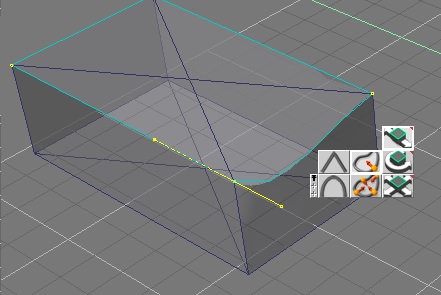
By dragging the green arrow shaft of a "non-one-patch" cube, it seems to rotate about blue arrow's direction rightly, However, in case of "one-patch", the rotation axis seems points a direction bit above (it's < 45, about 40 degree. Fig. 2)

After dragged and released an arrow to inside of the object (the cube in this example), we cannot highlight it again. Dragging it moves not the arrow but the vertex with all arrows.
Btw, What is the "LR-X axis" of the CV Handles in the Quick Guide? Left-Right-X axis, i.e. a pair of arrows in the different color from the dragging arrow?


 Please ignore my sentences above about "problem of documents".