D3D Render script

Technical questions, etc..
User avatar
Emmanuel
Chief Warrant Officer
Posts: 670
Joined: 14 Jun 2009, 06:47

D3D Render script

Post by Emmanuel »

I never used Clinton's D3D Render script before.

I am giving a try today, trying to render a modeler animation using Workspace real-time render engine.
Here is the error message I get when I press the Start button.
D3D error.jpg
If I uncheck the Protect Scene from Modelspace option, the script seems to be running but no animation is recorded.

The Protect Workspace is installed. I am using tS7.61 with unofficial update.
What am I doing wrong ?
User avatar
trueBlue
Captain
Posts: 5548
Joined: 06 Jul 2009, 22:50
Type the number ten into the box: 10

Re: D3D Render script

Post by trueBlue »

The unofficial update is currently being updated (Beta) and is not posted to the Unofficial Updates thread yet.
First I would try to render opposite of the way you are using it, with the main window Workspace and a new window switched to Model, as shown.
Screenshot (13).png
Looking at your screenshot it looks like you do not have the unofficial update installed
The most recent unofficial update (Beta):
viewtopic.php?t=5411&start=10#p55600
User avatar
Emmanuel
Chief Warrant Officer
Posts: 670
Joined: 14 Jun 2009, 06:47

Re: D3D Render script

Post by Emmanuel »

Thank you TrueBlue !
Using the main window Workspace layout and Modelspace as small window, the script is running (as long as I uncheck the Protect Scene from Modelspace option, otherwiseI still get the error message )

That's very nice to have a complex Modeler animation to render in seconds with D3D !
Now the challenge is to bake lights that will look like a CPU render...
User avatar
clintonman
Captain
Posts: 5659
Joined: 21 May 2009, 21:08
Type the number ten into the box: 0
Location: California

Re: D3D Render script

Post by clintonman »

Can you share your scene file? It looks like there's something about a light in your scene that the protection doesn't like.
Clinton Reese

http://clintons3d.com
User avatar
Emmanuel
Chief Warrant Officer
Posts: 670
Joined: 14 Jun 2009, 06:47

Re: D3D Render script

Post by Emmanuel »

You are right : it is about lights.
If I remove all lights from the Modeler scene, the rendering works even with Protect Scene from Modelspace turned on.

On an empty scene, I get the error message as soon as I add any of the Modeler lights : Spot, Infinite, Local, etc.
User avatar
clintonman
Captain
Posts: 5659
Joined: 21 May 2009, 21:08
Type the number ten into the box: 0
Location: California

Re: D3D Render script

Post by clintonman »

Emmanuel wrote: 16 Sep 2019, 15:40 You are right : it is about lights.
If I remove all lights from the Modeler scene, the rendering works even with Protect Scene from Modelspace turned on.

On an empty scene, I get the error message as soon as I add any of the Modeler lights : Spot, Infinite, Local, etc.
Can you share a scene? I can add lights all day long and it still works for me.
Clinton Reese

http://clintons3d.com
User avatar
Emmanuel
Chief Warrant Officer
Posts: 670
Joined: 14 Jun 2009, 06:47

Re: D3D Render script

Post by Emmanuel »

Here is a basic scene that generates the error message.
The same one without lights passes through it.
Attachments
Space 3D.zip
(88.98 KiB) Downloaded 241 times
User avatar
clintonman
Captain
Posts: 5659
Joined: 21 May 2009, 21:08
Type the number ten into the box: 0
Location: California

Re: D3D Render script

Post by clintonman »

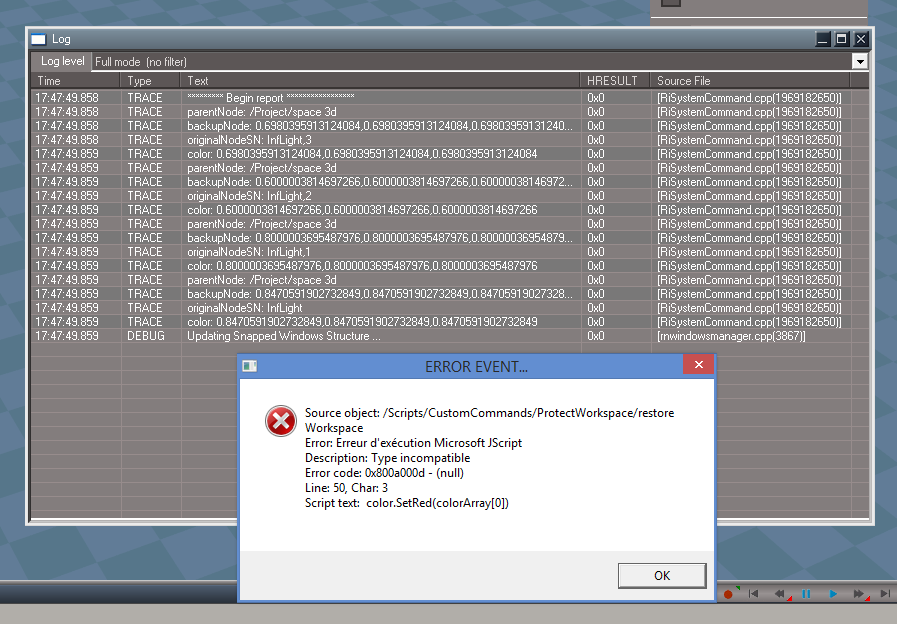
Wow, this is a a mystery. It still works for me even with your scene. Can you try this scene? I modified the code to generate and display a report to hopefully see what's going on.
Attachments
space 3d.scn
(350.85 KiB) Downloaded 226 times
Clinton Reese

http://clintons3d.com
User avatar
Emmanuel
Chief Warrant Officer
Posts: 670
Joined: 14 Jun 2009, 06:47

Re: D3D Render script

Post by Emmanuel »

Here is the log file.
capture03.png
User avatar
trueBlue
Captain
Posts: 5548
Joined: 06 Jul 2009, 22:50
Type the number ten into the box: 10

Re: D3D Render script

Post by trueBlue »

Works for me too! I animated the Camera1 in Model, and Rendered with the D3D Render Start button. Set the Bridge to On as it looks like that is the way he rendered it. No errors!
Perhaps you can get a better idea if you save as a Workspace Project.
From the screen shot it looks like the AnimPref panel is not the one in the tS761 Update
User avatar
clintonman
Captain
Posts: 5659
Joined: 21 May 2009, 21:08
Type the number ten into the box: 0
Location: California

Re: D3D Render script

Post by clintonman »

Report data looks good, one more test scene. This one may error out earlier. If it does then I have a fix.
Attachments
space 3da965.scn
(351.36 KiB) Downloaded 236 times
Clinton Reese

http://clintons3d.com
User avatar
Emmanuel
Chief Warrant Officer
Posts: 670
Joined: 14 Jun 2009, 06:47

Re: D3D Render script

Post by Emmanuel »

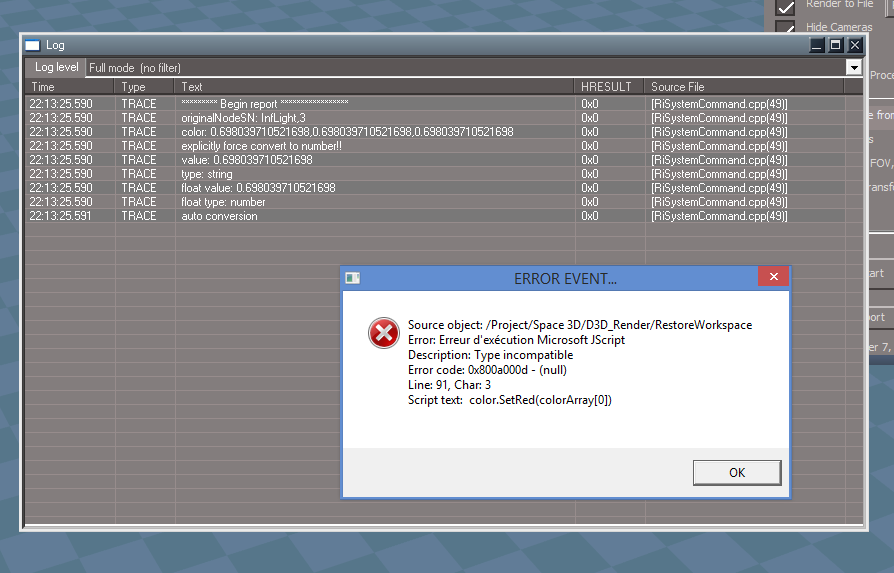
Here is the new log.
capture04.png
User avatar
clintonman
Captain
Posts: 5659
Joined: 21 May 2009, 21:08
Type the number ten into the box: 0
Location: California

Re: D3D Render script

Post by clintonman »

Thanks, it didn't do what I expected. I was trying to force a number conversion but it failed to do so.
Ok, another attempt.
Also try running the attached script.
Attachments
CanSetColor.RsObj
(4.45 KiB) Downloaded 245 times
space 3dddf9.scn
(337.81 KiB) Downloaded 236 times
Clinton Reese

http://clintons3d.com
User avatar
Emmanuel
Chief Warrant Officer
Posts: 670
Joined: 14 Jun 2009, 06:47

Re: D3D Render script

Post by Emmanuel »

I've removed my tS7.61 installation, installed a fresh one with trueBlue B8.5 unofficial update... and now D3D Render doesn't work at all. Also, the Protect Scene from Modelspace option uncheck itself on its own !
Even the new D3D Render version doesn't work.
User avatar
clintonman
Captain
Posts: 5659
Joined: 21 May 2009, 21:08
Type the number ten into the box: 0
Location: California

Re: D3D Render script

Post by clintonman »

Emmanuel wrote: 17 Sep 2019, 18:53 I've removed my tS7.61 installation, installed a fresh one with trueBlue B8.5 unofficial update... and now D3D Render doesn't work at all. Also, the Protect Scene from Modelspace option uncheck itself on its own !
Even the new D3D Render version doesn't work.
That's a lot of crazy.
First try restarting your computer, then open truespace and reset to default context.
Clinton Reese

http://clintons3d.com
User avatar
trueBlue
Captain
Posts: 5548
Joined: 06 Jul 2009, 22:50
Type the number ten into the box: 10

Re: D3D Render script

Post by trueBlue »

The link in this thread to the update is to the previous update.
It does not include the D3D Render
User avatar
clintonman
Captain
Posts: 5659
Joined: 21 May 2009, 21:08
Type the number ten into the box: 0
Location: California

Re: D3D Render script

Post by clintonman »

trueBlue wrote: 17 Sep 2019, 19:16 The link in this thread to the update is to the previous update.
It does not include the D3D Render
Are you sure?
"New upload...
Toolbar Manager 'fixed'
D3D Render 'fixed'"
Clinton Reese

http://clintons3d.com
User avatar
Emmanuel
Chief Warrant Officer
Posts: 670
Joined: 14 Jun 2009, 06:47

Re: D3D Render script

Post by Emmanuel »

I remove that new installation, re-install tS7.61 (with no unofficial update at all), run C3dPersistenceAutoload, thenD3DRenderAutoload,

I Load your scene and the CanSetColor.RsObj

Run CanSetColor.RsObj (nothing happens)

Run the D3D Render, set the Render Settings, clic in the Protect Scene from Modelspace chechbox, clic Start... no error message :superbanana: (but the Protect Scene from Modelspace chechbox uncheck itself on its own).

It looks like there is something wrong with the unofficial updates.
User avatar
clintonman
Captain
Posts: 5659
Joined: 21 May 2009, 21:08
Type the number ten into the box: 0
Location: California

Re: D3D Render script

Post by clintonman »

Emmanuel wrote: 17 Sep 2019, 19:23 I remove that new installation, re-install tS7.61 (with no unofficial update at all), run C3dPersistenceAutoload, thenD3DRenderAutoload,

I Load your scene and the CanSetColor.RsObj

Run CanSetColor.RsObj (nothing happens)

Run the D3D Render, set the Render Settings, clic in the Protect Scene from Modelspace chechbox, clic Start... no error message :superbanana: (but the Protect Scene from Modelspace chechbox uncheck itself on its own).

It looks like there is something wrong with the unofficial updates.
I think it unchecks itself because you have no protect workspace installed. So for a real test you need to install it. http://clintons3d.com/plugins/truespace ... space.html
If you got an error with the CanSetColor I would have said that your truespace is messed up and needs to be reinstalled. So nothing happens is good news.
Clinton Reese

http://clintons3d.com
User avatar
Emmanuel
Chief Warrant Officer
Posts: 670
Joined: 14 Jun 2009, 06:47

Re: D3D Render script

Post by Emmanuel »

I installed the Unofficial Upddate 5 over that fresh installation, reset the layout (to test the YafaRay4tS display)... and lost ALL icons in Workspace toolbars :(
User avatar
Emmanuel
Chief Warrant Officer
Posts: 670
Joined: 14 Jun 2009, 06:47

Re: D3D Render script

Post by Emmanuel »

clintonman wrote: 17 Sep 2019, 19:30 I think it unchecks itself because you have no protect workspace installed. So for a real test you need to install it. http://clintons3d.com/plugins/truespace ... space.html
If you got an error with the CanSetColor I would have said that your truespace is messed up and needs to be reinstalled. So nothing happens is good news.
The error message is back as soon as I install the Protect Workspace script :(
User avatar
clintonman
Captain
Posts: 5659
Joined: 21 May 2009, 21:08
Type the number ten into the box: 0
Location: California

Re: D3D Render script

Post by clintonman »

Emmanuel wrote: 17 Sep 2019, 19:38 I installed the Unofficial Upddate 5 over that fresh installation, reset the layout (to test the YafaRay4tS display)... and lost ALL icons in Workspace toolbars :(
When you say "reset the layout" do you mean reset default context?
Clinton Reese

http://clintons3d.com
User avatar
clintonman
Captain
Posts: 5659
Joined: 21 May 2009, 21:08
Type the number ten into the box: 0
Location: California

Re: D3D Render script

Post by clintonman »

Emmanuel wrote: 17 Sep 2019, 19:41
clintonman wrote: 17 Sep 2019, 19:30 I think it unchecks itself because you have no protect workspace installed. So for a real test you need to install it. http://clintons3d.com/plugins/truespace ... space.html
If you got an error with the CanSetColor I would have said that your truespace is messed up and needs to be reinstalled. So nothing happens is good news.
The error message is back as soon as I install the Protect Workspace script :(
The last scene I uploaded should have a slightly different error and report information. Can you give a screen shot of that?
Clinton Reese

http://clintons3d.com
User avatar
Emmanuel
Chief Warrant Officer
Posts: 670
Joined: 14 Jun 2009, 06:47

Re: D3D Render script

Post by Emmanuel »

clintonman wrote: 17 Sep 2019, 19:43 When you say "reset the layout" do you mean reset default context?
My mistake : I clicked the YafaRay4tS tab before using the Reset_to_default_context icon that applies the unofficial update change.
Sorry, it is late here in France and my brain does not run as it should. That's not the best state for testing :lol:
User avatar
clintonman
Captain
Posts: 5659
Joined: 21 May 2009, 21:08
Type the number ten into the box: 0
Location: California

Re: D3D Render script

Post by clintonman »

Making progress...
How about running that last scene before you go to sleep? :P
Clinton Reese

http://clintons3d.com
User avatar
Emmanuel
Chief Warrant Officer
Posts: 670
Joined: 14 Jun 2009, 06:47

Re: D3D Render script

Post by Emmanuel »

Here it is.
capture05.png
User avatar
clintonman
Captain
Posts: 5659
Joined: 21 May 2009, 21:08
Type the number ten into the box: 0
Location: California

Re: D3D Render script

Post by clintonman »

Emmanuel wrote: 17 Sep 2019, 20:15 Here it is.

capture05.png
Bingo, I know how to fix it now.
My guess is that we may be running different versions of windows with different jscript engines. The one I'm running is correcting the data type before using it in the set color functions. I'm running windows10 and maybe Emmanuel is running an earlier version of windows. I'll test with windowsXP to see if the error occurs there.

Edit:

Tested on winxp and it does the conversion automatically, so will have to make the fix blindly and hope it works.
Clinton Reese

http://clintons3d.com
User avatar
clintonman
Captain
Posts: 5659
Joined: 21 May 2009, 21:08
Type the number ten into the box: 0
Location: California

Re: D3D Render script

Post by clintonman »

I updated the D3D Render and ProtectWorkspace and gave the changes to trueBlue for the updates.

http://clintons3d.com/plugins/truespace ... space.html
http://clintons3d.com/plugins/truespace ... ender.html

My website also has the latest changes.
Clinton Reese

http://clintons3d.com
User avatar
Emmanuel
Chief Warrant Officer
Posts: 670
Joined: 14 Jun 2009, 06:47

Re: D3D Render script

Post by Emmanuel »

Yepee, it works. :bananamouse: :bananamouse:
No error message (btw I am using Windows 8.1)

Clinton, you are the boss !
User avatar
clintonman
Captain
Posts: 5659
Joined: 21 May 2009, 21:08
Type the number ten into the box: 0
Location: California

Re: D3D Render script

Post by clintonman »

Awesome,
Windows 8 the one version I don't have for testing. I have XP, 7 and 10.
Clinton Reese

http://clintons3d.com
User avatar
clintonman
Captain
Posts: 5659
Joined: 21 May 2009, 21:08
Type the number ten into the box: 0
Location: California

Re: D3D Render script

Post by clintonman »

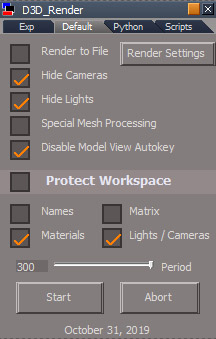
Update October 31, 2019

fixed a bug with the jscript script processing commands - they were all still set to run from old location inside the scene
added an option to disable Model view autokey
Clinton Reese

http://clintons3d.com
User avatar
trueBlue
Captain
Posts: 5548
Joined: 06 Jul 2009, 22:50
Type the number ten into the box: 10

Re: D3D Render script

Post by trueBlue »

I have not figured out how to use the Command Script Processing yet.

Do you need to have these buttons and if so how are they used?
tempsnip.png
Start?
Stop?
Set Target Node?

I notice you have default settings and they are different in the installed state. Is there a recommended default state?
D3dRenderPanel1.jpg
D3dRenderPanel1.jpg (47.77 KiB) Viewed 3305 times
As an example can you supply the Steps needed to make this Workspace animation into a Model animation?
Attachments
Camera Shake Effect.RsRcd
(863.45 KiB) Downloaded 200 times
User avatar
clintonman
Captain
Posts: 5659
Joined: 21 May 2009, 21:08
Type the number ten into the box: 0
Location: California

Re: D3D Render script

Post by clintonman »

trueBlue wrote: 01 Nov 2019, 15:17 I have not figured out how to use the Command Script Processing yet.

Do you need to have these buttons and if so how are they used?
tempsnip.png
Start?
Stop?
Set Target Node?

I notice you have default settings and they are different in the installed state. Is there a recommended default state?
D3dRenderPanel1.jpg

As an example can you supply the Steps needed to make this Workspace animation into a Model animation?
No recommended default state. 100% depends on what you're trying to do.
The D3D Render is generally used for getting animations from Model view into workspace, not the other way so it won't help with this scene.

if it did work the steps would be:
open model view
open new 3d view
open Vibrator in link editor
disconnect the watchdog from the Random Generator
select Random Generator
press select entry command node
same selection, press exit command node
copy script node hooks
Clinton Reese

http://clintons3d.com
User avatar
clintonman
Captain
Posts: 5659
Joined: 21 May 2009, 21:08
Type the number ten into the box: 0
Location: California

Re: D3D Render script

Post by clintonman »

Update Nov 4 2019

new python special mesh processing - more stable
no need to create and manually assign the python script for special mesh processing
Clinton Reese

http://clintons3d.com
User avatar
clintonman
Captain
Posts: 5659
Joined: 21 May 2009, 21:08
Type the number ten into the box: 0
Location: California

Re: D3D Render script

Post by clintonman »

Update April 2025

Large rewrite of the tool used to combine workspace and modelspace renders into one d3d render.

The ability to bake workspace animations to modelspace has been restored.

The sync between modelspace and workspace is improved. It uses a new modelspace tsx plugin instead of the incredibly buggy python script. Well not so much the python script is buggy, the real issue is the broken python system inside trueSpace.

The old protection scripts have been mostly removed and a new protect materials has been installed.

The cancel process is quicker.

When protecting materials it keeps track of memory usage so tS does not crash when it runs out. This is only an issue when protecting a lot of materials.

upgraded user interface.

The documentation is not done yet and there will probably be one more release for issues I find while creating the documentation.

https://clintons3d.com/plugins/truespac ... ender.html
Clinton Reese

http://clintons3d.com
User avatar
clintonman
Captain
Posts: 5659
Joined: 21 May 2009, 21:08
Type the number ten into the box: 0
Location: California

Re: D3D Render script

Post by clintonman »

Update:

fixed bugs found while writing the documentation

added more checks before the render
Clinton Reese

http://clintons3d.com

Return to “TechForum”