Alkathosk - Minlis WIP (3D Cartoon Character Design WIP)

User avatar
Draise
Captain
Posts: 3200
Joined: 21 Sep 2009, 19:33
Type the number ten into the box: 0
Location: Bogota, Colombia

Alkathosk - Minlis WIP (3D Cartoon Character Design WIP)

Post by Draise »

Alkathosk - Minlis WIP (3D Cartoon Character Design WIP)

Image

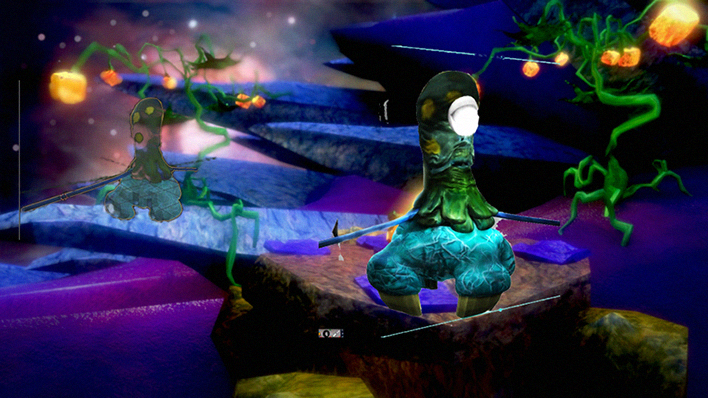
This is the character I'm going to make. He is part of my Alkathosk project or mini webseries made entirely, or mostly, in trueSpace, a project testing to see if tS is a viable cheap method for a production worthy of selling.

So far I've started the asteroid where these characters live in a previous WIP, including one of the characters called Krahli. If you want more info, you can visit my blog site and check out more info on the project! You can even collaborate, the more I organize it.

Alkathosk Project
jamesmc
Captain
Posts: 1776
Joined: 08 Jul 2009, 15:35

Re: Alkathosk - Minlis WIP (3D Cartoon Character Design WIP)

Post by jamesmc »

How is "Alkathosk" pronounced?

I tried, but kept spitting all over myself.
Walk by faith, not by sight.
User avatar
Draise
Captain
Posts: 3200
Joined: 21 Sep 2009, 19:33
Type the number ten into the box: 0
Location: Bogota, Colombia

Re: Alkathosk - Minlis WIP (3D Cartoon Character Design WIP)

Post by Draise »

:lol: :lol: :lol: :lol: :lol: :lol:

hahahaha.. Ok..

Al - ka - thosk

Al - Kah - thoh-sk

Does that help?

Or:

ul - kah - thoh-sk
DarkScythe
Senior Chief Petty Officer
Posts: 243
Joined: 23 Sep 2009, 08:57

Re: Alkathosk - Minlis WIP (3D Cartoon Character Design WIP)

Post by DarkScythe »

nice :bananamouse: ... are you gonna entry it in the challenge?
User avatar
Draise
Captain
Posts: 3200
Joined: 21 Sep 2009, 19:33
Type the number ten into the box: 0
Location: Bogota, Colombia

Re: Alkathosk - Minlis WIP (3D Cartoon Character Design WIP)

Post by Draise »

Yes! I will enter this guy into the contest! Once I model him ofcourse... =P
User avatar
clintonman
Captain
Posts: 5659
Joined: 21 May 2009, 21:08
Type the number ten into the box: 0
Location: California

Re: Alkathosk - Minlis WIP (3D Cartoon Character Design WIP)

Post by clintonman »

Nice concept. Though I did think he had some long thing growing out of his ear when I first saw it. :)
Clinton Reese

http://clintons3d.com
User avatar
Draise
Captain
Posts: 3200
Joined: 21 Sep 2009, 19:33
Type the number ten into the box: 0
Location: Bogota, Colombia

Re: Alkathosk - Minlis WIP (3D Cartoon Character Design WIP)

Post by Draise »

:D Strange disease, whatever was growing out of his ear!

Image

Started working on the modelling.


My TS has a strange error where I have to drag the mouse on soft select or paint select on WS to select geometry. I can't just click and select whatever.

I wish there would be a quick fix for this somewhere, as I have had trouble fixing it permanently... I have done cold layout/toolbars/script reinstalls, momentarily fixing it when i reset the default context and do cold reissues, but after some use it has the same error... This error reflects on past .CTX backups when previously it didn't...

Anyway! I have Minlis on a livespace. You can either visit my space and go to the Alkathosk Portal, then then into the Minlins - Build area or directly go to:

//190.24.111.140/1114

!
Try not do change anything!
User avatar
MikomDude
Captain
Posts: 1930
Joined: 04 Oct 2010, 11:12
Type the number ten into the box: 0
Location: The Hague, Netherlands

Re: Alkathosk - Minlis WIP (3D Cartoon Character Design WIP)

Post by MikomDude »

If you can't select or click anything, or only a few things, then just restart trueSpace and you should be ok. I get that all the time, I'm not sure what exactly it is that causes this...
User avatar
Draise
Captain
Posts: 3200
Joined: 21 Sep 2009, 19:33
Type the number ten into the box: 0
Location: Bogota, Colombia

Re: Alkathosk - Minlis WIP (3D Cartoon Character Design WIP)

Post by Draise »

I couldn't fix the problem.. But I found that it isn't too much of an issue if I use the widget or move faces, points or edges as if I had a Softimage system. (click on item to drag, click select and modify with widget). Then the paint select can only be used for exactly that, paint select.. and when i want to add or deselect painted faces, i select the item, then hold the CTRL or SHIFT button then deselect accordingly.

I haven't had a very productive weekend, many friends and good time.. but sometimes that's needed to keep on nerding it out healthily!

So here is a little update:

Image

I'm loving the other entries, and it's going to be a hard vote! Very good.
User avatar
Steinie
Captain
Posts: 2958
Joined: 21 May 2009, 17:38
Type the number ten into the box: 10

Re: Alkathosk - Minlis WIP (3D Cartoon Character Design WIP)

Post by Steinie »

This creature's name is "Joy" isn't it?

Last name is "Stick" :bananamouse:
User avatar
clintonman
Captain
Posts: 5659
Joined: 21 May 2009, 21:08
Type the number ten into the box: 0
Location: California

Re: Alkathosk - Minlis WIP (3D Cartoon Character Design WIP)

Post by clintonman »

Draise wrote:
My TS has a strange error where I have to drag the mouse on soft select or paint select on WS to select geometry. I can't just click and select whatever.

I wish there would be a quick fix for this somewhere, as I have had trouble fixing it permanently... I have done cold layout/toolbars/script reinstalls, momentarily fixing it when i reset the default context and do cold reissues, but after some use it has the same error... This error reflects on past .CTX backups when previously it didn't...
I've seen that too. My theory(and it's only a theory) is that the priority on the widgets gets messed up and the PE Select tool takes over . You can try adjusting the values on these nodes:

Widgets/Tools/Mesh editor/PE basic select/Basic select/Background widget controller

Widgets/Tools/Mesh editor/PE Select tool/Select_apply/Background widget controller

Widgets/Tools/Mesh editor/PE soft select/Soft select/Background widget controller
Clinton Reese

http://clintons3d.com
User avatar
Draise
Captain
Posts: 3200
Joined: 21 Sep 2009, 19:33
Type the number ten into the box: 0
Location: Bogota, Colombia

Re: Alkathosk - Minlis WIP (3D Cartoon Character Design WIP)

Post by Draise »

I... had a look at those nodes and found two to be at a priority of 0 and the other at 1.

I will compare them to a default context as when you reset the context it isn't screwed up.....

EDIT: I compared them and they are all identical. I even copied the original to the new one, and it didn't fix the issue. So I guess that theory is debunked..

I wonder......
User avatar
Draise
Captain
Posts: 3200
Joined: 21 Sep 2009, 19:33
Type the number ten into the box: 0
Location: Bogota, Colombia

Re: Alkathosk - Minlis WIP (3D Cartoon Character Design WIP)

Post by Draise »

Image

I'm at home on a Saturday night, infact all my 5 roommates were at home tonight! Strange! But my stomach is still bloated, and now I can't sleep.. So I modeled a little.
User avatar
Draise
Captain
Posts: 3200
Joined: 21 Sep 2009, 19:33
Type the number ten into the box: 0
Location: Bogota, Colombia

Re: Alkathosk - Minlis WIP (3D Cartoon Character Design WIP)

Post by Draise »

Again, woke up with acid in my stomach, what to do!!!

Image

Going to export him as an OBJ and UV him in Blender, to texture paint his colour in blender. But I'm not sure about the colours at the moment. I may jsut fiddle with my tablet tonight doing some 2D drawings. But I think the modeling is practically done! Wasn't so hard after all!!!
User avatar
Draise
Captain
Posts: 3200
Joined: 21 Sep 2009, 19:33
Type the number ten into the box: 0
Location: Bogota, Colombia

Re: Alkathosk - Minlis WIP (3D Cartoon Character Design WIP)

Post by Draise »

Got a little stumped on the colours.... so decided to try practice some actual hand on pen action... and opened up gimp and sketched this little image to help with ideas.

Image

I will later, find images with colour pallettes to taste and will experiment with shading and colours.

Fun!
User avatar
Draise
Captain
Posts: 3200
Joined: 21 Sep 2009, 19:33
Type the number ten into the box: 0
Location: Bogota, Colombia

Re: Alkathosk - Minlis WIP (3D Cartoon Character Design WIP)

Post by Draise »

Updated it's livespace! You can personally check it out!

//190.24.111.140/1114
User avatar
Draise
Captain
Posts: 3200
Joined: 21 Sep 2009, 19:33
Type the number ten into the box: 0
Location: Bogota, Colombia

Re: Alkathosk - Minlis WIP (3D Cartoon Character Design WIP)

Post by Draise »


!
Livespace Offline
Scene was corrupted or something...

meanwhile, did the UV unwrapping in Blender, ready to texture paint in blender. I found a good texture layer feature, so going to play with that. I may also try import the mesh into sculptris, subdivide it and add some deatail for a good normal map for the WS render. Slow progress! Time is ticking fast!

Image

I have a lot on my plate..
User avatar
Draise
Captain
Posts: 3200
Joined: 21 Sep 2009, 19:33
Type the number ten into the box: 0
Location: Bogota, Colombia

Re: Alkathosk - Minlis WIP (3D Cartoon Character Design WIP)

Post by Draise »

Righteo! I have a 3 day holiday over the weekend as it's Colombia's independence day. So that give me some time to chill on my home computer on my own projects. So with the great news of SMAK being free, I've decided to change my workflow.

I was thinking to do the textures in Blender, because it has everything, but I think there is no need for that, well maybe only for the specular maps or other maps. But using sculptris and smak, I don't have to worry about the sculpting UV and texture troubles untill I bake it all onto the other low poly Uv'd one! Hurrah! That makes life easier.

So in order to sculpt a poly mesh made in TS, I subdivided it as wanted, fixed the Ngons, then triangulated it. Scultris works better with Tri's. So now in scultris i subdivided again and began sculpting. As you can see the detail is good. I have yet to try out smak and it's baking capabilities, but we'll see...

Image
User avatar
Draise
Captain
Posts: 3200
Joined: 21 Sep 2009, 19:33
Type the number ten into the box: 0
Location: Bogota, Colombia

Re: Alkathosk - Minlis WIP (3D Cartoon Character Design WIP)

Post by Draise »

Image

Update, ok, don't have much time and I want to get this project underway, so gonna start doing some painting. My computer isn't hacking the polycount, not sure why.
User avatar
Draise
Captain
Posts: 3200
Joined: 21 Sep 2009, 19:33
Type the number ten into the box: 0
Location: Bogota, Colombia

Re: Alkathosk - Minlis WIP (3D Cartoon Character Design WIP)

Post by Draise »

Image

Ok... a small glitch in the auto UV of sculptris. For a free application, it's great. But man does it have it's limitations! I wish it would preserve UV's on sculpt, and have detail layers and UV based painting also. That would be nice..... I guess that why you buy the full thing of Zbrush or Mudbox.

Going to export the maps to Blender and try figure out what went wrong and continue in there. But before I do that, I may need to bake these textures onto a low poly using SMAK. Wish me luck!
User avatar
Draise
Captain
Posts: 3200
Joined: 21 Sep 2009, 19:33
Type the number ten into the box: 0
Location: Bogota, Colombia

Re: Alkathosk - Minlis WIP (3D Cartoon Character Design WIP)

Post by Draise »

Hehehe.. I think I'm gonna keep this as a live update as I work.

So! SMAK is awesome. You can export the textures from sculptris then add them to the detailed object in SMAK. Now I just need to make sure the objects are lined up and test the theory of projection to and from each.
User avatar
Steinie
Captain
Posts: 2958
Joined: 21 May 2009, 17:38
Type the number ten into the box: 10

Re: Alkathosk - Minlis WIP (3D Cartoon Character Design WIP)

Post by Steinie »

Draise,
If you have time please better describe how you take the UV of Sculptris and utilize it in Smak. What is your workflow between them.
Looking good!!!
User avatar
Draise
Captain
Posts: 3200
Joined: 21 Sep 2009, 19:33
Type the number ten into the box: 0
Location: Bogota, Colombia

Re: Alkathosk - Minlis WIP (3D Cartoon Character Design WIP)

Post by Draise »

Yeah I'd love to! But I'm still figuring it out.

Process:

1. Make Low Poly mesh in trueSpace or any other program. Later Unwrap the UV of the Low Poly mesh.
2. Subdivide and triangulate mesh to export to Sculptris.
3. Import with no scale and subdivide again within Sculptris
4. Make new sculpt detail.
5. Switch to paint mode and allow some time for Sculptris to regenerate the UV's.
6. Paint textures.
7. Export normals, diffuse and bump layers and the high poly sculpted mesh.
8. Import low poly and high poly mesh into SMAK
9. Make sure each model is the same size, and that the high poly mesh is contained within the low poly mesh.
10. Add the low poly to the low poly and the high poly to the high poly side of the map generators. You can optionally load textures onto the high poly (necessary for diffuse and cavity from normal map)
11. Generate each map accordingly: diffuse, normal, AO, and cavity (optional). Do each one seperately because it's safer.
12. Now SMAK will generate the textures from your highpoly mesh from sculptris to your low poly mesh.


I'm having a little trouble making the Normal Map Generator to work well. It's a little tricky because you need to make sure the normals of the high poly mesh are more or less contained within the low poly mesh.

I got the following anomalies due to exactly that. But otherwise, all the textures, bump, even AO were generated onto the low poly mesh, as planned.

Later I will reimport the UV's mesh from blender into truespace again, as OBJ's and then invert the UV (as truespace seems to do that) and paint the textures generated from SMAK and made in Sculptris.

All free software! But I think I'm going to clean up some of the textures either in sculptris or blender.. as you can see their are errors.

Image

Also need to figure out a way as to fix those errors. they are ugly.
User avatar
Draise
Captain
Posts: 3200
Joined: 21 Sep 2009, 19:33
Type the number ten into the box: 0
Location: Bogota, Colombia

Re: Alkathosk - Minlis WIP (3D Cartoon Character Design WIP)

Post by Draise »

My english in the last one was terrible but I hope you got it! Here is a proposed fix to the normal map generation anomalies.

Image

In blender I fixed up the low poly mesh to fully incase the high poly mesh. As you can see that the low poly mesh fits snuggly around the high poly one.

This is necessary for the normal map generation. Unfortunately the flaps are a hard thing to model, UV and use to generate maps. Quite irritating really.
User avatar
Draise
Captain
Posts: 3200
Joined: 21 Sep 2009, 19:33
Type the number ten into the box: 0
Location: Bogota, Colombia

Re: Alkathosk - Minlis WIP (3D Cartoon Character Design WIP)

Post by Draise »

Image

Ok... I am going out to a BBQ with mates. Weekends are fun to work in, but so are people... Anyway! So I finally am starting to get the hang on Blender's paint layers and paint system. Crikey it's hard to do. And I found a bug that somehow locked my model from being painted... And damn it's not intuitive to learn unless you get some kind of 20 minute tutorial!

SMAK was super easy, so is Sculptris, despite it's limits... but seriously.

I think any program should have a dummed down front face value, then if you want to, you can delve into heavier options that give you more flexibility, but the core face value of the interface and tools should be dummed down to utter minimalism and easy of use. Crikey!

Blender is powerful... and hard.

So, decided to put on some spots. My roomies think this is starting to look like... either a joystick or something else quite devious. I didn't do that intentionally, and after 15 concept's I didn't think... oh well, too late now!

I may taper the tentacles a little later.

Also, I need to make a blank white light to paint on. Sometimes I don't know what are the true colours. But I guess I could change that in another free program.
User avatar
Draise
Captain
Posts: 3200
Joined: 21 Sep 2009, 19:33
Type the number ten into the box: 0
Location: Bogota, Colombia

Re: Alkathosk - Minlis WIP (3D Cartoon Character Design WIP)

Post by Draise »

Image

Here's another final colour design! It's strange! I'm going to import the textures into other programs and finally truespace to see how it actually looks like! Exciting!
User avatar
Draise
Captain
Posts: 3200
Joined: 21 Sep 2009, 19:33
Type the number ten into the box: 0
Location: Bogota, Colombia

Re: Alkathosk - Minlis WIP (3D Cartoon Character Design WIP)

Post by Draise »

This is quite the learning curve!

I've found many issues. Due to painting on the UV in blender, the you can choose if the UV subdivides or not. Truespace seems to run another algorithm of the UV's and subdivides the texture, stretching them a bit. Quite a bit. I got the following errors on some seams.

Image

But after some smudging, softening in blender, with 6 or 8 pixel bleeding, I've managed to fix that, and it all looks fine now! Cleaned up the seams with smudge and everything.

Image

Now I'm working on the normal map. The normal map from SMAK is good, but it's to the world tangent. Unfortunately trueSpace only reads normal maps from object tangents, and to get world tangent you need to play a lot with the link editor, and I couldn't be bothered. So using a Normal Map plugin for GIMP which is based of Nvidias plugin for photoshop, I managed to flatten out the world Tangen normal map to object tangent normal map.

Unfortunately, like the diffuse map, I got some seams and odd anomalies. I found many anomalies around the gills because the UV extract on those were terrible to do well... I had to blur them alot in blender to make them not ugly....


Sucks I can only work on this between slight hangovers during the weekend!
User avatar
Draise
Captain
Posts: 3200
Joined: 21 Sep 2009, 19:33
Type the number ten into the box: 0
Location: Bogota, Colombia

Re: Alkathosk - Minlis WIP (3D Cartoon Character Design WIP)

Post by Draise »

Image

See this is the problem.. Seams.... But using the normal map I made in GIMP, and using Blender, I've managed to clean up these seams by blurring the colours together, with 6 pixel bleed for truespace realtime render engine.
User avatar
Draise
Captain
Posts: 3200
Joined: 21 Sep 2009, 19:33
Type the number ten into the box: 0
Location: Bogota, Colombia

Re: Alkathosk - Minlis WIP (3D Cartoon Character Design WIP)

Post by Draise »

Image

here's a sample of the normal map. Smoothed, with another blured overlay to give it more amplitude, and the vine layer from Blender overlayed as another normal map twice, once blurred to get more veins. Yay!
User avatar
Draise
Captain
Posts: 3200
Joined: 21 Sep 2009, 19:33
Type the number ten into the box: 0
Location: Bogota, Colombia

Re: Alkathosk - Minlis WIP (3D Cartoon Character Design WIP)

Post by Draise »

Image

So there you have it! Something not perfect, but more than decent! I have the map nearly double what I'll have it in production, but here he is! Now I'm going to make some undermaps with some textures and different shades, a dead coloured one, a fat coloured one and then the skin coloured one.. to get some real time translucency on this guy! See how it looks.. Then I gotta make his eye, then rig him well enough to pose him to then enter the contest! Not that it has enough contestants already... ;)
User avatar
Draise
Captain
Posts: 3200
Joined: 21 Sep 2009, 19:33
Type the number ten into the box: 0
Location: Bogota, Colombia

Re: Alkathosk - Minlis WIP (3D Cartoon Character Design WIP)

Post by Draise »

Righteo.. Working on the the translucency. Everything in this world will be translucent for the look and feel, if I can. It will be taxing on my card, but it will still be 100 times faster than renders using traditional biased or unbiased render engines... with only the GPU. We'll see how this goes.

Image
User avatar
Draise
Captain
Posts: 3200
Joined: 21 Sep 2009, 19:33
Type the number ten into the box: 0
Location: Bogota, Colombia

Re: Alkathosk - Minlis WIP (3D Cartoon Character Design WIP)

Post by Draise »

Ok, textures done, that's all good now!

Image

Now making textures for the eyes and modeling the eyes. I have learnt a rough way to control shapes, just don't know how to make and integrar number into a vectoral number. I think that means.... 1 into 1.000. And then I also need to divide this value by the power of 10 or 100 to get 1 = 0.1. Not sure how to do that.....

But then I could make some powerful rig controls with shapes from that!

To get a good eye texture, I found a friends photograph, got a chunch of flat eye colour and then copied and pasted it into a circle to make a flat eye texture. I will mod it and clean it up in GIMP. I used Paint.Net to do the copy and pasting and image manipulation because it's intuitive and easy. With GIMP you gotta use a complicated system of move, then select rotate, rotate, accept in the rotate dialogue, select move tool, move again, rotate again, accept, paste the changed selection into a layer, select again if needed, copy selection into new layer, repeat.. and that's too much beaucracy!

Image

Prefer, copy, paste into new layer, one tool to move and scale and rotate, do that various times and viola! the simplicity of Paint.Net is good! The whole dialogue accept to rotate/scale is a little annoying in GIMP. Very slow.

I can't get refraction easily in TS, but it may not be needed in the eyes. I will just give it a false curve and a flat texture in the eye to get the desired effect.

I will then later make eye deform controls with morphs to give it dynamic deformations when it looks around.

Image
User avatar
Dragneye
Lieutenant
Posts: 906
Joined: 02 Sep 2009, 22:09

Re: Alkathosk - Minlis WIP (3D Cartoon Character Design WIP)

Post by Dragneye »

Draise, I gotta tell ya; this is the whackiest thing I've seen in a while. :)
:bananathumb:
User avatar
Draise
Captain
Posts: 3200
Joined: 21 Sep 2009, 19:33
Type the number ten into the box: 0
Location: Bogota, Colombia

Re: Alkathosk - Minlis WIP (3D Cartoon Character Design WIP)

Post by Draise »

Hehe thanks Drangoneye.

Here's an update for you! He doesn't look so weird with his eye! He's ready for rigging now! Maybe some minor touchups on the mesh, but all good! I may make him more... "slimey".

I'm looking forward to seeing where I can go with the animation and rigging in trueSpace... let's see how far I can go...

Image
User avatar
Dragneye
Lieutenant
Posts: 906
Joined: 02 Sep 2009, 22:09

Re: Alkathosk - Minlis WIP (3D Cartoon Character Design WIP)

Post by Dragneye »

Would like to see how far you get with animating. I could rarely make it to a finished product in the past due to tS bugging out.
My only advice is to keep it as simple as possible for success.
User avatar
Draise
Captain
Posts: 3200
Joined: 21 Sep 2009, 19:33
Type the number ten into the box: 0
Location: Bogota, Colombia

Re: Alkathosk - Minlis WIP (3D Cartoon Character Design WIP)

Post by Draise »

Yes, you're right about that.. I've done some experimenting and I find the simpler you keep the rig, or anything 3D, the less room for error...

I have experimented and documented some bugs I found in the rigging process, up to a point that I could make a semi complicated rig. But it took a lot of TS crashes to find them! I will document my method of practice as I go a long. As far as I know, I did rig and animate a full hand without errors. But I have yet to figure out squash and stretch, muscle deformations, even if possible, and clean controllable FK/IK rigs.. I guess this is just my personal stress test for TS.. And to see what quality animation I can get from TS........
User avatar
Draise
Captain
Posts: 3200
Joined: 21 Sep 2009, 19:33
Type the number ten into the box: 0
Location: Bogota, Colombia

Re: Alkathosk - Minlis WIP (3D Cartoon Character Design WIP)

Post by Draise »

Image

Righteo, here is my rigging plan.

Red = bone places and skin influences, stretch indications
Green = IK controls
Yellow = squash and stretch

I may add a little squash and stretch in the legs also along with the body.

I am planning to make the eye deform using morphs, with X and Y movement, plus morphs for the eyelids and expressions. I will later make controls that link the eyebrow morphs, face morphs and mouth morphs into basic controls for a very expressive character.
User avatar
Draise
Captain
Posts: 3200
Joined: 21 Sep 2009, 19:33
Type the number ten into the box: 0
Location: Bogota, Colombia

Re: Alkathosk - Minlis WIP (3D Cartoon Character Design WIP)

Post by Draise »

Image

Scaled the rig.. not sure what that will do. I have also added the IK controls, the constraints and the rig is set. I did delete the former controls, and I think one of my tips advised against that. But we'll see.
*later
Oh crap... well yes, I should have listened to my own advice. Found out you can't scale constraints. It screws things up. I'll post that in the thread. Atleast I have an idea for the controls. In the LE I'll also have the squash/stretch and other facial controls with morphs. Everything I can't get through a lack of latices or expressions I can get from morphs.
User avatar
Draise
Captain
Posts: 3200
Joined: 21 Sep 2009, 19:33
Type the number ten into the box: 0
Location: Bogota, Colombia

Re: Alkathosk - Minlis WIP (3D Cartoon Character Design WIP)

Post by Draise »

Image

YAY! FIgured out how to to Object to Tangent Normal Mapping instead of Worl Tangent! YUSS! Looks VERY BEAUTIFUL!

I find most Normal Map baking does it to a Tangent standard, or Object Tangent. Varying it's strength is harder to do in trueSpace or the gamegine, but there is a small easy tecnique that you can overlay and blur multiple passess of the normal map in GIMP or something like that. I like free software. Using your ingenuity, anything is possible!
User avatar
Draise
Captain
Posts: 3200
Joined: 21 Sep 2009, 19:33
Type the number ten into the box: 0
Location: Bogota, Colombia

Re: Alkathosk - Minlis WIP (3D Cartoon Character Design WIP)

Post by Draise »

Image

I have updated his Normal's to Object Tangent and also tried to work on the translucency. Due to the Object Tangents in the normals, I got a strange reading of the translucency, so worked on different shaders to get what I wanted.
User avatar
Draise
Captain
Posts: 3200
Joined: 21 Sep 2009, 19:33
Type the number ten into the box: 0
Location: Bogota, Colombia

Re: Alkathosk - Minlis WIP (3D Cartoon Character Design WIP)

Post by Draise »

Image

And here he is with my AO light rig and a single spot light.

Learning how each light input affects translucency, plus normal map multiplication and all of that is interesting. I don't know half the math in the HLSL script blocks, but hey!! I got this result!
User avatar
Draise
Captain
Posts: 3200
Joined: 21 Sep 2009, 19:33
Type the number ten into the box: 0
Location: Bogota, Colombia

Re: Alkathosk - Minlis WIP (3D Cartoon Character Design WIP)

Post by Draise »

Image

I made him have a slight glow by placing a light. I have yet to learn how to attach a light to a bone, but it should work out fine! He's almost ready to rig. I just have to tighten some joints, and then I'll be ready to have it all sorted ready for the hard part of weighting.
User avatar
Draise
Captain
Posts: 3200
Joined: 21 Sep 2009, 19:33
Type the number ten into the box: 0
Location: Bogota, Colombia

Re: Alkathosk - Minlis WIP (3D Cartoon Character Design WIP)

Post by Draise »

My gosh, I wish rigging was this easy in Autodesk software...
User avatar
Draise
Captain
Posts: 3200
Joined: 21 Sep 2009, 19:33
Type the number ten into the box: 0
Location: Bogota, Colombia

Re: Alkathosk - Minlis WIP (3D Cartoon Character Design WIP)

Post by Draise »

Image

Using a mix of position and rotation constraints, I've managed to create a very very manageable arm! Awesome! I love the rigging in trueSpace, it's very very very very intuitive and easy to do. If the LE editor didn't have so many bugs with the bone/joint attributes, linking the bones to morphs and other attributes would be incredible!

I have also studied some of the pre-made rigs, as I didn't notice, they have foot roll, and an ingenious rotation constraint on the legs! Also learning how to plant the feet, etc. I would kill to have this in Autodesk's rigging. It's all so easy, just click and point. No menus, no attributes, no FK unless I want it...... marvelous. Creating the IK handles was intuitive and had no bugs (unless you forget to add a reference constraint to a handle.)

Now the tricky part is Keying everything... I will probably export all the Matrix values of everything that needs to be keyed to the Root skeleton Keys, and label them for easy use. Another downside of TS is you can't save preset keyframe sets.. like the arm keyframes, or the leg keyframes or all the keyframes. Also, I'm a little nervous as to how to make blended animations...... but considering the posing being simple, I guess making new animations won't be toooo hard.

Going to post some tips in my other thread..
User avatar
Draise
Captain
Posts: 3200
Joined: 21 Sep 2009, 19:33
Type the number ten into the box: 0
Location: Bogota, Colombia

Re: Alkathosk - Minlis WIP (3D Cartoon Character Design WIP)

Post by Draise »

Image

Image

Nearly done!

I had to do a texture switch to aid the weighting, as I found that when you click or highlight a bone, the texture will have to refresh. If you have heavy shaders, then this can sometimes take 5 seconds to refreash..... so made a handy texture switch.

The rigging did prove some troubles because you can have multiple bone weights on the same part of the skin. powerful indeed, but with it comes greater weighting problems. But it wasn't so bad. I found the tools very intuitive, the healing very handy, and everything (following my tips - freeze mesh, stretch bones with no influence, etc) thus making the rigging process very quick and easy.

Nearly done, now it's a matter of time and learning how to animate well with TS limited Fcurve features and additive clip blending.
User avatar
Draise
Captain
Posts: 3200
Joined: 21 Sep 2009, 19:33
Type the number ten into the box: 0
Location: Bogota, Colombia

Re: Alkathosk - Minlis WIP (3D Cartoon Character Design WIP)

Post by Draise »

Image

A stretch morph, well really a fat morph in reverse, along with the stretch. I need to work on the body part of the rig a bit....
User avatar
Draise
Captain
Posts: 3200
Joined: 21 Sep 2009, 19:33
Type the number ten into the box: 0
Location: Bogota, Colombia

Re: Alkathosk - Minlis WIP (3D Cartoon Character Design WIP)

Post by Draise »

I found the same old same old error of mine. The one where you have too many locks on, and it deforms everything beyond repair, the rigs, joints, bones, mesh, everything. It usually only happens on certain spans between full lock constraints.

I finally found the big bug!!! And why is that? Too many full constraints.

I had a full constraint on the body, on the chest and then on the arm tip. With both of them activated, any movement from the chest up to the arm would make everything haywire, with the only save is reloading the scene.

The dreaded bug!!!!

HAH! But I deleted the full constraint on the arms and only put position ones, no more error. Everything is perfect for now.... phew............... scary for a moment there. Didn't know where to begin trouble shooting with that one! But the position node fixed that.

Image

Here he is with a squash, don't want to exaggerate it too much. But he's good. I like how you can use negative values of morphs in this.
User avatar
Draise
Captain
Posts: 3200
Joined: 21 Sep 2009, 19:33
Type the number ten into the box: 0
Location: Bogota, Colombia

Re: Alkathosk - Minlis WIP (3D Cartoon Character Design WIP)

Post by Draise »

Image

Image

Hehehehehe. He's coming on! I have yet to... figure out how I'm going to control shapes from another mesh with the same control as the eye, for example, deform his head when he looks around.

I find the character can only be as good as the the rig can be.

I'm still dreading the animation, as I'm sure it will be very hard to get fluid animation. But that may be a blessing in disguise as I may do it southpark style and do frozen keyframes, as I know WS can do that very well, maybe with some fluid animation here and there depending on the mood. It will be cheaper, faster and not quite as low quality I'm sure. =)

I love it tho! He's slowly become more and more alive!
User avatar
Draise
Captain
Posts: 3200
Joined: 21 Sep 2009, 19:33
Type the number ten into the box: 0
Location: Bogota, Colombia

Re: Alkathosk - Minlis WIP (3D Cartoon Character Design WIP)

Post by Draise »

Another curious beauty shot! =)

Image
User avatar
Draise
Captain
Posts: 3200
Joined: 21 Sep 2009, 19:33
Type the number ten into the box: 0
Location: Bogota, Colombia

Re: Alkathosk - Minlis WIP (3D Cartoon Character Design WIP)

Post by Draise »

I am now testing my character ready for animation. I even tried an autokey script to help in the animation process.. The animation will be featured in another WIP.

Image
These are the eye controls exported to the root of the object. I use two sliders for for the eye direction and brow state. I also have an open/close slider, and a squash and stretch slider. Soon I will have a mouth control as soon as I create the morphs for it.

You can quickly achieve some cool results.
Image
Image
Image
Image
Image
Image

Pro's of Morphs in trueSpace - easily made and quick to add and change in an additive relative way or fixed. No need to change the rig or envelopes to add or modify morphs.
Con's of Morphs in trueSpace - morphing is translation based and vertex rotation values are not calvulated, so a rotating eyeball is impossible and a heavily finetuned system of relative morphs makes an eyeball deform. No biggie, just harder to get the right morphs.

Due to the additive/relative way the morphs work with translation and no rotation of vertex's, you can easily eaggerate anomolies and errors quickly, but finetuning it and animating it well will help you avoid this. There is a pro to this style of morph though, is that it looks MUCH more plasticiney, more maleable and cartoony as the volumes morph easily.

The character has a simple squash and stretch feature, make him fat or thin, then in the rig will stretch or squash accordingly, so that also makes his squash and stretch abilites very maleable.

I will have fun with this guy!
User avatar
Draise
Captain
Posts: 3200
Joined: 21 Sep 2009, 19:33
Type the number ten into the box: 0
Location: Bogota, Colombia

Re: Alkathosk - Minlis WIP (3D Cartoon Character Design WIP)

Post by Draise »

Image

Minlis isn't too terribly impressed with the new mouth shapes of his. Bit I'll refine them, don't you worry!!!

I am wondering if he will talk or not, if I should prep him for lipsync, I guess there is no harm in doing so....
User avatar
Draise
Captain
Posts: 3200
Joined: 21 Sep 2009, 19:33
Type the number ten into the box: 0
Location: Bogota, Colombia

Re: Alkathosk - Minlis WIP (3D Cartoon Character Design WIP)

Post by Draise »

He is starting to like the idea of being expressive...

Image

I am like the ability to bold this guy, I love this part about a character, designing the characterization, in a process of making morphs and controls. It's like making a puppet, then making it come alive.
User avatar
Draise
Captain
Posts: 3200
Joined: 21 Sep 2009, 19:33
Type the number ten into the box: 0
Location: Bogota, Colombia

Re: Alkathosk - Minlis WIP (3D Cartoon Character Design WIP)

Post by Draise »

My word, I'm falling in love with this guy! Pardon my enthusiasm!


Image
User avatar
MikomDude
Captain
Posts: 1930
Joined: 04 Oct 2010, 11:12
Type the number ten into the box: 0
Location: The Hague, Netherlands

Re: Alkathosk - Minlis WIP (3D Cartoon Character Design WIP)

Post by MikomDude »

It looks a lot of fun posing him. Keep it up :)
User avatar
Draise
Captain
Posts: 3200
Joined: 21 Sep 2009, 19:33
Type the number ten into the box: 0
Location: Bogota, Colombia

Re: Alkathosk - Minlis WIP (3D Cartoon Character Design WIP)

Post by Draise »

I have been very busy due to the end of the year to work on my baby.. but I did today, due to not partying hard. I usually work hard, play hard.. but not this weekend. So I can do this. Still a winning situation!

I now have a few more controls for the mouth. The blending of morphs I find to be very exact on the relative additive system. It's annoying as it's mathematics is very linear, thus making errors and artifacts very easy with combined morphs.

But to date I have the following controls:

Blink
Eyebrow left right up and down
Eye look up down left right
Stretch and squash of the whole body
mouth corner L up/down R up/down
both mouth corners up and down
mouth location up down left right
mouth/lips in/out

I think this will have to be enough for now. I can easily add and change the morphs for later, but now I want to animate.
Saul
Senior Chief Petty Officer
Posts: 308
Joined: 22 May 2009, 16:50

Re: Alkathosk - Minlis WIP (3D Cartoon Character Design WIP)

Post by Saul »

Nice, the colour is really good, would be cool to see it all move.
Attachments
j548zv8TaT16tanim.png
User avatar
Draise
Captain
Posts: 3200
Joined: 21 Sep 2009, 19:33
Type the number ten into the box: 0
Location: Bogota, Colombia

Re: Alkathosk - Minlis WIP (3D Cartoon Character Design WIP)

Post by Draise »

Lol, what's he doing on the table!?

Image

My controls at the moment. Due to the nature of using a colour picker or Bitmap operators, I can't keyframe them from the root object (keying template). I will have to find an alternative to creating bitmap morph controls with keyframes on the root of the object, so I don't have to navigate and find those attributes buries in the whole file structure.. meanwhile posing with the control panel is a breeze and very fun!!!! Like any professional software!!

Now for a test animation and some rough clips.
User avatar
Draise
Captain
Posts: 3200
Joined: 21 Sep 2009, 19:33
Type the number ten into the box: 0
Location: Bogota, Colombia

Re: Alkathosk - Minlis WIP (3D Cartoon Character Design WIP)

Post by Draise »

Image

I ran out of time and energy lastnight to do the animatic.. but he's ready for animation! Maybe need more FK contraints for the legs, but I think he's ready.

I parented the whole actor to a root object using Clinton's parenting script, so any animation I do with rotation, scale or translation will be done to the root object, and the rest will follow suite. The clips won't be affected by it later, so I can use him in a loop animation (walk) and move him aruond.
User avatar
Draise
Captain
Posts: 3200
Joined: 21 Sep 2009, 19:33
Type the number ten into the box: 0
Location: Bogota, Colombia

Re: Alkathosk - Minlis WIP (3D Cartoon Character Design WIP)

Post by Draise »


Just doing some stock animation. I have only done this guy's keyframes one pass over, i haven't had any modded clips, cleaned up the timing nor nothing.. just went once and set the main keyframes I had in mind.

Enjoy!

Return to “Work in Progress”