Normal Move Tool

free scripts, plugins, models, textures
User avatar
clintonman
Captain
Posts: 5659
Joined: 21 May 2009, 21:08
Type the number ten into the box: 0
Location: California

Normal Move Tool

Post by clintonman »

normalMoveImage3.jpg
normalMoveImage4.jpg
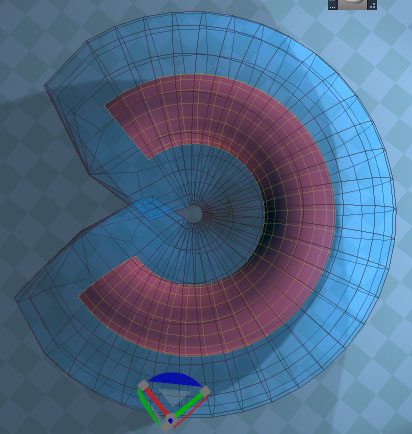
The normal move tool displaces/moves a vertex selection along their average normals. It makes things fat or skinny. It's like an interactive version of the old "FeedTheDino" script included with truespace.

get it at the top of the page here:

http://www.clintons3d.com/plugins/trues ... index.html"

If you have a soft selection it will respect that and move the softer items less.
Also the mesh only updates after the drag is completed. So you have to drag blindly, see the result and make adjustments if needed before right clicking to end the tool.
Clinton Reese

http://clintons3d.com
froo
Captain
Posts: 2554
Joined: 22 May 2009, 12:13

Re: Normal Move Tool

Post by froo »

Wow that's cool man! :bananadrum:
User avatar
marcel
Captain
Posts: 2247
Joined: 21 May 2009, 19:52
Type the number ten into the box: 0
Location: paris - France

Re: Normal Move Tool

Post by marcel »

Good tool for the workspace. It can be used as the shell tool of modelside. Is it possible to use it on a selected part of an object or is it allways on the entire object?
Design - illustration - Animation
http://www.crea-vision.fr
v3rd3
Lieutenant Commander
Posts: 1191
Joined: 21 May 2009, 20:04

Re: Normal Move Tool

Post by v3rd3 »

Thank you sir...
User avatar
clintonman
Captain
Posts: 5659
Joined: 21 May 2009, 21:08
Type the number ten into the box: 0
Location: California

Re: Normal Move Tool

Post by clintonman »

marcel wrote:Good tool for the workspace. It can be used as the shell tool of modelside. Is it possible to use it on a selected part of an object or is it allways on the entire object?
It only works on the selected part of the object.
normalMoveSoft.jpg
This was done with a soft selection to give a smooth transition.
Clinton Reese

http://clintons3d.com
User avatar
bitkar
Captain
Posts: 2089
Joined: 16 Mar 2010, 07:14
Type the number ten into the box: 0
Location: Czech Republic

Re: Normal Move Tool

Post by bitkar »

hey, thats useful... is it possible to compile it as tsx for modeler (ts6.6) side?
Michal aka bitkar
tS freak since tS2 (1998) and forever (tS7.61 modeler)
User avatar
clintonman
Captain
Posts: 5659
Joined: 21 May 2009, 21:08
Type the number ten into the box: 0
Location: California

Re: Normal Move Tool

Post by clintonman »

bitkar wrote:hey, thats useful... is it possible to compile it as tsx for modeler (ts6.6) side?
No, it would require a complete rewrite for modelside. Besides I think marcel showed in another post somewhere around here that the shell tool can be used as a normal move tool.
vi ... 1&start=10"
Clinton Reese

http://clintons3d.com
User avatar
bitkar
Captain
Posts: 2089
Joined: 16 Mar 2010, 07:14
Type the number ten into the box: 0
Location: Czech Republic

Re: Normal Move Tool

Post by bitkar »

this would be just siplier, i love simple things :D but ok, thanks for answer.
Michal aka bitkar
tS freak since tS2 (1998) and forever (tS7.61 modeler)
User avatar
clintonman
Captain
Posts: 5659
Joined: 21 May 2009, 21:08
Type the number ten into the box: 0
Location: California

Re: Normal Move Tool

Post by clintonman »

Update: Tool is fully interactive now. No need to move a little, see the change, move a little more, see the change...
Just drag and see the change all at once.

I think i discovered a way to make the Watch Dog Event node work better. In this tool I run the Watch Dog Event manually the first time and that seems to "unstick" it so it works reliably. I'll need to do some more tests, but in the past it was unpredictable if the node was more than about 2 or 3 levels down in the scene graph. Hopefully this trick will fix those cases too.
Clinton Reese

http://clintons3d.com
User avatar
trueBlue
Captain
Posts: 5548
Joined: 06 Jul 2009, 22:50
Type the number ten into the box: 10

Re: Normal Move Tool

Post by trueBlue »

clintonman wrote: I think i discovered a way to make the Watch Dog Event node work better. In this tool I run the Watch Dog Event manually the first time and that seems to "unstick" it so it works reliably. I'll need to do some more tests, but in the past it was unpredictable if the node was more than about 2 or 3 levels down in the scene graph. Hopefully this trick will fix those cases too.
Nice find! I can confirm that running that command works great in several test on my own. Thanks Clinton!

Also me thinks that converting the selection to vertices would be good too!
Node.Value("/Preferences/Mesh Editor Settings", "PE selection mode") = "vertex"
MeshModifiers.ConvertSelection('','')

Even better if you could use the present PE selection method instead of only vertices.
User avatar
clintonman
Captain
Posts: 5659
Joined: 21 May 2009, 21:08
Type the number ten into the box: 0
Location: California

Re: Normal Move Tool

Post by clintonman »

trueBlue wrote:
clintonman wrote: I think i discovered a way to make the Watch Dog Event node work better. In this tool I run the Watch Dog Event manually the first time and that seems to "unstick" it so it works reliably. I'll need to do some more tests, but in the past it was unpredictable if the node was more than about 2 or 3 levels down in the scene graph. Hopefully this trick will fix those cases too.
Nice find! I can confirm that running that command works great in several test on my own. Thanks Clinton!

Also me thinks that converting the selection to vertices would be good too!
Node.Value("/Preferences/Mesh Editor Settings", "PE selection mode") = "vertex"
MeshModifiers.ConvertSelection('','')

Even better if you could use the present PE selection method instead of only vertices.
Request is done. :) Thanks for the suggestion. It's easier to just convert the selection back and forth, so that's what I did.
Clinton Reese

http://clintons3d.com
User avatar
trueBlue
Captain
Posts: 5548
Joined: 06 Jul 2009, 22:50
Type the number ten into the box: 10

Re: Normal Move Tool

Post by trueBlue »

Perfect! Thanks!
User avatar
trueBlue
Captain
Posts: 5548
Joined: 06 Jul 2009, 22:50
Type the number ten into the box: 10

Re: Normal Move Tool

Post by trueBlue »

Can you check out this widget?
I am getting an error when I open it in Widgets/Tools/PE NormalMove/silderReport
Capture.PNG
Capture.PNG (12.41 KiB) Viewed 4095 times
User avatar
clintonman
Captain
Posts: 5659
Joined: 21 May 2009, 21:08
Type the number ten into the box: 0
Location: California

Re: Normal Move Tool

Post by clintonman »

trueBlue wrote: 14 Jan 2020, 18:40 Can you check out this widget?
I am getting an error when I open it in Widgets/Tools/PE NormalMove/silderReport
Capture.PNG
No clue, without steps to reproduce it can't tell.
Clinton Reese

http://clintons3d.com
User avatar
trueBlue
Captain
Posts: 5548
Joined: 06 Jul 2009, 22:50
Type the number ten into the box: 10

Re: Normal Move Tool

Post by trueBlue »

Try... Open and Close the driver node
Capture.PNG
Capture.PNG (2.45 KiB) Viewed 4096 times
User avatar
clintonman
Captain
Posts: 5659
Joined: 21 May 2009, 21:08
Type the number ten into the box: 0
Location: California

Re: Normal Move Tool

Post by clintonman »

trueBlue wrote: 14 Jan 2020, 18:57 Try... Open and Close the driver node
Capture.PNG
That would never happen in normal use. So if you want to fix it you'll have to add some tests to check for proper selection and that the selected object is in PE mode.
Clinton Reese

http://clintons3d.com
User avatar
trueBlue
Captain
Posts: 5548
Joined: 06 Jul 2009, 22:50
Type the number ten into the box: 10

Re: Normal Move Tool

Post by trueBlue »

Okay, I added the following to the normalMove script

Code: Select all

	var firstsel = Node.FirstSelected();
	if ((firstsel == "") || !Node.ConExists(firstsel, 'Matrix') || !Node.ConExists(firstsel,"Selection")) 
	{
		params.SetTerminationFlag(); 
		return;
	}
User avatar
clintonman
Captain
Posts: 5659
Joined: 21 May 2009, 21:08
Type the number ten into the box: 0
Location: California

Re: Normal Move Tool

Post by clintonman »

Update Feb 2025

uses fewer undos during operation
move mouse horizontally or vertically(only horizontal before)
include some enhancements from the UU version
new "R" to reset
new snapping option
new number input for the offset value
new toolbar button rclick panel

The reason for this update was that I wanted to test some ideas for the upcoming shear tool, like snapping and numerical inputs and a method for fewer undos when using the tool.

https://clintons3d.com/plugins/truespac ... lmove.html
Clinton Reese

http://clintons3d.com
User avatar
trueBlue
Captain
Posts: 5548
Joined: 06 Jul 2009, 22:50
Type the number ten into the box: 10

Re: Normal Move Tool

Post by trueBlue »

Normal Move Tool
new "R" to reset
In the UU10, the R shortcut is being used for the Rectangle Zoom

So, I will be changing this to N = Reset Normal Offset
or use the current method which is Left Click = Reset Normal Offset

Which one would you prefer?
User avatar
clintonman
Captain
Posts: 5659
Joined: 21 May 2009, 21:08
Type the number ten into the box: 0
Location: California

Re: Normal Move Tool

Post by clintonman »

trueBlue wrote: 17 Feb 2025, 16:18 Normal Move Tool
new "R" to reset
In the UU10, the R shortcut is being used for the Rectangle Zoom

So, I will be changing this to N = Reset Normal Offset
or use the current method which is Left Click = Reset Normal Offset

Which one would you prefer?
When the tool is active R does not run the rectangle zoom so there is no conflict unless you want to rect zoom while normal moving so,
I prefer the keyboard shortcut "N", not the mouse click.

If you're planning a new UU release I have an updated CCFunctionSet and Global Function Set nodes. The CCFunctionSet was reorganized from 950 lines of code down to 652 lines and the GlobalFS has new code to open toolbars.
Clinton Reese

http://clintons3d.com
User avatar
trueBlue
Captain
Posts: 5548
Joined: 06 Jul 2009, 22:50
Type the number ten into the box: 10

Re: Normal Move Tool

Post by trueBlue »

When the tool is active R does not run the rectangle zoom so there is no conflict
For me it does, and the Normal Move widget is still active
So, in this case both are active

Would be best, if one widget canceled the other current widget, like the Object and Camera widgets work
Not sure if that is possible with the Normal Move widget
User avatar
clintonman
Captain
Posts: 5659
Joined: 21 May 2009, 21:08
Type the number ten into the box: 0
Location: California

Re: Normal Move Tool

Post by clintonman »

trueBlue wrote: 17 Feb 2025, 19:26
When the tool is active R does not run the rectangle zoom so there is no conflict
For me it does, and the Normal Move widget is still active
So, in this case both are active

Would be best, if one widget canceled the other current widget, like the Object and Camera widgets work
Not sure if that is possible with the Normal Move widget
Cross post, so you missed my edit

"When the tool is active R does not run the rectangle zoom so there is no conflict unless you want to rect zoom while normal moving so,
I prefer the keyboard shortcut "N", not the mouse click."
Clinton Reese

http://clintons3d.com
User avatar
clintonman
Captain
Posts: 5659
Joined: 21 May 2009, 21:08
Type the number ten into the box: 0
Location: California

Re: Normal Move Tool

Post by clintonman »

Update Feb 17

uses "N" shortcut to reset
load on demand format

This is the first of several updated installers. I found that there was a major flaw in the installer code for the load on demand style scripts. It would add to the list of functions instead of replacing the function.
Clinton Reese

http://clintons3d.com
User avatar
clintonman
Captain
Posts: 5659
Joined: 21 May 2009, 21:08
Type the number ten into the box: 0
Location: California

Re: Normal Move Tool

Post by clintonman »

The last release still had the same old installer bug on one piece. Fixed now.
Clinton Reese

http://clintons3d.com
User avatar
trueBlue
Captain
Posts: 5548
Joined: 06 Jul 2009, 22:50
Type the number ten into the box: 10

Re: Normal Move Tool

Post by trueBlue »

clintonman wrote: 18 Feb 2025, 04:03 The last release still had the same old installer bug on one piece. Fixed now.
Are you sure this new installer is correct?
Have not tried it, just reading
1.) Looks like the Toolbar Manager would be a requirement for non-UU10 installation
2.) Looks like you are copying theScript and theWidget inside trueSpace, which negates Load On-Demand
The toolbar left mouse button Command and RClickCommand should be the process to load theScript and theWidget

Edit: Unless I am missing seeing this, it looks like you are not saving the CCFunctionSet.RsObj to disk
User avatar
clintonman
Captain
Posts: 5659
Joined: 21 May 2009, 21:08
Type the number ten into the box: 0
Location: California

Re: Normal Move Tool

Post by clintonman »

trueBlue wrote: 18 Feb 2025, 18:44
clintonman wrote: 18 Feb 2025, 04:03 The last release still had the same old installer bug on one piece. Fixed now.
Are you sure this new installer is correct?
Have not tried it, just reading
1.) Looks like the Toolbar Manager would be a requirement for non-UU10 installation
2.) Looks like you are copying theScript and theWidget inside trueSpace, which negates Load On-Demand
The toolbar left mouse button Command and RClickCommand should be the process to load theScript and theWidget

Edit: Unless I am missing seeing this, it looks like you are not saving the CCFunctionSet.RsObj to disk
1.) Toolbar Manager is not used by the Normal Move Tool, there is no toolbar.
2.) Script and Widget are copied in so they can be used immediately. They are not saved to disk inside CustomCommands or Widgets. They only exist on disk inside \\Scripts\\clintonobjects\\CustomScriptsStore2\\

LMB
Node.AccessFnSet("Scripts/CustomCommands/CCFunctionSet").NormalMove("LMB")
RMB
Node.AccessFnSet("Scripts/CustomCommands/CCFunctionSet").NormalMove("RMB")

code copied into the CCFunctionSet loads the script and widget and runs it:

Code: Select all

function NormalMove(MouseButton)
{
	if(!LoadScript("NormalMove", "NormalMove.RsObj", "Normal Move Script is not installed")) return;

	if(!Node.Exists("/Widgets/Tools/Mesh editor/PE NormalMove"))
		RsFileIO.LoadObject(System.GetMainDir() + "\\Scripts\\clintonobjects\\CustomScriptsStore2\\PE NormalMove.RsObj", "/Widgets/Tools/Mesh editor");

	if(MouseButton == "LMB") {
		Activity.Run("Scripts/CustomCommands/NormalMove/StartNormalMove")
	} else {
		UserInterface.OpenToolPanelViewEx2("" , "" ,"/Widgets/Tools/Mesh editor/PE NormalMove/Normal Move", 3,1,0)
	}
}
Good catch :bananathumb: , the very last step was missing. While testing I didn't want permanent changes to the CCFunctionSet. Should have copied and commented it out.

Code: Select all

RsFileIO.SaveObject(mainDir + "\\Scripts\\clintonobjects\\CustomScriptsStore\\CCFunctionSet.RsObj", "/Scripts/CustomCommands/CCFunctionSet");
The installer also adds functions OpenToolbar, LoadScript and UpdateScriptManagerList.
OpenToolbar will be removed from the installer since an OpenToolbar function was just added to the latest Global Function Set.
Clinton Reese

http://clintons3d.com
User avatar
trueBlue
Captain
Posts: 5548
Joined: 06 Jul 2009, 22:50
Type the number ten into the box: 10

Re: Normal Move Tool

Post by trueBlue »

Script and Widget are copied in so they can be used immediately
Seems like the user pressing the toolbar Normal Move tool's LMB or RMB command would be the requirement, making the installation a true Load On-Demand
User avatar
clintonman
Captain
Posts: 5659
Joined: 21 May 2009, 21:08
Type the number ten into the box: 0
Location: California

Re: Normal Move Tool

Post by clintonman »

Update Feb 18

Fixed the installer bug found by trueBlue, thanks
Removed the OpenToolbar function from the installer, since it was obsolete for my purposes almost as soon as I added it. The last CCFunctionSet I created for the UU uses it, so the installer will not remove it.

I'm hoping this is the last of the bugs in the installer. If so I can finish up the Shear Tool(complete except for the installer) and fix and update all the old flawed load on demand installers.
Clinton Reese

http://clintons3d.com
User avatar
trueBlue
Captain
Posts: 5548
Joined: 06 Jul 2009, 22:50
Type the number ten into the box: 10

Re: Normal Move Tool

Post by trueBlue »

Ran your newest installer
As said, this is not a true Load On-Demand installer because this installer loads the script and widget
Also. when you Reset to the Default Context, the PE NormalMove widget is still present
The installer does not save the Widgets without the PE NormalMove widget
HTH
User avatar
clintonman
Captain
Posts: 5659
Joined: 21 May 2009, 21:08
Type the number ten into the box: 0
Location: California

Re: Normal Move Tool

Post by clintonman »

trueBlue wrote: 19 Feb 2025, 13:25 Ran your newest installer
As said, this is not a true Load On-Demand installer because this installer loads the script and widget
Also. when you Reset to the Default Context, the PE NormalMove widget is still present
The installer does not save the Widgets without the PE NormalMove widget
HTH
Ah, I see. The new load on demand is not removing the old widget from the Widgets file. I forgot the old version was not load on demand.

Fix is up now, thanks.
Clinton Reese

http://clintons3d.com

Return to “Repositorium”