Howdy all - I've not been around here for a while but I know where to go to get the best advice about tS. I've made a simple animation using tS 7.6. It renders beautifully (and very quickly) in WS using realtime shaders. It renders beautifully, but takes way longer, when using LW renderer. It also renders beautifully without taking quite so long using Vray. The Vray frames look great - I prefer the colour response and clarity of the Vray renders.
The problem reveals itself when I compile the Vray rendered frames - the objects leap about and the results are useless.
I'v searched the forum here for help but have not found any mention. Any work-arounds or insight into this issue would be much appreciated. It's not vital as I can happily use the results from rendering with LW but I would like to be able to render anims with Vray if possible.
Thanx in advance
Wizard
Animations jump when rendered with Vray
-
W!ZARD

- Petty Officer First Class
- Posts: 42
- Joined: 23 May 2009, 08:31
- Type the number ten into the box: 0
- Location: Otautahi, Aotearoa
Animations jump when rendered with Vray
 WHERE MAGICK HAPPENS!!
-
trueBlue

- Captain
- Posts: 5548
- Joined: 06 Jul 2009, 22:50
- Type the number ten into the box: 10
Re: Animations jump when rendered with Vray
Hey W!zard,
Long time, hope all is well in your world!
Is the jumping related to Workspace's bones? Only?
Are you rendering from Workspace?
Do you have Vray for tS761?
Long time, hope all is well in your world!
Is the jumping related to Workspace's bones? Only?
Are you rendering from Workspace?
Do you have Vray for tS761?
-
W!ZARD
- Petty Officer First Class
- Posts: 42
- Joined: 23 May 2009, 08:31
- Type the number ten into the box: 0
- Location: Otautahi, Aotearoa
Re: Animations jump when rendered with Vray
Hi trueBlue. How are you? Things are OK down here although everything is still a shambles from the big earthquakes we've had. I've been spending a lot of time on my PC to keep my mind off the destruction all around us but we're doing pretty well anyway. My only major problem is that my Vray animations jump around like... well, like our house does when we get an aftershock! 
OK, no bones involved in this shot - just a couple of simple spaceships flying in front of a large alpha plane background with the camera panning to follow. Yes I'm rendering from Workspace and I don't know if I'm using Vray for 7.61 or not. It's been awhile since I've used it as I've been doing most of my rendering in Vue. How do I tell if I've got the appropriate version?
OK, no bones involved in this shot - just a couple of simple spaceships flying in front of a large alpha plane background with the camera panning to follow. Yes I'm rendering from Workspace and I don't know if I'm using Vray for 7.61 or not. It's been awhile since I've used it as I've been doing most of my rendering in Vue. How do I tell if I've got the appropriate version?
WHERE MAGICK HAPPENS!!-
bitkar

- Captain
- Posts: 2089
- Joined: 16 Mar 2010, 07:14
- Type the number ten into the box: 0
- Location: Czech Republic
Re: Animations jump when rendered with Vray
maybe you should show what you mean. Just a small resolution video, but big enough to show the bug.
Michal aka bitkar
tS freak since tS2 (1998) and forever (tS7.61 modeler)
tS freak since tS2 (1998) and forever (tS7.61 modeler)
-
Saul
- Senior Chief Petty Officer
- Posts: 308
- Joined: 22 May 2009, 16:50
Re: Animations jump when rendered with Vray
Hi Wizard
Are you using look-at for the camera? If you are you might try turning it off and animating the movement manually.
HTH
Are you using look-at for the camera? If you are you might try turning it off and animating the movement manually.
HTH
-
trueBlue
- Captain
- Posts: 5548
- Joined: 06 Jul 2009, 22:50
- Type the number ten into the box: 10
Re: Animations jump when rendered with Vray
I am great thank you, and I am glad you are doing okay.W!ZARD wrote:Hi trueBlue. How are you? Things are OK down here although everything is still a shambles from the big earthquakes we've had. I've been spending a lot of time on my PC to keep my mind off the destruction all around us but we're doing pretty well anyway. My only major problem is that my Vray animations jump around like... well, like our house does when we get an aftershock!
OK, no bones involved in this shot - just a couple of simple spaceships flying in front of a large alpha plane background with the camera panning to follow. Yes I'm rendering from Workspace and I don't know if I'm using Vray for 7.61 or not. It's been awhile since I've used it as I've been doing most of my rendering in Vue. How do I tell if I've got the appropriate version?
In my Vista32's "Programs and Features" I see:
1.) Vray1.53 for trueSpace7.6
2.) Vray1.54 for trueSpace7.61B8
I did some simple testing and was hoping Clinton's new "Bridge Synchronize Script" would help.
vi ... =31&t=2681"
I do get smoother animation rendered to AVI. IE: From Model, Rendere to File, Animation = Workspace, with Vray.
Perhaps you can build a simple RsScn with animation that we can all test?
I'd be willing to bet a nickle that Clinton finds a solution.
Clinton is the Bomb!
-
W!ZARD
- Petty Officer First Class
- Posts: 42
- Joined: 23 May 2009, 08:31
- Type the number ten into the box: 0
- Location: Otautahi, Aotearoa
Re: Animations jump when rendered with Vray
Thanks for the input guys. Today I've re-rendered the anim using all 3 renderers and I'm still experiencing the jittering with Vray.
I'm using tS7.6 and Vray1.53 for trueSpace7.6.
Here's the anim: First up is a LW render from model side, then a realtime render and lastly a Vray render. All were rendered to a sequence of .jpg images. The first two show clear movement and the last (the Vray rendered sequence) shows the jitters.
Looking through the destination folder for the Vray version it looks as if the frames might be incorrectly numbered! I'll check into that further later on.
I'll also simplify the scene right down to lower the weight and see if I can post a stripped down .RsScn file.
I'm using tS7.6 and Vray1.53 for trueSpace7.6.
Here's the anim: First up is a LW render from model side, then a realtime render and lastly a Vray render. All were rendered to a sequence of .jpg images. The first two show clear movement and the last (the Vray rendered sequence) shows the jitters.
Looking through the destination folder for the Vray version it looks as if the frames might be incorrectly numbered! I'll check into that further later on.
I'll also simplify the scene right down to lower the weight and see if I can post a stripped down .RsScn file.
WHERE MAGICK HAPPENS!!-
trueBlue
- Captain
- Posts: 5548
- Joined: 06 Jul 2009, 22:50
- Type the number ten into the box: 10
Re: Animations jump when rendered with Vray
From my test, the jumping is from Rendering a View from a Workspace Camera. I tried several different options to no avail. However I rendered a smooth animation by Rendering from Model. I used Model's LookAt tool while Viewing from a Camera and Rendered to File as an AVI using Modeler (Animattion). HTH
-
froo
- Captain
- Posts: 2554
- Joined: 22 May 2009, 12:13
Re: Animations jump when rendered with Vray
Hey W!zard.
How do you mean, 'the frames are incorrectly numbered'?
Can you post some sample file names?
I have not looked at VRay in awhile, but it sounds like, the prefix or suffix
for the filename may not be set correctly. Can you specify the number of
'digits' for the frame sequence when you export to VRay?
For example, if you have a sequence of image files with names like this:
10.jpg
101.jpg
2002.jpg
That may cause an issue when you load your images into your video editor for
compilation to video. Notice how the first file has 2 characters, the next has 3,
and the other has 4 characters. Your video editor may not interpret the series
of filenames in the order you expect.
How do you mean, 'the frames are incorrectly numbered'?
Can you post some sample file names?
I have not looked at VRay in awhile, but it sounds like, the prefix or suffix
for the filename may not be set correctly. Can you specify the number of
'digits' for the frame sequence when you export to VRay?
For example, if you have a sequence of image files with names like this:
10.jpg
101.jpg
2002.jpg
That may cause an issue when you load your images into your video editor for
compilation to video. Notice how the first file has 2 characters, the next has 3,
and the other has 4 characters. Your video editor may not interpret the series
of filenames in the order you expect.
-
W!ZARD
- Petty Officer First Class
- Posts: 42
- Joined: 23 May 2009, 08:31
- Type the number ten into the box: 0
- Location: Otautahi, Aotearoa
Re: Animations jump when rendered with Vray
Thanks guys and Hi Froo - hope the world is treating you better these days  .
.
TrueBlue are you saying it's possible to render using Vray from a model side camera? I have nevered tried to see if that's possible. I never render to .avi, always to an sequence of image files - usually jpegs.
Froo, I've canned the 'misnumbered frames' idea. The background moves sequentially when I look at the frame sequence but the objects in the foreground - the two spaceships - leap about, but only when rendering with Vray from a workspace camera. I've since made a bunch of animations - using Vray from WS - of different, more complex scenes involving multiple skeletons with absolutely no problems at all. Weird.
Still, it's no biggy as I can use the LW rendered version for my final film. I was concerned that it was a bug with Vray/tS but if it's just a 'buggy' scene and it works fine elsewhere then it's not really a problem
.TrueBlue are you saying it's possible to render using Vray from a model side camera? I have nevered tried to see if that's possible. I never render to .avi, always to an sequence of image files - usually jpegs.
Froo, I've canned the 'misnumbered frames' idea. The background moves sequentially when I look at the frame sequence but the objects in the foreground - the two spaceships - leap about, but only when rendering with Vray from a workspace camera. I've since made a bunch of animations - using Vray from WS - of different, more complex scenes involving multiple skeletons with absolutely no problems at all. Weird.
Still, it's no biggy as I can use the LW rendered version for my final film. I was concerned that it was a bug with Vray/tS but if it's just a 'buggy' scene and it works fine elsewhere then it's not really a
problem WHERE MAGICK HAPPENS!!-
Finis

- Captain
- Posts: 5410
- Joined: 21 May 2009, 18:26
- Type the number ten into the box: 0
- Location: America!
Re: Animations jump when rendered with Vray
Hi W!zard,
I don't know anything to help with the jumpyness problem but I am glad to hear you are ok after the quake. These animations will be on wizitch.com right?
I don't know anything to help with the jumpyness problem but I am glad to hear you are ok after the quake. These animations will be on wizitch.com right?
I prefer dangerous freedom over peaceful servitude. -- Thomas Jefferson/Jean Jacques Rousseau
-
W!ZARD
- Petty Officer First Class
- Posts: 42
- Joined: 23 May 2009, 08:31
- Type the number ten into the box: 0
- Location: Otautahi, Aotearoa
Re: Animations jump when rendered with Vray
Hi Finis .
Yeah I'll post 'em at http://www.wizitch.com" and on YouTube as well and I'll let you guys have the URL's when it happens. I'm just stringing together some sequences from several projects some dating back quite some time - there's no real story to it and I've still got some other scenes to animate for it and then make a soundtrack and so on. Any results are still some way off but I'm definitely making good progress.
.Yeah I'll post 'em at http://www.wizitch.com" and on YouTube as well and I'll let you guys have the URL's when it happens. I'm just stringing together some sequences from several projects some dating back quite some time - there's no real story to it and I've still got some other scenes to animate for it and then make a soundtrack and so on. Any results are still some way off but I'm definitely making good progress.
WHERE MAGICK HAPPENS!!-
trueBlue
- Captain
- Posts: 5548
- Joined: 06 Jul 2009, 22:50
- Type the number ten into the box: 10
Re: Animations jump when rendered with Vray
After further tests in tS7.6 (Only), it seems that the bug is when you render from a Camera view using Workspace's "Render Animation".
I had success rendering from a Camera view using Model's "Render Scene to File".
I used both Workspace and Modeler animations, both in Images and AVI.
So it seems that it does not matter if it is a Workspace or a Model Camera. You should be able to render your scene in Model. If you are using LookAt you will have to apply it in Model too. Can you confirm this?
BTW: I am surprised that you do not use PNG. I also notice you have the option of 24 or 32 bit PNG in Model.
I had success rendering from a Camera view using Model's "Render Scene to File".
I used both Workspace and Modeler animations, both in Images and AVI.

BTW: I am surprised that you do not use PNG. I also notice you have the option of 24 or 32 bit PNG in Model.
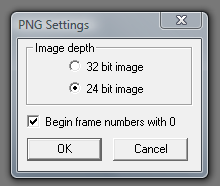
- png settings.PNG (12.02 KiB) Viewed 3253 times
-
W!ZARD
- Petty Officer First Class
- Posts: 42
- Joined: 23 May 2009, 08:31
- Type the number ten into the box: 0
- Location: Otautahi, Aotearoa
Re: Animations jump when rendered with Vray
Hi tB - ah that's interesting! I've successfully rendered out 4 or 5 sequences from other scenes without any issues but you're research is most appreciated. It gives me other options should I experience the jitters in a future animation.
Re using the Model 'Look at' function. I've not used that feature for these anims because it gives nicely positioned camera shots consistently 'looking at' the subject. I was after a more natural 'handheld' feel where the camera loses and then regains the subject in a more 'realistic' way. Of course I've used the 'look at' function in other scenes where I've 'looked at' an invisible target object with good results to mimic this same 'hand held' camera feel..
Re .jpg vs .png - I've dabbled with lots of different formats and of course I always use a lossless format for my large still renders - for the most part however I use .jpg image sequences for my anims as the fidelity doesn't need to be quite so hi for a frame that's only visible for a 30th of a second. I use no compression at all with the .jpg's so I'm getting the highest quality image but due to the nature of .jpg format I end up with lighter files than if I used .bmp, .tga or other totally lossless format.
I often use the same principle for textures in my still pics too. Of course .png files would probably give very similar results but it's my understanding that the real advantage of .png is better compression than .jpg's and I don't actually use compression. Shrug. If there's a better way I could do this I'd love to hear about it.
Re using the Model 'Look at' function. I've not used that feature for these anims because it gives nicely positioned camera shots consistently 'looking at' the subject. I was after a more natural 'handheld' feel where the camera loses and then regains the subject in a more 'realistic' way. Of course I've used the 'look at' function in other scenes where I've 'looked at' an invisible target object with good results to mimic this same 'hand held' camera feel..
Re .jpg vs .png - I've dabbled with lots of different formats and of course I always use a lossless format for my large still renders - for the most part however I use .jpg image sequences for my anims as the fidelity doesn't need to be quite so hi for a frame that's only visible for a 30th of a second. I use no compression at all with the .jpg's so I'm getting the highest quality image but due to the nature of .jpg format I end up with lighter files than if I used .bmp, .tga or other totally lossless format.
I often use the same principle for textures in my still pics too. Of course .png files would probably give very similar results but it's my understanding that the real advantage of .png is better compression than .jpg's and I don't actually use compression. Shrug. If there's a better way I could do this I'd love to hear about it.
WHERE MAGICK HAPPENS!!-
trueBlue
- Captain
- Posts: 5548
- Joined: 06 Jul 2009, 22:50
- Type the number ten into the box: 10
Re: Animations jump when rendered with Vray
Okay, thanks W!zard.