New script called "Bridge Synchronize" makes it possible to render workspace animations from modelspace.
http://www.clintons3d.com/plugins/trues ... index.html"
Create a workspace animation.
Load the script node into the link editor scene and push the setup button.
Check the active checkbox and you're good to go.
Now you can render from modelspace and when you scrub the workspace timeline modelspace follows along. If scrubbing is slow, deactivate the node until you are ready to render.
I've only tested with keyframe animation. Physics and procedural have not been tested yet.
Workspace render in modelspace fix
-
clintonman

- Captain
- Posts: 5659
- Joined: 21 May 2009, 21:08
- Type the number ten into the box: 0
- Location: California
Workspace render in modelspace fix
-
froo
- Captain
- Posts: 2554
- Joined: 22 May 2009, 12:13
Re: Workspace render in modelspace fix
Kickass Clinton! 
-
ranger0101

- Master Chief Petty Officer
- Posts: 363
- Joined: 22 May 2009, 13:15
- Type the number ten into the box: 0
- Location: Orrville Ohio U.S.A.
Re: Workspace render in modelspace fix
clintoman!!! You are the Man..
Breathing new life into TrueSpace!!!
BRAVO and Thank You!!!

CHEERS
Tim Koons
Breathing new life into TrueSpace!!!
BRAVO and Thank You!!!
CHEERS
Tim Koons
In order to Create Art... You must first learn to See...
My Website http://www.theartoftimkoons.yolasite.com
My Website http://www.theartoftimkoons.yolasite.com
-
v3rd3
- Lieutenant Commander
- Posts: 1191
- Joined: 21 May 2009, 20:04
Re: Workspace render in modelspace fix
Clinton you are just full of wonderful surporises.... thanks
-
bitkar

- Captain
- Posts: 2089
- Joined: 16 Mar 2010, 07:14
- Type the number ten into the box: 0
- Location: Czech Republic
Re: Workspace render in modelspace fix
great! i appreciate every plugin that enables modelspace to do something new!
Michal aka bitkar
tS freak since tS2 (1998) and forever (tS7.61 modeler)
tS freak since tS2 (1998) and forever (tS7.61 modeler)
-
clintonman
- Captain
- Posts: 5659
- Joined: 21 May 2009, 21:08
- Type the number ten into the box: 0
- Location: California
Re: Workspace render in modelspace fix
Update August 31 2011:
Script did not work with encapsulated objects like Actors. Now it does.
Script did not work with encapsulated objects like Actors. Now it does.
-
lysvallee
- Petty Officer Second Class
- Posts: 21
- Joined: 20 Sep 2011, 19:04
- Type the number ten into the box: 9
- Location: France
Re: Workspace render in modelspace fix
Thank you very much, Clintonman. It works with physics and procedural animation as well 
-
ranger0101
- Master Chief Petty Officer
- Posts: 363
- Joined: 22 May 2009, 13:15
- Type the number ten into the box: 0
- Location: Orrville Ohio U.S.A.
Re: Workspace render in modelspace fix
HA ZA!!!
Thank You CLintonman!!!

This is really significant..
CHEERS!!!
Tim Koons
Thank You CLintonman!!!
This is really significant..
CHEERS!!!
Tim Koons
In order to Create Art... You must first learn to See...
My Website http://www.theartoftimkoons.yolasite.com
My Website http://www.theartoftimkoons.yolasite.com
-
Jimmer
- Chief Petty Officer
- Posts: 122
- Joined: 22 May 2009, 11:54
Re: Workspace render in modelspace fix
WOW ! ! !
-
trueBlue

- Captain
- Posts: 5548
- Joined: 06 Jul 2009, 22:50
- Type the number ten into the box: 10
Re: Workspace render in modelspace fix
I found an issue while using your new updated Bridge Synchronize Script.
First as a test using Model's 'Render to File' and without using any Bridge Synchronize scripts.
I can confirm that when changing Model Render to File's Animation to Workspace it captures the Workspace AE 'Play Range' and the Workspace's Animation Preference's 'Shrink Play Range' button works.
I can repeatedly make changes and Model's 'Render to File' and Workspace's Animation Preference's 'Shrink Play Range' button works as expected.
When I use your new updated Bridge Synchronize Script the Workspace's Animation Preference's 'Shrink Play Range' button stops working. I have to Reset the Default Context to get it to work again.
Edit: It happens when the script is Active and you select the Shrink Play Range.
Thinking it may be the Try and catch error.
If I run this script below without the Try and catch error with Bridge Synchronize active, then this script does not work. But I do not have to Reset the Default Context.
RsTime.AnimStart = RsTime.EvalAnimStart('')
RsTime.AnimEnd = RsTime.EvalAnimEnd('')
Node.Value("/Preferences/AnimPref", "PlayRangeStart") = Node.Value("/AnimMng", "AnimStart")
Node.Value("/Preferences/AnimPref", "PlayRangeEnd") = Node.Value("/AnimMng", "AnimEnd")
Idea? - Use ScriptObject.Execute() for the Shrink Play Range?
First as a test using Model's 'Render to File' and without using any Bridge Synchronize scripts.
I can confirm that when changing Model Render to File's Animation to Workspace it captures the Workspace AE 'Play Range' and the Workspace's Animation Preference's 'Shrink Play Range' button works.
I can repeatedly make changes and Model's 'Render to File' and Workspace's Animation Preference's 'Shrink Play Range' button works as expected.
When I use your new updated Bridge Synchronize Script the Workspace's Animation Preference's 'Shrink Play Range' button stops working. I have to Reset the Default Context to get it to work again.
Edit: It happens when the script is Active and you select the Shrink Play Range.
Thinking it may be the Try and catch error.
If I run this script below without the Try and catch error with Bridge Synchronize active, then this script does not work. But I do not have to Reset the Default Context.
RsTime.AnimStart = RsTime.EvalAnimStart('')
RsTime.AnimEnd = RsTime.EvalAnimEnd('')
Node.Value("/Preferences/AnimPref", "PlayRangeStart") = Node.Value("/AnimMng", "AnimStart")
Node.Value("/Preferences/AnimPref", "PlayRangeEnd") = Node.Value("/AnimMng", "AnimEnd")
Idea? - Use ScriptObject.Execute() for the Shrink Play Range?
-
clintonman
- Captain
- Posts: 5659
- Joined: 21 May 2009, 21:08
- Type the number ten into the box: 0
- Location: California
Re: Workspace render in modelspace fix
Are you talking about the active at the top or the Active under General Timer? If it's the first active does the problem occur when you use the version built into the Unofficial Update(UU)? Last time I looked the UU seemed to have a few changes which would make it more up to date when compared to the upper portion of the last one I made.
According to my notes
"Activity.Run(scene + “/second”);//runs after the calling script is done
ScriptObject.Execute(scene + “/second”);//runs immediately pausing the calling script"
You can try printing (System.Trace) the try catch error, to see if it gives any useful clues.
According to my notes
"Activity.Run(scene + “/second”);//runs after the calling script is done
ScriptObject.Execute(scene + “/second”);//runs immediately pausing the calling script"
You can try printing (System.Trace) the try catch error, to see if it gives any useful clues.
Code: Select all
try
{
RsTime.AnimStart = RsTime.EvalAnimStart('')
RsTime.AnimEnd = RsTime.EvalAnimEnd('')
Node.Value("/Preferences/AnimPref", "PlayRangeStart") = Node.Value("/AnimMng", "AnimStart")
Node.Value("/Preferences/AnimPref", "PlayRangeEnd") = Node.Value("/AnimMng", "AnimEnd")
}
catch (e)
{
System.Trace(e)
}-
trueBlue
- Captain
- Posts: 5548
- Joined: 06 Jul 2009, 22:50
- Type the number ten into the box: 10
Re: Workspace render in modelspace fix
I did not use the Timer.
Problem accures with the unofficial Bridge Snycronize.RsObj and your updated Bridge Snycronize Script.RsObj when they are Active.
Edit: No errors showing
Problem accures with the unofficial Bridge Snycronize.RsObj and your updated Bridge Snycronize Script.RsObj when they are Active.
Edit: No errors showing
-
clintonman
- Captain
- Posts: 5659
- Joined: 21 May 2009, 21:08
- Type the number ten into the box: 0
- Location: California
Re: Workspace render in modelspace fix
Ok, I think I see what's happening. The Bridge Synchronize object has keyframes on it. So you can't shrink below the existing keyframes.
One solution would be to remove the Bridge Synch keyframes, shrink the range, then set the bridge synch keyframes for the smaller range.
One solution would be to remove the Bridge Synch keyframes, shrink the range, then set the bridge synch keyframes for the smaller range.
-
trueBlue
- Captain
- Posts: 5548
- Joined: 06 Jul 2009, 22:50
- Type the number ten into the box: 10
Re: Workspace render in modelspace fix
Both scripts when in use create an AnimClip.
If I delete the AnimClip, the Shrink Play Range works.
Not sure why or how the AnimClip is being used.
If I delete the AnimClip, the Shrink Play Range works.
Not sure why or how the AnimClip is being used.
-
clintonman
- Captain
- Posts: 5659
- Joined: 21 May 2009, 21:08
- Type the number ten into the box: 0
- Location: California
Re: Workspace render in modelspace fix
When the time changes the frame number on the BridgeSync script changes because of it's animation, which activates the watchdog which in turn Synchronizes the objects in the scene.trueBlue wrote: 24 Mar 2019, 05:11 Both scripts when in use create an AnimClip.
If I delete the AnimClip, the Shrink Play Range works.
Not sure why or how the AnimClip is being used.
-
trueBlue
- Captain
- Posts: 5548
- Joined: 06 Jul 2009, 22:50
- Type the number ten into the box: 10
Re: Workspace render in modelspace fix
Thought I found he issue.
Changed you frame attribute to a real Number.
Tested the Shrink Play Range and it worked.
Then further testing it stopped working.
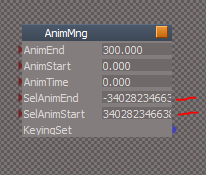
When it stops working I notice the AnimMng's SelAnimStart and SelAnimEnd attributes get funky.
Never the less, the AnimPref, AnimMng and AnimClips all are using real Numbers.
Changed you frame attribute to a real Number.
Tested the Shrink Play Range and it worked.
Then further testing it stopped working.
When it stops working I notice the AnimMng's SelAnimStart and SelAnimEnd attributes get funky.
- Capture.PNG (4.91 KiB) Viewed 3632 times