How can I find the real aspect of a scene camera. (easy way please)
For the first time I tried to use a portrait format instead of landscape.
And know I found that the screen aspect is very different to
the rendered aspect.
I remember a view frame in the modeler, but I want to use workspace.
I know I could make a frame objekt, but then I have to adjust the frames
size together with the cameras aspect.
Is there an easier way?
Camera Aspect
-
Wigand
- Senior Chief Petty Officer
- Posts: 204
- Joined: 21 May 2009, 17:38
Camera Aspect
-
Prodigy

- Site Admin
- Posts: 957
- Joined: 21 May 2009, 14:46
- Type the number ten into the box: 0
- Location: Uruguay
Re: Camera Aspect
Not sure if i understand your question but please check my script..
I think this will give you some help.
vi ... =31&t=2318"
Regards
I think this will give you some help.
vi ... =31&t=2318"
Regards
๑۩۞۩๑ prodigy ๑۩۞۩๑
-
Wigand
- Senior Chief Petty Officer
- Posts: 204
- Joined: 21 May 2009, 17:38
Re: Camera Aspect
Sorry, I think it's not that what I needed.
-
darkmage
- Senior Chief Petty Officer
- Posts: 184
- Joined: 03 Apr 2011, 13:42
- Type the number ten into the box: 9
Re: Camera Aspect
do you mean you want to change the aspect of the window in wich your scene is displayed?Wigand wrote:How can I find the real aspect of a scene camera. (easy way please)
For the first time I tried to use a portrait format instead of landscape.
And know I found that the screen aspect is very different to
the rendered aspect.
I remember a view frame in the modeler, but I want to use workspace.
I know I could make a frame objekt, but then I have to adjust the frames
size together with the cameras aspect.
Is there an easier way?
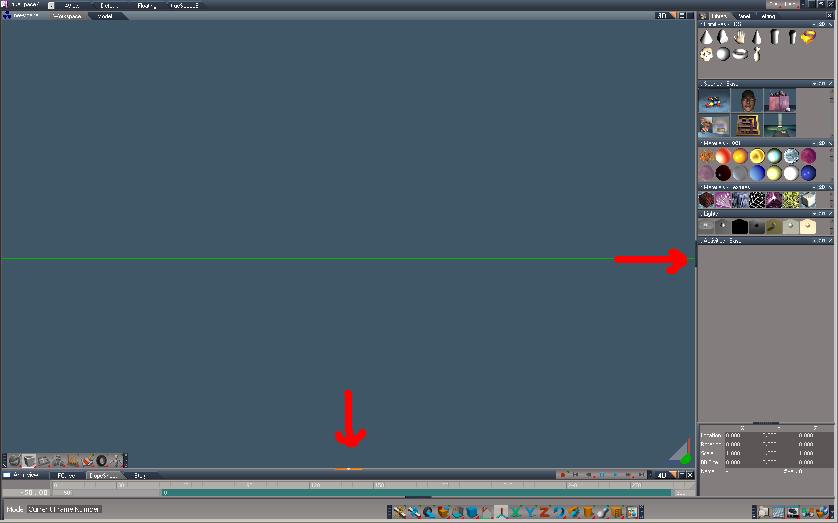
if you do try this, it's the only way i know of.
in the workspace side click and drag ,on the bits i've shown with arrows,(below)
and it will resize the window.
- Attachments
-
-
Wigand
- Senior Chief Petty Officer
- Posts: 204
- Joined: 21 May 2009, 17:38
Re: Camera Aspect
Thank you darkmage for replying.
I try to explain it again:
1. Set a camera into your scene
2. Switch to camera view. Move and turn and scale the camera as you want.
3. In VRay Panel set the height and width of the rendered image. But now use
640 for height and 480 for width. This should create a portrait sized picture.
You will see that the camera view of your not yet renderer scene is still landscape,
maybe 1024 width to 960 height. But now I want to see in my workspace-scene-view
the same size and all the objects I would see in my rendered picture. Therefore I would need to
see a frame in my camera aspect that shows me the size and format of my
desired picture.
Try it and you will understand.
I try to explain it again:
1. Set a camera into your scene
2. Switch to camera view. Move and turn and scale the camera as you want.
3. In VRay Panel set the height and width of the rendered image. But now use
640 for height and 480 for width. This should create a portrait sized picture.
You will see that the camera view of your not yet renderer scene is still landscape,
maybe 1024 width to 960 height. But now I want to see in my workspace-scene-view
the same size and all the objects I would see in my rendered picture. Therefore I would need to
see a frame in my camera aspect that shows me the size and format of my
desired picture.
Try it and you will understand.
-
trueBlue

- Captain
- Posts: 5548
- Joined: 06 Jul 2009, 22:50
- Type the number ten into the box: 10
Re: Camera Aspect
In Vray/Dimensions select Custom and render
-
clintonman

- Captain
- Posts: 5659
- Joined: 21 May 2009, 21:08
- Type the number ten into the box: 0
- Location: California
Re: Camera Aspect
Maybe a variation of darkmage. Open a new floating 3D view and change it to the camera view. Be sure the window is active and press the Alt key. A menu will pop up and you can set the dimensions of the window to match your render output.
-
Wigand
- Senior Chief Petty Officer
- Posts: 204
- Joined: 21 May 2009, 17:38
Re: Camera Aspect
Thank you
I think the floating window was the trick.
I think the floating window was the trick.