Hi guys, well i decided to share all my personal projects and scripts..
Most of them are custom made for my needs so maybe some of you will find some of this scripts useless..
Other's may not..
So here is a list of free stuff for Truespace 7.62b8 Workspace.
By the way, i will release the power dx shader aswell
Merry Christmas and better 2011
๑۩۞۩๑ prodigy ๑۩۞۩๑
Prodigy
Site Admin
Posts:957
Joined: 21 May 2009, 14:46
Type the number ten into the box: 0
Location: Uruguay
PreRender Script.
Postby Prodigy »
Pre render:
We have all different monitors. 4.3 and 16.9, and most of us use different resolutions.
This is a problem because our 3d window in mayor of cases is not in proportion of what we want to render, so the final result is slightly different that what we see on our screens.
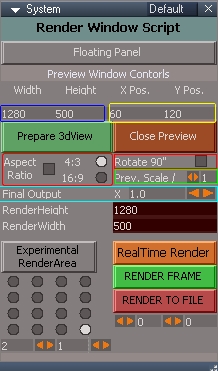
1.jpg (53.22 KiB) Viewed 3164 times
Blue: you can set the specific size of the window.
Yellow: you can set where you want that window by default.
RED: If Aspect Ratio is enabled, the Height of your window (Blue) will not work but 4.3 or 16.9 will work and take the specific height depending on the aspect ratio.
RED Rotate: will rotate the Window, perfect if you want to take pictures of a building portraits or anything else than landscapes.
Green: Prev Scale / . This is the scale of your 3Dwindow. if i'ts 1 will be 1=1 if you set 2 will be the half (ej. 800x600 = 400x300px)
This is greate cos if you will have to render a huge picture ej 1280x768 and you won't to have a large 3dwindow over your workspace just click half size and voilá, a small preview..
Prepare 3Dview launch the new 3D floating window.
Close Just close the prerender 3d window.
Final Output X, is how many times larger your final render will be.. (will not be affected by your preview)
Orange; RealTime Render is just that, will take a realrender from the 3dwindow preview. Note; you will have to set by hand the final resolution since truespace has no support to change that size from a script.
Render Frame: Will execute Vray render taking all your PreRender Settings. If you press the common render button will not be affected by any settings from your panel so you HAVE to click that render to take advantage of this script.
Purple: Render To file, the same as Render Frame but to directly to a file. Also for Animations..
Grey Experimental Area, this is an experiment to make Render Areas. Example render a huge render by 4x4 big renders.. I'm not sure if in this version is working or not, i have to check it, also truespace render black areas, so it's needed to copy paste the final image on another software.
Ok a small example (also in HD)
Better if i show you with a video
TO me this solves a Lot of problems with truespace, also to render parts of animation on different computers cos it doesn't depend on the res of your screen nor the layout.