Here are the Dribble shaders complied with 3Delight version 9.0.84
You must have 3Delight v9.0.84 and Dribble installed first!
3Delight v9.0.84
Dribble
Then Copy & Replace all of these files to the 3Delight shaders folder
IE: C:\Program Files\3Delight\shaders
Dribble shaders for 3Delight v9.0.84
-
trueBlue

- Captain
- Posts: 5548
- Joined: 06 Jul 2009, 22:50
- Type the number ten into the box: 10
Dribble shaders for 3Delight v9.0.84
- Attachments
-
- Dribble Compiled Shaders version version 9084.zip
- (28.72 KiB) Downloaded 478 times
-
Emmanuel

- Chief Warrant Officer
- Posts: 670
- Joined: 14 Jun 2009, 06:47
Re: Dribble shaders for 3Delight v9.0.84
Thank you TrueBlue !
-
wancow
- Marine
- Posts: 2
- Joined: 16 Dec 2012, 19:41
- Type the number ten into the box: 10
Re: Dribble shaders for 3Delight v9.0.84
The Dribble link is broken 
-
lrdsatyr8
- Petty Officer First Class
- Posts: 68
- Joined: 24 Mar 2013, 20:19
- Type the number ten into the box: 10
Re: Dribble shaders for 3Delight v9.0.84
Both links appear to be broken 
-
spacekdet

- Captain
- Posts: 1810
- Joined: 27 May 2009, 15:00
- Type the number ten into the box: 10
- Location: On the day shift at the Utility Muffin Research Kitchen
Re: Dribble shaders for 3Delight v9.0.84
The right word went in the correct ear and the Dribble link is fixed.
-
Steinie

- Captain
- Posts: 2958
- Joined: 21 May 2009, 17:38
- Type the number ten into the box: 10
Re: Dribble shaders for 3Delight v9.0.84
I am trying to find 3Delight version 9.0.84 and appears like there is only 64 bit version on the site.
It is the Maya version correct? (I bought this years ago and loved it however I don't use the Model side much
and stopped rendering with it. I want to start up again so any help would be appreciated.
It is the Maya version correct? (I bought this years ago and loved it however I don't use the Model side much
and stopped rendering with it. I want to start up again so any help would be appreciated.
-
clintonman

- Captain
- Posts: 5659
- Joined: 21 May 2009, 21:08
- Type the number ten into the box: 0
- Location: California
Re: Dribble shaders for 3Delight v9.0.84
Try the internet archive, https://archive.org/"
Direct link to 3delight website from 2011
https://web.archive.org/web/20110501000 ... elight.com"
Direct link to 3delight website from 2011
https://web.archive.org/web/20110501000 ... elight.com"
-
trueBlue
- Captain
- Posts: 5548
- Joined: 06 Jul 2009, 22:50
- Type the number ten into the box: 10
Re: Dribble shaders for 3Delight v9.0.84
You are looking for 3Delight Studio Pro 11
Windows 32 bit:
https://web.archive.org/save/http://www ... up.exe.php"
https://web.archive.org/web/20131202183 ... P_download"
Windows 32 bit:
https://web.archive.org/save/http://www ... up.exe.php"
https://web.archive.org/web/20131202183 ... P_download"
-
Steinie
- Captain
- Posts: 2958
- Joined: 21 May 2009, 17:38
- Type the number ten into the box: 10
Re: Dribble shaders for 3Delight v9.0.84
Thanks trueBlue and clintonman!
-
Steinie
- Captain
- Posts: 2958
- Joined: 21 May 2009, 17:38
- Type the number ten into the box: 10
Re: Dribble shaders for 3Delight v9.0.84
This isn't working for me, ts crashing when I select the render button.
For the shaders I am suppose to have 3Delight v9.0.84 but the links shown has me downloading v 11.0.24
I cannot find a good download of 9.0.84. The shaders are still compiled for version 9.0.84 correct?
edit: I have 9.0.84 burned on a cd from the past. Are these shaders still for that version of 3Delight? If so doesn't the new version of
3Delight not need a license anymore. Wouldn't 9.0.84 stop working since that one always looked for a new license? The later versions (32bit)
3Delight came with one permanent user license.
For the shaders I am suppose to have 3Delight v9.0.84 but the links shown has me downloading v 11.0.24
I cannot find a good download of 9.0.84. The shaders are still compiled for version 9.0.84 correct?
edit: I have 9.0.84 burned on a cd from the past. Are these shaders still for that version of 3Delight? If so doesn't the new version of
3Delight not need a license anymore. Wouldn't 9.0.84 stop working since that one always looked for a new license? The later versions (32bit)
3Delight came with one permanent user license.
-
trueBlue
- Captain
- Posts: 5548
- Joined: 06 Jul 2009, 22:50
- Type the number ten into the box: 10
Re: Dribble shaders for 3Delight v9.0.84
Dribble update Nov 2013
Links for the installer, the updated tsx file and new compiled shaders.
viewtopic.php?t=4222&p=41354"
5.unzip Compiled3DelightShaders_Nov2013.zip
6.copy the sdl files to the 3Delight shaders (C:\Program Files\3Delight\shaders\)
Links for the installer, the updated tsx file and new compiled shaders.
viewtopic.php?t=4222&p=41354"
5.unzip Compiled3DelightShaders_Nov2013.zip
6.copy the sdl files to the 3Delight shaders (C:\Program Files\3Delight\shaders\)
-
Steinie
- Captain
- Posts: 2958
- Joined: 21 May 2009, 17:38
- Type the number ten into the box: 10
Re: Dribble shaders for 3Delight v9.0.84
Yikes and I was even here before...AARP
-
trueBlue
- Captain
- Posts: 5548
- Joined: 06 Jul 2009, 22:50
- Type the number ten into the box: 10
Re: Dribble shaders for 3Delight v9.0.84
LOL@ARRP
Can you please make Clinton's Dribble and YafaRay4tS075 update threads stickey at the top of the Rendering thread?
Can you please make Clinton's Dribble and YafaRay4tS075 update threads stickey at the top of the Rendering thread?
-
Steinie
- Captain
- Posts: 2958
- Joined: 21 May 2009, 17:38
- Type the number ten into the box: 10
Re: Dribble shaders for 3Delight v9.0.84
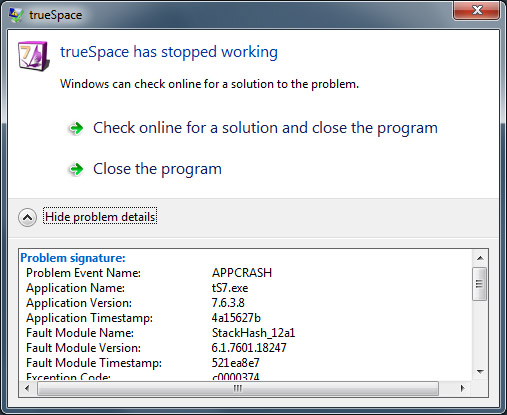
I followed instructions at Clinton's site to a tee. trueSpace still crashes right after a completed render. (a simple sphere for example)
I am using 3Delight 11.0.24 with Shaders Nov2013, I also tried these
vi ... f=9&t=4179"
from October.
I notice that the header at the top of Dribble says 1.05wip110713 not 1.05wip101813
but Clinton's graphic also shows the wrong number too.
Does 3Delight now open a window called "I-Display" ? If so are there special settings?
I also just realized my machine is win7 64 bit and Clinton's note states "maybe solves ts7.61 crashing on win7
64 bit machine- problem just disappeared at some point"
I am using 3Delight 11.0.24 with Shaders Nov2013, I also tried these
vi ... f=9&t=4179"
from October.
I notice that the header at the top of Dribble says 1.05wip110713 not 1.05wip101813
but Clinton's graphic also shows the wrong number too.
Does 3Delight now open a window called "I-Display" ? If so are there special settings?
I also just realized my machine is win7 64 bit and Clinton's note states "maybe solves ts7.61 crashing on win7
64 bit machine- problem just disappeared at some point"
- Attachments
-
-
clintonman
- Captain
- Posts: 5659
- Joined: 21 May 2009, 21:08
- Type the number ten into the box: 0
- Location: California
Re: Dribble shaders for 3Delight v9.0.84
Does it crash when you check the use renderdl option? When it was crashing for me it was when rendering to the screen. I added the renderdl(i-display) option and it stopped crashing. Later I was mysteriously able to render directly the the screen, but I'm sure most of my tests used renderdl so I could compare renders while testing.
-
Steinie
- Captain
- Posts: 2958
- Joined: 21 May 2009, 17:38
- Type the number ten into the box: 10
Re: Dribble shaders for 3Delight v9.0.84
Clintonman,
I do see weird messages in the cmd window however the Rendering seems to work for me now.
Thanks!
I do see weird messages in the cmd window however the Rendering seems to work for me now.
Thanks!
- Attachments
-

-
clintonman
- Captain
- Posts: 5659
- Joined: 21 May 2009, 21:08
- Type the number ten into the box: 0
- Location: California
Re: Dribble shaders for 3Delight v9.0.84
It doesn't like the shaders. Be sure you copied the shaders to C:\Program Files\3Delight\shaders\. Don't copy the folder, copy the sdl files. Those errors look like the original sdl files haven't been overwritten.
I'm running version 11.0.5 so I guess it's possible you may have to recompile the shaders for version 11.0.2
Can you run the I-display from the menu?
Also try running tS as an admin. It could be a permissions problem.
I'm running version 11.0.5 so I guess it's possible you may have to recompile the shaders for version 11.0.2
Can you run the I-display from the menu?
Also try running tS as an admin. It could be a permissions problem.
-
trueBlue
- Captain
- Posts: 5548
- Joined: 06 Jul 2009, 22:50
- Type the number ten into the box: 10
Re: Dribble shaders for 3Delight v9.0.84
Where can we get the 11.0.5 version?
-
clintonman
- Captain
- Posts: 5659
- Joined: 21 May 2009, 21:08
- Type the number ten into the box: 0
- Location: California
Re: Dribble shaders for 3Delight v9.0.84
I downloaded 11.0.5 in October, but the website has 11.0.31 ( I was thinking 2.4 and 3.1 not 24 and 31)trueBlue wrote:Where can we get the 11.0.5 version?
I'll get a fresh copy and test it. Maybe the compiled shaders are too old.
-
clintonman
- Captain
- Posts: 5659
- Joined: 21 May 2009, 21:08
- Type the number ten into the box: 0
- Location: California
Re: Dribble shaders for 3Delight v9.0.84
My 64bit windows trueSpace7.61 crashes are back. Wish I knew what made them disappear before.
Seems ok when run on trueSpace6.6 though, no crashes.
Seems ok when run on trueSpace6.6 though, no crashes.
-
Steinie
- Captain
- Posts: 2958
- Joined: 21 May 2009, 17:38
- Type the number ten into the box: 10
Re: Dribble shaders for 3Delight v9.0.84
Clintonman and trueBlue,
I'll keep an eye on this Forum for any updates you might find and in the meantime I'll keep experimenting with the installs
to see if that matters.
Thanks for your help.
Edit:
Another observation, I believe these files may have been installed back when I bought Dribble.
They are located in ts/shaders/material/
DRBSimpleFur.tss
DRBSimpleSSS.tss
VormatShader.tss
Spots.tss
They are x'd out in trueSpace and no longer available
I'll keep an eye on this Forum for any updates you might find and in the meantime I'll keep experimenting with the installs
to see if that matters.
Thanks for your help.
Edit:
Another observation, I believe these files may have been installed back when I bought Dribble.
They are located in ts/shaders/material/
DRBSimpleFur.tss
DRBSimpleSSS.tss
VormatShader.tss
Spots.tss
They are x'd out in trueSpace and no longer available
-
Steinie
- Captain
- Posts: 2958
- Joined: 21 May 2009, 17:38
- Type the number ten into the box: 10
Re: Dribble shaders for 3Delight v9.0.84
I installed trueSpace7.61Complete, 3Delight 11.0.24, Dribble and Clintonman shaders for vers. 11 in WindowsXP with VMware running under a Widows7 64bit machine. Everything works perfectly.
So I believe the issue was 64 bit environment and not the shaders. I don't think Dribble/shaders will run in Win7 64bit.
So I believe the issue was 64 bit environment and not the shaders. I don't think Dribble/shaders will run in Win7 64bit.
-
Steinie
- Captain
- Posts: 2958
- Joined: 21 May 2009, 17:38
- Type the number ten into the box: 10
Re: Dribble shaders for 3Delight v9.0.84
I think I solved the problem with Dribble crashes. There was two ways everyone was using to render 3Delight without crashing.
1) save as a .rib file, right click on file and render with 3Delight or...
2) check "renderdl" before rendering
I found a third way that now renders within trueSpace without crashing.
3) as trueBlue pointed out before make sure your renderer is set to "LightWorks.tsr"
(if it is set to "VRay" your Dribble shaders are no longer selectable)
Under the TS6 Files drop-down select "Display Options"
Next to "LW" in the Display Options panel I selected 1024x1024 and Txt Res for Workspace 1024x1024
You no longer need "renderdl" checked.
Now you should be able to render using all the options. (at least for me) using Win 7 64bit
1) save as a .rib file, right click on file and render with 3Delight or...
2) check "renderdl" before rendering
I found a third way that now renders within trueSpace without crashing.
3) as trueBlue pointed out before make sure your renderer is set to "LightWorks.tsr"
(if it is set to "VRay" your Dribble shaders are no longer selectable)
Under the TS6 Files drop-down select "Display Options"
Next to "LW" in the Display Options panel I selected 1024x1024 and Txt Res for Workspace 1024x1024
You no longer need "renderdl" checked.
Now you should be able to render using all the options. (at least for me) using Win 7 64bit
- Attachments
-

-
clintonman
- Captain
- Posts: 5659
- Joined: 21 May 2009, 21:08
- Type the number ten into the box: 0
- Location: California
Re: Dribble shaders for 3Delight v9.0.84
Still no good for me.
win7 64bit
tS7.61
3delight 11.0.24
crash
win7 64bit
ts6.6
3delight 11.0.24
no crash
win7 32bit
ts7.61
3delight 11.0.24
no crash
64bit 3delight - dribble won't even load
win7 64bit
tS7.61
3delight 11.0.24
crash
win7 64bit
ts6.6
3delight 11.0.24
no crash
win7 32bit
ts7.61
3delight 11.0.24
no crash
64bit 3delight - dribble won't even load
-
bitkar

- Captain
- Posts: 2089
- Joined: 16 Mar 2010, 07:14
- Type the number ten into the box: 0
- Location: Czech Republic
Re: Dribble shaders for 3Delight v9.0.84
so.. .gentlemen:
i use win8 x64. Dribble renders to tS little window (first time i got a crash, then i started tS again, loaded tsx, closed tS, run it again and it works now). RenderDL output works too.
BUT i cannot make the fur shader running - tS crashes, renderDl render is incomplete. I got error msg. I hope the screenshot is complete, coz its just a blink of an eye - it took some time to grab it in exact moment before it disappears :D
one more thing... the render to tS window is shifted up... it doesnt fit in the window, is it problem to fix it so it would be exactly in the window, all over it?
i use win8 x64. Dribble renders to tS little window (first time i got a crash, then i started tS again, loaded tsx, closed tS, run it again and it works now). RenderDL output works too.
BUT i cannot make the fur shader running - tS crashes, renderDl render is incomplete. I got error msg. I hope the screenshot is complete, coz its just a blink of an eye - it took some time to grab it in exact moment before it disappears :D
one more thing... the render to tS window is shifted up... it doesnt fit in the window, is it problem to fix it so it would be exactly in the window, all over it?
- Attachments
-

Michal aka bitkar
tS freak since tS2 (1998) and forever (tS7.61 modeler)
tS freak since tS2 (1998) and forever (tS7.61 modeler)
-
clintonman
- Captain
- Posts: 5659
- Joined: 21 May 2009, 21:08
- Type the number ten into the box: 0
- Location: California
Re: Dribble shaders for 3Delight v9.0.84
I got it working! I did everything mentioned above  and I cleared the scene before installing the plugin and it worked for me.
1. clear the scene
2. set lightworks as render engine
3. set txt res's to 1024x1024
4. install the plugin and exit tS
and I cleared the scene before installing the plugin and it worked for me.1. clear the scene
2. set lightworks as render engine
3. set txt res's to 1024x1024
4. install the plugin and exit tS
-
clintonman
- Captain
- Posts: 5659
- Joined: 21 May 2009, 21:08
- Type the number ten into the box: 0
- Location: California
Re: Dribble shaders for 3Delight v9.0.84
I don't see any of these things happening. It fits the window when it renders and no 3delight crash. There is a warning on the fur shader, but I get that too so that is not the cause. You could try downloading a fresh copy of 3delight again and reinstall.bitkar wrote:so.. .gentlemen:
i use win8 x64. Dribble renders to tS little window (first time i got a crash, then i started tS again, loaded tsx, closed tS, run it again and it works now). RenderDL output works too.
BUT i cannot make the fur shader running - tS crashes, renderDl render is incomplete. I got error msg. I hope the screenshot is complete, coz its just a blink of an eye - it took some time to grab it in exact moment before it disappears
one more thing... the render to tS window is shifted up... it doesnt fit in the window, is it problem to fix it so it would be exactly in the window, all over it?

-
bitkar
- Captain
- Posts: 2089
- Joined: 16 Mar 2010, 07:14
- Type the number ten into the box: 0
- Location: Czech Republic
Re: Dribble shaders for 3Delight v9.0.84
great guess... reinstalling dribble worked :)
tho my render is still shifted upwards a bit in the tS viewport. But its a minor problem.
PS: can fur shader produce shadows? seems like object with fur doesnt cast shadows at all... is it possible to make the shadows work in this release?
tho my render is still shifted upwards a bit in the tS viewport. But its a minor problem.
PS: can fur shader produce shadows? seems like object with fur doesnt cast shadows at all... is it possible to make the shadows work in this release?
Michal aka bitkar
tS freak since tS2 (1998) and forever (tS7.61 modeler)
tS freak since tS2 (1998) and forever (tS7.61 modeler)