Fixed. The problem was converting from 1 undo version to open testable version. Added a comment as reminder for conversion back to 1 undotrueBlue wrote: 10 Aug 2022, 14:18Thanks!clintonman wrote: 10 Aug 2022, 03:26 Sure, it's just one line added to the StartWebServer.
DeletePrefsPanel.jpg
Also attached is my Delete changes. It's not optimized for single undo yet.
It will ask before deleting a Vray node in the scene.
Other nodes can be added for the are you sure questioning
If the Delete preferences is added to Custom preferences then the rmb can be changed to open the panel.
Protect Special Nodes will ask "are you sure?" question, otherwise just deletes.
Delete Whole NURBS will delete the whole nurbs object, otherwise only delete what is selected.
The new Delete (Enhanced) script does not delete multiple selected objects
I did a test with the previous Delete.xml with multiple selected NURBS and it deleted all of the NURBS
Notes and Scene View for workspace
-
clintonman

- Captain
- Posts: 5659
- Joined: 21 May 2009, 21:08
- Type the number ten into the box: 0
- Location: California
Re: Notes and Scene View for workspace
- Attachments
-
- Delete940c.RsObj
- (8.45 KiB) Downloaded 105 times
-
trueBlue

- Captain
- Posts: 5548
- Joined: 06 Jul 2009, 22:50
- Type the number ten into the box: 10
Re: Notes and Scene View for workspace
Great, thanks!
I did a test wondering if the Vray Question would work with multiple selections
It worked!
On another note, I notice you have to select Undo twice before undoing one of the Deletes
Adding one RsApp.Undo() to the bottom of the Delete script eliminates one Undo
Before
After
.
.
Is it possible to detect if a selection is not in the scene, like selecting anything in System?
And if so, add a Question - Yes or No like you have done with Vray?
I did a test wondering if the Vray Question would work with multiple selections
It worked!
On another note, I notice you have to select Undo twice before undoing one of the Deletes
Adding one RsApp.Undo() to the bottom of the Delete script eliminates one Undo
Before

- Commands Before.png (8.57 KiB) Viewed 1853 times
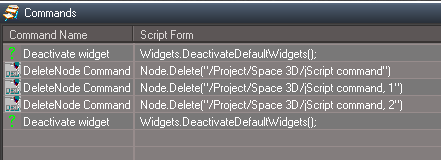
- Commands After adding one undo.png (7.04 KiB) Viewed 1853 times
.
Is it possible to detect if a selection is not in the scene, like selecting anything in System?
And if so, add a Question - Yes or No like you have done with Vray?
-
trueBlue
- Captain
- Posts: 5548
- Joined: 06 Jul 2009, 22:50
- Type the number ten into the box: 10
Re: Notes and Scene View for workspace
This eliminates the two undoes
Delete script
.
After
,
Delete script
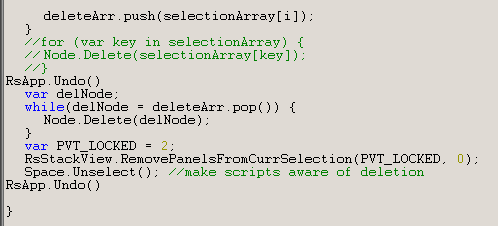
- Delete script.png (6.68 KiB) Viewed 1848 times
After
,

- After adding two RsApp.Undo().png (5.49 KiB) Viewed 1848 times
-
clintonman
- Captain
- Posts: 5659
- Joined: 21 May 2009, 21:08
- Type the number ten into the box: 0
- Location: California
Re: Notes and Scene View for workspace
You missed that line.clintonman wrote: 10 Aug 2022, 03:26 ...
Also attached is my Delete changes. It's not optimized for single undo yet.
...
When converted back to single undo form all the extra RsApp undos aren't needed.
-
clintonman
- Captain
- Posts: 5659
- Joined: 21 May 2009, 21:08
- Type the number ten into the box: 0
- Location: California
Re: Notes and Scene View for workspace
Asks if outside the scene.trueBlue wrote: 10 Aug 2022, 15:21 Great, thanks!
I did a test wondering if the Vray Question would work with multiple selections
It worked!
On another note, I notice you have to select Undo twice before undoing one of the Deletes
Adding one RsApp.Undo() to the bottom of the Delete script eliminates one Undo
Before
Commands Before.png
After
Commands After adding one undo.png
.
.
Is it possible to detect if a selection is not in the scene, like selecting anything in System?
And if so, add a Question - Yes or No like you have done with Vray?
RsApp.Undo not need. Not in 1 undo form yet.
- Attachments
-
- Deleteb8a4.RsObj
- (9.37 KiB) Downloaded 137 times
-
trueBlue
- Captain
- Posts: 5548
- Joined: 06 Jul 2009, 22:50
- Type the number ten into the box: 10
Re: Notes and Scene View for workspace
AWESOME !!!clintonman wrote: 10 Aug 2022, 15:48Asks if outside the scene.trueBlue wrote: 10 Aug 2022, 15:21 Great, thanks!
I did a test wondering if the Vray Question would work with multiple selections
It worked!
On another note, I notice you have to select Undo twice before undoing one of the Deletes
Adding one RsApp.Undo() to the bottom of the Delete script eliminates one Undo
Before
Commands Before.png
After
Commands After adding one undo.png
.
.
Is it possible to detect if a selection is not in the scene, like selecting anything in System?
And if so, add a Question - Yes or No like you have done with Vray?
RsApp.Undo not need. Not in 1 undo form yet.

On another issue, I have noticed that the Clear history button has a bug
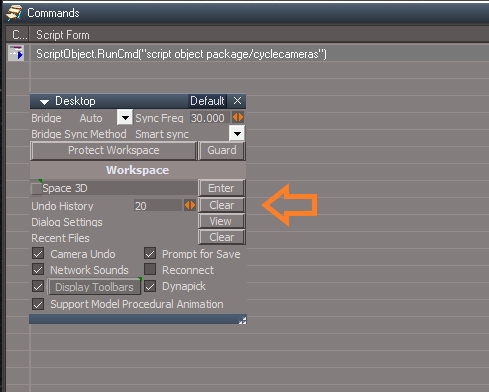
Every time I select the Clear button an entry is added to Commands
Can you confirm?
Edit: I fixed this issue by adding another script to Scripts/Commands
And changed the Clear button script to:
Activity.Run("Scripts/Commands/ClearHistory")
-
clintonman
- Captain
- Posts: 5659
- Joined: 21 May 2009, 21:08
- Type the number ten into the box: 0
- Location: California
Re: Notes and Scene View for workspace
Nope, all I see is a single question mark icon and blank command.
-
trueBlue
- Captain
- Posts: 5548
- Joined: 06 Jul 2009, 22:50
- Type the number ten into the box: 10
Re: Notes and Scene View for workspace
Why me and not YOU?
Nevertheless it does add an Undo entry for you
I think it is a button script bug
If I run RsApp.ClearHistory() from a jScript it works as expected so I fixed the Desktop's Clear button script
Nevertheless it does add an Undo entry for you
I think it is a button script bug
If I run RsApp.ClearHistory() from a jScript it works as expected so I fixed the Desktop's Clear button script
Edit: I fixed this issue by adding another script to Scripts/Commands
And changed the Clear button script to:
Activity.Run("Scripts/Commands/ClearHistory")
-
clintonman
- Captain
- Posts: 5659
- Joined: 21 May 2009, 21:08
- Type the number ten into the box: 0
- Location: California
Re: Notes and Scene View for workspace
You should try adding it to the UUFunctionSet.trueBlue wrote: 10 Aug 2022, 16:48 Why me and not YOU?
Nevertheless it does add an Undo entry for you
I think it is a button script bug
If I run RsApp.ClearHistory() from a jScript it works as expected so I fixed the Desktop's Clear button scriptEdit: I fixed this issue by adding another script to Scripts/Commands
And changed the Clear button script to:
Activity.Run("Scripts/Commands/ClearHistory")
I switched computers and the tS install that I know has the latest UU plus the recent changes looks like your screenshot, with the single line of ScriptObject.RunCmd("script object package/cyclecameras")
-
trueBlue
- Captain
- Posts: 5548
- Joined: 06 Jul 2009, 22:50
- Type the number ten into the box: 10
Re: Notes and Scene View for workspace
Better idea, will do
Can you make a toolbar script for the Delete object icons?
"HelpText") = "Delete selected objects / Preferences"
"RClickCommand") = "UserInterface.OpenToolPanelViewEx2('', '','/Preferences/Custom preferences/Delete preferences',3,1,1);"
Can you make a toolbar script for the Delete object icons?
"HelpText") = "Delete selected objects / Preferences"
"RClickCommand") = "UserInterface.OpenToolPanelViewEx2('', '','/Preferences/Custom preferences/Delete preferences',3,1,1);"
-
clintonman
- Captain
- Posts: 5659
- Joined: 21 May 2009, 21:08
- Type the number ten into the box: 0
- Location: California
Re: Notes and Scene View for workspace
Is there more than 1 Delete object icons? Maybe I don't understand what you're asking for.trueBlue wrote: 10 Aug 2022, 17:32 Better idea, will do
Can you make a toolbar script for the Delete object icons?
"HelpText") = "Delete selected objects / Preferences"
"RClickCommand") = "UserInterface.OpenToolPanelViewEx2('', '','/Preferences/Custom preferences/Delete preferences',3,1,1);"
-
trueBlue
- Captain
- Posts: 5548
- Joined: 06 Jul 2009, 22:50
- Type the number ten into the box: 10
Re: Notes and Scene View for workspace
Yes, there is several toolbars with the Delete object icons
I was hoping you could make a script like you did for the visibility icons for the Delete object icons
Change two attributes:
"HelpText") = "Delete selected objects / Preferences"
"RClickCommand") = "UserInterface.OpenToolPanelViewEx2('', '','/Preferences/Custom preferences/Delete preferences',3,1,1);"
I was hoping you could make a script like you did for the visibility icons for the Delete object icons
Change two attributes:
"HelpText") = "Delete selected objects / Preferences"
"RClickCommand") = "UserInterface.OpenToolPanelViewEx2('', '','/Preferences/Custom preferences/Delete preferences',3,1,1);"
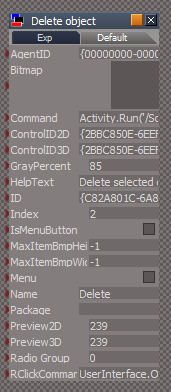
- Toolbar button.png (19.78 KiB) Viewed 2008 times

-
clintonman
- Captain
- Posts: 5659
- Joined: 21 May 2009, 21:08
- Type the number ten into the box: 0
- Location: California
Re: Notes and Scene View for workspace
That looks like 1 button to me, I'm guessing you mean for different layouts and stuff. Stand by...trueBlue wrote: 10 Aug 2022, 18:13 Yes, there is several toolbars with the Delete object icons
I was hoping you could make a script like you did for the visibility icons for the Delete object icons
Change two attributes:
"HelpText") = "Delete selected objects / Preferences"
"RClickCommand") = "UserInterface.OpenToolPanelViewEx2('', '','/Preferences/Custom preferences/Delete preferences',3,1,1);"
Toolbar button.png
Delete icons.png
-
trueBlue
- Captain
- Posts: 5548
- Joined: 06 Jul 2009, 22:50
- Type the number ten into the box: 10
Re: Notes and Scene View for workspace
Nope, just all of the toolbars in Toolbar Prototypes Encapsulator
-
clintonman
- Captain
- Posts: 5659
- Joined: 21 May 2009, 21:08
- Type the number ten into the box: 0
- Location: California
Re: Notes and Scene View for workspace
here it is.
- Attachments
-
- Modify Delete Button.RsObj
- (21.5 KiB) Downloaded 140 times
-
trueBlue
- Captain
- Posts: 5548
- Joined: 06 Jul 2009, 22:50
- Type the number ten into the box: 10
Re: Notes and Scene View for workspace
Thanks!
I would like to add these two other nodes to your Delete.xml:
YafaRay4tS
PhotoRender
Also, System.Question can hide behind trueSpace
Is it possible to add a modal Question?
I would like to add these two other nodes to your Delete.xml:
YafaRay4tS
PhotoRender
Code: Select all
		if(ProtectSpecialNodes == true) {
			if(selectionArray[i] == Space.CurrentScene() + "/Vray") {
				if(!System.Question("The Vray node is selected. Are you sure you want to delete it?")) {
					continue;
				}
			}
Is it possible to add a modal Question?
-
clintonman
- Captain
- Posts: 5659
- Joined: 21 May 2009, 21:08
- Type the number ten into the box: 0
- Location: California
Re: Notes and Scene View for workspace
Added YafaRay4tS and PhotoRender questionstrueBlue wrote: 10 Aug 2022, 19:12 Thanks!
I would like to add these two other nodes to your Delete.xml:
YafaRay4tS
PhotoRender
Also, System.Question can hide behind trueSpaceCode: Select all
		if(ProtectSpecialNodes == true) {
			if(selectionArray[i] == Space.CurrentScene() + "/Vray") {
				if(!System.Question("The Vray node is selected. Are you sure you want to delete it?")) {
					continue;
				}
			}
Is it possible to add a modal Question?
Question dialog from Global Function Set instead of System
- Attachments
-
- Delete3a59.RsObj
- (10.54 KiB) Downloaded 159 times
-
trueBlue
- Captain
- Posts: 5548
- Joined: 06 Jul 2009, 22:50
- Type the number ten into the box: 10
Re: Notes and Scene View for workspace
Thanks!
I added WarningQuestion Function to your Global Function Set
.
I added WarningQuestion Function to your Global Function Set
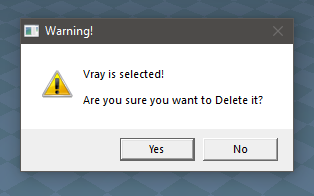
- Warning Question.png (16.78 KiB) Viewed 2005 times
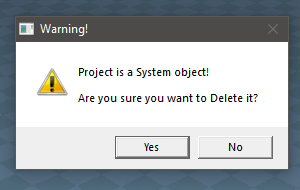
- System object.png (14.22 KiB) Viewed 2003 times
-
clintonman
- Captain
- Posts: 5659
- Joined: 21 May 2009, 21:08
- Type the number ten into the box: 0
- Location: California
Re: Notes and Scene View for workspace
It's not needed. Add a second argument to change the titletrueBlue wrote: 10 Aug 2022, 20:18 Thanks!
I added WarningQuestion Function to your Global Function Set
Warning Question.png
.
System object.png
Code: Select all
if(!GlobalFS.Question("The Vray node is selected. Are you sure you want to delete it?","Warning")) {I'll add that as a parameter, called "urgent", to the question function
-
clintonman
- Captain
- Posts: 5659
- Joined: 21 May 2009, 21:08
- Type the number ten into the box: 0
- Location: California
Re: Notes and Scene View for workspace
Here's the new format
Question(strText, strTitle, nSecondsToWait, urgent)
GlobalFS.Question("The Vray node is selected. Are you sure you want to delete it?", "Warning!", -1, true)
The nSecondsToWait will automatically answer NO after the time has passed, -1 means no timeout.
Question(strText, strTitle, nSecondsToWait, urgent)
GlobalFS.Question("The Vray node is selected. Are you sure you want to delete it?", "Warning!", -1, true)
The nSecondsToWait will automatically answer NO after the time has passed, -1 means no timeout.
- Attachments
-
- Global Function Set2664.RsObj
- (66.16 KiB) Downloaded 107 times
-
trueBlue
- Captain
- Posts: 5548
- Joined: 06 Jul 2009, 22:50
- Type the number ten into the box: 10
Re: Notes and Scene View for workspace
Never cease to amaze me!clintonman wrote: 10 Aug 2022, 20:51 Here's the new format
Question(strText, strTitle, nSecondsToWait, urgent)
GlobalFS.Question("The Vray node is selected. Are you sure you want to delete it?", "Warning!", -1, true)
The nSecondsToWait will automatically answer NO after the time has passed, -1 means no timeout.
Really cool how you are able to change the Function like that!

Yes, the Exclamation icon is what I was hoping for to give it a more serious question/warning
Edit: I have not been able to figure out how to change the icon
I used your example
if(!GlobalFS.Question("Vray is selected!\n\nAre you sure you want to Delete it?","Warning!", -1, true)) {
-
clintonman
- Captain
- Posts: 5659
- Joined: 21 May 2009, 21:08
- Type the number ten into the box: 0
- Location: California
Re: Notes and Scene View for workspace
trueBlue wrote: 10 Aug 2022, 21:39Never cease to amaze me!clintonman wrote: 10 Aug 2022, 20:51 Here's the new format
Question(strText, strTitle, nSecondsToWait, urgent)
GlobalFS.Question("The Vray node is selected. Are you sure you want to delete it?", "Warning!", -1, true)
The nSecondsToWait will automatically answer NO after the time has passed, -1 means no timeout.
Really cool how you are able to change the Function like that!
Yes, the Exclamation icon is what I was hoping for to give it a more serious question/warning
Edit: I have not been able to figure out how to change the icon
I used your example
if(!GlobalFS.Question("Vray is selected!\n\nAre you sure you want to Delete it?","Warning!", -1, true)) {
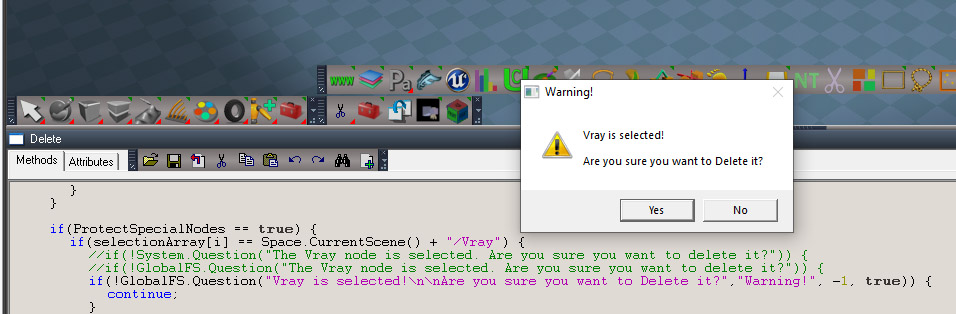
I'll download and check the function set I gave you is correct...
Yep, it checks out
-
trueBlue
- Captain
- Posts: 5548
- Joined: 06 Jul 2009, 22:50
- Type the number ten into the box: 10
Re: Notes and Scene View for workspace
I had two tS761 running
It is working now, thanks!
It is working now, thanks!
-
trueBlue
- Captain
- Posts: 5548
- Joined: 06 Jul 2009, 22:50
- Type the number ten into the box: 10
Re: Notes and Scene View for workspace
- Question defaults to Yes.png (17.81 KiB) Viewed 1953 times
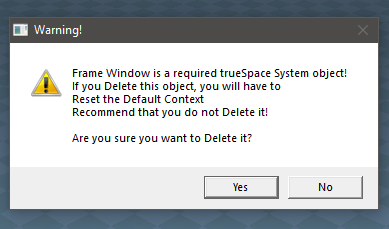
The modal Question dialog defaults to Yes
If a user selects the keyboard Enter key, the object will be Deleted
Is there a way to make the No button the default?
Edit: Found info
To indicate the default button, specify one of the following values.
Value Meaning
MB_DEFBUTTON1
0x00000000L
The first button is the default button.
MB_DEFBUTTON1 is the default unless MB_DEFBUTTON2, MB_DEFBUTTON3, or MB_DEFBUTTON4 is specified.
MB_DEFBUTTON2
0x00000100L
The second button is the default button.
MB_DEFBUTTON3
0x00000200L
The third button is the default button.
MB_DEFBUTTON4
0x00000300L
-
clintonman
- Captain
- Posts: 5659
- Joined: 21 May 2009, 21:08
- Type the number ten into the box: 0
- Location: California
Re: Notes and Scene View for workspace
added another parameter, 2 will set the second button to the default, all other numbers or nothing at all will set first button as default.
if(!GlobalFS.Question("Vray is selected!\n\nAre you sure you want to Delete it?","Warning!", -1, true,2)) {
if(!GlobalFS.Question("Vray is selected!\n\nAre you sure you want to Delete it?","Warning!", -1, true,2)) {
- Attachments
-
- Global Function Sete324.RsObj
- (66.54 KiB) Downloaded 105 times
-
trueBlue
- Captain
- Posts: 5548
- Joined: 06 Jul 2009, 22:50
- Type the number ten into the box: 10
Re: Notes and Scene View for workspace
Excellent!
Here is an updated Delete.xml script
Only changes are the question messages and adding the 2 at the end
If you do not like the question messages, please suggest an alternative
Here is an updated Delete.xml script
Only changes are the question messages and adding the 2 at the end
If you do not like the question messages, please suggest an alternative
- Attachments
-
- Delete.zip
- (1.46 KiB) Downloaded 111 times
-
clintonman
- Captain
- Posts: 5659
- Joined: 21 May 2009, 21:08
- Type the number ten into the box: 0
- Location: California
Re: Notes and Scene View for workspace
Vray is required for VRay RenderingtrueBlue wrote: 11 Aug 2022, 17:06 Excellent!
Here is an updated Delete.xml script
Only changes are the question messages and adding the 2 at the end
If you do not like the question messages, please suggest an alternative
YafaRay4tS is required for YafaRay Rendering
PhotoRender is required for VRay Rendering
each of the above made it sound like all rendering options would stop working, so made more specific
may be a required trueSpace System object!\nIf you Delete this file, you may have to\nReset the Default Context to recover it
Delete AnimMng it creates a new one
Delete Status Line it creates a new one
Delete Avatar Manager everything still works, think it's legacy code
Don't have to reset default context in all cases
-
trueBlue
- Captain
- Posts: 5548
- Joined: 06 Jul 2009, 22:50
- Type the number ten into the box: 10
Re: Notes and Scene View for workspace
PhotoRender is mostly a Model Lightworks Render Settings, but Vray uses it tooclintonman wrote: 11 Aug 2022, 17:53Vray is required for VRay RenderingtrueBlue wrote: 11 Aug 2022, 17:06 Excellent!
Here is an updated Delete.xml script
Only changes are the question messages and adding the 2 at the end
If you do not like the question messages, please suggest an alternative
YafaRay4tS is required for YafaRay Rendering
PhotoRender is required for VRay Rendering
each of the above made it sound like all rendering options would stop working, so made more specific
may be a required trueSpace System object!\nIf you Delete this file, you may have to\nReset the Default Context to recover it
Delete AnimMng it creates a new one
Delete Status Line it creates a new one
Delete Avatar Manager everything still works, think it's legacy code
Don't have to reset default context in all cases
May never see the PhotoRender in Standalone, but may be possible, and Standalone does not have Lightworks
With Vray & PhotoRender, how about "is required for Offline rendering"?
Maybe YafaRay4tS too?
When you RMB click the Rendering icons, it opens the Offline renderers panel
-
clintonman
- Captain
- Posts: 5659
- Joined: 21 May 2009, 21:08
- Type the number ten into the box: 0
- Location: California
Re: Notes and Scene View for workspace
Sounds goodtrueBlue wrote: 11 Aug 2022, 21:30PhotoRender is mostly a Model Lightworks Render Settings, but Vray uses it tooclintonman wrote: 11 Aug 2022, 17:53Vray is required for VRay RenderingtrueBlue wrote: 11 Aug 2022, 17:06 Excellent!
Here is an updated Delete.xml script
Only changes are the question messages and adding the 2 at the end
If you do not like the question messages, please suggest an alternative
YafaRay4tS is required for YafaRay Rendering
PhotoRender is required for VRay Rendering
each of the above made it sound like all rendering options would stop working, so made more specific
may be a required trueSpace System object!\nIf you Delete this file, you may have to\nReset the Default Context to recover it
Delete AnimMng it creates a new one
Delete Status Line it creates a new one
Delete Avatar Manager everything still works, think it's legacy code
Don't have to reset default context in all cases
May never see the PhotoRender in Standalone, but may be possible, and Standalone does not have Lightworks
With Vray & PhotoRender, how about "is required for Offline rendering"?
Maybe YafaRay4tS too?
When you RMB click the Rendering icons, it opens the Offline renderers panel
-
trueBlue
- Captain
- Posts: 5548
- Joined: 06 Jul 2009, 22:50
- Type the number ten into the box: 10
Re: Notes and Scene View for workspace
clintonman wrote: 28 Jul 2022, 04:33 It's looking hopeful. The "harsh" show/hide is a little less harsh. When used it will either read and save it's own ORA values or the ORA values of it's ancestor ORA and write those values back at the end. It will still overwrite any descendant ORA values. The "soft" show/hide are maintaining all the ORA values unless it has the RA node and descendants with an ORA node. It's not perfect. It is less damaging to ORA values and may be the most practical solution.
More testing is needed and I think the soft needs to check for descendant ORAs and abort if it finds any.
TODO list:
soft show/hide check for descendant ORA nodes to avoid changing them
reorganize the show/hide code so it's less confusing and remove any unneeded bits
check NURBS again with all the new changes
option to verify delete nodes outside of the scene
web page scroll is jumping - need to maintain scroll value
newer rsx plugin still needs to be added
prep to publish the parenting/grouping toolbar since it seems stable now
Is this your 'Clintons3dPlugin package for trueSpace' ?newer rsx plugin still needs to be added
Did you update your plugin?
Your website states the last update as:
Feb 3, 2022
v1638433
-
clintonman
- Captain
- Posts: 5659
- Joined: 21 May 2009, 21:08
- Type the number ten into the box: 0
- Location: California
Re: Notes and Scene View for workspace
Clintons3dRsView.rsx - the web server plugin, v.1638408 released July 30 2022trueBlue wrote: 20 Aug 2022, 19:35clintonman wrote: 28 Jul 2022, 04:33 It's looking hopeful. The "harsh" show/hide is a little less harsh. When used it will either read and save it's own ORA values or the ORA values of it's ancestor ORA and write those values back at the end. It will still overwrite any descendant ORA values. The "soft" show/hide are maintaining all the ORA values unless it has the RA node and descendants with an ORA node. It's not perfect. It is less damaging to ORA values and may be the most practical solution.
More testing is needed and I think the soft needs to check for descendant ORAs and abort if it finds any.
TODO list:
soft show/hide check for descendant ORA nodes to avoid changing them
reorganize the show/hide code so it's less confusing and remove any unneeded bits
check NURBS again with all the new changes
option to verify delete nodes outside of the scene
web page scroll is jumping - need to maintain scroll value
newer rsx plugin still needs to be added
prep to publish the parenting/grouping toolbar since it seems stable nowIs this your 'Clintons3dPlugin package for trueSpace' ?newer rsx plugin still needs to be added
Did you update your plugin?
Your website states the last update as:
Feb 3, 2022
v1638433
http://clintons3d.com/plugins/truespace ... webui.html
-
trueBlue
- Captain
- Posts: 5548
- Joined: 06 Jul 2009, 22:50
- Type the number ten into the box: 10
Re: Notes and Scene View for workspace
Getting this alert even though I have nothing running
Any ideas why?
Never seen this before
Restarted my PC and tried again with the same results

- Web Server alert.png (7.16 KiB) Viewed 2050 times
Never seen this before
Restarted my PC and tried again with the same results
-
clintonman
- Captain
- Posts: 5659
- Joined: 21 May 2009, 21:08
- Type the number ten into the box: 0
- Location: California
Re: Notes and Scene View for workspace
trueBlue wrote: 01 Sep 2022, 15:54 Getting this alert even though I have nothing running
Web Server alert.png
Any ideas why?
Never seen this before
Restarted my PC and tried again with the same results
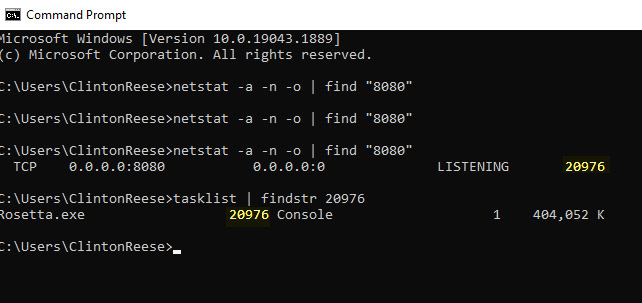
Open a windows command prompt and type
Code: Select all
netstat -a -n -o | find "8080"Code: Select all
tasklist | findstr <PID>If no luck then you can change the port number in the www panel to some other number, like 8081.
-
trueBlue
- Captain
- Posts: 5548
- Joined: 06 Jul 2009, 22:50
- Type the number ten into the box: 10
Re: Notes and Scene View for workspace
Restart my PC
Open trueSpace and then open the Web Server, I get the alert and click No
Shut down trueSpace
Hold down the Windows key and press the R key to open the Run dialog
Type “cmd” and click OK
Command Console
netstat -a -n -o | find "8080"
TCP 192.168.1.107:50629 192.168.1.115:8080 SYN_SENT 13688
tasklist | findstr 13688
HPNetworkCommunicatorCom. 13688 Console 1 7,972 K
Prior to getting this alert, I ran Layers and Scene View 2 in Rosetta to see if they worked
All seemed fine, I closed both down and shutdown Rosetta
Then I opened trueSpace UU9, opened the Web Server, this is when I got the alert
Since then, the alert shows every time I open the Web Server
Open trueSpace and then open the Web Server, I get the alert and click No
Shut down trueSpace
Hold down the Windows key and press the R key to open the Run dialog
Type “cmd” and click OK
Command Console
netstat -a -n -o | find "8080"
TCP 192.168.1.107:50629 192.168.1.115:8080 SYN_SENT 13688
tasklist | findstr 13688
HPNetworkCommunicatorCom. 13688 Console 1 7,972 K
Prior to getting this alert, I ran Layers and Scene View 2 in Rosetta to see if they worked
All seemed fine, I closed both down and shutdown Rosetta
Then I opened trueSpace UU9, opened the Web Server, this is when I got the alert
Since then, the alert shows every time I open the Web Server
-
clintonman
- Captain
- Posts: 5659
- Joined: 21 May 2009, 21:08
- Type the number ten into the box: 0
- Location: California
Re: Notes and Scene View for workspace
Did you try killing the "HPNetworkCommunicatorCom" process? It's the reason your'e getting the alert. tS can't use port 8080 if something else is already using it.trueBlue wrote: 01 Sep 2022, 19:22 Restart my PC
Open trueSpace and then open the Web Server, I get the alert and click No
Shut down trueSpace
Hold down the Windows key and press the R key to open the Run dialog
Type “cmd” and click OK
Command Console
netstat -a -n -o | find "8080"
TCP 192.168.1.107:50629 192.168.1.115:8080 SYN_SENT 13688
tasklist | findstr 13688
HPNetworkCommunicatorCom. 13688 Console 1 7,972 K
Prior to getting this alert, I ran Layers and Scene View 2 in Rosetta to see if they worked
All seemed fine, I closed both down and shutdown Rosetta
Then I opened trueSpace UU9, opened the Web Server, this is when I got the alert
Since then, the alert shows every time I open the Web Server
I can't find any useful info on it. It's something that HP uses, one person declared it not a threat but a nuisance and some people get infected with a virus disguised as it. Do you have HP hardware and did you get any updates lately?
-
trueBlue
- Captain
- Posts: 5548
- Joined: 06 Jul 2009, 22:50
- Type the number ten into the box: 10
Re: Notes and Scene View for workspace
I have a HP Envy 24
I was suspecting that maybe my request to have the WWW toolbar button open the Web Server was the culprit
Last time, I opened the Web Server from the panel
Either way seems to be working now without the alert
I was suspecting that maybe my request to have the WWW toolbar button open the Web Server was the culprit
Last time, I opened the Web Server from the panel
Either way seems to be working now without the alert
-
clintonman
- Captain
- Posts: 5659
- Joined: 21 May 2009, 21:08
- Type the number ten into the box: 0
- Location: California
Re: Notes and Scene View for workspace
Glad you got it working. This is the reason you can change the port number in the panel, to avoid conflicts with other programs.
-
trueBlue
- Captain
- Posts: 5548
- Joined: 06 Jul 2009, 22:50
- Type the number ten into the box: 10
Re: Notes and Scene View for workspace
Maybe the alert message should better reflect the abovethe reason your'e getting the alert. tS can't use port 8080 if something else is already using it.
Better yet change from a Question dialog to an Alert