Notes and Scene View for workspace
-
clintonman
- Captain
- Posts: 5659
- Joined: 21 May 2009, 21:08
- Type the number ten into the box: 0
- Location: California
Notes and Scene View for workspace
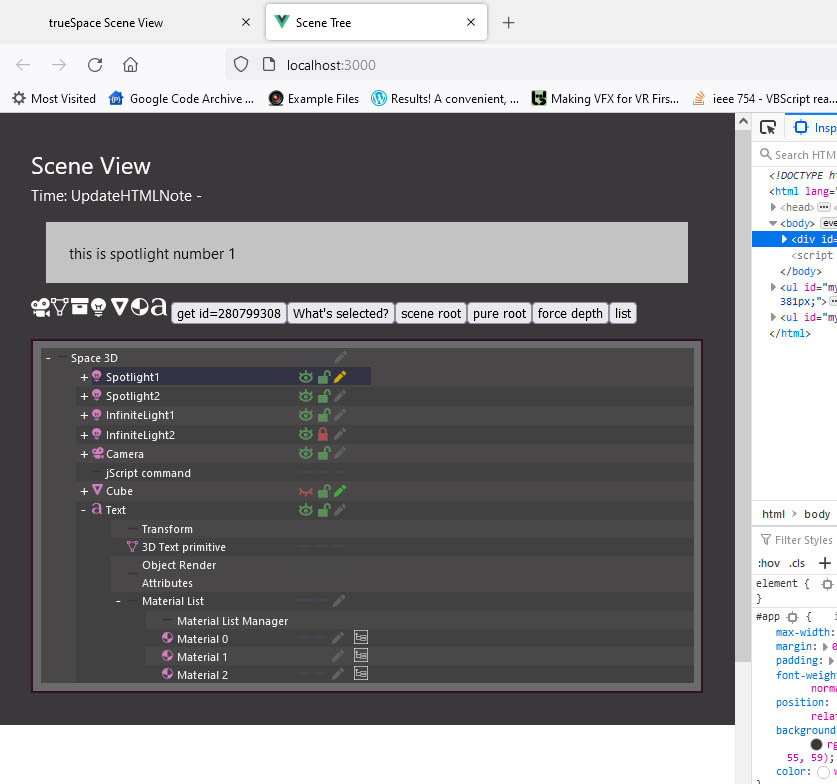
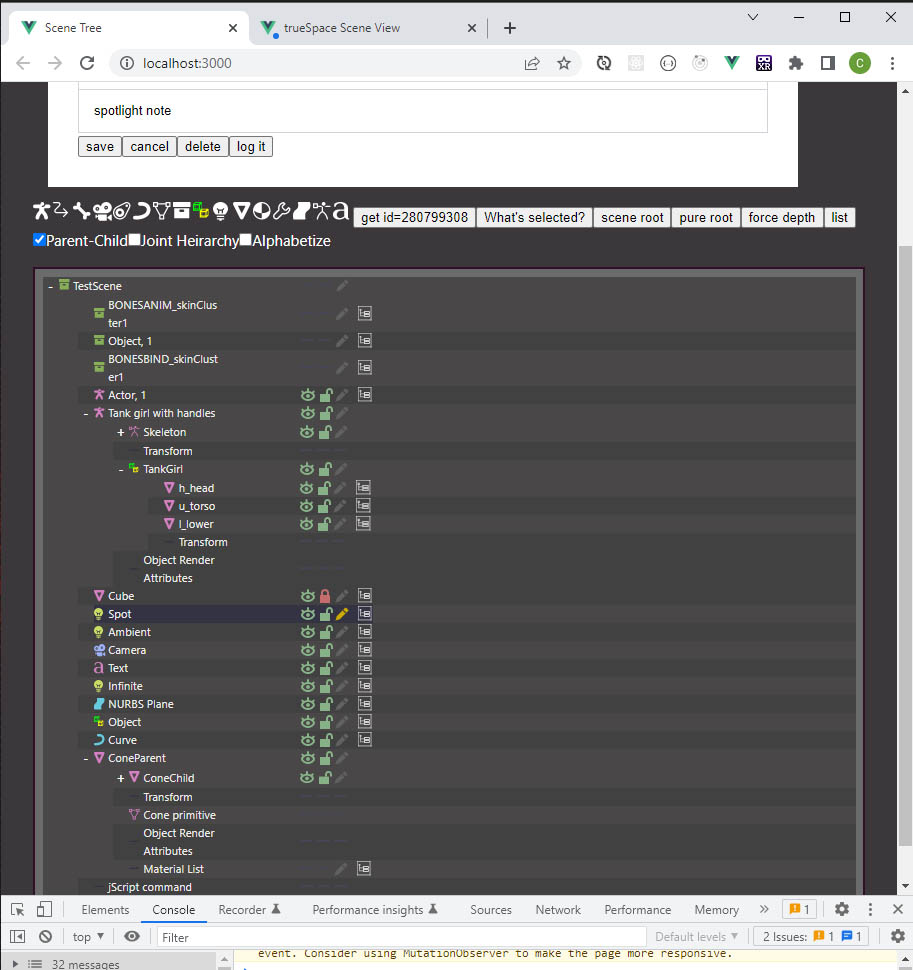
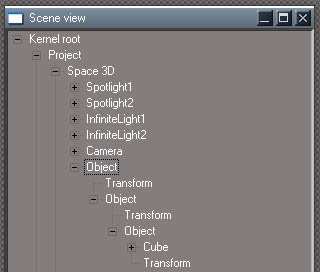
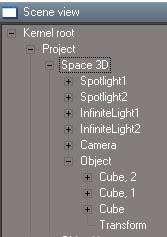
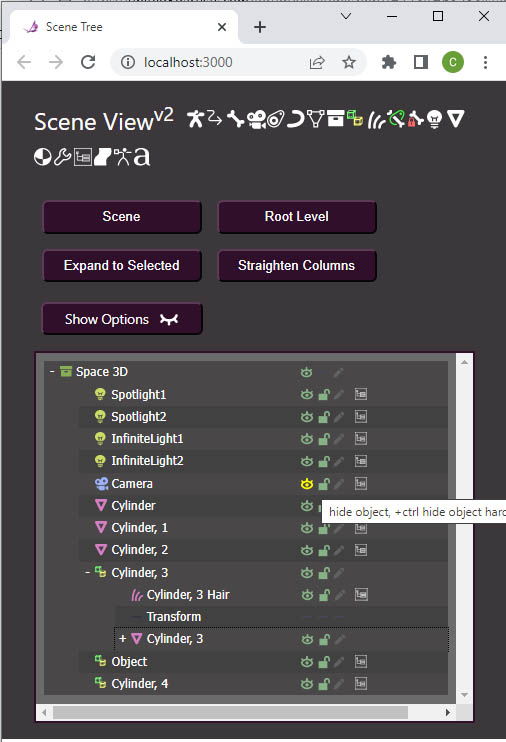
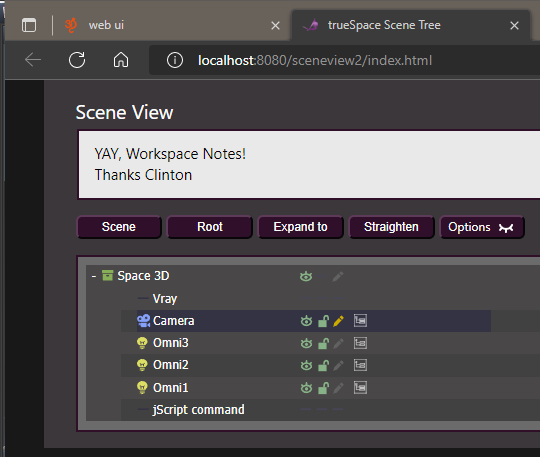
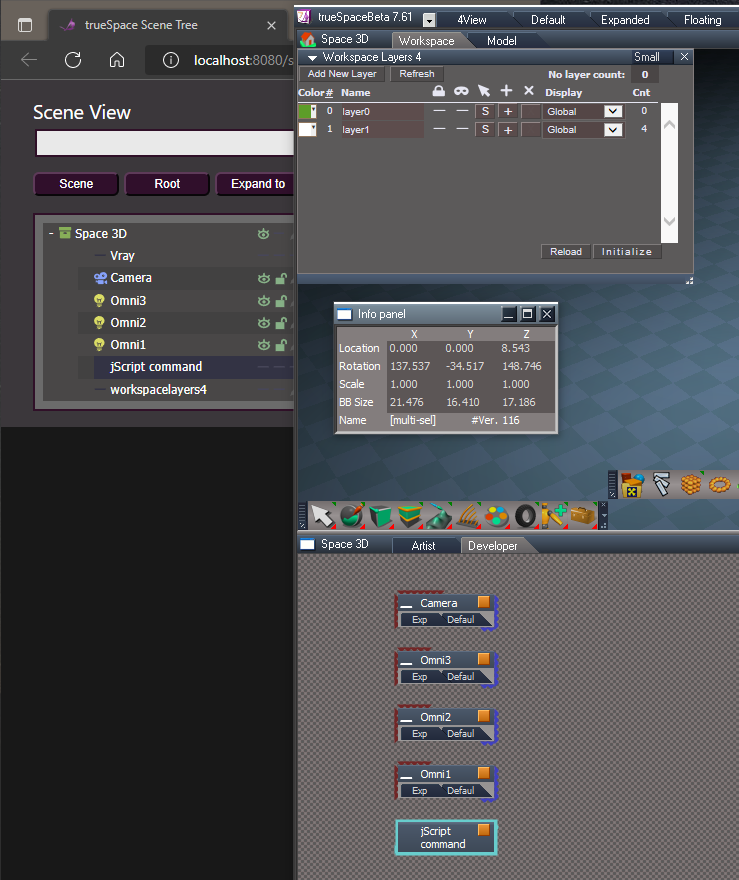
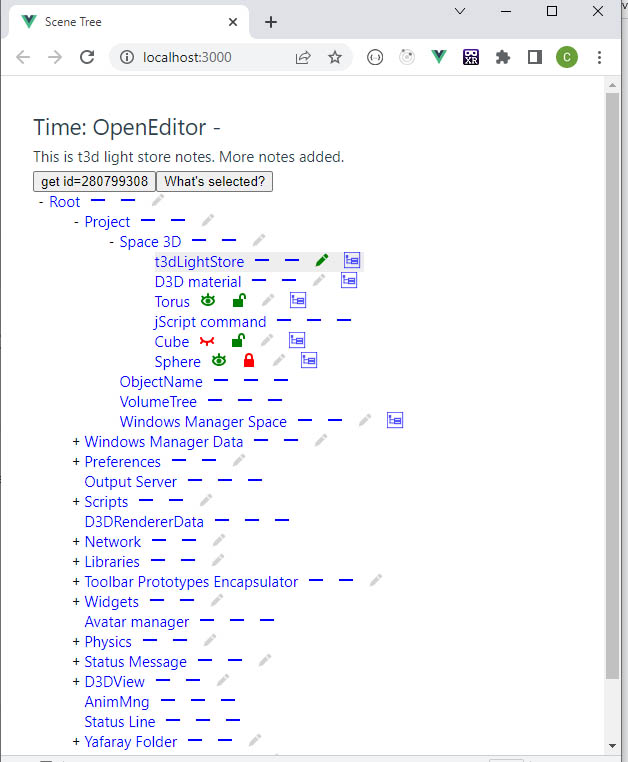
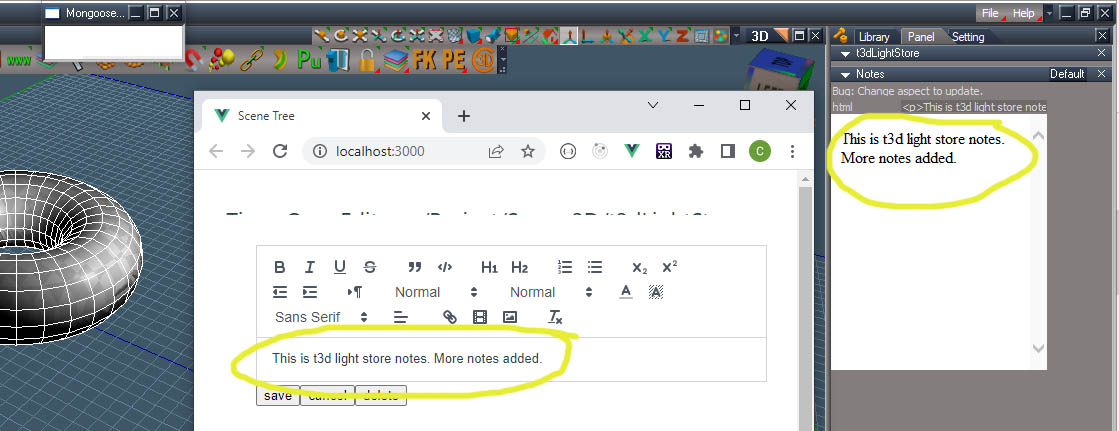
Here's the beginning of my latest programming project. Modelspace has a nice notes feature so I wanted to add notes for workspace. It uses a javascript based editor called Quill to save rich text notes into trueSpace nodes. The first image shows the beginning of a new web based scene tree view and the second shows the note editor opened next to the trueSpace note display.
A lot will change before it's done, but the green pen icon indicates a note and gray icon is no note. Pressing the pen icon opens the editor. You can't edit the note inside truespace. It can be read without the web server running.
Gray background shows selected items. The open and closed eyes indicate visibility, locked and unlocked show select ability in the 3D view and the last icon will be for loading more children nodes into the tree. It takes a long time to load every node in truespace into the tree so it only loads a couple of levels to start. Also plan to add some "start from here" choices, like only show the actual scene instead of everything.
The dash icon means nothing to do, can't add a note, can't hide or show, can't lock.
The icons came from Inkscape and I have several icons from Blender that I plan to use.
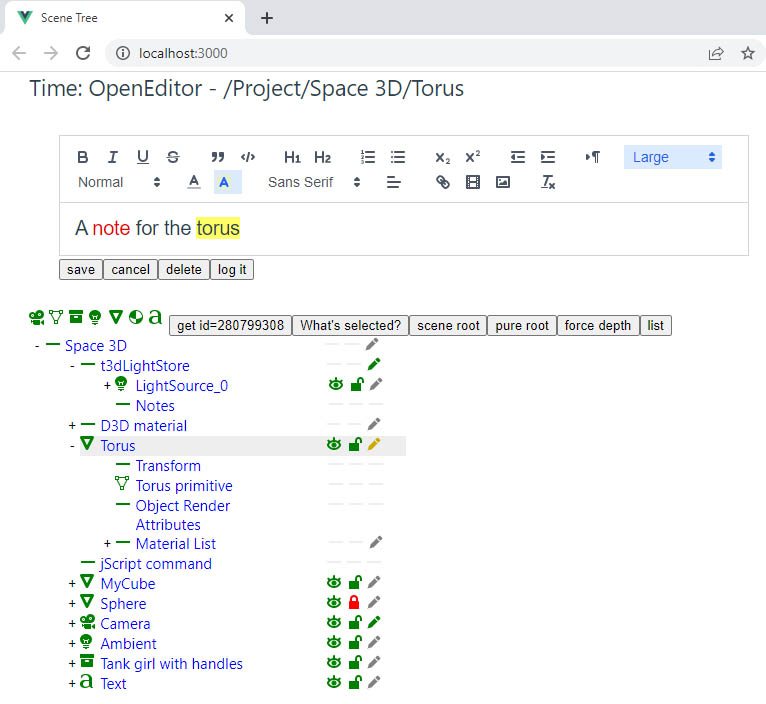
A lot will change before it's done, but the green pen icon indicates a note and gray icon is no note. Pressing the pen icon opens the editor. You can't edit the note inside truespace. It can be read without the web server running.
Gray background shows selected items. The open and closed eyes indicate visibility, locked and unlocked show select ability in the 3D view and the last icon will be for loading more children nodes into the tree. It takes a long time to load every node in truespace into the tree so it only loads a couple of levels to start. Also plan to add some "start from here" choices, like only show the actual scene instead of everything.
The dash icon means nothing to do, can't add a note, can't hide or show, can't lock.
The icons came from Inkscape and I have several icons from Blender that I plan to use.
-
clintonman
- Captain
- Posts: 5659
- Joined: 21 May 2009, 21:08
- Type the number ten into the box: 0
- Location: California
Re: Notes and Scene View for workspace
More icons and the trailing icons line up vertically. The notes are working now and I discovered a limitation in that all the formatting of the notes won't display inside truespace. The web page will be needed to see any fancy notes in a fancy way.
Next I plan to do a right click context menu or I'll spend some time making it look better. It's so ugly I can barely stand to look at it.
-
v3rd3
- Lieutenant Commander
- Posts: 1191
- Joined: 21 May 2009, 20:04
Re: Notes and Scene View for workspace
Nice work Clinton.... I can't wait to try this myself.

-
clintonman
- Captain
- Posts: 5659
- Joined: 21 May 2009, 21:08
- Type the number ten into the box: 0
- Location: California
Re: Notes and Scene View for workspace
Thank you.
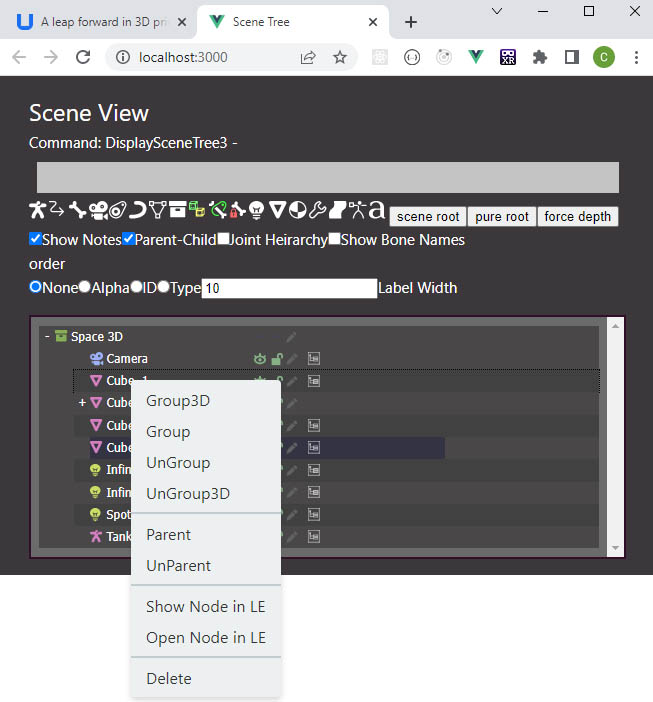
Worked on the styling so my eyes don't bleed out while working on this. Most of the buttons and icons at the top are test junk and will be removed in the end. The context menu is next. I also want to test to see if the page can be opened inside a tS panel.
-
clintonman
- Captain
- Posts: 5659
- Joined: 21 May 2009, 21:08
- Type the number ten into the box: 0
- Location: California
Re: Notes and Scene View for workspace
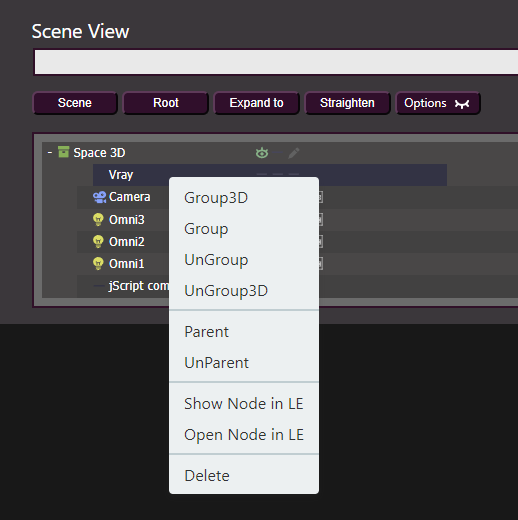
I got most of the difficult part done. That was adding alternate ways of displaying parented and skeleton hierarchies. There are a few more icons with more colors. The context menu is working and has options for delete and open in the link editor like the built in scene view. I found some info that may show a way to build the result so it can be used in older web browsers and maybe inside a tS panel.
I also just noticed that the notes controls should be sticky at the top of the page.
-
clintonman
- Captain
- Posts: 5659
- Joined: 21 May 2009, 21:08
- Type the number ten into the box: 0
- Location: California
Re: Notes and Scene View for workspace
Notes stay at the top of the page now.
Building for older browsers is not an option so this new scene view may not work on winXP. Going to keep the old version with some bug fixes.
Updated the sort to have options to sort alphabetically and by type of object and by id which is close to the default tS scene order.
Added a name width control so the right icons can be closer to the name.
RClick context menu is complete
Added icons for ikhandles and iklocks.
Option to not show the notes all the time.
Updated the rsx plugin to help fix an old bug when grouping.
I'm currently working on a drag and drop menu. Right now drag and drop parenting is working. I need to enable the menu so after dropping there are options for parenting, moving a node into a 2D or 3D group and copy options.
-
trueBlue
- Captain
- Posts: 5548
- Joined: 06 Jul 2009, 22:50
- Type the number ten into the box: 10
Re: Notes and Scene View for workspace
Wait...What?I'm currently working on a drag and drop menu
Is this bug present in the current UU May 18, 2022?Updated the rsx plugin to help fix an old bug when grouping.
-
clintonman
- Captain
- Posts: 5659
- Joined: 21 May 2009, 21:08
- Type the number ten into the box: 0
- Location: California
Re: Notes and Scene View for workspace
Drag and drop is only in the scene view, no dragging to or from tS. I just got the parenting part working. You drag and drop an item and you get a menu with one option to parent. It will also do re-parenting and parent within group objects. The old version didn't re-parent, so you would have to unparent and then parent. Also you could not parent inside a group before, all parenting was at the scene top level.trueBlue wrote: 11 Jul 2022, 22:30Wait...What?I'm currently working on a drag and drop menu![]()
Is this bug present in the current UU May 18, 2022?Updated the rsx plugin to help fix an old bug when grouping.
Yep, it should be in there. The bug is that when you use the group commands the tree display doesn't update because the update gets short circuited by a selection change event caused by the grouping action.
-
trueBlue
- Captain
- Posts: 5548
- Joined: 06 Jul 2009, 22:50
- Type the number ten into the box: 10
Re: Notes and Scene View for workspace
Testing the Scene View in the current UU...The bug is that when you use the group commands the tree display doesn't update because the update gets short circuited by a selection change event caused by the grouping action
I see that it does not update when using the Group commands, but you can use the Refresh button to update the Scene View
I do not see a Selection Change Event in your WebServer node located in Custom Commands or anywhere else
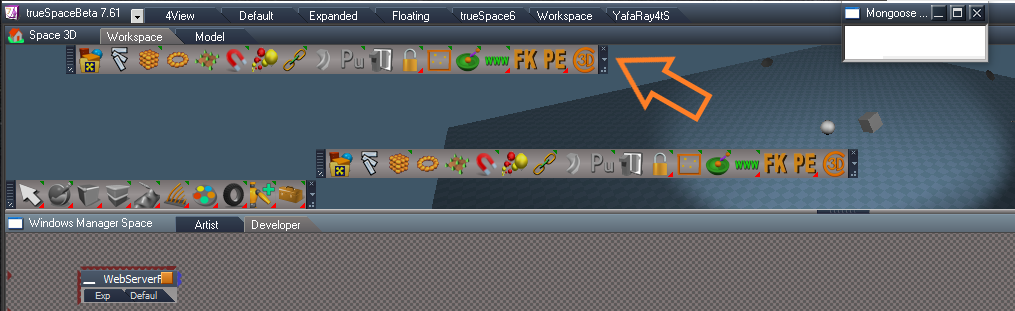
When opening the Scene View, I notice that your toolbar is duplicated
-
clintonman
- Captain
- Posts: 5659
- Joined: 21 May 2009, 21:08
- Type the number ten into the box: 0
- Location: California
Re: Notes and Scene View for workspace
Selection change comes from the rsx plugin.trueBlue wrote: 12 Jul 2022, 14:37Testing the Scene View in the current UU...The bug is that when you use the group commands the tree display doesn't update because the update gets short circuited by a selection change event caused by the grouping action
I see that it does not update when using the Group commands, but you can use the Refresh button to update the Scene View
I do not see a Selection Change Event in your WebServer node located in Custom Commands or anywhere else
When opening the Scene View, I notice that your toolbar is duplicated
Duplicate toolbar.png
-
trueBlue
- Captain
- Posts: 5548
- Joined: 06 Jul 2009, 22:50
- Type the number ten into the box: 10
Re: Notes and Scene View for workspace
Gotcha
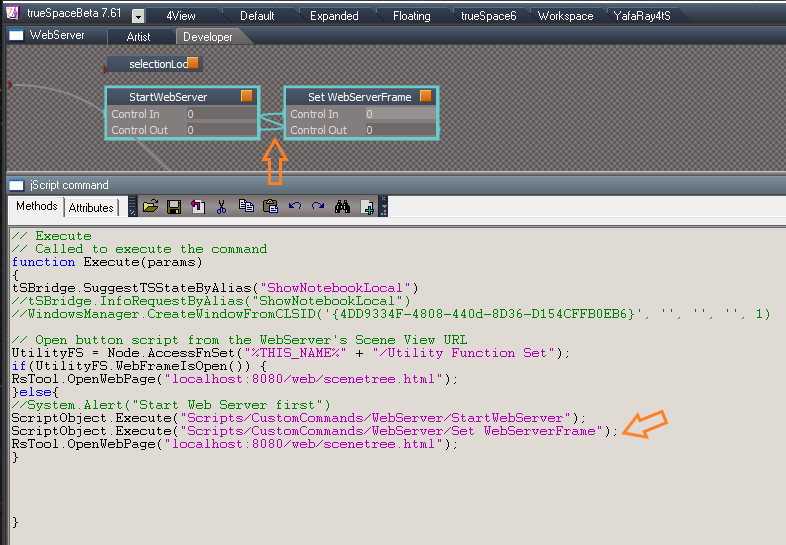
I cannot find any code that would open the duplicate toolbar
I do notice that the StartWebServer script is connected to the Set WebServerFrame script
The Open button script from the WebServer's Sene View URL, calls both scripts
This seems to me, that the Set WebServerFrame script is running twice
Suggestions? Disregard lines 5, 6, and 7
I cannot find any code that would open the duplicate toolbar
I do notice that the StartWebServer script is connected to the Set WebServerFrame script
The Open button script from the WebServer's Sene View URL, calls both scripts
This seems to me, that the Set WebServerFrame script is running twice
Suggestions? Disregard lines 5, 6, and 7
-
clintonman
- Captain
- Posts: 5659
- Joined: 21 May 2009, 21:08
- Type the number ten into the box: 0
- Location: California
Re: Notes and Scene View for workspace
I don't see any duplicate toolbars. It does look like it's running twice, so the linetrueBlue wrote: 12 Jul 2022, 15:28 Gotcha
I cannot find any code that would open the duplicate toolbar![]()
I do notice that the StartWebServer script is connected to the Set WebServerFrame script
The Open button script from the WebServer's Sene View URL, calls both scripts
This seems to me, that the Set WebServerFrame script is running twice
Suggestions?
Open button script.png
Disregard lines 5, 6, and 7
ScriptObject.Execute("Scripts/CustomCommands/WebServer/Set WebServerFrame");
isn't needed in any of the open buttons.
-
trueBlue
- Captain
- Posts: 5548
- Joined: 06 Jul 2009, 22:50
- Type the number ten into the box: 10
Re: Notes and Scene View for workspace
Thanks, that seems to stop the duplicate toolbar
-
clintonman
- Captain
- Posts: 5659
- Joined: 21 May 2009, 21:08
- Type the number ten into the box: 0
- Location: California
Re: Notes and Scene View for workspace
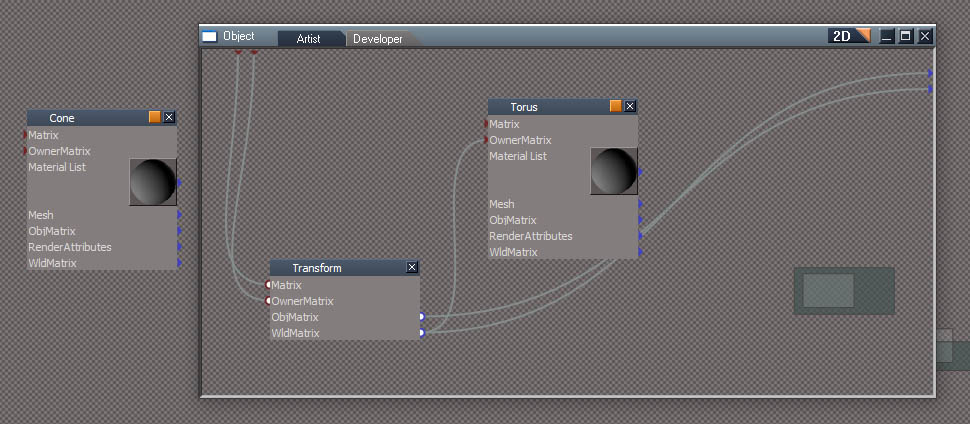
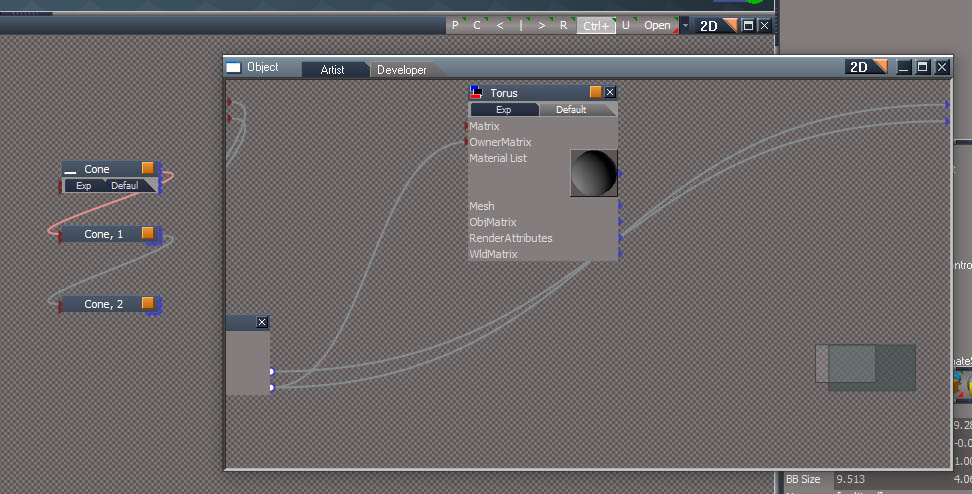
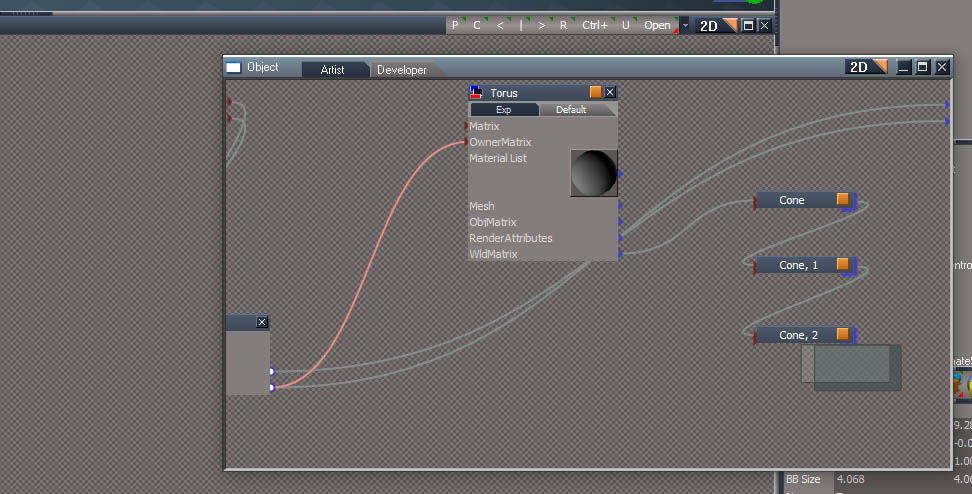
Ran into a problem during parenting of a scene object to a group member. This first image shows a Cone that I want to parent to the Torus inside the Object group.
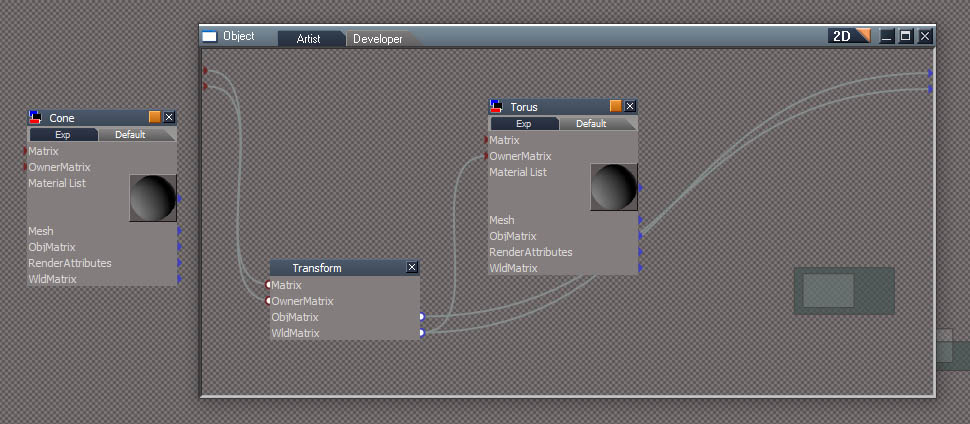
Second image shows selection, first the Cone then the Torus.
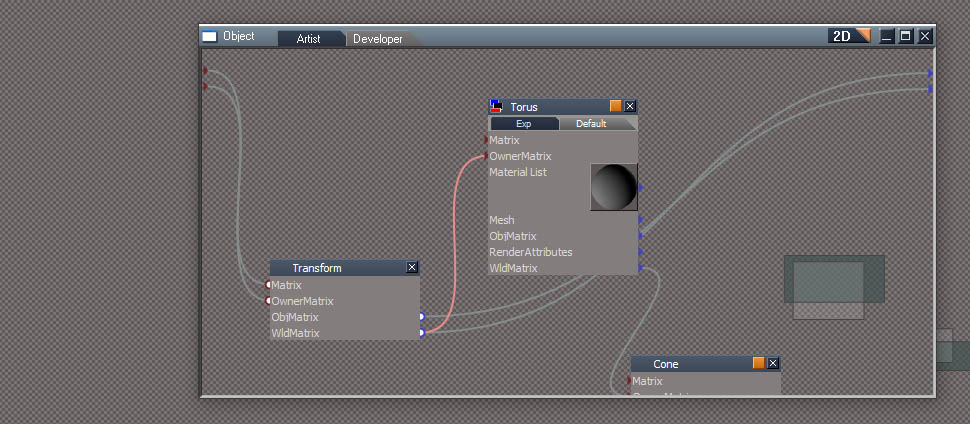
Third is after parenting. The Cone is moved into the Object group and parented to the Torus. So it works for a single object. The other option is to parent without moving the Cone. This creates an invisible link between the two, but it actually works, it behaves like it's been parented. The currently released and UU versions of the parenting script will just create the invisible link.
The last thing to fix is for the case where say the Cone is the parent of another item. In that case the other item plus any of it's children will need to be moved and the parenting links recreated inside the group object.
-
clintonman
- Captain
- Posts: 5659
- Joined: 21 May 2009, 21:08
- Type the number ten into the box: 0
- Location: California
Re: Notes and Scene View for workspace
Nice, got parenting and unparenting working fully.
Before parenting the Cone is selected then the Torus inside of the Object group is added to the selection.
After parenting all the descendant nodes move with the Cone.
Next up is groups. Adding items to groups, removing items from groups and moving items between groups.
Before parenting the Cone is selected then the Torus inside of the Object group is added to the selection.
After parenting all the descendant nodes move with the Cone.
Next up is groups. Adding items to groups, removing items from groups and moving items between groups.
-
clintonman
- Captain
- Posts: 5659
- Joined: 21 May 2009, 21:08
- Type the number ten into the box: 0
- Location: California
Re: Notes and Scene View for workspace
Latest update is that it can move and copy(drag and drop) into 2D and 3D groups. Updated the panel buttons with auto start for the web server and does extra check for the rsx plugin. Both changes are from the unofficial updates.
The parenting and unparenting code has been moved into a Global Function Set so it exists in one location. The old html scene view, the new html scene view and the toolbar buttons will all use the same code. So the toolbar button "Pu" has been altered to use the new parenting code in the function set.
The visibility functions need to be updated to match the UU way of visibility control and need to do a bunch of testing for incompatible actions like trying to add an object to a 3d group as a 3d object when it is not a 3d object.
NURBS processing is missing from a couple of places. And I just remembered I forgot to test moving an object from one group into another.
The parenting and unparenting code has been moved into a Global Function Set so it exists in one location. The old html scene view, the new html scene view and the toolbar buttons will all use the same code. So the toolbar button "Pu" has been altered to use the new parenting code in the function set.
The visibility functions need to be updated to match the UU way of visibility control and need to do a bunch of testing for incompatible actions like trying to add an object to a 3d group as a 3d object when it is not a 3d object.
NURBS processing is missing from a couple of places. And I just remembered I forgot to test moving an object from one group into another.
-
trueBlue
- Captain
- Posts: 5548
- Joined: 06 Jul 2009, 22:50
- Type the number ten into the box: 10
Re: Notes and Scene View for workspace
Have you tried Node.Move(var, var) versus Node.Copy(var, var)?
Node.Move(Node.FirstSelected(), Space.CurrentScene() +"/Sphere/")
-
clintonman
- Captain
- Posts: 5659
- Joined: 21 May 2009, 21:08
- Type the number ten into the box: 0
- Location: California
Re: Notes and Scene View for workspace
I tried it but it did weird things. I think it removed all internal nodes from an object. Maybe it only works for nodes that have no sub-objects?trueBlue wrote: 18 Jul 2022, 16:12 Have you tried Node.Move(var, var) versus Node.Copy(var, var)?
Node.Move(Node.FirstSelected(), Space.CurrentScene() +"/Sphere/")
If it works for you I'll need to double check it.
-
trueBlue
- Captain
- Posts: 5548
- Joined: 06 Jul 2009, 22:50
- Type the number ten into the box: 10
Re: Notes and Scene View for workspace
Your right!
I originally tested moving a jScript node which worked as expected
Edit: If you move an object to somewhere that does not exist, it is gone from existence
There is no undo!
Very Strange command
I originally tested moving a jScript node which worked as expected
Edit: If you move an object to somewhere that does not exist, it is gone from existence
There is no undo!
Very Strange command
-
clintonman
- Captain
- Posts: 5659
- Joined: 21 May 2009, 21:08
- Type the number ten into the box: 0
- Location: California
Re: Notes and Scene View for workspace
Ran into all sorts of bugs and omissions while testing. I thought I might finish this weekend but it's going to take a little bit longer.
Got the delete nodes working with multiple selections and optionally parenting structures.
When creating groups it asks for a name for the group, defaulting to a random name.
I split the parent/unparent icon button so shortcuts can be defined and because the parenting needed an options panel for invisible parenting. I figure the shortcuts will be p to parent and shift+p to unparent. I also created new icon images for adding to a group and adding to a 3D group. They work the same as parenting in that the last item selected is the destination group.
Got the delete nodes working with multiple selections and optionally parenting structures.
When creating groups it asks for a name for the group, defaulting to a random name.
I split the parent/unparent icon button so shortcuts can be defined and because the parenting needed an options panel for invisible parenting. I figure the shortcuts will be p to parent and shift+p to unparent. I also created new icon images for adding to a group and adding to a 3D group. They work the same as parenting in that the last item selected is the destination group.
-
clintonman
- Captain
- Posts: 5659
- Joined: 21 May 2009, 21:08
- Type the number ten into the box: 0
- Location: California
Re: Notes and Scene View for workspace
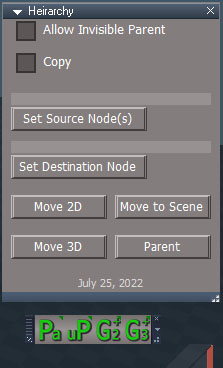
Image shows the new hierarchy options and new buttons. From left to right they are parent, unparent, add to group 2D and add to group 3D. RMB Panel gives options for invisible parenting and copy when running any of the buttons except unparent. It also has buttons to preset the selections and a button to move any node to the scene. Move to Scene will use the presets Source or if the Source is not set it will just use the current selection.
All of this exists in the new Scene View. I just decided to add some toolbar buttons to call the same functions.
Testing is going well. Only a few things left on the TODO list:
want to maybe verify delete of nodes outside of the scene. Caligari made it more difficult to delete outside the scene to stop accidental removal of vital nodes.
check all working with NURBS
maybe some error feedback
change to rsx plugin so server is not hard coded to port 8080 and want to add option to change the root which is the tS folder, it would be better if the root was the web folder.
Found some interesting tS behaviors.
Show Object Attribs does not work for group objects with only 1 member, no error, it just does nothing
When you load a camera or light the visibility state seems wonky. It says it's invisible. Making it invisible and then visible again clears out the bad value.
All of this exists in the new Scene View. I just decided to add some toolbar buttons to call the same functions.
Testing is going well. Only a few things left on the TODO list:
want to maybe verify delete of nodes outside of the scene. Caligari made it more difficult to delete outside the scene to stop accidental removal of vital nodes.
check all working with NURBS
maybe some error feedback
change to rsx plugin so server is not hard coded to port 8080 and want to add option to change the root which is the tS folder, it would be better if the root was the web folder.
Found some interesting tS behaviors.
Show Object Attribs does not work for group objects with only 1 member, no error, it just does nothing
When you load a camera or light the visibility state seems wonky. It says it's invisible. Making it invisible and then visible again clears out the bad value.
-
trueBlue
- Captain
- Posts: 5548
- Joined: 06 Jul 2009, 22:50
- Type the number ten into the box: 10
Re: Notes and Scene View for workspace
One member, being one object that is 3D Encapsulated?Show Object Attribs does not work for group objects with only 1 member, no error, it just does nothing
If that is the case, it seems to work for me if that one member does not have ORA, using the Settings/Scene/Show Object Attribs button (Script) in the UU
-
clintonman
- Captain
- Posts: 5659
- Joined: 21 May 2009, 21:08
- Type the number ten into the box: 0
- Location: California
Re: Notes and Scene View for workspace
Thanks for the tip.trueBlue wrote: 26 Jul 2022, 14:52 ... if that one member does not have ORA, ...
-
clintonman
- Captain
- Posts: 5659
- Joined: 21 May 2009, 21:08
- Type the number ten into the box: 0
- Location: California
Re: Notes and Scene View for workspace
Ends up the "... work for me if that one member does not have ORA, using the Settings/Scene/Show Object Attribs button (Script) in the UU"
didn't work out for the Scene View because the visibility in that case is for the group member and not the group.
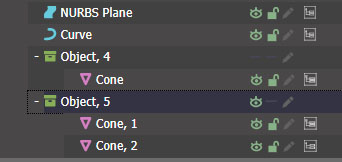
I was able to get it to display the view option properly. In the image "Object, 4" only has 1 member, so there is no eye. "Object, 5" has 2 cones so it show the eye. While working on object render attributes nodes I noticed that junk "Input Attributes" connectors are sometimes left behind. So for group visibility I start be removing all the "Object Render Attribute"and "Render Attribute" nodes and removed all the "Input Attribute" connectors. This approach may or may not make the UU visibility scripts better.
Started working on the NURBS. Next up is combining NURBS with groups. Once NURBS are fully working it should be close to done.
-
trueBlue
- Captain
- Posts: 5548
- Joined: 06 Jul 2009, 22:50
- Type the number ten into the box: 10
Re: Notes and Scene View for workspace
It seems to be an issue with the native tS command when using it on an encapsulated object that only has one member
D3DView.ShowRenderAttribsForObject('', '')
-
clintonman
- Captain
- Posts: 5659
- Joined: 21 May 2009, 21:08
- Type the number ten into the box: 0
- Location: California
Re: Notes and Scene View for workspace
Yep, that's why I go in and remove all ORA and RA as a first step so it always works whether or not the member has an ORA.trueBlue wrote: 27 Jul 2022, 14:15 It seems to be an issue with the native tS command when using it on an encapsulated object that only has one member
D3DView.ShowRenderAttribsForObject('', '')
Ideally, tS would create an ORA in the group and give the group member an RA node.
-
trueBlue
- Captain
- Posts: 5548
- Joined: 06 Jul 2009, 22:50
- Type the number ten into the box: 10
Re: Notes and Scene View for workspace
Could you check if the group has only one member?
If so, then add the ORA panel to the group plus the other nodes and attributes?
Or an easier way, just add another temporary object, run the ORA command, and remove the temporary object
Been looking at the Object hider for Lights and Cameras
It looks like it is being used with tS widgets in with which tS toggles the Object hider's Invisible attribute off/on
Only if the Hide command connector is exported out
If so, then add the ORA panel to the group plus the other nodes and attributes?
Or an easier way, just add another temporary object, run the ORA command, and remove the temporary object
Been looking at the Object hider for Lights and Cameras
It looks like it is being used with tS widgets in with which tS toggles the Object hider's Invisible attribute off/on
Only if the Hide command connector is exported out
-
clintonman
- Captain
- Posts: 5659
- Joined: 21 May 2009, 21:08
- Type the number ten into the box: 0
- Location: California
Re: Notes and Scene View for workspace
It's possible but it would get messy going down a deep group and creating and connecting all the nodes manually. In this extreme example would have to go into the Object see that it has 1 member and add all the needed stuff and connect it up, then go down to the next se it has only 1 member and do the same and so on.trueBlue wrote: 27 Jul 2022, 16:01 Could you check if the group has only one member?
If so, then add the ORA panel to the group plus the other nodes and attributes?
Or an easier way, just add another temporary object, run the ORA command, and remove the temporary object
Been looking at the Object hider for Lights and Cameras
It looks like it is being used with tS widgets in with which tS toggles the Object hider's Invisible attribute off/on
Only if the Hide command connector is exported out
-
trueBlue
- Captain
- Posts: 5548
- Joined: 06 Jul 2009, 22:50
- Type the number ten into the box: 10
Re: Notes and Scene View for workspace
Best I can tell, the ORA command does all the creating and connecting all the nodes
Even with deep grouped objects which accordingly to the Seal of good modeling is not recommended
You know better but it seems that deleting the user's predefined ORA nodes and or Workspace Layers setups may not be a very good idea
Question...
What is the purpose and or advantage of Parenting verses tS Grouping/Encapsulating?
Even with deep grouped objects which accordingly to the Seal of good modeling is not recommended
You know better but it seems that deleting the user's predefined ORA nodes and or Workspace Layers setups may not be a very good idea
Question...
What is the purpose and or advantage of Parenting verses tS Grouping/Encapsulating?
-
clintonman
- Captain
- Posts: 5659
- Joined: 21 May 2009, 21:08
- Type the number ten into the box: 0
- Location: California
Re: Notes and Scene View for workspace
I see. Because they may have other things set besides visible/invisible.trueBlue wrote: 27 Jul 2022, 17:42 Best I can tell, the ORA command does all the creating and connecting all the nodes
Even with deep grouped objects which accordingly to the Seal of good modeling is not recommended
You know better but it seems that deleting the user's predefined ORA nodes and or Workspace Layers setups may not be a very good idea
Some other programs don't have a concept of 3D grouping and only support parenting structures. Others do groups differently. They attach the children to a common transform node without encapsulation and that's a group by their definition. Parenting in tS makes it possible to have complex hierarchies without the need for deep grouping. Some features of other programs expect parenting and don't work with groups. Like in game engines they may have a collision mesh for fast physics and if you define those collisions in your 3D program they must be parented to the mesh.trueBlue wrote: 27 Jul 2022, 17:42 Question...
What is the purpose and or advantage of Parenting verses tS Grouping/Encapsulating?
So basically it's so tS can export to other programs better and I think animation is better controlled with parenting than with groups.
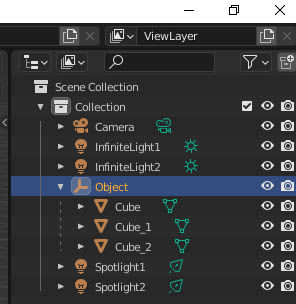
Example of grouped object in tS converted to parenting in Blender. The Object does not have a transform node because it is a transform node and the Cubes are parented to it.
-
trueBlue
- Captain
- Posts: 5548
- Joined: 06 Jul 2009, 22:50
- Type the number ten into the box: 10
Re: Notes and Scene View for workspace
Sounds like Parenting is superior to Encapsulation and more user friendly
The only thing I find not user friendly is the knowing which object is the Parent (without using the Link Editor)
I have in the past selected the wrong parent (last selected object) before Parenting or Unparenting
What might be helpful, is adding a connecter/attribute (Parent) that would be more visible and could be checked with scripting. Much like your selection locking
The only thing I find not user friendly is the knowing which object is the Parent (without using the Link Editor)
I have in the past selected the wrong parent (last selected object) before Parenting or Unparenting
What might be helpful, is adding a connecter/attribute (Parent) that would be more visible and could be checked with scripting. Much like your selection locking
-
clintonman
- Captain
- Posts: 5659
- Joined: 21 May 2009, 21:08
- Type the number ten into the box: 0
- Location: California
Re: Notes and Scene View for workspace
You don't need to select the parent when unparenting. You can see parenting structure in the web based Scene View.
You can also parent and unparent using the web based scene view.
-
clintonman
- Captain
- Posts: 5659
- Joined: 21 May 2009, 21:08
- Type the number ten into the box: 0
- Location: California
Re: Notes and Scene View for workspace
I've been doing some testing and the Hide Show scripts in UU are deleting the user's predefined ORA nodes.trueBlue wrote: 27 Jul 2022, 17:42 ...but it seems that deleting the user's predefined ORA nodes and or Workspace Layers setups may not be a very good idea
-
trueBlue
- Captain
- Posts: 5548
- Joined: 06 Jul 2009, 22:50
- Type the number ten into the box: 10
Re: Notes and Scene View for workspace
Show and Hide scripts
The comment above
"Model removes the Object_Name connector for Lights"
I do not think that Model removes the Object_Name connector for Lights
In fact, I do not think Model's ORA settings in the Object Panel even work with Lights
I just tested a workspace Spot light
Edit: In addition to the above, I now see two other places in these scripts that delete the ORA panel
I am all for this to be fixed
Code: Select all
// Model removes the Object_Name connector for Lights
if(Node.Exists(Sel + "/Object Render Attributes") && Node.IsLight(Sel) && !Node.ConExists(Sel + "/Object Render Attributes", "Object_Name")) {
util.Delete(Sel + "/Object Render Attributes")
"Model removes the Object_Name connector for Lights"
I do not think that Model removes the Object_Name connector for Lights
In fact, I do not think Model's ORA settings in the Object Panel even work with Lights
I just tested a workspace Spot light
Edit: In addition to the above, I now see two other places in these scripts that delete the ORA panel
I am all for this to be fixed
-
clintonman
- Captain
- Posts: 5659
- Joined: 21 May 2009, 21:08
- Type the number ten into the box: 0
- Location: California
Re: Notes and Scene View for workspace
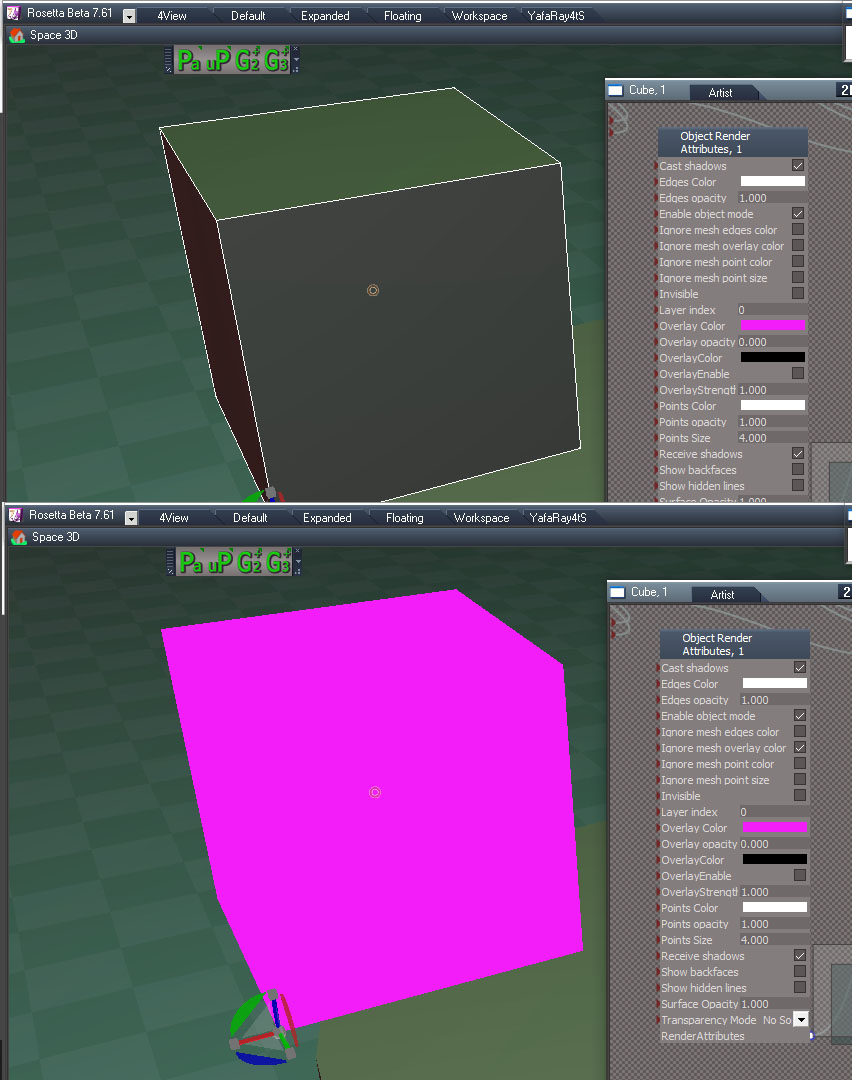
Looking at the ORA node to try to fix some of the show/hide problems and found the overlay color setting.
"Overlay Color" with the space and "OverlayStrength" controls the effect. Strength of 1 completely covers the original color.
"Ignore mesh overlay color" turns it on and off.
All the other overlay controls don't seem to do anything.
I was attempting to copy the ORA node values and several connectors have bad values, causing errors when you try to read them. I think it might be fixed by setting values and saving over the preobjects "ObjectAttributes2.RsObj" and "ObjectAttributes.RsObj"
As far as fixes I'm creating 2 versions of show/hide for the scene view page. One only sets the value of the Invisible and the plan is to add the ability to change RA node to an ORA node and copy the ORA values from the ancestor node. This will make it possible to hide subobjects and still maintain all the ORA values. The second version will be more like the current UU show/hide with hopefully some fixes to help preserve ORA settings. In the scene view the show/hide icons have click for the soft versions and ctrl+click for the harsh versions. The main goal is to make the harsh versions less harsh.
-
clintonman
- Captain
- Posts: 5659
- Joined: 21 May 2009, 21:08
- Type the number ten into the box: 0
- Location: California
Re: Notes and Scene View for workspace
It's looking hopeful. The "harsh" show/hide is a little less harsh. When used it will either read and save it's own ORA values or the ORA values of it's ancestor ORA and write those values back at the end. It will still overwrite any descendant ORA values. The "soft" show/hide are maintaining all the ORA values unless it has the RA node and descendants with an ORA node. It's not perfect. It is less damaging to ORA values and may be the most practical solution.
More testing is needed and I think the soft needs to check for descendant ORAs and abort if it finds any.
TODO list:
soft show/hide check for descendant ORA nodes to avoid changing them
reorganize the show/hide code so it's less confusing and remove any unneeded bits
check NURBS again with all the new changes
option to verify delete nodes outside of the scene
web page scroll is jumping - need to maintain scroll value
newer rsx plugin still needs to be added
prep to publish the parenting/grouping toolbar since it seems stable now
More testing is needed and I think the soft needs to check for descendant ORAs and abort if it finds any.
TODO list:
soft show/hide check for descendant ORA nodes to avoid changing them
reorganize the show/hide code so it's less confusing and remove any unneeded bits
check NURBS again with all the new changes
option to verify delete nodes outside of the scene
web page scroll is jumping - need to maintain scroll value
newer rsx plugin still needs to be added
prep to publish the parenting/grouping toolbar since it seems stable now
-
trueBlue
- Captain
- Posts: 5548
- Joined: 06 Jul 2009, 22:50
- Type the number ten into the box: 10
Re: Notes and Scene View for workspace
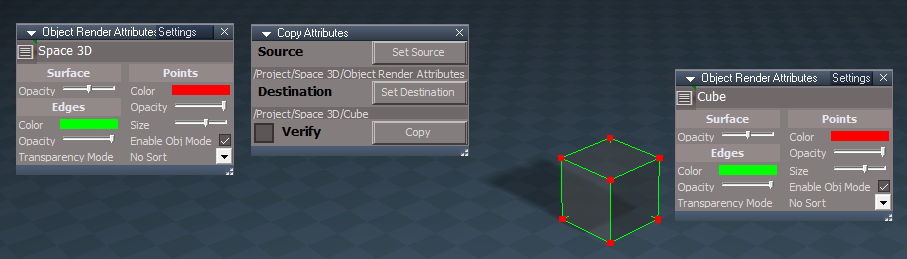
I used your Copy Attributes script using the ObjectAttributes.RsObj as a Source and a Cube's ORA for the Destinationclintonman wrote: 28 Jul 2022, 01:20 I was attempting to copy the ORA node values and several connectors have bad values, causing errors when you try to read them. I think it might be fixed by setting values and saving over the preobjects "ObjectAttributes2.RsObj" and "ObjectAttributes.RsObj"
Everything transferred over without any errors I tried the Default values first and then modified values shown in the above pic
-
clintonman
- Captain
- Posts: 5659
- Joined: 21 May 2009, 21:08
- Type the number ten into the box: 0
- Location: California
Re: Notes and Scene View for workspace
Copy Attributes script has a try catch so any error values are skipped. I ended up doing the same for the scene view show/hide scripts.trueBlue wrote: 28 Jul 2022, 21:43I used your Copy Attributes script using the ObjectAttributes.RsObj as a Source and a Cube's ORA for the Destinationclintonman wrote: 28 Jul 2022, 01:20 I was attempting to copy the ORA node values and several connectors have bad values, causing errors when you try to read them. I think it might be fixed by setting values and saving over the preobjects "ObjectAttributes2.RsObj" and "ObjectAttributes.RsObj"
Everything transferred over without an errors
ORA copied attribs.png
I tried the Default values first and then modified values shown in the above pic
-
trueBlue
- Captain
- Posts: 5548
- Joined: 06 Jul 2009, 22:50
- Type the number ten into the box: 10
Re: Notes and Scene View for workspace
I used System.Trace("Failed to copy " + connector[0]);
Edit: I see the errors now
Only the Overlay attributes
Edit2: Cannot seem to fix it
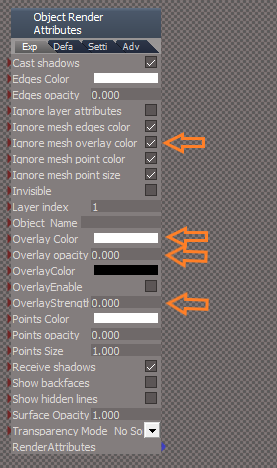
Edit3: I think I fixed it
Arrows note changes from Original
Code: Select all
} catch(e) {
System.Trace("Failed to copy " + connector[0]);
Only the Overlay attributes
Edit2: Cannot seem to fix it
Edit3: I think I fixed it
Arrows note changes from Original
-
clintonman
- Captain
- Posts: 5659
- Joined: 21 May 2009, 21:08
- Type the number ten into the box: 0
- Location: California
Re: Notes and Scene View for workspace
Changing the preobject files didn't do anything for me. I think the problem is you would have to fix it everywhere it's used. It looks like all the primitives inside the Preferences have ORA nodes with bad values. Maybe the same for cameras and lights too. I did a test and changed the ORA inside the Cube primitive preferences and the ORA looked good when creating a cube in the scene.trueBlue wrote: 28 Jul 2022, 22:15 I used System.Trace("Failed to copy " + connector[0]);
Edit: I see the errors nowCode: Select all
} catch(e) { System.Trace("Failed to copy " + connector[0]);
Only the Overlay attributes
Edit2: Cannot seem to fix it
Edit3: I think I fixed it
Arrows note changes from Original
Saved ORA.png
I wonder if all the non-working overlay stuff is legacy or if it's used somewhere.
-
trueBlue
- Captain
- Posts: 5548
- Joined: 06 Jul 2009, 22:50
- Type the number ten into the box: 10
Re: Notes and Scene View for workspace
Well, you discovered how to use Overlay, so it works
I Reset the Overlay attributes, some of them did not reset
Adding the values 0.000 seem to help too
Oddities
Attributes with the same name and no _ used for spaces between words
Empty values might cause error when copying/pasting
I think there should be an option for replacing the ORA panel, if possible
I am guessing it is used for widgets
I Reset the Overlay attributes, some of them did not reset
Adding the values 0.000 seem to help too
Oddities
Attributes with the same name and no _ used for spaces between words
Empty values might cause error when copying/pasting
I think there should be an option for replacing the ORA panel, if possible
I am guessing it is used for widgets
-
clintonman
- Captain
- Posts: 5659
- Joined: 21 May 2009, 21:08
- Type the number ten into the box: 0
- Location: California
Re: Notes and Scene View for workspace
How do you figure?trueBlue wrote: 29 Jul 2022, 02:23 ...
I think there should be an option for replacing the ORA panel, if possible
...
I did find out the preobject ORA files are used when you run the command, "D3DView.ShowRenderAttribsForObject"
-
clintonman
- Captain
- Posts: 5659
- Joined: 21 May 2009, 21:08
- Type the number ten into the box: 0
- Location: California
Re: Notes and Scene View for workspace
Latest bug fixes:
Mostly notes so I know what I did for the soft show/hide function:
Found that the "D3DView.ShowRenderAttribsForObject" command works when there are at least 2 renderable nodes as descendent nodes anywhere in the group. So one can be near the top and the other can be deep down in the group hierarchy. Adjusted the soft show/hide to use that. Soft also now cleans orphan ORA nodes and discovered that orphans can also happen above the node, so cleaned those too. Soft can leave some junk connections behind. Hard show/hide will clean the junk connections.
soft show/hide is safe with the ORA values preserved
hard show/hide mostly keeps the ORA values now
removed show/hide and lock/unlock from outside of the scene tree
the tree view gets updated states from tS which caused the view to reset and jump to the top, added some scroll value preservation code to stop the jumping
safety measure - when deleting outside of the scene a dialog will ask "Are you sure?"
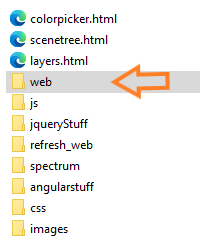
got new connectors in place for the rsx plugin change, there is port so another number besides 8080 can be used and root which is set to serve the web pages from a specific folder, "web", this shortens the links and makes it possible to use other port numbers to prevent conflicts.
"http://localhost:8080/web/colorpicker.html" is now
"http://localhost:8080/colorpicker.html"
it's a small change. Now it's not serving a website directly from the tS root folder anymore
The last big thing to test is NURBS inside groups. After that there's just some small changes before finally releasing it.
Mostly notes so I know what I did for the soft show/hide function:
Found that the "D3DView.ShowRenderAttribsForObject" command works when there are at least 2 renderable nodes as descendent nodes anywhere in the group. So one can be near the top and the other can be deep down in the group hierarchy. Adjusted the soft show/hide to use that. Soft also now cleans orphan ORA nodes and discovered that orphans can also happen above the node, so cleaned those too. Soft can leave some junk connections behind. Hard show/hide will clean the junk connections.
soft show/hide is safe with the ORA values preserved
hard show/hide mostly keeps the ORA values now
removed show/hide and lock/unlock from outside of the scene tree
the tree view gets updated states from tS which caused the view to reset and jump to the top, added some scroll value preservation code to stop the jumping
safety measure - when deleting outside of the scene a dialog will ask "Are you sure?"
got new connectors in place for the rsx plugin change, there is port so another number besides 8080 can be used and root which is set to serve the web pages from a specific folder, "web", this shortens the links and makes it possible to use other port numbers to prevent conflicts.
"http://localhost:8080/web/colorpicker.html" is now
"http://localhost:8080/colorpicker.html"
it's a small change. Now it's not serving a website directly from the tS root folder anymore
The last big thing to test is NURBS inside groups. After that there's just some small changes before finally releasing it.
-
trueBlue
- Captain
- Posts: 5548
- Joined: 06 Jul 2009, 22:50
- Type the number ten into the box: 10
Re: Notes and Scene View for workspace
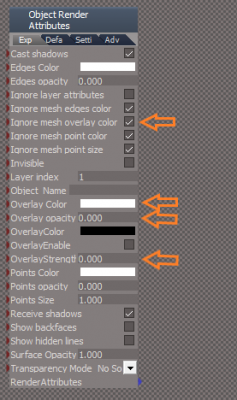
Here is the modified ORA node that, as far as I can tell, is fixed
These are the changes made noted by arrows I have updated the Primitives, Lights, Cameras, New Scene Lights and Camera in the preObjects folder, as well as the Default Light setup with this updated ORA panel
Also confirmed that the original ORA panel has the Overlay issues which is used with Workspace Widgets and Model Lights
Edit: I discovered that you could fix the original ORA panel from script
These are the changes made noted by arrows I have updated the Primitives, Lights, Cameras, New Scene Lights and Camera in the preObjects folder, as well as the Default Light setup with this updated ORA panel
Also confirmed that the original ORA panel has the Overlay issues which is used with Workspace Widgets and Model Lights
Edit: I discovered that you could fix the original ORA panel from script
Code: Select all
// Must select the Object Render Attributes.RsObj first
function Execute(params)
{
sel = Node.Selection();
for (i = 0; i < Node.SelectionLength(sel); i++)
{Node.Select(Node.SelectionGetAt(sel, i)); ApplyMacro(Node.SelectionGetAt(sel, i))};
}
function ApplyMacro(selectedObj_)
{
ScriptObject.RunCmd("graph package/conreset command", "Node", selectedObj_, "Con", "Overlay Color")
ScriptObject.RunCmd("graph package/conreset command", "Node", selectedObj_, "Con", "Overlay opacity")
ScriptObject.RunCmd("graph package/conreset command", "Node", selectedObj_, "Con", "OverlayColor")
ScriptObject.RunCmd("graph package/conreset command", "Node", selectedObj_, "Con", "OverlayEnable")
ScriptObject.RunCmd("graph package/conreset command", "Node", selectedObj_, "Con", "OverlayStrength")
ScriptObject.RunCmd("graph package/conreset command", "Node", selectedObj_, "Con", "Ignore mesh overlay color")
//Reset original settings
Node.Value(selectedObj_, "Ignore mesh overlay color") = 0
Node.Value(selectedObj_, "OverlayEnable") = 0
}
-
clintonman
- Captain
- Posts: 5659
- Joined: 21 May 2009, 21:08
- Type the number ten into the box: 0
- Location: California
Re: Notes and Scene View for workspace
I'll see about writing a script to update the cameras,lights and primitives with this ORA.trueBlue wrote: 29 Jul 2022, 14:48 Here is the modified ORA node that, as far as I can tell, is fixed
These are the changes made noted by arrows
Saved ORA.png
I have updated the Primitives, Lights, Cameras, New Scene Lights and Camera in the preObjects folder, as well as the Default Light setup with this updated ORA panel
Also confirmed that the original ORA panel has the Overlay issues which is used with Workspace Widgets and Model Lights
Edit: Never mind. Somehow I missed the part where you said you already fixed it.
Last edited by clintonman on 30 Jul 2022, 14:24, edited 1 time in total.
-
clintonman
- Captain
- Posts: 5659
- Joined: 21 May 2009, 21:08
- Type the number ten into the box: 0
- Location: California
Re: Notes and Scene View for workspace
I think I got the nurbs working properly. If so then that's the last of the super big fixes.
fixed bunch of nurbs related bugs
nurbs ORA values are preserved
added option to auto select the nurbs control point mesh for moving them around in the 3D view
improved visible/invisible soft method to set visibility of all descendant nodes
group3d view scrolling was not updating causing the tree to jump locations
fixed bunch of nurbs related bugs
nurbs ORA values are preserved
added option to auto select the nurbs control point mesh for moving them around in the 3D view
improved visible/invisible soft method to set visibility of all descendant nodes
group3d view scrolling was not updating causing the tree to jump locations
-
trueBlue
- Captain
- Posts: 5548
- Joined: 06 Jul 2009, 22:50
- Type the number ten into the box: 10
Re: Notes and Scene View for workspace
I think a new script or option that replaces the ORA panel would be helpful for legacy purposesclintonman wrote: 30 Jul 2022, 05:56I'll see about writing a script to update the cameras,lights and primitives with this ORA.trueBlue wrote: 29 Jul 2022, 14:48 Here is the modified ORA node that, as far as I can tell, is fixed
These are the changes made noted by arrows
Saved ORA.png
I have updated the Primitives, Lights, Cameras, New Scene Lights and Camera in the preObjects folder, as well as the Default Light setup with this updated ORA panel
Also confirmed that the original ORA panel has the Overlay issues which is used with Workspace Widgets and Model Lights
Edit: Never mind. Somehow I missed the part where you said you already fixed it.
But then again, is it really needed? Not sure! The Overlay attributes do not interfere with normal visibilities for 3D objects and the tS developers only exposed these attributes on the Exp aspect
Question...
Code: Select all
safety measure - when deleting outside of the scene a dialog will ask "Are you sure?"Are you planning on updating all of the UU visibility, encapsulation, and NURBS scripts in the ScriptCommands folder?
-
clintonman
- Captain
- Posts: 5659
- Joined: 21 May 2009, 21:08
- Type the number ten into the box: 0
- Location: California
Re: Notes and Scene View for workspace
I'm planning to do something. Visibility, parenting, new grouping options. No nurbs changes planned.trueBlue wrote: 30 Jul 2022, 14:56 ...
Are you planning on updating all of the UU visibility, encapsulation, and NURBS scripts in the ScriptCommands folder?
-
trueBlue
- Captain
- Posts: 5548
- Joined: 06 Jul 2009, 22:50
- Type the number ten into the box: 10
Re: Notes and Scene View for workspace
Awesome, thank you! 
-
clintonman
- Captain
- Posts: 5659
- Joined: 21 May 2009, 21:08
- Type the number ten into the box: 0
- Location: California
Re: Notes and Scene View for workspace
fixed a bug in the GatherChildORAs function, same bug was found in the UU Show and Hide scripts, improved protection of ORA settings
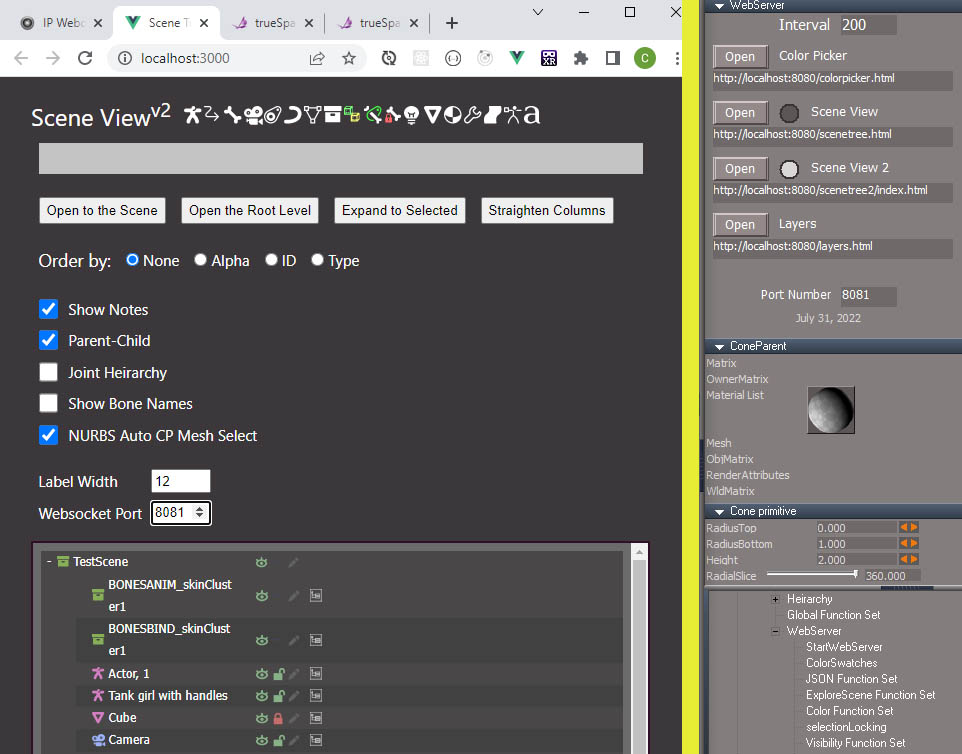
added port number inputs and actually used it for real, the IP Webcam App in the first tab used port 8080 so I changed to port 8081
added favicon - the caligari butterfly you can see in a couple of the tabs in the image of the browser, the new scene view doesn't use it yet but the color picker, old scene view and layers pages all use it
created an index file, will need to add an open button for it
hover tool tip text for all the icons and controls
started organizing and laying out the final form, the 4 buttons will always be visible and the rest of the controls will be in some kind of compacted form with an expansion control
-
clintonman
- Captain
- Posts: 5659
- Joined: 21 May 2009, 21:08
- Type the number ten into the box: 0
- Location: California
Re: Notes and Scene View for workspace
more styling
added a hair type object
button to show/hide the option controls
trueSpace butterfly favicon - see the browser tab
currently the show and hide icons will only do a "soft" version when an object has any hair node descendants.
TODO
clean the web code
maybe add "hard" show/hide for hair objects or objects that contain hair - do after UU show/hide for hair?
links to other pages, maybe place in the test icons location at the top
check see if any other object types are missing
-
clintonman
- Captain
- Posts: 5659
- Joined: 21 May 2009, 21:08
- Type the number ten into the box: 0
- Location: California
Re: Notes and Scene View for workspace
Added icons for physics and particle objects.
Fixed parenting hierarchy display problem cause by particle and boolean objects.
Made the top buttons smaller and all in one line when browser is wide enough
TODO
clean the web code
add "hard" show/hide for hair objects or objects that contain hair
links to other pages, maybe place in the test icons location at the top
final styling/layout
Fixed parenting hierarchy display problem cause by particle and boolean objects.
Made the top buttons smaller and all in one line when browser is wide enough
TODO
clean the web code
add "hard" show/hide for hair objects or objects that contain hair
links to other pages, maybe place in the test icons location at the top
final styling/layout
-
clintonman
- Captain
- Posts: 5659
- Joined: 21 May 2009, 21:08
- Type the number ten into the box: 0
- Location: California
Re: Notes and Scene View for workspace
Almost done.
Made the top buttons small enough to fit on one line
Removed the dummy test icons
Added the new Show/Hide techniques
created a build version for testing
TODO:
The workspace layers is included in the web ui package and it needs to be updated to use the new show/hide techniques
try it out for a few days, make any final changes and release it to the world
Made the top buttons small enough to fit on one line
Removed the dummy test icons
Added the new Show/Hide techniques
created a build version for testing
TODO:
The workspace layers is included in the web ui package and it needs to be updated to use the new show/hide techniques
try it out for a few days, make any final changes and release it to the world
-
clintonman
- Captain
- Posts: 5659
- Joined: 21 May 2009, 21:08
- Type the number ten into the box: 0
- Location: California
Re: Notes and Scene View for workspace
Change of plan, released early for the next UU update
layers works with the new show/hide functions
old scene view works with the new show/hide functions
removed the port number from the page from the publish version since it's only needed for development
port number in the panel updates all the buttons and text fields
added an error message if scene view fails to connect to tS
pre-published to http://clintons3d.com/plugins/truespace ... webui.html
TODO document it
layers works with the new show/hide functions
old scene view works with the new show/hide functions
removed the port number from the page from the publish version since it's only needed for development
port number in the panel updates all the buttons and text fields
added an error message if scene view fails to connect to tS
pre-published to http://clintons3d.com/plugins/truespace ... webui.html
TODO document it
-
trueBlue
- Captain
- Posts: 5548
- Joined: 06 Jul 2009, 22:50
- Type the number ten into the box: 10
Re: Notes and Scene View for workspace
I am getting a "404 Not found" when opening Scene View 2
Port # 8080
Port # 8080
-
clintonman
- Captain
- Posts: 5659
- Joined: 21 May 2009, 21:08
- Type the number ten into the box: 0
- Location: California
Re: Notes and Scene View for workspace
Did you update the web folder? It contains the scene view 2.trueBlue wrote: 09 Aug 2022, 15:20 I am getting a "404 Not found" when opening Scene View 2
Port # 8080
-
trueBlue
- Captain
- Posts: 5548
- Joined: 06 Jul 2009, 22:50
- Type the number ten into the box: 10
Re: Notes and Scene View for workspace
-
trueBlue
- Captain
- Posts: 5548
- Joined: 06 Jul 2009, 22:50
- Type the number ten into the box: 10
Re: Notes and Scene View for workspace
I added a Note to the scene, deleted the Notes, selected the notes pencil icon (colored) in Scene View 2
I know, I know, "Do Not delete the Note dummy!"
Anyway, maybe you can add an error check?
Selected Root, selected Toolbar Prototypes Encapsulator, selected Expand to
Code: Select all
ERR Source object: /Scripts/CustomCommands/WebServer/compute Error: Microsoft JScript runtime error Description: Invalid procedure call or argument Error code: 0x800a0005 - (null) Line: 90, Char: 1 Script text: if(datafromweb.command == "SetColor") { ColorFS.SetColor(datafromweb); return; } IMPORTANT - if the above mentioned command is accessing any function set, the error line above may refer to the function set code, instead of command code!
Anyway, maybe you can add an error check?
Selected Root, selected Toolbar Prototypes Encapsulator, selected Expand to
Code: Select all
Source object: /Scripts/CustomCommands/WebServer/compute Error: Microsoft JScript runtime error Description: 'undefined' is null or not an object Error code: 0x800a138f - (null) Line: 654, Char: 1 Script text: IMPORTANT - if the above mentioned command is accessing any function set, the error line above may refer to the function set code, instead of command code!
-
clintonman
- Captain
- Posts: 5659
- Joined: 21 May 2009, 21:08
- Type the number ten into the box: 0
- Location: California
Re: Notes and Scene View for workspace
Here's a fix.trueBlue wrote: 09 Aug 2022, 16:32 I added a Note to the scene, deleted the Notes, selected the notes pencil icon (colored) in Scene View 2
...
Reminds me that I wanted to add some generic error checking and recovery, but it's unlikely I would have caught that one.
Missed second part... of expand to
-
clintonman
- Captain
- Posts: 5659
- Joined: 21 May 2009, 21:08
- Type the number ten into the box: 0
- Location: California
Re: Notes and Scene View for workspace
Fixed, will refresh the tree when trying to open a non-existent notetrueBlue wrote: 09 Aug 2022, 16:32 I added a Note to the scene, deleted the Notes, selected the notes pencil icon (colored) in Scene View 2
...
Fixed, was only working for scene objects and a bad value is being sent from the scene view. tS checks for the bad value and adjusts it. Also enhanced it so it will automatically open the root level if the selected node is outside of the scene.trueBlue wrote: 09 Aug 2022, 16:32 ...
Selected Root, selected Toolbar Prototypes Encapsulator, selected Expand toCode: Select all
Source object: /Scripts/CustomCommands/WebServer/compute Error: Microsoft JScript runtime error Description: 'undefined' is null or not an object Error code: 0x800a138f - (null) Line: 654, Char: 1 Script text: IMPORTANT - if the above mentioned command is accessing any function set, the error line above may refer to the function set code, instead of command code!
- Attachments
-
- WebServercb05.RsObj
- (348.81 KiB) Downloaded 87 times
-
trueBlue
- Captain
- Posts: 5548
- Joined: 06 Jul 2009, 22:50
- Type the number ten into the box: 10
Re: Notes and Scene View for workspace
I added a Note to the scene, deleted the Notes, selected the notes pencil icon (colored) in Scene View 2
Different error this time
Did not add any Selection lockingERR Source object: /Scripts/CustomCommands/WebServer/compute Error: Microsoft JScript runtime error Description: Invalid procedure call or argument Error code: 0x800a0005 - (null) Line: 104, Char: 1 Script text: newnode = Node.Copy(owner + "/selectionLocking", datafromweb.path); IMPORTANT - if the above mentioned command is accessing any function set, the error line above may refer to the function set code, instead of command code!
-
clintonman
- Captain
- Posts: 5659
- Joined: 21 May 2009, 21:08
- Type the number ten into the box: 0
- Location: California
Re: Notes and Scene View for workspace
Oops, sorry about that. I forgot to remove a test line while fixing the problem or I never saved the good version.trueBlue wrote: 09 Aug 2022, 19:40 I added a Note to the scene, deleted the Notes, selected the notes pencil icon (colored) in Scene View 2
Different error this timeDid not add any Selection lockingERR Source object: /Scripts/CustomCommands/WebServer/compute Error: Microsoft JScript runtime error Description: Invalid procedure call or argument Error code: 0x800a0005 - (null) Line: 104, Char: 1 Script text: newnode = Node.Copy(owner + "/selectionLocking", datafromweb.path); IMPORTANT - if the above mentioned command is accessing any function set, the error line above may refer to the function set code, instead of command code!
"IMPORTANT - if the above mentioned command is accessing any function set, the error line above may refer to the function set code, instead of command code!"
is the reason it listed the selection locking line. The only valid information is the "Line 104".
- Attachments
-
- WebServer9029.RsObj
- (348.8 KiB) Downloaded 84 times
-
trueBlue
- Captain
- Posts: 5548
- Joined: 06 Jul 2009, 22:50
- Type the number ten into the box: 10
Re: Notes and Scene View for workspace
Previous two errors fixed
Thank you!
Would it be hard to add an Unselect (purple) button in Scene View 2?
Also, the Option button's tooltip does not always work
What is the meaning of these two tips?
Show object, +ctrl show object hard
Hide object, +ctrl hide object hard
Thank you!
Would it be hard to add an Unselect (purple) button in Scene View 2?
Also, the Option button's tooltip does not always work
What is the meaning of these two tips?
Show object, +ctrl show object hard
Hide object, +ctrl hide object hard
-
clintonman
- Captain
- Posts: 5659
- Joined: 21 May 2009, 21:08
- Type the number ten into the box: 0
- Location: California
Re: Notes and Scene View for workspace
Why an unselect button? What can you do when nothing is selected?trueBlue wrote: 09 Aug 2022, 22:28 Previous two errors fixed
Thank you!
Would it be hard to add an Unselect (purple) button in Scene View 2?
Also, the Option button's tooltip does not always work
What is the meaning of these two tips?
Show object, +ctrl show object hard
Hide object, +ctrl hide object hard
Soft and hard are terms I used when developing for the slow and thorough and fast methods. Here if you press the ctrl button when choosing show or hide it will use the slow method. Now that there is an options panel I'll most likely get rid of that and just have it read the option.
-
trueBlue
- Captain
- Posts: 5548
- Joined: 06 Jul 2009, 22:50
- Type the number ten into the box: 10
Re: Notes and Scene View for workspace
Just to clarify about the tooltips, the two tips I posted are shown on the Options (purple) buttonclintonman wrote: 09 Aug 2022, 22:43Why an unselect button? What can you do when nothing is selected?trueBlue wrote: 09 Aug 2022, 22:28 Previous two errors fixed
Thank you!
Would it be hard to add an Unselect (purple) button in Scene View 2?
Also, the Option button's tooltip does not always work
What is the meaning of these two tips?
Show object, +ctrl show object hard
Hide object, +ctrl hide object hard
Soft and hard are terms I used when developing for the slow and thorough and fast methods. Here if you press the ctrl button when choosing show or hide it will use the slow method. Now that there is an options panel I'll most likely get rid of that and just have it read the option.
. .
Just thought it might be a good idea to add an Unselect button
For instance, when selecting nodes like the Vray node, could accidently be deleted in Workspace
The only visual you have in Workspace when the Vray node is selected is in the Info panel if you do not have Panels open
-
clintonman
- Captain
- Posts: 5659
- Joined: 21 May 2009, 21:08
- Type the number ten into the box: 0
- Location: California
Re: Notes and Scene View for workspace
I'm like what?!?? The options button doesn't have any tooltips!trueBlue wrote: 09 Aug 2022, 23:06 ...
Just to clarify about the tooltips, the two tips I posted are shown on the Options (purple) button
...
Then I realized it's coming from the icons, which are also used for show and hide in the tree section
That doesn't seem like a good solution to me. Better if the delete, which is already modded for the UU includes a "are you sure you want to delete vray" portion. I already plan to make a UU4Clinton version of the delete. The current delete makes it difficult to work on nurbs, because it deletes the whole thing no matter what. It took a while to remember that rmb is the original delete. So it wasn't difficult, just not obvious. I want to make an options panel instead.trueBlue wrote: 09 Aug 2022, 23:06 ...
.
Just thought it might be a good idea to add an Unselect button
For instance, when selecting nodes like the Vray node, could accidently be deleted in Workspace
The only visual you have in Workspace when the Vray node is selected is in the Info panel if you do not have Panels open
If you want to keep the UU lmb does one thing and rmb does another it'll be easy to share code for delete vray protection.
-
trueBlue
- Captain
- Posts: 5548
- Joined: 06 Jul 2009, 22:50
- Type the number ten into the box: 10
Re: Notes and Scene View for workspace
Cross post
Another example, you can have an item selected in the Scene View 2 and an item selected in the web-based Layers which shows as a [multi-sel] in the Info Panel
I also just discovered that if you have Workspace Layers 4 open in the scene and Scene View 2 open, you cannot select anything in the Scene View 2
It selects the scene
So, that looks like you should not be able to open the Scene View 2 when Workspace Layers 4 is already open
Another example, you can have an item selected in the Scene View 2 and an item selected in the web-based Layers which shows as a [multi-sel] in the Info Panel
I also just discovered that if you have Workspace Layers 4 open in the scene and Scene View 2 open, you cannot select anything in the Scene View 2
It selects the scene
So, that looks like you should not be able to open the Scene View 2 when Workspace Layers 4 is already open
-
clintonman
- Captain
- Posts: 5659
- Joined: 21 May 2009, 21:08
- Type the number ten into the box: 0
- Location: California
Re: Notes and Scene View for workspace
Do you have any steps to share. I don't see any of that happening.trueBlue wrote: 09 Aug 2022, 23:40 Cross post
Another example, you can have an item selected in the Scene View 2 and an item selected in the web-based Layers which shows as a [multi-sel] in the Info Panel
I also just discovered that if you have Workspace Layers 4 open in the scene and Scene View 2 open, you cannot select anything in the Scene View 2
It selects the scene
So, that looks like you should not be able to open the Scene View 2 when Workspace Layers 4 is already open
-
clintonman
- Captain
- Posts: 5659
- Joined: 21 May 2009, 21:08
- Type the number ten into the box: 0
- Location: California
Re: Notes and Scene View for workspace
Maybe you have Scene View selected in the webserver instead of Scene View 2?
-
trueBlue
- Captain
- Posts: 5548
- Joined: 06 Jul 2009, 22:50
- Type the number ten into the box: 10
Re: Notes and Scene View for workspace
My bad, I had a layer selected that had multiple itemsclintonman wrote: 09 Aug 2022, 23:55Do you have any steps to share. I don't see any of that happening.trueBlue wrote: 09 Aug 2022, 23:40 Cross post
Another example, you can have an item selected in the Scene View 2 and an item selected in the web-based Layers which shows as a [multi-sel] in the Info Panel
I also just discovered that if you have Workspace Layers 4 open in the scene and Scene View 2 open, you cannot select anything in the Scene View 2
It selects the scene
So, that looks like you should not be able to open the Scene View 2 when Workspace Layers 4 is already open
Sorry about that
-
trueBlue
- Captain
- Posts: 5548
- Joined: 06 Jul 2009, 22:50
- Type the number ten into the box: 10
-
clintonman
- Captain
- Posts: 5659
- Joined: 21 May 2009, 21:08
- Type the number ten into the box: 0
- Location: California
Re: Notes and Scene View for workspace
Yep, that makes sense. The scene view doesn't respond to all changes in the scene, including selections done by script. True for both Scene view and Scene View 2. Might be able to adjust for this.
Edit: changed and it worked for both old scene view and new scene view 2. If you select layers it lets the scene view know about the change. I'll attach another after a quick look around.
-
clintonman
- Captain
- Posts: 5659
- Joined: 21 May 2009, 21:08
- Type the number ten into the box: 0
- Location: California
Re: Notes and Scene View for workspace
Web site was down for a while.
Anyway, I modified so scene view responds to selection changes from layers, hide/show from layers and lock and unlock from layers
Also made it so the scene view buttons only work if the corresponding radio button is active, because Scene View 2 doesn't work if the radio is set at Scene View, and Scene View doesn't work if the radio is set at Scene View 2.
Anyway, I modified so scene view responds to selection changes from layers, hide/show from layers and lock and unlock from layers
Also made it so the scene view buttons only work if the corresponding radio button is active, because Scene View 2 doesn't work if the radio is set at Scene View, and Scene View doesn't work if the radio is set at Scene View 2.
- Attachments
-
- WebServer4b59.RsObj
- (350.8 KiB) Downloaded 136 times
-
trueBlue
- Captain
- Posts: 5548
- Joined: 06 Jul 2009, 22:50
- Type the number ten into the box: 10
Re: Notes and Scene View for workspace
Looks like some good changes
Is it just the compute script that got modified?
-
clintonman
- Captain
- Posts: 5659
- Joined: 21 May 2009, 21:08
- Type the number ten into the box: 0
- Location: California
Re: Notes and Scene View for workspace
Yes, I think so.trueBlue wrote: 10 Aug 2022, 01:56 Looks like some good changes![]()
Is it just the compute script that got modified?
-
trueBlue
- Captain
- Posts: 5548
- Joined: 06 Jul 2009, 22:50
- Type the number ten into the box: 10
Re: Notes and Scene View for workspace
Can you add code to the Set WebServerFrame script that opens the Settings panel, if it is not open?clintonman wrote: 10 Aug 2022, 02:00Yes, I think so.trueBlue wrote: 10 Aug 2022, 01:56 Looks like some good changes![]()
Is it just the compute script that got modified?
-
clintonman
- Captain
- Posts: 5659
- Joined: 21 May 2009, 21:08
- Type the number ten into the box: 0
- Location: California
Re: Notes and Scene View for workspace
You mean so lmb will act the same as lmb then rmb?trueBlue wrote: 10 Aug 2022, 02:02Can you add code to the Set WebServerFrame script that opens the Settings panel, if it is not open?clintonman wrote: 10 Aug 2022, 02:00Yes, I think so.trueBlue wrote: 10 Aug 2022, 01:56 Looks like some good changes![]()
Is it just the compute script that got modified?
-
trueBlue
- Captain
- Posts: 5548
- Joined: 06 Jul 2009, 22:50
- Type the number ten into the box: 10
Re: Notes and Scene View for workspace
Yes
When you use the www toolbar LMB command, it Starts the Server and opens the panel so you can Open the programs
-
clintonman
- Captain
- Posts: 5659
- Joined: 21 May 2009, 21:08
- Type the number ten into the box: 0
- Location: California
Re: Notes and Scene View for workspace
Sure, it's just one line added to the StartWebServer.
Also attached is my Delete changes. It's not optimized for single undo yet.
It will ask before deleting a Vray node in the scene.
Other nodes can be added for the are you sure questioning
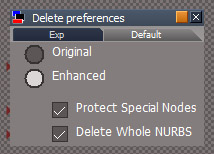
If the Delete preferences is added to Custom preferences then the rmb can be changed to open the panel.
Protect Special Nodes will ask "are you sure?" question, otherwise just deletes.
Delete Whole NURBS will delete the whole nurbs object, otherwise only delete what is selected.
Also attached is my Delete changes. It's not optimized for single undo yet.
It will ask before deleting a Vray node in the scene.
Other nodes can be added for the are you sure questioning
If the Delete preferences is added to Custom preferences then the rmb can be changed to open the panel.
Protect Special Nodes will ask "are you sure?" question, otherwise just deletes.
Delete Whole NURBS will delete the whole nurbs object, otherwise only delete what is selected.
- Attachments
-
- Delete preferences.RsObj
- (47.86 KiB) Downloaded 125 times
-
- Delete.RsObj
- (8.26 KiB) Downloaded 100 times
-
- WebServer2fe1.RsObj
- (351.34 KiB) Downloaded 132 times
-
trueBlue
- Captain
- Posts: 5548
- Joined: 06 Jul 2009, 22:50
- Type the number ten into the box: 10
Re: Notes and Scene View for workspace
Thanks!clintonman wrote: 10 Aug 2022, 03:26 Sure, it's just one line added to the StartWebServer.
DeletePrefsPanel.jpg
Also attached is my Delete changes. It's not optimized for single undo yet.
It will ask before deleting a Vray node in the scene.
Other nodes can be added for the are you sure questioning
If the Delete preferences is added to Custom preferences then the rmb can be changed to open the panel.
Protect Special Nodes will ask "are you sure?" question, otherwise just deletes.
Delete Whole NURBS will delete the whole nurbs object, otherwise only delete what is selected.
The new Delete (Enhanced) script does not delete multiple selected objects
I did a test with the previous Delete.xml with multiple selected NURBS and it deleted all of the NURBS