Suggestions?
Help me make an object hollow
-
compPanda
- Senior Chief Petty Officer
- Posts: 275
- Joined: 21 May 2009, 21:15
- Type the number ten into the box: 0
Help me make an object hollow
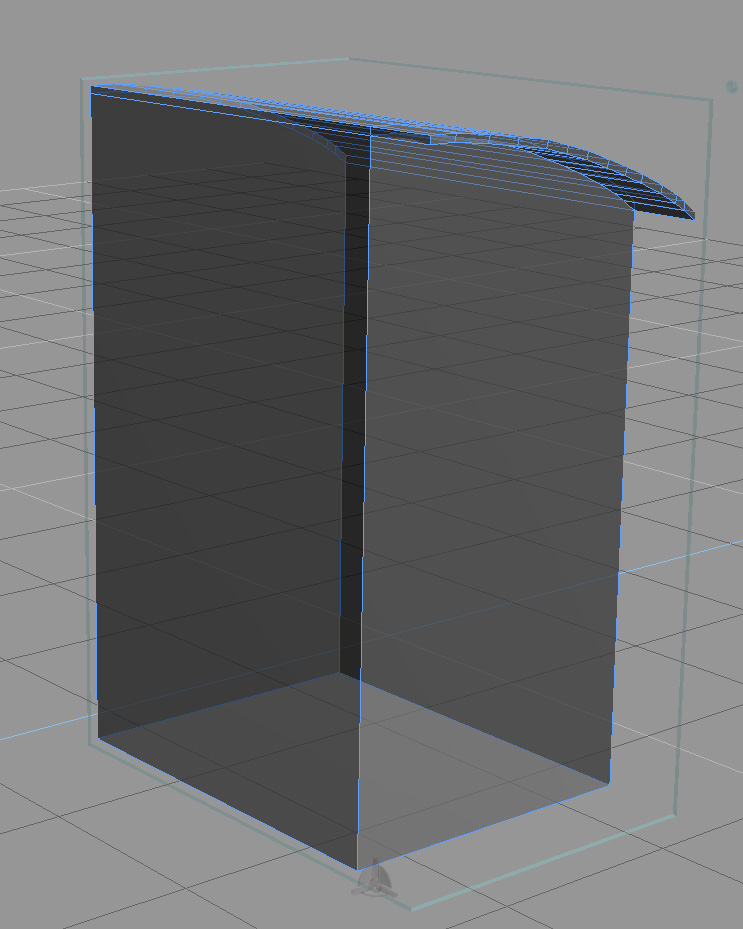
I want to make this object hollow:
But I can't make this. When I try to remove the back I get it hollow but I want to have some thickness to the walls. But I can't get the walls any thicker whatever I do. When I try to use the slice object and add walls before I remove the back face I don't get any inner wall anyway.
Suggestions?
Suggestions?
-
Breech Block

- Master Chief Petty Officer
- Posts: 482
- Joined: 13 Jun 2009, 20:31
Re: Help me make an object hollow
I use the Shell tool when I want to hollow items out.

-
spacekdet

- Captain
- Posts: 1810
- Joined: 27 May 2009, 15:00
- Type the number ten into the box: 10
- Location: On the day shift at the Utility Muffin Research Kitchen
Re: Help me make an object hollow
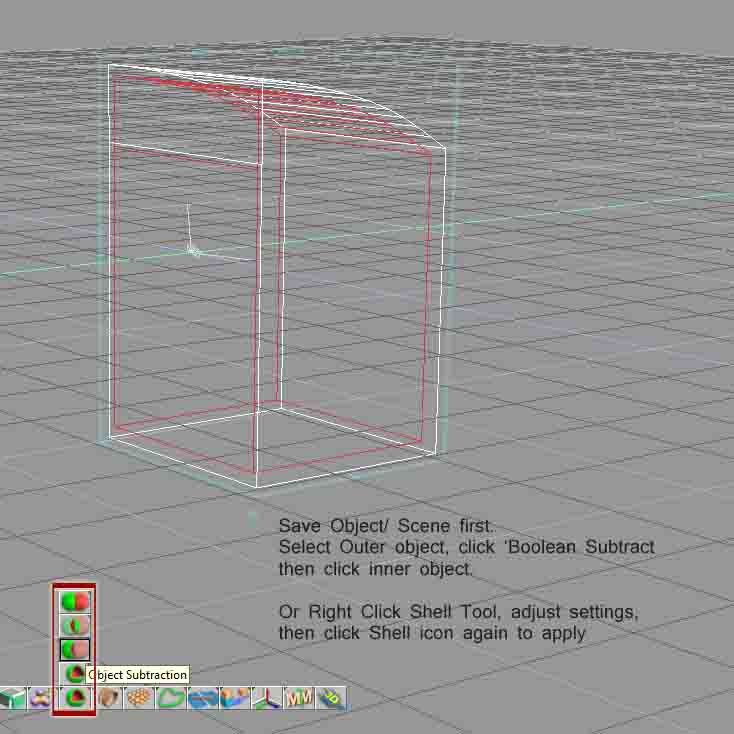
Use the Shell tool or Boolean subtract a copy of the object from itself.
Did you want it hollow and also remove the back?
Did you want it hollow and also remove the back?
-
compPanda
- Senior Chief Petty Officer
- Posts: 275
- Joined: 21 May 2009, 21:15
- Type the number ten into the box: 0
Re: Help me make an object hollow
Yep, hollow and removed back.spacekdet wrote:Use the Shell tool or Boolean subtract a copy of the object from itself.
Did you want it hollow and also remove the back?
The problem with boolean subtract is that the object doesn't really fit inside itself.
-
spacekdet
- Captain
- Posts: 1810
- Joined: 27 May 2009, 15:00
- Type the number ten into the box: 10
- Location: On the day shift at the Utility Muffin Research Kitchen
Re: Help me make an object hollow
Is the 'roof' a separate object?
If not and it's all one object then I can see why boolean wouldn't work.
If they are separate, there should be no problem subtracting a slightly scaled down copy (or using shell) and then a second boolean op to cut a hole for the back.
You could also sweep the back out of the 'drill' object so that it protrudes thru the base object and boolean everything in one go- probably your best bet.
If not and it's all one object then I can see why boolean wouldn't work.
If they are separate, there should be no problem subtracting a slightly scaled down copy (or using shell) and then a second boolean op to cut a hole for the back.
You could also sweep the back out of the 'drill' object so that it protrudes thru the base object and boolean everything in one go- probably your best bet.
-
Tiles

- Master Chief Petty Officer
- Posts: 401
- Joined: 27 May 2009, 08:34
Re: Help me make an object hollow
Maybe Clintonmans Normal Move Plugin for the workspace could be part of the solution. At least for the fitting inside itself part
vi ... =31&t=2443"
vi ... =31&t=2443"
Free Gamegraphics, Freeware Games http://reinerstilesets.de
-
compPanda
- Senior Chief Petty Officer
- Posts: 275
- Joined: 21 May 2009, 21:15
- Type the number ten into the box: 0
Re: Help me make an object hollow
I ended up doing a new object that I used to make a boolean subtraction.
-
BNG

- Chief Warrant Officer
- Posts: 684
- Joined: 16 Oct 2009, 03:26
- Type the number ten into the box: 0
- Location: Texas
Re: Help me make an object hollow
You can also adjust the thickness by right clicking the shell icon and adjusting the sliders up or down to increase or decrease the wall thickness.compPanda wrote:I ended up doing a new object that I used to make a boolean subtraction.
If you want to create a hollow frame then right click the object and select all the faces and then press the shell icon to create the frame object.
Casual Truespace 3D modeling hobbyist. My Truespace blog and simple 3d Modeling Tutorials for Casual Model Makers.