I decided to start a new thread for the Unofficial Update documentation to keep the Unofficial Update thread clean.
Attached is what I have so far. There is the QuickGuide, Shortcuts and Chapter 2 of the manual. The files are previews of the coming final versions. All the new information has been added to the document files and they just need some formatting adjustments.
The shortcuts file does not have the newest shortcuts yet - new shortcuts were recently added.
I'm using LibreOffice Draw to author the changes.
This is a rough map of the changes in chapter 2:
pg 54 hyperlink to shortcuts
pg 63-65 toolbar locations, unlook at, zoom to selection buttons
pg 66 mini 3d toolbar
pg 72 desktop aspect, added new page
pg 76 toolbar image
pg 81 file menu
pg 82 help menu image
pg 87, 88 LE mini toolbar
pg 104 toolbar, 3D unencaps
pg 106 unencaps 2d
pg 158 quad window, uu toolbar
pg 164 rmb command nodes
pg 176 to end is modelspace - nothing todo
Unofficial Update Documentation
-
clintonman

- Captain
- Posts: 5659
- Joined: 21 May 2009, 21:08
- Type the number ten into the box: 0
- Location: California
Unofficial Update Documentation
- Attachments
-
- UnofficialUpdateDocs.zip
- (8.29 MiB) Downloaded 311 times
-
clintonman
- Captain
- Posts: 5659
- Joined: 21 May 2009, 21:08
- Type the number ten into the box: 0
- Location: California
Re: Unofficial Update Documentation
I just found that the chapter 2 is incomplete
TODO - synchronize and protect workspace new page(s) after pg 74
TODO - select and alphabetize panel - maybe pg 90
TODO - maybe show LE "bookmarks" in scene view window hierarchy
TODO - synchronize and protect workspace new page(s) after pg 74
TODO - select and alphabetize panel - maybe pg 90
TODO - maybe show LE "bookmarks" in scene view window hierarchy
-
trueBlue

- Captain
- Posts: 5548
- Joined: 06 Jul 2009, 22:50
- Type the number ten into the box: 10
Re: Unofficial Update Documentation
Unofficial Update 3D Mini Toolbar page 66
There is much more info about this toolbar not included
If interested, I'll post here about it
Also the Quad Window & New View
Animation shortcuts
K = Next Key frame
Should be:
K = Set Keyframe
+ = Grow selection
- = Shrink selection
Both have an additional command
MeshModifiers.ConvertSelection('','')
Render to File - RB = Open Folder
There is much more info about this toolbar not included
If interested, I'll post here about it
Also the Quad Window & New View
Animation shortcuts
K = Next Key frame
Should be:
K = Set Keyframe
+ = Grow selection
- = Shrink selection
Both have an additional command
MeshModifiers.ConvertSelection('','')
Render to File - RB = Open Folder
-
clintonman
- Captain
- Posts: 5659
- Joined: 21 May 2009, 21:08
- Type the number ten into the box: 0
- Location: California
Re: Unofficial Update Documentation
I think it would be helpful if you shared whatever knowledge you have.
-
trueBlue
- Captain
- Posts: 5548
- Joined: 06 Jul 2009, 22:50
- Type the number ten into the box: 10
Re: Unofficial Update Documentation
From the revised trueSpace Beta 7.61 Standalone Unofficial Update.txt
:: Widgets
Object Move, Rotate, and Scale widgets
Custom shortcuts
Rotate
* Ctrl + LMB click rotates selected object +45 degrees
* Alt + LMB click rotates selected object -45 degrees
Camera Move, Rotate, FOV, and Rectangle Zoom widgets
Custom shortcuts
* Shift + LMB click in empty 3D Space deactivates Camera widgets
FOV
* RMB click in empty 3D Space resets FOV
Rectangle Zoom
* RMB click in empty 3D Space resets FOV
Main2 toolbar
* Render to File
RMB Opens the Render to File folder
* Quad Window
RMB Saves Quad Window's user modifications
Added to the main view's title bar in all layouts
Uses the main 3D window's WinGUID in the commands for the Views, Ground, Scene render attributes, Reset view, and Look at Selection icons. Which means the window does not have to have focus in order to work.
Includes:
* Material Editor
* Set Camera - LMB = Set Camera / RMB = Eye view.
* Look at Selection - LMB = Look a selection / RMB = Look at next object.
* Perspective - RMB = Rotates the View.
* Isometric - RMB = Rotates the View.
* Object Move, Object Rotate, and Object Scale - RMB = Exit
* Camera Move, Camera Rotate, Camera FOV, and Rectangle Zoom - RMB = Exit
* Zoom to Selection - LMB = Zoom to Selection / RMB = Zoom to next object.
* Zoom to next Object - LMB = Zoom to next Object / RMB = Zoom to All.
* Reset view - LMB = Reset View / RMB = Resets Perspective 'Unique settings'
* New View - LMB = Opens a 3D Window with a NewViewBar toolbar set to its WinID
NewViewBar toolbar
* Save New View - LMB = Saves the window's current size and location.
New development!
:: Widgets
Object Move, Rotate, and Scale widgets
Custom shortcuts
Rotate
* Ctrl + LMB click rotates selected object +45 degrees
* Alt + LMB click rotates selected object -45 degrees
Camera Move, Rotate, FOV, and Rectangle Zoom widgets
Custom shortcuts
* Shift + LMB click in empty 3D Space deactivates Camera widgets
FOV
* RMB click in empty 3D Space resets FOV
Rectangle Zoom
* RMB click in empty 3D Space resets FOV
Main2 toolbar
* Render to File
RMB Opens the Render to File folder
* Quad Window
RMB Saves Quad Window's user modifications
WinGUID_BarNot included in the document. Each windows title toolbar is unique.
Uses the window's WinGUID in the commands for the Views, Ground, Scene render attributes, Reset view, and Look at Selection icons. Which means the window does not have to have focus in order to work.
Added to the main view's title bar in all layouts
Uses the main 3D window's WinGUID in the commands for the Views, Ground, Scene render attributes, Reset view, and Look at Selection icons. Which means the window does not have to have focus in order to work.
Includes:
* Material Editor
* Set Camera - LMB = Set Camera / RMB = Eye view.
* Look at Selection - LMB = Look a selection / RMB = Look at next object.
* Perspective - RMB = Rotates the View.
* Isometric - RMB = Rotates the View.
* Object Move, Object Rotate, and Object Scale - RMB = Exit
* Camera Move, Camera Rotate, Camera FOV, and Rectangle Zoom - RMB = Exit
* Zoom to Selection - LMB = Zoom to Selection / RMB = Zoom to next object.
* Zoom to next Object - LMB = Zoom to next Object / RMB = Zoom to All.
* Reset view - LMB = Reset View / RMB = Resets Perspective 'Unique settings'
* New View - LMB = Opens a 3D Window with a NewViewBar toolbar set to its WinID
NewViewBar toolbar
* Save New View - LMB = Saves the window's current size and location.
New development!
This trueSpace Beta 7.61 Standalone Unofficial Update.txt is the same as the trueSpace Beta 7.61 Unofficial Update.txt minus Model infoPE Widgets
P + MB click the widget moves to object center and rotates the Axis to the selected Face
This is not working, it activates the following shortcuts
Bars, Triangles, Cubes, & Arcs
MB click the Bars, Triangles, and Sphere activates the Object Move widget
MB click the Arcs activates the Object Rotate widget
MB click the Cubes activates the Object Scale widget
I am going to change it to:
Ctrl + LB click the widget moves to object center and rotates the Axis to the selected Face
- Attachments
-
- trueSpace Beta 7.61 Standalone Unofficial Update.zip
- (8.85 KiB) Downloaded 277 times
-
clintonman
- Captain
- Posts: 5659
- Joined: 21 May 2009, 21:08
- Type the number ten into the box: 0
- Location: California
Re: Unofficial Update Documentation
Chapter 2 updated to
include some information from the release notes.
Select and Alphabetize panels pg 92
Synchronize notes - mostly me trying the understand/remember how it works. pg 76
The next release should be cleaned up with actual documentation for the synchronize scripts. Then it's time to start the modeling chapter which should be easier since things haven't been moved around as much and new stuff can all be added to the end of the chapter (probably).
include some information from the release notes.
Select and Alphabetize panels pg 92
Synchronize notes - mostly me trying the understand/remember how it works. pg 76
The next release should be cleaned up with actual documentation for the synchronize scripts. Then it's time to start the modeling chapter which should be easier since things haven't been moved around as much and new stuff can all be added to the end of the chapter (probably).
- Attachments
-
- ch2_UserInterface.zip
- (6.86 MiB) Downloaded 272 times
-
trueBlue
- Captain
- Posts: 5548
- Joined: 06 Jul 2009, 22:50
- Type the number ten into the box: 10
Re: Unofficial Update Documentation
The pages are not in sync starting after page 71
It looks like you started inserting information on page 72 'Two pages named 72'
Page 71 "2.7.6 Desktop Preferences"
Original information starts here and then continues on the second page 72
Pages are not in sync from here on...
If possible, it seems it would be much easier and better to add pages and insert hyper links just like you did with the Unofficial Shortcuts
Table of Contents 'Page 3'
Add info for new pages starting with page 204
2.15 Unofficial Update - page 204
2.15.1 Desktop Preferences - page 205
And if possible add hyper links to the new pages that go back to the page that has the hyper link
page 66
Set Camera RMB switch to perspective view

- Page 71.png (4.2 KiB) Viewed 7747 times
Page 71 "2.7.6 Desktop Preferences"
Original information starts here and then continues on the second page 72
Pages are not in sync from here on...
If possible, it seems it would be much easier and better to add pages and insert hyper links just like you did with the Unofficial Shortcuts

Add info for new pages starting with page 204
2.15 Unofficial Update - page 204
2.15.1 Desktop Preferences - page 205
And if possible add hyper links to the new pages that go back to the page that has the hyper link
page 66
Set Camera RMB switch to perspective view

-
trueBlue
- Captain
- Posts: 5548
- Joined: 06 Jul 2009, 22:50
- Type the number ten into the box: 10
Re: Unofficial Update Documentation
Important reason for my suggestion!
Instructions from the trueSpace Beta 7.61 Unofficial Update.txt
Install the PDF Manual for trueSpace. (Optional but required before installing the Update)
* Included a modified ts76_manual.html that links to an included modified tS6help.chm, New in 6.5.PDF, ch30_NewInTrueSpace66.PDF, ch27_PhysicalSimulation.pdf, tS76_MS_Animation.pdf, tS7_AG_3.17.pdf, tS7_AG_Ch_4_NormalMapping.pdf, tS7_DG_chapt1_chapt2.pdf, and UsingBonesToVertex.pdf files.
Instructions from the trueSpace Beta 7.61 Unofficial Update.txt
Install the PDF Manual for trueSpace. (Optional but required before installing the Update)
* Included a modified ts76_manual.html that links to an included modified tS6help.chm, New in 6.5.PDF, ch30_NewInTrueSpace66.PDF, ch27_PhysicalSimulation.pdf, tS76_MS_Animation.pdf, tS7_AG_3.17.pdf, tS7_AG_Ch_4_NormalMapping.pdf, tS7_DG_chapt1_chapt2.pdf, and UsingBonesToVertex.pdf files.
-
clintonman
- Captain
- Posts: 5659
- Joined: 21 May 2009, 21:08
- Type the number ten into the box: 0
- Location: California
Re: Unofficial Update Documentation
I just noticed a problem. The imported pdf files lost the chapter links, so they don't have a click in the table of contents to jump to the page.
-
clintonman
- Captain
- Posts: 5659
- Joined: 21 May 2009, 21:08
- Type the number ten into the box: 0
- Location: California
Re: Unofficial Update Documentation
Still gathering up the content for the UU manual.
Taking a new direction because of the limitations of my editing/publishing tools.
The UU manual will concentrate on changed items only, with chapters and sections to match the trueSpace manual. This way if you read the manual but it doesn't match the UU release version the information can be cross referenced.
There is no way for me to edit the tS manuals since I would lose the table of contents links and links to the manual videos.
There is no way for me to link from the UU manual to specific parts of the tS manuals. I can only link to the entire document at this time.
I think I can add comments to the tS manuals indicating that updated information can be found in the UU manual.
The shortcuts are no longer a separate file and have been added into the chapter 2 UU manual. These shortcuts have not been updated to the latest release of UU.
This whole thing is in a very rough state at this point in time. The next step is the rough in the surfacing chapter 5.
Taking a new direction because of the limitations of my editing/publishing tools.
The UU manual will concentrate on changed items only, with chapters and sections to match the trueSpace manual. This way if you read the manual but it doesn't match the UU release version the information can be cross referenced.
There is no way for me to edit the tS manuals since I would lose the table of contents links and links to the manual videos.
There is no way for me to link from the UU manual to specific parts of the tS manuals. I can only link to the entire document at this time.
I think I can add comments to the tS manuals indicating that updated information can be found in the UU manual.
The shortcuts are no longer a separate file and have been added into the chapter 2 UU manual. These shortcuts have not been updated to the latest release of UU.
This whole thing is in a very rough state at this point in time. The next step is the rough in the surfacing chapter 5.
- Attachments
-
- UnofficialUpdateDocsd73e.zip
- (2.33 MiB) Downloaded 309 times
-
clintonman
- Captain
- Posts: 5659
- Joined: 21 May 2009, 21:08
- Type the number ten into the box: 0
- Location: California
Re: Unofficial Update Documentation
Chapter 5, materials and uv editing, first rough draft.
- Attachments
-
- ch5_SurfacingWorkspace_UU.zip
- (357.44 KiB) Downloaded 226 times
-
clintonman
- Captain
- Posts: 5659
- Joined: 21 May 2009, 21:08
- Type the number ten into the box: 0
- Location: California
Re: Unofficial Update Documentation
All chapters have been touched now. Includes changes for chapters 7, 8, 9, 10 and 12
It's still extremely rough, but now I have a roadmap to work off of.
Only thing completely missing is the new Show/Hide objects buttons
While looking through the manuals I saw that some information was missing. There was nothing on the text and primitive creation tools, a couple of notes on tS snapping, some polygon draw techniques. No mention of the display mode preset buttons - wireframe, wireframe solid, transparent...
The XYZ locking buttons are not in the manual. The preferences panel that they change is in there but not the buttons themselves.
Next step is to flesh out the information and then start adding new stuff that did not end up in a part of the user interface that is covered in the manual. That's to say things that have been added but did not add to or rearrange what was already there.
It's still extremely rough, but now I have a roadmap to work off of.
Only thing completely missing is the new Show/Hide objects buttons
While looking through the manuals I saw that some information was missing. There was nothing on the text and primitive creation tools, a couple of notes on tS snapping, some polygon draw techniques. No mention of the display mode preset buttons - wireframe, wireframe solid, transparent...
The XYZ locking buttons are not in the manual. The preferences panel that they change is in there but not the buttons themselves.
Next step is to flesh out the information and then start adding new stuff that did not end up in a part of the user interface that is covered in the manual. That's to say things that have been added but did not add to or rearrange what was already there.
- Attachments
-
- tSManualChanges_UU.zip
- (4.41 MiB) Downloaded 230 times
-
clintonman
- Captain
- Posts: 5659
- Joined: 21 May 2009, 21:08
- Type the number ten into the box: 0
- Location: California
Re: Unofficial Update Documentation
Here's the latest, still rough, modeling chapter.
I started adding the new tools to flesh it out see how they would fit in.
I started adding the new tools to flesh it out see how they would fit in.
- Attachments
-
- ch3_ModelWorkspace_UU.zip
- (605.98 KiB) Downloaded 229 times
-
clintonman
- Captain
- Posts: 5659
- Joined: 21 May 2009, 21:08
- Type the number ten into the box: 0
- Location: California
Re: Unofficial Update Documentation
Latest Chapter 5, Surfacing
Also attached are the source odg(Open Document Graphic) format files used to create the pdf files.
Also attached are the source odg(Open Document Graphic) format files used to create the pdf files.
- Attachments
-
- UUDocs_SourceFiles.zip
- (14.27 MiB) Downloaded 223 times
-
- ch5_SurfacingWorkspace_UU389a.zip
- (411.6 KiB) Downloaded 234 times
-
clintonman
- Captain
- Posts: 5659
- Joined: 21 May 2009, 21:08
- Type the number ten into the box: 0
- Location: California
Re: Unofficial Update Documentation
Changes to Chapters 3,5,7,8 and 9
Attached UUDocChanges_Jan31.zip contains the pdf files, UUDocs_Source_Jan31.zip contains the odg files.
Attached UUDocChanges_Jan31.zip contains the pdf files, UUDocs_Source_Jan31.zip contains the odg files.
- Attachments
-
- UUDocChanges_Jan31.zip
- (1.75 MiB) Downloaded 226 times
-
- UUDocs_Source_Changes_Jan31.zip
- (1.97 MiB) Downloaded 217 times
-
trueBlue
- Captain
- Posts: 5548
- Joined: 06 Jul 2009, 22:50
- Type the number ten into the box: 10
Re: Unofficial Update Documentation
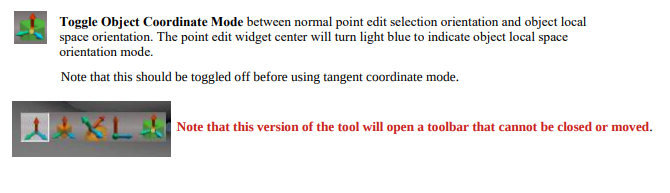
Use
LMB = Enables Object Coordinate Mode & the Sphere turns Cyan
LMB Select the Object Coordinate system toolbar icon
Note: Same concept as your Quad Menu, when you select the icon, the toolbar closes
Turn it off
LMB = Disables Object Coordinate Mode & the Sphere turns Yellow
LMB Select whatever Coordinate system toolbar icon you want
Toolbar does not have a toolbar handle/menu
The Object Coordinate Mode icon does not close
It is meant to toggle Object Coordinate Mode On/Off
-
clintonman
- Captain
- Posts: 5659
- Joined: 21 May 2009, 21:08
- Type the number ten into the box: 0
- Location: California
Re: Unofficial Update Documentation
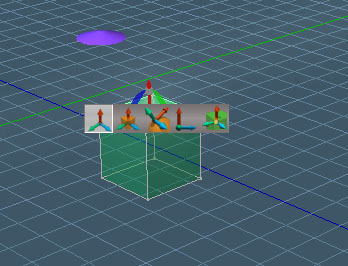
- BadPopupIn theway.jpg (53.43 KiB) Viewed 5071 times
-
trueBlue
- Captain
- Posts: 5548
- Joined: 06 Jul 2009, 22:50
- Type the number ten into the box: 10
Re: Unofficial Update Documentation
Okay, pop up toolbar be gone
I am finding it impossible to see any difference in the widget's behavior when switching to Mesh Object Coordinate Mode in World coordinate or Object coordinate system
Can you give me an example?
Thinking about adding a temp Status Message
Node.Value("/Status Message", "Seconds") = 7000
Node.Value("/Status Message", "Message") = " Object Coordinate Mode is On ... Switch to the Object Coordinate system to change the widget's behavoir"
Activity.Run("/Status Message/Status Message")
I am finding it impossible to see any difference in the widget's behavior when switching to Mesh Object Coordinate Mode in World coordinate or Object coordinate system
Can you give me an example?
Thinking about adding a temp Status Message
Node.Value("/Status Message", "Seconds") = 7000
Node.Value("/Status Message", "Message") = " Object Coordinate Mode is On ... Switch to the Object Coordinate system to change the widget's behavoir"
Activity.Run("/Status Message/Status Message")
-
clintonman
- Captain
- Posts: 5659
- Joined: 21 May 2009, 21:08
- Type the number ten into the box: 0
- Location: California
Re: Unofficial Update Documentation
It's only for object coordinate mode, it has no effect in world coordinatetrueBlue wrote: 01 Feb 2021, 18:22 Okay, pop up toolbar be gone
I am finding it impossible to see any difference in the widget's behavior when switching to Mesh Object Coordinate Mode in World coordinate or Object coordinate system
Can you give me an example?
Thinking about adding a temp Status Message
Node.Value("/Status Message", "Seconds") = 7000
Node.Value("/Status Message", "Message") = " Object Coordinate Mode is On ... Switch to the Object Coordinate system to change the widget's behavoir"
Activity.Run("/Status Message/Status Message")
Maybe video will help
-
trueBlue
- Captain
- Posts: 5548
- Joined: 06 Jul 2009, 22:50
- Type the number ten into the box: 10
Re: Unofficial Update Documentation
Exactly!clintonman wrote: 01 Feb 2021, 18:36 It's only for object coordinate mode, it has no effect in world coordinate
Finally figured out how to make this a little more user friendly.
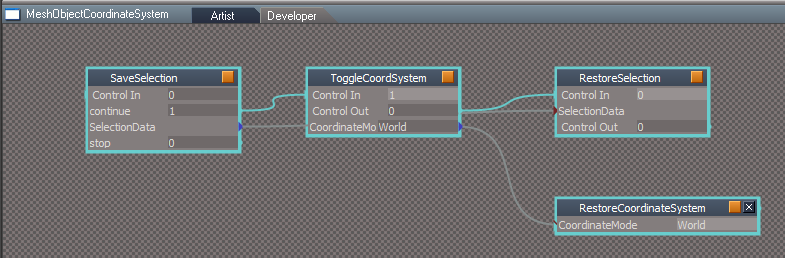
Switch to Local when using your Mesh Object Coordinate System
Restore users previous Coordinate system when toggling off your Mesh Object Coordinate System
Can you give me an example where this would not be a good way to use your Mesh Object Coordinate System?
-
clintonman
- Captain
- Posts: 5659
- Joined: 21 May 2009, 21:08
- Type the number ten into the box: 0
- Location: California
Re: Unofficial Update Documentation
in object coordinate
toggle mesh object
do stuff
switch to tangent
remember mesh object mode is not compatible so
toggle mesh object
now you're back in object coordinate
have to switch back to tangent coordinate
in world coord
toggle mesh object
go to object coord
toggle mesh object
now you're in world mode
have to switch back to object coordinate
there are 2 valid places to toggle the mesh object mode, while in object coord and in tangent coord
in object mode to toggle off/on
in tangent turn off
no valid reason to restore some previous coord mode
the only automation that would be useful would be to turn mesh coordinates off when switching to tangent
the other solution would be to find some way to make the mesh object coordinate a true coordinate mode that does not effect the tangent coordinate mode
toggle mesh object
do stuff
switch to tangent
remember mesh object mode is not compatible so
toggle mesh object
now you're back in object coordinate
have to switch back to tangent coordinate
in world coord
toggle mesh object
go to object coord
toggle mesh object
now you're in world mode
have to switch back to object coordinate
there are 2 valid places to toggle the mesh object mode, while in object coord and in tangent coord
in object mode to toggle off/on
in tangent turn off
no valid reason to restore some previous coord mode
the only automation that would be useful would be to turn mesh coordinates off when switching to tangent
the other solution would be to find some way to make the mesh object coordinate a true coordinate mode that does not effect the tangent coordinate mode
-
trueBlue
- Captain
- Posts: 5548
- Joined: 06 Jul 2009, 22:50
- Type the number ten into the box: 10
Re: Unofficial Update Documentation
With your ToggleCoordSystem script, I added this to the beginning of the script
Also, I am switching to Local
Node.Value("/Preferences/Modeling preferences", "Coordinate system") = "Local"
So in a nut shell, I am restricting the use the Tangent Coordinate system, and restoring the user's current/previous Coordinate system
It seems to work well, except changing Coordinate systems while in Mesh Object Coordinate Mode
Code: Select all
if(Node.Value("/Preferences/Modeling preferences", "Coordinate system") == "Tangent") {
params.SetTerminationFlag()
System.Alert("Tangent Coordinate system mode is not supported!\nSwitch to Object Coordinate system")
return;
}
Node.Value("/Preferences/Modeling preferences", "Coordinate system") = "Local"
So in a nut shell, I am restricting the use the Tangent Coordinate system, and restoring the user's current/previous Coordinate system
It seems to work well, except changing Coordinate systems while in Mesh Object Coordinate Mode
-
clintonman
- Captain
- Posts: 5659
- Joined: 21 May 2009, 21:08
- Type the number ten into the box: 0
- Location: California
Re: Unofficial Update Documentation
How does that stop the first example from happening?clintonman wrote: 02 Feb 2021, 16:27 in object coordinate
toggle mesh object
do stuff
switch to tangent
remember mesh object mode is not compatible so
toggle mesh object
now you're back in object coordinate
have to switch back to tangent coordinate
....
except now it's
in object coordinate
toggle mesh object
do stuff
switch to tangent - still in mesh object mode
remember mesh object mode is not compatible so
toggle mesh object - nope cant do it
switch to object coordinate
toggle mesh object off
back to tangent coordinate again
-
trueBlue
- Captain
- Posts: 5548
- Joined: 06 Jul 2009, 22:50
- Type the number ten into the box: 10
Re: Unofficial Update Documentation
New modification, instead of the annoying alert which breaks the workflow
This replaces:
Now for the PE Widget (WIP)
Got it 
If Persp. comp. preferences cs is Active, User can not switch to another Coordinate system
Code: Select all
if(!Node.Value("/Preferences/Modeling preferences", "Coordinate system") == "Tangent") {
Activity.Run(System.ThisOwner() + "/RestoreCoordinateSystem")
}
Code: Select all
if(Node.Value("/Preferences/Modeling preferences", "Coordinate system") == "Tangent") {
params.SetTerminationFlag()
System.Alert("Tangent Coordinate system mode is not supported!\nSwitch to Object Coordinate system")
return;
}
Code: Select all
if(Node.Value("/Preferences/Modeling preferences", "Coordinate system") == "Tangent" && Node.Value("/Widgets/Edit/Point edit widget/Persp. comp. preferences cs", "Active") == true) {
Node.Value("/Preferences/Modeling preferences", "Coordinate system") = "Local"
}
if(Node.Value("/Preferences/Modeling preferences", "Coordinate system") == "World" && Node.Value("/Widgets/Edit/Point edit widget/Persp. comp. preferences cs", "Active") == true) {
Node.Value("/Preferences/Modeling preferences", "Coordinate system") = "Local"
}
if(Node.Value("/Preferences/Modeling preferences", "Coordinate system") == "Screen" && Node.Value("/Widgets/Edit/Point edit widget/Persp. comp. preferences cs", "Active") == true) {
Node.Value("/Preferences/Modeling preferences", "Coordinate system") = "Local"
RsApp.ClearHistory()
}
If Persp. comp. preferences cs is Active, User can not switch to another Coordinate system

-
trueBlue
- Captain
- Posts: 5548
- Joined: 06 Jul 2009, 22:50
- Type the number ten into the box: 10
Re: Unofficial Update Documentation
Looky here:
https://www.adobe.com/acrobat/online.html
https://www.adobe.com/acrobat/online.html
-
clintonman
- Captain
- Posts: 5659
- Joined: 21 May 2009, 21:08
- Type the number ten into the box: 0
- Location: California
Re: Unofficial Update Documentation
Started roughing in the chapter of additions
This was created with Scribus instead of LibreOffice Draw, which was used for the modified chapters because it reads in the pdf format better.
chXX_Additions_UU is the pdf file
GatherSLA is the source Scribus file and linked images.
This was created with Scribus instead of LibreOffice Draw, which was used for the modified chapters because it reads in the pdf format better.
chXX_Additions_UU is the pdf file
GatherSLA is the source Scribus file and linked images.
- Attachments
-
- GatherSLA.zip
- (1.02 MiB) Downloaded 246 times
-
- chXX_Additions_UU.zip
- (1.47 MiB) Downloaded 235 times
-
trueBlue
- Captain
- Posts: 5548
- Joined: 06 Jul 2009, 22:50
- Type the number ten into the box: 10
Re: Unofficial Update Documentation
Appreciate all of your work involved in this much needed information!
How will this be incorporated into the PDFMan folder?
Will the Table of Contents/links work?
How will this be incorporated into the PDFMan folder?
Will the Table of Contents/links work?
-
clintonman
- Captain
- Posts: 5659
- Joined: 21 May 2009, 21:08
- Type the number ten into the box: 0
- Location: California
Re: Unofficial Update Documentation
We'll see....trueBlue wrote: 06 Feb 2021, 20:14 Appreciate all of your work involved in this much needed information!
How will this be incorporated into the PDFMan folder?
Will the Table of Contents/links work?
-
clintonman
- Captain
- Posts: 5659
- Joined: 21 May 2009, 21:08
- Type the number ten into the box: 0
- Location: California
Re: Unofficial Update Documentation
Same roughness as before. Finished getting all the images except for the NURBS buttons and panels.
Will start the text after these last images are captured.
chXX_Additions_UU is the pdf file
GatherSLA is the source Scribus file and linked images.
Will start the text after these last images are captured.
chXX_Additions_UU is the pdf file
GatherSLA is the source Scribus file and linked images.
- Attachments
-
- GatherSLAbc98.zip
- (1.48 MiB) Downloaded 235 times
-
- chXX_Additions_UU199e.zip
- (2.22 MiB) Downloaded 218 times
-
clintonman
- Captain
- Posts: 5659
- Joined: 21 May 2009, 21:08
- Type the number ten into the box: 0
- Location: California
Re: Unofficial Update Documentation
Finished images for buttons and panels for the nurbs tools.
Now time to start writing.
Now time to start writing.
- Attachments
-
- GatherSLA5f41.zip
- (2.26 MiB) Downloaded 223 times
-
- chXX_Additions_UU1e0c.zip
- (2.77 MiB) Downloaded 222 times
-
clintonman
- Captain
- Posts: 5659
- Joined: 21 May 2009, 21:08
- Type the number ten into the box: 0
- Location: California
Re: Unofficial Update Documentation
First 8 pages of the new chapter.
Information is in flux as I learn what the various buttons and panels do.
Information is in flux as I learn what the various buttons and panels do.
- Attachments
-
- chXX_Additions_UU_section1to8.zip
- (444.57 KiB) Downloaded 215 times
-
trueBlue
- Captain
- Posts: 5548
- Joined: 06 Jul 2009, 22:50
- Type the number ten into the box: 10
Re: Unofficial Update Documentation
You can Open two different toolbarsTruespace Toolbars - use the dropdown
list to select a toolbar then use the small
button to the right of the dropdown to load
the toolbar. Right Click on the small button
to open the toolbar twice.
RMB close all toolbars
tS761 Toolbars panel
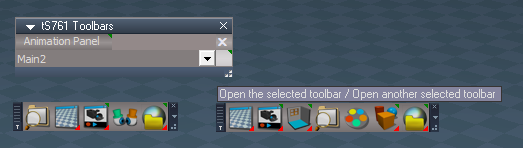
LMB - Opens MyToolbarFrame
RMB - Opens MyToolbarFrame2
X - Deletes the tS761 Toolbars.RsObj from the scene
-
clintonman
- Captain
- Posts: 5659
- Joined: 21 May 2009, 21:08
- Type the number ten into the box: 0
- Location: California
Re: Unofficial Update Documentation
Thanks, the last line, "X - Deletes the tS761 Toolbars.RsObj from the scene" will show in the next release.trueBlue wrote: 11 Feb 2021, 07:03You can Open two different toolbarsTruespace Toolbars - use the dropdown
list to select a toolbar then use the small
button to the right of the dropdown to load
the toolbar. Right Click on the small button
to open the toolbar twice.
RMB close all toolbars
tS761 Toolbars panel
LMB Opens toolbar1 RMB Opens toolbar2.png
Small button at the right of the Combo Control
LMB - Opens MyToolbarFrame
RMB - Opens MyToolbarFrame2
X - Deletes the tS761 Toolbars.RsObj from the scene
-
clintonman
- Captain
- Posts: 5659
- Joined: 21 May 2009, 21:08
- Type the number ten into the box: 0
- Location: California
Re: Unofficial Update Documentation
First 39 pages started adding some meat to the bones and some corrections from trueBlue.
- Attachments
-
- chXX_Additions_UU_page1to39.zip
- (2.3 MiB) Downloaded 224 times
-
clintonman
- Captain
- Posts: 5659
- Joined: 21 May 2009, 21:08
- Type the number ten into the box: 0
- Location: California
Re: Unofficial Update Documentation
some pages ( 9 - 12 ) on the various view buttons in the blue toolbar
some confusing bits and some of the names got mangled do to my lack of understanding
will try to fix the names and clarify explanations on the next pass and after any trueBlue, the author of the tools, input
some confusing bits and some of the names got mangled do to my lack of understanding
will try to fix the names and clarify explanations on the next pass and after any trueBlue, the author of the tools, input
- Attachments
-
- chXX_Additions_UU_page9to12.zip
- (314.06 KiB) Downloaded 245 times
-
trueBlue
- Captain
- Posts: 5548
- Joined: 06 Jul 2009, 22:50
- Type the number ten into the box: 10
Re: Unofficial Update Documentation
The Camera toolbar is a simple way to switch back a forth from the Eye Camera and 1 of 7 existing Cameras in your scene
These cameras must be named as follows:
Camera | Camera, 1 | Camera, 2 | Camera, 3 | Camera, 4 | Camera, 5 | Camera, 6
or
Camera | Camera,1 | Camera,2 | Camera,3 | Camera,4 | Camera,5 | Camera,6
Eye Camera
LMB - Eye Camera
RMB - Eye Camera preferences
Shows the current Eye Camera panel in the Stack
Note: This panel will change when you switch to Front, Back, Left, Right, Top, Bottom, Isometric, and Perspective
trueSpace's Eye Camera "EyeCamera_{2C152F81-45A2-4035-8896-9E49D60C8A7A}"
This is the name of the Eye Camera in the main 3D view (most layouts), located in System/D3DView
Note: When viewing from a scene camera or FPN, you are not viewing from the Eye Camera
When you open another 3D Window, an Eye Camera will be created in System/D3DView with a different name:
EyeCamera_
Plus the Frame's WinID attribute located in the Windows Manager Space
Example:
EyeCamera_{7BCDBD9D-E165-4581-A0E0-3240186A8CF5}
The Camera toolbar's Eye Camera LMB command:
Note: This command uses SubObject 0 which is the first Eye Camera in System/D3DView
EyeCamera_{2C152F81-45A2-4035-8896-9E49D60C8A7A}
If you created another 3D View, that would be SubObject 1
If you created an additional 3D View, that would be SubObject 2
Looks like I need to fix the commands in my first trueSpace creation...
TBC
1) Change the view from camera commands so that it does not change all views. Only the widow that has focus
These cameras must be named as follows:
Camera | Camera, 1 | Camera, 2 | Camera, 3 | Camera, 4 | Camera, 5 | Camera, 6
or
Camera | Camera,1 | Camera,2 | Camera,3 | Camera,4 | Camera,5 | Camera,6
Eye Camera
LMB - Eye Camera
RMB - Eye Camera preferences
Shows the current Eye Camera panel in the Stack
Note: This panel will change when you switch to Front, Back, Left, Right, Top, Bottom, Isometric, and Perspective
trueSpace's Eye Camera "EyeCamera_{2C152F81-45A2-4035-8896-9E49D60C8A7A}"
This is the name of the Eye Camera in the main 3D view (most layouts), located in System/D3DView
Note: When viewing from a scene camera or FPN, you are not viewing from the Eye Camera
When you open another 3D Window, an Eye Camera will be created in System/D3DView with a different name:
EyeCamera_
Plus the Frame's WinID attribute located in the Windows Manager Space
Example:
EyeCamera_{7BCDBD9D-E165-4581-A0E0-3240186A8CF5}
The Camera toolbar's Eye Camera LMB command:
Code: Select all
if(Node.SubObjectCount("/D3DView")==0) return;Cam = Node.SubObject("/D3DView", 0);D3DView.SetActiveCamera('/D3DView/' + Cam, '%WIN_ID%');EyeCamera_{2C152F81-45A2-4035-8896-9E49D60C8A7A}
If you created another 3D View, that would be SubObject 1
If you created an additional 3D View, that would be SubObject 2
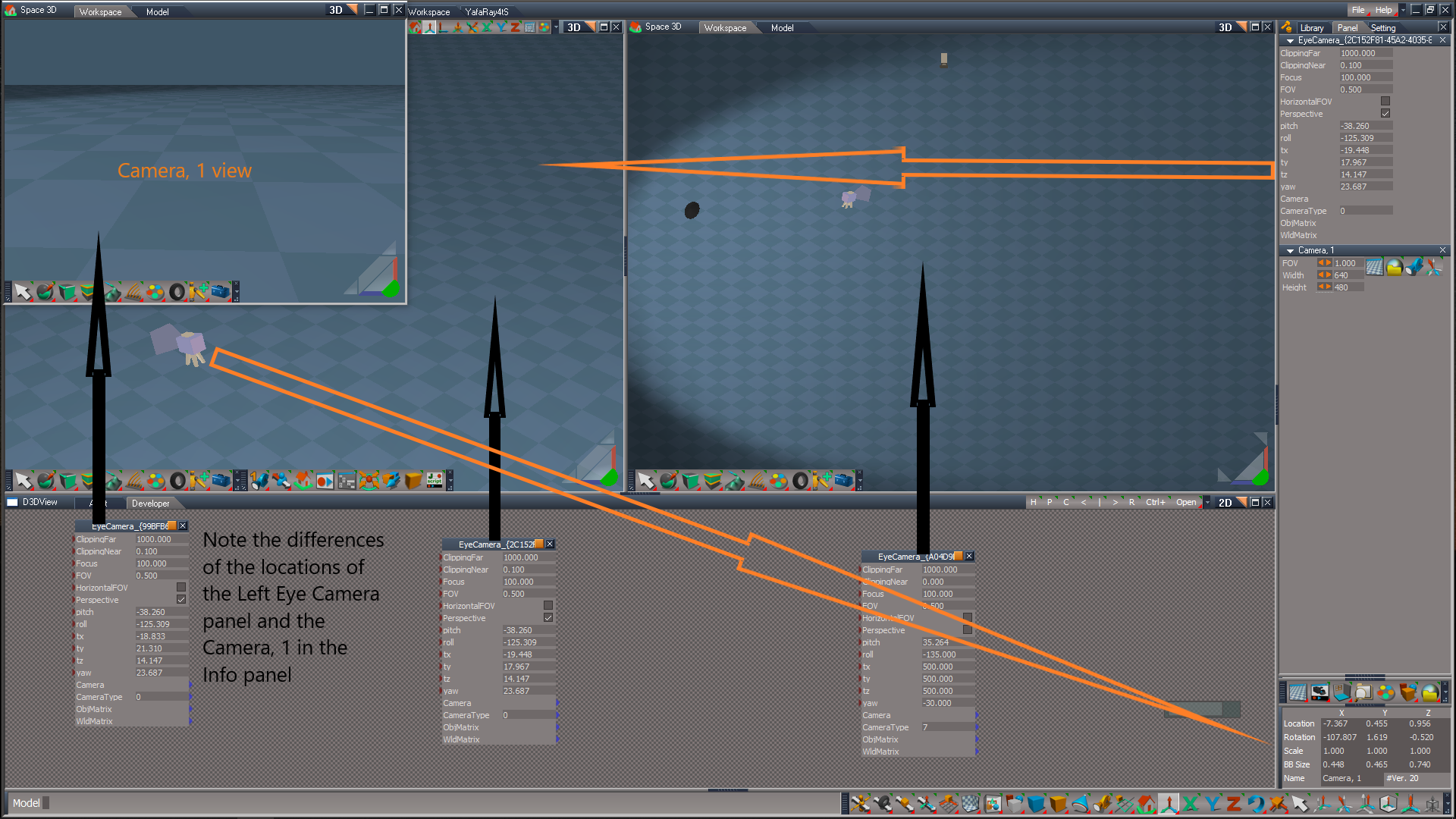
TBC
1) Change the view from camera commands so that it does not change all views. Only the widow that has focus
Code: Select all
//D3DView.SetActiveCamera(Space.CurrentScene() + '/Camera, 1', '%WIN_ID%');D3DView.SetActiveCamera(Space.CurrentScene() + '/Camera,1', '%WIN_ID%');

D3DView.SetActiveCamera(Space.CurrentScene() + '/Camera, 1', '');D3DView.SetActiveCamera(Space.CurrentScene() + '/Camera,1', '');-
clintonman
- Captain
- Posts: 5659
- Joined: 21 May 2009, 21:08
- Type the number ten into the box: 0
- Location: California
Re: Unofficial Update Documentation
Thanks for the info.trueBlue wrote: 13 Feb 2021, 14:42 ...
Note: When viewing from a scene camera or FPN, you are not viewing from the Eye Camera
...
1) Change the view from camera commands so that it does not change all views. Only the widow that has focusCode: Select all
//D3DView.SetActiveCamera(Space.CurrentScene() + '/Camera, 1', '%WIN_ID%');D3DView.SetActiveCamera(Space.CurrentScene() + '/Camera,1', '%WIN_ID%');

D3DView.SetActiveCamera(Space.CurrentScene() + '/Camera, 1', '');D3DView.SetActiveCamera(Space.CurrentScene() + '/Camera,1', '');
-
clintonman
- Captain
- Posts: 5659
- Joined: 21 May 2009, 21:08
- Type the number ten into the box: 0
- Location: California
Re: Unofficial Update Documentation
The FPN also switches all open views to it's camera.trueBlue wrote: 13 Feb 2021, 14:42 ...
Looks like I need to fix the commands in my first trueSpace creation...
TBC
1) Change the view from camera commands so that it does not change all views. Only the widow that has focusCode: Select all
//D3DView.SetActiveCamera(Space.CurrentScene() + '/Camera, 1', '%WIN_ID%');D3DView.SetActiveCamera(Space.CurrentScene() + '/Camera,1', '%WIN_ID%');

D3DView.SetActiveCamera(Space.CurrentScene() + '/Camera, 1', '');D3DView.SetActiveCamera(Space.CurrentScene() + '/Camera,1', '');
-
clintonman
- Captain
- Posts: 5659
- Joined: 21 May 2009, 21:08
- Type the number ten into the box: 0
- Location: California
Re: Unofficial Update Documentation
I can't find any information on how to use the Scene Animator FX. Did a forum search and found a description and see it has something to do with the post process plus other stuff.
-
trueBlue
- Captain
- Posts: 5548
- Joined: 06 Jul 2009, 22:50
- Type the number ten into the box: 10
Re: Unofficial Update Documentation
This is all I have
It is the Library description
Scene Animator supports animating
Background color, Ground settings,
Scene Render Attributes, and Postprocess.
Also useful to Save with your scene and the
settings will apply automatically.
To see the attributes in the Animation Editor,
select this object or in the top menu
Open / Dock
Supported in the Default Layout or
similar by default.
If you wish to use this in another layout
you will have to change the path in the
Layouts tab.
Render to File
Set the Play Range
Select the Render button
Select the D3D Render - Start button
It is the Library description
Scene Animator supports animating
Background color, Ground settings,
Scene Render Attributes, and Postprocess.
Also useful to Save with your scene and the
settings will apply automatically.
To see the attributes in the Animation Editor,
select this object or in the top menu
Open / Dock
Supported in the Default Layout or
similar by default.
If you wish to use this in another layout
you will have to change the path in the
Layouts tab.
Render to File
Set the Play Range
Select the Render button
Select the D3D Render - Start button
-
clintonman
- Captain
- Posts: 5659
- Joined: 21 May 2009, 21:08
- Type the number ten into the box: 0
- Location: California
Re: Unofficial Update Documentation
So you didn't create this?trueBlue wrote: 13 Feb 2021, 22:58 This is all I have
It is the Library description
...
-
clintonman
- Captain
- Posts: 5659
- Joined: 21 May 2009, 21:08
- Type the number ten into the box: 0
- Location: California
Re: Unofficial Update Documentation
Extra Chapter as it exists at this moment in time. Looks like the bulk of missing information is in the NURBS tools section. Almost everything else has at least some notes.
chXX_Additions_UU.zip contains the PDF file
GatherSLA.zip contains the source file and materials for this chapter
chXX_Additions_UU.zip contains the PDF file
GatherSLA.zip contains the source file and materials for this chapter
- Attachments
-
- GatherSLA3ce6.zip
- (2.26 MiB) Downloaded 229 times
-
- chXX_Additions_UU5979.zip
- (3.46 MiB) Downloaded 223 times
-
trueBlue
- Captain
- Posts: 5548
- Joined: 06 Jul 2009, 22:50
- Type the number ten into the box: 10
Re: Unofficial Update Documentation
Besides the animating part, KeyColor, and the Render button, you set your settings just like you would in the Stack/Setting panelsclintonman wrote: 13 Feb 2021, 23:20So you didn't create this?trueBlue wrote: 13 Feb 2021, 22:58 This is all I have
It is the Library description
...
Save your scene
When you reload the scene, all of your saved settings are Set
For Animating, select the Scene Animator and open the Keying panel

-
trueBlue
- Captain
- Posts: 5548
- Joined: 06 Jul 2009, 22:50
- Type the number ten into the box: 10
Re: Unofficial Update Documentation
With regards to the above...Scene Animator FX
Note:
This enables you to apply the Set Postprocess Color Key to a
New 3D Window. Only one.
When trueSpace opens a new 3D Window, the Postprocess
panel does not exist until you select the 3D Window with the
Settings tab opened. If you want to have the new 3D Window
with Postprocess Color Key and not the scene, here is the steps.
1.)Do not apply the Set Postprocess Color Key to the scene!
2.) Open a new 3D Window with the Settings tab opened and
make sure it has a Postprocess panel.
3.) Set the Postprocess Color Key.
If you close the 3D Window, you will have to apply the steps
again.
In the UUs/Open - 3D Window icon(s) LMB Command

- 3D Window.png (2.12 KiB) Viewed 5322 times
Code: Select all
WindowsManager.CreateWindowFromCLSIDEx('default', 'default', 'default', '[Scene]', 1, '3D');
D3DView.ShowPostProcessing('');
D3DView.ShowRenderAttribsForLayer('');
Node.Rename(WindowsManager.GetWorkWindow() + "/Layer Render Attributes", "Scene");
RsApp.ClearHistory();-
trueBlue
- Captain
- Posts: 5548
- Joined: 06 Jul 2009, 22:50
- Type the number ten into the box: 10
Re: Unofficial Update Documentation

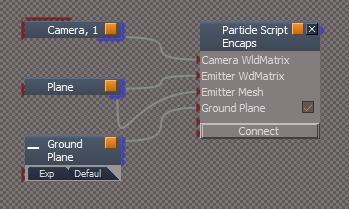
Must have a Camera & Mesh selected
- Ground Plane Connect button.png (18.18 KiB) Viewed 5318 times
This example is a Smoke Particle Script that I saved to my Library

- Default aspect.png (14.07 KiB) Viewed 5280 times
-
clintonman
- Captain
- Posts: 5659
- Joined: 21 May 2009, 21:08
- Type the number ten into the box: 0
- Location: California
Re: Unofficial Update Documentation
Background widget UU docs has the following
Is this still true? I didn't see it in the help display.
Code: Select all
 + drag opens the Default Context widget panel in the Stack/Panel and activates Auto Select NURBS toggles ( Active/Deactive )

Ctrl + x = Cut
Ctrl + v = Paste the last cut object-
trueBlue
- Captain
- Posts: 5548
- Joined: 06 Jul 2009, 22:50
- Type the number ten into the box: 10
Re: Unofficial Update Documentation
It is actually the Default context widget

- DCW.png (11.91 KiB) Viewed 5315 times
-
trueBlue
- Captain
- Posts: 5548
- Joined: 06 Jul 2009, 22:50
- Type the number ten into the box: 10
Re: Unofficial Update Documentation
BTW...
I think I have addressed and or fixed all of your red comments in this latest update(s)
Besides...
Flilpbook2 uses a different Alpha shader
Changed Fix corrupt SDS to Remove SDS
I think I have addressed and or fixed all of your red comments in this latest update(s)
Besides...
Flilpbook2 uses a different Alpha shader
Changed Fix corrupt SDS to Remove SDS

-
clintonman
- Captain
- Posts: 5659
- Joined: 21 May 2009, 21:08
- Type the number ten into the box: 0
- Location: California
Re: Unofficial Update Documentation
Here is the final Quick Guide
Cleaned up and all the latest shortcuts are included... as far as I can tell anyway(shrug shoulders emoji).
Cleaned up and all the latest shortcuts are included... as far as I can tell anyway(shrug shoulders emoji).
- Attachments
-
- QuickGuide_UU.zip
- (1.75 MiB) Downloaded 221 times
-
clintonman
- Captain
- Posts: 5659
- Joined: 21 May 2009, 21:08
- Type the number ten into the box: 0
- Location: California
Re: Unofficial Update Documentation
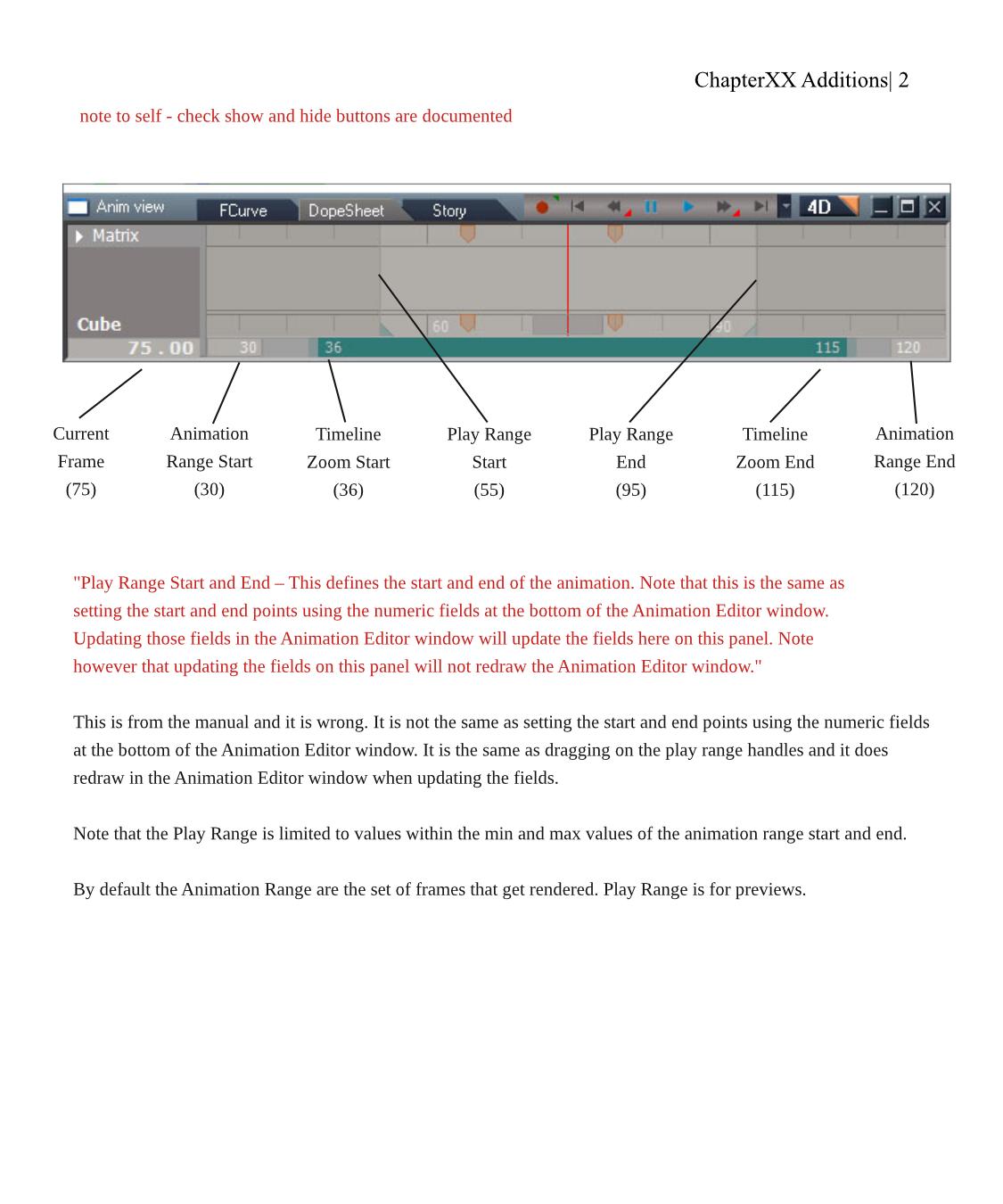
Some Animation View information is missing from the manual. This image shows what I found out. I wanted to post here to get any feedback. I'm thinking the labels for "Animation Range Start and End" should be called "Timeline Start and End". Timeline seem to match modelspace animation terms more closely.
Ignore the first red line
The red paragraph is what the manual says. The diagram and black paragraph shows what I found to be the case.
Ignore the first red line
The red paragraph is what the manual says. The diagram and black paragraph shows what I found to be the case.
- Attachments
-
-
trueBlue
- Captain
- Posts: 5548
- Joined: 06 Jul 2009, 22:50
- Type the number ten into the box: 10
Re: Unofficial Update Documentation
Looks good!
Were you planning on including info about the Animation Preferences panel UU.7 version?
Notably, the Shrink Range button that sets the Play Range and Start/End values for the Timeline
Advance Frame by amount Forward/Reverse
Rendering from a Camera view using the UU.7 Cameras?
Notably, setting the inside dimensions (what gets rendered) of the Camera's view using Width/Height
Render to File icon
RMB - Open Folder
Render to File dialog
Save animation from frame - Reset button
Were you planning on including info about the Animation Preferences panel UU.7 version?
Notably, the Shrink Range button that sets the Play Range and Start/End values for the Timeline
Advance Frame by amount Forward/Reverse
Rendering from a Camera view using the UU.7 Cameras?
Notably, setting the inside dimensions (what gets rendered) of the Camera's view using Width/Height
Render to File icon
RMB - Open Folder
Render to File dialog
Save animation from frame - Reset button
-
clintonman
- Captain
- Posts: 5659
- Joined: 21 May 2009, 21:08
- Type the number ten into the box: 0
- Location: California
Re: Unofficial Update Documentation
Additions Chapter is up to 74 pages now.
Continue to fill in the gaps and planning to add screen shots of the tools in use. I tried an animated gif but it didn't work, so it will have to be static images. Once all the images and text are in will come the final layout and links.
Everything that I find/discover and understand will go into the manual. If I don't see it or don't understand it then it won't.
Continue to fill in the gaps and planning to add screen shots of the tools in use. I tried an animated gif but it didn't work, so it will have to be static images. Once all the images and text are in will come the final layout and links.
Everything that I find/discover and understand will go into the manual. If I don't see it or don't understand it then it won't.
- Attachments
-
- chXX_Additions_UUd626.zip
- (3.75 MiB) Downloaded 227 times
-
clintonman
- Captain
- Posts: 5659
- Joined: 21 May 2009, 21:08
- Type the number ten into the box: 0
- Location: California
Re: Unofficial Update Documentation
Updated the animation chapter with the timeline diagram and filled in some more of the text.
I also realized there are things missing from the trueSpace manual. Add camera and primitives are not mentioned anywhere. I think there's a few other things missing as well. So the plan is to have a "missing items" chapter to go with the "uu additions" chapter.
I also realized there are things missing from the trueSpace manual. Add camera and primitives are not mentioned anywhere. I think there's a few other things missing as well. So the plan is to have a "missing items" chapter to go with the "uu additions" chapter.
- Attachments
-
- ch9_Animation_UU.zip
- (394.26 KiB) Downloaded 222 times
-
clintonman
- Captain
- Posts: 5659
- Joined: 21 May 2009, 21:08
- Type the number ten into the box: 0
- Location: California
Re: Unofficial Update Documentation
I got a list of things, specifically buttons not mentioned in the original manual and a couple of buttons with the wrong image.
I didn't look closely at the modelspace manual section so I'm sure some of the missing info is in there.
missing stuff
render buttons - but not really
new scene, reset default context
display mode - only in modelspace docs
coordinate system buttons world, object,screen, tangent
XYZ locking - ch3 pg 203 brief mention
undo/redo - only in modelspace docs
copy/delete - only in modelspace docs
primitives including text, camera and entry point(really just a camera)
area light and sky light
ch3 hide unselected has wrong icon
ch8 convert soft selection to skin weights wrong icon
I didn't look closely at the modelspace manual section so I'm sure some of the missing info is in there.
missing stuff
render buttons - but not really
new scene, reset default context
display mode - only in modelspace docs
coordinate system buttons world, object,screen, tangent
XYZ locking - ch3 pg 203 brief mention
undo/redo - only in modelspace docs
copy/delete - only in modelspace docs
primitives including text, camera and entry point(really just a camera)
area light and sky light
ch3 hide unselected has wrong icon
ch8 convert soft selection to skin weights wrong icon
-
clintonman
- Captain
- Posts: 5659
- Joined: 21 May 2009, 21:08
- Type the number ten into the box: 0
- Location: California
Re: Unofficial Update Documentation
Updated chapter 2 and 3 with the missing items, mostly just screenshots as place holders.
The shortcuts list was lost during conversion of the file from OpenDocument odg to Scribus sla formats. This is no real loss since the list was out of date.
The shortcuts list was lost during conversion of the file from OpenDocument odg to Scribus sla formats. This is no real loss since the list was out of date.
- Attachments
-
- ch2_and_ch3_UU.zip
- (2.49 MiB) Downloaded 220 times
-
clintonman
- Captain
- Posts: 5659
- Joined: 21 May 2009, 21:08
- Type the number ten into the box: 0
- Location: California
Re: Unofficial Update Documentation
This may be the last of the missing toolbar buttons
Now has the show and hide buttons, some notes on how UU is different and primitives including the camera.
Only new/updated pages attached
Now has the show and hide buttons, some notes on how UU is different and primitives including the camera.
Only new/updated pages attached
- Attachments
-
- SomeMissingStuff.zip
- (653.78 KiB) Downloaded 218 times
-
clintonman
- Captain
- Posts: 5659
- Joined: 21 May 2009, 21:08
- Type the number ten into the box: 0
- Location: California
Re: Unofficial Update Documentation
I got the primitive creation sections fleshed in. Attached is the modeling chapter primitives section. There's still a few things to figure out about the primitives and primitve creation plus snapping tools. Most of this information applies to the unmodified trueSpace release, not just the Unofficial Update version.
- Attachments
-
- ch3_ModelWorkspace_UU_pg22-35.zip
- (680.77 KiB) Downloaded 212 times
-
clintonman
- Captain
- Posts: 5659
- Joined: 21 May 2009, 21:08
- Type the number ten into the box: 0
- Location: California
Re: Unofficial Update Documentation
I finally got the trueSpace snapping stuff figured out. The notes are rough and uncoordinated. The inferences section was especially difficult to understand. In that case I found an undocumented limitation in that inferences only work on perfectly flat faces. So if you say move 1 corner of a cube the inferences won't work on the connected faces. I think I'll have some pages to share tomorrow. This is all basic unmodified trueSpace. I'll also need to run through the Unofficial Update to see if it still works the same way.
-
trueBlue
- Captain
- Posts: 5548
- Joined: 06 Jul 2009, 22:50
- Type the number ten into the box: 10
Re: Unofficial Update Documentation
I can not find "Keep Sizes"!!!
Did that not make it into tS761B8 ???
Edit: Found it...
Primitives Default aspect
Did that not make it into tS761B8 ???
Edit: Found it...
Primitives Default aspect
-
clintonman
- Captain
- Posts: 5659
- Joined: 21 May 2009, 21:08
- Type the number ten into the box: 0
- Location: California
Re: Unofficial Update Documentation
Latest version of chapter 3
page 17 to 33 has the latest updates with new or corrected information on the snapping and inferences. This portion of the manual needs some screenshots.
page 17 to 33 has the latest updates with new or corrected information on the snapping and inferences. This portion of the manual needs some screenshots.
- Attachments
-
- ch3_ModelWorkspace_UUf8f8.zip
- (1.85 MiB) Downloaded 191 times
-
the_ant

- Chief Petty Officer
- Posts: 155
- Joined: 02 Jun 2009, 09:26
- Type the number ten into the box: 0
- Location: Perugia - Italy
Re: Unofficial Update Documentation
Have no words for your (Clinton & Blue) impressive work around this software...


-
trueBlue
- Captain
- Posts: 5548
- Joined: 06 Jul 2009, 22:50
- Type the number ten into the box: 10
Re: Unofficial Update Documentation
EntryPoint
An EntryPoint camera is the same as a normal trueSpace camera
trueSpace recognizes an EntryPoint camera by this name when loading a scene as an entry point into the scene and switches the 3D View to the EntryPoint camera
This camera is useful for truePlay scenes/Portals, but can also be used with scenes
If you rename the EntryPoint camera, trueSpace will not recognize it as an entry point and it will act as a normal trueSpace camera
An EntryPoint camera is the same as a normal trueSpace camera
trueSpace recognizes an EntryPoint camera by this name when loading a scene as an entry point into the scene and switches the 3D View to the EntryPoint camera
This camera is useful for truePlay scenes/Portals, but can also be used with scenes
If you rename the EntryPoint camera, trueSpace will not recognize it as an entry point and it will act as a normal trueSpace camera
-
clintonman
- Captain
- Posts: 5659
- Joined: 21 May 2009, 21:08
- Type the number ten into the box: 0
- Location: California
Re: Unofficial Update Documentation
Thanks. If you rename the normal camera to EntryPoint will it be used by truePlay?trueBlue wrote: 02 Mar 2021, 16:32 EntryPoint
An EntryPoint camera is the same as a normal trueSpace camera
trueSpace recognizes an EntryPoint camera by this name when loading a scene as an entry point into the scene and switches the 3D View to the EntryPoint camera
This camera is useful for truePlay scenes/Portals, but can also be used with scenes
If you rename the EntryPoint camera, trueSpace will not recognize it as an entry point and it will act as a normal trueSpace camera
-
trueBlue
- Captain
- Posts: 5548
- Joined: 06 Jul 2009, 22:50
- Type the number ten into the box: 10
Re: Unofficial Update Documentation
Yes and it works for scenes too.
It is not just for truePlay
Does not work in Model as an entry point, but you can use Model's View from Object
It is not just for truePlay
Does not work in Model as an entry point, but you can use Model's View from Object
-
clintonman
- Captain
- Posts: 5659
- Joined: 21 May 2009, 21:08
- Type the number ten into the box: 0
- Location: California
Re: Unofficial Update Documentation
Updates for Chapter 2, chapter 3 and chapter XX
Added entry point camera info, moved show/hide information and a little general cleanup. I've decided to settle on the arial font for all new content. Currently it has a random mixture of various fonts. The final UU docs chapters will be combined into one file so it can have internal links to the different sections. The shortcuts list will be a separate document like the quick guide.
I've been bouncing around the various chapters to get a basic skeletal structure worked out. A basic outline of all the info is in place now so.
The next step I think will be to work through the manual start to finish, filling in all the stuff I don't know, cleaning up and adding screenshots of the tools in action also maybe do some videos for the manual.
Added entry point camera info, moved show/hide information and a little general cleanup. I've decided to settle on the arial font for all new content. Currently it has a random mixture of various fonts. The final UU docs chapters will be combined into one file so it can have internal links to the different sections. The shortcuts list will be a separate document like the quick guide.
I've been bouncing around the various chapters to get a basic skeletal structure worked out. A basic outline of all the info is in place now so.
The next step I think will be to work through the manual start to finish, filling in all the stuff I don't know, cleaning up and adding screenshots of the tools in action also maybe do some videos for the manual.
- Attachments
-
- ch2_ch3_chXX_Additions_UU.zip
- (7.06 MiB) Downloaded 198 times
-
clintonman
- Captain
- Posts: 5659
- Joined: 21 May 2009, 21:08
- Type the number ten into the box: 0
- Location: California
Re: Unofficial Update Documentation
First pass of the shortcuts pages. I'll make it look pretty later. Data was copied from the "tS761 Workspace Shortcut List.rtf" file.
- Attachments
-
- Shortcuts.zip
- (90.74 KiB) Downloaded 209 times
-
clintonman
- Captain
- Posts: 5659
- Joined: 21 May 2009, 21:08
- Type the number ten into the box: 0
- Location: California
Re: Unofficial Update Documentation
Chapter 2 complete up to section 2.7.6, Desktop Preferences
Table of Contents is a work in progress.
Shortcuts table to be copied into the file later.
Table of Contents is a work in progress.
Shortcuts table to be copied into the file later.
- Attachments
-
- ch2_UserInterface_UU_s276.zip
- (1.23 MiB) Downloaded 200 times
-
trueBlue
- Captain
- Posts: 5548
- Joined: 06 Jul 2009, 22:50
- Type the number ten into the box: 10
Re: Unofficial Update Documentation
2.7.4 Render Preferences Presets - UU7clintonman wrote: 07 Mar 2021, 05:32 Chapter 2 complete up to section 2.7.6, Desktop Preferences
Table of Contents is a work in progress.
Shortcuts table to be copied into the file later.
All icons
RMB - Sets all opened views
-
clintonman
- Captain
- Posts: 5659
- Joined: 21 May 2009, 21:08
- Type the number ten into the box: 0
- Location: California
Re: Unofficial Update Documentation
Thanks, added the note.trueBlue wrote: 07 Mar 2021, 15:512.7.4 Render Preferences Presets - UU7clintonman wrote: 07 Mar 2021, 05:32 Chapter 2 complete up to section 2.7.6, Desktop Preferences
Table of Contents is a work in progress.
Shortcuts table to be copied into the file later.
All icons
RMB - Sets all opened views
-
clintonman
- Captain
- Posts: 5659
- Joined: 21 May 2009, 21:08
- Type the number ten into the box: 0
- Location: California
Re: Unofficial Update Documentation
Today's update chapter 2 up to section 2.7.9, the help menu and includes the cleaned up shortcuts pages.
The synchronize pages may be obsolete soon. Have to wait and see.
The synchronize pages may be obsolete soon. Have to wait and see.
- Attachments
-
- ch2_UserInterface_UU_s297.zip
- (1.65 MiB) Downloaded 183 times
-
trueBlue
- Captain
- Posts: 5548
- Joined: 06 Jul 2009, 22:50
- Type the number ten into the box: 10
Re: Unofficial Update Documentation
Looking good!
One thing you might want to mention about Synchronize, it is a Camera and it is necessary to be viewing from this camera from within Workspace & Model for synchronization
Adding objects from Workspace after Activating the Synchronize camera will not be Protected
One thing you might want to mention about Synchronize, it is a Camera and it is necessary to be viewing from this camera from within Workspace & Model for synchronization
Adding objects from Workspace after Activating the Synchronize camera will not be Protected
-
clintonman
- Captain
- Posts: 5659
- Joined: 21 May 2009, 21:08
- Type the number ten into the box: 0
- Location: California
Re: Unofficial Update Documentation
Thanks added a note. Will wait until the ? Synchronize 2 ? is final before finalize.trueBlue wrote: 08 Mar 2021, 18:42 Looking good!
One thing you might want to mention about Synchronize, it is a Camera and it is necessary to be viewing from this camera from within Workspace & Model for synchronization
Adding objects from Workspace after Activating the Synchronize camera will not be Protected
-
clintonman
- Captain
- Posts: 5659
- Joined: 21 May 2009, 21:08
- Type the number ten into the box: 0
- Location: California
Re: Unofficial Update Documentation
"Finished" chapter 2 and started adding chapter 3, modeling, up to section 3.1.6
The table of content links will be the last thing added. There is a test for the jump from the toc to chapter 3.
Removed the rendering toolbar. It will go in chapter 7.
The table of content links will be the last thing added. There is a test for the jump from the toc to chapter 3.
Removed the rendering toolbar. It will go in chapter 7.
- Attachments
-
- tS761_UU_Artists_Guide_s316.zip
- (1.79 MiB) Downloaded 203 times
-
clintonman
- Captain
- Posts: 5659
- Joined: 21 May 2009, 21:08
- Type the number ten into the box: 0
- Location: California
Re: Unofficial Update Documentation
Chapter 2 and 3 in one pdf file. The last part of the chapter 3 UU is not in place yet. Those items may go into the Additions chapter instead of in the modeling chapter. Used some update images in the snapping section to replace the images I found confusing. There are still a few icons to add in chapter 3 and some organization needed. For now these 2 chapters are complete.
The last page note has a typo, it should be "more pages in chapter 3", not chapter 2.
Next chapter is number 5, surfacing then 7, lighting and rendering
The last page note has a typo, it should be "more pages in chapter 3", not chapter 2.
Next chapter is number 5, surfacing then 7, lighting and rendering
- Attachments
-
- tS761_UU_Artists_Guide_ch2_ch3.zip
- (3.32 MiB) Downloaded 177 times
-
clintonman
- Captain
- Posts: 5659
- Joined: 21 May 2009, 21:08
- Type the number ten into the box: 0
- Location: California
Re: Unofficial Update Documentation
Added Chapter 5, surfacing and chapter 7, lighting and rendering up to section 7.1.1(incomplete)
- Attachments
-
- tS761_UU_Artists_Guide_s711.zip
- (4.46 MiB) Downloaded 209 times
-
clintonman
- Captain
- Posts: 5659
- Joined: 21 May 2009, 21:08
- Type the number ten into the box: 0
- Location: California
Re: Unofficial Update Documentation
The entire manual, 199 pages so far.
Pages up to about 114 have had a first pass for beauty and tests to see how things work. The second half is a dump of the Additions chapter with some orphan sections in back.
The manual will be organized into 2 basic parts.
The first will be made of items that have been modified in the base trueSpace layout. So if a new button was added to a toolbar or buttons get moved to other parts of the interface the change will be documented with the same chapters and sections of the original manual. This first section will also have a couple of corrections for the old manual plus new information that was never added to the manual.
New toolbars and such will go in the second half of the manual. If items are closely related to existing items then the original chapter sections will have links into the new sections.
Pages up to about 114 have had a first pass for beauty and tests to see how things work. The second half is a dump of the Additions chapter with some orphan sections in back.
The manual will be organized into 2 basic parts.
The first will be made of items that have been modified in the base trueSpace layout. So if a new button was added to a toolbar or buttons get moved to other parts of the interface the change will be documented with the same chapters and sections of the original manual. This first section will also have a couple of corrections for the old manual plus new information that was never added to the manual.
New toolbars and such will go in the second half of the manual. If items are closely related to existing items then the original chapter sections will have links into the new sections.
- Attachments
-
- tS761_UU_Artists_Guide_Draft.zip
- (10.92 MiB) Downloaded 213 times
-
clintonman
- Captain
- Posts: 5659
- Joined: 21 May 2009, 21:08
- Type the number ten into the box: 0
- Location: California
Re: Unofficial Update Documentation
Draft 2
201 total pages
"Valid" pages up to page 133 covering the red toolbar and the blue toolbar up to the Scene Animator
201 total pages
"Valid" pages up to page 133 covering the red toolbar and the blue toolbar up to the Scene Animator
- Attachments
-
- tS761_UU_Artists_Guide_Draft2.zip
- (11.08 MiB) Downloaded 215 times
-
trueBlue
- Captain
- Posts: 5548
- Joined: 06 Jul 2009, 22:50
- Type the number ten into the box: 10
Re: Unofficial Update Documentation
Page 71 - 75
The Camera info (Page 72 & 73) is in between the Text primitive and the Tube primitive
Page 73
RB - Previous View
Switches the main 3D window to the current Eye Camera
Note: I'll see if I change this to the active window instead of just the main 3D window
Page 25
Workaround is, if the the main 3D view is Model, open a 3D Window first before selecting Activate
But this seems wrong to me!
It really should be closing Model first
The Camera info (Page 72 & 73) is in between the Text primitive and the Tube primitive
Page 73
The above text in red is not true, this has been fixedView switches the main 3D window to the camera view.
RClick restores the previous perspective view of the window. Does not set previous view if
the window was an orthogonal view or another camera view. Only switches to previous
perspective view.
Same icon as Set camera
RB - Previous View
Switches the main 3D window to the current Eye Camera
Note: I'll see if I change this to the active window instead of just the main 3D window
Page 25
Noticed that, if the main 3D view is Model and you press the Activate button, Synchronize does not create a new 3D view and there is no ProtectionActivate will open a new 3D view or use an existing 3D view, convert it to a modelspace view and
modelspace will become aware of workspace changes.
Workaround is, if the the main 3D view is Model, open a 3D Window first before selecting Activate
But this seems wrong to me!
It really should be closing Model first
-
clintonman
- Captain
- Posts: 5659
- Joined: 21 May 2009, 21:08
- Type the number ten into the box: 0
- Location: California
Re: Unofficial Update Documentation
Thanks, I'll update after your testtrueBlue wrote: 14 Mar 2021, 14:06 Page 71 - 75
The Camera info (Page 72 & 73) is in between the Text primitive and the Tube primitive
Page 73The above text in red is not true, this has been fixedView switches the main 3D window to the camera view.
RClick restores the previous perspective view of the window. Does not set previous view if
the window was an orthogonal view or another camera view. Only switches to previous
perspective view.
Same icon as Set camera
RB - Previous View
Switches the main 3D window to the current Eye Camera
Note: I'll see if I change this to the active window instead of just the main 3D window
Page 25Noticed that, if the main 3D view is Model and you press the Activate button, Synchronize does not create a new 3D view and there is no ProtectionActivate will open a new 3D view or use an existing 3D view, convert it to a modelspace view and
modelspace will become aware of workspace changes.
Workaround is, if the the main 3D view is Model, open a 3D Window first before selecting Activate
But this seems wrong to me!
It really should be closing Model first
The camera is between Text primitive and Tube primitive because it is the last standard truespace "primitive" and Tube is the first new UU primitive.
-
trueBlue
- Captain
- Posts: 5548
- Joined: 06 Jul 2009, 22:50
- Type the number ten into the box: 10
Re: Unofficial Update Documentation
Not a big deal but in the UU7, the Cameras were removed from the Primitivesclintonman wrote: 14 Mar 2021, 15:42 The camera is between Text primitive and Tube primitive because it is the last standard truespace "primitive" and Tube is the first new UU primitive.
I just find it confusing that Cameras were included the Primitives where you create meshes