Yep, make sense either way. So I decided to follow the original tS organization since this UU docs cross references back to the original docs. Caligari had a habit of sticking the camera just anywhere, even in model it's with deform tools or something.trueBlue wrote: 14 Mar 2021, 16:18Not a big deal but in the UU7, the Cameras were removed from the Primitivesclintonman wrote: 14 Mar 2021, 15:42 The camera is between Text primitive and Tube primitive because it is the last standard truespace "primitive" and Tube is the first new UU primitive.
I just find it confusing that Cameras were included the Primitives where you create meshes
Unofficial Update Documentation
-
clintonman

- Captain
- Posts: 5659
- Joined: 21 May 2009, 21:08
- Type the number ten into the box: 0
- Location: California
Re: Unofficial Update Documentation
-
clintonman
- Captain
- Posts: 5659
- Joined: 21 May 2009, 21:08
- Type the number ten into the box: 0
- Location: California
Re: Unofficial Update Documentation
Draft 3
204 pages, first run now up to page 148, the constraints toolbar which jumps back to the constraints section in chapter 3
Updated the last few buttons in the blue toolbar and started the gold toolbar
Updated sections : Snapping Toolbar, D3D Render, Grid Array, Radial Array and Point Clone
204 pages, first run now up to page 148, the constraints toolbar which jumps back to the constraints section in chapter 3
Updated the last few buttons in the blue toolbar and started the gold toolbar
Updated sections : Snapping Toolbar, D3D Render, Grid Array, Radial Array and Point Clone
- Attachments
-
- tS761_UU_Artists_Guide_Draft3.zip
- (11.63 MiB) Downloaded 228 times
-
clintonman
- Captain
- Posts: 5659
- Joined: 21 May 2009, 21:08
- Type the number ten into the box: 0
- Location: California
Re: Unofficial Update Documentation
Draft 4, 205 pages, up to page 154 in the middle of the particles section. Have to figure out a few things there.
Didn't get very far today, which isn't surprising, I figured it would take a while to figure out the particle tools.
Added some notes from the release notes for future changes.
Didn't get very far today, which isn't surprising, I figured it would take a while to figure out the particle tools.
Added some notes from the release notes for future changes.
- Attachments
-
- tS761_UU_Artists_Guide_Draft4.zip
- (11.62 MiB) Downloaded 225 times
-
clintonman
- Captain
- Posts: 5659
- Joined: 21 May 2009, 21:08
- Type the number ten into the box: 0
- Location: California
Re: Unofficial Update Documentation
Draft 5, 210 pages finished particles and constraints, almost finished with deformers, pg 169
- Attachments
-
- tS761_UU_Artists_Guide_Draft5.zip
- (12.04 MiB) Downloaded 192 times
-
clintonman
- Captain
- Posts: 5659
- Joined: 21 May 2009, 21:08
- Type the number ten into the box: 0
- Location: California
Re: Unofficial Update Documentation
Draft 6, 212 pages, up to page 182,183
finished deformers, pass includes parenting, mirror matrix, lock/unlock objects, rectangle select, layers, mesh origin, fk controls, lathe
started static sweep
looks like my speed is about 10 pages per day, so the first full draft of the manual should be done in a couple of days
after that will need to go through and fix all the pages that are out of date due to all the trueBlue changes
still a few scripts that are changing daily like the synchronize scripts and a few that need to change - remove clear undo history some and need to add clear undo history to others
The reason for the clearing of undo history is because when scripts run they don't run as a single step, but as multiple steps with each step using an undo slot. So a person could undo to a bad spot corresponding to the middle of a script run, the clear undos prevents that from happening. In some cases because of what is happening it doesn't matter that the undos are cleared. In other cases it could mess up your workflow and prevent you from undoing something unexpectedly. Those are the cases that need o be worked on or warnings added so you can make an informed decision and not blindly move forward with the use of the tool.
finished deformers, pass includes parenting, mirror matrix, lock/unlock objects, rectangle select, layers, mesh origin, fk controls, lathe
started static sweep
looks like my speed is about 10 pages per day, so the first full draft of the manual should be done in a couple of days
after that will need to go through and fix all the pages that are out of date due to all the trueBlue changes
still a few scripts that are changing daily like the synchronize scripts and a few that need to change - remove clear undo history some and need to add clear undo history to others
The reason for the clearing of undo history is because when scripts run they don't run as a single step, but as multiple steps with each step using an undo slot. So a person could undo to a bad spot corresponding to the middle of a script run, the clear undos prevents that from happening. In some cases because of what is happening it doesn't matter that the undos are cleared. In other cases it could mess up your workflow and prevent you from undoing something unexpectedly. Those are the cases that need o be worked on or warnings added so you can make an informed decision and not blindly move forward with the use of the tool.
- Attachments
-
- tS761_UU_Artists_Guide_Draft6.zip
- (12.47 MiB) Downloaded 231 times
-
clintonman
- Captain
- Posts: 5659
- Joined: 21 May 2009, 21:08
- Type the number ten into the box: 0
- Location: California
Re: Unofficial Update Documentation
Draft 7, 219 pages good up to pg 208
finished static sweep, trueBevel, plane Loop select, Select and Quadrify by normals, target weld, normal move, toggle object coord mode, freeze transform, quad toolbar and menu, toolbar toolbar, interpolation toolbar and about half way through the NURBS tools
After the rest of the NURBS tools are done the final first draft will be complete.
finished static sweep, trueBevel, plane Loop select, Select and Quadrify by normals, target weld, normal move, toggle object coord mode, freeze transform, quad toolbar and menu, toolbar toolbar, interpolation toolbar and about half way through the NURBS tools
After the rest of the NURBS tools are done the final first draft will be complete.
- Attachments
-
- tS761_UU_Artists_Guide_Draft7.zip
- (13.38 MiB) Downloaded 233 times
-
clintonman
- Captain
- Posts: 5659
- Joined: 21 May 2009, 21:08
- Type the number ten into the box: 0
- Location: California
Re: Unofficial Update Documentation
Draft 8 the final draft version, 218 pages 
Pretty much everything that's going into the manual is in place.
The table of contents main chapters are clickable, subsections are not.
Still some questions to try to answer, and some areas to fill in.
Edit: upload not working...
Find at the top of this page:
http://clintons3d.com/plugins/truespace ... index.html
Pretty much everything that's going into the manual is in place.
The table of contents main chapters are clickable, subsections are not.
Still some questions to try to answer, and some areas to fill in.
Edit: upload not working...
Find at the top of this page:
http://clintons3d.com/plugins/truespace ... index.html
-
trueBlue

- Captain
- Posts: 5548
- Joined: 06 Jul 2009, 22:50
- Type the number ten into the box: 10
Re: Unofficial Update Documentation
Might be a good idea to mention about a single selected object and multiple selected objects
Most of the tools/scripts only work on one object at a time
If you select multiple objects and run certain tools/scripts, it uses the last selected object out of the selection
In these cases there is no warning or message indicating which object in the selection the tool/script was applied to unless the tool/script opens the Stack/Panel
Most of the tools/scripts only work on one object at a time
If you select multiple objects and run certain tools/scripts, it uses the last selected object out of the selection
In these cases there is no warning or message indicating which object in the selection the tool/script was applied to unless the tool/script opens the Stack/Panel
-
clintonman
- Captain
- Posts: 5659
- Joined: 21 May 2009, 21:08
- Type the number ten into the box: 0
- Location: California
Re: Unofficial Update Documentation
Noted, thanks.trueBlue wrote: 22 Mar 2021, 23:54 Might be a good idea to mention about a single selected object and multiple selected objects
...
-
clintonman
- Captain
- Posts: 5659
- Joined: 21 May 2009, 21:08
- Type the number ten into the box: 0
- Location: California
Re: Unofficial Update Documentation
Phase 2 Draft 1
First 50 pages
Added the modified quick start guide to the start of the manual
Updated the pages based on the latest UU release
General refinement of the layout and content
First 50 pages
Added the modified quick start guide to the start of the manual
Updated the pages based on the latest UU release
General refinement of the layout and content
- Attachments
-
- tS761_UU_Artists_Guide_Phase2_Draft1.zip
- (3.57 MiB) Downloaded 196 times
-
clintonman
- Captain
- Posts: 5659
- Joined: 21 May 2009, 21:08
- Type the number ten into the box: 0
- Location: California
Re: Unofficial Update Documentation
Phase 2 Draft 2
First 99 pages up to chapter 5 - Surfacing
Several links were added but they point to pages beyond the 99 pages here.
There have been recent changes to the Unofficial Update that have not been updated in this section of the manual yet.
First 99 pages up to chapter 5 - Surfacing
Several links were added but they point to pages beyond the 99 pages here.
There have been recent changes to the Unofficial Update that have not been updated in this section of the manual yet.
- Attachments
-
- tS761_UU_Artists_Guide_Phase2_Draft2.zip
- (5.82 MiB) Downloaded 242 times
-
clintonman
- Captain
- Posts: 5659
- Joined: 21 May 2009, 21:08
- Type the number ten into the box: 0
- Location: California
Re: Unofficial Update Documentation
Phase 2 Draft 3
First 131 pages up to the New In UU section starting the Red toolbar section.
Just grinding away at it, fixing errors, adding clarifications and making it slightly prettier. Also some detours to improve some of the scripts added in the UU.
First 131 pages up to the New In UU section starting the Red toolbar section.
Just grinding away at it, fixing errors, adding clarifications and making it slightly prettier. Also some detours to improve some of the scripts added in the UU.
- Attachments
-
- tS761_UU_Artists_Guide_Phase2_Draft3.zip
- (8.68 MiB) Downloaded 236 times
-
clintonman
- Captain
- Posts: 5659
- Joined: 21 May 2009, 21:08
- Type the number ten into the box: 0
- Location: California
Re: Unofficial Update Documentation
Phase 2 Draft 4
First 159 pages finished the Red toolbar and into the Gold toolbar up to point clone
About 70 pages to go before Phase 2 pass is complete.
First 159 pages finished the Red toolbar and into the Gold toolbar up to point clone
About 70 pages to go before Phase 2 pass is complete.
- Attachments
-
- tS761_UU_Artists_Guide_Phase2_Draft4.zip
- (10.72 MiB) Downloaded 232 times
-
clintonman
- Captain
- Posts: 5659
- Joined: 21 May 2009, 21:08
- Type the number ten into the box: 0
- Location: California
Re: Unofficial Update Documentation
Phase 2 Draft 5
First 184 pages - constraints, particle system, deformers, mirror matrix, locks and rectangle select
46 pages to go
next up is the layers. I'm going to try to rewrite the layers system so it does not need to clear history
First 184 pages - constraints, particle system, deformers, mirror matrix, locks and rectangle select
46 pages to go
next up is the layers. I'm going to try to rewrite the layers system so it does not need to clear history
- Attachments
-
- tS761_UU_Artists_Guide_Phase2_Draft5.zip
- (12.33 MiB) Downloaded 251 times
-
clintonman
- Captain
- Posts: 5659
- Joined: 21 May 2009, 21:08
- Type the number ten into the box: 0
- Location: California
Re: Unofficial Update Documentation
Phase 2 Draft 6
ran through to the end of the manual and then started over from the beginning again because of multiple changes to the UU
most recent updates are up to page 115, the start of the character editor section
There was a style change for the manual so some labels and text will be blank after page 115 because they don't fit in their boxes anymore.
The new workspace layers system is started and maybe it can be added by the end of Phase 3 of the manual. Phase 3 will involve looking for places to add more diagrams and examples and start planning the links to other files. The final step will be integrating it into the existing manuals via the html index and links to the various chapters files.
ran through to the end of the manual and then started over from the beginning again because of multiple changes to the UU
most recent updates are up to page 115, the start of the character editor section
There was a style change for the manual so some labels and text will be blank after page 115 because they don't fit in their boxes anymore.
The new workspace layers system is started and maybe it can be added by the end of Phase 3 of the manual. Phase 3 will involve looking for places to add more diagrams and examples and start planning the links to other files. The final step will be integrating it into the existing manuals via the html index and links to the various chapters files.
- Attachments
-
- tS761_UU_Artists_Guide_Phase2_Draft6.zip
- (15.63 MiB) Downloaded 221 times
-
clintonman
- Captain
- Posts: 5659
- Joined: 21 May 2009, 21:08
- Type the number ten into the box: 0
- Location: California
Re: Unofficial Update Documentation
Phase 2 Draft 7
all pages included, up to date pages up to page 204, start of nurbs section
total of 231 pages
started from the beginning again, adding in a bunch of notes from trueBlue
all pages included, up to date pages up to page 204, start of nurbs section
total of 231 pages
started from the beginning again, adding in a bunch of notes from trueBlue
- Attachments
-
- tS761_UU_Artists_Guide_Phase2_Draft7.zip
- (15.62 MiB) Downloaded 221 times
-
clintonman
- Captain
- Posts: 5659
- Joined: 21 May 2009, 21:08
- Type the number ten into the box: 0
- Location: California
Re: Unofficial Update Documentation
Phase 2 Draft 8
phase 2 is complete now, last few pages are junk pages that will be removed at the start of the final phase of the manual
I think the next step is to start integrating it into the existing manuals and start editing the html index page to include it
phase 2 is complete now, last few pages are junk pages that will be removed at the start of the final phase of the manual
I think the next step is to start integrating it into the existing manuals and start editing the html index page to include it
- Attachments
-
- tS761_UU_Artists_Guide_Phase2_Draft8.zip
- (15.6 MiB) Downloaded 237 times
-
trueBlue
- Captain
- Posts: 5548
- Joined: 06 Jul 2009, 22:50
- Type the number ten into the box: 10
Re: Unofficial Update Documentation
Artist Guide
Object Navigation Widget
Not sure of a good one word replacement of Drag
To open the Widget's Help panel, you press and hold the keyboard i Key and move the cursor over the widget's mesh
The Object Navigation Widget image used in the document does not have semi transparent triangles
Object Navigation Widget
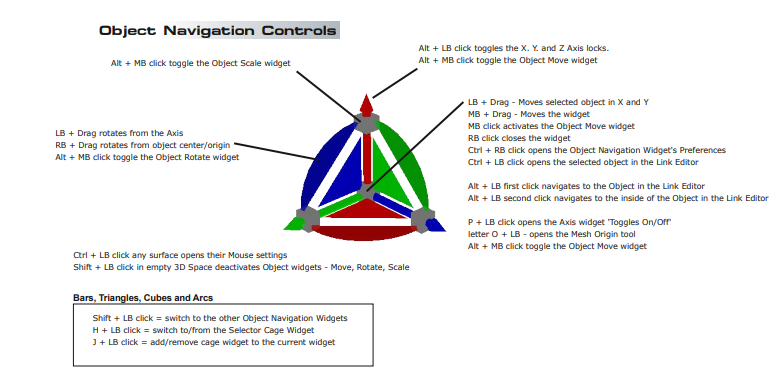
This should be removed"Ctrl + LB click opens the selected object in the Link Editor"
i + drag may be a little misleading"i + drag any surface = Opens the widget's Additional Shortcuts Help floating panel"
Not sure of a good one word replacement of Drag
To open the Widget's Help panel, you press and hold the keyboard i Key and move the cursor over the widget's mesh
The Object Navigation Widget image used in the document does not have semi transparent triangles

- ONW.png (5.01 KiB) Viewed 5367 times
-
clintonman
- Captain
- Posts: 5659
- Joined: 21 May 2009, 21:08
- Type the number ten into the box: 0
- Location: California
Re: Unofficial Update Documentation
Starting the final version of the manual.
This is meant to be placed inside the PDFMan folder and the ts76_manual.html replaces the original file. The manual works best if the pdf files open in the browser instead of the pdf viewer. This new file has a size of 5Kb, the original was made with MS Word so it had a lot of extra nonsesne and is 65Kb size.
I missed the note.
"Ctrl + LB click opens the selected object in the Link Editor"
This should be removed
Will get to it next time.
This is meant to be placed inside the PDFMan folder and the ts76_manual.html replaces the original file. The manual works best if the pdf files open in the browser instead of the pdf viewer. This new file has a size of 5Kb, the original was made with MS Word so it had a lot of extra nonsesne and is 65Kb size.
I missed the note.
"Ctrl + LB click opens the selected object in the Link Editor"
This should be removed
Will get to it next time.
- Attachments
-
- tS761_UU_Artists_Guide.zip
- (15.61 MiB) Downloaded 229 times
-
- ts76_manual.zip
- (1.27 KiB) Downloaded 242 times
-
clintonman
- Captain
- Posts: 5659
- Joined: 21 May 2009, 21:08
- Type the number ten into the box: 0
- Location: California
Re: Unofficial Update Documentation
Updated up to page 117 which has a video link.
The html file is the same as last time, so no link attached here.
The new video file needs to be placed in \PDFMan\resources\chapter8
The video is a demo of the transfer skinning process. It has no sound and was created by one of the developers during the beta testing cycle.
For me the video won't play from the browser. It just gets downloaded. When viewed from a pdf viewer the video plays in an external player.
I'll need to check to see if there's any way to force it to play from the browser.
I did some research and it looks like the transfer skinning tool would be useful for things like adding clothing to a skinned character or modifying a character to give it a different shape and using the old skinning to produce most of the new skinning. I plan to get some sample cases for the manual and maybe make a video for the manual showing how it all works.
The html file is the same as last time, so no link attached here.
The new video file needs to be placed in \PDFMan\resources\chapter8
The video is a demo of the transfer skinning process. It has no sound and was created by one of the developers during the beta testing cycle.
For me the video won't play from the browser. It just gets downloaded. When viewed from a pdf viewer the video plays in an external player.
I'll need to check to see if there's any way to force it to play from the browser.
I did some research and it looks like the transfer skinning tool would be useful for things like adding clothing to a skinned character or modifying a character to give it a different shape and using the old skinning to produce most of the new skinning. I plan to get some sample cases for the manual and maybe make a video for the manual showing how it all works.
- Attachments
-
- TransferSkinWeights.zip
- (1.24 MiB) Downloaded 232 times
-
- tS761_UU_Artists_Guidec9c0.zip
- (15.65 MiB) Downloaded 242 times
-
clintonman
- Captain
- Posts: 5659
- Joined: 21 May 2009, 21:08
- Type the number ten into the box: 0
- Location: California
Re: Unofficial Update Documentation
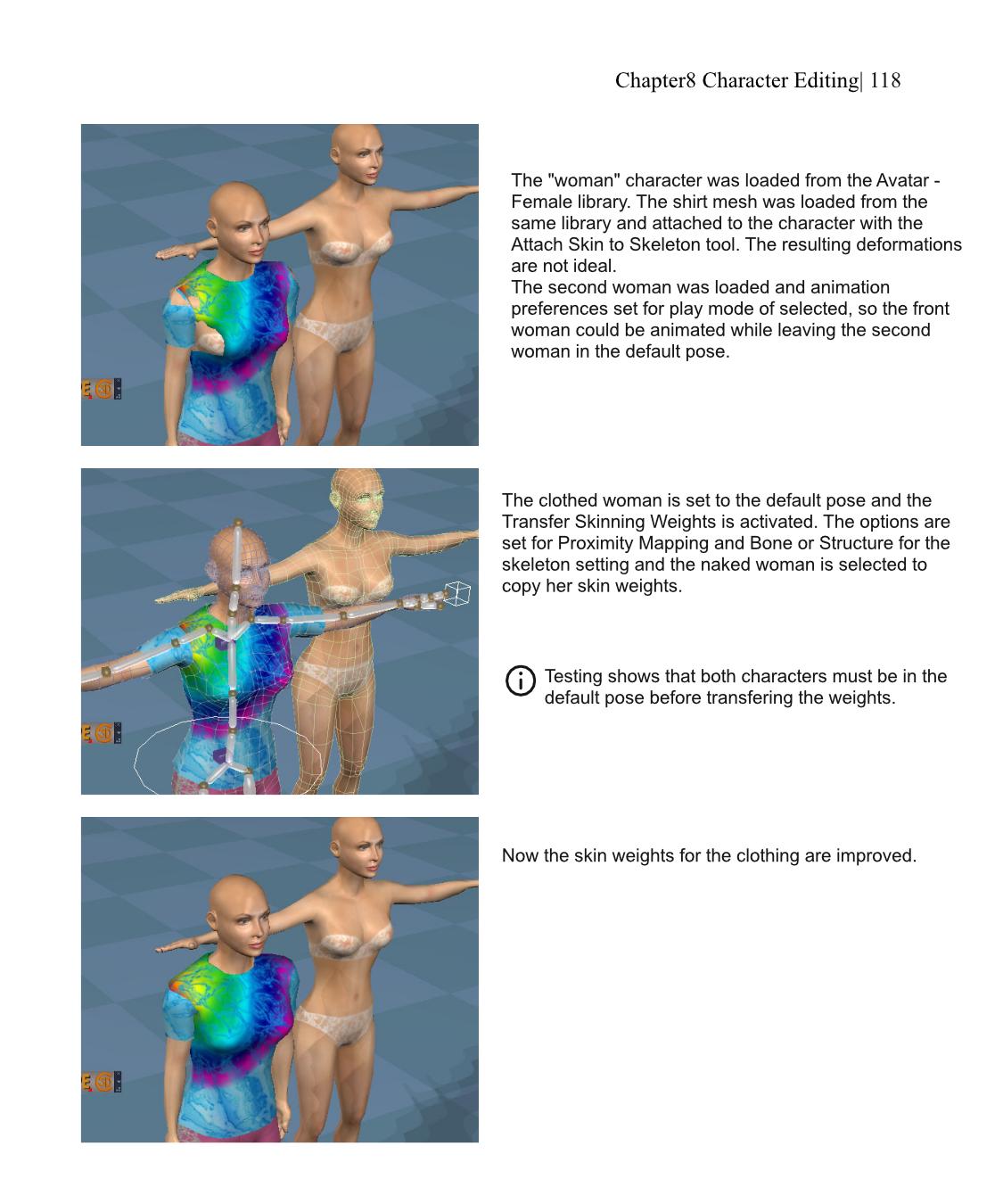
This page was added to show how the transfer skinning weights tool can be used to fix deformations when adding clothing to preexisting characters.
No other changes were made to the manual
-
trueBlue
- Captain
- Posts: 5548
- Joined: 06 Jul 2009, 22:50
- Type the number ten into the box: 10
Re: Unofficial Update Documentation
page 26
Uses the main window's WinID in the commands for the Views, Ground, Scene render attributes, Reset view, and Look at Selection icons.
Which means the window does not have to have focus in order to work
Also works with any active window
Uses the new view window's WinID in the commands for the Views, Ground, Scene render attributes, Reset view, and Look at Selection icons.
Which means the window does not have to have focus in order to work
Main View toolbar3D Mini Toolbar "NewViewBar, WinGUID_Bar ?"
Uses the main window's WinID in the commands for the Views, Ground, Scene render attributes, Reset view, and Look at Selection icons.
Which means the window does not have to have focus in order to work
Also works with any active window
New View toolbarOpen New 3D View - includes a version of the mini toolbar
Uses the new view window's WinID in the commands for the Views, Ground, Scene render attributes, Reset view, and Look at Selection icons.
Which means the window does not have to have focus in order to work
-
clintonman
- Captain
- Posts: 5659
- Joined: 21 May 2009, 21:08
- Type the number ten into the box: 0
- Location: California
Re: Unofficial Update Documentation
An update to the PDF file. The video and html file from earlier posts have not changed.
At this point it's getting close to completion. Need to write a simple introduction. Maybe add some more images and check that the links work. Maybe some links to animated gif files for some images.
At this point it's getting close to completion. Need to write a simple introduction. Maybe add some more images and check that the links work. Maybe some links to animated gif files for some images.
- Attachments
-
- tS761_UU_Artists_Guide611f.zip
- (15.77 MiB) Downloaded 203 times
-
trueBlue
- Captain
- Posts: 5548
- Joined: 06 Jul 2009, 22:50
- Type the number ten into the box: 10
Re: Unofficial Update Documentation
page 98
D3D materials is a pre defined list of useful libraries for loading or creating materials
Library Places button
RMB click to Update Library Places
This will add all Library Places from the Library Browser
Main Library Place is all of the libraries installed with trueSpace
2D Aspect / 1D 2D Aspect
LMB click - Opens and Saves the 2D Aspect frame's current Location, Height, and Thumbnail size
RMB click - Opens and Saves the 1D 2D Aspect frame's current Location, Height, and Thumbnail size
Note: Also saves the current aspect, 1D, 2D, or 1+2
Library PlacesLibrary Places button – RClick loads a preset list of libraries into the Library Selection list and places
"D3D materials" plus all defined library places into the Library Places selection list. LClick nothing
D3D materials is a pre defined list of useful libraries for loading or creating materials
Library Places button
RMB click to Update Library Places
This will add all Library Places from the Library Browser
Main Library Place is all of the libraries installed with trueSpace
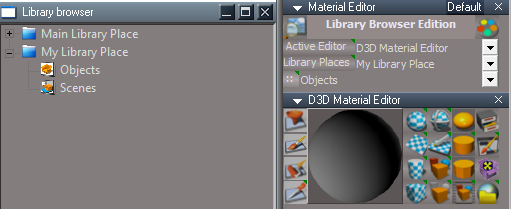
:: Library button:: – LMB open the library as 2D aspect, all subsequent library selections will open as 2D, RMB open the
library as 1D+2D aspect, all subsequent library selections will open as 1D+2D aspect.
LMB and RMB also save the vertical position of the library panel
2D Aspect / 1D 2D Aspect
LMB click - Opens and Saves the 2D Aspect frame's current Location, Height, and Thumbnail size
RMB click - Opens and Saves the 1D 2D Aspect frame's current Location, Height, and Thumbnail size
Note: Also saves the current aspect, 1D, 2D, or 1+2
-
clintonman
- Captain
- Posts: 5659
- Joined: 21 May 2009, 21:08
- Type the number ten into the box: 0
- Location: California
Re: Unofficial Update Documentation
Thanks, I'll add your notes to the manual.
That :: button was confusing because it does 2 different things from a users perspective.
Click once and it opens the panel. Maybe it also saves it but as a user you can't see that.
Click it while the panel is open will set/save the position and size etc. of the panel. Again no user feedback, so you just have to know it's saving the panel.
On top of that it also saves the 1D, 2D, 1+2 appearance so LMB does not necessarily open a 2D look and RMB may not open as 1+2 aspect for the panel.
That :: button was confusing because it does 2 different things from a users perspective.
Click once and it opens the panel. Maybe it also saves it but as a user you can't see that.
Click it while the panel is open will set/save the position and size etc. of the panel. Again no user feedback, so you just have to know it's saving the panel.
On top of that it also saves the 1D, 2D, 1+2 appearance so LMB does not necessarily open a 2D look and RMB may not open as 1+2 aspect for the panel.
-
trueBlue
- Captain
- Posts: 5548
- Joined: 06 Jul 2009, 22:50
- Type the number ten into the box: 10
Re: Unofficial Update Documentation
I realize it is not very intuitive
The saving part was added at a latter date pre request
LMB & RMB have their own panel frames
The saving part was added at a latter date pre request
LMB & RMB have their own panel frames
-
clintonman
- Captain
- Posts: 5659
- Joined: 21 May 2009, 21:08
- Type the number ten into the box: 0
- Location: California
Re: Unofficial Update Documentation
Updated the Materials section and added images for the NURBS section. Added a note for using materials with NURBS patches. The gif images idea has been abandoned in favor of a simple sequence of images in the pdf file.
page 74 say joint snapping is broken, it's been fixed since that note was written.
page 74 say joint snapping is broken, it's been fixed since that note was written.
- Attachments
-
- tS761_UU_Artists_Guide5e10.zip
- (16.67 MiB) Downloaded 260 times
-
trueBlue
- Captain
- Posts: 5548
- Joined: 06 Jul 2009, 22:50
- Type the number ten into the box: 10
Re: Unofficial Update Documentation
page 102
It works from the Stack and changes the Main View to the light's Camera view
It does not work from the Stack with active floating 3D windows
Using the View button from the light's floating panel changes the Main View and any active 3D Window
page 149
page 199
page 207
page 219
You might want to revisit the Projector & Spot light's View buttonView – the light has a camera inside of it. This button will set the active 3D window to a camera view
using this camera. Click again to switch back to the previous view.
Do not press this button except in a floating panel. This button does not work from the stack
view. Do not switch to another 3D views while active or the button will change both 3d
windows the next time it is used. So press View, do what you need to do and then disable it.
It works from the Stack and changes the Main View to the light's Camera view
It does not work from the Stack with active floating 3D windows
Using the View button from the light's floating panel changes the Main View and any active 3D Window
page 149
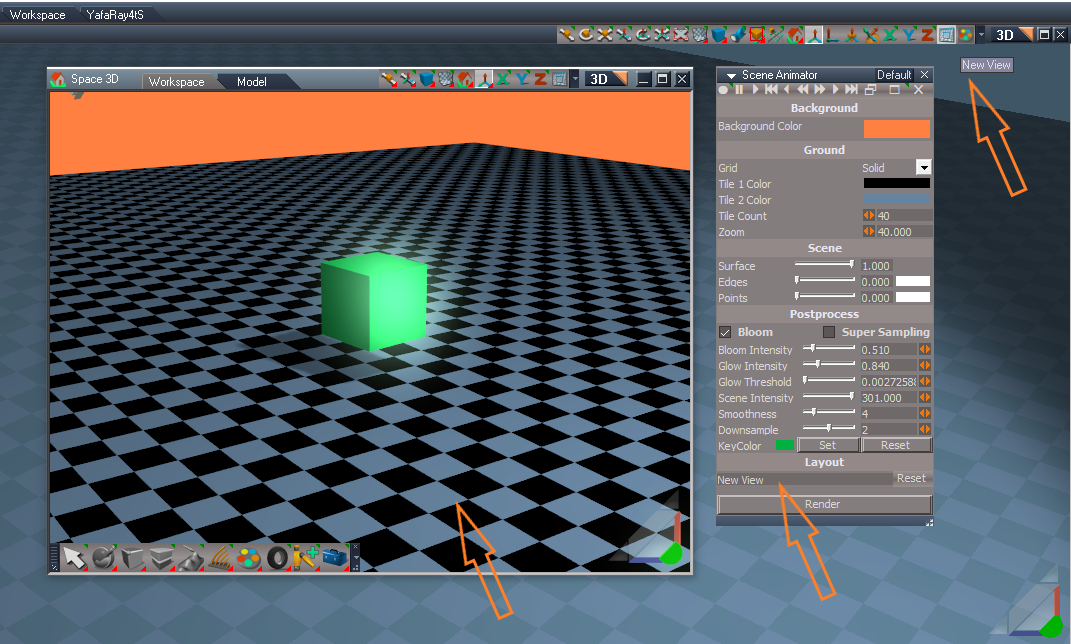
Scene Animator/Layouts
New View Select unknown, uses a "Frame Window New View" window
Removed RsApp.ClearHistory() in Test Update 41Quadrify
will erases undo history if Quadrify by Normals is unchecked dont see any reason for this add to UU4me
page 207
What needs to change?NURBS toolbar
NURBS the Curve and
patch controlPointMesh
do not need a material
node. Still need
visibility control for the
individual control point
meshes.
page 219
What needs to change?bug: end of curve will effect the nearest neighbor handle, not the end handle
-
clintonman
- Captain
- Posts: 5659
- Joined: 21 May 2009, 21:08
- Type the number ten into the box: 0
- Location: California
Re: Unofficial Update Documentation
will update pg 102, 149 and 199
pg 207 Working on the NURBS. I want those changes listed plus change the PE widget to just switch to NURBS control point mesh instead of stopping it.
pg 219 the code needs to be rewritten to fix the bug
pg 207 Working on the NURBS. I want those changes listed plus change the PE widget to just switch to NURBS control point mesh instead of stopping it.
pg 219 the code needs to be rewritten to fix the bug
-
clintonman
- Captain
- Posts: 5659
- Joined: 21 May 2009, 21:08
- Type the number ten into the box: 0
- Location: California
Re: Unofficial Update Documentation
Fix for the curve smoothing bug when the last control point is selected for smoothing. Bug mentioned on page 219 of the UU Manual.
- Attachments
-
- alignHandleScript.RsObj
- (91.87 KiB) Downloaded 247 times
-
clintonman
- Captain
- Posts: 5659
- Joined: 21 May 2009, 21:08
- Type the number ten into the box: 0
- Location: California
Re: Unofficial Update Documentation
Getting close to complete. I expect the final version of the manual to be done by the end of this week, if not sooner.
attached is the latest draft.
TODO:
update the particle system section
update the page numbers in the table of contents - all main sections are good, the minor sections not so good
read through it all to determine what's missing or difficult to understand
make sure all the internal document links point to the correct locations
make installation instructions and gather it all together
attached is the latest draft.
TODO:
update the particle system section
update the page numbers in the table of contents - all main sections are good, the minor sections not so good
read through it all to determine what's missing or difficult to understand
make sure all the internal document links point to the correct locations
make installation instructions and gather it all together
- Attachments
-
- tS761_UU_Artists_Guide7187.zip
- (16.66 MiB) Downloaded 237 times
-
trueBlue
- Captain
- Posts: 5548
- Joined: 06 Jul 2009, 22:50
- Type the number ten into the box: 10
Re: Unofficial Update Documentation
page 36
The Delete icon(s) tooltip = Delete selected objects
Shortcut = Delete keyboard key
The word delete is mostly found in the digital world referring to removing something from one place and putting it in another. When we delete files from the desktop it goes into the recycle bin; however, if the files are too big for the recycle bin it may permanently delete them. But there is a catch, when we delete something from the computer the data is not removed or erased from the hard drive, it is still there. However, the place where the data was saved is marked by the system as being empty, so the next time a person saves something it over writes that area. When we delete something from the computer, it is usually recoverable, maybe not manually but one can use recovery software to bring back the data. But once the data is rewritten, the older data is erased and written over with the new data.
Hence, in the technological world deleting only refers to removing the object, but the evidence of that object is still there. However, erasing refers to completely wiping it out meaning it is no longer available or recoverable. The delete button is found as a physical button the computer, marked as ‘Delete’ or ‘Del’.
page 161
2. Select the source objects to be cloned
3. Ctrl + Select the destination/target item
4. Press the "Start Clone" button
May or may not want to change the image
Date at the bottom of the panel was changed to April 1, 2021
page 185
Removed
Uncheck - Use Script Based Locking when not in use
Use - Script Based Locking
page 202
Select - Face, Edge, or Vertex
Why are you using the name, Erase, for the Delete icon?Erase LMB will erase the currently selected object(s) and compensates for NURBS
objects. It also formally deselects to fix a ghost selection bug (tS thinks the objects
still exist).
RMB old behavior, no compensation for NURBS objects or ghost selection fix
The Delete icon(s) tooltip = Delete selected objects
Shortcut = Delete keyboard key
The word delete is mostly found in the digital world referring to removing something from one place and putting it in another. When we delete files from the desktop it goes into the recycle bin; however, if the files are too big for the recycle bin it may permanently delete them. But there is a catch, when we delete something from the computer the data is not removed or erased from the hard drive, it is still there. However, the place where the data was saved is marked by the system as being empty, so the next time a person saves something it over writes that area. When we delete something from the computer, it is usually recoverable, maybe not manually but one can use recovery software to bring back the data. But once the data is rewritten, the older data is erased and written over with the new data.
Hence, in the technological world deleting only refers to removing the object, but the evidence of that object is still there. However, erasing refers to completely wiping it out meaning it is no longer available or recoverable. The delete button is found as a physical button the computer, marked as ‘Delete’ or ‘Del’.
page 161
1. Set the options in the panelPush the button to open the panel
set the desired options
select one or more items to clone
click the "Start Clone" button
select the target item to receive the clones
2. Select the source objects to be cloned
3. Ctrl + Select the destination/target item
4. Press the "Start Clone" button
RsApp.ClearHistory() has been removedwill erase undo history
May or may not want to change the image
Date at the bottom of the panel was changed to April 1, 2021
page 185
Removed
Uncheck - Use Script Based Locking when not in use
Use - Script Based Locking
page 202
Changed text on panelnote: "Face Edge" is Face or Edge
Select - Face, Edge, or Vertex
-
clintonman
- Captain
- Posts: 5659
- Joined: 21 May 2009, 21:08
- Type the number ten into the box: 0
- Location: California
Re: Unofficial Update Documentation
"Why are you using the name, Erase, for the Delete icon?"
trueSpace manual, chapter 4 section 4.1.1 Copy and Erase
But, no worries, Next release will say "Delete"
page 36
page 161
page 185
page 202
All changes made, thanks.
trueSpace manual, chapter 4 section 4.1.1 Copy and Erase
But, no worries, Next release will say "Delete"
page 36
page 161
page 185
page 202
All changes made, thanks.
-
trueBlue
- Captain
- Posts: 5548
- Joined: 06 Jul 2009, 22:50
- Type the number ten into the box: 10
Re: Unofficial Update Documentation
Thank YOU!
Appreciate everything that you have contributed and your thorough analyses of trueSpace, making it the best that it can be!
Appreciate everything that you have contributed and your thorough analyses of trueSpace, making it the best that it can be!
-
clintonman
- Captain
- Posts: 5659
- Joined: 21 May 2009, 21:08
- Type the number ten into the box: 0
- Location: California
Re: Unofficial Update Documentation
Started on the table of contents
noteworthy milestone - no more "RED gotta fix this" text in the manual
noteworthy milestone - no more "RED gotta fix this" text in the manual
- Attachments
-
- tS761_UU_Artists_Guidef2e9.zip
- (16.66 MiB) Downloaded 251 times
-
clintonman
- Captain
- Posts: 5659
- Joined: 21 May 2009, 21:08
- Type the number ten into the box: 0
- Location: California
Re: Unofficial Update Documentation
More work on the table of contents and started adding internal links to the document.
- Attachments
-
- tS761_UU_Artists_Guide1970.zip
- (16.67 MiB) Downloaded 243 times
-
clintonman
- Captain
- Posts: 5659
- Joined: 21 May 2009, 21:08
- Type the number ten into the box: 0
- Location: California
Re: Unofficial Update Documentation
Almost done.
Table of Contents is complete
Internal links are complete.
TODO: write an introduction, look at the whole thing with fresh eyes and final cleanup.
Table of Contents is complete
Internal links are complete.
TODO: write an introduction, look at the whole thing with fresh eyes and final cleanup.
- Attachments
-
- tS761_UU_Artists_Guidece31.zip
- (16.69 MiB) Downloaded 217 times
-
trueBlue
- Captain
- Posts: 5548
- Joined: 06 Jul 2009, 22:50
- Type the number ten into the box: 10
Re: Unofficial Update Documentation
page 25
UnLookAt
page 27
RotatePOV
RotateISO
UnLookAt
Updated using a RsApp.RunScriptBuffer script"will clear undo history"
page 27
RotatePOV
RotateISO
These have been updated using a RsApp.RunScriptBuffer script"Each RMB press will use up 7 undo steps"
-
clintonman
- Captain
- Posts: 5659
- Joined: 21 May 2009, 21:08
- Type the number ten into the box: 0
- Location: California
Re: Unofficial Update Documentation
Thanks, updated for the next manual release.trueBlue wrote: 17 May 2021, 18:49 page 25
UnLookAtUpdated using a RsApp.RunScriptBuffer script"will clear undo history"
page 27
RotatePOV
RotateISOThese have been updated using a RsApp.RunScriptBuffer script"Each RMB press will use up 7 undo steps"
-
clintonman
- Captain
- Posts: 5659
- Joined: 21 May 2009, 21:08
- Type the number ten into the box: 0
- Location: California
Re: Unofficial Update Documentation
Removed many "clears undo history" warnings
Added notes and placeholders for the new additions to the UU: layers and web server
Added notes and placeholders for the new additions to the UU: layers and web server
- Attachments
-
- tS761_UU_Artists_Guide68ac.zip
- (16.65 MiB) Downloaded 206 times
-
trueBlue
- Captain
- Posts: 5548
- Joined: 06 Jul 2009, 22:50
- Type the number ten into the box: 10
Re: Unofficial Update Documentation
page 24
page 48
Parenting
More Information <- Change Font color to Blue
page 51
Macro Record – jScript. <- Note period
Macro Record VBScript
OpenRecordToolbar <- Note no space between words
These three LMB commands no longer clear the history
page 91
The Stack View/Info Panel seems out of place2.6 Stack View
Info Panel
math expressions can be used in the numeric input fields:
2.6 Stack View
+, , *, /, sin, cos, arcsin, arcos, ln, log, exp, sqrt, PI
page 48
Parenting
More Information <- Change Font color to Blue
page 51
Macro Record – jScript. <- Note period
Macro Record VBScript
OpenRecordToolbar <- Note no space between words
These three LMB commands no longer clear the history
This seems to be out of place and has nothing to do with Macro RecordingCreate JScript More Information
page 91
This seems to be out of placeNURBS Toolbar More Information
-
trueBlue
- Captain
- Posts: 5548
- Joined: 06 Jul 2009, 22:50
- Type the number ten into the box: 10
Re: Unofficial Update Documentation
page 151
Shear
Shear
Updated 'Does not clear the history & use util.Commands'will erase undo history
-
clintonman
- Captain
- Posts: 5659
- Joined: 21 May 2009, 21:08
- Type the number ten into the box: 0
- Location: California
Re: Unofficial Update Documentation
Thanks, updated for the next release. Including the Shear change.trueBlue wrote: 23 May 2021, 19:32 page 24The Stack View/Info Panel seems out of place2.6 Stack View
Info Panel
math expressions can be used in the numeric input fields:
2.6 Stack View
+, , *, /, sin, cos, arcsin, arcos, ln, log, exp, sqrt, PI
page 48
Parenting
More Information <- Change Font color to Blue
page 51
Macro Record – jScript. <- Note period
Macro Record VBScript
OpenRecordToolbar <- Note no space between words
These three LMB commands no longer clear the history
This seems to be out of place and has nothing to do with Macro RecordingCreate JScript More Information
page 91This seems to be out of placeNURBS Toolbar More Information
-
clintonman
- Captain
- Posts: 5659
- Joined: 21 May 2009, 21:08
- Type the number ten into the box: 0
- Location: California
Re: Unofficial Update Documentation
Made some corrections and added a raw dump of the web ui info pages(layers version 4, color picker and scene view).
- Attachments
-
- tS761_UU_Artists_Guide3b11.zip
- (16.97 MiB) Downloaded 220 times
-
trueBlue
- Captain
- Posts: 5548
- Joined: 06 Jul 2009, 22:50
- Type the number ten into the box: 10
Re: Unofficial Update Documentation
page 234
Web Server
Add info about the Interval
I had seen info on your web page but can not find it presently
Something about trueSpace using more or less resources verses Web Server resources
Interval will ignore values > 1000 and less than 50 ms
Default = 200 - Why is this different from the installation set at 50?
Edit:
page 203
Freeze Transform
Note from script:
//july 2015 multiselection for shear
page 194
Lathe
page 47
Alphabetize aspect
Add warning
Should not have more then one Link Editor opened before Alphabetizing the Scene or Selected Object
Web Server
Add info about the Interval
I had seen info on your web page but can not find it presently
Something about trueSpace using more or less resources verses Web Server resources
Interval will ignore values > 1000 and less than 50 ms
Default = 200 - Why is this different from the installation set at 50?
Edit:
page 203
Freeze Transform
Add util.commands & removed Clear History 6/9/2021"The Flatten Axis option will erase undo history"
What do you mean by "single mesh objects"?"The Shear option only operates on single mesh objects."
Note from script:
//july 2015 multiselection for shear
page 194
Lathe
Add util.commands & Clear History 6/9/2021"Can potentially eat up a large number of undos"
page 47
Alphabetize aspect
Add warning
Should not have more then one Link Editor opened before Alphabetizing the Scene or Selected Object
-
clintonman
- Captain
- Posts: 5659
- Joined: 21 May 2009, 21:08
- Type the number ten into the box: 0
- Location: California
Re: Unofficial Update Documentation
Made some corrections due to changes in the code, cleaned and added some "to do" notes. Last section with the browser based tools is still untouched.
- Attachments
-
- tS761_UU_Artists_Guide2807.zip
- (16.99 MiB) Downloaded 210 times
-
clintonman
- Captain
- Posts: 5659
- Joined: 21 May 2009, 21:08
- Type the number ten into the box: 0
- Location: California
Re: Unofficial Update Documentation
Did the browser based tools and refined the internal links.
Very little left to do, almost done.
Very little left to do, almost done.
- Attachments
-
- tS761_UU_Artists_Guidecf2d.zip
- (17.17 MiB) Downloaded 263 times
-
clintonman
- Captain
- Posts: 5659
- Joined: 21 May 2009, 21:08
- Type the number ten into the box: 0
- Location: California
Re: Unofficial Update Documentation
Going to start collecting notes to update the UU manual.
Desktop Preferences - missing information in the manual
Selection(Selection Mode in UU) not documented:
pe and nav widget preferences/settings - On Operating Visible on/off clears undo history and only effects the active widget
tS manual chapt 10 pg 38, Physics cloth tip r-click should be l-click
Desktop Preferences - missing information in the manual
Selection(Selection Mode in UU) not documented:
- Default - select front object or cycle among all objects that are overlapping/touching
First Object - select front object
Small BBox - select through to the smallest object
Through - each click cycle through occluded objects, not necessarily overlapping/touching
pe and nav widget preferences/settings - On Operating Visible on/off clears undo history and only effects the active widget
tS manual chapt 10 pg 38, Physics cloth tip r-click should be l-click
-
clintonman
- Captain
- Posts: 5659
- Joined: 21 May 2009, 21:08
- Type the number ten into the box: 0
- Location: California
Re: Unofficial Update Documentation
Working on the additions/changes to the manual
note: TODO blue toolbar icon changes
note: TODO blue toolbar icon changes
- Attachments
-
- tS761_UU_Artists_Guide02.zip
- (17.22 MiB) Downloaded 233 times
-
clintonman
- Captain
- Posts: 5659
- Joined: 21 May 2009, 21:08
- Type the number ten into the box: 0
- Location: California
Re: Unofficial Update Documentation
Today's update attached.
- Attachments
-
- tS761_UU_Artists_Guide03.zip
- (17.31 MiB) Downloaded 245 times
-
trueBlue
- Captain
- Posts: 5548
- Joined: 06 Jul 2009, 22:50
- Type the number ten into the box: 10
Re: Unofficial Update Documentation
page 33
Desktop pic is the Standalone version
Since you are describing Synchronize & Protect Workspace, I would suggest showing the trueSpace7.61 Beta 8 Unofficial Update Version 8 version
It has been split into 3 aspects
page 32
Show All, Hide All, Hide and Show Cameras and Lights can eat up many undo steps
This is incorrect now since your updated undo friendly versions
Desktop pic is the Standalone version
Since you are describing Synchronize & Protect Workspace, I would suggest showing the trueSpace7.61 Beta 8 Unofficial Update Version 8 version
It has been split into 3 aspects
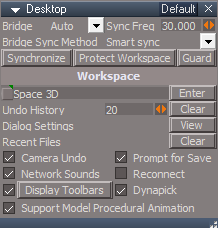
- Desktop Default.png (25.67 KiB) Viewed 5616 times
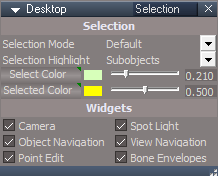
- Desktop Selection.png (19.39 KiB) Viewed 5616 times
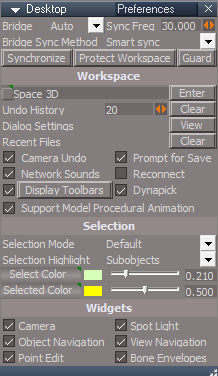
- Desktop Preferences.png (28.96 KiB) Viewed 5616 times
Show All, Hide All, Hide and Show Cameras and Lights can eat up many undo steps
This is incorrect now since your updated undo friendly versions
-
clintonman
- Captain
- Posts: 5659
- Joined: 21 May 2009, 21:08
- Type the number ten into the box: 0
- Location: California
Re: Unofficial Update Documentation
Thanks, I'll get the new UU beta and include these changes in the next manual update.trueBlue wrote: 13 Sep 2021, 20:45 page 33
Desktop pic is the Standalone version
Since you are describing Synchronize & Protect Workspace, I would suggest showing the trueSpace7.61 Beta 8 Unofficial Update Version 8 version
It has been split into 3 aspects
Desktop Default.png
Desktop Selection.png
Desktop Preferences.png
page 32
Show All, Hide All, Hide and Show Cameras and Lights can eat up many undo steps
This is incorrect now since your updated undo friendly versions
-
clintonman
- Captain
- Posts: 5659
- Joined: 21 May 2009, 21:08
- Type the number ten into the box: 0
- Location: California
Re: Unofficial Update Documentation
latest update for the manual
Oops, forgot,
"page 32
Show All, Hide All, Hide and Show Cameras and Lights can eat up many undo steps
This is incorrect now since your updated undo friendly versions"
Oops, forgot,
"page 32
Show All, Hide All, Hide and Show Cameras and Lights can eat up many undo steps
This is incorrect now since your updated undo friendly versions"
- Attachments
-
- tS761_UU_Artists_Guide04.zip
- (17.35 MiB) Downloaded 215 times
-
clintonman
- Captain
- Posts: 5659
- Joined: 21 May 2009, 21:08
- Type the number ten into the box: 0
- Location: California
Re: Unofficial Update Documentation
I think this version has all the new information in it. Close to completion.
- Attachments
-
- tS761_UU_Artists_Guide05.zip
- (17.35 MiB) Downloaded 246 times
-
clintonman
- Captain
- Posts: 5659
- Joined: 21 May 2009, 21:08
- Type the number ten into the box: 0
- Location: California
Re: Unofficial Update Documentation
Ctrl + LB click any surface opens their Mouse settings for object navigation widgets, the cage widget mouse settings has a mouse wheel on/off button
when on the mouse wheel will activate the rotation surfaces and move and scale in the direction of the move and scale surfaces instead of the perpendicular directions of the normal settings. So you can use the left and right mouse buttons to move perpendicular to the line or the middle wheel(not button) to move along the line.
pg 212 correction: frozen 2 sided nurbs is not triangulated, need to document changes for freezing patches
missing navigation information, UV Editor section 5.2
alt+RMB drag zoom
MMB click zoom all
alt+LMB click zoom all
when on the mouse wheel will activate the rotation surfaces and move and scale in the direction of the move and scale surfaces instead of the perpendicular directions of the normal settings. So you can use the left and right mouse buttons to move perpendicular to the line or the middle wheel(not button) to move along the line.
pg 212 correction: frozen 2 sided nurbs is not triangulated, need to document changes for freezing patches
missing navigation information, UV Editor section 5.2
alt+RMB drag zoom
MMB click zoom all
alt+LMB click zoom all
-
clintonman
- Captain
- Posts: 5659
- Joined: 21 May 2009, 21:08
- Type the number ten into the box: 0
- Location: California
Re: Unofficial Update Documentation
I thought I released the final document yesterday, but there are still a few things to add. Specifically, I was going through my UU4Clinton scripts and found that material inspect and axis tool help shortcuts exist. So I need to go through and add any missing help popups and their commands to UU4Clinton and add the missing shortcuts to the manual.
-
clintonman
- Captain
- Posts: 5659
- Joined: 21 May 2009, 21:08
- Type the number ten into the box: 0
- Location: California
Re: Unofficial Update Documentation
Just found out that the Fix Orphan Materials is not reliable for scene instanced materials. Need to add a note to the manual to only used with none type instanced materials.
UU updated Nov 11 - need to document quick and regular show hide and layers
DX Material Components toolbar
note - just found bug? show all will change the layer assignment for nurbs objects
some show/hide notes:
QUICK
shows a status message if you try to hide an object that does not have an ora node
hide hideall will not hide an object that does not have ora node
if you group objects the group will not have an ora node and will not work with hide scripts
The children of groups will hide/show selection. They will be ignored by show/hide all
old scenes have objects that do not have ora node so don't work until after slow hide or show is run
speed difference only noticable in large scenes(large number of items)
SLOW
hide will deselect spotlights, cameras and projector lights, hide all will not
once slow show/hide is run on an object it can be used with the quick show and hide commands with some restrictions on groups
?shortcuts still use slow show hide or new quick show hide?
boolean operations will cause items to lose their layer assignments - ora is removed
view popup toolbar will not open unless something(anything) is selected
will need new clear history warnings:
"Show & ShowAll runs Fix NURBS ORA even if the NURBS needs fixing or Not!
Not sure what the results would be if a user selected UnDo
So... I would like to add RsApp.ClearHistory() at the end of the following two scripts
NURBSUtilities/fixRenderAttributes
Commands/Fix NURBS ORA
Everytime you click in a 3D View WHEN a NURBS is selected, the following script runs:
NURBSUtilities/NURBStoCPMeshSelection
I notice that the Undo History no longer WORKS!!!
So... I would like to add RsApp.ClearHistory() at the end of the above script"
Published changes for Nov 11 release
UU updated Nov 11 - need to document quick and regular show hide and layers
DX Material Components toolbar
note - just found bug? show all will change the layer assignment for nurbs objects
some show/hide notes:
QUICK
shows a status message if you try to hide an object that does not have an ora node
hide hideall will not hide an object that does not have ora node
if you group objects the group will not have an ora node and will not work with hide scripts
The children of groups will hide/show selection. They will be ignored by show/hide all
old scenes have objects that do not have ora node so don't work until after slow hide or show is run
speed difference only noticable in large scenes(large number of items)
SLOW
hide will deselect spotlights, cameras and projector lights, hide all will not
once slow show/hide is run on an object it can be used with the quick show and hide commands with some restrictions on groups
?shortcuts still use slow show hide or new quick show hide?
boolean operations will cause items to lose their layer assignments - ora is removed
view popup toolbar will not open unless something(anything) is selected
will need new clear history warnings:
"Show & ShowAll runs Fix NURBS ORA even if the NURBS needs fixing or Not!
Not sure what the results would be if a user selected UnDo
So... I would like to add RsApp.ClearHistory() at the end of the following two scripts
NURBSUtilities/fixRenderAttributes
Commands/Fix NURBS ORA
Everytime you click in a 3D View WHEN a NURBS is selected, the following script runs:
NURBSUtilities/NURBStoCPMeshSelection
I notice that the Undo History no longer WORKS!!!
So... I would like to add RsApp.ClearHistory() at the end of the above script"
Published changes for Nov 11 release
-
clintonman
- Captain
- Posts: 5659
- Joined: 21 May 2009, 21:08
- Type the number ten into the box: 0
- Location: California
Re: Unofficial Update Documentation
Potential changes to UU Docs from recent releases.
nov 28 UU
Link Editor Navigator
Ctrl+ icon - RMB = RsTool.Arrow()
Removed - H icon "Hide unselected"
Add
U icon
LMB = Unselect
RMB = Unselect and Close Panels
Infinite lights
Add
Enable Shadow On & Off buttons for VRay only
Rename DirlightShader
Add the modifications to New Scene, Lights, and WS - Default.RsSLgts
Commands for all floating toolbars, Scene ORA modes, Grid modes, Switch Views, Reset View, Look at Selection, and Zoom to Selection
All toolbar buttons updated to use the UUFunctionSet
These new commands will run without the Main 3D Window needing focus unless there is a floating 3D Window that has focus
Add a Hide unselected icon to Workspace toolbars
nov 29 UU
Improved the View from camera script
Will run without the Main 3D Window needing focus unless there is a floating 3D Window that has focus
dec 3 UU
Widgets/UUFunctionSet
Set Camera
Reset View
Look At Selection
Reduced the undo(s) to one undo
UU Dec 5,6
Toolbars 'All - Reset View & Look at Selection, RMB command, add original command'
Removed the unused BottomBar
Camera toolbar
UU dec 10
D3D Material Editor/Inspect icon
Vray Material Editor/Inspect icon
WorkspaceNav/Inspect icon
All of the above, deselect if first selected item is a camera or light?
Rs Main Libraries
Vray Materials
Sequence Alpha Mask
Sequence Image
Vray - Animation scripts
VRay Background
VRay DOF
VRay Environment
Scripts/Commands
Show Object Attribs
Show Object Attribs RMB
Add check before running the Fix NURBS ORA script
Preferences/Cameras
preobjects/Camera1
"Improved all Camera panel button scripts"
nov 28 UU
Link Editor Navigator
Ctrl+ icon - RMB = RsTool.Arrow()
Removed - H icon "Hide unselected"
Add
U icon
LMB = Unselect
RMB = Unselect and Close Panels
Infinite lights
Add
Enable Shadow On & Off buttons for VRay only
Rename DirlightShader
Add the modifications to New Scene, Lights, and WS - Default.RsSLgts
Commands for all floating toolbars, Scene ORA modes, Grid modes, Switch Views, Reset View, Look at Selection, and Zoom to Selection
All toolbar buttons updated to use the UUFunctionSet
These new commands will run without the Main 3D Window needing focus unless there is a floating 3D Window that has focus
Add a Hide unselected icon to Workspace toolbars
nov 29 UU
Improved the View from camera script
Will run without the Main 3D Window needing focus unless there is a floating 3D Window that has focus
dec 3 UU
Widgets/UUFunctionSet
Set Camera
Reset View
Look At Selection
Reduced the undo(s) to one undo
UU Dec 5,6
Toolbars 'All - Reset View & Look at Selection, RMB command, add original command'
Removed the unused BottomBar
Camera toolbar
UU dec 10
D3D Material Editor/Inspect icon
Vray Material Editor/Inspect icon
WorkspaceNav/Inspect icon
All of the above, deselect if first selected item is a camera or light?
Rs Main Libraries
Vray Materials
Sequence Alpha Mask
Sequence Image
Vray - Animation scripts
VRay Background
VRay DOF
VRay Environment
Scripts/Commands
Show Object Attribs
Show Object Attribs RMB
Add check before running the Fix NURBS ORA script
Preferences/Cameras
preobjects/Camera1
"Improved all Camera panel button scripts"
Last edited by clintonman on 10 Dec 2021, 18:23, edited 2 times in total.
-
trueBlue
- Captain
- Posts: 5548
- Joined: 06 Jul 2009, 22:50
- Type the number ten into the box: 10
Re: Unofficial Update Documentation
Please check out this demo scene
Scripts are documented, so it should be easy to understand
The error is concerning!
Scripts are documented, so it should be easy to understand
The error is concerning!
- Attachments
-
- RunScriptBuffer.RsScn
- (1.11 MiB) Downloaded 220 times
-
clintonman
- Captain
- Posts: 5659
- Joined: 21 May 2009, 21:08
- Type the number ten into the box: 0
- Location: California
Re: Unofficial Update Documentation
You have to be careful how you use quotes. If your string has double quotes inside of it you have to use single quotes to define it. And the opposite is also true, if you have a string with single quotes you have to use double quotes to define it. A third way is to backslash all your internal quotes like this:
System.Alert(" \"Hello World\" ")
System.Alert(" \"Hello World\" ")
- Attachments
-
- Position2Eye ScriptObject.RsObj
- (5.99 KiB) Downloaded 229 times
-
trueBlue
- Captain
- Posts: 5548
- Joined: 06 Jul 2009, 22:50
- Type the number ten into the box: 10
Re: Unofficial Update Documentation
So, the problem that I am trying to explain is the Error you will get when you copy the ScriptObject.RunCmd from the Command History and paste into a jScriptclintonman wrote: 04 Dec 2021, 16:00 You have to be careful how you use quotes. If your string has double quotes inside of it you have to use single quotes to define it. And the opposite is also true, if you have a string with single quotes you have to use double quotes to define it.

- ScriptObject.RunCmd.png (5.55 KiB) Viewed 5730 times
Code: Select all
var cmd = ''; <- single quotestrueSpace uses double quotes
Code: Select all
ScriptObject.RunCmd("kernel package/run script command", "File", "<-Put commands here using single quotes->", "IsBuffer", -1)-
clintonman
- Captain
- Posts: 5659
- Joined: 21 May 2009, 21:08
- Type the number ten into the box: 0
- Location: California
Re: Unofficial Update Documentation
In that case you can't 100% trust what you copy from the Command History. JScript doesn't care if you use single or double quotes it just has to follow the rules so if you copy something that doesn't work you'll have to fix it manually.trueBlue wrote: 04 Dec 2021, 16:30So, the problem that I am trying to explain is the Error you will get when you copy the ScriptObject.RunCmd from the Command History and paste into a jScriptclintonman wrote: 04 Dec 2021, 16:00 You have to be careful how you use quotes. If your string has double quotes inside of it you have to use single quotes to define it. And the opposite is also true, if you have a string with single quotes you have to use double quotes to define it.
ScriptObject.RunCmd.png
This is happening will all the scripts that use:Code: Select all
var cmd = ''; <- single quotes
trueSpace uses double quotesCode: Select all
ScriptObject.RunCmd("kernel package/run script command", "File", "<-Put commands here using single quotes->", "IsBuffer", -1)
Confirmed: pressed the "Run Original" button and the code in the Command History is not valid because of the quotes.
-
trueBlue
- Captain
- Posts: 5548
- Joined: 06 Jul 2009, 22:50
- Type the number ten into the box: 10
Re: Unofficial Update Documentation
Sorry, I have to disagree!clintonman wrote: 04 Dec 2021, 16:00 In that case you can't 100% trust what you copy from the Command History. JScript doesn't care if you use single or double quotes it just has to follow the rules so if you copy something that doesn't work you'll have to fix it manually.
Confirmed: pressed the "Run Original" button and the code in the Command History is not valid because of the quotes.
1.) We should be able to 100% trust what you copy from the Command History, because this is what trueSpace is generating
Solution: Write the scripts to play nice with trueSpace, and use Double Quotes like trueSpace uses
var cmd = ""
2.) Could this be making trueSpace unstable?
-
clintonman
- Captain
- Posts: 5659
- Joined: 21 May 2009, 21:08
- Type the number ten into the box: 0
- Location: California
Re: Unofficial Update Documentation
1.) Then do like I said in the first answer and rewrite everything in this form - System.Alert(" \"Hello World\" ")trueBlue wrote: 04 Dec 2021, 17:14Sorry, I have to disagree!clintonman wrote: 04 Dec 2021, 16:00 In that case you can't 100% trust what you copy from the Command History. JScript doesn't care if you use single or double quotes it just has to follow the rules so if you copy something that doesn't work you'll have to fix it manually.
Confirmed: pressed the "Run Original" button and the code in the Command History is not valid because of the quotes.
1.) We should be able to 100% trust what you copy from the Command History, because this is what trueSpace is generating
Solution: Write the scripts to play nice with trueSpace, and use Double Quotes like trueSpace uses
var cmd = ""
2.) Could this be making trueSpace unstable?
2.) I don't see how it could make tS unstable
-
clintonman
- Captain
- Posts: 5659
- Joined: 21 May 2009, 21:08
- Type the number ten into the box: 0
- Location: California
Re: Unofficial Update Documentation
More potential changesclintonman wrote: 04 Dec 2021, 01:21 Potential changes to UU Docs from recent releases.
nov 28 UU
Link Editor Navigator
Ctrl+ icon - RMB = RsTool.Arrow()
Removed - H icon "Hide unselected"
Add
U icon
LMB = Unselect
RMB = Unselect and Close Panels
Infinite lights
Add
Enable Shadow On & Off buttons for VRay only
Rename DirlightShader
Add the modifications to New Scene, Lights, and WS - Default.RsSLgts
Commands for all floating toolbars, Scene ORA modes, Grid modes, Switch Views, Reset View, Look at Selection, and Zoom to Selection
All toolbar buttons updated to use the UUFunctionSet
These new commands will run without the Main 3D Window needing focus unless there is a floating 3D Window that has focus
Add a Hide unselected icon to Workspace toolbars
nov 29 UU
Improved the View from camera script
Will run without the Main 3D Window needing focus unless there is a floating 3D Window that has focus
dec 3 UU
Widgets/UUFunctionSet
Set Camera
Reset View
Look At Selection
Reduced the undo(s) to one undo
UU Dec 5,6
Toolbars 'All - Reset View & Look at Selection, RMB command, add original command'
Removed the unused BottomBar
Camera toolbar
UU dec 10
D3D Material Editor/Inspect icon
Vray Material Editor/Inspect icon
WorkspaceNav/Inspect icon
All of the above, deselect if first selected item is a camera or light?
Rs Main Libraries
Vray Materials
Sequence Alpha Mask
Sequence Image
Vray - Animation scripts
VRay Background
VRay DOF
VRay Environment
Scripts/Commands
Show Object Attribs
Show Object Attribs RMB
Add check before running the Fix NURBS ORA script
Preferences/Cameras
preobjects/Camera1
"Improved all Camera panel button scripts"
UU dec 16
freezeNURBS - Add: RsApp.ClearHistory()
Unglue.xml - Add Utility Function commands
Cut.xml - Add Utility Function command
Show Object Attribs.xml - Fix for NURBS Group
View Widget Transparency
Encircle 'Green' i + Move cursor opens the View Widget Help and View Widget Transparency panel
dec 23
Removed - D3D Render from std
Bake Keyframes - Add Shrink Play Range button script
Animation Preferences/Shrink Play Range button script
D3D Render
Setup
Shrinks the Play Range, if checked
Opens Protect Workspace and runs Backup
Opens a Docked Model View
dec 25
D3D Render - Add check in the Render button script (if Model is not open do nothing), check if a 3D Window is open with an Alert, and modified the panel
Alternate manual process:
Do not press Setup
Open Protect Workspace and press the Backup button
Switch the main view to Model
Open a Workspace 3D Window
Set the Workspace Play Range
Note: The Play Range should be equal or greater than the Model's animation
Press the Render button
dec 27
Protect Workspace
Add check if 3D Window is open with an Alert
Add Set Keyframes script
This will set a Keyframe for every object in your scene
Synchronize
Start - Add check if 3D Window is open with an Alert
Restore - Closes Model before Restoring - Protect Workspace
Add Set Keyframes script
This will set a Keyframe for every object in your scene
that does not have any keyframes
dec 28
D3D Render
Special Mesh Processing
Disabled - Synchronize Object 'Not needed'
Add - Modal Question with option to Close trueSpace
-
clintonman
- Captain
- Posts: 5659
- Joined: 21 May 2009, 21:08
- Type the number ten into the box: 0
- Location: California
Re: Unofficial Update Documentation
Started the next round of doc updates. Working my way backward from the Dec 28 UU release.
Attached are the new D3D Render pages.
Attached are the new D3D Render pages.
- Attachments
-
- tS761_UU_Artists_Guide09_pg153154.zip
- (435.11 KiB) Downloaded 225 times
-
clintonman
- Captain
- Posts: 5659
- Joined: 21 May 2009, 21:08
- Type the number ten into the box: 0
- Location: California
Re: Unofficial Update Documentation
TODO List/Notes
manual bug 9.2.1.1 pg 5 Edit in New Track belongs in section 9.2.1.2 pg 6
Page 10
Point Edit Widget
PEW image does not look very good
Triangles
Alt + LB click open quaf menu
Ctrl + LB close quad menu
The above two no longer works
fix error: Shrink Play Range : set the timeline start and end to match the scene minimum and maximum
keyframe times
|< : set timeline start to 0, does not effect the play range
>| : set timeline end to 300, does not effect the play range
AnimPref show object choices only work in the Anim View, Story tab.
borgcone - quick guide modelspace cage changes
potential changes from UU updates
uu jan 16
Desktop
Removed - Synchronize
Animation Preferences
Add - Play - Plays the Play Range
Add - Stop - Stops and sets the time to the Start of the Play Range
Add - D3D Render - Opens D3D Render floating panel
uu jan 18
Animation Panel
Workspace Animation controls
Model Animation controls
Model Workspace Animation Panel
Model and Workspace combined Animation controls
Update: Both of the above Synchronize with Model
check for clear history - protect workspace, shrink play range, synchronize when end session
D3D render bake keyframes - check, maybe remove, sets keys on all animated objects?
uu feb 10
Widgets
Point Edit widget
Object Navigation widget
Add
XYZ Locks to Scale and Rotate
Alt + LMB On|Off
View widget
Rotate X 'Blue'
Add
Ctrl + LMB - Open Select Cycle
Rotate YZ 'Red'
Ctrl + LMB - Open Animation toolbar
Cube View widget
Changed Active Highlight color from Yellow to White on all meshes
Applied a darker color for Left, Back and Bottom
Add Right click gesture command RsTool.Arrow() where no Right click gesture existed 'Stops Point Edit mode when an object is selected'
(note to self - check with standard colors installer)
Toolbars
Camera toolbar
Add
Cycle Camera Views
Select(link editor toolbar)
Add
Cycle aspect
Add
CycleCameras
Animation panel
Gets and Sets the Current Time, Play Range Start, and Play Range End when loaded
Add
Bidirectional option on the Exp aspect
Play and Stop
If checked on the Exp aspect, activates a Timer Event that sets the Current Time on the Animation panel and Synchronizes Workspace with Model
Warning! This does not work when any Anim View is open!
Use with the Link Editor view, only!
Synchronize works when One object is selected, only!
Protect Workspace
Add
Open and Dock Model tS6.7 button
Animation Preferences
Add
Interpolation button
Shortcuts
Anim View
Add
Ctrl + U = Clear Selection
uu feb 11
Keyframe Interpolation
uu feb 13
Widgets/Object Rotate
Ctrl + LB - Rotate selected object +45 degrees
Alt + LB - Rotate selected object -45 degrees
Fixed error with Mutiple selected objects
Use First selected only
Edit
Removed support for Cameras, Spot, & Projector lights
manual bug 9.2.1.1 pg 5 Edit in New Track belongs in section 9.2.1.2 pg 6
Page 10
Point Edit Widget
PEW image does not look very good
Triangles
Alt + LB click open quaf menu
Ctrl + LB close quad menu
The above two no longer works
fix error: Shrink Play Range : set the timeline start and end to match the scene minimum and maximum
keyframe times
|< : set timeline start to 0, does not effect the play range
>| : set timeline end to 300, does not effect the play range
AnimPref show object choices only work in the Anim View, Story tab.
borgcone - quick guide modelspace cage changes
potential changes from UU updates
uu jan 16
Desktop
Removed - Synchronize
Animation Preferences
Add - Play - Plays the Play Range
Add - Stop - Stops and sets the time to the Start of the Play Range
Add - D3D Render - Opens D3D Render floating panel
uu jan 18
Animation Panel
Workspace Animation controls
Model Animation controls
Model Workspace Animation Panel
Model and Workspace combined Animation controls
Update: Both of the above Synchronize with Model
check for clear history - protect workspace, shrink play range, synchronize when end session
D3D render bake keyframes - check, maybe remove, sets keys on all animated objects?
uu feb 10
Widgets
Point Edit widget
Object Navigation widget
Add
XYZ Locks to Scale and Rotate
Alt + LMB On|Off
View widget
Rotate X 'Blue'
Add
Ctrl + LMB - Open Select Cycle
Rotate YZ 'Red'
Ctrl + LMB - Open Animation toolbar
Cube View widget
Changed Active Highlight color from Yellow to White on all meshes
Applied a darker color for Left, Back and Bottom
Add Right click gesture command RsTool.Arrow() where no Right click gesture existed 'Stops Point Edit mode when an object is selected'
(note to self - check with standard colors installer)
Toolbars
Camera toolbar
Add
Cycle Camera Views
Select(link editor toolbar)
Add
Cycle aspect
Add
CycleCameras
Animation panel
Gets and Sets the Current Time, Play Range Start, and Play Range End when loaded
Add
Bidirectional option on the Exp aspect
Play and Stop
If checked on the Exp aspect, activates a Timer Event that sets the Current Time on the Animation panel and Synchronizes Workspace with Model
Warning! This does not work when any Anim View is open!
Use with the Link Editor view, only!
Synchronize works when One object is selected, only!
Protect Workspace
Add
Open and Dock Model tS6.7 button
Animation Preferences
Add
Interpolation button
Shortcuts
Anim View
Add
Ctrl + U = Clear Selection
uu feb 11
Keyframe Interpolation
uu feb 13
Widgets/Object Rotate
Ctrl + LB - Rotate selected object +45 degrees
Alt + LB - Rotate selected object -45 degrees
Fixed error with Mutiple selected objects
Use First selected only
Edit
Removed support for Cameras, Spot, & Projector lights
-
clintonman
- Captain
- Posts: 5659
- Joined: 21 May 2009, 21:08
- Type the number ten into the box: 0
- Location: California
Re: Unofficial Update Documentation
Previous post changes are in and published.
New list of changes TODO:
Notes from trueBlue
page 15
Render Panel is missing the Background aspect
PhotoRender Backround.png
PhotoRender Backround.png (2.27 KiB) Viewed 3 times
Page 20
3D Window Shortcuts
UU 2/22/2022
Removed all Animation Editor shortcuts except ESC = Pause
Changed:
7 = Object Rotate Left -Z
9 = Object Rotate Left +Z
CTRL 7 = Object Rotate Left -Z -45
Ctrl 9 = Object Rotate Left +Z +45
5 = Object Normalize Rotation
Animation Editor Shortcuts
Add
Object Move & Rotate command(s)
Note: Page 22
Animation Editor
Key | Descriptio <- missing n
More importantly, you might add the following:
You will need to Update the Library Places after adding Libraries or Library Place(s)
Resetting the Default Context will remove all updated Library Places
page 25
Object Rotate reverse + and -
Note to self:
need to revisit pg 98 library places stuff
UU Feb 22, 2022 potential changes
Cycle Select aspect
Add
Hair button and script
Bevel and Extrude tool
Mirror Modeler
Updated panel settings
Add
Flatten History button
Note: All Toolbars - Mirror Modeler icon's LMB command shows the panel in the Stack
Mesh Editor Settings/Mirror tool aspect
Update panel UI
Manual button scripts use util commands
Note: All Toolbars - Mirror tool icon's LMB command shows the panel in the Stack
Animation Panel
Add
Play Range button script
Play | Stop Range / Shrink Play Range
Animation Editor
Add
Object Move & Rotate command(s)
New list of changes TODO:
Notes from trueBlue
page 15
Render Panel is missing the Background aspect
PhotoRender Backround.png
PhotoRender Backround.png (2.27 KiB) Viewed 3 times
Page 20
3D Window Shortcuts
UU 2/22/2022
Removed all Animation Editor shortcuts except ESC = Pause
Changed:
7 = Object Rotate Left -Z
9 = Object Rotate Left +Z
CTRL 7 = Object Rotate Left -Z -45
Ctrl 9 = Object Rotate Left +Z +45
5 = Object Normalize Rotation
Animation Editor Shortcuts
Add
Object Move & Rotate command(s)
Note: Page 22
Animation Editor
Key | Descriptio <- missing n
More importantly, you might add the following:
You will need to Update the Library Places after adding Libraries or Library Place(s)
Resetting the Default Context will remove all updated Library Places
page 25
Object Rotate reverse + and -
Note to self:
need to revisit pg 98 library places stuff
UU Feb 22, 2022 potential changes
Cycle Select aspect
Add
Hair button and script
Bevel and Extrude tool
Mirror Modeler
Updated panel settings
Add
Flatten History button
Note: All Toolbars - Mirror Modeler icon's LMB command shows the panel in the Stack
Mesh Editor Settings/Mirror tool aspect
Update panel UI
Manual button scripts use util commands
Note: All Toolbars - Mirror tool icon's LMB command shows the panel in the Stack
Animation Panel
Add
Play Range button script
Play | Stop Range / Shrink Play Range
Animation Editor
Add
Object Move & Rotate command(s)
-
clintonman
- Captain
- Posts: 5659
- Joined: 21 May 2009, 21:08
- Type the number ten into the box: 0
- Location: California
Re: Unofficial Update Documentation
More UU Updates to document
march 4
mirror matrix
march 3
Bevel and Extrude tool
Update 'Add support for more than one object in Point Edit mode'
feb 23
Toolbars/PointEdit & PointEdit2
Update LMB commands
Mirror Modeler
Mirror tool
march 4
mirror matrix
march 3
Bevel and Extrude tool
Update 'Add support for more than one object in Point Edit mode'
feb 23
Toolbars/PointEdit & PointEdit2
Update LMB commands
Mirror Modeler
Mirror tool