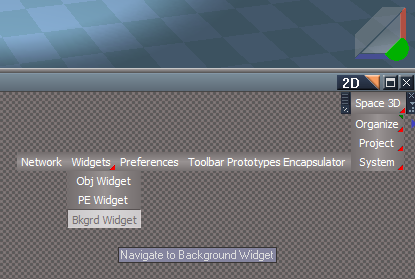
tS7.6 Link Editor Navigator Toolbar
Space 3D = Navigate to the Scene level
Organize = Arrange and Minimize - RMB = Arrange and Maximize
Unselect = Unselects everything selected
The rest of the buttons are shortcuts to the various places within tS76
All of the previous scripts have been removed due to being incorporated into tS76 and tS761.
Removed 3/7/2018
tS7.6 Link Editor Navigator Toolbar
-
trueBlue
- Captain
- Posts: 5548
- Joined: 06 Jul 2009, 22:50
- Type the number ten into the box: 10
tS7.6 Link Editor Navigator Toolbar
-
v3rd3
- Lieutenant Commander
- Posts: 1191
- Joined: 21 May 2009, 20:04
Re: tS7.6 Link Editor Navigator Toolbar
Thanks for all these tools Trueblue... would you please confirm these are TS7.6 and up or other dependencies?
-
trueBlue
- Captain
- Posts: 5548
- Joined: 06 Jul 2009, 22:50
- Type the number ten into the box: 10
Re: tS7.6 Link Editor Navigator Toolbar
Everything noted as tS7.6 were built in tS7.6 and should work in tS7.6.1.
Everything noted as tS7.6.1 were built using tS7.6.1 and are not backwards compatible.
With regards to this Link Editor Navigator it is the same as the tS7.6.1 version except
there is no customized Object Render Preference panel with the added Owner Name.
You should uninstall the tS7.6.1 version before installing this tS7.6 version.
FYI: If you right click and select Properties for any object in it's library, you can see where the item was Produced.
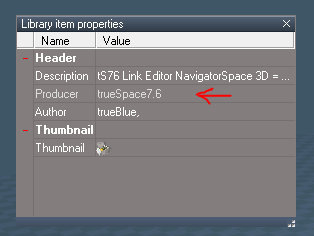
HTH and Thanks.
Everything noted as tS7.6.1 were built using tS7.6.1 and are not backwards compatible.
With regards to this Link Editor Navigator it is the same as the tS7.6.1 version except
there is no customized Object Render Preference panel with the added Owner Name.
You should uninstall the tS7.6.1 version before installing this tS7.6 version.
FYI: If you right click and select Properties for any object in it's library, you can see where the item was Produced.
HTH and Thanks.
-
v3rd3
- Lieutenant Commander
- Posts: 1191
- Joined: 21 May 2009, 20:04
Re: tS7.6 Link Editor Navigator Toolbar
Thank you again.