Hi
I was trying to make a railroad bus (or what you call it in english) in Truespace but was forced to give up and try Blender instead.
However, I am sure that it could be done in TS and it bugs me that I have problems so I decided to post my issue here to perhaps get an explanation.
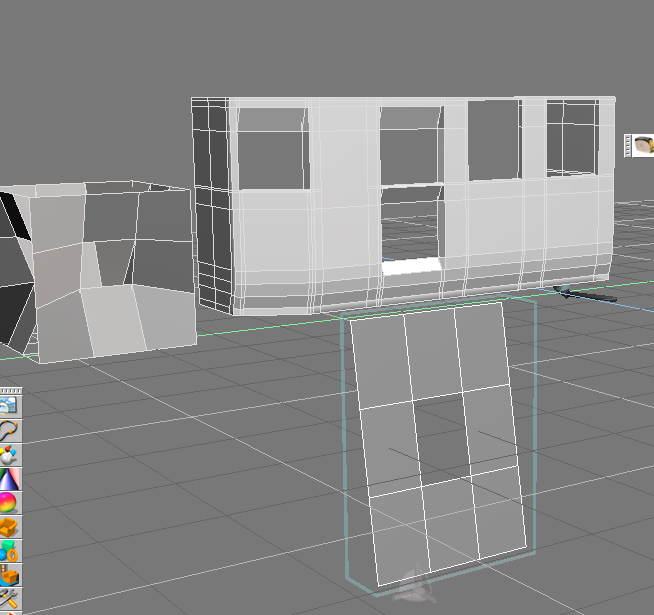
I had several windows that I needed to make in the chassis/body of the bus. So I decided to use the "change face into hole" tool.
And it appears to work. I got some nice looking windows - in wireframe. But not in solid view.
So I decided to look more closely.
One vertice looked strange.
When I come closer and moved it a bit I realised - there is two vertices.
But there shold only be one vertice here. The tool apparently didn't do as it should.
But how do you fix this problem in Truespace? You apparently can't use the weld vertices tool since that seam to need to have one edge connecting the veritices. And you can't add an edge between these veritices - if I try it is automatically deleted when I leave editing mode of the object.
I find this most frustrating. What are you supposed to do in a case like this when you need to weld the veritices but are unable to do that?
Hole into face?
-
compPanda
- Senior Chief Petty Officer
- Posts: 275
- Joined: 21 May 2009, 21:15
- Type the number ten into the box: 0
Hole into face?
- Attachments
-
- chassi.zip
- (64.09 KiB) Downloaded 249 times
-
Draise
- Captain
- Posts: 3200
- Joined: 21 Sep 2009, 19:33
- Type the number ten into the box: 0
- Location: Bogota, Colombia
Re: Hole into face?
In the WS you can use the "Heal Vertice" tool and that will fix that for you. Just pipe your geometry over the bridge, and viola!
-
compPanda
- Senior Chief Petty Officer
- Posts: 275
- Joined: 21 May 2009, 21:15
- Type the number ten into the box: 0
Re: Hole into face?
OK, I will try that. Thanks.Draise wrote:In the WS you can use the "Heal Vertice" tool and that will fix that for you. Just pipe your geometry over the bridge, and viola!
But there is no way to fix this in the old model side?
-
stan
- Master Chief Petty Officer
- Posts: 584
- Joined: 21 May 2009, 17:20
Re: Hole into face?
It works but not like you'd expect. Try it on a double sided plane with 3 faces. Select the center plane, then click on the hole from plane tool. Next go to the back and click on the center plane..voila. you now have a plane with a hole in it. Now try it on a cube with res 3. On your chassis it takes the planes adjacent to it as walls like it does the cube.
-
marcel
- Captain
- Posts: 2247
- Joined: 21 May 2009, 19:52
- Type the number ten into the box: 0
- Location: paris - France
Re: Hole into face?
You can do that in one click with the Bridge face plugin.
All these good plugin are from the PolyTools package.
The free version is limited with 200 vertices but is enought for simple model.
All these good plugin are from the PolyTools package.
The free version is limited with 200 vertices but is enought for simple model.
Design - illustration - Animation
http://www.crea-vision.fr
-
compPanda
- Senior Chief Petty Officer
- Posts: 275
- Joined: 21 May 2009, 21:15
- Type the number ten into the box: 0
Re: Hole into face?
I am sure I am a bit stupid but I really don't understand this. I tried to follow this tutorial from Clinton but I guess I missunderstand some crucial parts:stan wrote:It works but not like you'd expect. Try it on a double sided plane with 3 faces. Select the center plane, then click on the hole from plane tool. Next go to the back and click on the center plane..voila. you now have a plane with a hole in it. Now try it on a cube with res 3. On your chassis it takes the planes adjacent to it as walls like it does the cube.
https://www.youtube.com/watch?v=dz16aMG ... xLZ-IewUwE
In this it looks like he has a more advanced object and then sweeps the face and then click the face to hole to make a hole.
If I understand this correctly I am supposed to sweep the face I want to make into a hole, then press the "face to hole" tool and then press the face I want the hole to go to? Which is what I did.
Can't I have a "wall" with a thickness? Does it have to be plane? Or do I need a more simple object?
I would like to try the Polytools but where can I find them? I found a site but there doesn't seam to be available to download any version any more, neither free or otherwise?
Thank you for your help, I know that I am "hole challenged"...
-
marcel
- Captain
- Posts: 2247
- Joined: 21 May 2009, 19:52
- Type the number ten into the box: 0
- Location: paris - France
Re: Hole into face?
Design - illustration - Animation
http://www.crea-vision.fr
-
compPanda
- Senior Chief Petty Officer
- Posts: 275
- Joined: 21 May 2009, 21:15
- Type the number ten into the box: 0
Re: Hole into face?
Thank you marcel and stan