Object Tool
-
waderain
- Seaman
- Posts: 7
- Joined: 18 Oct 2009, 04:00
Object Tool
Well I guess I need to figure out this program in a day. where can i find the Object Tool button in the Model view window? I need to resize my objects to a precise measurement
-
waderain
- Seaman
- Posts: 7
- Joined: 18 Oct 2009, 04:00
Re: Object Tool
I guess what I'm looking for is the whole toolbar part that has the Object Tool button on it. How Do I bring it up?
-
LeonRegis

- Captain
- Posts: 1946
- Joined: 18 Aug 2009, 17:36
- Type the number ten into the box: 0
- Location: Brazil/Earth/Orion Arm/Milky Way/4th Dimension/This Universe/Multiverse???/Singularity???
Re: Object Tool
Select Object Scale them press and drag both RMB (Right Mouse Button) and LMB.
HTH
HTH
Be the change you want to see in the world. - Mohandas Gandhi
-
spacekdet

- Captain
- Posts: 1810
- Joined: 27 May 2009, 15:00
- Type the number ten into the box: 10
- Location: On the day shift at the Utility Muffin Research Kitchen
Re: Object Tool
Object Tool icon looks like a cursor. Right click it to open Object Info panel.
Input numbers (or equations) here.
Here it is in the default Model layout, in the lower right corner of the screen.
As Leon said. you can also scale by click-dragging both mouse buttons.
To keep things proportionate, Toggle on Grid Mode first {icon looks like a blue grid---good one to hotkey}
It's on the same toolbar as the Object Tool.
Input numbers (or equations) here.
Here it is in the default Model layout, in the lower right corner of the screen.
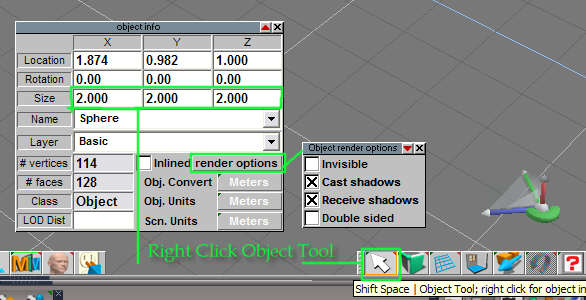
To keep things proportionate, Toggle on Grid Mode first {icon looks like a blue grid---good one to hotkey}
It's on the same toolbar as the Object Tool.
-
waderain
- Seaman
- Posts: 7
- Joined: 18 Oct 2009, 04:00
Re: Object Tool
Sorry, I should of been more clear but I know what the Object tool looks like I just don't have it on any of the toolbars. The actual toolbar for it is not there. I tried opening all other toolbars from min to full expanded but nothing. Is there some property tool bar setting that will bring it up or let me add it to a different toolbar. I've been playing with the program in my spare time and I'm getting the hang of it again but I need to make objects to an exact scale, not just close. They have to be perfect so I can import them into autocad for blueprints. (thats why I really need the Object tool)
-
Finis

- Captain
- Posts: 5410
- Joined: 21 May 2009, 18:26
- Type the number ten into the box: 0
- Location: America!
Re: Object Tool
The tool bar with the object tool is probably minimized. If so then it is just a small square somewhere and may be hidden behind some other tool bar. I'd minimize or move all the tool bars until you find it. It may be out in the middle of the screen too.
- Attachments
-
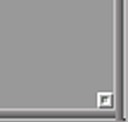
- The minimized tool bar is a small square.
- Minimized.jpg (1.37 KiB) Viewed 5083 times
I prefer dangerous freedom over peaceful servitude. -- Thomas Jefferson/Jean Jacques Rousseau
-
waderain
- Seaman
- Posts: 7
- Joined: 18 Oct 2009, 04:00
Re: Object Tool
Yea!!!!!!!!!!!! I found it. I clicked on the Configuration Library and the the default view and the Object tool bar popped up. Oh man, I think I need a beer after that.
Thx again for the tips
Thx again for the tips