Truespace doesnt seem to like repeating textures??

User avatar
horusra
Petty Officer First Class
Posts: 70
Joined: 02 Feb 2010, 13:09
Type the number ten into the box: 0
Location: Appleton, Wisconsin. U.S.A.

Truespace doesnt seem to like repeating textures??

Post by horusra »

I've noticed this with TS 5 - 7.
1. I bring up the material editor. Choose a texture.
2. I set texture repeats (U & V) to multiples. e.g., U=3, V=3.
3. I paint surface, TS crashes, everytime, always has with above versions.

any work-arounds, or anyone know why this happens? Very frustrating. :evil:

Thanks.
User avatar
trueBlue
Captain
Posts: 5548
Joined: 06 Jul 2009, 22:50
Type the number ten into the box: 10

Re: Truespace doesnt seem to like repeating textures??

Post by trueBlue »

Assuming you are talking about Model.
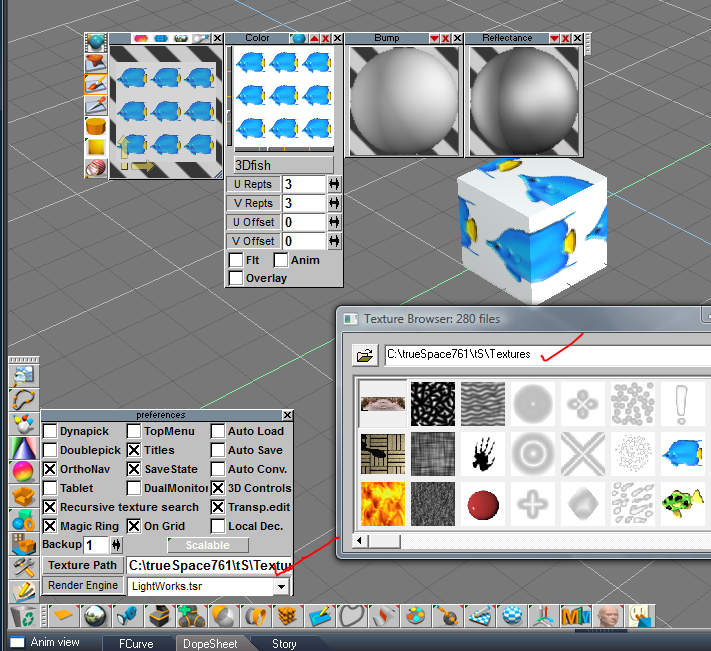
I am not having difficulties with repeated textures in tS761 Workspace nor Model.
I keep all of my textures as shown.
Capture.PNG

From the Help file:
Recursive Texture Search

This lets you enter one or more user-defined paths for image map files. trueSpace has a flexible method of dealing with the location of image map files. When an image map is used in a scene or on an object, trueSpace will expect to find the file in the path specified inside the scene or objects file. However, if it does not find the image, trueSpace can continue to search. This makes it easier to move scenes and image maps to other machines and/or hard drives.

The places that trueSpace searches for image maps are controlled in the Change Texture Path field in the Preferences panel. In here, it is possible to define one or more directory paths in which the program will search for image maps. Separate directories need to be separated by semicolons (;).

Example:

D:\TRUESPACE\TEXTURES;C:\MAPS

You can enter the first user-defined path via the keyboard, or by clicking on the Texture Path button,
navigating to the desired subdirectory, and then double-clicking on any file in that directory. To enter
additional user-defined paths, you must use the keyboard. Using the Texture Path button always
replaces any currently defined path(s).
Materials are searched for in this order:


The material’s last location
In the current project’s directory and its subdirectories for textures, bumps, and Environ-ment.
In the current scene directory and its subdirectories for textures, bumps, and Environment.
In the user defined directory and its subdirectories for textures, bumps, and Environment.
In the current directory and its subdirectories for textures, bumps, and Environment.
If the recursive search is enabled:

In the user’s directory and all of its subdirectories.
In all trueSpace subdirectories
In the current directory and all of its subdirectories.
If the texture is not found, then the user is asked for it. The recursive texture search is indicated in the help bar and can be interrupted by the Esc key. The dialog prompting for the location of the missing texture can be dismissed by clicking the cancel button.
User avatar
marcel
Captain
Posts: 2247
Joined: 21 May 2009, 19:52
Type the number ten into the box: 0
Location: paris - France

Re: Truespace doesnt seem to like repeating textures??

Post by marcel »

Avoid this : paint surface when you are on wireframe mode. There are too many reason for that (driver, memorie, scene, ...). TS can crash when lightwork work to render the new texture on an object only. Choose a solid mode to avoid the rendering of the new texture. But for the texture repeat i never see more crash than a single texture with TS 5 or 7. ?!
Design - illustration - Animation
http://www.crea-vision.fr
User avatar
Finis
Captain
Posts: 5410
Joined: 21 May 2009, 18:26
Type the number ten into the box: 0
Location: America!

Re: Truespace doesnt seem to like repeating textures??

Post by Finis »

Set the rendering visibility to scanline instead of raycast. At least while applying textures. I had those crashes until I did that. Then far fewer.

Solid mode, good too.
I prefer dangerous freedom over peaceful servitude. -- Thomas Jefferson/Jean Jacques Rousseau
User avatar
horusra
Petty Officer First Class
Posts: 70
Joined: 02 Feb 2010, 13:09
Type the number ten into the box: 0
Location: Appleton, Wisconsin. U.S.A.

Re: Truespace doesnt seem to like repeating textures??

Post by horusra »

@trueblue, I appreciate your post. I do have my textures in the proper places. U may have misunderstood my post (which of course could be my fault) as I couldnt figure out how that effected my problem, unless its a thing with textures not being in proper directories or other things u mentioned. :)
your help is appreciated however.
kind regards
Rob
User avatar
horusra
Petty Officer First Class
Posts: 70
Joined: 02 Feb 2010, 13:09
Type the number ten into the box: 0
Location: Appleton, Wisconsin. U.S.A.

Re: Truespace doesnt seem to like repeating textures??

Post by horusra »

@finis
@marcel
Thanks for the help. That could be. I will check these as soon as I can and try to post back on here if that solved it.
thans again.
User avatar
horusra
Petty Officer First Class
Posts: 70
Joined: 02 Feb 2010, 13:09
Type the number ten into the box: 0
Location: Appleton, Wisconsin. U.S.A.

Re: Truespace doesnt seem to like repeating textures??

Post by horusra »

I can tell ya right now that since keeping the scene in solid mode, its already doing perfect. Not one crash yet, and it should have already, I even raised the tex repeats up to 4 without a crash (wow for that). =P Probably have limited time to do much more work tonight, but will know something more definite within one - three days.
I didnt try the scan line setting yet because I thought I'd just try solid mode alone first.
thanks again.
User avatar
MikomDude
Captain
Posts: 1930
Joined: 04 Oct 2010, 11:12
Type the number ten into the box: 0
Location: The Hague, Netherlands

Re: Truespace doesnt seem to like repeating textures??

Post by MikomDude »

99% of the time when trueSpace doesn't want to render my models or runs out of memory or crashes in the model-side, it's because I am using 2048x2048 textures with bump maps, usually several and tS simply can't handle that. It is really starting to show how outdated the model-side in trueSpace is unfortunately...
About the only option at that point is cutting corners, that is creating smaller textures, polygon reduction tool etc.
User avatar
horusra
Petty Officer First Class
Posts: 70
Joined: 02 Feb 2010, 13:09
Type the number ten into the box: 0
Location: Appleton, Wisconsin. U.S.A.

Re: Truespace doesnt seem to like repeating textures??

Post by horusra »

@mikomdude: Thanks for the info. Most of the textures I'm using are around that size. I bought near to the whole collection of the Total 3d texture cd's (3dtotal.com). Most of them are large but they do give lower res versions.
Thanks for the info.
User avatar
horusra
Petty Officer First Class
Posts: 70
Joined: 02 Feb 2010, 13:09
Type the number ten into the box: 0
Location: Appleton, Wisconsin. U.S.A.

Re: Truespace doesnt seem to like repeating textures??

Post by horusra »

Well I'm still not getting crashes anymore using solid object instead of wire-frame, so for now I'm gonna assume; problem solved. Thanks so much guys for the help. Its always great when a burning problem is solved. :worship: to you all.

Return to “General Discussion”