I'll create this thread so that I stop cluttering up Pugman's thread, sorry.
Here is a stupid question. How do you move a voxel object? or
Do you need to move a voxel object? (I am under the voxel tab in the program.)
I can move the camera, move voxels but cannot move the entire voxel object.
Can you have two voxel objects side by side or are they considered one object but not connected?
(I am under the voxel tab in the program.)
Rendering seems to stop but status shows that 3DCoat is still running. Is the rendering engine slow?
3D Coat discussions
-
Steinie

- Captain
- Posts: 2958
- Joined: 21 May 2009, 17:38
- Type the number ten into the box: 10
3D Coat discussions
-
pugman 1
- Captain
- Posts: 1555
- Joined: 21 May 2009, 19:26
- Type the number ten into the box: 0
- Location: Germany
Re: 3D Coat discussions
Here is a link for voxel sculping work flow
http://vimeo.com/10291522"
http://vimeo.com/10291522"
-
Math Path

- Chief Petty Officer
- Posts: 92
- Joined: 22 May 2009, 18:06
- Type the number ten into the box: 0
- Location: Germany
Re: 3D Coat discussions
Hey Steinie,
To move entire voxel object use 'Transform' in side menu 'Adjust'. Please note also Tool Options to Transform. 'Leave rotated axes' is nice and handy.
Consider Voxel objects as entity if they are in the same Voxtree Layer (VoxTree is another tab with Shaders on the right). To manage multiple objects keep them on separate Layers. They can be moved free in the hierarchy. To select them with click on object you will use 'Adjust'->'Pick'
TIP: do not work to quickly. There are tool tips to all command and options. So you can see what they are for.
To move entire voxel object use 'Transform' in side menu 'Adjust'. Please note also Tool Options to Transform. 'Leave rotated axes' is nice and handy.
Consider Voxel objects as entity if they are in the same Voxtree Layer (VoxTree is another tab with Shaders on the right). To manage multiple objects keep them on separate Layers. They can be moved free in the hierarchy. To select them with click on object you will use 'Adjust'->'Pick'
TIP: do not work to quickly.
There are tool tips to all command and options. So you can see what they are for.-
Steinie
- Captain
- Posts: 2958
- Joined: 21 May 2009, 17:38
- Type the number ten into the box: 10
Re: 3D Coat discussions
Great advise guys. Using both suggestions now and loving it!
Good tutorials and good instructions.
My Mr. Snoot project can continue utilizing trueSpace and 3D Coat.
I'm sure I'll be using this thread for other issues I'm having with this software.
I remember trying this application when it was called 3D Brush. It seemed like a toy back then.
Not anymore.
Good tutorials and good instructions.
My Mr. Snoot project can continue utilizing trueSpace and 3D Coat.
I'm sure I'll be using this thread for other issues I'm having with this software.
I remember trying this application when it was called 3D Brush. It seemed like a toy back then.
Not anymore.
- Attachments
-

-
Steinie
- Captain
- Posts: 2958
- Joined: 21 May 2009, 17:38
- Type the number ten into the box: 10
Re: 3D Coat discussions
Well this is my first attempt at 3D Coat with trueSpace. It wasn't a smooth process since I don't know
what I'm doing yet. I couldn't get the Autoretopo to work from the Voxel tab. I know this isn't the right way but I saved
the Voxel as an Object. Reloaded Object using the "Object to Retopo" load function.
Any help here?
I'll attach what I have so far...
Pugman1 got me thinkin' about staring creatures soooooo
Hey Rayman why not use this character in your Titanic scene?!
what I'm doing yet. I couldn't get the Autoretopo to work from the Voxel tab. I know this isn't the right way but I saved
the Voxel as an Object. Reloaded Object using the "Object to Retopo" load function.
Any help here?
I'll attach what I have so far...
Pugman1 got me thinkin' about staring creatures soooooo
Hey Rayman why not use this character in your Titanic scene?!
- Attachments
-

-
RAYMAN

- Captain
- Posts: 2547
- Joined: 21 May 2009, 18:56
Re: 3D Coat discussions
As far as my memory goes back the people on the Titanic drounded they didnt get scared to death !Steinie wrote: Hey Rayman why not use this character in your Titanic scene?!
-
Math Path
- Chief Petty Officer
- Posts: 92
- Joined: 22 May 2009, 18:06
- Type the number ten into the box: 0
- Location: Germany
Re: 3D Coat discussions
Hi, Your creation Steinie confirms my opinion that talented guys do not need necessary the perfection provided by application's technics. Starting with the mix of imagination and talent is the best, what one can do, trying to get first grasp on the new software. If the software is good, It will give anyone expected support. But nobody can expect more than that from the software itself. Really awesome, what you show us SteinieSteinie wrote:I couldn't get the Autoretopo to work from the Voxel tab. I know this isn't the right way but I saved the Voxel as an Object...
On topic: You get access to autoretopo tool only from the voxels room. There are no other way to it (expect of new import to AUTOPO). This is why I said elsewhere, "autoretopo needs voxels to be able to work at all."
Go to VoxTree and right click the Layer called Volume, you want to retopologize. Then from context menu choose AUTOPO for general use. This will launch the wizard for autoretopology.
-
Steinie
- Captain
- Posts: 2958
- Joined: 21 May 2009, 17:38
- Type the number ten into the box: 10
Re: 3D Coat discussions
Thanks!Math Path wrote:If the software is good, It will give anyone expected support. But nobody can expect more than that from the software itself. Really awesome, what you show us Steinie
Marcel and Buzz using older versions of trueSpace display your point time and again.
Yes I tried it again using your advise and it works great. I am not sure why it didn't work last night. I thought I had done the same thing but no menu options appeared. Not too sure I saw a Layer called "Volume" to select.Math Path wrote:Go to VoxTree and right click the Layer called Volume, you want to retopologize. Then from context menu choose AUTOPO for general use. This will launch the wizard for autoretopology.
3D Coat is new to me and it can overwhelm you at first. I'm trying to take it one step at a time.
I like voxels a lot and Ptex is the future. (or an alternative)
Have fun!
Having fun!!!

-
pugman 1
- Captain
- Posts: 1555
- Joined: 21 May 2009, 19:26
- Type the number ten into the box: 0
- Location: Germany
Re: 3D Coat discussions
This app is a joy to work with. the more you learn it
the better it gets.awsome
the better it gets.awsome
-
Steinie
- Captain
- Posts: 2958
- Joined: 21 May 2009, 17:38
- Type the number ten into the box: 10
Re: 3D Coat discussions
I feel real stupid using it.
Today I took a voxel object and saved as an poly object. Reloaded into 3D Coat
under the Paint tab. At first I could paint on the object. Clicked on the Sculpt tab to add two
spheres (for eyes), went back to the Paint tab and could no longer get paint to work on the object.
(I was trying to help you with your eye texture problem Pugman1)
Today I took a voxel object and saved as an poly object. Reloaded into 3D Coat
under the Paint tab. At first I could paint on the object. Clicked on the Sculpt tab to add two
spheres (for eyes), went back to the Paint tab and could no longer get paint to work on the object.
(I was trying to help you with your eye texture problem Pugman1)
-
Steinie
- Captain
- Posts: 2958
- Joined: 21 May 2009, 17:38
- Type the number ten into the box: 10
Re: 3D Coat discussions
I need help on this one, I'm really stumped after two days trying.
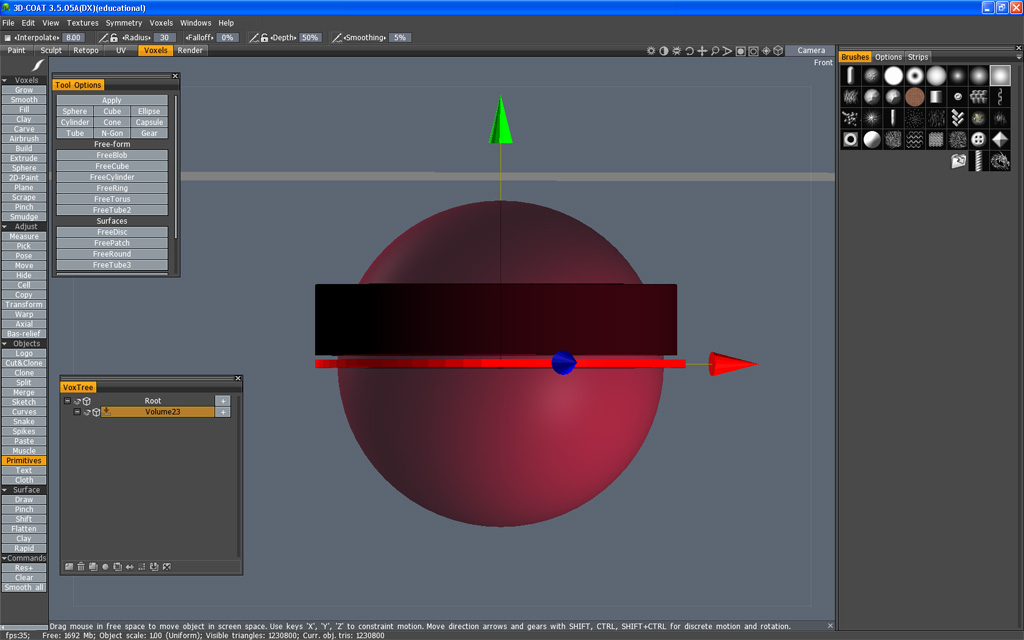
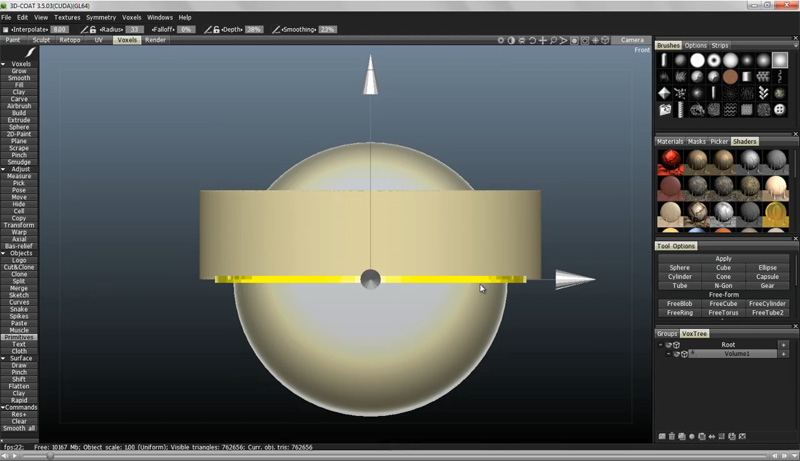
I will include two screen grabs of the instruction video and one of mine. ( called subtract.jpg)
My screen matches his pretty close
(I think)
I'll include a link to the tutorial and the instructions are almost at the very beginning if you want to
hear/watch it.
The instructions say "hold the cntrl key and hit enter" this will subtract the sphere from the cylinder.
I cannot get this to happen no matter what I do. Help!
Can somebody please try this and see if I am missing something. Maybe my computer isn't new enough to handle
the boolean subtraction?
Here is the video:
http://pilgway.com/~greg/RatTeeth/RatTeeth.mov"
I will include two screen grabs of the instruction video and one of mine. ( called subtract.jpg)
My screen matches his pretty close
(I think)
I'll include a link to the tutorial and the instructions are almost at the very beginning if you want to
hear/watch it.
The instructions say "hold the cntrl key and hit enter" this will subtract the sphere from the cylinder.
I cannot get this to happen no matter what I do. Help!
Can somebody please try this and see if I am missing something. Maybe my computer isn't new enough to handle
the boolean subtraction?
Here is the video:
http://pilgway.com/~greg/RatTeeth/RatTeeth.mov"
- Attachments
-
-
-

-
richlevy

- Senior Chief Petty Officer
- Posts: 162
- Joined: 17 Aug 2009, 20:08
Re: 3D Coat discussions
I am not exactly sure if he got all of the steps. I know how to do it another way,
Create the cylinder from the cylinder primitive
Create another layer by clicking on the + sign to the right of the volume name (the cylinder) in the Vox Tree
On the new layer create the sphere
right click on the new volume object (the sphere you just created) in the Vox Tree
down in the menu that pops up, toward the bottom is "subtract from".
When you click on it a box appears right next to the mouse with the name of all of the layers you have. Select the cylinder and it will do the exact same thing he did in the video.
I am not sure if he knows something I do not, or he skipped some steps...
HTH
Rich
Create the cylinder from the cylinder primitive
Create another layer by clicking on the + sign to the right of the volume name (the cylinder) in the Vox Tree
On the new layer create the sphere
right click on the new volume object (the sphere you just created) in the Vox Tree
down in the menu that pops up, toward the bottom is "subtract from".
When you click on it a box appears right next to the mouse with the name of all of the layers you have. Select the cylinder and it will do the exact same thing he did in the video.
I am not sure if he knows something I do not, or he skipped some steps...
HTH
Rich
My Flickr site, here you can see some of the photography I do:
http://www.flickr.com/photos/rich-l/" onclick="window.open(this.href);return false;
http://www.flickr.com/photos/rich-l/" onclick="window.open(this.href);return false;
-
Steinie
- Captain
- Posts: 2958
- Joined: 21 May 2009, 17:38
- Type the number ten into the box: 10
Re: 3D Coat discussions
Thanks for your help Rich. I could get the sphere on the screen but it will not turn into a Voxel after I
hit the enter key. The cylinder does turn into one. I did create the new layer as you instructed.
It seems like the second object is the problem. Any ideas or settings that I might have missed?
hit the enter key. The cylinder does turn into one. I did create the new layer as you instructed.
It seems like the second object is the problem. Any ideas or settings that I might have missed?
-
Steinie
- Captain
- Posts: 2958
- Joined: 21 May 2009, 17:38
- Type the number ten into the box: 10
Re: 3D Coat discussions
Well after 2 days and countless tries, I finally figured out what the problem was. A Bug in the software!
I went through the bug list posted at 3D Coat and noticed a "large Sphere" problem in Windows 32 non Cuda version.
This bug is in Version 3.5.05A (the stable release version). After updating to the current Beta version 3.5.10
all is right in the world again!
Thanks for all your support guys!
I went through the bug list posted at 3D Coat and noticed a "large Sphere" problem in Windows 32 non Cuda version.
This bug is in Version 3.5.05A (the stable release version). After updating to the current Beta version 3.5.10
all is right in the world again!
Thanks for all your support guys!
-
richlevy
- Senior Chief Petty Officer
- Posts: 162
- Joined: 17 Aug 2009, 20:08
Re: 3D Coat discussions
Ok, I see now, the sphere gets cut from the original cylinder. The thing that caught me is the tool places a new sphere in the same position. This makes it appear as if there is no operation performed... Something new learned  I've learned a few cool things in that tutorial series, I've purchased a couple of trainings tutorials that were pretty good also.
Thanks.
Rich
I've learned a few cool things in that tutorial series, I've purchased a couple of trainings tutorials that were pretty good also.Thanks.
Rich
My Flickr site, here you can see some of the photography I do:
http://www.flickr.com/photos/rich-l/" onclick="window.open(this.href);return false;
http://www.flickr.com/photos/rich-l/" onclick="window.open(this.href);return false;
-
v3rd3
- Lieutenant Commander
- Posts: 1191
- Joined: 21 May 2009, 20:04
Re: 3D Coat discussions
Good catch Steinie.... I have to admit I am not using 3DC for geometry yet so this thread is very interesting.
My immediate goal with 3DC is painting and uv.
My immediate goal with 3DC is painting and uv.
-
jamesmc
- Captain
- Posts: 1776
- Joined: 08 Jul 2009, 15:35
Re: 3D Coat discussions
Glad you picked up 3DCoat Steinie.
It takes a little while to get used to the Interface, but it's worth every penny from it's auto-retopo to auto-UV- to interfacing with PhotoShop, PTEX or just plain painting.
The only challenge left is creativy.
It takes a little while to get used to the Interface, but it's worth every penny from it's auto-retopo to auto-UV- to interfacing with PhotoShop, PTEX or just plain painting.
The only challenge left is creativy.
Walk by faith, not by sight.
-
Math Path
- Chief Petty Officer
- Posts: 92
- Joined: 22 May 2009, 18:06
- Type the number ten into the box: 0
- Location: Germany
Re: 3D Coat discussions
Hey Guys,
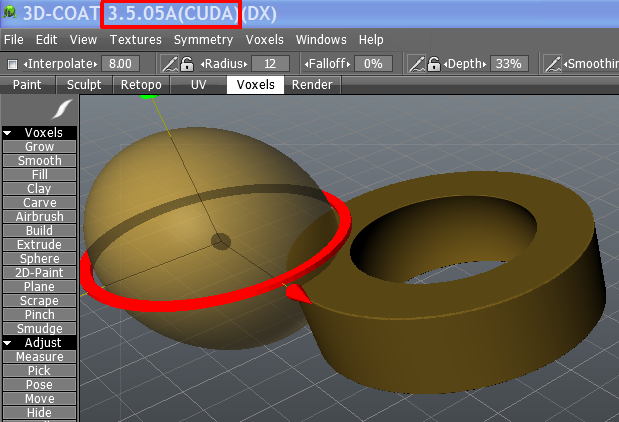
I couldn't recreate this bug found by Steinie. It's probably because I'm using CUDA build.
(stable release, no beta) I think CUDA is really recommendable, not only because it's faster.
@jamesmc: That couldn't be better said. 100% agree
I couldn't recreate this bug found by Steinie. It's probably because I'm using CUDA build.
(stable release, no beta) I think CUDA is really recommendable, not only because it's faster.
@jamesmc: That couldn't be better said. 100% agree
- Attachments
-
-
jamesmc
- Captain
- Posts: 1776
- Joined: 08 Jul 2009, 15:35
Re: 3D Coat discussions
Yeah, I use 64 bit Cuda/3Dcoat on a Win 7, 920 processor with 8 gig mem, so it just flies through most every operation. Boolean cuts are instantaneously for me.
Walk by faith, not by sight.
-
pugman 1
- Captain
- Posts: 1555
- Joined: 21 May 2009, 19:26
- Type the number ten into the box: 0
- Location: Germany
Re: 3D Coat discussions
Hi, can you tell me which one is better .The 99 doller or the pro version i
can not see much difference in the two exept the layers and size of renders
Thanks Ralph
can not see much difference in the two exept the layers and size of renders
Thanks Ralph
-
jamesmc
- Captain
- Posts: 1776
- Joined: 08 Jul 2009, 15:35
Re: 3D Coat discussions
Well, there didn't used to be a difference in versions and I've always had the 'Pro' version.pugman 1 wrote:Hi, can you tell me which one is better .The 99 doller or the pro version i
can not see much difference in the two exept the layers and size of renders
Thanks Ralph
Layers can be invaluable in a lot of operations, like making parts for some object in voxels.
Walk by faith, not by sight.
-
Steinie
- Captain
- Posts: 2958
- Joined: 21 May 2009, 17:38
- Type the number ten into the box: 10
Re: 3D Coat discussions
Limitation of $99.00 Education version:
1) no commercial usage
2) textures size to export is limited to 2048x2048
3) layers amount is limited to 7
1) I don't plan on selling anything I do. If I do I'll upgrade or buy the other version at a later time.
2) My textures (for me) are never that large.
3) If I approach that limit I plan on merging the layers up so that I could add another.
Other then the above three there is no difference in product. You can buy more software with the savings. This works for me and for other users the reasons might be different.
1) no commercial usage
2) textures size to export is limited to 2048x2048
3) layers amount is limited to 7
1) I don't plan on selling anything I do. If I do I'll upgrade or buy the other version at a later time.
2) My textures (for me) are never that large.
3) If I approach that limit I plan on merging the layers up so that I could add another.
Other then the above three there is no difference in product. You can buy more software with the savings. This works for me and for other users the reasons might be different.
-
Math Path
- Chief Petty Officer
- Posts: 92
- Joined: 22 May 2009, 18:06
- Type the number ten into the box: 0
- Location: Germany
Re: 3D Coat discussions
Hey pugman,
You can always upgrade any time later, so nothing will be graven in stone... Buy more just if you need to.
You can always upgrade any time later, so nothing will be graven in stone... Buy more just if you need to.
Yes, in fact. That was for me decision-making reason....jamesmc wrote:Layers can be invaluable in a lot of operations, like making parts for some object in voxels.
-
jamesmc
- Captain
- Posts: 1776
- Joined: 08 Jul 2009, 15:35
Re: 3D Coat discussions
True enough, can upgrade at any time - so nothing lost, everything to gain.Math Path wrote:Hey pugman,
You can always upgrade any time later, so nothing will be graven in stone... Buy more just if you need to.Yes, in fact. That was for me decision-making reason....jamesmc wrote:Layers can be invaluable in a lot of operations, like making parts for some object in voxels.
Walk by faith, not by sight.
-
pugman 1
- Captain
- Posts: 1555
- Joined: 21 May 2009, 19:26
- Type the number ten into the box: 0
- Location: Germany
Re: 3D Coat discussions
Thanks guys ill get the 99 doller version and z brush.
hopefully next week
hopefully next week