Hi
I have this model:
This is textured in parts. The poles are mapped separately, the crossbar etc.
Each off these parts here have one mapping:
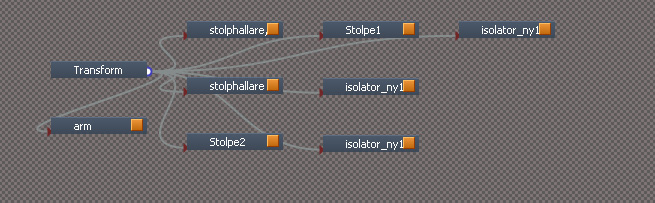
How can I merge these mappings so that they are on ONE mapping for the total object?
I have tried to go into the UV mapping editor when having the object selected but there is only a blank page.
I need to merge these to save resources - I am going to add this to a game and each texture map adds overhead.
How do I merge UV mapping?
-
compPanda
- Senior Chief Petty Officer
- Posts: 275
- Joined: 21 May 2009, 21:15
- Type the number ten into the box: 0
How do I merge UV mapping?
-
spacekdet
- Captain
- Posts: 1810
- Joined: 27 May 2009, 15:00
- Type the number ten into the box: 10
- Location: On the day shift at the Utility Muffin Research Kitchen
Re: How do I merge UV mapping?
-
jamesmc
- Captain
- Posts: 1776
- Joined: 08 Jul 2009, 15:35
Re: How do I merge UV mapping?
You can use Blender. It has superb UV mapping tools, it's free and has video tutorials on how to use it.
Walk by faith, not by sight.
-
compPanda
- Senior Chief Petty Officer
- Posts: 275
- Joined: 21 May 2009, 21:15
- Type the number ten into the box: 0
Re: How do I merge UV mapping?
Well, the video doesn't since it only target objects with one mesh. My object has sub-objects so it doesn't work that way - when I open the UV editor on my object (on the top level) I don't see any vertices at all - I have to go down one step in the hierarchy and open the UV editor for each sub object to see the vertices and that is my problem.
The tutorial by Tiles has the same problem it only shows an simple object with one mesh - a cube in this case.
Is the only way to boolean union all object together?
-
compPanda
- Senior Chief Petty Officer
- Posts: 275
- Joined: 21 May 2009, 21:15
- Type the number ten into the box: 0
Re: How do I merge UV mapping?
I will need to see if I can find a tutorial for the new 2.5 interface then - the one I have looked at in the past was with the 2.4x series interface (and to be honest, if I follow a tutorial for that interface I can't find the position of the buttons in the new interface - it has really changed... for the better).jamesmc wrote:You can use Blender. It has superb UV mapping tools, it's free and has video tutorials on how to use it.
Using Blender might be better anyway since I need to export the object from Blender to my game later on anyway.
-
jamesmc
- Captain
- Posts: 1776
- Joined: 08 Jul 2009, 15:35
Re: How do I merge UV mapping?
Here's some UV tutorials on 2.5 and newer. There appears to be a lot of these around.compPanda wrote:I will need to see if I can find a tutorial for the new 2.5 interface then - the one I have looked at in the past was with the 2.4x series interface (and to be honest, if I follow a tutorial for that interface I can't find the position of the buttons in the new interface - it has really changed... for the better).jamesmc wrote:You can use Blender. It has superb UV mapping tools, it's free and has video tutorials on how to use it.
Using Blender might be better anyway since I need to export the object from Blender to my game later on anyway.
http://www.youtube.com/watch?v=zv86PSPycPA"
http://www.youtube.com/watch?v=QFiPN4Z_ ... re=related"
http://www.youtube.com/watch?v=A3M21GqA ... re=related"
Walk by faith, not by sight.
-
clintonman
- Captain
- Posts: 5659
- Joined: 21 May 2009, 21:08
- Type the number ten into the box: 0
- Location: California
Re: How do I merge UV mapping?
Have you tried boolean merge geometry on the pieces? If it's going into a game you may want it to be a single mesh object and I think that would combine the maps?

