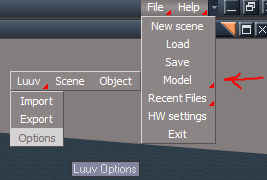
tS7.6 Workspace Import Export buttons
This installs Model - Object, Scene, and Luuv 1.1.4 buttons in the Workspace's File Menu. You must load the luuv.tsx plugin on the Model side before using the Luuv buttons.
Each button turns the Bridge ON as that is the only way you can use these commands.
Model
Object = Load OBJ
Scene = Load SCN
Luuv
Import = Import OBJ file
Export = Ctrl + Export for selected object
Options = Luuv Options
Note: Select and hold the Alt key before selecting the Export button for your selected object that you want to Export.
tS7.6 Workspace Import Export buttons
-
trueBlue
- Captain
- Posts: 5548
- Joined: 06 Jul 2009, 22:50
- Type the number ten into the box: 10
tS7.6 Workspace Import Export buttons
- Attachments
-
- tS76 Workspace Import Export buttons.zip
- (38.88 KiB) Downloaded 404 times
Last edited by trueBlue on 18 Oct 2009, 19:31, edited 1 time in total.
-
froo
- Captain
- Posts: 2554
- Joined: 22 May 2009, 12:13
Re: tS7.61 Workspace Import Button
Groovy trueBlue!
I'll download this when I get the PC fully operational.
Hm maybe I should rename my PC: DeathStar!
I'll download this when I get the PC fully operational.
Hm maybe I should rename my PC: DeathStar!
-
3dvisuals dude
- Chief Warrant Officer
- Posts: 643
- Joined: 03 Jun 2009, 02:53
- Type the number ten into the box: 0
Re: tS7.61 Workspace Import Button
Awesome!! Thanks!!!!!! 
-
Steinie
- Captain
- Posts: 2958
- Joined: 21 May 2009, 17:38
- Type the number ten into the box: 10
Re: tS7.61 Workspace Import Button
Well it does work when the bridge is "on". Why does it not work
when the bridge is set to "Auto"?
This is a very nice addition for us. Thanks!
when the bridge is set to "Auto"?
This is a very nice addition for us. Thanks!
-
trueBlue
- Captain
- Posts: 5548
- Joined: 06 Jul 2009, 22:50
- Type the number ten into the box: 10
Re: tS7.61 Workspace Import Button
Your welcome, I got the idea when Leon asked how to download the .3ds files. Not sure why it does not work when the Bridge is set to Auto.
-
LeonRegis
- Captain
- Posts: 1946
- Joined: 18 Aug 2009, 17:36
- Type the number ten into the box: 0
- Location: Brazil/Earth/Orion Arm/Milky Way/4th Dimension/This Universe/Multiverse???/Singularity???
Re: tS7.61 Workspace Import Button
I help somehow indirectly, that's a start...
Thank you again
Thank you again
Be the change you want to see in the world. - Mohandas Gandhi
-
trueBlue
- Captain
- Posts: 5548
- Joined: 06 Jul 2009, 22:50
- Type the number ten into the box: 10
Re: tS7.6 Workspace Import Export buttons
I have updated this Thread with what used to be a tS7.6.1 Workspace Import button to a tS7.6 Workspace Import Export buttons installer which includes:
Model
Object = Load OBJ
Scene = Load SCN
Luuv
Import = Import OBJ file
Export = Ctrl + Export for selected object
Options = Luuv Options
See the first post for details.
Model
Object = Load OBJ
Scene = Load SCN
Luuv
Import = Import OBJ file
Export = Ctrl + Export for selected object
Options = Luuv Options
See the first post for details.
