I'm not sure if this can be done but I thought I'd ask
Request - Merge Scene Option
-
MikomDude
- Captain
- Posts: 1930
- Joined: 04 Oct 2010, 11:12
- Type the number ten into the box: 0
- Location: The Hague, Netherlands
Request - Merge Scene Option
I was wondering if it would be possible to add a "merge scene" option to either the model-side or workspace-side in tS? It would make my life so much easier if I wouldn't have to make every single model I have into a single object before I can add it to a different scene, not to mention that merging loads of parts together usually screw up the entire model making it impossible to render in the model-side.
I'm not sure if this can be done but I thought I'd ask
-
clintonman
- Captain
- Posts: 5659
- Joined: 21 May 2009, 21:08
- Type the number ten into the box: 0
- Location: California
Re: Request - Merge Scene Option
Workspace, you can drag a scene into another scene and use the unencapsulate objects button to make it one scene instead of a scene within a scene or just leave it as one scene within another.
-
MikomDude
- Captain
- Posts: 1930
- Joined: 04 Oct 2010, 11:12
- Type the number ten into the box: 0
- Location: The Hague, Netherlands
Re: Request - Merge Scene Option
Hmm, I'm not quite sure I follow. I am suppose to drag a saved scene into the current scene and then press the "unencapsulate objects" button? Because if I drag one scene into another, it just changes to that scene.
-
clintonman
- Captain
- Posts: 5659
- Joined: 21 May 2009, 21:08
- Type the number ten into the box: 0
- Location: California
Re: Request - Merge Scene Option
Sorry, drag into the link editor not the 3D view.MikomDude wrote:Hmm, I'm not quite sure I follow. I am suppose to drag a saved scene into the current scene and then press the "unencapsulate objects" button? Because if I drag one scene into another, it just changes to that scene.
-
MikomDude
- Captain
- Posts: 1930
- Joined: 04 Oct 2010, 11:12
- Type the number ten into the box: 0
- Location: The Hague, Netherlands
Re: Request - Merge Scene Option
Ok I'll try that, thanks 
-
MikomDude
- Captain
- Posts: 1930
- Joined: 04 Oct 2010, 11:12
- Type the number ten into the box: 0
- Location: The Hague, Netherlands
Re: Request - Merge Scene Option
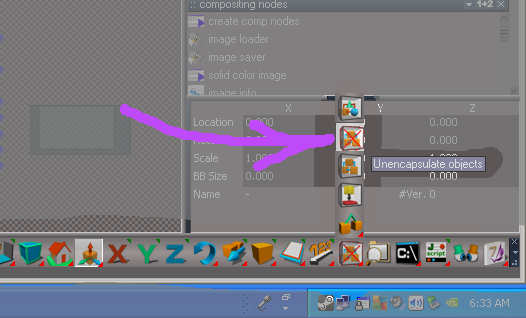
It works but I can't seem to find the un-encapsulate button, is it the same button as the "encapsulate in 3d" button?
-
clintonman
- Captain
- Posts: 5659
- Joined: 21 May 2009, 21:08
- Type the number ten into the box: 0
- Location: California
Re: Request - Merge Scene Option
Are you running with the Unofficial Patch installed? If so it is here:MikomDude wrote:It works but I can't seem to find the un-encapsulate button, is it the same button as the "encapsulate in 3d" button?
-
Steinie
- Captain
- Posts: 2958
- Joined: 21 May 2009, 17:38
- Type the number ten into the box: 10
Re: Request - Merge Scene Option
"Unofficial trueSpace Update" It fixes LOTS of issues!
After installing trueSpace I always install this next.
viewforum.php?f=55"
After installing trueSpace I always install this next.
viewforum.php?f=55"
-
MikomDude
- Captain
- Posts: 1930
- Joined: 04 Oct 2010, 11:12
- Type the number ten into the box: 0
- Location: The Hague, Netherlands
Re: Request - Merge Scene Option
I installed the Patch, however it still doesn't appear to work for me. I do remember seeing that button though, a long time ago when I first started with tS. I might have installed the patch then as well.
Thanks for the link Steinie =)
-
clintonman
- Captain
- Posts: 5659
- Joined: 21 May 2009, 21:08
- Type the number ten into the box: 0
- Location: California
Re: Request - Merge Scene Option
Try resetting the toolbar using the little triangle.
-
MikomDude
- Captain
- Posts: 1930
- Joined: 04 Oct 2010, 11:12
- Type the number ten into the box: 0
- Location: The Hague, Netherlands
Re: Request - Merge Scene Option
Wow!! It worked
You're the best, thanks!
-
bitkar
- Captain
- Posts: 2089
- Joined: 16 Mar 2010, 07:14
- Type the number ten into the box: 0
- Location: Czech Republic
Re: Request - Merge Scene Option
in modelspace just unzoom and hold shift (maybe ctrl) and drag mouse to select everything, then hit the Group as * button (edit: i meant glue as *). It will be grouped together and then you can save it.
Last edited by bitkar on 20 Jun 2011, 12:43, edited 1 time in total.
Michal aka bitkar
tS freak since tS2 (1998) and forever (tS7.61 modeler)
-
MikomDude
- Captain
- Posts: 1930
- Joined: 04 Oct 2010, 11:12
- Type the number ten into the box: 0
- Location: The Hague, Netherlands
Re: Request - Merge Scene Option
Will I be able to save it as a .cob file?
-
bitkar
- Captain
- Posts: 2089
- Joined: 16 Mar 2010, 07:14
- Type the number ten into the box: 0
- Location: Czech Republic
Re: Request - Merge Scene Option
in model space? sure. Select, glue, save. It will be just glued object cosisting of all object from scene. Just save it as whatever. Point is that its fast, you dont have to select every object manually. Shift + drag rectangle (start in space where there is no object) will work.MikomDude wrote:Will I be able to save it as a .cob file?
Michal aka bitkar
tS freak since tS2 (1998) and forever (tS7.61 modeler)
