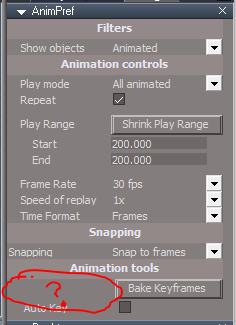
Script that adds automatic keyframing to workspace. A checkbox is added to the animation preferences. When AutoKey is checked keyframes are generated when you move, scale or rotate an item. It also works with dynapose. Does not work with the info panel since the autokey is widget based.
http://www.clintons3d.com/plugins/trues ... index.html"
Auto Keyframe Mode
-
clintonman

- Captain
- Posts: 5659
- Joined: 21 May 2009, 21:08
- Type the number ten into the box: 0
- Location: California
Auto Keyframe Mode
-
Draise

- Captain
- Posts: 3200
- Joined: 21 Sep 2009, 19:33
- Type the number ten into the box: 0
- Location: Bogota, Colombia
Re: Auto Keyframe Mode
REVOLUTIONARY!
-
clintonman
- Captain
- Posts: 5659
- Joined: 21 May 2009, 21:08
- Type the number ten into the box: 0
- Location: California
Re: Auto Keyframe Mode
Just discovered that it does not work with IK handles, but there's a workaround. Just the act of selecting any joint so the object nav widget appears is enough to make a key and if the widget is already active on a joint just clicking will create a key.
Also updated the script so it works with the new interpolation tools.
Also updated the script so it works with the new interpolation tools.
-
trueBlue

- Captain
- Posts: 5548
- Joined: 06 Jul 2009, 22:50
- Type the number ten into the box: 10
Re: Auto Keyframe Mode
Something you might want to consider or note, if a user did not install the unofficial upate, then the Bake Keyframes button would not work. Also the Bridge Synchronize button is missing.
- Attachments
-
- Capture.PNG (12.13 KiB) Viewed 6436 times
-
clintonman
- Captain
- Posts: 5659
- Joined: 21 May 2009, 21:08
- Type the number ten into the box: 0
- Location: California
Re: Auto Keyframe Mode
Noted and fixed. Thanks.trueBlue wrote:Something you might want to consider or note, if a user did not install the unofficial upate, then the Bake Keyframes button would not work. Also the Bridge Synchronize button is missing.

-
trueBlue
- Captain
- Posts: 5548
- Joined: 06 Jul 2009, 22:50
- Type the number ten into the box: 10
Re: Auto Keyframe Mode
Have not been using tS7.61 w/Unofficial Update until recently when I installed on my new Win10 PC.
One thing I noticed first is when tS was Maximized, I could see my desktop on the sides of tS.
So I selected the Properties of the tS7.exe and select Win8 in Compatibility Mode.
I installed your update for the tS Animation Preference panel adding Automatic Keyframing.
This is not working for me. So I reinstalled it. Still not working
After looking at your installer I noticed a few problems.
1.) Scripts/CustomCommands/KeyInterp is missing.
2.) The additions to the Select(s) Widgets had duplicate nodes that were added.
3.) As noted at your website this installation will not survive a Reset
Widgets.RsObj not saved.
animpref.RsObj not saved.
Update: Installed/Reinstalled all of the above.
I see one Keyframe added on the first time frame.
One thing I noticed first is when tS was Maximized, I could see my desktop on the sides of tS.
So I selected the Properties of the tS7.exe and select Win8 in Compatibility Mode.
I installed your update for the tS Animation Preference panel adding Automatic Keyframing.
This is not working for me. So I reinstalled it. Still not working
After looking at your installer I noticed a few problems.
1.) Scripts/CustomCommands/KeyInterp is missing.
2.) The additions to the Select(s) Widgets had duplicate nodes that were added.
3.) As noted at your website this installation will not survive a Reset
Widgets.RsObj not saved.
animpref.RsObj not saved.
Update: Installed/Reinstalled all of the above.
I see one Keyframe added on the first time frame.
-
clintonman
- Captain
- Posts: 5659
- Joined: 21 May 2009, 21:08
- Type the number ten into the box: 0
- Location: California
Re: Auto Keyframe Mode
I have a guess. The auto key and interpolation scripts were created at almost the same time. It could be that auto key script is dependent on the interpolation script.trueBlue wrote: 17 Jan 2018, 14:30 Have not been using tS7.61 w/Unofficial Update until recently when I installed on my new Win10 PC.
One thing I noticed first is when tS was Maximized, I could see my desktop on the sides of tS.
So I selected the Properties of the tS7.exe and select Win8 in Compatibility Mode.
I installed your update for the tS Animation Preference panel adding Automatic Keyframing.
This is not working for me. So I reinstalled it. Still not working
After looking at your installer I noticed a few problems.
1.) Scripts/CustomCommands/KeyInterp is missing.
2.) The additions to the Select(s) Widgets had duplicate nodes that were added.
3.) As noted at your website this installation will not survive a Reset
Widgets.RsObj not saved.
animpref.RsObj not saved.
Update: Installed/Reinstalled all of the above.
I see one Keyframe added on the first time frame.
-
trueBlue
- Captain
- Posts: 5548
- Joined: 06 Jul 2009, 22:50
- Type the number ten into the box: 10
Re: Auto Keyframe Mode
I installed your Keyframe Interpolation Toolbar for trueSpace7.61 which adds the missing KeyInterp script.
Your AutoKey script is calling Scripts/CustomCommands/KeyInterp/copyDefaultInterp
copyDefaultInterp is missing.
HTH
Your AutoKey script is calling Scripts/CustomCommands/KeyInterp/copyDefaultInterp
copyDefaultInterp is missing.
HTH
-
clintonman
- Captain
- Posts: 5659
- Joined: 21 May 2009, 21:08
- Type the number ten into the box: 0
- Location: California
Re: Auto Keyframe Mode
Finally got a chance to look at this. It looks like the installer doesn't properly check for an existing install, so you can get the duplicate nodes that stops it from working.trueBlue wrote: 17 Jan 2018, 14:30 Have not been using tS7.61 w/Unofficial Update until recently when I installed on my new Win10 PC.
One thing I noticed first is when tS was Maximized, I could see my desktop on the sides of tS.
So I selected the Properties of the tS7.exe and select Win8 in Compatibility Mode.
I installed your update for the tS Animation Preference panel adding Automatic Keyframing.
This is not working for me. So I reinstalled it. Still not working
After looking at your installer I noticed a few problems.
1.) Scripts/CustomCommands/KeyInterp is missing.
2.) The additions to the Select(s) Widgets had duplicate nodes that were added.
3.) As noted at your website this installation will not survive a Reset
Widgets.RsObj not saved.
animpref.RsObj not saved.
Update: Installed/Reinstalled all of the above.
I see one Keyframe added on the first time frame.
The KeyInterp script is not needed for this script to work, so that's ok.
I just finished the utility installers and the animation scripts are next so a fix is coming soon.
-
trueBlue
- Captain
- Posts: 5548
- Joined: 06 Jul 2009, 22:50
- Type the number ten into the box: 10
Re: Auto Keyframe Mode
Thanks but as said you might want to check your AutoKey script.
Code: Select all
	if(Node.ConExists("Preferences/AnimPref","autokey") && Node.Value("Preferences/AnimPref","autokey"))
	{
		RsAnim.SetKeyFrame(Node.FirstSelected(), RsTime.CurrentTime());
		if(Node.Exists("Scripts/CustomCommands/KeyInterp"))
			Activity.Run("Scripts/CustomCommands/KeyInterp/copyDefaultInterp");
Code: Select all
Activity.Run("Scripts/CustomCommands/KeyInterp/copyDefaultInterp");-
clintonman
- Captain
- Posts: 5659
- Joined: 21 May 2009, 21:08
- Type the number ten into the box: 0
- Location: California
Re: Auto Keyframe Mode
You lost me there. The copyDefaultInterp doesn't run unless the interpolation scripts are installed.trueBlue wrote: 21 Jan 2018, 22:39 Thanks but as said you might want to check your AutoKey script.
Code: Select all
	if(Node.ConExists("Preferences/AnimPref","autokey") && Node.Value("Preferences/AnimPref","autokey"))
	{
		RsAnim.SetKeyFrame(Node.FirstSelected(), RsTime.CurrentTime());
		if(Node.Exists("Scripts/CustomCommands/KeyInterp"))
			Activity.Run("Scripts/CustomCommands/KeyInterp/copyDefaultInterp");
Code: Select all
Activity.Run("Scripts/CustomCommands/KeyInterp/copyDefaultInterp");
-
trueBlue
- Captain
- Posts: 5548
- Joined: 06 Jul 2009, 22:50
- Type the number ten into the box: 10
Re: Auto Keyframe Mode
This code was taken from the AutoKey script dated 9/27/2013 downloaded again today from your site.
And with the above installation your Simple Script Command AutoKey(s) (that is installed in all the Select widgets, etc.) calls the AutoKey script.
I understand that if the KeyInterp script is not present it will not call the copyDefaultInterp script.
I was just thinking that was the problem. Maybe not. HTH
And with the above installation your Simple Script Command AutoKey(s) (that is installed in all the Select widgets, etc.) calls the AutoKey script.
I understand that if the KeyInterp script is not present it will not call the copyDefaultInterp script.
I was just thinking that was the problem. Maybe not. HTH
-
clintonman
- Captain
- Posts: 5659
- Joined: 21 May 2009, 21:08
- Type the number ten into the box: 0
- Location: California
Re: Auto Keyframe Mode
Gotcha, not a problem. It makes the key take the custom interpolation if the script is installed otherwise it just sets a key and leaves it.trueBlue wrote: 22 Jan 2018, 00:56 This code was taken from the AutoKey script dated 9/27/2013 downloaded again today from your site.
And with the above installation your Simple Script Command AutoKey calls the AutoKey script.
I understand that if the KeyInterp script is not present it will not call the copyDefaultInterp script.
I was just thinking that was the problem. Maybe not. HTH
-
clintonman
- Captain
- Posts: 5659
- Joined: 21 May 2009, 21:08
- Type the number ten into the box: 0
- Location: California
Re: Auto Keyframe Mode
The latest installer has been uploaded, so you can check it out.
http://clintons3d.com/plugins/truespace ... tokey.html
It's not 100% tested yet. The final test is I download, install it and make a youtube video. I have a few other utility scripts to run through the process first.
http://clintons3d.com/plugins/truespace ... tokey.html
It's not 100% tested yet. The final test is I download, install it and make a youtube video. I have a few other utility scripts to run through the process first.
-
trueBlue
- Captain
- Posts: 5548
- Joined: 06 Jul 2009, 22:50
- Type the number ten into the box: 10
Re: Auto Keyframe Mode
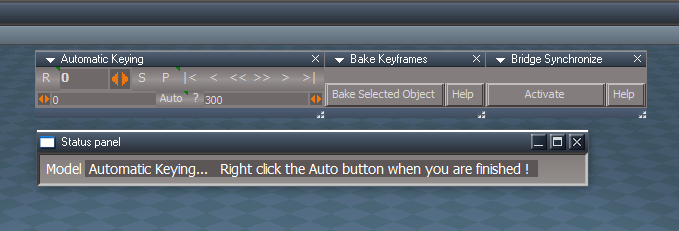
What do you think about this Automatic Keying panel for your update?
It has the ability to scrub the time line forward and reverse.
It has the ability to scrub the time line forward and reverse.
-
clintonman
- Captain
- Posts: 5659
- Joined: 21 May 2009, 21:08
- Type the number ten into the box: 0
- Location: California
Re: Auto Keyframe Mode
I don't see the advantages of it. Why use this instead of the timeline for scrubbing?trueBlue wrote: 01 Feb 2018, 02:34 What do you think about this Automatic Keying panel for your update?
It has the ability to scrub the time line forward and reverse.
Capture.PNG
It does make me think that a button on the animation toolbar might be a better place to control autokey than in the preferences panel.
-
trueBlue
- Captain
- Posts: 5548
- Joined: 06 Jul 2009, 22:50
- Type the number ten into the box: 10
Re: Auto Keyframe Mode
Well I got the idea when I watched your video. The thought was that you can drag the panel closer to where you are working. There is no scrubber on the Animation toolbar. The button on the panel starts your script and opens the AnimPerf panel in the Stack, and gives status when it is running. The panel also has a Help file just like the other Anim tools. It lessons the steps on initial startup, the movement from where your working to the bottom of the screen to where the timeline is. It is up to you it is ready if you want to try it.
-
clintonman
- Captain
- Posts: 5659
- Joined: 21 May 2009, 21:08
- Type the number ten into the box: 0
- Location: California
Re: Auto Keyframe Mode
You should make a video of it.trueBlue wrote: 01 Feb 2018, 04:02 Well I got the idea when I watched your video. The thought was that you can drag the panel closer to where you are working. There is no scrubber on the Animation toolbar. The button on the panel starts your script and opens the AnimPerf panel in the Stack, and gives status when it is running. The panel also has a Help file just like the other Anim tools. It lessons the steps on initial startup, the movement from where your working to the bottom of the screen to where the timeline is. It is up to you it is ready if you want to try it.
-
trueBlue
- Captain
- Posts: 5548
- Joined: 06 Jul 2009, 22:50
- Type the number ten into the box: 10
Re: Auto Keyframe Mode
I am not setup with a screen capture recorder on Win10, still trying to get my head straight with the newclintonman wrote: 01 Feb 2018, 06:18 You should make a video of it.
 OS.
OS. I think I still have the old screen capture recorder from BetaSpace, but I am not sure if it is compatible with Win10.
What OS do you use?
What screen capture recorder do you use?
Can NOT wait to try your Automatic Keyframing Mode.

-
trueBlue
- Captain
- Posts: 5548
- Joined: 06 Jul 2009, 22:50
- Type the number ten into the box: 10
Re: Auto Keyframe Mode
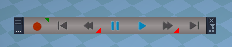
clintonman wrote: 01 Feb 2018, 03:36 It does make me think that a button on the animation toolbar might be a better place to control autokey than in the preferences panel.
 I included the RsAnimPlugin.rsx in the Unofficial Update. There is no Prototype installed though.

- RsAninmPlugin.PNG (9.02 KiB) Viewed 5975 times
- AnimBar.PNG (7.31 KiB) Viewed 5970 times
Code: Select all
WindowsManager.CloseToolbar("AnimationBar");
WindowsManager.OpenToolbarFromPrototype("AnimationBar", 25, 25, 25, 25);
WindowsManager.Activate();
WindowsManager.UpdateWindowsStructure();-
clintonman
- Captain
- Posts: 5659
- Joined: 21 May 2009, 21:08
- Type the number ten into the box: 0
- Location: California
Re: Auto Keyframe Mode
This year I just started using OBS for screen capture running on win10. It creates mp4 files that I upload to youtube.trueBlue wrote: 01 Feb 2018, 13:53I am not setup with a screen capture recorder on Win10, still trying to get my head straight with the newclintonman wrote: 01 Feb 2018, 06:18 You should make a video of it.
I think I still have the old screen capture recorder from BetaSpace, but I am not sure if it is compatible with Win10.
What OS do you use?
What screen capture recorder do you use?
Can NOT wait to try your Automatic Keyframing Mode.
https://obsproject.com/
-
clintonman
- Captain
- Posts: 5659
- Joined: 21 May 2009, 21:08
- Type the number ten into the box: 0
- Location: California
Re: Auto Keyframe Mode
That's interesting, I forgot about the RsAnimPlugin.rsx toolbar and procedural clip node.trueBlue wrote: 01 Feb 2018, 14:01clintonman wrote: 01 Feb 2018, 03:36 It does make me think that a button on the animation toolbar might be a better place to control autokey than in the preferences panel.
RsAninmPlugin.PNG
I also included the Prototype for the AnimationBar in the Unofficial Update.
AnimBar.PNGCode: Select all
WindowsManager.CloseToolbar("AnimationBar");
WindowsManager.OpenToolbarFromPrototype("AnimationBar", 25, 25, 25, 25);
WindowsManager.Activate();
WindowsManager.UpdateWindowsStructure();
-
trueBlue
- Captain
- Posts: 5548
- Joined: 06 Jul 2009, 22:50
- Type the number ten into the box: 10
Re: Auto Keyframe Mode
Thanks for the link. I will check it out.clintonman wrote: 01 Feb 2018, 15:36 This year I just started using OBS for screen capture running on win10. It creates mp4 files that I upload to youtube.
https://obsproject.com/
-
trueBlue
- Captain
- Posts: 5548
- Joined: 06 Jul 2009, 22:50
- Type the number ten into the box: 10
Re: Auto Keyframe Mode
Is this still valid in Autokey.RsObj
I do not see copyDefaultInterp in the KeyInterp.RsObj
Code: Select all
Activity.Run("Scripts/CustomCommands/KeyInterp/[b]copyDefaultInterp[/b]");-
clintonman
- Captain
- Posts: 5659
- Joined: 21 May 2009, 21:08
- Type the number ten into the box: 0
- Location: California
Re: Auto Keyframe Mode
I don't see it either, so it's either not valid or there's a bug caused by a missing command node.trueBlue wrote: 14 Oct 2019, 22:27 Is this still valid in Autokey.RsObjI do not see copyDefaultInterp in the KeyInterp.RsObjCode: Select all
Activity.Run("Scripts/CustomCommands/KeyInterp/[b]copyDefaultInterp[/b]");