This script will install a button that toggles the visibility of a scene object. It's equivalent to show object render attributes, select advanced aspect and clicking the Invisible checkbox. Right click the button will open the Object Render Attributes in the Panel tab instead of the Settings tab and only one render attributes will display at one time. There was a v1.0 version of the script. This adds the right click function and fixes a bug where the Invisibility check was not initialized causing a script error.
http://www.clintons3d.com/plugins/trues ... index.html"
Object Visibility Toggle
-
clintonman

- Captain
- Posts: 5659
- Joined: 21 May 2009, 21:08
- Type the number ten into the box: 0
- Location: California
Object Visibility Toggle
-
trueBlue

- Captain
- Posts: 5548
- Joined: 06 Jul 2009, 22:50
- Type the number ten into the box: 10
Re: Object Visibility Toggle
Nice one Clinton!
Almost perfect with the exception of an error when using your script with NOTHING selected.
Also the Camera, SpotLight, and Projector have an Object Hider node that is connected to the ORA's Invisible attribute which unless disconnected you are not able to hide these objects.
Almost perfect with the exception of an error when using your script with NOTHING selected.
Also the Camera, SpotLight, and Projector have an Object Hider node that is connected to the ORA's Invisible attribute which unless disconnected you are not able to hide these objects.
-
spacekdet

- Captain
- Posts: 1810
- Joined: 27 May 2009, 15:00
- Type the number ten into the box: 10
- Location: On the day shift at the Utility Muffin Research Kitchen
Re: Object Visibility Toggle
thanks Clintonman, I miss my invisibility hotkey, this will eliminate a lot of extra clicks.
trueBlue, that's very Zen-like... desiring to make nothing invisible.
trueBlue, that's very Zen-like... desiring to make nothing invisible.
-
trueBlue
- Captain
- Posts: 5548
- Joined: 06 Jul 2009, 22:50
- Type the number ten into the box: 10
Re: Object Visibility Toggle
Ah... but I was suggesting to make the error INVISIBLE.
-
Rhino169

- Senior Chief Petty Officer
- Posts: 201
- Joined: 29 Nov 2009, 03:15
Re: Object Visibility Toggle
Works Great! Thanks! 
-
clintonman
- Captain
- Posts: 5659
- Joined: 21 May 2009, 21:08
- Type the number ten into the box: 0
- Location: California
Re: Object Visibility Toggle
That made me laugh.spacekdet wrote:...
trueBlue, that's very Zen-like... desiring to make nothing invisible.

@trueBlue - I'll look into it
-
Steinie

- Captain
- Posts: 2958
- Joined: 21 May 2009, 17:38
- Type the number ten into the box: 10
Re: Object Visibility Toggle
Can you select multiple objects at once to make invisible?
-
trueBlue
- Captain
- Posts: 5548
- Joined: 06 Jul 2009, 22:50
- Type the number ten into the box: 10
Re: Object Visibility Toggle
FYI: In your showObjRendAttr.rsobj script you might want to remove the ORA from selORA.
Node.ExportConnector(selORA, "RenderAttributes", "", 1, 1);
Node.ExportConnector(selORA, "RenderAttributes", "", 1, 1);
-
clintonman
- Captain
- Posts: 5659
- Joined: 21 May 2009, 21:08
- Type the number ten into the box: 0
- Location: California
Re: Object Visibility Toggle
No, only works on one object at a time.Steinie wrote:Can you select multiple objects at once to make invisible?
-
clintonman
- Captain
- Posts: 5659
- Joined: 21 May 2009, 21:08
- Type the number ten into the box: 0
- Location: California
Re: Object Visibility Toggle
Why?trueBlue wrote:FYI: In your showObjRendAttr.rsobj script you might want to remove the ORA from selORA.
Node.ExportConnector(selORA, "RenderAttributes", "", 1, 1);
Code: Select all
sel = Node.FirstSelected();
selORA = sel + "/Object Render Attributes";-
trueBlue
- Captain
- Posts: 5548
- Joined: 06 Jul 2009, 22:50
- Type the number ten into the box: 10
Re: Object Visibility Toggle
Hummm the script that I downloaded from your site is missing:
selORA = sel + "/Object Render Attributes";
selORA = sel + "/Object Render Attributes";
-
clintonman
- Captain
- Posts: 5659
- Joined: 21 May 2009, 21:08
- Type the number ten into the box: 0
- Location: California
Re: Object Visibility Toggle
I just downloaded to check it out and it's in there. Try downloading again.trueBlue wrote:Hummm the script that I downloaded from your site is missing:
selORA = sel + "/Object Render Attributes";
-
trueBlue
- Captain
- Posts: 5548
- Joined: 06 Jul 2009, 22:50
- Type the number ten into the box: 10
Re: Object Visibility Toggle
Ok... sorry about that.
I really like how you are showing the ORA panel. Very nice!
Edit: I redownloaded again and notice the missing command in your showObjRendAttr.rsobj script:
selORA = sel + "/Object Render Attributes";
HTH
I really like how you are showing the ORA panel. Very nice!
Edit: I redownloaded again and notice the missing command in your showObjRendAttr.rsobj script:
selORA = sel + "/Object Render Attributes";
HTH
-
clintonman
- Captain
- Posts: 5659
- Joined: 21 May 2009, 21:08
- Type the number ten into the box: 0
- Location: California
Re: Object Visibility Toggle
Just found that myself. It was a testing error since I was mostly testing the visible/invisible script so when I added the show ORA panel all the test objects already had the node. I'll put up a fix later along with your other suggestions.trueBlue wrote:Ok... sorry about that.
I really like how you are showing the ORA panel. Very nice!
Edit: I redownloaded again and notice the missing command in your showObjRendAttr.rsobj script:
selORA = sel + "/Object Render Attributes";
HTH
-
trueBlue
- Captain
- Posts: 5548
- Joined: 06 Jul 2009, 22:50
- Type the number ten into the box: 10
Re: Object Visibility Toggle
How in heck do you toggle the Invisible attribute on and off from the same script?
Last edited by trueBlue on 15 Jan 2010, 22:27, edited 3 times in total.
-
clintonman
- Captain
- Posts: 5659
- Joined: 21 May 2009, 21:08
- Type the number ten into the box: 0
- Location: California
Re: Object Visibility Toggle
Update:
check for WldMatrix
multiple selections
fix selORA error in right click show object attributes
I don't know how to add the name to the ORA node.
Camera, Spot and Projector require 2 clicks to make visible again. One click for invisible is ok.
check for WldMatrix
multiple selections
fix selORA error in right click show object attributes
I don't know how to add the name to the ORA node.
Camera, Spot and Projector require 2 clicks to make visible again. One click for invisible is ok.
- Attachments
-
- install Visibility Toggle Button v1.3 temp.zip
- (18.26 KiB) Downloaded 262 times
-
trueBlue
- Captain
- Posts: 5548
- Joined: 06 Jul 2009, 22:50
- Type the number ten into the box: 10
Re: Object Visibility Toggle
I have been studying how tS761 applies ORA to objects.
The command tS761 uses is:
D3DView.ShowRenderAttribsForObject('','');
I am fairly sure that this command loads the ObjectAttributes.rsobj from the preobjects folder into the object and Exports the RenderAttributes attribute out for a single (Selected) object.
With grouped objects (3D Encapsulated), this command loads the ObjectAttributes.rsobj from the preobjects folder into the encapsulater as well as a RenderAttributes.rsobj into all of the encapsulated objects with both of it's attributes Exported out. The ORA panel's RenderAttributes attribute is connected to all of the encapsulated object's Input Attributes attribute which was exported out from the RenderAttributes.rsobj for each object. I also note with regards to 3D Encapsulated objects, if any of the objects have had the ORA applied before being 3D Encapsulated, and then appling ORA to the group, then it's ORA panel still exist but not used. errrrrr!
@ Clinton: So I think, given what I think is true above and with 3D Encapsulated objects, using the command would be best verses coping your own ORA panel. I say this with reservation though as I have not tested it with your scripting.
Other observations:
All Workspace's Lights and Cameras already have their own ORA panel with Receive and Cast Shadows unchecked which is different from all other objects. This is something I need to fix in my Link Editor Navigator script. Oooops!
Cameras, Spot lights, and Projector lights have an additional Object hider.rsobj hooked up to the ORA panel's Invisible attribute, making them compatible with Model's UI.
The command tS761 uses is:
D3DView.ShowRenderAttribsForObject('','');
I am fairly sure that this command loads the ObjectAttributes.rsobj from the preobjects folder into the object and Exports the RenderAttributes attribute out for a single (Selected) object.
With grouped objects (3D Encapsulated), this command loads the ObjectAttributes.rsobj from the preobjects folder into the encapsulater as well as a RenderAttributes.rsobj into all of the encapsulated objects with both of it's attributes Exported out. The ORA panel's RenderAttributes attribute is connected to all of the encapsulated object's Input Attributes attribute which was exported out from the RenderAttributes.rsobj for each object. I also note with regards to 3D Encapsulated objects, if any of the objects have had the ORA applied before being 3D Encapsulated, and then appling ORA to the group, then it's ORA panel still exist but not used. errrrrr!
@ Clinton: So I think, given what I think is true above and with 3D Encapsulated objects, using the command would be best verses coping your own ORA panel. I say this with reservation though as I have not tested it with your scripting.
Other observations:
All Workspace's Lights and Cameras already have their own ORA panel with Receive and Cast Shadows unchecked which is different from all other objects. This is something I need to fix in my Link Editor Navigator script. Oooops!
Cameras, Spot lights, and Projector lights have an additional Object hider.rsobj hooked up to the ORA panel's Invisible attribute, making them compatible with Model's UI.
-
trueBlue
- Captain
- Posts: 5548
- Joined: 06 Jul 2009, 22:50
- Type the number ten into the box: 10
Re: Object Visibility Toggle
@ Clinton
Here is what I came up with and should include everything except toggling Invisible On and Off from one script.
I still do not understand how you accomplish that.
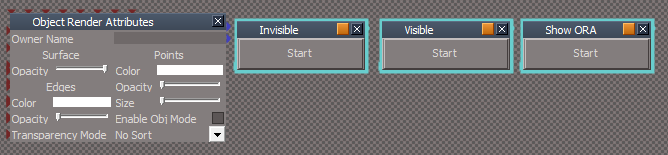
You will have to replace the ObjectAttributes.RsObj in your preobjects folder with the included ObjectAttributes.RsObj which has the Owner Name attribute.
HTH
Supports:
Lights
Cameras
Single objects
Mutiple objects
3D Encapsulted objects
ORA panel with Owner's name <---- "Aalways wanted to do that"
Here is what I came up with and should include everything except toggling Invisible On and Off from one script.
I still do not understand how you accomplish that.
You will have to replace the ObjectAttributes.RsObj in your preobjects folder with the included ObjectAttributes.RsObj which has the Owner Name attribute.
HTH
Supports:
Lights
Cameras
Single objects
Mutiple objects
3D Encapsulted objects
ORA panel with Owner's name <---- "Aalways wanted to do that"
- Attachments
-
-
- ORA.zip
- (13.44 KiB) Downloaded 243 times
-
clintonman
- Captain
- Posts: 5659
- Joined: 21 May 2009, 21:08
- Type the number ten into the box: 0
- Location: California
Re: Object Visibility Toggle
Thanks, I'll see about putting it all together and I think I see why you say it can't be done in one script. The one script trick only works with simple non-3D encapsulated objects all it does is copy and link up an ORA. It doesn't follow heirarchies like the "D3DView.ShowRenderAttribsForObject('','')" command. I don't do a lot of 3d encaps so I never even noticed.trueBlue wrote:@ Clinton
Here is what I came up with and should include everything except toggling Invisible On and Off from one script.
I still do not understand how you accomplish that.
You will have to replace the ObjectAttributes.RsObj in your preobjects folder with the included ObjectAttributes.RsObj which has the Owner Name attribute.
HTH
Supports:
Lights
Cameras
Single objects
Mutiple objects
3D Encapsulted objects
ORA panel with Owner's name <---- "Aalways wanted to do that"
How did you add the ownername to the node? Evil sorcery?
-
trueBlue
- Captain
- Posts: 5548
- Joined: 06 Jul 2009, 22:50
- Type the number ten into the box: 10
Re: Object Visibility Toggle
You can use the tS761 command Node.ConCreate([in] BSTR szNodeName,[in] BSTR szNewConName,[in] BSTR szNewType,[in] VARIANT vNewflags)clintonman wrote: How did you add the ownername to the node? Evil sorcery?
which creates one on the Exp aspect. But I am not sure how to use the VARIANT and I was not able to create it on the Default aspect. So to answer your question, I created the Owner_Name manually with the Panel Editor. BTW adding/replacing this customized ORA panel to the preobjects folder and using the D3DView.ShowRenderAttribsForObject('','') command was the only way to get the this panel to show in every aspect of the script, more importantly with the 3D Encapsulated objects.
Have you tried your toggling script using the D3DView.ShowRenderAttribsForObject('','') command? Since all of the hierarchies magic is in that command, I thought you might have better success. Which is why I mentioned it to you. Hope I did not give you a headache with all this Voodoo!
-
clintonman
- Captain
- Posts: 5659
- Joined: 21 May 2009, 21:08
- Type the number ten into the box: 0
- Location: California
Re: Object Visibility Toggle
Oh, I see. That's funny, I've never noticed the Add button for the attributes. For some reason it was just invisible to me. Attached is the latest.trueBlue wrote:You can use the tS761 command Node.ConCreate([in] BSTR szNodeName,[in] BSTR szNewConName,[in] BSTR szNewType,[in] VARIANT vNewflags)clintonman wrote: How did you add the ownername to the node? Evil sorcery?
which creates one on the Exp aspect. But I am not sure how to use the VARIANT and I was not able to create it on the Default aspect. So to answer your question, I created the Owner_Name manually with the Panel Editor. BTW adding/replacing this customized ORA panel to the preobjects folder and using the D3DView.ShowRenderAttribsForObject('','') command was the only way to get the this panel to show in every aspect of the script, more importantly with the 3D Encapsulated objects.
Have you tried your toggling script using the D3DView.ShowRenderAttribsForObject('','') command? Since all of the hierarchies magic is in that command, I thought you might have better success. Which is why I mentioned it to you. Hope I did not give you a headache with all this Voodoo!
It works with hierarchies, the visible/invisible is not "sticky" anymore and it adds a second button to copy object render attributes. I think it has everything you mentioned. I just need to add the custom Object Render Attribute node to the installer.
To copy render attributes select the source object then ctrl-select the target objects and press the button copy attributes button.
- Attachments
-
- install Visibility Toggle Button v1.5.zip
- (20.43 KiB) Downloaded 250 times
-
trueBlue
- Captain
- Posts: 5548
- Joined: 06 Jul 2009, 22:50
- Type the number ten into the box: 10
Re: Object Visibility Toggle
Getting much closer.
Issues that I am running across so far:
* Cameras - Invisible works except in mutiple selections. Visible does not except occasionally (glitch) when multiple objects/cameras are selected and only one becomes Visible.
* Objects with existing ORA panel - I deleted the RenderAttributes attribute and the ORA panel first before running the ORA command. This is important for the new ORA panel with OwnerName and to eliminate Duplicate ORA panels which will cause problems.
* ToggleVisibilty script - Needs the OwnerName command here verses on the Show script.
* 3D Encapsulated objects. - I deleted the InputAttributes and RenderAttributes attributes. This is important in case a user applies the ORA command to one of the encapsulated objects.
* Object Hider - I Disconnect/ConnectTo from the ORA's Invisible attribute for Invisible/Visible. I note that you are hooking up the the Layer Index attribute and not Disconnecting it. Not sure of the consequences of this.
HTH and I will be running additional test.
Issues that I am running across so far:
* Cameras - Invisible works except in mutiple selections. Visible does not except occasionally (glitch) when multiple objects/cameras are selected and only one becomes Visible.
* Objects with existing ORA panel - I deleted the RenderAttributes attribute and the ORA panel first before running the ORA command. This is important for the new ORA panel with OwnerName and to eliminate Duplicate ORA panels which will cause problems.
* ToggleVisibilty script - Needs the OwnerName command here verses on the Show script.
* 3D Encapsulated objects. - I deleted the InputAttributes and RenderAttributes attributes. This is important in case a user applies the ORA command to one of the encapsulated objects.
* Object Hider - I Disconnect/ConnectTo from the ORA's Invisible attribute for Invisible/Visible. I note that you are hooking up the the Layer Index attribute and not Disconnecting it. Not sure of the consequences of this.
HTH and I will be running additional test.
-
clintonman
- Captain
- Posts: 5659
- Joined: 21 May 2009, 21:08
- Type the number ten into the box: 0
- Location: California
Re: Object Visibility Toggle
Well I've taken it as far as I can for now. Not much different in this "final version". If anyone(trueBlue?) wants to continue this project feel free and watch out for the Object hider node. It's a real pain in the butt.
The object hider connection to the layer index was a programming error and has been removed.
No progress on 3D encapsulated node processing.
Added the owner name to the visibility toggle script.
Objects that have the Object hider node will go invisible but the script won't make them visible again. Click on these items in the LE or scene view to make them visible again.
No installer for the custom Object Render Attribute node, it will have to be added manually.
http://www.clintons3d.com/plugins/trues ... index.html"
The object hider connection to the layer index was a programming error and has been removed.
No progress on 3D encapsulated node processing.
Added the owner name to the visibility toggle script.
Objects that have the Object hider node will go invisible but the script won't make them visible again. Click on these items in the LE or scene view to make them visible again.
No installer for the custom Object Render Attribute node, it will have to be added manually.
http://www.clintons3d.com/plugins/trues ... index.html"
-
trueBlue
- Captain
- Posts: 5548
- Joined: 06 Jul 2009, 22:50
- Type the number ten into the box: 10
Re: Object Visibility Toggle
Sorry Clinton, I tried several times with no luck with a toggling script.
The best I could come with is two scripts, one for Visible and another for Invisible.
Wouldn't it be better to have two buttons for your toolbar?
BTW... you might want to change the description on your web page for the Un Look At script.
The best I could come with is two scripts, one for Visible and another for Invisible.
Wouldn't it be better to have two buttons for your toolbar?
BTW... you might want to change the description on your web page for the Un Look At script.
-
clintonman
- Captain
- Posts: 5659
- Joined: 21 May 2009, 21:08
- Type the number ten into the box: 0
- Location: California
Re: Object Visibility Toggle
Oops, thanks.trueBlue wrote:Sorry Clinton, I tried several times with no luck with a toggling script.
The best I could come with is two scripts, one for Visible and another for Invisible.
Wouldn't it be better to have two buttons for your toolbar?
BTW... you might want to change the description on your web page for the Un Look At script.
-
trueBlue
- Captain
- Posts: 5548
- Joined: 06 Jul 2009, 22:50
- Type the number ten into the box: 10
Re: Object Visibility Toggle
Hey Clinton?
1.) Here is a script from another project that I updated to included everything that was mentioned in this thread. With one exception, I have not figured out how to re Connect the Object Hider in Lights and Cameras, if the Invisible attribute is not checked.
2.) On a different note, is it possible to create a script that runs scriptA or scriptB if a certain Existing attribute is Checked/Unchecked?
Hope that makes since, more or less like a toggling script?
Thanks in advance!
1.) Here is a script from another project that I updated to included everything that was mentioned in this thread. With one exception, I have not figured out how to re Connect the Object Hider in Lights and Cameras, if the Invisible attribute is not checked.
2.) On a different note, is it possible to create a script that runs scriptA or scriptB if a certain Existing attribute is Checked/Unchecked?
Hope that makes since, more or less like a toggling script?
Thanks in advance!
- Attachments
-
- New Compressed (zipped) Folder0c7a.zip
- (17.17 KiB) Downloaded 311 times
-
clintonman
- Captain
- Posts: 5659
- Joined: 21 May 2009, 21:08
- Type the number ten into the box: 0
- Location: California
Re: Object Visibility Toggle
For 2) It should be possible by adding 2 Control Flow attributes to a script node and then choosing between them. That's how I make the face snapping script wait for a selection.trueBlue wrote:Hey Clinton?
1.) Here is a script from another project that I updated to included everything that was mentioned in this thread. With one exception, I have not figured out how to re Connect the Object Hider in Lights and Cameras, if the Invisible attribute is not checked.
2.) On a different note, is it possible to create a script that runs scriptA or scriptB if a certain Existing attribute is Checked/Unchecked?
Hope that makes since, more or less like a toggling script?
Thanks in advance!
Code: Select all
if(cont)
		params.ConValue("continue") = 1;
	else
params.ConValue("loop") = 1;-
trueBlue
- Captain
- Posts: 5548
- Joined: 06 Jul 2009, 22:50
- Type the number ten into the box: 10
Re: Object Visibility Toggle
I figured out a way to toggle two scripts in a different way.
- Attachments
-
- Hide n Show.zip
- (8.79 KiB) Downloaded 282 times