tSX plug-in: tSX Horn
-
Fenerit

- Senior Chief Petty Officer
- Posts: 173
- Joined: 21 Nov 2011, 19:19
- Type the number ten into the box: 9
tSX plug-in: tSX Horn
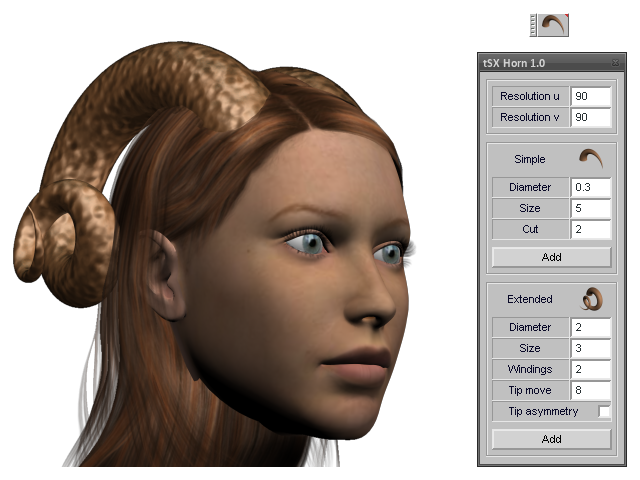
Version 1.0. tSX to make horns/teeth/claws and such fantasy stuffs. Simplyfied the one-fold windings' direction envelope; do use the mirror tool to change it.
Extract with path inside the "..\Tsx\" folder.
-
Emmanuel

- Chief Warrant Officer
- Posts: 670
- Joined: 14 Jun 2009, 06:47
Re: tSX plug-in: tSX Horn
Good tsx idea ! Thank you Fenerit.
Note that user must load the plugin and close trueSpace before using the plugin for the first time (at least with my Windows 8 configuration). Otherwise, trueSpace crashes if I try to use the plugin just after loading it.
Note that user must load the plugin and close trueSpace before using the plugin for the first time (at least with my Windows 8 configuration). Otherwise, trueSpace crashes if I try to use the plugin just after loading it.
-
Fenerit
- Senior Chief Petty Officer
- Posts: 173
- Joined: 21 Nov 2011, 19:19
- Type the number ten into the box: 9
Re: tSX plug-in: tSX Horn
Thanks for the feedback. Absolutely I do not have that issue in my tS 6.6 Xp32. Always bear in mind that these plug-in are developed for at least the trueSpace 6.6 version and NOT for the tS 7.x modelside. A half an idea could be that no .ini. file is shipped with the pack, since it is created at the start with values set within the MFC costructors. I know that 6.6 points to TSX folder through "..\Truespace\TSX\" path, while tS 7.x through "..\Truespace\tS\TSX\"; you could try to create a new folder named TSX inside "..\Truespace\" folder in which to place these plug-ins. Please, do tell me what happens in this case.Emmanuel wrote:Good tsx idea ! Thank you Fenerit.
Note that user must load the plugin and close trueSpace before using the plugin for the first time (at least with my Windows 8 configuration). Otherwise, trueSpace crashes if I try to use the plugin just after loading it.
-
Fenerit
- Senior Chief Petty Officer
- Posts: 173
- Joined: 21 Nov 2011, 19:19
- Type the number ten into the box: 9
Re: tSX plug-in: tSX Horn
Please Emmanuel, do try this workaround ex-novo and tell me if it is working from start.
-
Cellulo

- Lieutenant
- Posts: 927
- Joined: 27 Sep 2012, 07:48
- Type the number ten into the box: 9
- Location: France
Re: tSX plug-in: tSX Horn
Thanks fenerit, really cool plugin.
EDIT: for me the plugin working fine under 7.6 Modelside.
EDIT: for me the plugin working fine under 7.6 Modelside.
Last edited by Cellulo on 03 Nov 2015, 09:46, edited 2 times in total.
-
BNG

- Chief Warrant Officer
- Posts: 684
- Joined: 16 Oct 2009, 03:26
- Type the number ten into the box: 0
- Location: Texas
Re: tSX plug-in: tSX Horn
Thanks Fen, it seems to work okay on TS 7.61 Beta 8 model side. How are you at compiling TSX based model importers/exporters for TS? I've been looking all over the web for a Softimage XSI import and/or export. Currently, I've been exporting X models out of TS to another application called 3d Exploration to convert the X to an older version 1.5 of XSI. The format is a simple ASCII text based file write out, but it's not optimized like the original 1.5 version released by Softimage itself. Leroy
Casual Truespace 3D modeling hobbyist. My Truespace blog and simple 3d Modeling Tutorials for Casual Model Makers.
-
Fenerit
- Senior Chief Petty Officer
- Posts: 173
- Joined: 21 Nov 2011, 19:19
- Type the number ten into the box: 9
Re: tSX plug-in: tSX Horn
Hi Leroy: actually I'm sick in those matters, expecially in the XSI case, since I never have had it. Currently I'm exploring the FreeCAD features, which seems to allows the program to be used like a "library" of its own for others 2D/3D packages through the underlying Python scripting language.
-
bitkar

- Captain
- Posts: 2089
- Joined: 16 Mar 2010, 07:14
- Type the number ten into the box: 0
- Location: Czech Republic
Re: tSX plug-in: tSX Horn
great to see new tsx after years of dark trying to get the best out of the old plugins not even for tS7 or 6.6
thank you.
thank you.
Michal aka bitkar
tS freak since tS2 (1998) and forever (tS7.61 modeler)
tS freak since tS2 (1998) and forever (tS7.61 modeler)
-
Emmanuel
- Chief Warrant Officer
- Posts: 670
- Joined: 14 Jun 2009, 06:47
Re: tSX plug-in: tSX Horn
Same issue : trueSpace crashes if the tsx is ran just after loading. I tested in tS6.6 also. Same thing.Fenerit wrote:Please Emmanuel, do try this workaround ex-novo and tell me if it is working from start.
-
BNG
- Chief Warrant Officer
- Posts: 684
- Joined: 16 Oct 2009, 03:26
- Type the number ten into the box: 0
- Location: Texas
Re: tSX plug-in: tSX Horn
Sounds like it could be a good option. How's the UI? I love simple and if it could still be used with TS that would be awesome. Softimage will be missed by many and I liked it far better then Max, but even SI was far more complex then TS ever was.Fenerit wrote:Hi Leroy: actually I'm sick in those matters, expecially in the XSI case, since I never have had it. Currently I'm exploring the FreeCAD features, which seems to allows the program to be used like a "library" of its own for others 2D/3D packages through the underlying Python scripting language.
Casual Truespace 3D modeling hobbyist. My Truespace blog and simple 3d Modeling Tutorials for Casual Model Makers.
-
Fenerit
- Senior Chief Petty Officer
- Posts: 173
- Joined: 21 Nov 2011, 19:19
- Type the number ten into the box: 9
Re: tSX plug-in: tSX Horn
The UI is simple as long as one is not shocked by its icons' prompting.  An accomplished tree-like interface.
An accomplished tree-like interface.-
marcel

- Captain
- Posts: 2247
- Joined: 21 May 2009, 19:52
- Type the number ten into the box: 0
- Location: paris - France
Re: tSX plug-in: tSX Horn
Good but...
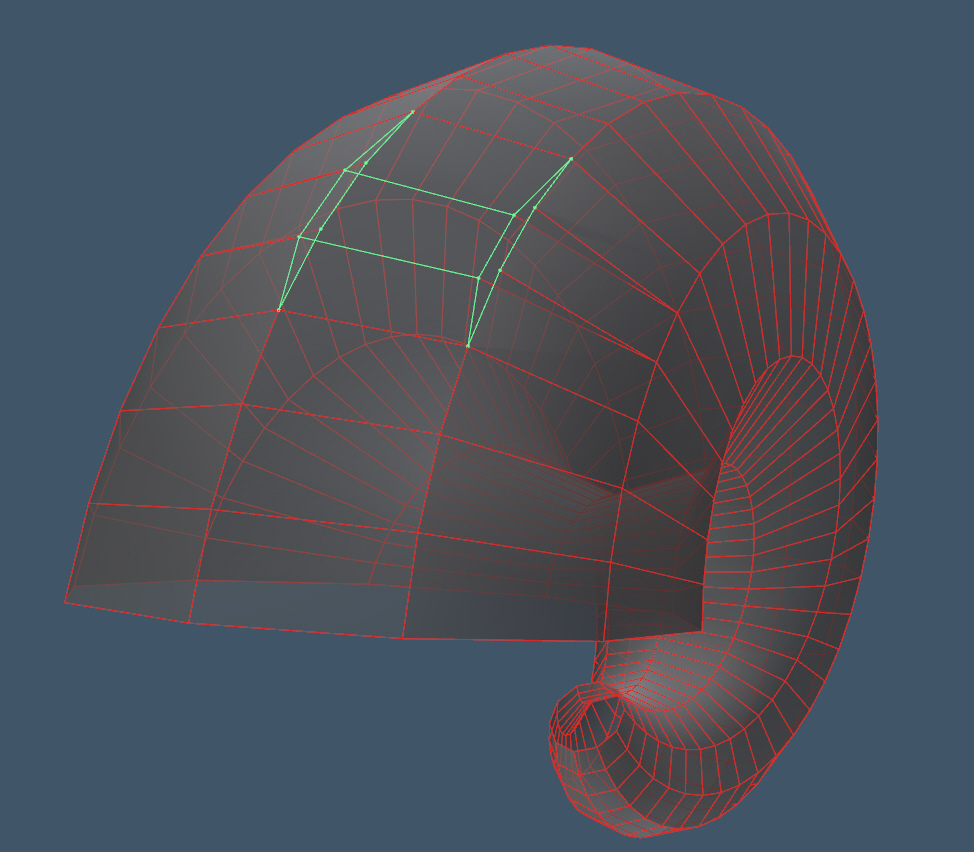
The geometry is totally bad. Impossible to edit. Each face are duplicated or not correctly connected.
Create a low poly object and try sds. You will see the error.
The geometry is totally bad. Impossible to edit. Each face are duplicated or not correctly connected.
Create a low poly object and try sds. You will see the error.
- Attachments
-
Design - illustration - Animation
http://www.crea-vision.fr
http://www.crea-vision.fr
-
Fenerit
- Senior Chief Petty Officer
- Posts: 173
- Joined: 21 Nov 2011, 19:19
- Type the number ten into the box: 9
Re: tSX plug-in: tSX Horn
Thank you for the feedback. Indeed - like said in the tSXSpring thread - these plug-ins are not perfect yet and I'm still working on them for what concern subdivison and/or point edit at low resolution. This latter is tied to the 0-2pi range and some values would naturally cross-sect the mesh. Because originally I wished the mesh always rounding close, I've experimentized a bit with the computefaceadjacency and its result. These are parametric surfaces and are suited to work best with the jewel deform tools (at least for now).
-
Fenerit
- Senior Chief Petty Officer
- Posts: 173
- Joined: 21 Nov 2011, 19:19
- Type the number ten into the box: 9
Re: tSX plug-in: tSX Horn
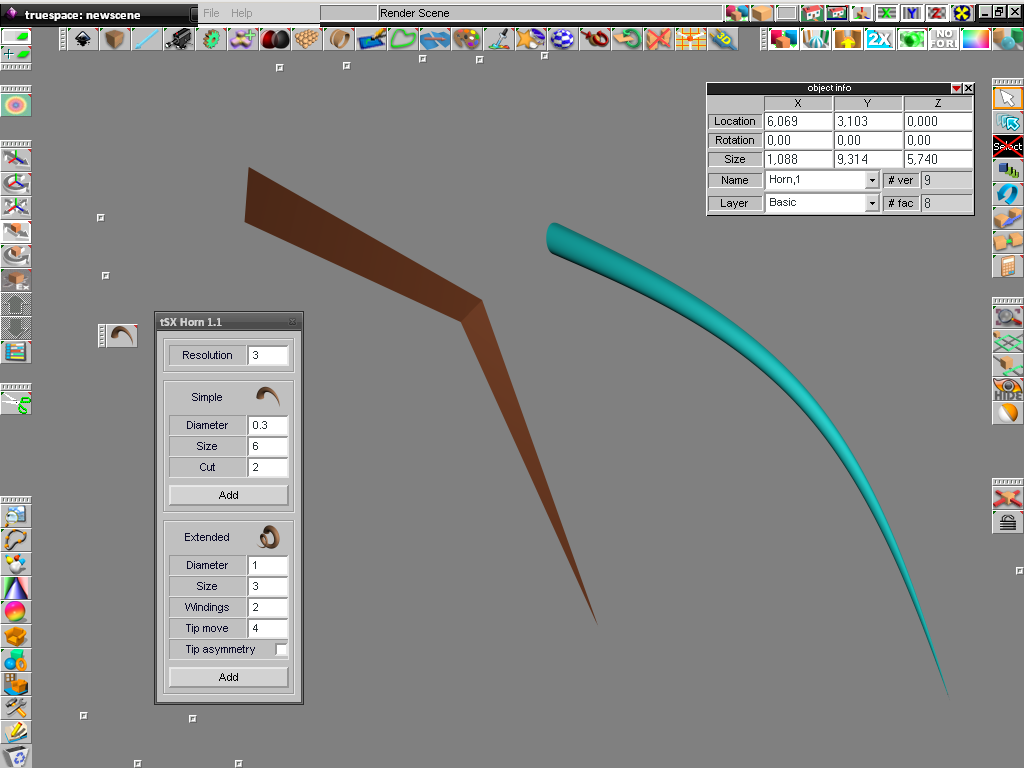
Version 1.1. This version fix the issues pointed out by Marcel. Changed method, the resolutions are now unifyed under one. Below a screen-dump where on the left side there is a horn with the least resolution and on the right its SDS refinement.
There is also a tS 6.6 version inside.
Still I'm working on these...
-
Fenerit
- Senior Chief Petty Officer
- Posts: 173
- Joined: 21 Nov 2011, 19:19
- Type the number ten into the box: 9
Re: tSX plug-in: tSX Horn
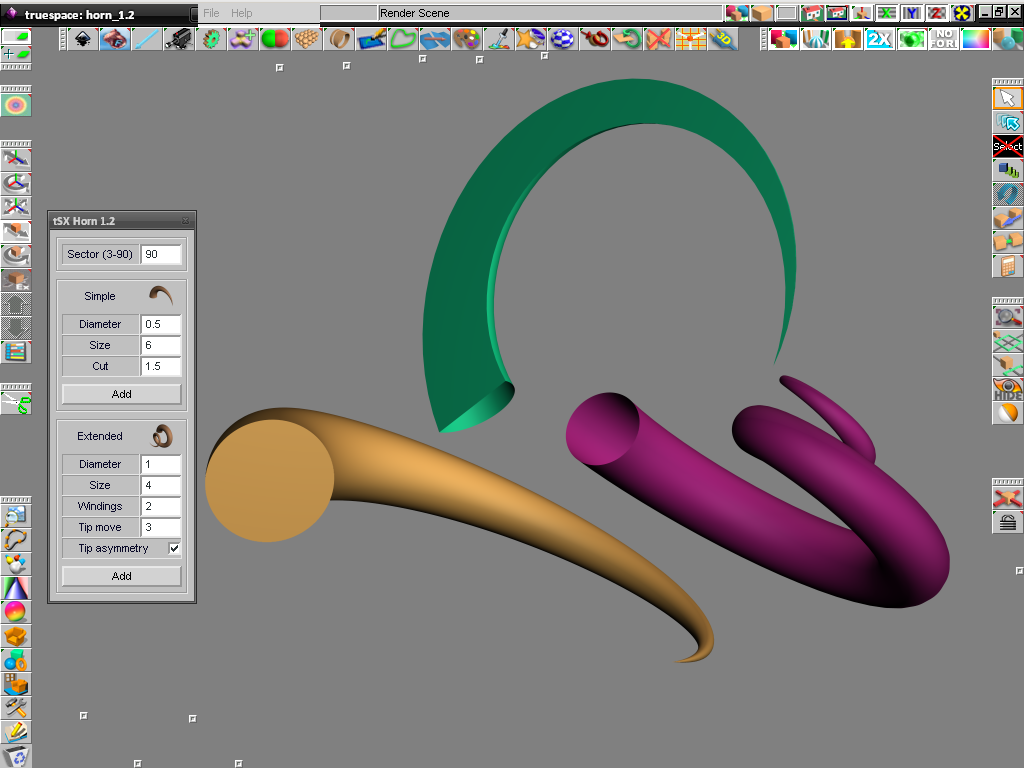
Version 1.2. This version is the reference version for what concern the gometry: it is correct also in point edit mode and the face can be added to the "base". It is a bit different from the previous in the surface generation.  The tSXSpring plug-in will be updated soon.
-
Cellulo
- Lieutenant
- Posts: 927
- Joined: 27 Sep 2012, 07:48
- Type the number ten into the box: 9
- Location: France
Re: tSX plug-in: tSX Horn
Thanks Fenerit.
-
marcel
- Captain
- Posts: 2247
- Joined: 21 May 2009, 19:52
- Type the number ten into the box: 0
- Location: paris - France
Re: tSX plug-in: tSX Horn
Thank !
Yes with the bad geometry It was impossible to create a face to the base. Now this plugins seem to be useful.
Not tested because I see that on my smartphone.
Try it tomorrow.
Yes with the bad geometry It was impossible to create a face to the base. Now this plugins seem to be useful.
Not tested because I see that on my smartphone.
Try it tomorrow.
Design - illustration - Animation
http://www.crea-vision.fr
http://www.crea-vision.fr
-
marcel
- Captain
- Posts: 2247
- Joined: 21 May 2009, 19:52
- Type the number ten into the box: 0
- Location: paris - France
Re: tSX plug-in: tSX Horn
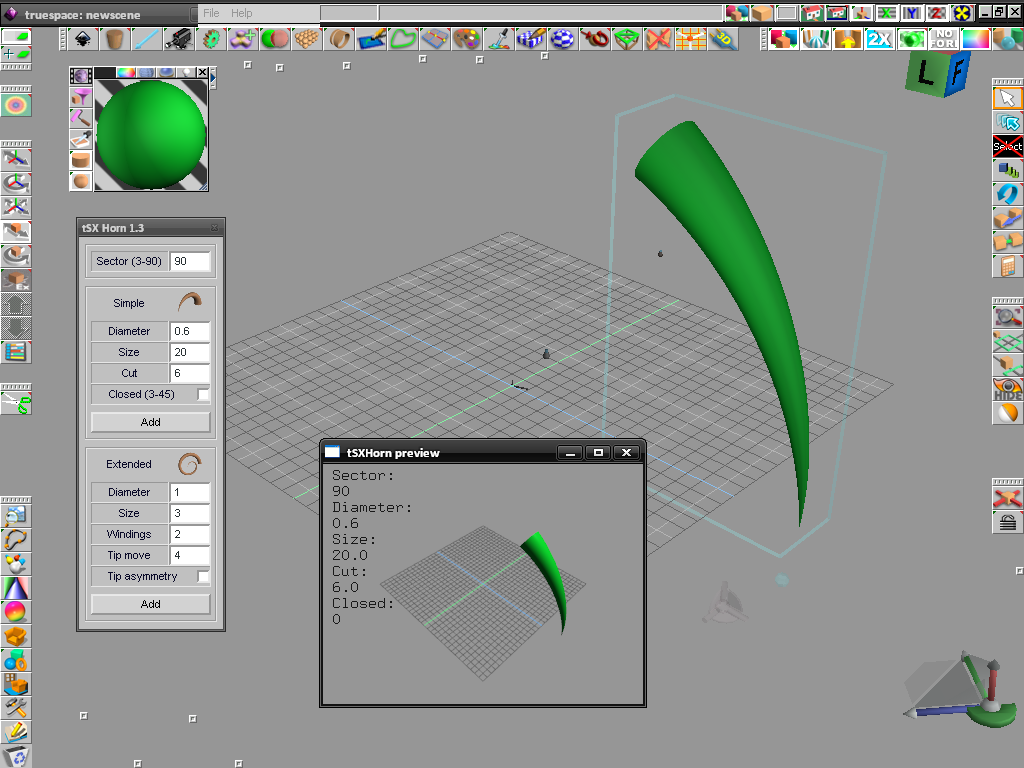
It will be interesting to have a "preview" of the result before to add the object on the scene.
Not realtime but imagine each time you change a data you erase the object and create a new object with the New data. "Add" is only to stop to erase object then you can add a second object on the scène.
Just an idea to have a better plugin.
Not realtime but imagine each time you change a data you erase the object and create a new object with the New data. "Add" is only to stop to erase object then you can add a second object on the scène.
Just an idea to have a better plugin.
Design - illustration - Animation
http://www.crea-vision.fr
http://www.crea-vision.fr
-
Fenerit
- Senior Chief Petty Officer
- Posts: 173
- Joined: 21 Nov 2011, 19:19
- Type the number ten into the box: 9
Re: tSX plug-in: tSX Horn
marcel wrote:It will be interesting to have a "preview" of the result before to add the object on the scene.
Not realtime but imagine each time you change a data you erase the object and create a new object with the New data. "Add" is only to stop to erase object then you can add a second object on the scène.
Just an idea to have a better plugin.
-
marcel
- Captain
- Posts: 2247
- Joined: 21 May 2009, 19:52
- Type the number ten into the box: 0
- Location: paris - France
-
Fenerit
- Senior Chief Petty Officer
- Posts: 173
- Joined: 21 Nov 2011, 19:19
- Type the number ten into the box: 9
Re: tSX plug-in: tSX Horn
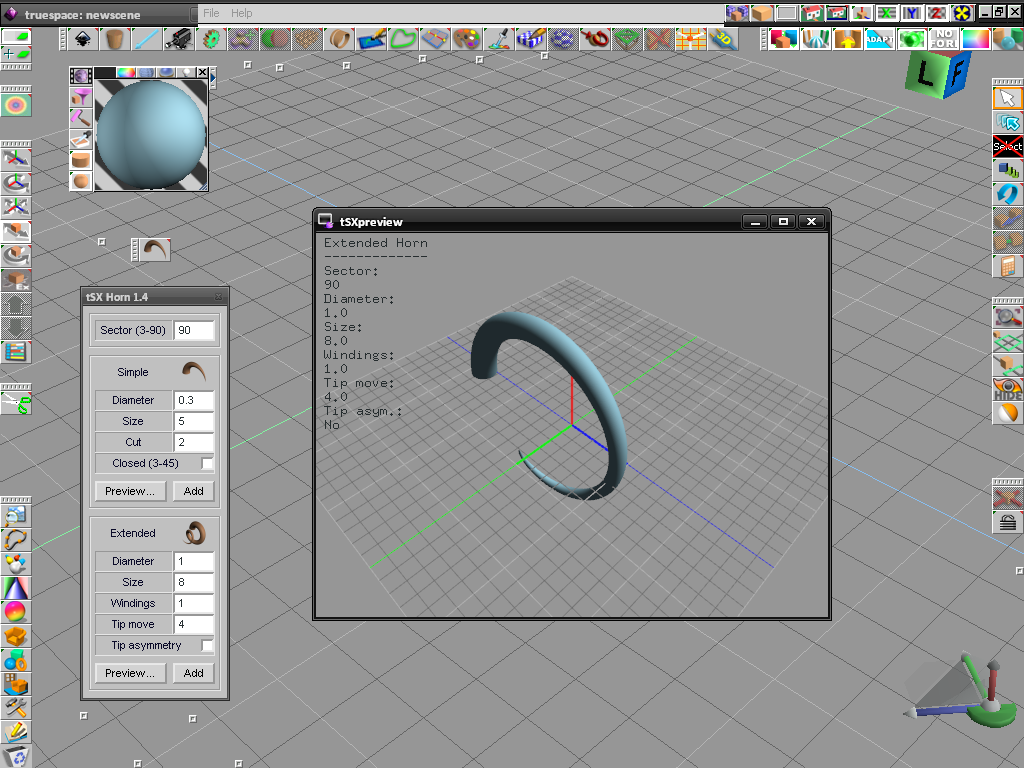
For tS 5.1 to 6.6. Not tested in tS 7.6x
- fix some error handlers;
- add option to close the surface for 3-45 sector;
this get a closed surface for SDS operations at low resolutions.
- add OpenGL (freeGLUT) preview window;
INSTALLATION:
Extract the zip content with path inside the "..\tsx\" folder. Move the files "tSXpreview.exe" and "freeglut.dll" within the main trueSpace root (where the "ts.exe" and its .DLLs are). The .exe is compiled without MFC shared DLLs, this would ensure a better compatibility. Both files are 32bit versions, on some x64 operating systems maybe must tell the OS to load the .exe as such. The tSXHorn plug-in acts like a wrapper for the OpenGL viewer, therefore by click on the latter icon will not get the desired result.
Preview commands:
- ESC: quit preview window;
- key UP: move camera forward;
- key DOWN: move camera backward;
- key "p": show path point shape;
- SPACE BAR: stop/resume rotation;
- Mouse WHEEL move camera forward/backward;
Note:
- No need to close the preview window before to load it again; the plug-in buttons will do that for you. The close button of the preview's window does save its screen position.
- the previewed surface hold the material as it is set. OpenGL lights and material have been tuned so to achieve the default tS phong parameters as much as possible.
KNOWN LIMITATIONS:
- viewport width and height are not saved;
- maximized window position is not saved.
Feedbacks about its system behaviour are appreciated, expecially in tS 7.6x
-
Cellulo
- Lieutenant
- Posts: 927
- Joined: 27 Sep 2012, 07:48
- Type the number ten into the box: 9
- Location: France
Re: tSX plug-in: tSX Horn
Thanks Fenerit i will test the plugin in 7.6 modelside.