Construction help
-
fahembree
- Chief Petty Officer
- Posts: 108
- Joined: 22 May 2009, 02:28
Construction help
Can someone show me how to go about constructing this shape is TS, model or workspace side,or combination of both. A similar shape was used in the supercar model a few years ago using ts6.6 to build the wheels by mirroring a similar shape, but for the life of me, I just can not seem to be able to figure out how to do this in ts successfully. My approach, which hasn't been successful is to start with a simple rectange object at pt1, copy rectangle 0 dist. and then rotate 10 degrees with the axis at the center point, copy again 0 distance, and rotate 10 degrees. Then use workspace side to join the edges into faces (not sure how to do that on model side). The construction needs to be done precisely or the mirroring doesn't work.
- Attachments
-

-
trueBlue

- Captain
- Posts: 5548
- Joined: 06 Jul 2009, 22:50
- Type the number ten into the box: 10
Re: Construction help
Hopefully this will help:
http://forums1.caligari.com/truespace/s ... .php?t=864"
and this:
http://forums1.caligari.com/truespace/s ... tcount=108"
http://forums1.caligari.com/truespace/s ... .php?t=864"
and this:
http://forums1.caligari.com/truespace/s ... tcount=108"
-
fahembree
- Chief Petty Officer
- Posts: 108
- Joined: 22 May 2009, 02:28
Re: Construction help
Thanks, I have those files with the original objects, so I know how to mirror them in to the final wheel. What I can't figure out is how to construct the original piece in TS. before mirroring them 
-
marcel

- Captain
- Posts: 2247
- Joined: 21 May 2009, 19:52
- Type the number ten into the box: 0
- Location: paris - France
Re: Construction help
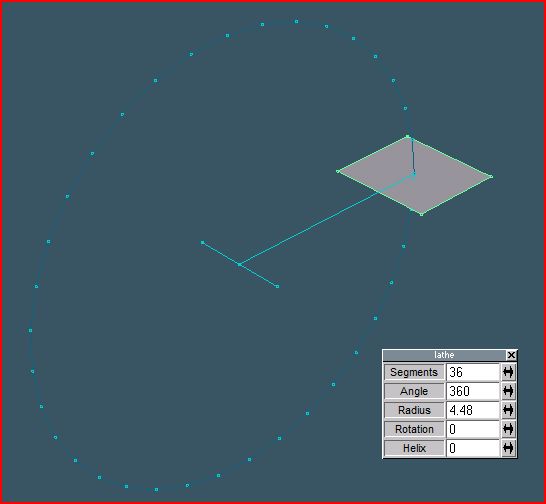
why don't use the lathe tool? You can move the center of the rotation. With 3 segments and a rotation of 30 degrees you have your model.
- Attachments
-
Design - illustration - Animation
http://www.crea-vision.fr
http://www.crea-vision.fr
-
Prodigy

- Site Admin
- Posts: 957
- Joined: 21 May 2009, 14:46
- Type the number ten into the box: 0
- Location: Uruguay
Re: Construction help
it is quite simple in workspace and i assume is that simple also in model side..
I'll make a small tutorial for that in a few minutes..
I'll make a small tutorial for that in a few minutes..
๑۩۞۩๑ prodigy ๑۩۞۩๑
-
fahembree
- Chief Petty Officer
- Posts: 108
- Joined: 22 May 2009, 02:28
Re: Construction help
marcel: "why don't use the lathe tool? You can move the center of the rotation. With 3 segments and a rotation of 30 degrees you have your model."
Thanks, I don't know why I couldn't see that. Now I just need to experment to see if I can do all of the faces at the center correctly.
Thanks, I don't know why I couldn't see that. Now I just need to experment to see if I can do all of the faces at the center correctly.
-
Prodigy
- Site Admin
- Posts: 957
- Joined: 21 May 2009, 14:46
- Type the number ten into the box: 0
- Location: Uruguay
Re: Construction help
exactly.. also you can do that with a cylinder.. in radialslice instead 360 set 30 after that radial set 3.. that's all.
Well seems i must delete the video and is not needed anymore
Well seems i must delete the video and is not needed anymore
๑۩۞۩๑ prodigy ๑۩۞۩๑
-
fahembree
- Chief Petty Officer
- Posts: 108
- Joined: 22 May 2009, 02:28
Re: Construction help
Thanks for the help. I think I've got the construction figured out. For the center point I just boolean subtracr a cbe rotated so as to cut at desired angle. Attached is my wheel but it needs lots of refinement but now I know the construction method.

- Attachments
-

-
fahembree
- Chief Petty Officer
- Posts: 108
- Joined: 22 May 2009, 02:28
Re: Construction help
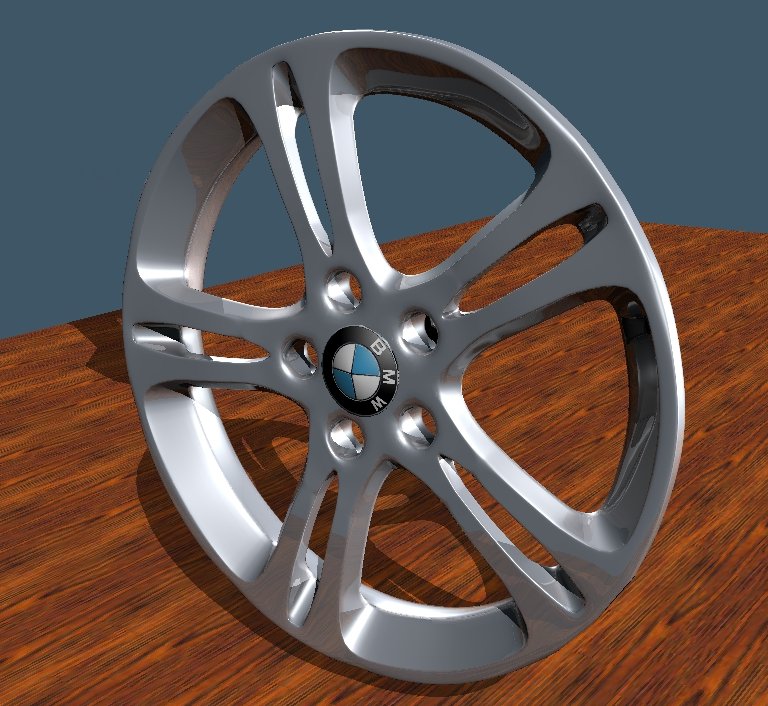
This is the wheel I was trying to model and I've worked very hard on it now for 2 day mostly 90% model space and 10% workspace and could never get it perfect but at least I can tell what it is. Things have to be prescise to get it to mirror model and subdivide smoothly. Didn't know it was so much work, oh well, I give up for a while.
- Attachments
-
-
Prodigy
- Site Admin
- Posts: 957
- Joined: 21 May 2009, 14:46
- Type the number ten into the box: 0
- Location: Uruguay
Re: Construction help
Very well done 
๑۩۞۩๑ prodigy ๑۩۞۩๑