SDK plugin findings

User avatar
clintonman
Captain
Posts: 5659
Joined: 21 May 2009, 21:08
Type the number ten into the box: 0
Location: California

SDK plugin findings

Post by clintonman »

I decided to read through every header file in the workspace sdk to see if there was anything interesting.

The first thing I found was a way to fix the quad toolbar popup location. It was a lot of trial and error to get something that worked and the change has already been released.

Another thing I found was the widget sample code.
Again after some dead ends I got mostly what I wanted out of it. I got a way to do a rectangle selection in the viewport. It has 2 flaws in that the rectangle doesn't show in the view and it gets a list of nodes by shooting rays through the rectangle into the scene. It takes too long to shoot a ray through every pixel so they have to be spaced out and small items can be missed.
More exciting than the rectangle selection is I found a way to do true viewport locking of items, so if they are marked as unselectable then they never even get to the point of being selected.
plugin_dev.jpg
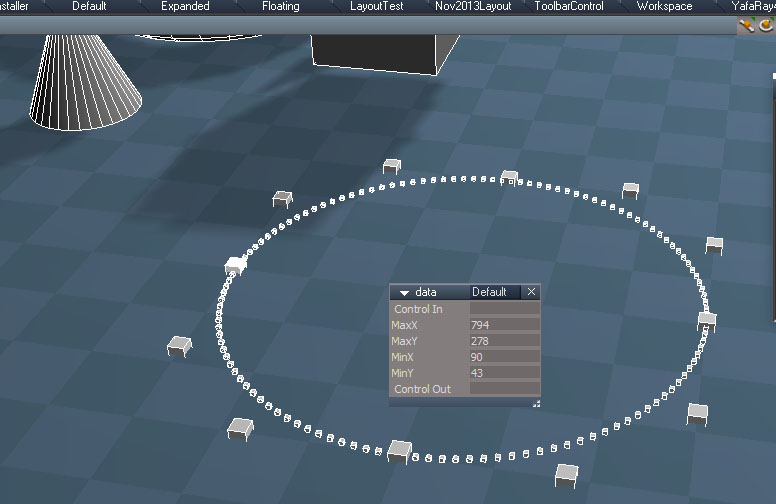
circle generated from the SDK and display of rectangle select coordinates to be used in in another SDK function to "ray trace" a selection

I found some NURBS code for generating circles. The large boxes represent the control points. The smaller boxes would be the visual representation of the curve and is also supplied by the SDK code. My curve tools do everything in script from scratch. I plan to use the SDK to replace chunks of the NURBS curve scripts. Also found similar code for NURBS patches so it should be possible to do some patch modeling in workspace.
The SDK NURBS are completely separate from the modelspace curves and patches.

Since I will be making changes I also decided to put the Collada plugin code into it's own package like the FBX import/export plugin. This reduces the size of Clintons3dPlugin.rsx file from about 4 Mb down to less than 1Mb.
Clinton Reese

http://clintons3d.com
User avatar
trueBlue
Captain
Posts: 5548
Joined: 06 Jul 2009, 22:50
Type the number ten into the box: 10

Re: SDK plugin findings

Post by trueBlue »

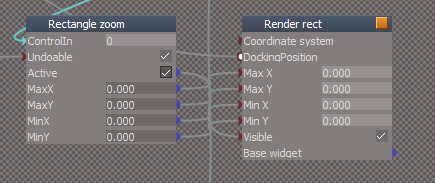
Take a look at the Rectangle Zoom widget.
Looks like the rectangle is a semi transparent Static Widget
Render Rectangle Static Widget.png
Please let me know when you release your updated Clintons3dPlugin.rsx file.
Have you noticed any performance increase?
I would like to add it to the Unofficial Updates
User avatar
clintonman
Captain
Posts: 5659
Joined: 21 May 2009, 21:08
Type the number ten into the box: 0
Location: California

Re: SDK plugin findings

Post by clintonman »

I expect to publish something in a few hours or tomorrow. It will be the invisible rectangle select and the selection locking widget.
I haven't seen any performance improvements since everything so far has been to small to make any difference. In fact the rectangle select may be slow because it's basically doing a crude ray tracing into the view. Ray tracing is slow. A better solution would be to use bounding box intersections. I didn't see anything in the SDK that does it.
Clinton Reese

http://clintons3d.com
User avatar
trueBlue
Captain
Posts: 5548
Joined: 06 Jul 2009, 22:50
Type the number ten into the box: 10

Re: SDK plugin findings

Post by trueBlue »

Something like this in the tS761SDK?
IRdVolumeTree Interface Reference

HRESULT IRdVolumeTree::RayIntersection ( [in] RtPoint * p0,
[in] RtPoint * ray,
[out] IRsNodeList ** node
)
User avatar
clintonman
Captain
Posts: 5659
Joined: 21 May 2009, 21:08
Type the number ten into the box: 0
Location: California

Re: SDK plugin findings

Post by clintonman »

trueBlue wrote: 21 Sep 2020, 02:24 Something like this in the tS761SDK?
IRdVolumeTree Interface Reference

HRESULT IRdVolumeTree::RayIntersection ( [in] RtPoint * p0,
[in] RtPoint * ray,
[out] IRsNodeList ** node
)
Yep, something sort of like that. That is closer to what I have with a ray tracing approach. There is a similar command that returns a list of everything that's visible in the viewport. You feed it the 6 planes of the view frustum and it returns a list of nodes. The missing piece is creating a volume/6 planes from the 2D rectangle in the view. Actually, 2 of the planes would be easy since it's just the front and back. Getting the other 4 planes would take some math, so I don't see that happening in the near future.
Clinton Reese

http://clintons3d.com
User avatar
clintonman
Captain
Posts: 5659
Joined: 21 May 2009, 21:08
Type the number ten into the box: 0
Location: California

Re: SDK plugin findings

Post by clintonman »

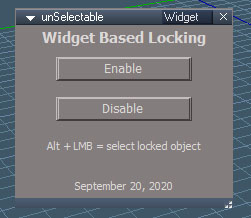
widgetLocking.jpg
widgetLocking.jpg (34.05 KiB) Viewed 3658 times
Here's the panel added to the unselectable script.
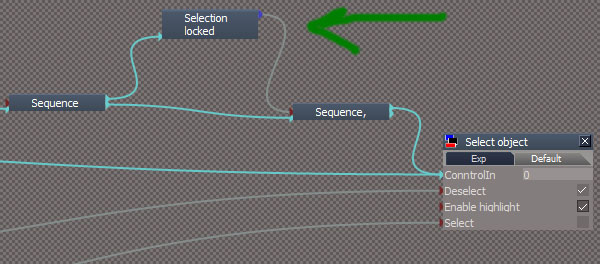
No releases tonight. Ran into some gotchas while building this. Image below shows one.
widgetDanger.jpg
The locking widget node sits in front of the actual selection node. If the plugin file is not installed then the truespace selection system would be broken.
The disable button needs more r&d to make sure it doesn't break trueSpace in a permanent way. I just realized that a reset context might break the disable button. I think at this point it just needs a backup of the select widget so it can just put back the original if needed.

In any case I think tomorrow is the day.
Clinton Reese

http://clintons3d.com
User avatar
clintonman
Captain
Posts: 5659
Joined: 21 May 2009, 21:08
Type the number ten into the box: 0
Location: California

Re: SDK plugin findings

Post by clintonman »

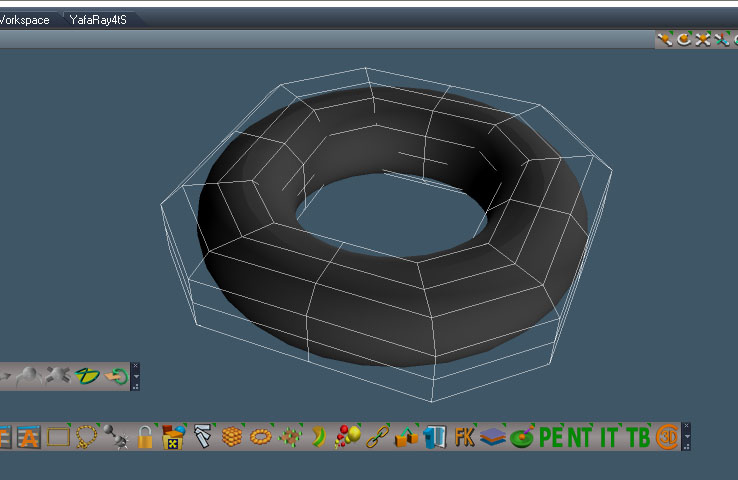
NURBSpatch.jpg
Control point mesh surrounding the resulting NURBS patch


First working NURBS patch for workspace. It took a million hours to figure it out. I can create editable sphere, box, cone/cylinder and torus patches in test form. There is no way for me to create a primitive tool to create them so instead I'll create a conversion tool to convert sphere, box etc. meshes into NURBS patches. The missing piece at this point is editing to add and remove columns and rows from the patch. After that the plan is to import/export NURBS patches from modelspace to use the pre-existing modelspace tools to fill in all the other missing capabilities.

This system should be an improvement over the modelspace nurbs cage plugin for editing patches.

I had to do some weird things to make it work, so further testing is needed to see if it really works or if it will fail in some way, especially on larger patches.
Clinton Reese

http://clintons3d.com
User avatar
clintonman
Captain
Posts: 5659
Joined: 21 May 2009, 21:08
Type the number ten into the box: 0
Location: California

Re: SDK plugin findings

Post by clintonman »

nurbsPatchImportAndEditing.jpg
loaded nurbs cylinder from cob file, editing in progress

Those "weird things I had to do to make it work" came back and bit me. So now it's all normal stuff and its working.

Can now load a nurbs patch from a modelspace file into workspace as a true nurbs patch. Next is saving out to modelspace so can use the modelspace nurbs tools.
Clinton Reese

http://clintons3d.com
User avatar
clintonman
Captain
Posts: 5659
Joined: 21 May 2009, 21:08
Type the number ten into the box: 0
Location: California

Re: SDK plugin findings

Post by clintonman »

rayIntersectAndMarkers.jpg
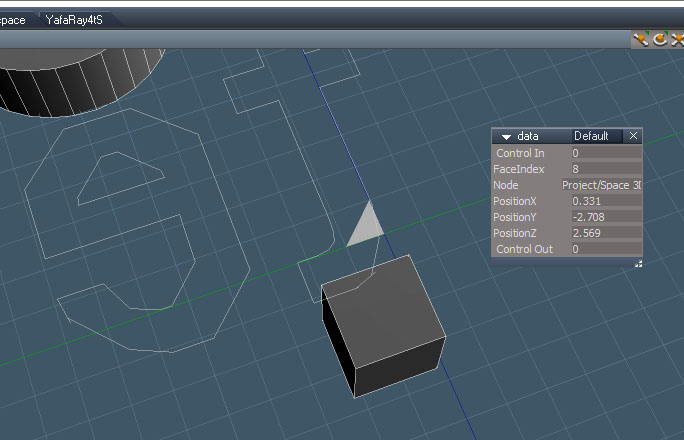
Triangle index, point intersection and object name.
More widget goodness on the way.

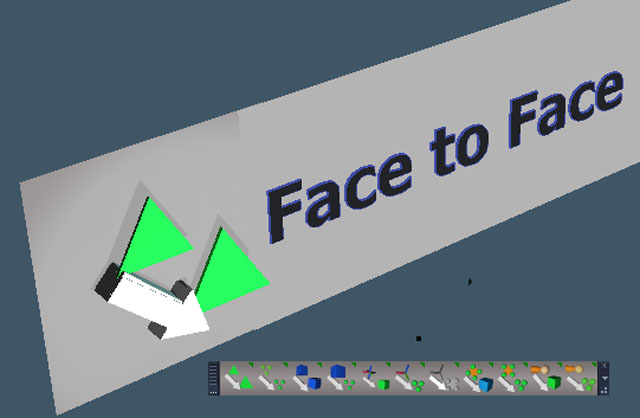
This new widget will get the triangle index of the mesh under the mouse position on the screen and the point intersection with that triangle in world space coordinates. I believe the triangle plus the intersection point can be used to get a point selection. The backwards "te" and the white triangle are a test of markers that will be used to highlight the selection. Scripting has markers for text, but the triangle can only be done in plugin code.

I hope to use this to improve the face to face snapping and the object vertex snap scripts, by eliminating the need for the tool to take a mesh into point edit mode to perform some of those actions.
Clinton Reese

http://clintons3d.com
User avatar
clintonman
Captain
Posts: 5659
Joined: 21 May 2009, 21:08
Type the number ten into the box: 0
Location: California

Re: SDK plugin findings

Post by clintonman »

Spent an entire day on the new widget. Slowly making progress.
Ends up the triangle marker was stuck at the off white color, so I decided to go with lines instead. It can read the mesh triangles and vertices so it can now do hover and apply highlighting effects over the mesh. To do something useful I need to add ctrl and shift inputs to the widget selection and make a change to the data it writes out. Then can move forward with the scripts to use it.
Clinton Reese

http://clintons3d.com
User avatar
clintonman
Captain
Posts: 5659
Joined: 21 May 2009, 21:08
Type the number ten into the box: 0
Location: California

Re: SDK plugin findings

Post by clintonman »

VertexAndTriangleSelectionWidgets.jpg
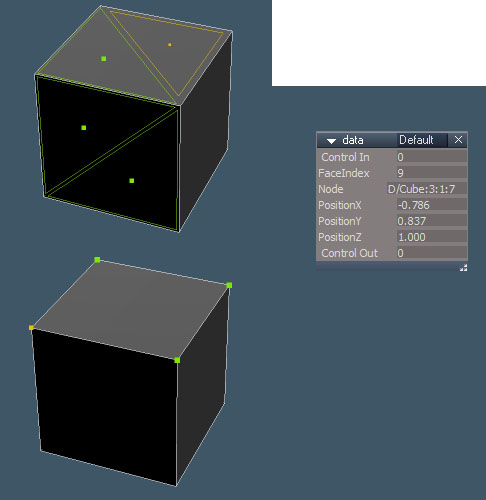
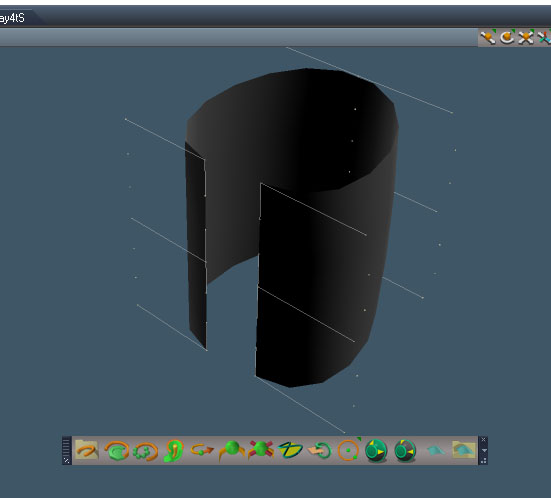
Vertex and Triangle Selection - NOT in point edit mode

Finally got it working. :superbanana: The widget highlight for the triangles uses edges and a center point to indicate hover state and selected triangles. Selected and hover triangles are slightly smaller than the actual triangle so if one triangle in a group isn't selected it can be seen. The hover triangle is also slightly smaller than the selected triangle so they can both be seen on the same triangle. Solid highlighting isn't practical because the marker triangle only has one color, making it impossible to tell if a triangle is selected or in a hover state or both. Right now green is selected and yellow is hover for both the vertex and triangle selections. Both widgets write to the same script node. The name of the node and the vertex or triangle indices are passed to it in the Node string connector. The widget uses the trueSpace standard of ctrl to add to a selection and shift to remove from a selection.

Next up is to clean up the code and make something from it.
Clinton Reese

http://clintons3d.com
User avatar
trueBlue
Captain
Posts: 5548
Joined: 06 Jul 2009, 22:50
Type the number ten into the box: 10

Re: SDK plugin findings

Post by trueBlue »

Awesome! :worship:
Workspace's PE Snapping highlight color is light blue, if you wanted to match tS :mrgreen:
User avatar
clintonman
Captain
Posts: 5659
Joined: 21 May 2009, 21:08
Type the number ten into the box: 0
Location: California

Re: SDK plugin findings

Post by clintonman »

trueBlue wrote: 10 Oct 2020, 04:47 Awesome! :worship:
Workspace's PE Snapping highlight color is light blue, if you wanted to match tS :mrgreen:
My first thought was to match or read the pre-existing trueSpace options. I decided to add color choices and point size to the script node instead.
Clinton Reese

http://clintons3d.com
User avatar
clintonman
Captain
Posts: 5659
Joined: 21 May 2009, 21:08
Type the number ten into the box: 0
Location: California

Re: SDK plugin findings

Post by clintonman »

nurbsToolbar.jpg
NURBS Toolbar with patch mesh
New buttons are for circle, expand selection, contract selection, NURBS primitive from mesh primitives and patch file scripts

The expand and contract were added from the original trueSpace release because of odd behavior of the patch control point mesh(only lines and points visible). Test shows it didn't solve the problem so they will be removed.

Found a tS crash bug. I saved a NURBS patch from model side as ascii format cob file. If tS display is wireframe and I read the file back in tS crashes. If the bridge is off there is no crash, but turn it on and it crashes. Thes bug shows in tS7.6 and 7.61. No crash in tS7 or 6.
Clinton Reese

http://clintons3d.com
User avatar
clintonman
Captain
Posts: 5659
Joined: 21 May 2009, 21:08
Type the number ten into the box: 0
Location: California

Re: SDK plugin findings

Post by clintonman »

facetofaceNodesBeforeAfter.jpg

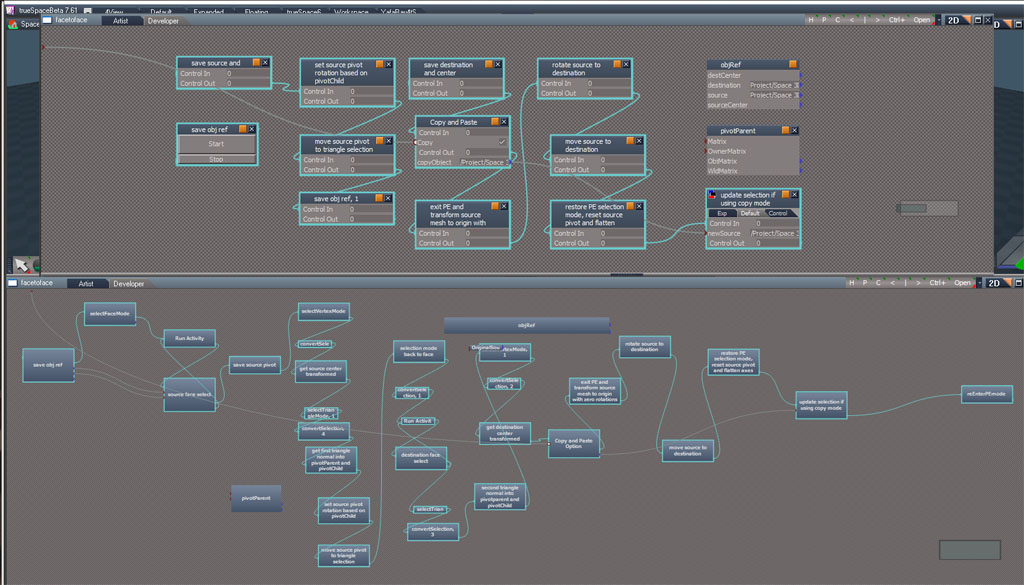
Got the face to face no point edit mode working as before.Image shows the before(below) and after(above) node networks. The new one has less than half as many nodes. Had to zoom out to make it fit.

Next I want to change the method so it doesn't depend on pivots and flattened mesh nodes.
One more thing it should work as is with lights and cameras now because no need for point edit.
Clinton Reese

http://clintons3d.com
User avatar
clintonman
Captain
Posts: 5659
Joined: 21 May 2009, 21:08
Type the number ten into the box: 0
Location: California

Re: SDK plugin findings

Post by clintonman »

facetoface_v2.jpg

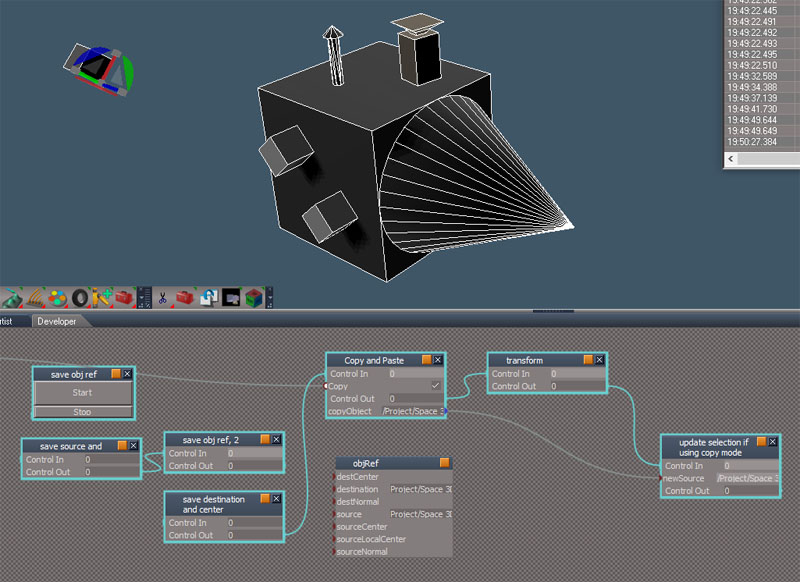
The face to face rewrite is working 100%! :superbanana: Image shows final code down to just 8 command nodes and easier to understand than before.
The snapping works with lights and cameras.
No point edit mode needed and it works with the pivot/axes.
I should have something published by tomorrow. :D
Clinton Reese

http://clintons3d.com
User avatar
trueBlue
Captain
Posts: 5548
Joined: 06 Jul 2009, 22:50
Type the number ten into the box: 10

Re: SDK plugin findings

Post by trueBlue »

Awesome! :bananathumb:
User avatar
clintonman
Captain
Posts: 5659
Joined: 21 May 2009, 21:08
Type the number ten into the box: 0
Location: California

Re: SDK plugin findings

Post by clintonman »

Notes for the new widget can be found at the bottom of this page:

http://clintons3d.com/plugins/truespace ... index.html
Clinton Reese

http://clintons3d.com
User avatar
clintonman
Captain
Posts: 5659
Joined: 21 May 2009, 21:08
Type the number ten into the box: 0
Location: California

Re: SDK plugin findings

Post by clintonman »

unorderedSnappingToolbar01.jpg
New snapping toolbar, pre-release version
The triangles represent mesh triangles, the cubes represent objects, 3 green dots are for points on an object, ball and arm are for joints, orange square with green dots represents point edit selection and the axes are 3 rectangles

The first 6 buttons are already working.


This is meant as a replacement for the face to face snapping tools and the object vertex snapping tools. Several now use the point picking widget and a modified selection widget who's RMB action has been changed to confirm a selection instead of taking an item into point edit mode.
From left to right:
face to face - move one object so it's selected face aligns with another objects selected face
object to object - snapping the position of one object to another
object to points - snap object to the selected points of another object
axes to object - snap the axes of an object to the center of another object
joint to object - snap a joint to the object center
point edit to points - snap a point edit selection to points on another object
axes to pe selection - same as the unofficial update widget shortcut for snapping the axes to a point edit selection
joint to points - snap joint the the points of another object
axes to points - snap axes to points on another object
points to points - snap one object to another based on point selections
pe selection to object - move pe selection to the center of another object

My todo list includes making the last 5 buttons operational , changing the order of the buttons and the design of the buttons. I think one change I already have in mind is to replace the 3 dots with a cube with a dot to represent object point picking.
Clinton Reese

http://clintons3d.com
User avatar
trueBlue
Captain
Posts: 5548
Joined: 06 Jul 2009, 22:50
Type the number ten into the box: 10

Re: SDK plugin findings

Post by trueBlue »

:idea:
Break it down into toolbar tools (Which could have a learning curve what I icon does)

Object Snap
Face Snap.png
Face Snap.png (851 Bytes) Viewed 3204 times
object to object - snapping the position of one object to another
face to face - move one object so it's selected face aligns with another objects selected face

Vertex Snap
Vertex Snap.png
Vertex Snap.png (872 Bytes) Viewed 3204 times
object to points - snap object to the selected points of another object
point edit to points - snap a point edit selection to points on another object
points to points - snap one object to another based on point selections

Axis Snap
Axis Snap.png
Axis Snap.png (1.34 KiB) Viewed 3204 times
axes to object - snap the axes of an object to the center of another object
axes to pe selection - same as the unofficial update widget shortcut for snapping the axes to a point edit selection
axes to points - snap axes to points on another object

Joint Snap
Joint Snap.png
Joint Snap.png (1.14 KiB) Viewed 3204 times
joint to object - snap a joint to the object center
joint to points - snap joint the the points of another object

?
pe selection to object - move pe selection to the center of another object

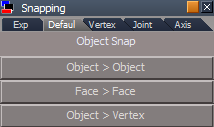
Instead of toolbars use a Panel (Easier to understand what a button does)
Snapping panel.png
Snapping panel.png (6.08 KiB) Viewed 3204 times
And... really cool!
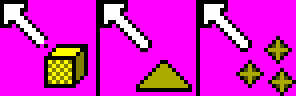
Using Stan's mouse icons with your widgets
Source
Source.png
Source.png (6.2 KiB) Viewed 3203 times
Target/Destination
Target.png
Target.png (5.7 KiB) Viewed 3203 times
User avatar
clintonman
Captain
Posts: 5659
Joined: 21 May 2009, 21:08
Type the number ten into the box: 0
Location: California

Re: SDK plugin findings

Post by clintonman »

All the snapping buttons work now, with the first 3 working at 100%... Nearly 100%, no work has been done yet to address random rotations around the normal direction when using face to face snapping.

threeCursors.jpg
threeCursors.jpg (22.02 KiB) Viewed 2347 times
These are the cursors for object picking, triangle/face picking and point picking widgets. The images for cursors are interesting. They are 32bit files 24x24 pixels with a white alpha channel. The transparent parts are defined by the purple/pink background color (255,0,255), but it still has to have the alpha to work.

The object picking widget was tricky. I had to make a modified object nav widget and make temporary changes to the background widget that does selections. Had to try a few things before finally getting something that worked without any problems or glitches. It's kind of a 2 state widget in that when it starts nothing is selected so it needs the selection widget setup with the proper behavior and cursor and then after something is selected the object nav widget takes over keeping the same cursor. Both have custom RMB mouse click for cancelling the process.

testbutton.jpg
testbutton.jpg (18.97 KiB) Viewed 2347 times
The buttons will likely look something like this. It's an ordinary toolbar button that's been stretched out to make room for text. I tried using the built-in text form of the buttons but they are limited in the number of characters they can display. Also thinking of having swap-able images so can also use standard buttons.
Clinton Reese

http://clintons3d.com
User avatar
trueBlue
Captain
Posts: 5548
Joined: 06 Jul 2009, 22:50
Type the number ten into the box: 10

Re: SDK plugin findings

Post by trueBlue »

I tried using the built-in text form of the buttons but they are limited in the number of characters they can display.
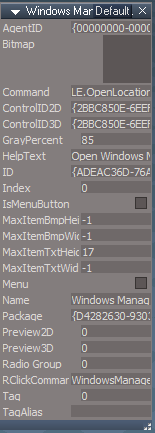
If you want to use text only with no bitmaps...
With the first button, make sure there is no LMB command. RMB command is okay.
Then all of the buttons inside the above button can be as long as the entered text in the Name attribute
Nested text button.png
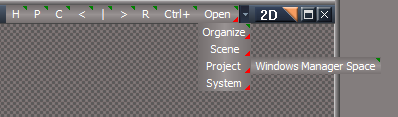
The toolbar needs to be in 2D
Look at the Link Editor toolbar
LENtB.png
LENtB.png (10.11 KiB) Viewed 2338 times
I really like this setup because, when you click on the first button, the flyout stays open
User avatar
clintonman
Captain
Posts: 5659
Joined: 21 May 2009, 21:08
Type the number ten into the box: 0
Location: California

Re: SDK plugin findings

Post by clintonman »

Awesome, thanks for the tip!
Clinton Reese

http://clintons3d.com
User avatar
clintonman
Captain
Posts: 5659
Joined: 21 May 2009, 21:08
Type the number ten into the box: 0
Location: California

Re: SDK plugin findings

Post by clintonman »

Getting closer to release :D
I added multiple selection to most of the functions.

Multiple source objects will snap several objects with the option to maintain their spacing or just snap all to the destination point.
Multiple destination object will snap the source to the center of the selection.

The face to face, pe to points, and points to points snapping don't have the multiple selections. The face and vertex picking widgets only work with a single object at a time and pe selections are just the 1 pe selection.

I also started testing the toolbar customization. I can set horizontal or vertical and 2d image or basic text with script and a plugin function. The only test left for the toolbar is setting the button images on the fly. If it works out there will be options for standard icon buttons, full text buttons as described by trueBlue above and the icon + text buttons I mentioned earlier.
Clinton Reese

http://clintons3d.com
User avatar
clintonman
Captain
Posts: 5659
Joined: 21 May 2009, 21:08
Type the number ten into the box: 0
Location: California

Re: SDK plugin findings

Post by clintonman »

WideIcon.jpg
image shows toolbar buttons in order:
left to right is the face and point, object, axis, point edit and joint snapping groups
the icons are not the latest versions

In the home stretch now. All the snapping functions are tested and working. Finalized the toolbar button designs and created the icon plus text button images.

The short todo list is to make a custom toolbar switcher, investigate an up axis for face to face snapping consistency, add a cleanup script for the custom picking widget and button states. Cleanup is needed because... I think I just thought of a way around that, so cleanup script may not be needed after all. No, cleanup will be needed for extreme cases anyway. Need to take into account the possibility of a user doing something like closing truespace, truespace crashing, doing something random like starting a hair tool in the middle of the snap process.
Clinton Reese

http://clintons3d.com

Return to “Workspace Side”