Hi Guys!
Well, I have finally installed TS7 on my new system (tS761B8)! I tried 7 when it first became free, but was TOTALLY scared off by the change (didn't know there was a TS6 interface on the Model side.....).....I have been even more afraid now that I have a new system, new OS, and a new graphics card (for the video/graphics card I poured over forums for weeks but still was nervous about my decision, as most info was out of date).....This is what I got in the end:
Intel Core i7-870 2.93 8M 1333
Motherboard (LGA 1156) Intel WHITESBURG DP55 WB
Memory 8GB DDR3 1333MHz
Graphics Card Gainward GTS 450 1024mb DVI HDMI DDR5
Hard Drive 1T/7200/64MB SATA-II WD WD1002FAEX
OS Windows 7 Home Premium 64bit
So now I have to begin the TS6 to TS7 transition....and can already use a little help....:-)....
1. Where the h.... is the d3d/openGL icon?????? The display is no where near as crisp as it used to be, and some things are not working. I don't know if it is on OGL or D3D, but would like to play around with that.....But can't for the life of me find where it is.....The manual refers to the D3D icon, but it does not seem to be listed in the icon finder....:-(....
2. The most upsetting part is that the icons across the very bottom of the screen don't seem to work. I would like to get rid of most of them anyway and have just the ones that were on TS6, such as the views, Display, and material mode. None of the modes work (solid, transparent, etc.). Which makes me think that maybe I am in Wire instead of openGL or D3D.....
3. Well, that's it for a start. I would also be very interested if any of you have anything to say about my graphics card.....
By the way, I am using the TS6 interface tab on Model side, and don't need any animation, bones, etc. I do product design.
Bye for now,
J.
EDIT: I found OpenGL in the icon finder list, but when I do the Find Icon thing, instead of pointing to where the icon is on the screen, it gives a fleeting (a few seconds) of a pop-up of the old TS6 bottom row of icons. How can I get that on my interface?
Win 7 64-bit
-
janetb
- Petty Officer Second Class
- Posts: 32
- Joined: 21 May 2009, 22:57
Win 7 64-bit
-
Finis

- Captain
- Posts: 5410
- Joined: 21 May 2009, 18:26
- Type the number ten into the box: 0
- Location: America!
Re: Win 7 64-bit
Hi Janet,
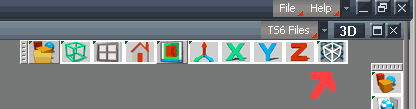
OGL, D3D icons see arrow on picture. This menu bar may be in a different place on your set up. (Model side. Not sure if this applies to TS6 tab.)
Not sure but I think the controls on the bottom that you want to get rid of are workspace things. If you aren't aware of workspace/model side there are plenty of posts here about that.
Most model side users just use model side not the TS 6 tab.
TS 7.6x model side is essentially TS6.6. There are a few goodies like bend tools and the GE HDRI lighting but you don't gain a lot vs. TS6. I'm not trying to discourage you from using TS but it is software that is no longer in production. Learning software that will advance or remain compatible with future OS's and hardware is a strategy to consider. Many posts about other software, including discussions of migrating to them, are available on this forum if you should need them.
Product design? Cool! Can we see some of your work?
Finis
OGL, D3D icons see arrow on picture. This menu bar may be in a different place on your set up. (Model side. Not sure if this applies to TS6 tab.)
Not sure but I think the controls on the bottom that you want to get rid of are workspace things. If you aren't aware of workspace/model side there are plenty of posts here about that.
Most model side users just use model side not the TS 6 tab.
TS 7.6x model side is essentially TS6.6. There are a few goodies like bend tools and the GE HDRI lighting but you don't gain a lot vs. TS6. I'm not trying to discourage you from using TS but it is software that is no longer in production. Learning software that will advance or remain compatible with future OS's and hardware is a strategy to consider. Many posts about other software, including discussions of migrating to them, are available on this forum if you should need them.
Product design? Cool! Can we see some of your work?
Finis
- Attachments
-
- OGL_DX.gif (7.06 KiB) Viewed 3464 times
I prefer dangerous freedom over peaceful servitude. -- Thomas Jefferson/Jean Jacques Rousseau
-
janetb
- Petty Officer Second Class
- Posts: 32
- Joined: 21 May 2009, 22:57
Re: Win 7 64-bit
Shoot--I added a second edit to my original post that seems to be missing....:-(....I had found that row of icons by switching to the Default config. But in my Janet.cfg, it should be at the VERY bottom right, where there are instead that row of icons that you think my be for workspace. So that row that is in the upper right do not appear anywhere, so I can't drag them. Itried to just build a new toolbar, but the manual only says how to copy or move icons, but not how to make a pop-up series. Itried common-sense, but it didn't work. Anyone know how to make popup tool bars from the huge retangle of ALL icons?
I know all about workspace/model sides. I am strictly a polygoner and do no animation, so TS unfortunately developed in a direction that was less good for me....:-(....I'm a goldsmith and also do ceremonial objects in metal and glass, so 3d is only a sideline for me. After having invested so much time and money in TS (since just before TS5 came out), the close-down was truly devastating for me, and I just can't start that whole journey all over again. So I was happy with TS6 on my XP. It's only because I had to upgrade to Win 7 that I was forced to go to TS7, and need for the time being to stick to a setup as close to TS6 as possible for the workflow....I much prefer the simple old icons. In the end, I just uninstalled TS from my system, and will try reinstalling and perhaps not using my config....:-(....
You can find a lot of ancient interesting threads with my jewels under either janetb or 'Janet in Jerusalem' or 'Jerusalem Goldsmith'....:-)....Hope they are still available somewhere....
Bye for now,
J.
I know all about workspace/model sides. I am strictly a polygoner and do no animation, so TS unfortunately developed in a direction that was less good for me....:-(....I'm a goldsmith and also do ceremonial objects in metal and glass, so 3d is only a sideline for me. After having invested so much time and money in TS (since just before TS5 came out), the close-down was truly devastating for me, and I just can't start that whole journey all over again. So I was happy with TS6 on my XP. It's only because I had to upgrade to Win 7 that I was forced to go to TS7, and need for the time being to stick to a setup as close to TS6 as possible for the workflow....I much prefer the simple old icons. In the end, I just uninstalled TS from my system, and will try reinstalling and perhaps not using my config....:-(....
You can find a lot of ancient interesting threads with my jewels under either janetb or 'Janet in Jerusalem' or 'Jerusalem Goldsmith'....:-)....Hope they are still available somewhere....
Bye for now,
J.
-
spacekdet

- Captain
- Posts: 1810
- Joined: 27 May 2009, 15:00
- Type the number ten into the box: 10
- Location: On the day shift at the Utility Muffin Research Kitchen
Re: Win 7 64-bit
Win 7 here as well, I installed tS 6.6 and it runs fine...I dare say even better than tS7 sometimes.
The trick is to install it not in the Program Files folder, but simply in C:/trueSpace/. (hat tip to Tiles!)
If you're going to keep trying with tS7, there is a patch somewhere around here that will fix the Win 7 / tS7 Link Editor bug. You'll need it.
(I tried to locate it but got lost)
PS, found it, glad I saved a copy because it looks like the site of the guy who wrote it is down.
The trick is to install it not in the Program Files folder, but simply in C:/trueSpace/. (hat tip to Tiles!)
If you're going to keep trying with tS7, there is a patch somewhere around here that will fix the Win 7 / tS7 Link Editor bug. You'll need it.
(I tried to locate it but got lost)
PS, found it, glad I saved a copy because it looks like the site of the guy who wrote it is down.
-
MikomDude

- Captain
- Posts: 1930
- Joined: 04 Oct 2010, 11:12
- Type the number ten into the box: 0
- Location: The Hague, Netherlands
Re: Win 7 64-bit
Cool, thanks spacekdet, I'm using win 7 as well and I'm trying to get things to work too. 
-
clintonman

- Captain
- Posts: 5659
- Joined: 21 May 2009, 21:08
- Type the number ten into the box: 0
- Location: California
Re: Win 7 64-bit
I sent a PM to David and he's going to get the site up and running again.spacekdet wrote:...
PS, found it, glad I saved a copy because it looks like the site of the guy who wrote it is down.