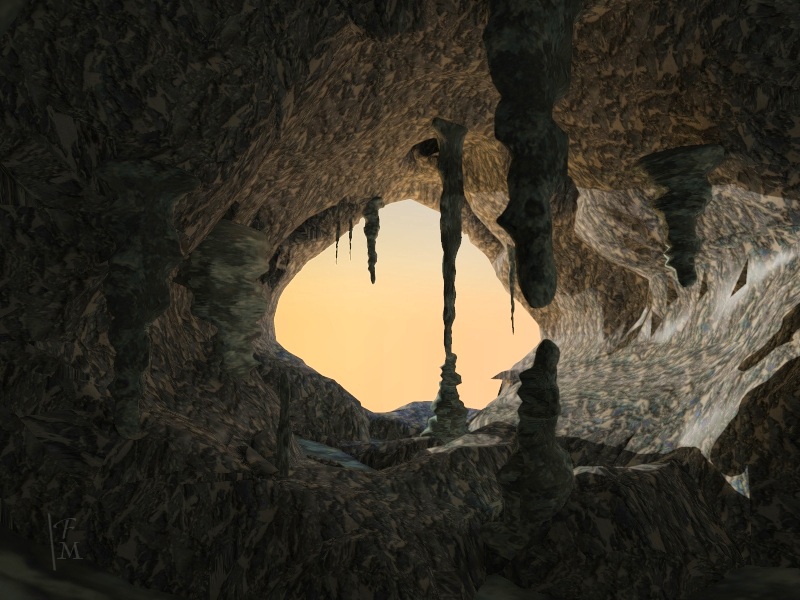
It was windy today so instead of working anyway I did this. Modeled mostly with metaballs in TS 7.6 model side. Some modeling in Hexagon 2. Rendered in Kerkythea 2008. I'm surprised how well it turned out.
The stalagmites and stalactites are resized copies of one prototype. I added and moved metaballs until I had the shape.
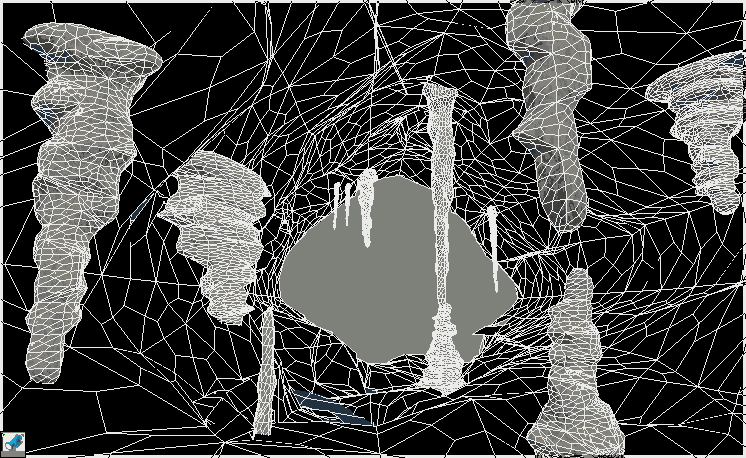
The cave is more complex. I Booleaned a tube from two cylinders and used the taper tool to change its shape. Then I spread about 200 cubes over it with geometry paint. Then I used global replace to replace the cubes with metaballs. I applied the bend tool to get the option to change the meta-shape into a regular shape. There is some bad geometry, a hole I think. TS would crash on SDS or remove the texture and not allow me to put it back with Fix Bad Geometry. Hexagon fixed some holes but not a bad geometry spot. I covered that place with a stalactite. Hexagon could do SDS and its several methods were handy since one produced some spikes. This SDS is bezier curve interpolation.
I used a Paint Shop filter called Clarify and increased saturation a little. Not a challenge entry.
Ice Cave
-
Finis

- Captain
- Posts: 5410
- Joined: 21 May 2009, 18:26
- Type the number ten into the box: 0
- Location: America!
Ice Cave
- Attachments
-
-
Last edited by Finis on 23 Feb 2013, 02:57, edited 2 times in total.
I prefer dangerous freedom over peaceful servitude. -- Thomas Jefferson/Jean Jacques Rousseau
-
jamesmc
- Captain
- Posts: 1776
- Joined: 08 Jul 2009, 15:35
Re: Ice Cave
Very cool!
The lattice of your wireframe looks like a complex spider web.
Edit: Using metaballs never occurred to me.
-------------
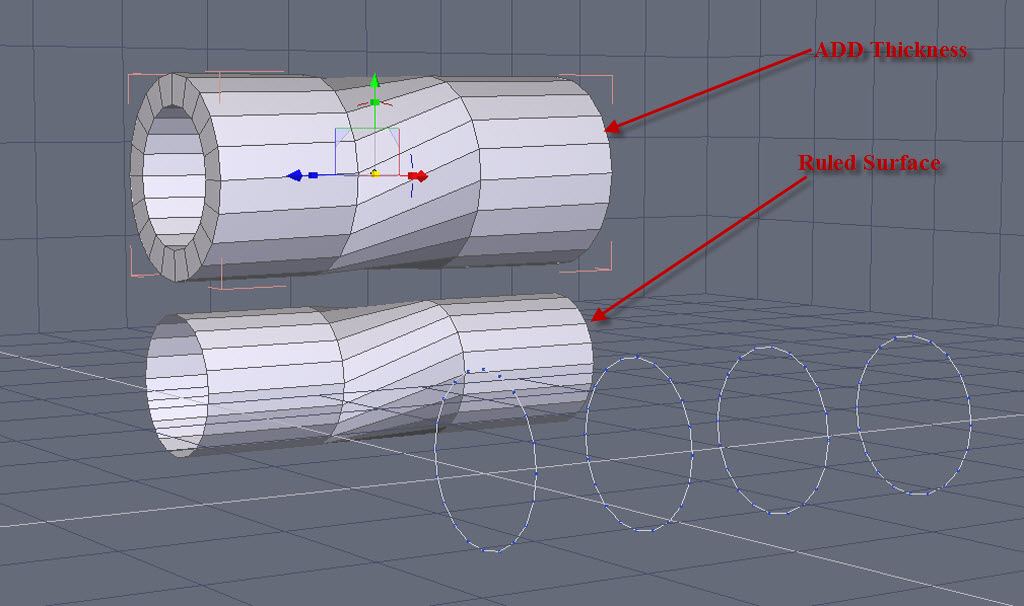
Instead of Boolean, you could use Hexagon, making some circles in the line tool section.
Then used ruled surface and add thickness. After thickness is applied, use the stretch tool in the utilities tab to make the shape you want.
Here's a pic of a quickie demonstration of that method.
BTW, using the line tool and thickness, one can make many things just by imagining the initial shape via sketch or breaking an object down to its constituent parts.
Hope that helps!
The lattice of your wireframe looks like a complex spider web.
Edit: Using metaballs never occurred to me.
-------------
Instead of Boolean, you could use Hexagon, making some circles in the line tool section.
Then used ruled surface and add thickness. After thickness is applied, use the stretch tool in the utilities tab to make the shape you want.
Here's a pic of a quickie demonstration of that method.
BTW, using the line tool and thickness, one can make many things just by imagining the initial shape via sketch or breaking an object down to its constituent parts.
Hope that helps!
- Attachments
-
-

Walk by faith, not by sight.
-
Finis
- Captain
- Posts: 5410
- Joined: 21 May 2009, 18:26
- Type the number ten into the box: 0
- Location: America!
Re: Ice Cave
That's a good method James. I don't think Hexagon can be my general purpose modeler but it is great for some things.
The cave still needs ice. Then I can play with translucency.
The cave still needs ice. Then I can play with translucency.
I prefer dangerous freedom over peaceful servitude. -- Thomas Jefferson/Jean Jacques Rousseau
-
RAYMAN

- Captain
- Posts: 2547
- Joined: 21 May 2009, 18:56
Re: Ice Cave
there are some awsome textures over at the kerkythea forum and i can remember also for ice..
here is something promising if you change the color and use it plain white or light blue... !
http://www.kerkythea.net/forum/viewtopi ... 19&t=10587"
Some ice material is in the new material pack under translucent....
Peter
here is something promising if you change the color and use it plain white or light blue... !
http://www.kerkythea.net/forum/viewtopi ... 19&t=10587"
Some ice material is in the new material pack under translucent....
Peter
-
Finis
- Captain
- Posts: 5410
- Joined: 21 May 2009, 18:26
- Type the number ten into the box: 0
- Location: America!
Re: Ice Cave
Thanks Rayman. Working from the jelly material from the KT forum for the ice.
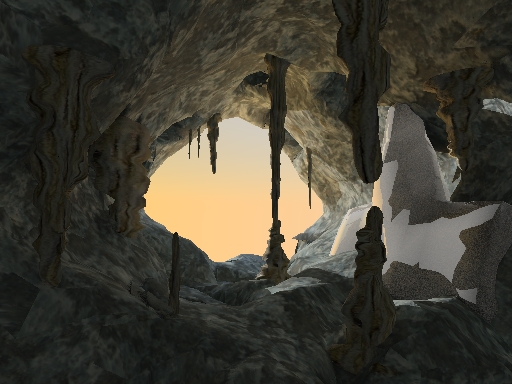
I made an ice shape meant to be like ones in an Austrian ice cave. The shape needs work but I have little time. This will be a long term project to learn Kerkythea and that kind of materials and rendering.
I changed the textures of the walls and stalactites but I think I like the original ones better, maybe.
This render took about 30 minutes at low quality settings. The ice shape has the base jelly material from the KT forum. Now I'll start changing that material. Maybe try MLT render as that is supposed to do well with translucency.
KT doesn't have subsurface scattering, that I have found, but there are materials that simulate it. 3Delight does, as well as displacement mapping, but it is slow by comparison to KT and Daz Studio's interface to it is not complete.
I made an ice shape meant to be like ones in an Austrian ice cave. The shape needs work but I have little time. This will be a long term project to learn Kerkythea and that kind of materials and rendering.
I changed the textures of the walls and stalactites but I think I like the original ones better, maybe.
This render took about 30 minutes at low quality settings. The ice shape has the base jelly material from the KT forum. Now I'll start changing that material. Maybe try MLT render as that is supposed to do well with translucency.
KT doesn't have subsurface scattering, that I have found, but there are materials that simulate it. 3Delight does, as well as displacement mapping, but it is slow by comparison to KT and Daz Studio's interface to it is not complete.
- Attachments
-
I prefer dangerous freedom over peaceful servitude. -- Thomas Jefferson/Jean Jacques Rousseau
-
pugman 1
- Captain
- Posts: 1555
- Joined: 21 May 2009, 19:26
- Type the number ten into the box: 0
- Location: Germany
Re: Ice Cave
cool finis, i tryed getting mine cave into thea render but could not make
head nor tail off it , i have to learn this .
head nor tail off it , i have to learn this .
-
Finis
- Captain
- Posts: 5410
- Joined: 21 May 2009, 18:26
- Type the number ten into the box: 0
- Location: America!
Re: Ice Cave
Thanks pugman 1. The little I know of KT took a while to learn. Since KT is sort of a development version of Thea I hope Thea has better documentation.
Here is a metropolis light transport render. Still not much translucency. Still speckled after 30 minutes of rendering. I'll work on the texture and make sure the model is life size. That seems important in this type of renderer.
Here is a metropolis light transport render. Still not much translucency. Still speckled after 30 minutes of rendering. I'll work on the texture and make sure the model is life size. That seems important in this type of renderer.
- Attachments
-

I prefer dangerous freedom over peaceful servitude. -- Thomas Jefferson/Jean Jacques Rousseau
-
RAYMAN
- Captain
- Posts: 2547
- Joined: 21 May 2009, 18:56
Re: Ice Cave
Hi Finis !
Yes lifesize is very important since its a physically acutrate render engine..
Kerkythea has not only translucency but also subsurface scattering..... !!
you have to activate volume Lightning in the Global Settings tab
http://www.kerkythea.net/phpBB2/viewtop ... sc&start=0"
I will do a short test for you.. and also there is a very good tutorial on texturing and materials from Patrick !
Here is the list of documentation.... http://www.kerkythea.net/joomla/index.p ... =tutorials"
and here is the material editor documentation...
its for the old 2007 version but very valuable information... just the interface has changed.. !
http://www.kerkythea.net/joomla/index.p ... info&id=49"
Peter
Here is also a material that I made for you.. !!! To get the best results use an omni light behind it to shine through !
You can adjust the colors to your liking ! Its a materail with layers so read about that first !
Yes lifesize is very important since its a physically acutrate render engine..
Kerkythea has not only translucency but also subsurface scattering..... !!
you have to activate volume Lightning in the Global Settings tab
http://www.kerkythea.net/phpBB2/viewtop ... sc&start=0"
I will do a short test for you.. and also there is a very good tutorial on texturing and materials from Patrick !
Here is the list of documentation.... http://www.kerkythea.net/joomla/index.p ... =tutorials"
and here is the material editor documentation...
its for the old 2007 version but very valuable information... just the interface has changed.. !
http://www.kerkythea.net/joomla/index.p ... info&id=49"
Peter
Here is also a material that I made for you.. !!! To get the best results use an omni light behind it to shine through !
You can adjust the colors to your liking ! Its a materail with layers so read about that first !
- Attachments
-
-
- ice.mat.zip
- (39.18 KiB) Downloaded 158 times
-
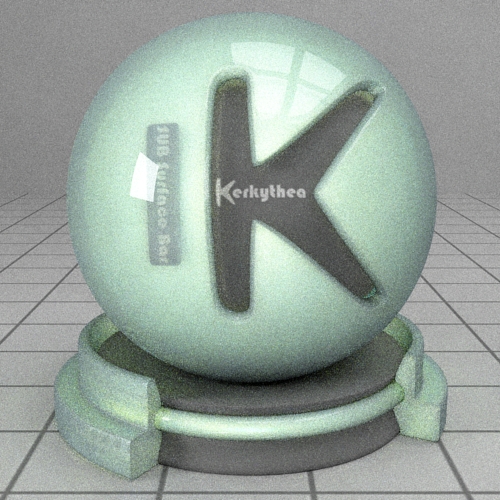

-
RAYMAN
- Captain
- Posts: 2547
- Joined: 21 May 2009, 18:56
Re: Ice Cave
Here the material is lighted from behind with an omni light and rendered with metropolis Light Tr. with BPT !
- Attachments
-

-
Finis
- Captain
- Posts: 5410
- Joined: 21 May 2009, 18:26
- Type the number ten into the box: 0
- Location: America!
Re: Ice Cave
Thanks Rayman! I'll use that material and learn from it. It looks great! We'll see how it looks with photon mapping + final gather. MLT takes too long.
I read on the forum that some things work only with some lights. This scene has a sun light and programmed sky from the sun and sky panel. Do I need to use an omni light instead?
I read on the forum that some things work only with some lights. This scene has a sun light and programmed sky from the sun and sky panel. Do I need to use an omni light instead?
I prefer dangerous freedom over peaceful servitude. -- Thomas Jefferson/Jean Jacques Rousseau
-
RAYMAN
- Captain
- Posts: 2547
- Joined: 21 May 2009, 18:56
Re: Ice Cave
No just use MLT and bpt and then thats the trick eliminate the rest of the noise in PP !
after about 30 cycles (that should take about 3 hours) its enough !
Material doesnt work so well in photon mapping !
Peter
after about 30 cycles (that should take about 3 hours) its enough !
Material doesnt work so well in photon mapping !
Peter
-
Finis
- Captain
- Posts: 5410
- Joined: 21 May 2009, 18:26
- Type the number ten into the box: 0
- Location: America!
Re: Ice Cave
Here is one with Rayman's material. This is PM+FG. I'll try a simplified very small render in MLT, due to render time, to tune the look of the ice and then try a regular render.
I temporarily added a 6' human figure, near the stalactite/stalagmite column, and scaled the cave accordingly.
I think there are light leaks on the right side. Bright patches.
I temporarily added a 6' human figure, near the stalactite/stalagmite column, and scaled the cave accordingly.
I think there are light leaks on the right side. Bright patches.
- Attachments
-

I prefer dangerous freedom over peaceful servitude. -- Thomas Jefferson/Jean Jacques Rousseau
-
RAYMAN
- Captain
- Posts: 2547
- Joined: 21 May 2009, 18:56
Re: Ice Cave
you need to run MLT Bpt to get the material working and a bump map on the ice and a omni light behind it.... !
Peter
Peter
-
Finis
- Captain
- Posts: 5410
- Joined: 21 May 2009, 18:26
- Type the number ten into the box: 0
- Location: America!
Re: Ice Cave
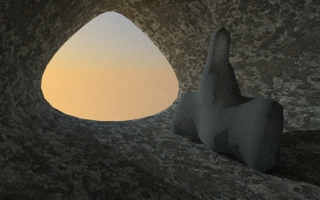
Yeah, MLT. This small render with simplified cave took less than 20 minutes* for 34 cycles of MLT. There's some translucency in the thin part on top. I don't want to have a light behind it for the finished image but for learning, and testing the the ice looks good, I will put one there. I'll try your (Rayman) other ice material too. There were two in the zip.
This shape is what I spread the metaballs on to make the cave walls.
Whenever this is finished it should be a cave in a very cold place like an antarctic mountain range. Cold enough that direct sunlight doesn't melt the ice.
*2.6 GHz dual core 2GB memory
This shape is what I spread the metaballs on to make the cave walls.
Whenever this is finished it should be a cave in a very cold place like an antarctic mountain range. Cold enough that direct sunlight doesn't melt the ice.
*2.6 GHz dual core 2GB memory
- Attachments
-
- temp_bmlt_tlucent.jpg (49.23 KiB) Viewed 3337 times
I prefer dangerous freedom over peaceful servitude. -- Thomas Jefferson/Jean Jacques Rousseau
-
RAYMAN
- Captain
- Posts: 2547
- Joined: 21 May 2009, 18:56
Re: Ice Cave
you can try to change the color of the ice to a bit more white and also put the light inside the ice !
Peter
Peter
-
Draise

- Captain
- Posts: 3200
- Joined: 21 Sep 2009, 19:33
- Type the number ten into the box: 0
- Location: Bogota, Colombia
Re: Ice Cave
I really liked the preultimate render of yours! if it was in the poll...... you know, its great!
-
Finis
- Captain
- Posts: 5410
- Joined: 21 May 2009, 18:26
- Type the number ten into the box: 0
- Location: America!
Re: Ice Cave
Thanks Draise and Rayman.
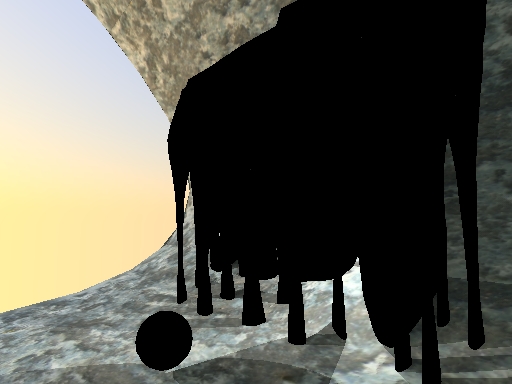
KT has a problem. If I give a glass material to an object then the object renders as a black silhouette. Does this with raytrace, PM, and MLT. I used one of the dielectric materials from a library from the KT web site. I think it happened with thin glass too. Here are pictures with dielectric glass and with wood on the new ice object and a sphere made it KT. There is a light among the ice columns and one outside. The preview image in the material editor looks like glass.
Edit: rebooted computer and still happened. Verified it does happen with thin glass too. Some kind of glass worked in Hobbit House.
KT has a problem. If I give a glass material to an object then the object renders as a black silhouette. Does this with raytrace, PM, and MLT. I used one of the dielectric materials from a library from the KT web site. I think it happened with thin glass too. Here are pictures with dielectric glass and with wood on the new ice object and a sphere made it KT. There is a light among the ice columns and one outside. The preview image in the material editor looks like glass.
Edit: rebooted computer and still happened. Verified it does happen with thin glass too. Some kind of glass worked in Hobbit House.
- Attachments
-
-

I prefer dangerous freedom over peaceful servitude. -- Thomas Jefferson/Jean Jacques Rousseau
-
Finis
- Captain
- Posts: 5410
- Joined: 21 May 2009, 18:26
- Type the number ten into the box: 0
- Location: America!
Re: Ice Cave
Glass works fine if I make a new scene but doesn't work in the current cave scene. A sphere made in KT and the new ice object both rendered as glass in the new scene. So there is some problem related to the current scene.
My Hobbit House scene rendered normally with thin glass windows. It also worked with various glasses from libraries and "hand made" dielectric glass.
Reinstalled KT. No change.
Saved the scene to a new file and opened that. Got worse. Then even the rock had black areas.
Deleted everything but the basic rock, lights, and glass things. No change.
I guess I have to rebuild the scene. Most of it is in TS but some things where moved into place in KT.
My Hobbit House scene rendered normally with thin glass windows. It also worked with various glasses from libraries and "hand made" dielectric glass.
Reinstalled KT. No change.
Saved the scene to a new file and opened that. Got worse. Then even the rock had black areas.
Deleted everything but the basic rock, lights, and glass things. No change.
I guess I have to rebuild the scene. Most of it is in TS but some things where moved into place in KT.
I prefer dangerous freedom over peaceful servitude. -- Thomas Jefferson/Jean Jacques Rousseau
-
Finis
- Captain
- Posts: 5410
- Joined: 21 May 2009, 18:26
- Type the number ten into the box: 0
- Location: America!
Re: Ice Cave
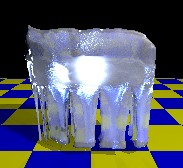
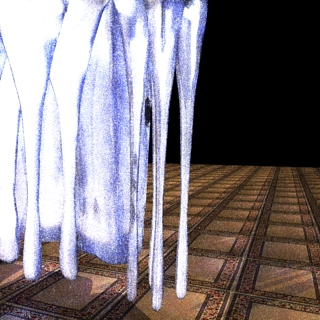
Here is an experiment with a KT ice material. There is a light behind and above and another above and in front. The lighting might not be right but I think it has too much of something that makes some areas too bright. Probably diffuse or translucency. I'd like the thinner parts and/or near-surface to be more transparent and the inner part more translucent. That might need a volumetric material ... wonder if I had volume, uh, rendering, on the settings turned on? I tried fog on the material editor but the results were not as expected so that requires study.
This has some diffuse and specular, a Fresnel translucency, some transmission with a blue color, and some refraction for clear or glass effect.
The material editor preview looks a lot like what I want.
MLT render to 31 cycles is still speckled.
Edit didn't have volume lighting checked. Trying one now with that. Also will try the material fog again with the volume lighting on.
This has some diffuse and specular, a Fresnel translucency, some transmission with a blue color, and some refraction for clear or glass effect.
The material editor preview looks a lot like what I want.
MLT render to 31 cycles is still speckled.
Edit didn't have volume lighting checked. Trying one now with that. Also will try the material fog again with the volume lighting on.
- Attachments
-
- KT preview image.
- temp_mlt.jpg (11.22 KiB) Viewed 3263 times
-
- Tone mapping.
- temp_mlt2.jpg (93.07 KiB) Viewed 3263 times
-

- No tone mapping.
- temp_mlt.jpg (92.2 KiB) Viewed 3263 times
I prefer dangerous freedom over peaceful servitude. -- Thomas Jefferson/Jean Jacques Rousseau
-
Finis
- Captain
- Posts: 5410
- Joined: 21 May 2009, 18:26
- Type the number ten into the box: 0
- Location: America!
Re: Ice Cave
With volume lighting on and a lot of tone mapping to darken it. This material might have potential but I need to get brightness down. Hard to experiment with an hour per test render.
- Attachments
-

- temp_mlt2.jpg (75.32 KiB) Viewed 3258 times
I prefer dangerous freedom over peaceful servitude. -- Thomas Jefferson/Jean Jacques Rousseau
-
jamesmc
- Captain
- Posts: 1776
- Joined: 08 Jul 2009, 15:35
Re: Ice Cave
Dang, that made me cold just looking at it. 
Walk by faith, not by sight.