Where can I encounter the config panel of workspace DX9 renderer? It's the real time renderer... it's that I got a new computer, a little better than my previous and it has a little better Graphics Card (But stills a onboard ones). So I want to see if I can make the renderer work harder.
Thanks in Advance!
Workspace DX9 Render Config
-
LeonRegis

- Captain
- Posts: 1946
- Joined: 18 Aug 2009, 17:36
- Type the number ten into the box: 0
- Location: Brazil/Earth/Orion Arm/Milky Way/4th Dimension/This Universe/Multiverse???/Singularity???
Workspace DX9 Render Config
Be the change you want to see in the world. - Mohandas Gandhi
-
Tiles

- Master Chief Petty Officer
- Posts: 401
- Joined: 27 May 2009, 08:34
Re: Workspace DX9 Render Config
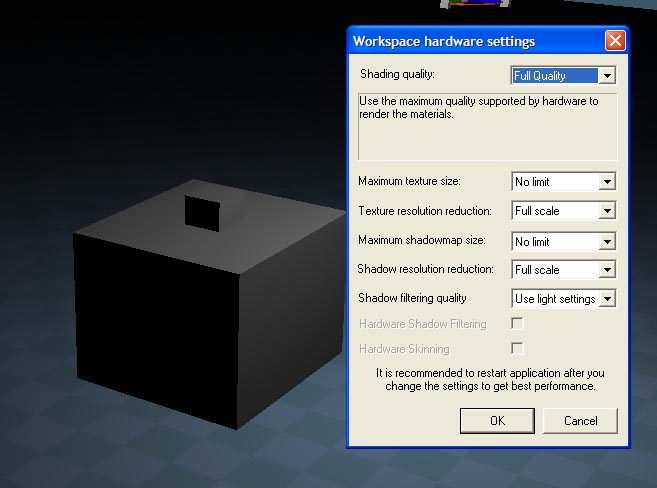
File menu upper right. File: HW Settings.
Stuff like Antialias and Supersampling is in the Stack, in the Setting tabs.
Stuff like Antialias and Supersampling is in the Stack, in the Setting tabs.
Free Gamegraphics, Freeware Games http://reinerstilesets.de
-
LeonRegis
- Captain
- Posts: 1946
- Joined: 18 Aug 2009, 17:36
- Type the number ten into the box: 0
- Location: Brazil/Earth/Orion Arm/Milky Way/4th Dimension/This Universe/Multiverse???/Singularity???
Re: Workspace DX9 Render Config
Thanks Tiles.
But I see that those config are in the maximum but don't display the maximum quality (Don't cast shadows, etc) how can I solve this? Here is a image showing:
But I see that those config are in the maximum but don't display the maximum quality (Don't cast shadows, etc) how can I solve this? Here is a image showing:
- Attachments
-
Be the change you want to see in the world. - Mohandas Gandhi
-
Tiles
- Master Chief Petty Officer
- Posts: 401
- Joined: 27 May 2009, 08:34
Re: Workspace DX9 Render Config
This depends of the lights setup you use. There are lights that casts shadow, and there are lights that doesn`t cast shadow.
Free Gamegraphics, Freeware Games http://reinerstilesets.de
-
LeonRegis
- Captain
- Posts: 1946
- Joined: 18 Aug 2009, 17:36
- Type the number ten into the box: 0
- Location: Brazil/Earth/Orion Arm/Milky Way/4th Dimension/This Universe/Multiverse???/Singularity???
Re: Workspace DX9 Render Config
How can I check the option to cast shadows in the workspace? (I don't know much about this side)
Thanks in Advance
Thanks in Advance
Be the change you want to see in the world. - Mohandas Gandhi