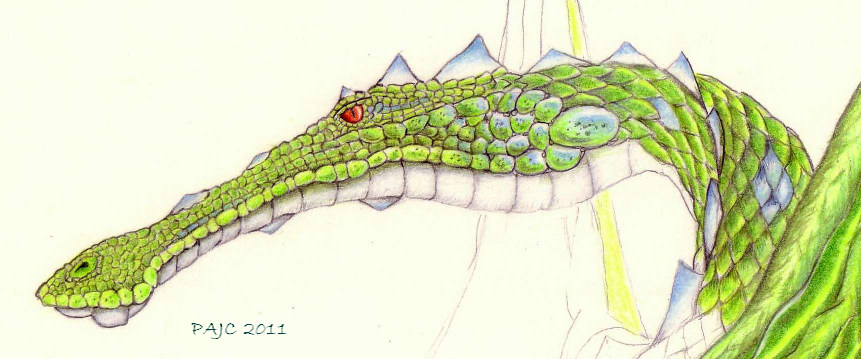

Drawing I thought you might like.
-
Peter
- Senior Chief Petty Officer
- Posts: 170
- Joined: 18 Apr 2010, 15:18
- Type the number ten into the box: 0
- Location: Texas
Drawing I thought you might like.
Here is a colored pencil sketch I'm working on.
I hope you enjoy
a day without orange juice is like... a day without orange juice
-
Draise

- Captain
- Posts: 3200
- Joined: 21 Sep 2009, 19:33
- Type the number ten into the box: 0
- Location: Bogota, Colombia
Re: Drawing I thought you might like.
Very very very good concept! Loving the characterization! It reminds of one of the dragons from "How to train a dragon"!!
-
Steinie

- Captain
- Posts: 2958
- Joined: 21 May 2009, 17:38
- Type the number ten into the box: 10
Re: Drawing I thought you might like.
Yep, I like your Dragon also. Very clean lines.
Any plans to make this into a 3D model?
Any plans to make this into a 3D model?
-
Peter
- Senior Chief Petty Officer
- Posts: 170
- Joined: 18 Apr 2010, 15:18
- Type the number ten into the box: 0
- Location: Texas
Re: Drawing I thought you might like.
Thanks guys!
Have a look at this one
yup, someday.Steinie wrote:Yep, I like your Dragon also. Very clean lines.
Any plans to make this into a 3D model?
Have a look at this one

a day without orange juice is like... a day without orange juice
-
BNG

- Chief Warrant Officer
- Posts: 684
- Joined: 16 Oct 2009, 03:26
- Type the number ten into the box: 0
- Location: Texas
Re: Drawing I thought you might like.
Very cool. I'd love to see a plugin that could generate a 3d model from a 2d image. I've only seen this done once in another modeling product. It would open a whole new world to 2d artists wanting to jump in to the 3d world of software modeling. Can Truespace read height data values in a 2d image and translate the information to a simple 3d mesh? Thanks, BNG.
Casual Truespace 3D modeling hobbyist. My Truespace blog and simple 3d Modeling Tutorials for Casual Model Makers.
-
Draise
- Captain
- Posts: 3200
- Joined: 21 Sep 2009, 19:33
- Type the number ten into the box: 0
- Location: Bogota, Colombia
Re: Drawing I thought you might like.
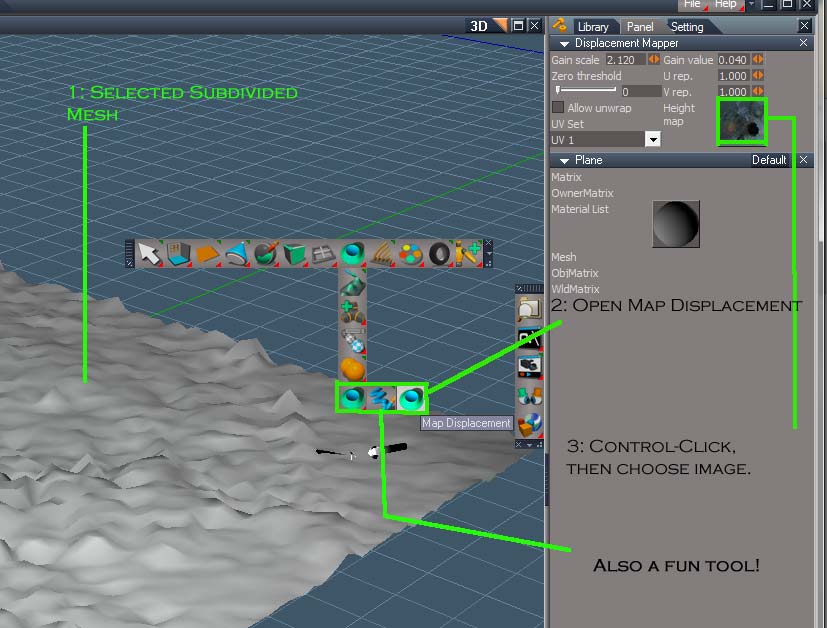
I think... you can do this with a displacement mesh editor. You can load a hightmap then project it onto a 2D plane with the displacement tool to create a 3D mesh. Play with the gain, and you get your 2d image to a 3d mesh. Then you can clean the mesh by cutting out it's sillohuette using a boolean or polygon extract, flatten a mirror axis, then mirror it! =) You have a drawing based model!
This is the tool in WS side.

This is a REALLLLY rough example, where I found this black and white eye, did the displacement over a high mesh, mirrored it, froze it, then cut it out of it's plane, then healed some of the verticies, and there you go.. a weird eye shaped thing! Very rough, but I had only 10 minutes to figure it out and do it. Now back to work!

This is the tool in WS side.
This is a REALLLLY rough example, where I found this black and white eye, did the displacement over a high mesh, mirrored it, froze it, then cut it out of it's plane, then healed some of the verticies, and there you go.. a weird eye shaped thing! Very rough, but I had only 10 minutes to figure it out and do it. Now back to work!
-
theuns
- Lieutenant Junior Grade
- Posts: 868
- Joined: 10 Jun 2009, 11:21
- Type the number ten into the box: 0
- Location: South Africa
Re: Drawing I thought you might like.
Wow! Very nice Peter. Did you do this cold? From the top of your head? Impressive! Got a web site with more pics to peep at???
theuns - tSer since 2000
. http://theunsfvo.cgarena.com/" onclick="window.open(this.href);return false; |:.
. http://bluestarcreations.wordpress.com/" onclick="window.open(this.href);return false; |:.
.
http://theunsfvo.cgarena.com/" onclick="window.open(this.href);return false; |:..
http://bluestarcreations.wordpress.com/" onclick="window.open(this.href);return false; |:.-
Peter
- Senior Chief Petty Officer
- Posts: 170
- Joined: 18 Apr 2010, 15:18
- Type the number ten into the box: 0
- Location: Texas
Re: Drawing I thought you might like.
Thanks.theuns wrote:Wow! Very nice Peter. Did you do this cold? From the top of your head? Impressive! Got a web site with more pics to peep at???
Yes it all just pops into my head. I'll set up a dropbox gallery during my Christmas break.
a day without orange juice is like... a day without orange juice
-
BNG
- Chief Warrant Officer
- Posts: 684
- Joined: 16 Oct 2009, 03:26
- Type the number ten into the box: 0
- Location: Texas
Re: Drawing I thought you might like.
Very cool Draise. Does this tool come stock with TS or is it a plugin addon? Thanks BNG.Draise wrote:I think... you can do this with a displacement mesh editor. You can load a hightmap then project it onto a 2D plane with the displacement tool to create a 3D mesh. Play with the gain, and you get your 2d image to a 3d mesh. Then you can clean the mesh by cutting out it's sillohuette using a boolean or polygon extract, flatten a mirror axis, then mirror it! =) You have a drawing based model!
This is the tool in WS side.
This is a REALLLLY rough example, where I found this black and white eye, did the displacement over a high mesh, mirrored it, froze it, then cut it out of it's plane, then healed some of the verticies, and there you go.. a weird eye shaped thing! Very rough, but I had only 10 minutes to figure it out and do it. Now back to work!
Casual Truespace 3D modeling hobbyist. My Truespace blog and simple 3d Modeling Tutorials for Casual Model Makers.
-
spacekdet

- Captain
- Posts: 1810
- Joined: 27 May 2009, 15:00
- Type the number ten into the box: 10
- Location: On the day shift at the Utility Muffin Research Kitchen
Re: Drawing I thought you might like.
Nope, this is a stock Workspace side tool.
You can use an image or a brush, or an image as a brush...very fun stuff.
EDIT: Forgot to add you should adjust 'Gain' settings to get different effects.
Note that you'll need a pretty dense subdivided mesh to begin with.
For Brush Displacement Tool, tic the 'Custom profile' box, and Control-Click on the image input box.
This will allow you to use an image as the displacement brush.
You can use an image or a brush, or an image as a brush...very fun stuff.
EDIT: Forgot to add you should adjust 'Gain' settings to get different effects.
Note that you'll need a pretty dense subdivided mesh to begin with.
For Brush Displacement Tool, tic the 'Custom profile' box, and Control-Click on the image input box.
This will allow you to use an image as the displacement brush.
-
spacekdet
- Captain
- Posts: 1810
- Joined: 27 May 2009, 15:00
- Type the number ten into the box: 10
- Location: On the day shift at the Utility Muffin Research Kitchen
Re: Drawing I thought you might like.
PS I like the dragon.
When you say 'drawing' do you mean pencil on paper or digital?
It's stylish either way you did it.
Didn't mean to derail your thread, sorry!
When you say 'drawing' do you mean pencil on paper or digital?
It's stylish either way you did it.
Didn't mean to derail your thread, sorry!
-
Peter
- Senior Chief Petty Officer
- Posts: 170
- Joined: 18 Apr 2010, 15:18
- Type the number ten into the box: 0
- Location: Texas
Re: Drawing I thought you might like.
I really don't mind.spacekdet wrote:PS I like the dragon.
When you say 'drawing' do you mean pencil on paper or digital?
It's stylish either way you did it.
Didn't mean to derail your thread, sorry!
The drawing is colored pencil on Bristol paper. I do most of my work in colored pencil.
Thanks. I'm glad you enjoyed it. I just need to finish it up.
a day without orange juice is like... a day without orange juice