Problems exporting to Blender

compPanda
Senior Chief Petty Officer
Posts: 275
Joined: 21 May 2009, 21:15
Type the number ten into the box: 0

Problems exporting to Blender

Post by compPanda »

Hi

I am trying to export an object to Blender but I have problems.
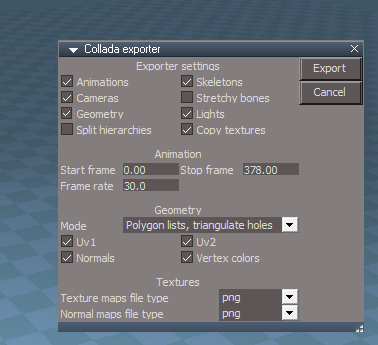
When I try to export using Collada then Blender refuse to import the object - I have tried different settings in the exporter but it doesn't work. Some of the settings I tried in Collada export:
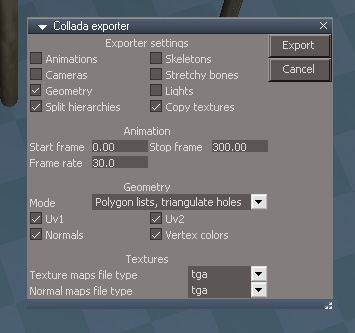
collada_export.jpg
collada_export.jpg (46.55 KiB) Viewed 5796 times
Blender gives me no error when I try to import....

So I tried to export from model side with 3DS. This works and Blender import it but the model doesn't look right. The mesh is corrupted in some way. Observer that all things below is 3DS since Collada couldn't be imported in Blender.

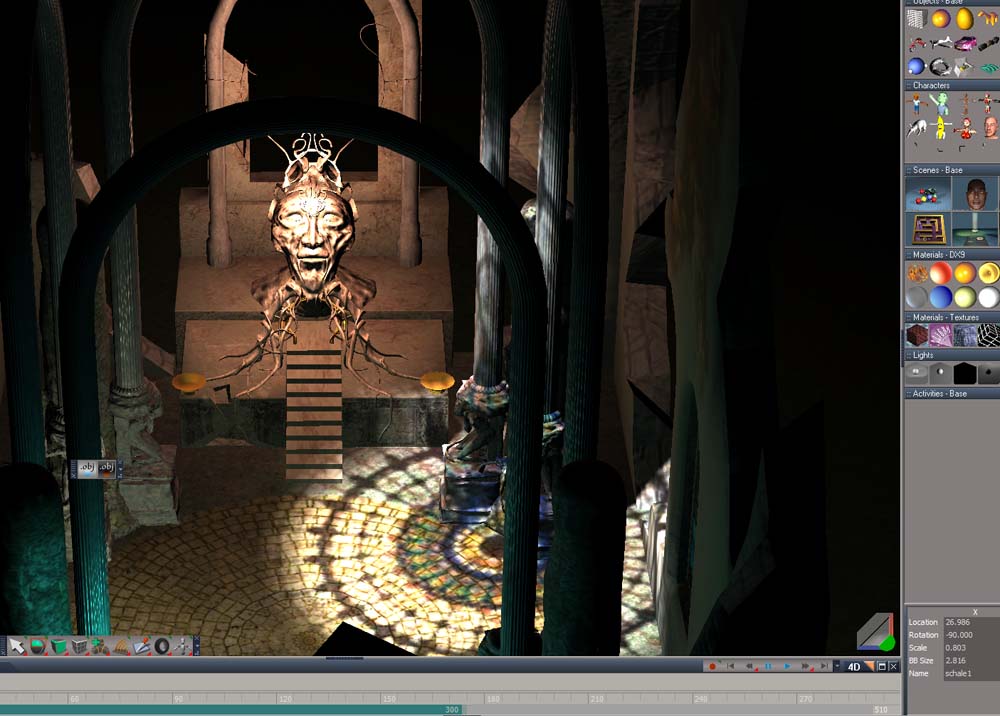
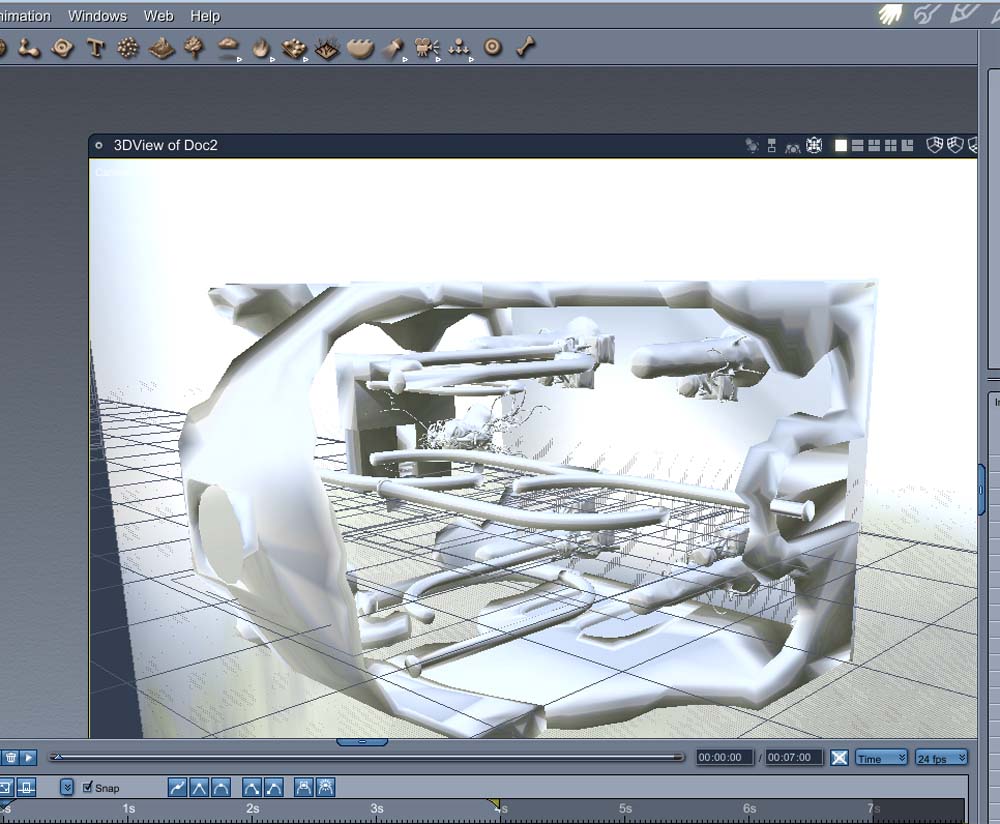
This image is a screen shot showing the model in TS:
ts_ok.jpg
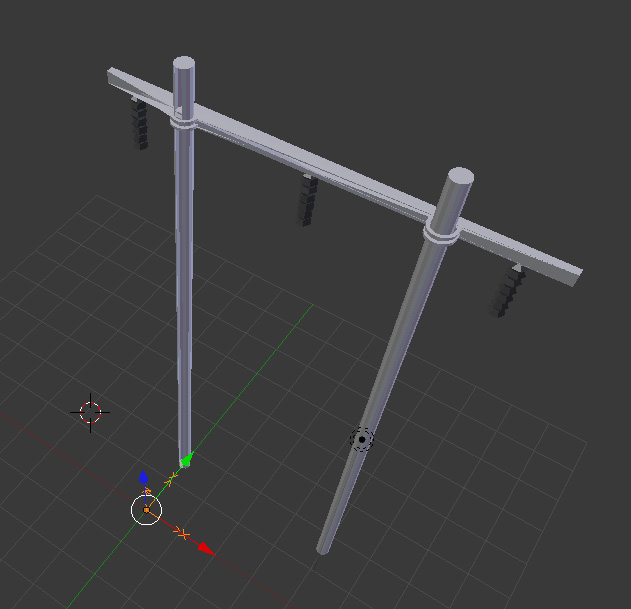
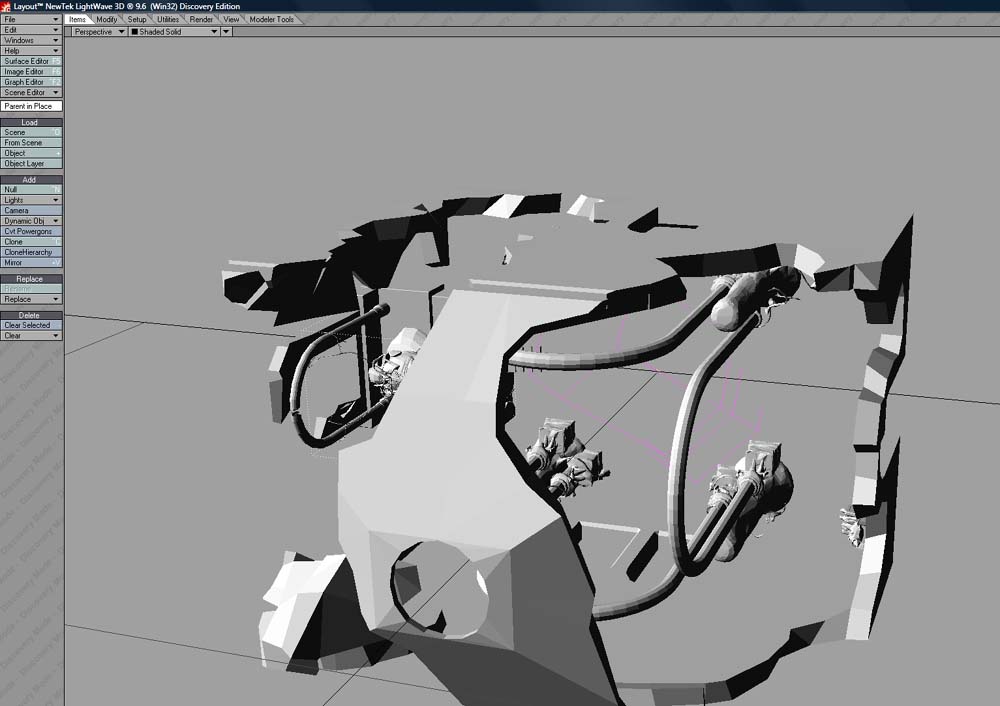
This is how it looks after import in Blender 2.56:
blender_error.jpg
As you see, the horizontal beam and the fittings are mangled in some way. This is one solid model - everything is boolean union:ed expect the black isolators hanging down (they are part of the same model but added as siblings).

What can I do? Can I get Collada export to work? Or can I get 3DS export to work? Can I get Blender to import COB files - I have found an old script for this but it is for Blender 2.4x and I am not sure that it works in 2.5x...
I need to get this to work since I want to work with modelling in TS (that I know how to use) and export them to a Trainz (a simulator) using Blender since there is only a exporter for that and 3DSMax and Gmax.
compPanda
Senior Chief Petty Officer
Posts: 275
Joined: 21 May 2009, 21:15
Type the number ten into the box: 0

Re: Problems exporting to Blender

Post by compPanda »

Here is my SCN file in a ZIP file - I wasn't allowed to add that in my first post (only 3 attachment/post rule).
elledning_ts7v7.zip
(250.47 KiB) Downloaded 286 times
User avatar
nigec
Master Chief Petty Officer
Posts: 561
Joined: 21 May 2009, 18:46

Re: Problems exporting to Blender

Post by nigec »

Have you tried the LUUV obj exporter?

With Blender I use 2.49 if I have problems importing objects, then export it as a Blend.. they usually open ok then in 2.5x (remember to untick the use GUI box)
User avatar
clintonman
Captain
Posts: 5659
Joined: 21 May 2009, 21:08
Type the number ten into the box: 0
Location: California

Re: Problems exporting to Blender

Post by clintonman »

nigec wrote:Have you tried the LUUV obj exporter?

With Blender I use 2.49 if I have problems importing objects, then export it as a Blend.. they usually open ok then in 2.5x (remember to untick the use GUI box)
I just tried that with the scene and it seems to work. Export Colllada from tS, import Collada to Blender 2.49. Save as a .blend file and load into Blender 2.5
The Blender 2.5 Collada stopped working properly a while ago and last I heard they were working on it.
Clinton Reese

http://clintons3d.com
compPanda
Senior Chief Petty Officer
Posts: 275
Joined: 21 May 2009, 21:15
Type the number ten into the box: 0

Re: Problems exporting to Blender

Post by compPanda »

clintonman wrote:
nigec wrote:Have you tried the LUUV obj exporter?

With Blender I use 2.49 if I have problems importing objects, then export it as a Blend.. they usually open ok then in 2.5x (remember to untick the use GUI box)
I just tried that with the scene and it seems to work. Export Colllada from tS, import Collada to Blender 2.49. Save as a .blend file and load into Blender 2.5
The Blender 2.5 Collada stopped working properly a while ago and last I heard they were working on it.
Ah, thank you. I will try that. I didn't have 2.49 installed so I didn't think of that.

Btw, where can I find this LUUV obj export and can Blender import OBJ?
compPanda
Senior Chief Petty Officer
Posts: 275
Joined: 21 May 2009, 21:15
Type the number ten into the box: 0

Re: Problems exporting to Blender

Post by compPanda »

clintonman wrote:
nigec wrote:Have you tried the LUUV obj exporter?

With Blender I use 2.49 if I have problems importing objects, then export it as a Blend.. they usually open ok then in 2.5x (remember to untick the use GUI box)
I just tried that with the scene and it seems to work. Export Colllada from tS, import Collada to Blender 2.49. Save as a .blend file and load into Blender 2.5
The Blender 2.5 Collada stopped working properly a while ago and last I heard they were working on it.
Ok, I have installed Blender 2.49b and the Python 2.7 scripting language.
But where do I find Collada import? It isn't under the import section of the File menu as in 2.5x...
Is it in a script I need to add? Or is it hidden somewhere else?
User avatar
nigec
Master Chief Petty Officer
Posts: 561
Joined: 21 May 2009, 18:46

Re: Problems exporting to Blender

Post by nigec »

There should be 2 versions pre installed, check the console to see if there's any python errors, all you should have is:

Code: Select all

Compiled with Python version 2.6.2.
Checking for installed Python... got it!
compPanda
Senior Chief Petty Officer
Posts: 275
Joined: 21 May 2009, 21:15
Type the number ten into the box: 0

Re: Problems exporting to Blender

Post by compPanda »

nigec wrote:There should be 2 versions pre installed, check the console to see if there's any python errors, all you should have is:

Code: Select all

Compiled with Python version 2.6.2.
Checking for installed Python... got it!
Yep, I have this text in my Blender console window.
But the only thing I have under import is:
VRML...
DXF...
STL...

Where do I find the Collada import? I tried to go to "script window" but that doesn't work - all scripts there is empty.
User avatar
clintonman
Captain
Posts: 5659
Joined: 21 May 2009, 21:08
Type the number ten into the box: 0
Location: California

Re: Problems exporting to Blender

Post by clintonman »

Try a different Blender download. If you downloaded the zip try using the installer instead and if you downloaded the installer try the zip download instead.
Clinton Reese

http://clintons3d.com
compPanda
Senior Chief Petty Officer
Posts: 275
Joined: 21 May 2009, 21:15
Type the number ten into the box: 0

Re: Problems exporting to Blender

Post by compPanda »

clintonman wrote:Try a different Blender download. If you downloaded the zip try using the installer instead and if you downloaded the installer try the zip download instead.
Thank you - now it works.
User avatar
Moonman
Petty Officer First Class
Posts: 58
Joined: 21 May 2009, 22:15
Type the number ten into the box: 0

Re: Problems exporting to Blender

Post by Moonman »

Ok, now I'm into the tS to blender translation.

:!: Installed:
- blender 2.59
- tS 6.6 w/ luuv & ConversionPak
- tS 7.6 (not 7.61) w/ luuv

I have an old copy of Deep Exploration 3.5 (not installed), which may help get better OBJ from a tS 4.3 file. Any thoughts?

Tried exporting to VRML and OBJ, but can't seem to find the fabled DAE (Collada) exporter. :cry:

:?: Questions:
1. Does 7.6 have the Collada exporter, if so, where?
2. Am I correct that 7.61 removed the Collada support?
2. Has any better pipeline been defined for translation between the apps?
jamesmc
Captain
Posts: 1776
Joined: 08 Jul 2009, 15:35

Re: Problems exporting to Blender

Post by jamesmc »

To my knowledge TS never had a compliant collada for export.

OBJ is your best bet. I'm sure froo or someone could help you out in that regard.
Walk by faith, not by sight.
User avatar
Moonman
Petty Officer First Class
Posts: 58
Joined: 21 May 2009, 22:15
Type the number ten into the box: 0

Re: Problems exporting to Blender

Post by Moonman »

Sad, about the incomplete Collada support in tS 7.x. :cry:

The luuv plugin seems to not like "complex" meshes. The exporter asks if I want to trianglarize the model, then crashes tS (both in 6.6 & 7.6).
User avatar
trueBlue
Captain
Posts: 5548
Joined: 06 Jul 2009, 22:50
Type the number ten into the box: 10

Re: Problems exporting to Blender

Post by trueBlue »

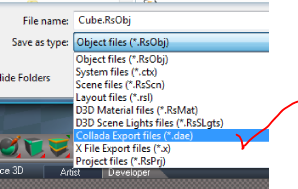
Have you tried saving your object from tS7.6 and or tS7.61 Workspace's File/Save menu?
Select the dae extension.
Capture.PNG
Capture.PNG (28.19 KiB) Viewed 5306 times
Capture2.PNG
Capture2.PNG (28.29 KiB) Viewed 5305 times
User avatar
RAYMAN
Captain
Posts: 2547
Joined: 21 May 2009, 18:56

Re: Problems exporting to Blender

Post by RAYMAN »

Collada actually works very well from inside Truespace !! ;)
The only mistake that most people make and then blame the bad exporter is that the DID NOT select the items before the export with dae extension...
If you dont do that Truespace doesnt export ANYTHING !
From the samplöes that I show you here you can see that it works quite well with Blender and very well with Daz studio and Vue !
Even got physics animations to export to Vue that way !
Peter
Attachments
church.jpg
church 2.jpg
Church 3.jpg
User avatar
RAYMAN
Captain
Posts: 2547
Joined: 21 May 2009, 18:56

Re: Problems exporting to Blender

Post by RAYMAN »

Even lightwave works and if you export item by item Modo and Carrara 8....

For applications like Carrara that dont import Dae so well youm canb use the Autodesk Collada to Fbx converter which is free and you get very good results....
In all case4s the Uv´s transform well .. in most cases though you need to manually reload the textures in your target application....
Peter
Attachments
Church 5.jpg
church 4.jpg
User avatar
Moonman
Petty Officer First Class
Posts: 58
Joined: 21 May 2009, 22:15
Type the number ten into the box: 0

Re: Problems exporting to Blender

Post by Moonman »

trueBlue wrote:Have you tried saving your object from tS7.6 and or tS7.61 Workspace's File/Save menu?
Select the dae extension.
I have little experience with 7.x, as it never really made sense to me. :oops: That is why I stuck with 6.6.

blender calls to me, and I don't want to walk away from my library of projects. I need a workable pipeline.

I just installed it this weekend, and managed to select the trueSpace6 tab. I could load/save models/scenes from there, but no DAE format options. Does it need to be done through the 7.6 workspace, if so I could not figure how to load a scene in there, much less save it.

A short tutorial, with images, would help. My apologies for being so dense.
User avatar
clintonman
Captain
Posts: 5659
Joined: 21 May 2009, 21:08
Type the number ten into the box: 0
Location: California

Re: Problems exporting to Blender

Post by clintonman »

I just did some tests and figured out why it works well for some and not for others. The problem is that it doesn't export modelside materials correctly. I never saw the problem because I always exported purely worskpace scenes and objects. So if you want to go straight to Blender 2.5x you need to use workspace materials.
Clinton Reese

http://clintons3d.com
User avatar
Moonman
Petty Officer First Class
Posts: 58
Joined: 21 May 2009, 22:15
Type the number ten into the box: 0

Re: Problems exporting to Blender

Post by Moonman »

clintonman wrote:So if you want to go straight to Blender 2.5x you need to use workspace materials.
Uh, ok. How do I do that?

I can't figure out how to load an existing scene in "workspace". The "File" menu (in the upper right corner) seems to want to load textures, no models (unless I'm in 6.6 mode, go figure). Not sure where is it hidden. I'm missing the first steps.

Is there some (illustrated) tutorial that shows how to load and/or save from 7.x workspace?

Help :!:
User avatar
clintonman
Captain
Posts: 5659
Joined: 21 May 2009, 21:08
Type the number ten into the box: 0
Location: California

Re: Problems exporting to Blender

Post by clintonman »

Moonman wrote:
clintonman wrote:So if you want to go straight to Blender 2.5x you need to use workspace materials.
Uh, ok. How do I do that?

I can't figure out how to load an existing scene in "workspace". The "File" menu (in the upper right corner) seems to want to load textures, no models (unless I'm in 6.6 mode, go figure). Not sure where is it hidden. I'm missing the first steps.

Is there some (illustrated) tutorial that shows how to load and/or save from 7.x workspace?

Help :!:
Load the scene file into modelspace and when you switch to workspace the scene will be there. The upper right File menu has all formats in one menu so it has RsScn and RsObj for the workspace scene and object formats and all the image formats and a few other things. If you save an RsScn scene file from workspace the modelspace scene elements are included. Workspace won't load modelspace objects or scenes directly. They have to be loaded from modelside. Same for the other direction, modelspace won't load workspace scenes or objects directly.
Clinton Reese

http://clintons3d.com
User avatar
trueBlue
Captain
Posts: 5548
Joined: 06 Jul 2009, 22:50
Type the number ten into the box: 10

Re: Problems exporting to Blender

Post by trueBlue »

Quick and dirty video. Takes a while Painting the object with the default D3D Material because there is alot of objects.
Attachments
DAE.zip
(2.75 MiB) Downloaded 247 times
User avatar
BNG
Chief Warrant Officer
Posts: 684
Joined: 16 Oct 2009, 03:26
Type the number ten into the box: 0
Location: Texas

Re: Problems exporting to Blender

Post by BNG »

compPanda wrote:
clintonman wrote:Try a different Blender download. If you downloaded the zip try using the installer instead and if you downloaded the installer try the zip download instead.
Thank you - now it works.
It's strange how you had to use an older version of Blender to get your model imported correctly. It seems that the latest version of Blender doesn't use Python scripts anymore. Does anyone have any thoughts on how plugins are written for Blender in the latest build?
User avatar
Tiles
Master Chief Petty Officer
Posts: 401
Joined: 27 May 2009, 08:34

Re: Problems exporting to Blender

Post by Tiles »

Collada in trueSpace is a bit flawed. And it is outdated now. That`s why older Blender versions works better with it. Newest Blender uses newest Collada version. The newest Blender Collada has a few flaws too though when it comes to animation. They wanted to fix them in this summer of code when i remember right.
User avatar
RAYMAN
Captain
Posts: 2547
Joined: 21 May 2009, 18:56

Re: Problems exporting to Blender

Post by RAYMAN »

Here is truespace scvene in the newest Blender that comes from the official page and not from test builds..
As you can see it works well here.. and it renders with textures on them..
I managed to even get truespace physics animations into Blender when I bake them
here is the file you can render the animation it works !
Peter
Attachments
fl.zip
(440.47 KiB) Downloaded 238 times
new blender.jpg
User avatar
clintonman
Captain
Posts: 5659
Joined: 21 May 2009, 21:08
Type the number ten into the box: 0
Location: California

Re: Problems exporting to Blender

Post by clintonman »

Tiles wrote:Collada in trueSpace is a bit flawed. And it is outdated now. That`s why older Blender versions works better with it. Newest Blender uses newest Collada version. The newest Blender Collada has a few flaws too though when it comes to animation. They wanted to fix them in this summer of code when i remember right.
They both use the same version of Collada, version 1.4.1

Code: Select all

<?xml version="1.0" encoding="utf-8"?>
<COLLADA xmlns="http://www.collada.org/2005/11/COLLADASchema" version="1.4.1">
  <asset>
    <contributor>
      <author>Blender User</author>
      <authoring_tool>Blender 2.59.0 r39307</authoring_tool>
    </contributor>
from newest blender with collada changes

Code: Select all

<?xml version="1.0"?>
    <COLLADA xmlns="http://www.collada.org/2005/11/COLLADASchema" version="1.4.1">
    <asset>
        <contributor>
            <author>Clinton Reese, Clintons 3D Creations</author>
            <authoring_tool>trueSpace 7.6 | trueSpaceCollada v1.1 </authoring_tool>
and from truespace
Clinton Reese

http://clintons3d.com
User avatar
Tiles
Master Chief Petty Officer
Posts: 401
Joined: 27 May 2009, 08:34

Re: Problems exporting to Blender

Post by Tiles »

I stand corrected. But trueSpace version never really gots finished, while the Blender version still evolves :)
Free Gamegraphics, Freeware Games http://reinerstilesets.de
User avatar
clintonman
Captain
Posts: 5659
Joined: 21 May 2009, 21:08
Type the number ten into the box: 0
Location: California

Re: Problems exporting to Blender

Post by clintonman »

clintonman wrote:I just did some tests and figured out why it works well for some and not for others. The problem is that it doesn't export modelside materials correctly. I never saw the problem because I always exported purely worskpace scenes and objects. So if you want to go straight to Blender 2.5x you need to use workspace materials.
Looks like I was wrong about this. I was testing using the scene downloaded from this thread, but it didn't include the texture file that was applied to the model. This was causing truspace to write bad materials. It was trying to use a nonexistent texture file and that messed it up. I reset the material in modelspace, repainted and the export was readable in Blender 2.59

Edit: Did some more testing.

save object with texture = dae file pointing to original textures with a weird path, texture file and an empty folder
save scene with texture = dae file pointing to renamed textures inside the folder with a relative path
save object or scene without textures = dae file pointing to original files with weird path

the weird path that starts with "C%3a"

Code: Select all

<init_from>C%3a/trueSpace761/tS/Textures/CALIGARI.JPG</init_from>
Clinton Reese

http://clintons3d.com
User avatar
Moonman
Petty Officer First Class
Posts: 58
Joined: 21 May 2009, 22:15
Type the number ten into the box: 0

Re: Problems exporting to Blender

Post by Moonman »

(Wish someone would write a tS importer for blender.) :geek:

Return to “General Discussion”