If on your travels you ever stumble across any of this stuff, or have any of these just laying around please let me know. I've been trying... but simply can not find...
1). "trueScape 2" (trueSpace landscape generator).
2). "PrimPlus" (landscape generator).
3). "fxPak" (with PyroCluster).
4). instructions for MentaMagic's "SpaceTime Morph 2" and
"Dream Motion Pose Mixer"
It's like this stuff fell off the Earth !!! I have dePak, I thought trueScape2 was supposed to be on it... but it's not. WILL BUY....
Looking For....
-
Jimmer
- Chief Petty Officer
- Posts: 122
- Joined: 22 May 2009, 11:54
Looking For....
-
spacekdet

- Captain
- Posts: 1810
- Joined: 27 May 2009, 15:00
- Type the number ten into the box: 10
- Location: On the day shift at the Utility Muffin Research Kitchen
Re: Looking For....
Ooo...an antique collector!
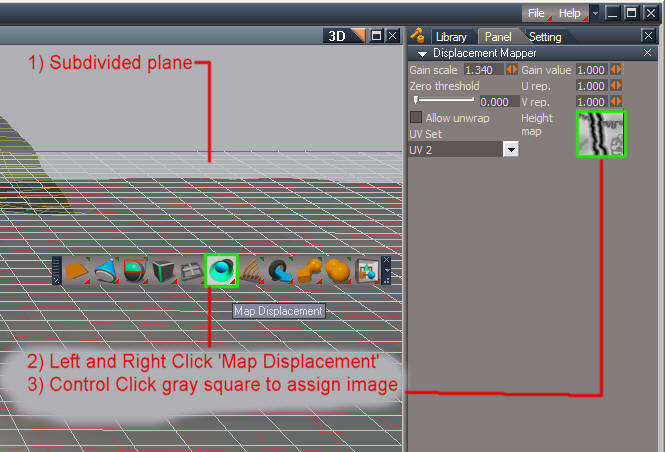
As far as landscape generation, Workspace has a fine tool called 'Map Displacement' that works great for terrains.
To use it, first you need to create or find a grayscale image with dark areas representing the 'deep' parts of your terrain and light areas for the 'high' points.
Next, create a subdivided plane object (right click the plane primitive icon and set resolution with the 'Segments' parameter in the Stack/Panel area).
You may also Point Edit/ Subdivide it further after creating it.
Scale it up large and make sure it's got lots of polygons.
Find the 'Map Displacement' icon and then right click it. In the Stack/Panel, control click the gray square where it says 'Height Map' and choose your grayscale image.
It is immediately applied to the selected, subdivided plane.
Adjust the 'gain' and 'gain scale' to your liking.
Easy-Peasy!
I run into the creator of SpaceTimeMorph, etc. occasionally; next time I see him I'll ask about the instructions.
As far as landscape generation, Workspace has a fine tool called 'Map Displacement' that works great for terrains.
To use it, first you need to create or find a grayscale image with dark areas representing the 'deep' parts of your terrain and light areas for the 'high' points.
Next, create a subdivided plane object (right click the plane primitive icon and set resolution with the 'Segments' parameter in the Stack/Panel area).
You may also Point Edit/ Subdivide it further after creating it.
Scale it up large and make sure it's got lots of polygons.
Find the 'Map Displacement' icon and then right click it. In the Stack/Panel, control click the gray square where it says 'Height Map' and choose your grayscale image.
It is immediately applied to the selected, subdivided plane.
Adjust the 'gain' and 'gain scale' to your liking.
Easy-Peasy!
I run into the creator of SpaceTimeMorph, etc. occasionally; next time I see him I'll ask about the instructions.
- Attachments
-
-
Jimmer
- Chief Petty Officer
- Posts: 122
- Joined: 22 May 2009, 11:54
Re: Looking For....
Thanks, spaceKdet...