I remember that an object was still selected after copying,
but now if I copy an object, nothing remains selected.
How can I switch this to the previous behaviour?
Selection after copy
-
Wigand
- Senior Chief Petty Officer
- Posts: 204
- Joined: 21 May 2009, 17:38
Selection after copy
-
spacekdet

- Captain
- Posts: 1810
- Joined: 27 May 2009, 15:00
- Type the number ten into the box: 10
- Location: On the day shift at the Utility Muffin Research Kitchen
Re: Selection after copy
Stays selected here, is the problem maybe a wireframe 'highlighting' setting?
Does it show anything as selected in the Object Info panel/ LE?
Does it show anything as selected in the Object Info panel/ LE?
-
Wigand
- Senior Chief Petty Officer
- Posts: 204
- Joined: 21 May 2009, 17:38
Re: Selection after copy
After copying, nothing is selected in the info panel.
I switched between highlighting object/subobject
but it's still the same.
I switched between highlighting object/subobject
but it's still the same.
-
trueBlue

- Captain
- Posts: 5548
- Joined: 06 Jul 2009, 22:50
- Type the number ten into the box: 10
Re: Selection after copy
Are you using the tS unofficial update?
-
Wigand
- Senior Chief Petty Officer
- Posts: 204
- Joined: 21 May 2009, 17:38
Re: Selection after copy
How can I know?
I use the OBJ Importer/Exporter and
Clinton's 3D Package
I use the OBJ Importer/Exporter and
Clinton's 3D Package
-
trueBlue
- Captain
- Posts: 5548
- Joined: 06 Jul 2009, 22:50
- Type the number ten into the box: 10
Re: Selection after copy
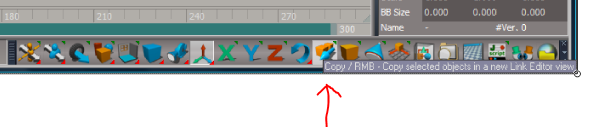
The original bottom toolbars were merged into one toolbar in the Unofficial Updates. The patched Copy button's help text should read as shown in the capture. I posted a fix here:
vi ... 740#p28740"
vi ... 740#p28740"
- Attachments
-
-
Wigand
- Senior Chief Petty Officer
- Posts: 204
- Joined: 21 May 2009, 17:38
Re: Selection after copy
Thank you trueBlue,
Your update solved my problem.
Your update solved my problem.