SenFlores - Momo's House WIP

User avatar
Draise
Captain
Posts: 3200
Joined: 21 Sep 2009, 19:33
Type the number ten into the box: 0
Location: Bogota, Colombia

SenFlores - Momo's House WIP

Post by Draise »

Hey guys! My work week has begun after a loooooong weekend of no work.

So today I built this house. I have not been able to finish the textures, cause time flew buy. But I built this house entirely in TS. I set up a few images showing some of the processess of the construction.

I used boolean exercises, mesh cleaning, mostly subdivision, weight painting and pushing and pulling (to get the organic looks) and some geometry defaults from the MS side. I will export all the elements as *.obj's to Softimage to then texture and set UV's. Furniture and another interior set will be built later.

This model is my chracter Momo's home.

Check him out here:
vi ... f=6&t=3108

1. Started with a cube, and with the soft selection, pushed it into this shape.
Image

2. With a plane, and polygon draw, I drew out the shape of the windows and doors, including frames. I then copied the geometry, and then seperated them from the rest.
I made a quick tile for the roof over a flat ceiling. I then booleaned everything, pushed and pulled them to the right tiling, then soft selectioned it all (connect:off to select the booleaned meshes) to bend and push into shape.
Image

3. Here is the result. I also changed the objects render view with the polygon drawing tecnique to make it handier with the polygon draw.
Image

4. I then extruded the drawn polygon cutouts, also copied the house cube, normal shrank it with clintons normal resize plugin, then subtract booleaned the lot. The tricky part was fixing the mesh (make sure there are no Ngons, only polys and tris.)
Image

5. I then extruded the frames, and placed them in place. I also fixed their meshes ready to deform them with the Softselection.
Image

6. The result.
Image

7. Made the window frames and the door. I had to play with the MS to get the geometry, but later I found rounded corners to be easier to do with a edge bevel, then shifting the right edge loops to get rounded corners, later SubDivide.
Image

8. The final result! Ready for UV's and textures! ALready exported the lot as *.obj's!
Image
User avatar
Steinie
Captain
Posts: 2958
Joined: 21 May 2009, 17:38
Type the number ten into the box: 10

Re: SenFlores - Momo's House WIP

Post by Steinie »

Excellent work Draise!
Based on all your work so far I can see you too prefer organic modeling too. TrueSpace's Workspace is perfect for this kind of modeling. I always loved WorkSpace and feel that VRay should have been built in because of it's material interface. The tools that are finished in workSpace are very good but I hated the LE. I'm glad you can use it's power. I wanted no part of it.
pugman 1
Captain
Posts: 1555
Joined: 21 May 2009, 19:26
Type the number ten into the box: 0
Location: Germany

Re: SenFlores - Momo's House WIP

Post by pugman 1 »

exalent work dude .workspace is cool for this like steinie said,
i also hate the le and miss a good render engine in it
theuns
Lieutenant Junior Grade
Posts: 868
Joined: 10 Jun 2009, 11:21
Type the number ten into the box: 0
Location: South Africa

Re: SenFlores - Momo's House WIP

Post by theuns »

woa! very good looking indeed! :) nice D
theuns - tSer since 2000
.:| http://theunsfvo.cgarena.com/" onclick="window.open(this.href);return false; |:.
.:| http://bluestarcreations.wordpress.com/" onclick="window.open(this.href);return false; |:.
User avatar
Draise
Captain
Posts: 3200
Joined: 21 Sep 2009, 19:33
Type the number ten into the box: 0
Location: Bogota, Colombia

Re: SenFlores - Momo's House WIP

Post by Draise »

:lol: Oh come on guys, the LE doesn't look exactly like spaggetti! It doesn't have meatballs! :lol: :lol:
... :| I see the LE working, cause i am starting to get used to node based systems in other programs (softimage, nuke, composite, etc). It can be very powerful once you figure it out, but it isn't everyone's cup of tea....

Considering the realtime directX9 renderengine, and the time saved with it, I am sure you can get good quality renders... :geek:
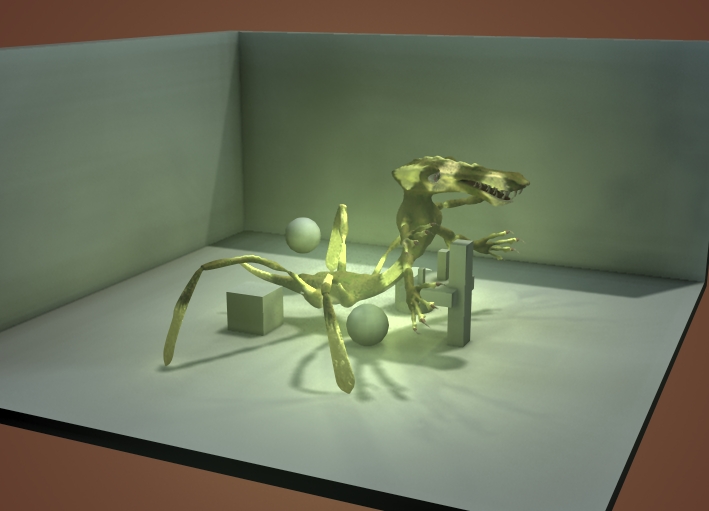
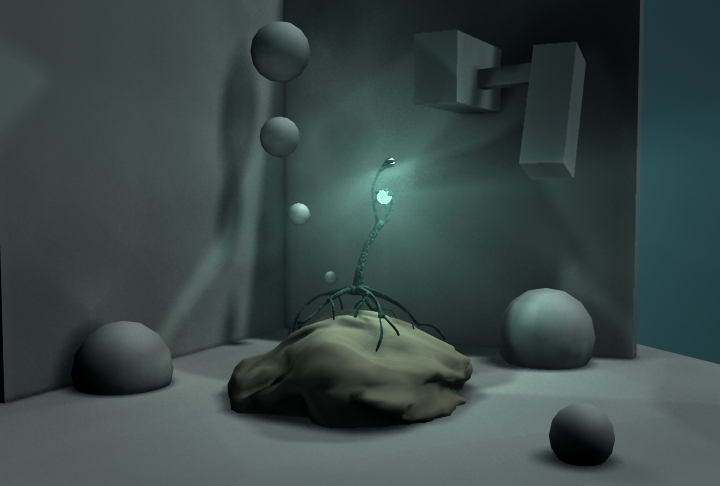
I managed to get reflections and refraction illusions with and without environment maps (or new type with camera based reflections and transparency), realtime normal maps, anisotropic, blinn, lambert, phong, incidence, displacement illusions, with bloom and supersampling and false volumetrics and fog. Some of it is integrated, some you have to be smart. With clever lighting and shadow maps, you can simulate AO, just have to be smare with how you set the lights up. And if you want final gathering, you can be smart and do what Pixar in Toystory 3 did, manually set it up with light rigs. If you think you need a ray to bounce, you add a bounce light to simulate the colour bleed or bounce. I have not done this yet, but with the old TS6.6, or the MS, I did manage the same using similar tecniques. (a looong looong time ago when I was a kid and final gathering was unheard of).
And really the d3d engine does all of that instantly, minus DOF.
But if you need a DOF in your scene, you can render a Zbuff and then in after-effects or composite or nuke, setup the DOF there, or even in TS which through the LE can be used like as a post processer like Nuke.

With the sacrifice of caustics, volumetrics, true displacement, and other smaller fine art details, for a convincing render I THINK it's possible with only D3D =) It's a hypothesis yet to be tested..

With the Modelside only and it's inbuilt render engine, I did the following renders attached using a similar render process. Each have no GI, AO, Final gathering nor renderosity. They do have some Volumetrics... but other than that, all the following images CAN be done in the WS only, almost at realtime (10 to 20 frames a second). For false AO, use a number of "ambiental" lights and large soft shadowmaps, which will fill in occluded areas with shadows. For false final gathering, place lights in objects to simulate ray bounces. For transparency and reflection, rig 2 or 3 look-at cameras and setup camera2texture maps with refractive shaders included with TS. For glows, play with the glow settings. For glowing objects, play with the shaders, and add lights into the objects to give more light. For false caustics, you can project a "caustic" projection light from the object. With magic, you can fool anyone. ;)

With time I'll make tutorials.... :)
Attachments
LightFAST2.jpg
Lights.jpg
LightDarknessTwo.jpg
User avatar
Draise
Captain
Posts: 3200
Joined: 21 Sep 2009, 19:33
Type the number ten into the box: 0
Location: Bogota, Colombia

Re: SenFlores - Momo's House WIP

Post by Draise »

A sneak peak of why I built the little house! Transferring this WIP to another one to stay in context.

Image

Return to “Work in Progress”