I got a scene with 80 mega and I did a 450 frames animation and I'm doing tests rendering this animation at 320x240 medium, draft and raycast. But after 3-7 rendered frames all other renders are black and the file has 0kb and can't be opened.
I think is a memory issue or something like that. When the images get black it don't recover, I need to restart TS... and when it gets black I just can't render anymore (even is just a frame shot instead the whole animation).
Man I need got this work!
Be the change you want to see in the world. - Mohandas Gandhi
Emmanuel
Chief Warrant Officer
Posts:670
Joined: 14 Jun 2009, 06:47
Re: Can't render entire animation!
Postby Emmanuel »
Yes, this is a memory issue.
From my experience, a 80 Mb scene is rather too big for trueSpace. I encounter such issues for 40 Mb scenes sometimes.
You could try to optimize your scene first (like reduce polygons number on objects at a distance), then free as much memory as possible in the tasks manager.
Also you should render in a frames mode (bmp, tga, png) rather than an avi file. So if a crash occurs, you can continue to render your anim from the bad frame.
I don't think there is a "magic" solution for this ; the only workaround is scene/memory optimization
I deleted some things as test and the final scene had just 50 Mega and then rendered 11 frames before the problem started again (normally render just 5).
I'm wondering if it also can have anything related to the computer or anything like that (I closed all apps before running the rendering).
After that I'm starting to lose my faith in Truespace as a super animation program I already knew that isn't that good at it but I was planning to use something that he is good (super realistic modeling) and try animations with it, but seems that it don't support.
DD's sorry but due to this I just can't go through my animation, I'll do some more tests but I think that is over... anyway I try to finish this animation someway, someday.
Be the change you want to see in the world. - Mohandas Gandhi
marcel
Captain
Posts:2247
Joined: 21 May 2009, 19:52
Type the number ten into the box: 0
Location: paris - France
Re: Can't render entire animation!
Postby marcel »
do you work with the model side and the bridge "on" ? If yes i can explain how to win memory...
Be the change you want to see in the world. - Mohandas Gandhi
v3rd3
Lieutenant Commander
Posts:1191
Joined: 21 May 2009, 20:04
Re: Can't render entire animation!
Postby v3rd3 »
Leon, every 3d program has limitations we have to deal with ... some have much higher tolerances than others.
If your scene is really large you will have to do what the rest of us do..... render a number of frames at a time.
One of my projects on the model side was just under 15 mb and I rendered the frames at 1024x768, uncompressed and 16 frames a night. I rendered them at night because I like rendering while I sleep... it almost makes sleeping a practical thing...
Rendering workspace side will have similar limitations more based on memory than anything I can think of right now. If you are running into a brick wall at 11 frames, render 10 at a time....
Also, pay attention to the comments from the experts here regarding optimizing your scene... there are a lot of things we all need to learn to make efficient use of the software.
Good hunting.
marcel
Captain
Posts:2247
Joined: 21 May 2009, 19:52
Type the number ten into the box: 0
Location: paris - France
Re: Can't render entire animation!
Postby marcel »
ok. open TS and choose "new scene" to erase all data. change the setting to bridge off. Open the scene you use for your animation. Don't open the workspace! now save the scene to erase all workspace data in the scene and see the size of the scene. It would be smaller. Close TS to erase all undo, history... and open the scene with only model side data.
I know what you mean but it's shame because my animation will have around 1000 frames (in the minimum) so I can't set manually after each 10 frames, it's work a chinese work, not for me... also they render pretty fast (I'll use a fast config) so I can't make it rendering all night because in reality it will render in 3 minutes.
Bad situation
Edit: Thanks Marcel, will do that but I don't think will optimize that much...
Be the change you want to see in the world. - Mohandas Gandhi
marcel
Captain
Posts:2247
Joined: 21 May 2009, 19:52
Type the number ten into the box: 0
Location: paris - France
Re: Can't render entire animation!
Postby marcel »
note:
I do a simple cube with bridge "off", the scene is 5 ko.
Now i use bridge "on" and save again, the scene is 151 ko.
I use sds to have 6140 faces, bridge "off" = 8 ko
The same scene with bridge "on" = 884 ko : 100 time more!
No comment!
also you can have a black render if the size of the texture is too big (try less 2000 pixels for the map)
Be the change you want to see in the world. - Mohandas Gandhi
marcel
Captain
Posts:2247
Joined: 21 May 2009, 19:52
Type the number ten into the box: 0
Location: paris - France
Re: Can't render entire animation!
Postby marcel »
if you have an important scene, keep a copy before turn the bridge "on". if you want to model with the workspace, you can use another scene to create the object you want then save as a .cob file and import the object on the final scene (with bridge "off" before open it). You avoid problem witch can destroy your scene definitely after an issue from ram.
Work as if you have two soft. A .scn file with workspace data is a very bad idea from the programmers and cause many problem. It is a no sense. I understand why i could not open old TS 6.6 files on TS 7 now. TS convert and add the data on the workspace (if it is "on") and some scene had more 300 megas! now the same have 36 megas (exactly the size of the TS 6.6 file).
Last point:
DON'T open a .scn file with nurbs and bridge "on" .It crash TS.
DON'T use anim function of workspace, even to try, if you want to use the keyframe and lightwork after.
DON'T open the workspace if you are on the modelside with SDS object (or reduce to 0 the level before).
DON'T edit on the workspace a sds object from model side (you lost the sds when you return on the model side).
Use TS 7.6, not 7.61 with the model side (really better).
Many more thing to do and you will have no problems. My scene have never more 20 megas in my BOT animation. and i have no problem to do hd anim with only 2 gigas ram.
Last edited by marcel on 10 Feb 2010, 00:12, edited 1 time in total.
The frames goes just to 16 with 19 mega...
Anyway I deleted almost everything and is with 900 kb and it's on the 70 frame now (I think it can go until the end)... but then the scene isn't the same... I'll try prepare the scene to be able to render at least 100 frames and then I can make it rendering all day tomorrow, tomorrow's night until I finish the 450... then I can move on to the next scene.
Thanks for the help Marcel, that's the magic I was looking for.
Be the change you want to see in the world. - Mohandas Gandhi
marcel
Captain
Posts:2247
Joined: 21 May 2009, 19:52
Type the number ten into the box: 0
Location: paris - France
Re: Can't render entire animation!
Postby marcel »
I think you have another problem.
with 2 gigas ram (if you have it ?) you could do 1000 frames with a 20 megas .scn and about 10 megas of textures without problem. but i can't see where is the problem without the scene.
yeah I also think is another problem... I have 2 giga ram or 1... I don't remember but I think is 2...
Then what could be?
Be the change you want to see in the world. - Mohandas Gandhi
marcel
Captain
Posts:2247
Joined: 21 May 2009, 19:52
Type the number ten into the box: 0
Location: paris - France
Re: Can't render entire animation!
Postby marcel »
leonregis wrote:yeah I also think is another problem... I have 2 giga ram or 1... I don't remember but I think is 2...
Then what could be?
2 or 1 ? is totally different. it is not enought (because the OS and the softs use a large part of the first mega. With only another giga ram more, you could have 3 or 4 time more ram for TS because the second giga is only for TS. With 1 Giga turn off all you have (utility, printer driver, antivirus, image on the desktop, etc...
I have 4 (I know xp supports only 3)... I was crazy ( I forgot I change my PC). So something else is causing the problem.
Be the change you want to see in the world. - Mohandas Gandhi
RAYMAN
Captain
Posts:2547
Joined: 21 May 2009, 18:56
Re: Can't render entire animation!
Postby RAYMAN »
Leon make a screenshot of what you got and what you want to do !
My own experiences with Ts ´s memory consumption are that you cant make big animations well with it....
the newer 7 version being even more difficult then the old 6.6.....
If its a simple scene its Ok but a little more and your stuck !
thosem 5000x 5000 px textures that you posted alread push it pretty far to the lmit !
Peter
I just want to render an animation with 450 frames in the model side, with a resolution of 320x240 and render settings as draft anti-aliasing and medium quality... what render pretty fast.
The problem is: After render 16 frames correctly others frames are rendered much more faster and it's just black and the file has just 0kb and I can't open it properly. I think I don't need to put a screenshot... I'm not using 5000 x textures because tS doesn't support it, instead I'm using 1500 or 2000 x textures, it may cause any trouble?
Anyway in my 900 kb I was able to render all 450 frames without problems and I create a gif of it... But there should appear more things on the scene... here is the gif and remember that the quality is awful and the final scene will not look like it.
As you can see the animation starts with a show room of the models (models I mean the rocket and what appear behind him) and then after two scenes of showroom (that's the first) then comes the launch which will render really slow due to Primal Particles effects for the smoke (which are the best I could reach and I needed to use a lot of emitters and tools, what you slow more than a normal effects).
Be the change you want to see in the world. - Mohandas Gandhi
Emmanuel
Chief Warrant Officer
Posts:670
Joined: 14 Jun 2009, 06:47
Re: Can't render entire animation!
Postby Emmanuel »
If you render at a resolution of 320x240, you may not need 2000x1500 pixels textures
This is also an area for optimization.
marcel
Captain
Posts:2247
Joined: 21 May 2009, 19:52
Type the number ten into the box: 0
Location: paris - France
Re: Can't render entire animation!
Postby marcel »
Leon: if you have 3 gigas, the problem is not a problem of ram or size of the animation. i do thing more complex with 2 gigas ram and in hd resolution. black render can be an error on the scene. This kind of error is often a bad data inside the scene. even if you save the scene, it keep bad data. the only solution i found to resolve this problem is to save each part of the scene as objects .cob (objects, light, camera,...). then create a new scene and import all the .cob to rebuild a new scene. the new scene can be good. If the problem appear again, it is because one of the object import the bad data. in this case you need to change this object. most of the time, rebuild a new scene erase the bad data.
First my animation intend to be HD so the big textures is needed, this is just a test so it's small...
I think isn't a problem with the scene at all, because the first frames do good... and less megas means more good frames... so I really don't know.
I'll try to delete some more things and do the scene with less than 10 mega, then I'll try to render again.
Thanks for all help
PS: The gif is too large (9 mega, zipped 6) so I'm trying to upload in another place
Be the change you want to see in the world. - Mohandas Gandhi
RAYMAN
Captain
Posts:2547
Joined: 21 May 2009, 18:56
Re: Can't render entire animation!
Postby RAYMAN »
Leon we dont need to see a gif or an animation all we need is a screenshot of the setup.
I cant help you if i cant analyse whats posibly wrong.....
It could be anything a particle effect or a plugin etc.....
Peter
Ok but which setup you want? The render? Scene objects?
If you PM me with your email I can send to you the scene.
I'll try to post the config you want before I go to dentist...
Be the change you want to see in the world. - Mohandas Gandhi
RAYMAN
Captain
Posts:2547
Joined: 21 May 2009, 18:56
Re: Can't render entire animation!
Postby RAYMAN »
I also had a crash with your scene just after i loaded it so i thought i´d try to export it to look at the size and everything
to maked things short youve got tp many parts and 505495 polys which is way to heavy for an animation of that size.
I will show you here how to cut down in polygon and part count dramaticaly.....
Youve simply made things with real geometry that can be made with alphas and bumpmaps.......
When I exported the encapsulated scene as an obj to import into the other application it ran out of memory too !
I only was able to transfer it with collada.
I will post some pix here to show you how to cut in size.
Peter
RAYMAN
Captain
Posts:2547
Joined: 21 May 2009, 18:56
Re: Can't render entire animation!
Postby RAYMAN »
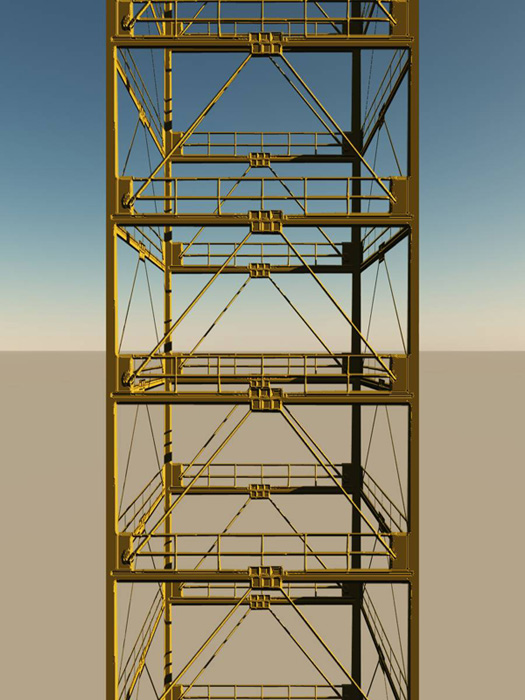
This whole tower with 30 elements (floors) only has 250 polygons.... the structure is made with 1 bumpmap and alpha. !
if you need to show a part of your tower from near you can use a part of it with real structure but for the launch you dont need the real structure.
this kind of level of detail is also used in movies that we see on screen !
Peter
Be the change you want to see in the world. - Mohandas Gandhi
RAYMAN
Captain
Posts:2547
Joined: 21 May 2009, 18:56
Re: Can't render entire animation!
Postby RAYMAN »
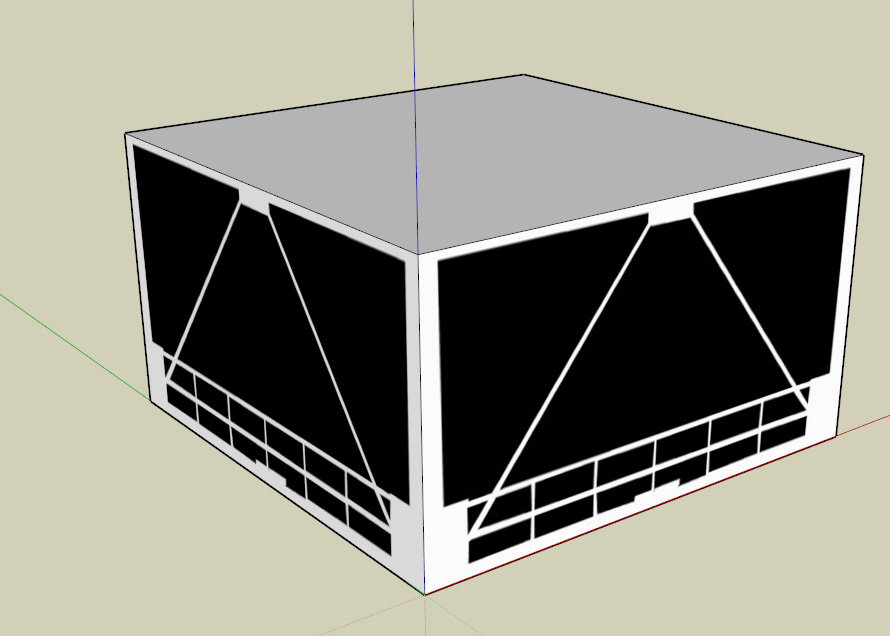
Ok here is how it goes...... You can do it in any program I just used Sketchup you can use the free version but Truespace also works
i took your model of the tower and rendered it out pretty close so that I had a render of only one element.I took that element into Photoshop
and made a map where the transparent part was black and the solid was white. I made a second map where theprotruding parts were white and the recesed
parts were black and all shades in between thats my bump map. i made a cube in my modeler (in my case sketchup) and applied the texture of the alpha to the side
i choose that cube and array it upwards and exported it. Where the alpha is white its transparent and were its black not plus with the other map in the bump chanel
you get the shape of the tubes....
thats it its as simple as that !
Peter
Attachments
RAYMAN
Captain
Posts:2547
Joined: 21 May 2009, 18:56
Re: Can't render entire animation!
Postby RAYMAN »
The cool thing about sketchup is that you can also apply textures to the inside of the box so that it looks like real geometry..
and best of all you get it for free...
But if you dont need that ... well Truespace works well too.
Peter
I can look in the future for sketchup but for this project I have no time... but I think that making this tower with only 265 poly will not cut down too much from the scene, right?
There is something else to alphamask? I mean, I don't know much about alpha mask and in my thoughts I thought that tS and my machine would handle pretty big scenes but now I see that do Avatar was hard...
Thanks for the help
Be the change you want to see in the world. - Mohandas Gandhi
RAYMAN
Captain
Posts:2547
Joined: 21 May 2009, 18:56
Re: Can't render entire animation!
Postby RAYMAN »
leonregis wrote:I can look in the future for sketchup but for this project I have no time... but I think that making this tower with only 265 poly will not cut down too much from the scene, right?
There is something else to alphamask? I mean, I don't know much about alpha mask and in my thoughts I thought that tS and my machine would handle pretty big scenes but now I see that do Avatar was hard...
Thanks for the help
That shaves off 80 % of the polycount !!!!
You can do that in Truespace too !
I will send you the file of that tower segment for Truespace !
Peter
thanks a lot man! But that only cuts the poly from the tower... or from the entire scene? You mean that the tower is the villain?
Thanks again
Be the change you want to see in the world. - Mohandas Gandhi
RAYMAN
Captain
Posts:2547
Joined: 21 May 2009, 18:56
Re: Can't render entire animation!
Postby RAYMAN »
Yes that tower should be 400000 polys at least !
Thats probably the problem !
The file that I sent you in the email is just a cube with the textures if you render it out you will see the cage and how it is made !
I also included the textures for you ! see if you can do it with it !
Peter
Thanks a lot... both of you Marcel and RAYMAN! Now I'll do the tests and will say what come from it...
Thanks again
Be the change you want to see in the world. - Mohandas Gandhi
RAYMAN
Captain
Posts:2547
Joined: 21 May 2009, 18:56
Re: Can't render entire animation!
Postby RAYMAN »
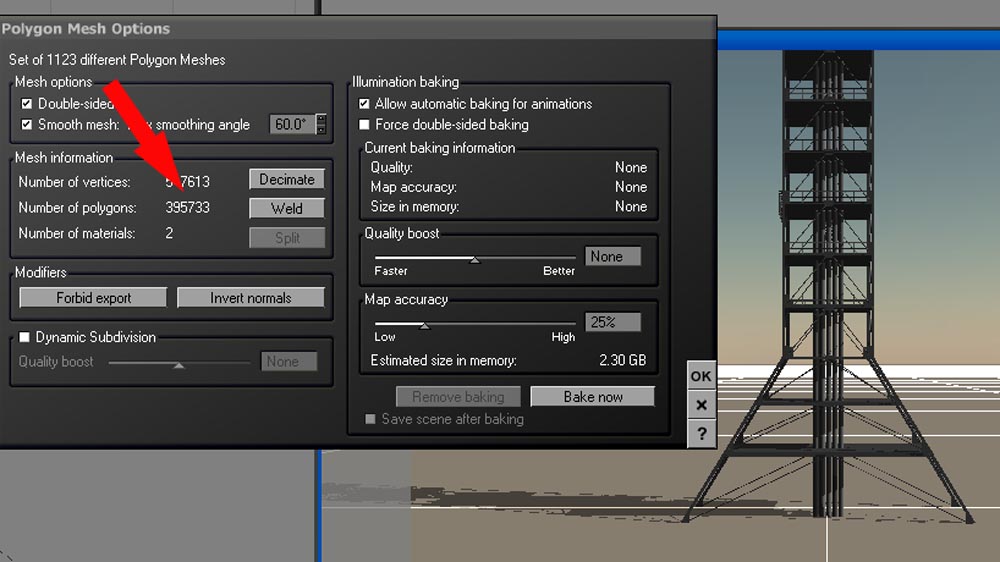
Leon like i said that launpod takes up the full memmory......
i rendered without it and a frame took less then a second to render and went up to 90 !
395733 poly just for the launchpad is just to much !
Peter
Attachments
Finis
Captain
Posts:5410
Joined: 21 May 2009, 18:26
Type the number ten into the box: 0
Location: America!
Re: Can't render entire animation!
Postby Finis »
Looks like you have this worked out but here's something. Best to reduce poly count as others advised. Especially with that 400000 poly item. But, you could render it in pieces and combine them post process ... like in a video editor. Each piece would be the whole animation but with only some of the objects visible or present in the scene. Just an idea. You'd have to figure out the details.
I prefer dangerous freedom over peaceful servitude. -- Thomas Jefferson/Jean Jacques Rousseau
Finis wrote:Looks like you have this worked out but here's something. Best to reduce poly count as others advised. Especially with that 400000 poly item. But, you could render it in pieces and combine them post process ... like in a video editor. Each piece would be the whole animation but with only some of the objects visible or present in the scene. Just an idea. You'd have to figure out the details.
I think this is what they do in the movies... it's with layers. But I think that it take a lot of time when composing, because when you are video editing the video is 2D and you need to mix some videos in the same second and think 3D with this 2D, if I understand correctly...
I may be wrong too
Be the change you want to see in the world. - Mohandas Gandhi
RAYMAN
Captain
Posts:2547
Joined: 21 May 2009, 18:56
Re: Can't render entire animation!
Postby RAYMAN »
I take out the Launchpad and the scene renders like a mashinegun but I only let it run to frame 90 because I dont have much time I´m still working for my job....
wiil be a night without sleep...
If you need any more help just post it !
You will just only need a few polygons for the tower ... do the rest with the alphamaps like I mentioned !
Peter
90 Frames... oh that's enough, even if you face a problem in frame 91 I can go by 90->restart->+90->restart->+90...
Yeah I'll try to optimize that tomorrow. Thanks a lot. I'll try to see also if I can do that method with other objects on the scene.
I have just one question: How do you did the bump map? I know that think about lighter and darker colors, but how can you know the distance in the gray scale? Is this a normal function of a program or you just do it by looking at?
Good luck with your job and try to sleep a lot when possible. Thanks again for all help provided.
Be the change you want to see in the world. - Mohandas Gandhi
Upload: Started rendering the animation in the scene semi-optimized with the alphamasks.
Let's see until what frame it will stop...
Fighting against my parents to stay awake.
Be the change you want to see in the world. - Mohandas Gandhi
RAYMAN
Captain
Posts:2547
Joined: 21 May 2009, 18:56
Re: Can't render entire animation!
Postby RAYMAN »
I do it by eyeballing it in thats all..... the white for the maximum bump and black inwards....
Its basically a painting job ! but I use the selections in photoshop and reduce the size of the selection and soft boarders and the fill in the next
greyfill actually pretty simple had those maps for your tower in 10 minutes ..
but i sent them to you via email !
You should be able to come down to about 3ooo polys for the tower !
Peter
Yeah I'm using those textures for the floor that are equal... but the tower still have some polys because there is the first floors that still being 3D and also those things that connect to the rocket.
But all of this can be alphamasked and I'll do that tomorrow.
Upload: at 60 Frame. Average: 15 seconds
PS: What render faster? Scanline or Raycast... in reality what they are?
What render you said that render in less than a second? And in which config... my is super low and I still get a 15 seconds average
Be the change you want to see in the world. - Mohandas Gandhi
RAYMAN
Captain
Posts:2547
Joined: 21 May 2009, 18:56
Re: Can't render entire animation!
Postby RAYMAN »
Normally scanline is faster but the difference is how it renders scanline renders line by line but use raycast.
Leon i didnt have the textures for the scene so that probably takes longer to render then what I had but i just made realy small size only to test !
You can make textures for everything including the water tower... you should come down very low for the whole scene... schouldnt be a problem anymore !
Peter
It rendered to frame 140. So I bet it can render to the end!
Thanks!
Be the change you want to see in the world. - Mohandas Gandhi
marcel
Captain
Posts:2247
Joined: 21 May 2009, 19:52
Type the number ten into the box: 0
Location: paris - France
Re: Can't render entire animation!
Postby marcel »
Leon: This project allows you to see an animation request to think before doing. Everything must be perfect, but simple. Fans are proud to show technical prowess as a high number of polygons. Modern equipment can do but the drawback is that users no longer care for simplicity. This learning is a rich and indispensable step to make things very complex later.
And don't forget: TS can do more what you do without problem if you work in the good way. A lot of people think the problem is their soft and change each month to find the good one. But they don't think the problem woulb comes from them.
The tower was the problem. I'm making a rendering test of the scene two that has much more things than the one and just optimizing the tower it is now in frame 70 and I think will stop just in the end.
I wouldn't do it without your help guys!
Marcel... you are right, This is my first big experience in animation and it seems pretty cool as I have imagined. But since what I do best is modeling and while modeling I don't have any memory problem I never thought about optimization. But now I see that is too important in Animation and will even optimize some scenes I'm working on.
I think is a valid experience and this contest already have reach his objective: Push me in the animation world.
Thanks
Be the change you want to see in the world. - Mohandas Gandhi
marcel
Captain
Posts:2247
Joined: 21 May 2009, 19:52
Type the number ten into the box: 0
Location: paris - France
Re: Can't render entire animation!
Postby marcel »
leonregis wrote:I think is a valid experience and this contest already have reach his objective: Push me in the animation world.
marcel wrote:Leon: This project allows you to see an animation request to think before doing. Everything must be perfect, but simple. Fans are proud to show technical prowess as a high number of polygons. Modern equipment can do but the drawback is that users no longer care for simplicity. This learning is a rich and indispensable step to make things very complex later.
And don't forget: TS can do more what you do without problem if you work in the good way. A lot of people think the problem is their soft and change each month to find the good one. But they don't think the problem woulb comes from them.
Most people dont understand that some of the basics are the same ikn whatever enviroment they are working in......
Yes some software is more powerfull then other but you got to try to get the most out of what you have ... as simple as possible !
Peter
Finis
Captain
Posts:5410
Joined: 21 May 2009, 18:26
Type the number ten into the box: 0
Location: America!
Re: Can't render entire animation!
Postby Finis »
RAYMAN wrote:you got to try to get the most out of what you have
Yes! If you learn to get the most out of a less powerful tool you'll not only do good things with it but imagine what you can do when you get the most from a more powerful tool.
I prefer dangerous freedom over peaceful servitude. -- Thomas Jefferson/Jean Jacques Rousseau
RAYMAN
Captain
Posts:2547
Joined: 21 May 2009, 18:56
Re: Can't render entire animation!
Postby RAYMAN »
Finis wrote:
RAYMAN wrote:you got to try to get the most out of what you have
Yes! If you learn to get the most out of a less powerful tool you'll not only do good things with it but imagine what you can do when you get the most from a more powerful tool.
Yup !The first thing that I learned when I started to do 3d was the LOD lesson or level of detail lesson. While things in the foregrond should be real structure
or meshes other things more in the distance can be faked and if you are not changing position can even be billboards....
Those things in the foreground dont have to be the whole object ... just model whats in the view helps sometimes too !
Keeping things on a diet helps stretching the limits that you have.....
Peter
That's what I learning now... maybe in the future it won't be necessary since we will have more powerful computers, but it will take some more time.
Be the change you want to see in the world. - Mohandas Gandhi
marcel
Captain
Posts:2247
Joined: 21 May 2009, 19:52
Type the number ten into the box: 0
Location: paris - France
Re: Can't render entire animation!
Postby marcel »
leonregis wrote:maybe in the future it won't be necessary since we will have more powerful computers...
To do simple is not because you have a low power computer, it is to handle complex work. even with the most powerfull computer you will need a work organization.