TRUESPACE USERS PLEASE TEST THIS

User avatar
DesignDevil
Master Chief Petty Officer
Posts: 500
Joined: 22 May 2009, 08:52
Type the number ten into the box: 0
Location: Neuruppin, Germany, Earth.

TRUESPACE USERS PLEASE TEST THIS

Post by DesignDevil »

Hi folks...sorry for crying out loud ;)

For these guys for don't know this. I develope plugins for tS6.6 (Modeler side on 7.x). The tS SDK is a bit lazy for a few things. As Example:

It is impossible to find out which tool are active (i.e. MOVE, SCALE, ROTATE) or in which coordinate system you are (i.e. OBJECT or WORLD).

For the plugin that i'm working on is this information importend so that i searched for a long time to find a solution. Now i think i got one but i need YOU to check if i'm right.

Please download this little file here (136KB) DOWNLOAD tsTest2.exe

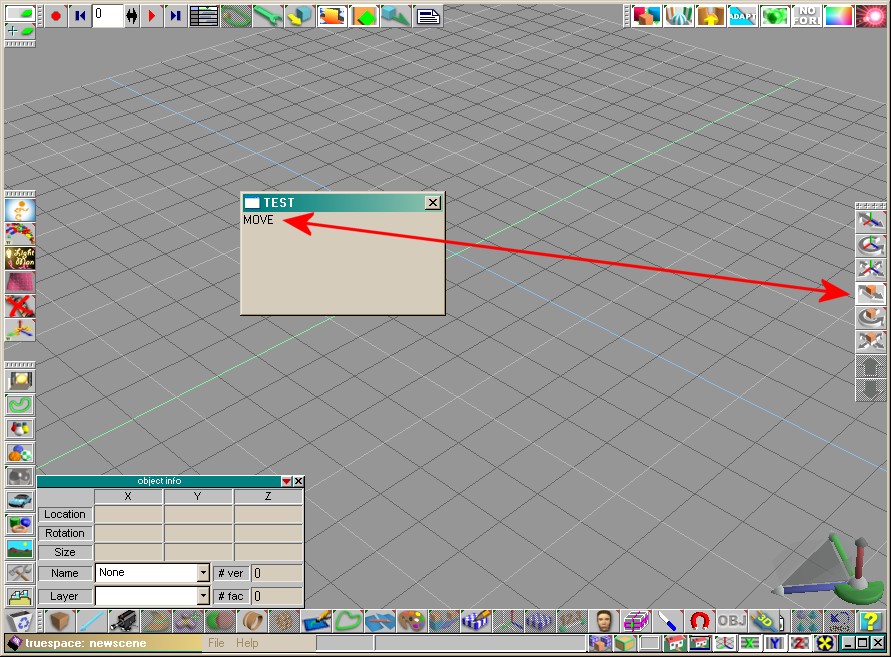
Now do the following steps (for tS7.x in the MODELER!!!):

- Start tS and the tsTest.exe, no matter which one first
- TrueSpace should be windowed to see both windows together, the tsTest and trueSpace
- Now click in tS on the "MOVE OBJECT" Tool and look if in the tsTest Window the word "MOVE" appears
- Do the same for SCALE and ROTATE
- After that please choose OBJECT COORDINATE SYSTEM and look if the word "OBJECT" appears
- At last choose "WORLD COORDINATE SYSTEM" and her should be appear "WORLD" in the tsTest Window

Please tell me here if anything works fine - and................

T H A N K Y O U ! ! !
Attachments
tsTest.jpg
Last edited by DesignDevil on 25 Mar 2010, 11:10, edited 1 time in total.
I still use TrueSpace 6.6
Link: My Youtube Channel
Link: www.DesignDevil.de - Plugins, Tutorials and more about TrueSpace 6.6
v3rd3
Lieutenant Commander
Posts: 1191
Joined: 21 May 2009, 20:04

Re: TRUESPACE USERS PLEASE TEST THIS

Post by v3rd3 »

The object scale and rotate buttons produce the text you expect.

The world and object coordinates buttons produce the text you expect.

The object move button shows none in the test text box.
User avatar
Steinie
Captain
Posts: 2958
Joined: 21 May 2009, 17:38
Type the number ten into the box: 10

Re: TRUESPACE USERS PLEASE TEST THIS

Post by Steinie »

Move pass
Rotate pass
Scale pass
World Coord. pass
Object Coord. pass
Screen Coord. fail (none)
User avatar
DesignDevil
Master Chief Petty Officer
Posts: 500
Joined: 22 May 2009, 08:52
Type the number ten into the box: 0
Location: Neuruppin, Germany, Earth.

Re: TRUESPACE USERS PLEASE TEST THIS

Post by DesignDevil »

I updated the tsTest.exe - PLEASE DOWNLOAD AGAIN

I fogot to say, please report if you use tS6.6 or 7.x - THANKS
I still use TrueSpace 6.6
Link: My Youtube Channel
Link: www.DesignDevil.de - Plugins, Tutorials and more about TrueSpace 6.6
User avatar
Steinie
Captain
Posts: 2958
Joined: 21 May 2009, 17:38
Type the number ten into the box: 10

Re: TRUESPACE USERS PLEASE TEST THIS

Post by Steinie »

Test 2 tS7.61 BETA
Obj. Move Fail (None)
Rotate Pass
Scale Pass
World Coord. Pass
Obj. Coord. Pass
Screen Coord. Fail (None)
User avatar
marcel
Captain
Posts: 2247
Joined: 21 May 2009, 19:52
Type the number ten into the box: 0
Location: paris - France

Re: TRUESPACE USERS PLEASE TEST THIS

Post by marcel »

don't work for me (7.6 on vista).
only "none" appears on the test windows when i click on the differents TS icons.
Design - illustration - Animation
http://www.crea-vision.fr
User avatar
DesignDevil
Master Chief Petty Officer
Posts: 500
Joined: 22 May 2009, 08:52
Type the number ten into the box: 0
Location: Neuruppin, Germany, Earth.

Re: TRUESPACE USERS PLEASE TEST THIS

Post by DesignDevil »

Thanks a lot to you all.

@marcel Strange that you get nothing...i have no idea why.

Hmmm ... over all ... sounds bad for me :cry:

I think i need another idea but i don't have one ... it is to stupid ... damn SDK ;)
I still use TrueSpace 6.6
Link: My Youtube Channel
Link: www.DesignDevil.de - Plugins, Tutorials and more about TrueSpace 6.6
User avatar
trueBlue
Captain
Posts: 5548
Joined: 06 Jul 2009, 22:50
Type the number ten into the box: 10

Re: TRUESPACE USERS PLEASE TEST THIS

Post by trueBlue »

trueSpace7.6 & trueSpaceBeta 7.61/Model - Vista32
Obj. Move Fail (None)
Rotate Pass
Scale Pass
World Coord. Pass
Obj. Coord. Pass
Screen Coord. Fail (None)

Not sure of your final goal here but I wonder if using the Status line verses a Window Text Box would work for you.
User avatar
DesignDevil
Master Chief Petty Officer
Posts: 500
Joined: 22 May 2009, 08:52
Type the number ten into the box: 0
Location: Neuruppin, Germany, Earth.

Re: TRUESPACE USERS PLEASE TEST THIS

Post by DesignDevil »

@marcel ... is it possible that your system runs with 16-Bit color depth?


It's just a test and this was the fastest way to implement it.

The point is the detection which tool the user has choosed and this is very difficult. trueSpace goes it's own way to "create" things.

A normal Windows application uses menus, label, button, textfields, icons etc. In such a application i could "insert" a routine in the program or i could log messages from this application to find out such things like a mouseclick on a control (i.e. a Button).

TrueSpace has just graphic. This means all panels with icons that you see, which are builds the user interface, are simple graphics (bitmaps) drawn in static panels. Also the HelpBar (in tS6.6), where a short help text is displayed if you move your mouse over a icon, is just a graphic - not a real StatusBar as in your Explorer as example. So i cannot "hack me" into these elements to detect anything because - these are no real Windows Controls.

Also the SDK gives you no possibility to detect which tool the user has choosed. In other words: There is no "normal" way to find out: "which tool is active in the moment". And for me as developer is this a very stupid situation.

On this point i am a bit stranded and i try "crazy" things to find a solution. In this case i try to verify the choosed tool while i compare the graphic under the mouse position if the user takes a mouseclick. On my PC (Windows XP, tS6.6 and 7.6) it works perfect. On other PC's not - as we can see. But i think i am on the right way.

I believe it has to do with the system and how the system (better the graphic system) displays and converts bitmaps.

In this version i compare a area of 11 x 11 pixel and if just 1 pixel is different in one bit of the color i got a fail. Maybe this is to sensitiv and i have to find a way to give this check a bit more "freedom".

Anyway, stay tuned i don't give up ;)
I still use TrueSpace 6.6
Link: My Youtube Channel
Link: www.DesignDevil.de - Plugins, Tutorials and more about TrueSpace 6.6
User avatar
Emmanuel
Chief Warrant Officer
Posts: 670
Joined: 14 Jun 2009, 06:47

Re: TRUESPACE USERS PLEASE TEST THIS

Post by Emmanuel »

TrueSpace 7.6 - Windows XP Pro 64

Using World coordinate system :
Obj. Move Fail (None)
Rotate Pass
Scale Pass

Using Object coordinate system :
Obj. Move Fail (None)
Rotate Pass
Scale Pass

Using Screen coordinate system :
Obj. Move Fail (None)
Rotate Pass
Scale Pass

Clic on Screen coordinate system icon fails (none)
Clic on Object coordinate system icon fails (none)
Clic on World coordinate system icon fails (none)
User avatar
DesignDevil
Master Chief Petty Officer
Posts: 500
Joined: 22 May 2009, 08:52
Type the number ten into the box: 0
Location: Neuruppin, Germany, Earth.

Re: TRUESPACE USERS PLEASE TEST THIS

Post by DesignDevil »

Hello again,

i worked on the detection system and try'd to make it better. Now the system has a "tolerance feature".

I would please you to go to the first post and download (and test) the new file - tsTest2.exe.

Again please also report the system (i.e. Windows XP), your system colordepth (16 or 32Bit) and the trueSpace version.

AGAIN - THANKS A LOT
I still use TrueSpace 6.6
Link: My Youtube Channel
Link: www.DesignDevil.de - Plugins, Tutorials and more about TrueSpace 6.6
v3rd3
Lieutenant Commander
Posts: 1191
Joined: 21 May 2009, 20:04

Re: TRUESPACE USERS PLEASE TEST THIS

Post by v3rd3 »

TS 7.6 WinXP

World Co-ordinate button - pass
Move - pass
Scale - pass
Rotate - pass

Object Co-ordinate button - pass
Move - pass
Scale - pass
Rotate - pass

Screen Co-ordinate button - fail
Move - pass
Scale - pass
Rotate - pass
User avatar
Emmanuel
Chief Warrant Officer
Posts: 670
Joined: 14 Jun 2009, 06:47

Re: TRUESPACE USERS PLEASE TEST THIS

Post by Emmanuel »

TrueSpace 7.6 - Windows XP Pro 64 - display 32 bits

Using World coordinate system :
Obj. Move Pass
Rotate Pass
Scale Pass

Using Object coordinate system :
Obj. Move Pass
Rotate Pass
Scale Pass

Using Screen coordinate system :
Obj. Move Pass
Rotate Pass
Scale Pass

Clic on Screen coordinate system icon fails (none)
Clic on Object coordinate system icon fails (none)
Clic on World coordinate system icon fails (none)
User avatar
marcel
Captain
Posts: 2247
Joined: 21 May 2009, 19:52
Type the number ten into the box: 0
Location: paris - France

Re: TRUESPACE USERS PLEASE TEST THIS

Post by marcel »

@marcel ... is it possible that your system runs with 16-Bit color depth?
Yes! because with my old driver i can't create thumbnails on explorer with 32 bits display.
In 32 bits display, i have the same result as emmanuel.
Design - illustration - Animation
http://www.crea-vision.fr
User avatar
trueBlue
Captain
Posts: 5548
Joined: 06 Jul 2009, 22:50
Type the number ten into the box: 10

Re: TRUESPACE USERS PLEASE TEST THIS

Post by trueBlue »

trueSpace7.6 & trueSpaceBeta 7.61/Model - Vista32 - Display 32
Obj. Move Pass
Rotate Pass
Scale Pass
World Coord. Pass
Obj. Coord. Pass
Screen Coord. Fail (None)
pugman 1
Captain
Posts: 1555
Joined: 21 May 2009, 19:26
Type the number ten into the box: 0
Location: Germany

Re: TRUESPACE USERS PLEASE TEST THIS

Post by pugman 1 »

TS 7.6. win7 64 display 32
move pass
rotate pass
scale pass
all the rest fail

Return to “General Discussion”