I was wondering, would it be possible to create a script/plugin for the workspace that with the click (or two clicks) of the mouse centers one object to the coordinates of another object?
I have no experience programming/scripting in trueSpace (or any program) myself so it's really just a suggestion but if it can be done I think it would be a very useful tool.
Center To Object - Workspace - Would this be possible?
-
MikomDude

- Captain
- Posts: 1930
- Joined: 04 Oct 2010, 11:12
- Type the number ten into the box: 0
- Location: The Hague, Netherlands
Center To Object - Workspace - Would this be possible?
-
froo
- Captain
- Posts: 2554
- Joined: 22 May 2009, 12:13
Re: Center To Object - Workspace - Would this be possible?
Yes I believe that is possible.
-
Draise

- Captain
- Posts: 3200
- Joined: 21 Sep 2009, 19:33
- Type the number ten into the box: 0
- Location: Bogota, Colombia
Re: Center To Object - Workspace - Would this be possible?
Actually... using the bridge, I made a button that first freezes the transforms on WS, then with the other button, it centers the axis onto the from the MS to the WS side.
1. You just need to copy the script into Custom Commands under the LE/Default/Scripts/ part of TS.
2. Then copy the button into a toolbar. LE/Default/Projects/Windows Space Manager/[Frame or Toolbar]/[Toolbar]/
3. Refresh the toolbar (change it's orientation or something) then turn the bridge on.
4. RMB = flatten axis, do this first. LMB = center axis.
You may need Clinton's extra LE navigator plugin to navigate to the default.
1. You just need to copy the script into Custom Commands under the LE/Default/Scripts/ part of TS.
2. Then copy the button into a toolbar. LE/Default/Projects/Windows Space Manager/[Frame or Toolbar]/[Toolbar]/
3. Refresh the toolbar (change it's orientation or something) then turn the bridge on.
4. RMB = flatten axis, do this first. LMB = center axis.
You may need Clinton's extra LE navigator plugin to navigate to the default.
! | Warning: Doing so will erase your object's shader, but you can easily back it up and put it back on before doing so. |
- Attachments
-
- Center Axis WS 0.2.zip
- (10.66 KiB) Downloaded 330 times
-
MikomDude
- Captain
- Posts: 1930
- Joined: 04 Oct 2010, 11:12
- Type the number ten into the box: 0
- Location: The Hague, Netherlands
Re: Center To Object - Workspace - Would this be possible?
Thank you Draise but I was looking for something just a little less complicated than that. I simply wanted a tool that with one click of the tool icon enables the function for the current object. Then, with the tool enabled, one would simply need to click whatever object I want to center the current object to and it will do so.
The reason I got this idea is because I tend to do this operation a lot only by using the object coordinates in the down-right corner of the Workspace. When I'm modeling, I tend to model very fast like I was drawing, so having to enter (and remember) these X-Y-Z values for each object takes time and momentarily halts my modeling.
I believe such a tool most likely would have been included in trueSpace, had anyone thought of this idea at the time it was being developed, since it is these types of quick-to-use tools that makes tS so great.
The reason I got this idea is because I tend to do this operation a lot only by using the object coordinates in the down-right corner of the Workspace. When I'm modeling, I tend to model very fast like I was drawing, so having to enter (and remember) these X-Y-Z values for each object takes time and momentarily halts my modeling.
I believe such a tool most likely would have been included in trueSpace, had anyone thought of this idea at the time it was being developed, since it is these types of quick-to-use tools that makes tS so great.
-
Finis

- Captain
- Posts: 5410
- Joined: 21 May 2009, 18:26
- Type the number ten into the box: 0
- Location: America!
Re: Center To Object - Workspace - Would this be possible?
If I was developing a 3D app, and there was time and money to reach this level of functionality, I'd make that one of the snap tools. Snap to center or snap to object axis. So, is there a TS snap tool that could do this?
I prefer dangerous freedom over peaceful servitude. -- Thomas Jefferson/Jean Jacques Rousseau
-
pugman 1
- Captain
- Posts: 1555
- Joined: 21 May 2009, 19:26
- Type the number ten into the box: 0
- Location: Germany
Re: Center To Object - Workspace - Would this be possible?
Modo and zbrush have this .but these are not ts i wish work space hadthis
to its the quickest modler i know. Modo is good but not as easy as ts
to its the quickest modler i know. Modo is good but not as easy as ts
-
Draise
- Captain
- Posts: 3200
- Joined: 21 Sep 2009, 19:33
- Type the number ten into the box: 0
- Location: Bogota, Colombia
Re: Center To Object - Workspace - Would this be possible?
Well...once you install the script and button, you only need to rightclick then leftclick the button to center the axis of the selected object. It isn't.. too complicated?MikomDude wrote:Thank you Draise but I was looking for something just a little less complicated than that. I simply wanted a tool that with one click of the tool icon enables the function for the current object. Then, with the tool enabled, one would simply need to click whatever object I want to center the current object to and it will do so.
-
MikomDude
- Captain
- Posts: 1930
- Joined: 04 Oct 2010, 11:12
- Type the number ten into the box: 0
- Location: The Hague, Netherlands
Re: Center To Object - Workspace - Would this be possible?
To center the axis of the selected object? Hmm, that's not what I meant. Besides, trueSpace already has a tool for that. I meant the function of the button to be that it would change the orientation of an object to the exact orientation of another object in the scene.
For example, if I wanted object A (at X-1.000 Y-1.000 Z-1.000) to position itself at the same coordinates as object B (which is at X-3.000 Y-5.000 Z-4.300) then all I would have to do is select object A --> click the button for the tool --> then click object B and it would automatically put object A at the coordinates of object B (X-3.000 Y-5.000 Z-4.300).
For example, if I wanted object A (at X-1.000 Y-1.000 Z-1.000) to position itself at the same coordinates as object B (which is at X-3.000 Y-5.000 Z-4.300) then all I would have to do is select object A --> click the button for the tool --> then click object B and it would automatically put object A at the coordinates of object B (X-3.000 Y-5.000 Z-4.300).
-
Draise
- Captain
- Posts: 3200
- Joined: 21 Sep 2009, 19:33
- Type the number ten into the box: 0
- Location: Bogota, Colombia
Re: Center To Object - Workspace - Would this be possible?
OOOOOOOH..!!!!! Capich. Terrible english I've got sometimes... 

hmmmmm...
Just expand the World Matrix output of the parent object, then expand the Matrix input of the child object, then link what you want to match to each other, and viola! If you want to snap another object to it's center, then unlink the parent object and put in another parent object.
Then when you are happy with the new position and you don't want it stuck to the center of the other object, then unlink them from the expanded nodes and you are good to go!


Or to the other object:


It's not a button solution..... but once you have the two extra exanded nodes, you just link and relink whatever you need in the LE to do what you want. Not quite a button, but it works.
Maybe a script can be made to do the like at the click of the button (like a constraint script around here somewhere) but I'm not sure how to write that.
hmmmmm...
Just expand the World Matrix output of the parent object, then expand the Matrix input of the child object, then link what you want to match to each other, and viola! If you want to snap another object to it's center, then unlink the parent object and put in another parent object.
Then when you are happy with the new position and you don't want it stuck to the center of the other object, then unlink them from the expanded nodes and you are good to go!
Or to the other object:
It's not a button solution.....
but once you have the two extra exanded nodes, you just link and relink whatever you need in the LE to do what you want. Not quite a button, but it works. Maybe a script can be made to do the like at the click of the button (like a constraint script around here somewhere) but I'm not sure how to write that.
-
froo
- Captain
- Posts: 2554
- Joined: 22 May 2009, 12:13
Re: Center To Object - Workspace - Would this be possible?
Actually, I think Draise's solution in the last post would work as a macro. You can enable the 'Macro Record' button, run through the steps, then click the Stop Macro Recording button. Save the macro, so you can run it whenever you want.
-
MikomDude
- Captain
- Posts: 1930
- Joined: 04 Oct 2010, 11:12
- Type the number ten into the box: 0
- Location: The Hague, Netherlands
Re: Center To Object - Workspace - Would this be possible?
Hmm, would this newly suggested method work for any object at any time? without having to redo all the steps? I'm not entirely sure I understand it but if this method together with the Macro function would enable me to do this while modeling then at least it would be a start.
-
Draise
- Captain
- Posts: 3200
- Joined: 21 Sep 2009, 19:33
- Type the number ten into the box: 0
- Location: Bogota, Colombia
Re: Center To Object - Workspace - Would this be possible?
Well it writes the rough part of the script, the macro recorder. So maybe there is a way to change the script to "parent object wld matrix" something something to "select second object, ok" then viola!
I ned to read the development documentation. Anyone know where this is?
I ned to read the development documentation. Anyone know where this is?
-
clintonman

- Captain
- Posts: 5659
- Joined: 21 May 2009, 21:08
- Type the number ten into the box: 0
- Location: California
Re: Center To Object - Workspace - Would this be possible?
Is this what you had in mind? It's not a button yet. It's a quick modification of my parenting script.
Select the object or objects to move and select the target object last and run the script.
It reads the world matrix of the last item and copies that value to the matrix input of the other item(s).
Edit: If it is what you had in mind, someone make an image for the button and I'll make an installer for it. I figure left click the button to work as described and right click to copy matrix to matrix instead of world matrix to matrix.
Select the object or objects to move and select the target object last and run the script.
It reads the world matrix of the last item and copies that value to the matrix input of the other item(s).
Edit: If it is what you had in mind, someone make an image for the button and I'll make an installer for it. I figure left click the button to work as described and right click to copy matrix to matrix instead of world matrix to matrix.
- Attachments
-
- Parent.zip
- (3.15 KiB) Downloaded 283 times
-
Draise
- Captain
- Posts: 3200
- Joined: 21 Sep 2009, 19:33
- Type the number ten into the box: 0
- Location: Bogota, Colombia
Re: Center To Object - Workspace - Would this be possible?
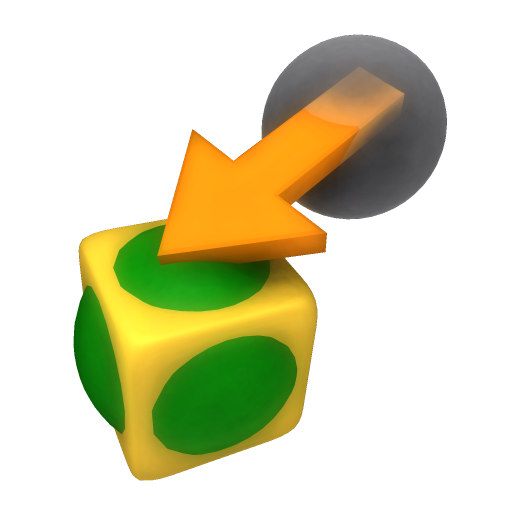
Yeah that works!!!! I can make the button for you. I have an idea of a sphere in a cube with a grey ghost sphere in the background and an arrow between them.
But it would be nice if it only did the transform, without the rotation nor the scale... or to have four scripts for four different buttons to only do match transform; match scale; match rotate and match all.
Can you do that? I gave it a whirl trying to get code from the Macro into your script, but I still don't really know what I'm doing, don't know how to define what matrix value it gets nor where to put those values.
Again Clinton, you're my legendary hero!
But it would be nice if it only did the transform, without the rotation nor the scale... or to have four scripts for four different buttons to only do match transform; match scale; match rotate and match all.
Can you do that? I gave it a whirl trying to get code from the Macro into your script, but I still don't really know what I'm doing, don't know how to define what matrix value it gets nor where to put those values.
Again Clinton, you're my legendary hero!
-
MikomDude
- Captain
- Posts: 1930
- Joined: 04 Oct 2010, 11:12
- Type the number ten into the box: 0
- Location: The Hague, Netherlands
Re: Center To Object - Workspace - Would this be possible?
Good idea!Draise wrote:I have an idea of a sphere in a cube with a grey ghost sphere in the background and an arrow between them.

Exactly, that would be perfect.Draise wrote:But it would be nice if it only did the transform, without the rotation nor the scale... or to have four scripts for four different buttons to only do match transform; match scale; match rotate and match all.
And mine!Draise wrote:Again Clinton, you're my legendary hero!

-
clintonman
- Captain
- Posts: 5659
- Joined: 21 May 2009, 21:08
- Type the number ten into the box: 0
- Location: California
Re: Center To Object - Workspace - Would this be possible?
I think that would be too many buttons. A right click to open an options panel would be the way to go. Like in the freeze transform script have check boxes for all the options.Draise wrote:Yeah that works!!!! I can make the button for you. I have an idea of a sphere in a cube with a grey ghost sphere in the background and an arrow between them.
But it would be nice if it only did the transform, without the rotation nor the scale... or to have four scripts for four different buttons to only do match transform; match scale; match rotate and match all.
Can you do that? I gave it a whirl trying to get code from the Macro into your script, but I still don't really know what I'm doing, don't know how to define what matrix value it gets nor where to put those values.
Again Clinton, you're my legendary hero!
-
Draise
- Captain
- Posts: 3200
- Joined: 21 Sep 2009, 19:33
- Type the number ten into the box: 0
- Location: Bogota, Colombia
Re: Center To Object - Workspace - Would this be possible?
clintonman wrote: I think that would be too many buttons. A right click to open an options panel would be the way to go. Like in the freeze transform script have check boxes for all the options.
Oh good idea, I am used to Autodesks infinite menus and options!
My current freeze script (freezetransform751) of yours doesn't have any options, it just freezes everything. Is it the updated version?
-
Draise
- Captain
- Posts: 3200
- Joined: 21 Sep 2009, 19:33
- Type the number ten into the box: 0
- Location: Bogota, Colombia
Re: Center To Object - Workspace - Would this be possible?
Oh cool, found your new one! NICE! Thanks!
-
clintonman
- Captain
- Posts: 5659
- Joined: 21 May 2009, 21:08
- Type the number ten into the box: 0
- Location: California
Re: Center To Object - Workspace - Would this be possible?
Here it is. It has a somewhat meaningless icon until a better one comes along.
Select 2 or more objects and press the button. They will move, rotate and scale to the last object. Right click for options. The Use Local Space option can be used for grouped objects to move the members relative to each other.
Edit: Good icon version is a few posts down now.
Select 2 or more objects and press the button. They will move, rotate and scale to the last object. Right click for options. The Use Local Space option can be used for grouped objects to move the members relative to each other.
Edit: Good icon version is a few posts down now.
Last edited by clintonman on 16 May 2012, 05:01, edited 1 time in total.
-
Draise
- Captain
- Posts: 3200
- Joined: 21 Sep 2009, 19:33
- Type the number ten into the box: 0
- Location: Bogota, Colombia
Re: Center To Object - Workspace - Would this be possible?
Cool! tried it out and it works like a charm.
Here is a button image at 512x512 PNG, you can resize it according to need.
Thanks so much for the time you put in writing the script. You are awesome.
Here is a button image at 512x512 PNG, you can resize it according to need.
Thanks so much for the time you put in writing the script. You are awesome.
- Attachments
-
-
froo
- Captain
- Posts: 2554
- Joined: 22 May 2009, 12:13
Re: Center To Object - Workspace - Would this be possible?
Damn that's a cool lookin icon Draise hahahaha!
-
clintonman
- Captain
- Posts: 5659
- Joined: 21 May 2009, 21:08
- Type the number ten into the box: 0
- Location: California
Re: Center To Object - Workspace - Would this be possible?
Nice icon and here's the final with the good icon.
- Attachments
-
- CopyTransform Autoload.zip
- (42.82 KiB) Downloaded 293 times
-
MikomDude
- Captain
- Posts: 1930
- Joined: 04 Oct 2010, 11:12
- Type the number ten into the box: 0
- Location: The Hague, Netherlands
Re: Center To Object - Workspace - Would this be possible?
That works perfectly!!!! 

Thanks so very very much Clintonman! And thank you Draise for the cool looking Icon as well!
Thanks so very very much Clintonman! And thank you Draise for the cool looking Icon as well!
-
Steinie

- Captain
- Posts: 2958
- Joined: 21 May 2009, 17:38
- Type the number ten into the box: 10
Re: Center To Object - Workspace - Would this be possible?
What is the purpose of "Local Space" option?
-
clintonman
- Captain
- Posts: 5659
- Joined: 21 May 2009, 21:08
- Type the number ten into the box: 0
- Location: California
Re: Center To Object - Workspace - Would this be possible?
It's for the case where you have a encapsulated group of objects and you want to move one of the objects to one of the other objects in the group. Local space copies the matrix from one object to another. Unchecked it copies the world matrix of one object to the matrix of another. If nothing is grouped then it doesn't really matter if it's checked or not.Steinie wrote:What is the purpose of "Local Space" option?
-
Draise
- Captain
- Posts: 3200
- Joined: 21 Sep 2009, 19:33
- Type the number ten into the box: 0
- Location: Bogota, Colombia
Re: Center To Object - Workspace - Would this be possible?
AH! Here it is!
Trying to find this handy plugin has been tricky!
@Clinton.... it's not on your website anymore...???
EDIT: @Clinton, found it! Just.. the index from the root page is a bit weird.
Trying to find this handy plugin has been tricky!
@Clinton.... it's not on your website anymore...???
EDIT: @Clinton, found it! Just.. the index from the root page is a bit weird.
-
clintonman
- Captain
- Posts: 5659
- Joined: 21 May 2009, 21:08
- Type the number ten into the box: 0
- Location: California
Re: Center To Object - Workspace - Would this be possible?
The index a little bit out of date.Draise wrote:AH! Here it is!
Trying to find this handy plugin has been tricky!
@Clinton.... it's not on your website anymore...???
EDIT: @Clinton, found it! Just.. the index from the root page is a bit weird.
 To be honest it's been out of date almost from the first day it was created.
-
clintonman
- Captain
- Posts: 5659
- Joined: 21 May 2009, 21:08
- Type the number ten into the box: 0
- Location: California
Re: Center To Object - Workspace - Would this be possible?
I updated the truespace plugin index. Hopefully, things will be a little easier to find. Now just need to update the general index for non-truespace scripts/plugins.
-
MikomDude
- Captain
- Posts: 1930
- Joined: 04 Oct 2010, 11:12
- Type the number ten into the box: 0
- Location: The Hague, Netherlands
Re: Center To Object - Workspace - Would this be possible?
Cool. Wouldn't want this plug-in to get lost. I still use it all the time while modeling. Probably one of my most used buttons, especially now that I assigned a keyboard shortcut to it as well.
Thanks still and again Clintonman!
Thanks still and again Clintonman!
-
clintonman
- Captain
- Posts: 5659
- Joined: 21 May 2009, 21:08
- Type the number ten into the box: 0
- Location: California
Re: Center To Object - Workspace - Would this be possible?
Copy Transform
Update March 2020
made installer compatible with the persistent install style
gave the button a unique id
can be found about 1/3 way down on this page
http://clintons3d.com/plugins/truespace ... index.html
a very very small update
Update March 2020
made installer compatible with the persistent install style
gave the button a unique id
can be found about 1/3 way down on this page
http://clintons3d.com/plugins/truespace ... index.html
a very very small update