Alpha channels in AVI
-
leevviiJ
- Petty Officer First Class
- Posts: 52
- Joined: 05 Sep 2009, 05:11
Alpha channels in AVI
Im trying to use an AVI file that is attached to a flat plane object, the AVI is a green screen "plate" [live action on green backgrnd]. Im trying to matte the green out so it is transparent on that area of the plane. How do i set the alpha value in TS?? i cant find the way, ..... have checked the manual, but came up blank, probly missed it..
-
ranger0101

- Master Chief Petty Officer
- Posts: 363
- Joined: 22 May 2009, 13:15
- Type the number ten into the box: 0
- Location: Orrville Ohio U.S.A.
Re: Alpha channels in AVI
Hi.. LeevviiJ..
All I rely know is Model Side..
In Model Side Material editor you can use
Transperencey Maps.. In TrueSpace this means
anything Black is Transparent..
You may be able to fix your video clips
in Adobe Premiere or comparable video editing
software by using coler replace.. Just change Green
to Black..
I have attached a short clip of a firey sun .avi which I made
in TrueSpace with a Black background.. I painted it onto a plane..
You will notice that any and all black in AVI is transparent..
This can make things a little tricky..
I hope this helps and I hope some one with more knoladge
of Work Space side will chime in with more..
CHEERS
ranger0101
All I rely know is Model Side..
In Model Side Material editor you can use
Transperencey Maps.. In TrueSpace this means
anything Black is Transparent..
You may be able to fix your video clips
in Adobe Premiere or comparable video editing
software by using coler replace.. Just change Green
to Black..
I have attached a short clip of a firey sun .avi which I made
in TrueSpace with a Black background.. I painted it onto a plane..
You will notice that any and all black in AVI is transparent..
This can make things a little tricky..
I hope this helps and I hope some one with more knoladge
of Work Space side will chime in with more..
CHEERS
ranger0101
- Attachments
-
- transperancey map AVI example.7z
- (1.07 MiB) Downloaded 261 times
In order to Create Art... You must first learn to See...
My Website http://www.theartoftimkoons.yolasite.com
My Website http://www.theartoftimkoons.yolasite.com
-
leevviiJ
- Petty Officer First Class
- Posts: 52
- Joined: 05 Sep 2009, 05:11
Re: Alpha channels in AVI
thanks mate, good idea and a great way to do it in your case, but i dont think i'll be able to use black b'grnd, as i had a dark shirt on when filming it and i'd reckon it will take too much of the "useable" part out with it. BTW, im a "model sider" also.
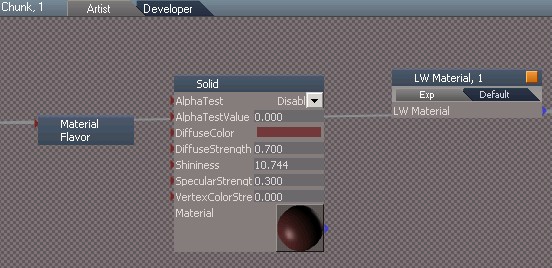
I found an "alpha test" and "alpha test value" in the link editor [which is mainly for the workspace side i think] see attached picture. Wonder if thats where i could set it??
I found an "alpha test" and "alpha test value" in the link editor [which is mainly for the workspace side i think] see attached picture. Wonder if thats where i could set it??
-
bitkar

- Captain
- Posts: 2089
- Joined: 16 Mar 2010, 07:14
- Type the number ten into the box: 0
- Location: Czech Republic
Re: Alpha channels in AVI
tS is able to load animation as a image sequence. So make an alfa channel in some videoeditor and export it to a numbered sequence of PNG files. Then load it into ts as color and transparency map. load frame 0 ;)
or make two avis, one as texture and second as grayscale transparency map ;)
or make two avis, one as texture and second as grayscale transparency map ;)
Michal aka bitkar
tS freak since tS2 (1998) and forever (tS7.61 modeler)
tS freak since tS2 (1998) and forever (tS7.61 modeler)
-
leevviiJ
- Petty Officer First Class
- Posts: 52
- Joined: 05 Sep 2009, 05:11
Re: Alpha channels in AVI
Thanks Bitkar, sounds like the way to go.
BTW, can someone tell me what the "alpha test" and "alpha test value" actually do??
as in, a mask for the matte, yes??or make two avis, one as texture and second as grayscale transparency map
BTW, can someone tell me what the "alpha test" and "alpha test value" actually do??
-
Prodigy

- Site Admin
- Posts: 957
- Joined: 21 May 2009, 14:46
- Type the number ten into the box: 0
- Location: Uruguay
Re: Alpha channels in AVI
Alpha test and alpha test value is a different way to show in realtime the transparency map from a texture but is not related on how vray or lightworks render the alpha channel.
One important thing. The alpha channel on Vray only works if you select TGA and Adaptive Antialiasing. Any other option doesnt work.
One way i can imagine to get a separated alpha channel is turn off all lights on the scene and set the background as plain white.. this will give you exactly a good alpha channel avi..
One important thing. The alpha channel on Vray only works if you select TGA and Adaptive Antialiasing. Any other option doesnt work.
One way i can imagine to get a separated alpha channel is turn off all lights on the scene and set the background as plain white.. this will give you exactly a good alpha channel avi..
๑۩۞۩๑ prodigy ๑۩۞۩๑