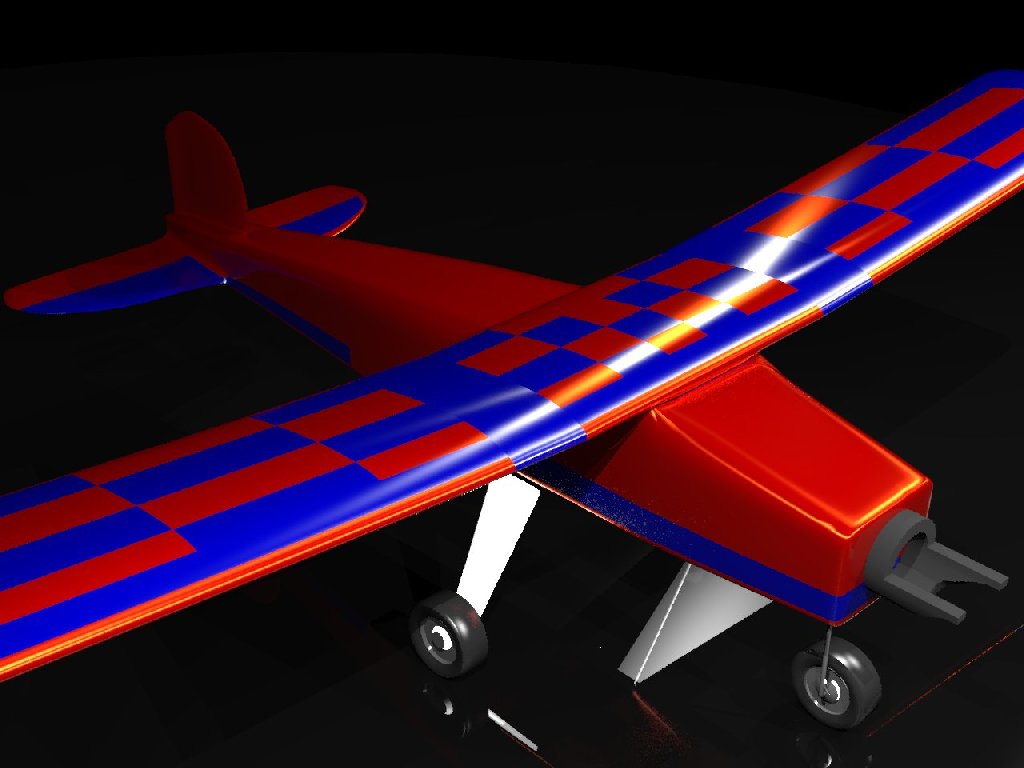
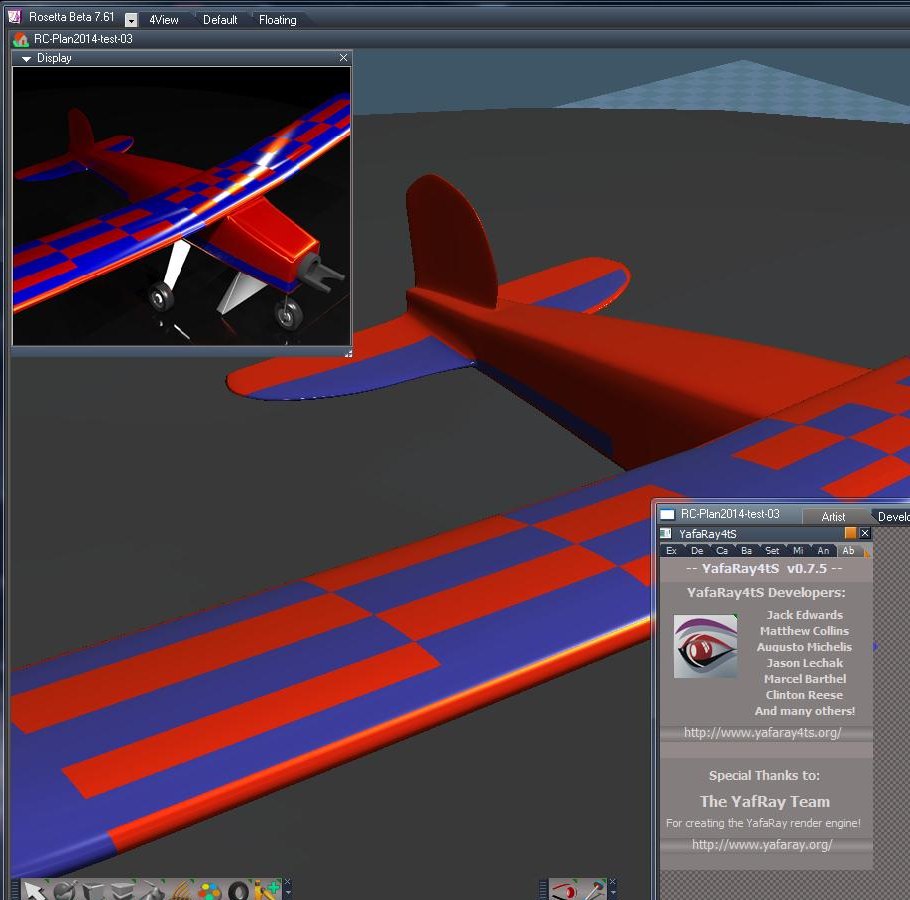
We've been working away to create the next official release of YafaRay4tS. It's pretty much done now. You can check it out here:
http://www.yafaray4ts.org/forum/index.p ... 9.135.html"
The last post by trueBlue on that page contains the latest installer for it. Changes if any from this point will be minor.
Edit: More details later..
YafaRay4tS version 0.7.5
-
clintonman

- Captain
- Posts: 5659
- Joined: 21 May 2009, 21:08
- Type the number ten into the box: 0
- Location: California
YafaRay4tS version 0.7.5
-
froo
- Captain
- Posts: 2554
- Joined: 22 May 2009, 12:13
Re: YafaRay4tS version 0.7.5
Excellent work, Clinton and trueBlue! 
-
bitkar

- Captain
- Posts: 2089
- Joined: 16 Mar 2010, 07:14
- Type the number ten into the box: 0
- Location: Czech Republic
Re: YafaRay4tS version 0.7.5
great ! many thanks !
Michal aka bitkar
tS freak since tS2 (1998) and forever (tS7.61 modeler)
tS freak since tS2 (1998) and forever (tS7.61 modeler)
-
Steinie

- Captain
- Posts: 2958
- Joined: 21 May 2009, 17:38
- Type the number ten into the box: 10
Re: YafaRay4tS version 0.7.5
What are the necessary pieces for this to work?
tS version? (workSpace side only or both?)
Will it work with tS7.6 Beta 8?
Do I need to download YafaRay too or it in included in the zip?
Which version Yafaray? YafaRay 0.1.1 for Blender? 64bit Work?
Are there shaders needed?
Is a Version 8 still in the works?
I'll be spending time testing Gord's VRay for awhile but this will definitely be on my radar.
Nice job sticking with this!
tS version? (workSpace side only or both?)
Will it work with tS7.6 Beta 8?
Do I need to download YafaRay too or it in included in the zip?
Which version Yafaray? YafaRay 0.1.1 for Blender? 64bit Work?
Are there shaders needed?
Is a Version 8 still in the works?
I'll be spending time testing Gord's VRay for awhile but this will definitely be on my radar.
Nice job sticking with this!
-
clintonman
- Captain
- Posts: 5659
- Joined: 21 May 2009, 21:08
- Type the number ten into the box: 0
- Location: California
Re: YafaRay4tS version 0.7.5
I put html format copy of the help file online:
http://www.clintons3d.com/HTMLhelp/Yafa ... /About.htm"
It looks a little weird because it is formatted for the chm help file included with the installer.
Link to the readme file:
http://www.clintons3d.com/HTMLhelp/Yafa ... ReadMe.txt"
Excerpt from the history page listing the changes from version 0.7.0 to 0.7.5:
YafaRay4tS version: 0.7.5
Sunday, July 24, 2011
TrueSpace 7.61 version required and is not backwards compatible.
Improved skeletal meshes/Actors with animation support.
Skeletal meshes and Characters, will export if you apply SDS to the mesh. The first Level of SDS is the preferred method unless the mesh is already subdivided.
Skeletal meshes will also export if you apply a morph to the character. Apply morph then right click to immediately exit the tool.
Support for multiple materials on one mesh.
Fixed mesh normals for better glass objects.
Spotlight and omni light power exports the same as Blender with a export power = power*power/2.
Area and Sphere lights have a render option to make them visible.
Area light has a new mesh so when the mesh is at (0,0,0) the resulting light is also at (0,0,0).
Adjusted light attenuation parameters to make the preview more closely match the render.
Does not lose camera selection if the scene name changes.
Glass material absorption value was not connected so value was never used.
Added a strength control to the glass material to control the D3D transparency preview(no effect on the final render).
Bumpmap preview for materials.
Changed the default render parameters to match Blender's UI values.
YafaRay4tS materials default to the corresponding Blender material default values.
Added a global input gamma that is applied to colors, lights and textures to translate them to linear color space used by YafaRay.
Gamma value does not effect the display in trueSpace 3D viewport.
Added DarkTide's sun sky background option.
Added support for rendering to the OpenEXR file format(exr).
New aspects for each Lighting Method.
YafaRay4tS Settings button shows the YafaRa4tS panel's presently used Lighting Method aspect in the Stack.
YafaRay4tS Export and Render button no longer shows the YafaRa4tS panel in the Stack with the LMB.
YafaRay4tS Export and Render button shows the YafaRa4tS panel's presently used Lighting Method aspect in the Stack with the RMB.
Diffuse Reflect Map fixed in new improved Yaf Coated Glossy and Yaf Glossy materials.
New improved YafaRay4tS Spot light with Hotspot generator.
Updated YafaRay4tS Help file.
New tS7.61 YafaRay4tS Installer script.
Yafaray 0.1.2 Beta support:
Requires Yafaray version 0.1.2 beta to be setup with YafaRay4tSv0.7.5 and the Yafaray 0.1.2 xml format - beta checkbox enabled, located in the Setup aspect. Only one version of Yafaray can be installed at one time.
New file formats hdr, jpg, png and tif.
Save Alpha located in the Lighting Method aspects. - Exports an alpha file in addition to the rgb output file.
Z - Channel option works.
New Volume Region mesh: Uniform and Height Fog work with the YafarayVolume.RsObj
Support for normalmap textures.
Rough Glass material.
Photon only and soft shadow parameters for the Spot light.
IES Light with preview.
SPPM lighting method(not working at this time for the xml renderer, YafaRay version 0.1.2-Beta2).
http://www.clintons3d.com/HTMLhelp/Yafa ... /About.htm"
It looks a little weird because it is formatted for the chm help file included with the installer.
Link to the readme file:
http://www.clintons3d.com/HTMLhelp/Yafa ... ReadMe.txt"
Excerpt from the history page listing the changes from version 0.7.0 to 0.7.5:
YafaRay4tS version: 0.7.5
Sunday, July 24, 2011
TrueSpace 7.61 version required and is not backwards compatible.
Improved skeletal meshes/Actors with animation support.
Skeletal meshes and Characters, will export if you apply SDS to the mesh. The first Level of SDS is the preferred method unless the mesh is already subdivided.
Skeletal meshes will also export if you apply a morph to the character. Apply morph then right click to immediately exit the tool.
Support for multiple materials on one mesh.
Fixed mesh normals for better glass objects.
Spotlight and omni light power exports the same as Blender with a export power = power*power/2.
Area and Sphere lights have a render option to make them visible.
Area light has a new mesh so when the mesh is at (0,0,0) the resulting light is also at (0,0,0).
Adjusted light attenuation parameters to make the preview more closely match the render.
Does not lose camera selection if the scene name changes.
Glass material absorption value was not connected so value was never used.
Added a strength control to the glass material to control the D3D transparency preview(no effect on the final render).
Bumpmap preview for materials.
Changed the default render parameters to match Blender's UI values.
YafaRay4tS materials default to the corresponding Blender material default values.
Added a global input gamma that is applied to colors, lights and textures to translate them to linear color space used by YafaRay.
Gamma value does not effect the display in trueSpace 3D viewport.
Added DarkTide's sun sky background option.
Added support for rendering to the OpenEXR file format(exr).
New aspects for each Lighting Method.
YafaRay4tS Settings button shows the YafaRa4tS panel's presently used Lighting Method aspect in the Stack.
YafaRay4tS Export and Render button no longer shows the YafaRa4tS panel in the Stack with the LMB.
YafaRay4tS Export and Render button shows the YafaRa4tS panel's presently used Lighting Method aspect in the Stack with the RMB.
Diffuse Reflect Map fixed in new improved Yaf Coated Glossy and Yaf Glossy materials.
New improved YafaRay4tS Spot light with Hotspot generator.
Updated YafaRay4tS Help file.
New tS7.61 YafaRay4tS Installer script.
Yafaray 0.1.2 Beta support:
Requires Yafaray version 0.1.2 beta to be setup with YafaRay4tSv0.7.5 and the Yafaray 0.1.2 xml format - beta checkbox enabled, located in the Setup aspect. Only one version of Yafaray can be installed at one time.
New file formats hdr, jpg, png and tif.
Save Alpha located in the Lighting Method aspects. - Exports an alpha file in addition to the rgb output file.
Z - Channel option works.
New Volume Region mesh: Uniform and Height Fog work with the YafarayVolume.RsObj
Support for normalmap textures.
Rough Glass material.
Photon only and soft shadow parameters for the Spot light.
IES Light with preview.
SPPM lighting method(not working at this time for the xml renderer, YafaRay version 0.1.2-Beta2).
-
clintonman
- Captain
- Posts: 5659
- Joined: 21 May 2009, 21:08
- Type the number ten into the box: 0
- Location: California
Re: YafaRay4tS version 0.7.5
workspace onlySteinie wrote:What are the necessary pieces for this to work?
tS version? (workSpace side only or both?)
Will it work with tS7.6 Beta 8?
Do I need to download YafaRay too or it in included in the zip?
Which version Yafaray? YafaRay 0.1.1 for Blender? 64bit Work?
Are there shaders needed?
Is a Version 8 still in the works?
I'll be spending time testing Gord's VRay for awhile but this will definitely be on my radar.
Nice job sticking with this!
ts7.61 beta 8 - no such thing as 7.6 beta 8
you need to get YafaRay separately
the script uses the xml renderer so 64 bit should be ok
yafaray for blender 0.1.1 or 0.1.2 beta
truespace shaders are included
version 8 was planned but development stopped at version 0.7.0 see http://www.yafaray4ts.org/plans.html"
Now that this is done I'll start some beta testing for Stan's VRay too.
-
Steinie
- Captain
- Posts: 2958
- Joined: 21 May 2009, 17:38
- Type the number ten into the box: 10
Re: YafaRay4tS version 0.7.5
Thanks Clinton for all the information.
"Beta 8" was another program I was thinking about.
Has it been tested with tS 7.61?
Thanks Clinton and trueBlue for all your hard work! It looks like we now have a another
fantastic rendering engine to use.
"Beta 8" was another program I was thinking about.
Has it been tested with tS 7.61?
Thanks Clinton and trueBlue for all your hard work! It looks like we now have a another
fantastic rendering engine to use.
-
froo
- Captain
- Posts: 2554
- Joined: 22 May 2009, 12:13
Re: YafaRay4tS version 0.7.5
Yeah that is Kick Ass Clinton and trueBlue!
-
clintonman
- Captain
- Posts: 5659
- Joined: 21 May 2009, 21:08
- Type the number ten into the box: 0
- Location: California
Re: YafaRay4tS version 0.7.5
Yes.Steinie wrote:...
Has it been tested with tS 7.61?
....
-
Rhino169

- Senior Chief Petty Officer
- Posts: 201
- Joined: 29 Nov 2009, 03:15
Re: YafaRay4tS version 0.7.5
YafaRay4tSv075.zip <--- I have installed
I also loaded: 9743_yafaray-win32.zip
I followed the directions and didn't really see anything that was a problem during installation.
I get this error/info when I try to use:
This text shows up in a seperate window:
C:\trueSpace761\tS\Rs Main Libraries\Clintons3DFBX>cd "C:\Temp\"
C:\Temp>"C:\Program Files\Blender Foundation\Blender\yafaray\bin\yafaray-xml.exe
" -op "C:/Temp/" "C:/Temp/yaf_temp.xml" yaf_test
And a warning box with the heading: yafaray-xml.exe - Entry Point Not Found
The procedure entry point vsprintf could not be located in the dynamic link library msvcrt.dll.
I assume someone out there has an easy fix hopefully.
Thanks in advance.
Jeff Herndon
I also loaded: 9743_yafaray-win32.zip
I followed the directions and didn't really see anything that was a problem during installation.
I get this error/info when I try to use:
This text shows up in a seperate window:
C:\trueSpace761\tS\Rs Main Libraries\Clintons3DFBX>cd "C:\Temp\"
C:\Temp>"C:\Program Files\Blender Foundation\Blender\yafaray\bin\yafaray-xml.exe
" -op "C:/Temp/" "C:/Temp/yaf_temp.xml" yaf_test
And a warning box with the heading: yafaray-xml.exe - Entry Point Not Found
The procedure entry point vsprintf could not be located in the dynamic link library msvcrt.dll.
I assume someone out there has an easy fix hopefully.
Thanks in advance.
Jeff Herndon
-
clintonman
- Captain
- Posts: 5659
- Joined: 21 May 2009, 21:08
- Type the number ten into the box: 0
- Location: California
Re: YafaRay4tS version 0.7.5
Try the Yafaray versions found here:
vi ... 245#p41245"
vi ... 245#p41245"
-
Rhino169
- Senior Chief Petty Officer
- Posts: 201
- Joined: 29 Nov 2009, 03:15
Re: YafaRay4tS version 0.7.5
Thanks Clinton, I followed the post from Trueblue and got it working on Workspace but still have the same error on modelspace.
As far as the help files...where should I put them? Yafaray activates the help file located in the ts folder. I have unzipped the help files into a folder in the ts folder. Do I need to move them up to the ts folder? where the yafaray help html file (YafaRay4tS Help)?
Thanks for your help.
As far as the help files...where should I put them? Yafaray activates the help file located in the ts folder. I have unzipped the help files into a folder in the ts folder. Do I need to move them up to the ts folder? where the yafaray help html file (YafaRay4tS Help)?
Thanks for your help.
-
clintonman
- Captain
- Posts: 5659
- Joined: 21 May 2009, 21:08
- Type the number ten into the box: 0
- Location: California
Re: YafaRay4tS version 0.7.5
Yafaray4tS is for workspace only.Rhino169 wrote:Thanks Clinton, I followed the post from Trueblue and got it working on Workspace but still have the same error on modelspace.
As far as the help files...where should I put them? Yafaray activates the help file located in the ts folder. I have unzipped the help files into a folder in the ts folder. Do I need to move them up to the ts folder? where the yafaray help html file (YafaRay4tS Help)?
Thanks for your help.
I thought the help files were installed along with the script, so I don't think you needed to do anything to copy them. trueBlue made the installer so he might know better.
-
trueBlue

- Captain
- Posts: 5548
- Joined: 06 Jul 2009, 22:50
- Type the number ten into the box: 10
Re: YafaRay4tS version 0.7.5
The help file is included. In the YafaRay4tS toolbar, select the help icon.
-
Rhino169
- Senior Chief Petty Officer
- Posts: 201
- Joined: 29 Nov 2009, 03:15
Re: YafaRay4tS version 0.7.5
I do see the help icon and have clicked on it.
I get a table of contents on the left side of the help window but no data in the right window where I believe the help pages are supposed to show up.
It doesn't matter which hyperlinked table of contents item I choose, it still is blank in the right side of the help window.

I get a table of contents on the left side of the help window but no data in the right window where I believe the help pages are supposed to show up.
It doesn't matter which hyperlinked table of contents item I choose, it still is blank in the right side of the help window.
-
trueBlue
- Captain
- Posts: 5548
- Joined: 06 Jul 2009, 22:50
- Type the number ten into the box: 10
Re: YafaRay4tS version 0.7.5
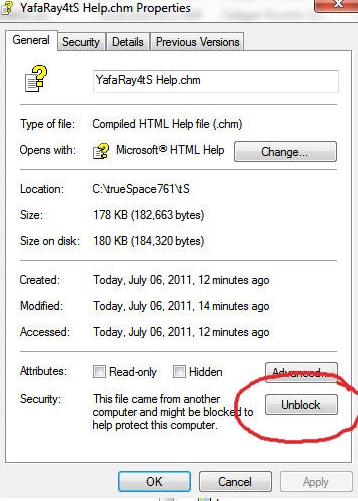
Right click on the YafaRay4tS Help.chm file and select Properties. Select the Unblock button and Apply button if necessary.
The above file is ONE compiled file and there is no other files needed.
The above file is ONE compiled file and there is no other files needed.
- Attachments
-
-
Draise

- Captain
- Posts: 3200
- Joined: 21 Sep 2009, 19:33
- Type the number ten into the box: 0
- Location: Bogota, Colombia
Re: YafaRay4tS version 0.7.5
Wow, thanks for all this. Good to have a render engine for Workspace side of things. =)
-
Rhino169
- Senior Chief Petty Officer
- Posts: 201
- Joined: 29 Nov 2009, 03:15
Re: YafaRay4tS version 0.7.5
Thanks trueblue! Success!...
I never knew a file could have such a lock on it...good to know.
I never knew a file could have such a lock on it...good to know.
-
trueBlue
- Captain
- Posts: 5548
- Joined: 06 Jul 2009, 22:50
- Type the number ten into the box: 10
Re: YafaRay4tS version 0.7.5
Good to hear!
I have moved and updated the post containing the updated YafaRay4tS v7.5 Project files. Which includes the two YafaRay versions that were used when updating YafaRay4tS v7.5
vi ... p?f=9&t=26"
Many thanks to clintonman for creating YafaRay4tS version 7.5 that fixes several bugs on version 7.0 and adding several additional functions to this project!
I have moved and updated the post containing the updated YafaRay4tS v7.5 Project files. Which includes the two YafaRay versions that were used when updating YafaRay4tS v7.5
vi ... p?f=9&t=26"
Many thanks to clintonman for creating YafaRay4tS version 7.5 that fixes several bugs on version 7.0 and adding several additional functions to this project!
-
FHembree

- Master Chief Petty Officer
- Posts: 337
- Joined: 21 Feb 2011, 17:43
- Type the number ten into the box: 9
Re: YafaRay4tS version 0.7.5
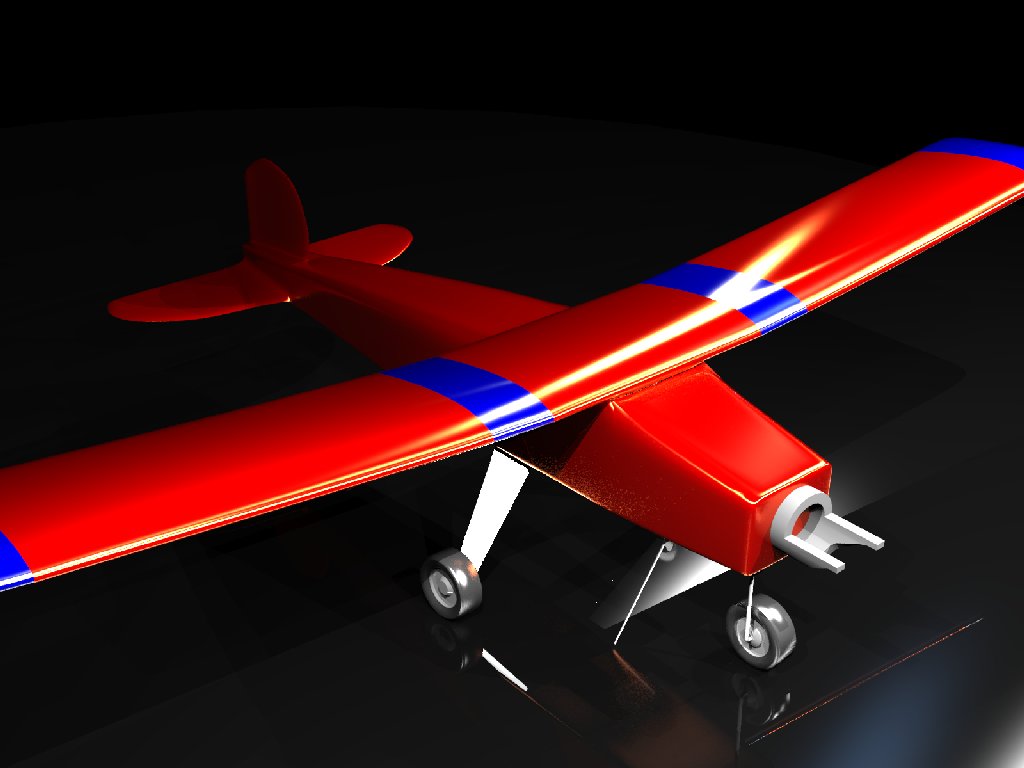
Have had YafaRay for ts installed since it was first added. Really like the glossy images that it creates.
See image attached.
Have tried to get these glossy images in other renders such as Blender, Carrara, Vue, but haven't been able.
I have tried a couple of times to install this update version and it seem to install Ok, but I can't get it to work. When it starts
to render the YafaRray stops almost immediately and windows wants to close program. See attached screen shot.
Does this version work with TS 7.6 Beta8?
I have gone back and installed my backup version.
See image attached.
Have tried to get these glossy images in other renders such as Blender, Carrara, Vue, but haven't been able.
I have tried a couple of times to install this update version and it seem to install Ok, but I can't get it to work. When it starts
to render the YafaRray stops almost immediately and windows wants to close program. See attached screen shot.
Does this version work with TS 7.6 Beta8?
I have gone back and installed my backup version.
- Attachments
-
-

-
clintonman
- Captain
- Posts: 5659
- Joined: 21 May 2009, 21:08
- Type the number ten into the box: 0
- Location: California
Re: YafaRay4tS version 0.7.5
The screen shot is fuzzy, but it looks like it failed after truespace had sent the instructions to the renderer.
-
trueBlue
- Captain
- Posts: 5548
- Joined: 06 Jul 2009, 22:50
- Type the number ten into the box: 10
Re: YafaRay4tS version 0.7.5
Could this be that you are using a 32 bit version of Yafaray on a 64 bit operating system?
Note that these versions are 32 bit:
vi ... p?f=9&t=26"
Note that these versions are 32 bit:
vi ... p?f=9&t=26"
-
clintonman
- Captain
- Posts: 5659
- Joined: 21 May 2009, 21:08
- Type the number ten into the box: 0
- Location: California
Re: YafaRay4tS version 0.7.5
Do you mean a 64bit Yafaray on a 64 bit OS? because I run 32 bit Yafaray on a 64 bit OS w/o any problems.trueBlue wrote:Could this be that you are using a 32 bit version of Yafaray on a 64 bit operating system?
Note that these versions are 32 bit:
vi ... p?f=9&t=26"
-
trueBlue
- Captain
- Posts: 5548
- Joined: 06 Jul 2009, 22:50
- Type the number ten into the box: 10
Re: YafaRay4tS version 0.7.5
Okay... It was just a stab in the dark given that there is both 32 and 64 bit versions.
-
FHembree
- Master Chief Petty Officer
- Posts: 337
- Joined: 21 Feb 2011, 17:43
- Type the number ten into the box: 9
Re: YafaRay4tS version 0.7.5
I have done some more testing and in my testing due to some expermenting it make me wonder if I am installing this update correctly.
I installed the update by just opening TS and then opening the file YafRaytS_Installer.RsObj. The reason I wonder is because if I now open one
of my old ts files it still shows the older version of Yafray.
I installed the update by just opening TS and then opening the file YafRaytS_Installer.RsObj. The reason I wonder is because if I now open one
of my old ts files it still shows the older version of Yafray.
-
trueBlue
- Captain
- Posts: 5548
- Joined: 06 Jul 2009, 22:50
- Type the number ten into the box: 10
Re: YafaRay4tS version 0.7.5
YafaRay4tS Installation
YafaRay4tS was created to work in tS7.61 Workspace (Rosetta)
It does not work in Model (tS6.6)
If you have previously installed YafaRay4tS before, Uninstall YafaRay4tS from the Add & Remove program in the Windows Control Panel first!
1.) Extract All the files from the YafaRay4tSv075.zip. into a folder named YafaRay4tSv075
IE: C:\trueSpace761\YafaRay4tSv075
2.) Open trueSpace7.61 and from the Workspace's File menu, Load the YafaRay4tS_Installer.RsObj from where you extracted the files.
3.) From the YafaRay4tS Installer panel select the "Install" button.
You should see a tS761 Question message asking: "Your existing YafaRay4tS Libraries will be deleted and replaced with updated versions. Would you like to continue?", if not select your keyboard keys Alt + Tab to bring the message forward. Selecting "Yes" will start the installation and selecting "No" will cancel the installation." If you have any content saved in any of these three libraries, they will be deleted, so save anything you want into a different library.
4.) From the Stack/Panel - YafaRay4tS/Setup panel, Set the YafaRay Install Path to where you have installed the YafaRay render engine.
IE: C:\Program Files\YafaRay\yafaray-xml.exe
5.) Check the Yafaray 0.1.2 if you are using that version.
6.) Select the "Save Settings" button to save your directories into the default YafaRay4tS object.
7.) Position the YafaRay4tS toolbar and save your Layout.
Congratulations you've finished your YafaRay4tS setup!
YafaRay4tS was created to work in tS7.61 Workspace (Rosetta)
It does not work in Model (tS6.6)
If you have previously installed YafaRay4tS before, Uninstall YafaRay4tS from the Add & Remove program in the Windows Control Panel first!
1.) Extract All the files from the YafaRay4tSv075.zip. into a folder named YafaRay4tSv075
IE: C:\trueSpace761\YafaRay4tSv075
2.) Open trueSpace7.61 and from the Workspace's File menu, Load the YafaRay4tS_Installer.RsObj from where you extracted the files.
3.) From the YafaRay4tS Installer panel select the "Install" button.
You should see a tS761 Question message asking: "Your existing YafaRay4tS Libraries will be deleted and replaced with updated versions. Would you like to continue?", if not select your keyboard keys Alt + Tab to bring the message forward. Selecting "Yes" will start the installation and selecting "No" will cancel the installation." If you have any content saved in any of these three libraries, they will be deleted, so save anything you want into a different library.
4.) From the Stack/Panel - YafaRay4tS/Setup panel, Set the YafaRay Install Path to where you have installed the YafaRay render engine.
IE: C:\Program Files\YafaRay\yafaray-xml.exe
5.) Check the Yafaray 0.1.2 if you are using that version.
6.) Select the "Save Settings" button to save your directories into the default YafaRay4tS object.
7.) Position the YafaRay4tS toolbar and save your Layout.
Congratulations you've finished your YafaRay4tS setup!
-
FHembree
- Master Chief Petty Officer
- Posts: 337
- Joined: 21 Feb 2011, 17:43
- Type the number ten into the box: 9
Re: YafaRay4tS version 0.7.5
I have done some more testing to try and figure out the problem. As far as I know there is no 64-bit
version of yafray. Yes there is an installer for blender that is either 32 bits or 64 bits. But the rafray
renderer is 32.
First I tried keeping my settings as is without the update for TS installed. I am using ts with yafray-
0.1.1 win32. So as an experiment I decided to try and install yafray-0.1.2-Beta2.1 win32.
Without making any other changes I installed yafray-0.1.2-Beta2.1 and I got the error that I posted in the
previous message. For some reason yafary-0.1.2-Beta2.1 doesn't work for me!
I re-installed yafray-0.1.1-Beta32 and everything is working again!
Then I opened ts and loaded the installer for Yafray4tsv07. It appeared to install ok. I checked
and verified that YafRaytsv0.7.5 was installed.
Then I created a ts file with 2 small spheres and tried to render file. I got no error messages but I
did not see any render and the dos window disappeared quickly because file was small. I tried again and
tried to get a screen capture so I could see what happened. I was able to do this and message was:
I/O warning : failed to load external entity "C:/Temp/"
Error parsing the file C:/temp/"
I kept my backups of my Temp directory so I decided to try and use to original
"Yaf_render(Orig).cmd",(that I renamed, by double clicking on it), and when I did the file rendered ok.
Then I loaded the file caustic.RsScn and clicked render in TS. Got same results Dos window opened and
closed quickly, but no render. I doubled clicked on the "Yaf_render(Orig).cmd", and when I did the file
rendered ok.
I open both original "Yaf_render(Orig).cmd" and the "Yaf_render.cmd" files to compare.
These files are generated each time you render, even though they don't change.
Yaf_render(Orig).cmd:
"C:\Program Files\YafaRay\yafaray-xml.exe" -o "C:/Temp/" "C:/Temp/yaf_temp.xml"
Copy /Y C:\Temp\yafaray.tga C:\Temp\yaf_test.tga
pause
exit
Yaf_render.cmd : Version YafRaytsv0.7.5
cd "C:\Temp\"
"C:\Program Files\YafaRay\yafaray-xml.exe" -f "jpg" -op "C:\Temp\" "C:\Temp\yaf_temp.xml" yaf_test
Don't know why ver 0.7.5 doesn't work or what the switches mean.
But after some experimenting I found out that what is causing the cmd file not to work is the switch "p"
in the command -op. I think that the p may mean preview so I unchecked this box in TS yafaray TS menu, but when I clicked
render the "P" switch was still added to the Yaf_render.cmd file.
version of yafray. Yes there is an installer for blender that is either 32 bits or 64 bits. But the rafray
renderer is 32.
First I tried keeping my settings as is without the update for TS installed. I am using ts with yafray-
0.1.1 win32. So as an experiment I decided to try and install yafray-0.1.2-Beta2.1 win32.
Without making any other changes I installed yafray-0.1.2-Beta2.1 and I got the error that I posted in the
previous message. For some reason yafary-0.1.2-Beta2.1 doesn't work for me!
I re-installed yafray-0.1.1-Beta32 and everything is working again!
Then I opened ts and loaded the installer for Yafray4tsv07. It appeared to install ok. I checked
and verified that YafRaytsv0.7.5 was installed.
Then I created a ts file with 2 small spheres and tried to render file. I got no error messages but I
did not see any render and the dos window disappeared quickly because file was small. I tried again and
tried to get a screen capture so I could see what happened. I was able to do this and message was:
I/O warning : failed to load external entity "C:/Temp/"
Error parsing the file C:/temp/"
I kept my backups of my Temp directory so I decided to try and use to original
"Yaf_render(Orig).cmd",(that I renamed, by double clicking on it), and when I did the file rendered ok.
Then I loaded the file caustic.RsScn and clicked render in TS. Got same results Dos window opened and
closed quickly, but no render. I doubled clicked on the "Yaf_render(Orig).cmd", and when I did the file
rendered ok.
I open both original "Yaf_render(Orig).cmd" and the "Yaf_render.cmd" files to compare.
These files are generated each time you render, even though they don't change.
Yaf_render(Orig).cmd:
"C:\Program Files\YafaRay\yafaray-xml.exe" -o "C:/Temp/" "C:/Temp/yaf_temp.xml"
Copy /Y C:\Temp\yafaray.tga C:\Temp\yaf_test.tga
pause
exit
Yaf_render.cmd : Version YafRaytsv0.7.5
cd "C:\Temp\"
"C:\Program Files\YafaRay\yafaray-xml.exe" -f "jpg" -op "C:\Temp\" "C:\Temp\yaf_temp.xml" yaf_test
Don't know why ver 0.7.5 doesn't work or what the switches mean.
But after some experimenting I found out that what is causing the cmd file not to work is the switch "p"
in the command -op. I think that the p may mean preview so I unchecked this box in TS yafaray TS menu, but when I clicked
render the "P" switch was still added to the Yaf_render.cmd file.
-
clintonman
- Captain
- Posts: 5659
- Joined: 21 May 2009, 21:08
- Type the number ten into the box: 0
- Location: California
Re: YafaRay4tS version 0.7.5
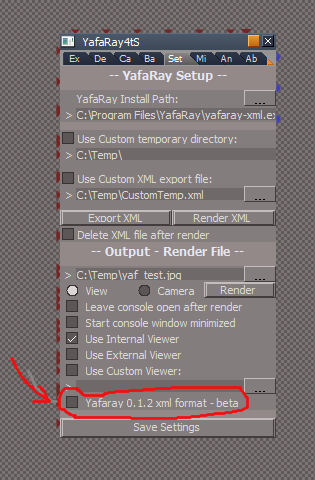
They have different command line arguments -op is used for 0.1.2 and won't work with 0.1.1
So un-check it.
Edit:
Also I don't know if the updated YafaRay4tS 0.7.5 would work with scenes created in earlier versions of YafaRay4tS. It might work but I can't say for sure.
-
Draise
- Captain
- Posts: 3200
- Joined: 21 Sep 2009, 19:33
- Type the number ten into the box: 0
- Location: Bogota, Colombia
Re: YafaRay4tS version 0.7.5
Cool!
This render engine for the WS! Um... what features does it have? Caustics? GI? Finalgathering? Irradience cache? Raytraced shadows? Is it multithreaded? Maybe I should do some research.
This render engine for the WS! Um... what features does it have? Caustics? GI? Finalgathering? Irradience cache? Raytraced shadows? Is it multithreaded? Maybe I should do some research.
-
trueBlue
- Captain
- Posts: 5548
- Joined: 06 Jul 2009, 22:50
- Type the number ten into the box: 10
Re: YafaRay4tS version 0.7.5
I did some testing.
I installed YafaRay-0.1.2-Beta2.1, rendered some scenes, and did not have any problems.
Note: It is not necessary to check "Yafaray 0.1.2 xml format - beta" as Clinton added code just before it's release that checks for that version automaticaly.
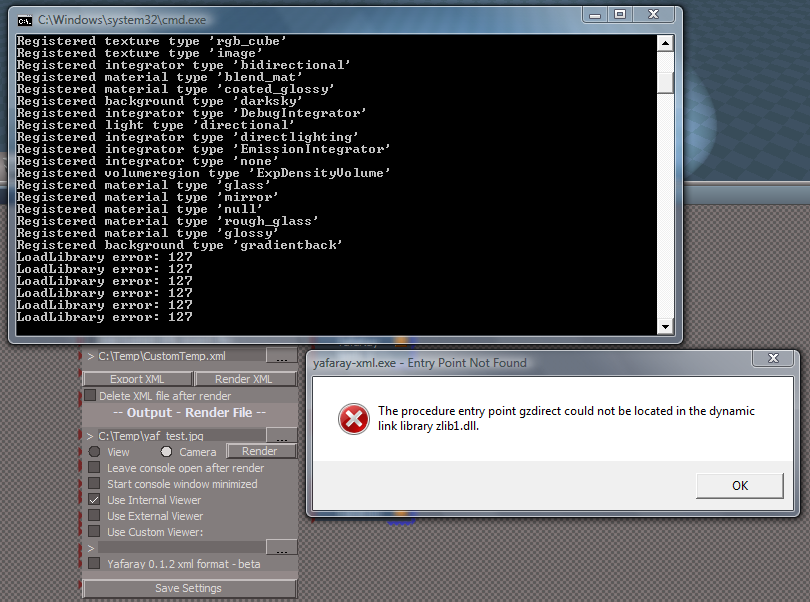
Next test, I installed YafaRay-0.1.1 without unistalling YafaRay-0.1.2-Beta2.1, thinking that that might be the problem. I received errors as shown below.
Next test, from the Add & Remove Programs I uninstalled both version above.
I installed YafaRay-0.1.1, I received errors as shown below.
Note: I am not 100% sure but I noticed the "Yafaray 0.1.2 xml format - beta" attribute being checked and unchecked.
@Clinton
Could that be the problem?
Looks like you converted these scenes to YafaRay4tS075
http://www.yafaray4ts.org/forum/index.p ... 9.135.html"
Would you mind posting these scenes here?
Would be a shame to lose all of your hard work should the abandoned yafaray4ts.org disappear someday!
I installed YafaRay-0.1.2-Beta2.1, rendered some scenes, and did not have any problems.
Note: It is not necessary to check "Yafaray 0.1.2 xml format - beta" as Clinton added code just before it's release that checks for that version automaticaly.
Next test, I installed YafaRay-0.1.1 without unistalling YafaRay-0.1.2-Beta2.1, thinking that that might be the problem. I received errors as shown below.
Next test, from the Add & Remove Programs I uninstalled both version above.
I installed YafaRay-0.1.1, I received errors as shown below.
Note: I am not 100% sure but I noticed the "Yafaray 0.1.2 xml format - beta" attribute being checked and unchecked.
@Clinton
Could that be the problem?
Looks like you converted these scenes to YafaRay4tS075
http://www.yafaray4ts.org/forum/index.p ... 9.135.html"
Would you mind posting these scenes here?
Would be a shame to lose all of your hard work should the abandoned yafaray4ts.org disappear someday!
- Attachments
-
-
FHembree
- Master Chief Petty Officer
- Posts: 337
- Joined: 21 Feb 2011, 17:43
- Type the number ten into the box: 9
Re: YafaRay4tS version 0.7.5
After a lot of experimenting I decided that the best option was to install the standard alone workspace
version of truespace. Then install the update YafaRay to that version and leave my existing
full version (model/workspace) version alone.
When I did that YafaRay version 0.7.5 is working correctly. If I want to work on an old version of
one of my YafaRay files I will just copy it to this standalone version and apply the update there to the
file.
One big improvement in v-0.7.5 is that you can apply materials to faces instead of being limited to the
whole object and it renders the face materials correctly, In v0.6.0 materials can only be applied to
objects and not faces. That one face alone make the update version much better in my opinon.
(I decided to stick with version YafaRay-0.1.1)
See attached image paintedfaces
version of truespace. Then install the update YafaRay to that version and leave my existing
full version (model/workspace) version alone.
When I did that YafaRay version 0.7.5 is working correctly. If I want to work on an old version of
one of my YafaRay files I will just copy it to this standalone version and apply the update there to the
file.
One big improvement in v-0.7.5 is that you can apply materials to faces instead of being limited to the
whole object and it renders the face materials correctly, In v0.6.0 materials can only be applied to
objects and not faces. That one face alone make the update version much better in my opinon.
(I decided to stick with version YafaRay-0.1.1)
See attached image paintedfaces
- Attachments
-
-
-
clintonman
- Captain
- Posts: 5659
- Joined: 21 May 2009, 21:08
- Type the number ten into the box: 0
- Location: California
Re: YafaRay4tS version 0.7.5
trueBlue wrote:I did some testing.
I installed YafaRay-0.1.2-Beta2.1, rendered some scenes, and did not have any problems.
Note: It is not necessary to check "Yafaray 0.1.2 xml format - beta" as Clinton added code just before it's release that checks for that version automaticaly.
Next test, I installed YafaRay-0.1.1 without unistalling YafaRay-0.1.2-Beta2.1, thinking that that might be the problem. I received errors as shown below.
I don't have the computer in front of me but I looked at some of the code yesterday and it first runs yafaray to get the version number and sets the check box based on that. I think it runs whatever version of yafaray was installed first. It might be using the windows registry to decide which version to run.trueBlue wrote: Next test, from the Add & Remove Programs I uninstalled both version above.
I installed YafaRay-0.1.1, I received errors as shown below.
Note: I am not 100% sure but I noticed the "Yafaray 0.1.2 xml format - beta" attribute being checked and unchecked.
@Clinton
Could that be the problem?
Looks like it would be easiest to just copy from that link. Should I put them in the announcement thread with the links to YafaRay and YafaRay4tS or should I start a new thread and place them there?trueBlue wrote:Looks like you converted these scenes to YafaRay4tS075
http://www.yafaray4ts.org/forum/index.p ... 9.135.html"
Would you mind posting these scenes here?
Would be a shame to lose all of your hard work should the abandoned yafaray4ts.org disappear someday!
I think I'll have some time to look at the errors too. Did the 2 versions of Yafaray install to the same location?
-
trueBlue
- Captain
- Posts: 5548
- Joined: 06 Jul 2009, 22:50
- Type the number ten into the box: 10
Re: YafaRay4tS version 0.7.5
I would think the Rendering thread. I installed both versions to the same location. Thanks Clinton!clintonman wrote: Looks like it would be easiest to just copy from that link. Should I put them in the announcement thread with the links to YafaRay and YafaRay4tS or should I start a new thread and place them there?
I think I'll have some time to look at the errors too. Did the 2 versions of Yafaray install to the same location?
-
clintonman
- Captain
- Posts: 5659
- Joined: 21 May 2009, 21:08
- Type the number ten into the box: 0
- Location: California
Re: YafaRay4tS version 0.7.5
Good news, I got YafaRay v 0.1.5 working at the same time as v 0.1.1
It required a code change because the new version ignores the mesh id for smoothing control.
It also requires a new registry entry. There is no standalone installer for 0.1.5 so no registry entry.
Previous versions had an entry that referred to "YafRay Team" and 0.1.5 is looking for "YafaRay Team". 2 different entries makes it possible to have 2 versions on one machine.
It required a code change because the new version ignores the mesh id for smoothing control.
It also requires a new registry entry. There is no standalone installer for 0.1.5 so no registry entry.
Previous versions had an entry that referred to "YafRay Team" and 0.1.5 is looking for "YafaRay Team". 2 different entries makes it possible to have 2 versions on one machine.
-
clintonman
- Captain
- Posts: 5659
- Joined: 21 May 2009, 21:08
- Type the number ten into the box: 0
- Location: California
Re: YafaRay4tS version 0.7.5
PRE-RELEASE
Attached is a version of YafaRay4tS that works with the latest version of YafaRay, v0.1.5
It's called YafaRay4tSv076, but the 7.6 version isn't reflected anywhere else yet. This is a not yet fully tested pre-release.
Installation for use with Yafaray 0.1.5:
get the latest YafaRay from http://www.graphicall.org/megasoft78"
unzip the file wherever you like
load and run the "Create reg file" script
fill in all the information
the registry file created is a text file with a ".reg" extension
the path for the plugins does not matter for truespace
find the ".reg" file and run it to add entries to the windows registry for YafaRay 0.1.5
it does not change the entries for v0.1.1 or v0.1.2beta
use the "Update Yafaray Scene" script to make a scene compatible with YafaRay 0.1.5
That's all. Using this method I have 32bit 0.1.2beta, 32bit 0.1.5 and 64bit 0.1.5 all installed at the same time and working.
Attached is a version of YafaRay4tS that works with the latest version of YafaRay, v0.1.5
It's called YafaRay4tSv076, but the 7.6 version isn't reflected anywhere else yet. This is a not yet fully tested pre-release.
Installation for use with Yafaray 0.1.5:
get the latest YafaRay from http://www.graphicall.org/megasoft78"
unzip the file wherever you like
load and run the "Create reg file" script
fill in all the information
the registry file created is a text file with a ".reg" extension
the path for the plugins does not matter for truespace
find the ".reg" file and run it to add entries to the windows registry for YafaRay 0.1.5
it does not change the entries for v0.1.1 or v0.1.2beta
use the "Update Yafaray Scene" script to make a scene compatible with YafaRay 0.1.5
That's all. Using this method I have 32bit 0.1.2beta, 32bit 0.1.5 and 64bit 0.1.5 all installed at the same time and working.
- Attachments
-
- YafaRay4tSv076.zip
- (1.29 MiB) Downloaded 333 times
-
clintonman
- Captain
- Posts: 5659
- Joined: 21 May 2009, 21:08
- Type the number ten into the box: 0
- Location: California
Re: YafaRay4tS version 0.7.5

- yaf015scripts.jpg (33.48 KiB) Viewed 16093 times
It shows the settings I used to setup the registry file for 32 bit windows and 32 bit yafaray.
The reg file that is generated from it
Code: Select all
Windows Registry Editor Version 5.00

[HKEY_LOCAL_MACHINE\SOFTWARE\YafaRay Team]

[HKEY_LOCAL_MACHINE\SOFTWARE\YafaRay Team\YafaRay]
"InstallDir"="D:\\9743_yafaray-win32\\yafaray\\bin"
"BlenderExporterPath"="c:\\temp"
Code: Select all
Windows Registry Editor Version 5.00

[HKEY_LOCAL_MACHINE\SOFTWARE\Wow6432Node\YafaRay Team]

[HKEY_LOCAL_MACHINE\SOFTWARE\Wow6432Node\YafaRay Team\YafaRay]
"InstallDir"="D:\\9743_yafaray-win32\\yafaray\\bin"
"BlenderExporterPath"="c:\\temp"
-
trueBlue
- Captain
- Posts: 5548
- Joined: 06 Jul 2009, 22:50
- Type the number ten into the box: 10
Re: YafaRay4tS version 0.7.5
Thanks Clinton! Sofar so good with YafaRay015.
Need to add the path to the yafaray-xml.exe file in the YafaRay4tS/Setup panel.
C:\Program Files\YafaRay015\bin\yafaray-xml.exe
Then select the Save Settings button.
Been testing your Caustic075 scene thus far.
Noticing sparkles in this version.
Need to add the path to the yafaray-xml.exe file in the YafaRay4tS/Setup panel.
C:\Program Files\YafaRay015\bin\yafaray-xml.exe
Then select the Save Settings button.

Noticing sparkles in this version.
-
FHembree
- Master Chief Petty Officer
- Posts: 337
- Joined: 21 Feb 2011, 17:43
- Type the number ten into the box: 9
Re: YafaRay4tS version 0.7.5
Very interesting. Could same be done using YafaRay015 64bit version.
-
clintonman
- Captain
- Posts: 5659
- Joined: 21 May 2009, 21:08
- Type the number ten into the box: 0
- Location: California
Re: YafaRay4tS version 0.7.5
Yep, like I said above I have 32 and 64 bit YafaRay running on the same machine.FHembree wrote:Very interesting. Could same be done using YafaRay015 64bit version.
-
clintonman
- Captain
- Posts: 5659
- Joined: 21 May 2009, 21:08
- Type the number ten into the box: 0
- Location: California
Re: YafaRay4tS version 0.7.5
You should post a picture. I don't see it here.trueBlue wrote:...
Been testing your Caustic075 scene thus far.
Noticing sparkles in this version.
-
trueBlue
- Captain
- Posts: 5548
- Joined: 06 Jul 2009, 22:50
- Type the number ten into the box: 10
Re: YafaRay4tS version 0.7.5
They were jaggies. Fixed by upping the samples.
-
trueBlue
- Captain
- Posts: 5548
- Joined: 06 Jul 2009, 22:50
- Type the number ten into the box: 10
Re: YafaRay4tS version 0.7.5
After using several versions of YafaRay in trueSpace and the necessary steps to make it work correctly for YafaRay015, I would suggest releasing seperate versions of YafaRay4tS.
Or even better, backwards compatible without user interaction?
YafaRay 0.1.5 is a key maintenance release which includes important improvements and fixes for long-standing issues such as sampling errors recurrence (black & white dots), new vertex normal calculation for better raytracing on high poly, improved materials behaviour and a better Blender compatibility. YafaRay 0.1.5 is now the recomended version.
Or even better, backwards compatible without user interaction?
YafaRay 0.1.5 is a key maintenance release which includes important improvements and fixes for long-standing issues such as sampling errors recurrence (black & white dots), new vertex normal calculation for better raytracing on high poly, improved materials behaviour and a better Blender compatibility. YafaRay 0.1.5 is now the recomended version.
-
FHembree
- Master Chief Petty Officer
- Posts: 337
- Joined: 21 Feb 2011, 17:43
- Type the number ten into the box: 9
Re: YafaRay4tS version 0.7.5
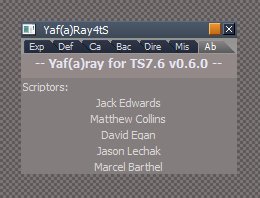
I have only been able to get yafaray version 0.1.1 to work with TS7.61 Beta 8 and I am now thinking
that it may be because the version of ts4yafary that I have installed is v0.6.0. See attached image.
I have been trying to update using the instructions that were for updating version 0.7.0 to
versions 0.7.5 (from download of YafaRay4tSv075.zip.
It seems I am missing the instruction/steps on how to go from version 0.6.0 to 0.7.0
that it may be because the version of ts4yafary that I have installed is v0.6.0. See attached image.
I have been trying to update using the instructions that were for updating version 0.7.0 to
versions 0.7.5 (from download of YafaRay4tSv075.zip.
It seems I am missing the instruction/steps on how to go from version 0.6.0 to 0.7.0
- Attachments
-
- Capture_Version_0-6-0.jpg (14.01 KiB) Viewed 16437 times
-
trueBlue
- Captain
- Posts: 5548
- Joined: 06 Jul 2009, 22:50
- Type the number ten into the box: 10
Re: YafaRay4tS version 0.7.5
Could it be that you are using a scene that was created in YafaRay4tS 0.6.0?
If so you might have to replace the Yaf(a)Ray4tS panel in your scene from within the Link Editor.
If it is the 0.6.0 version, delete it and add a new one from the YafaRay4tS toolbar.
You might want to transfer your old settings to the new panel before you delete it though.
YafaRay4tS 0.7
http://www.yafaray4ts.org/download.html"
You may have to install YafaRay4tS 0.7 to get rid of 0.6.0 version.
http://www.yafaray4ts.org/help/help.htm ... tS_Install"
Be sure to follow the Uninstall process before installing YafaRay4tS 0.7.5
http://www.yafaray4ts.org/help/help.html#Uninstall"
If so you might have to replace the Yaf(a)Ray4tS panel in your scene from within the Link Editor.
If it is the 0.6.0 version, delete it and add a new one from the YafaRay4tS toolbar.
You might want to transfer your old settings to the new panel before you delete it though.
YafaRay4tS 0.7
http://www.yafaray4ts.org/download.html"
You may have to install YafaRay4tS 0.7 to get rid of 0.6.0 version.
http://www.yafaray4ts.org/help/help.htm ... tS_Install"
Be sure to follow the Uninstall process before installing YafaRay4tS 0.7.5
http://www.yafaray4ts.org/help/help.html#Uninstall"
-
FHembree
- Master Chief Petty Officer
- Posts: 337
- Joined: 21 Feb 2011, 17:43
- Type the number ten into the box: 9
Re: YafaRay4tS version 0.7.5
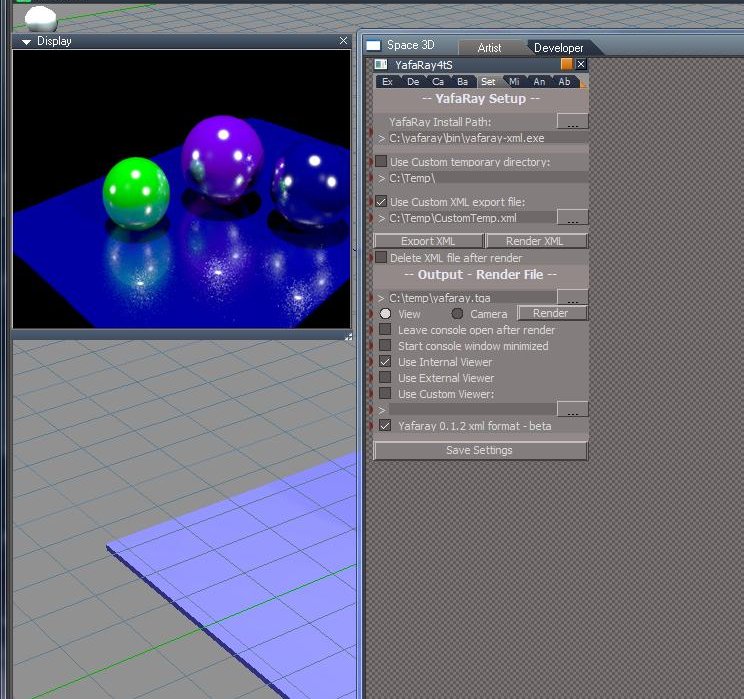
Attached is an image rendered from TS standalone workspace which seems to be working OK with with yafaray4ts75 and using yafaray-win 64 bit
version(installed in C:\yafaray\bin). This is a new scene created from scratch by just adding some spheres and applying material.
Now if I open an older file that is set up with Yafaray4ts_v0.6.0 does this mean I need to load the YafaRay4ts_Installer.RsObj and do an install
again and and than load the Update YafaRay scene.RsObj which says it will delete the older material library again. (Basically repeat this update/install for all older files I use?
version(installed in C:\yafaray\bin). This is a new scene created from scratch by just adding some spheres and applying material.
Now if I open an older file that is set up with Yafaray4ts_v0.6.0 does this mean I need to load the YafaRay4ts_Installer.RsObj and do an install
again and and than load the Update YafaRay scene.RsObj which says it will delete the older material library again. (Basically repeat this update/install for all older files I use?
- Attachments
-
-
trueBlue
- Captain
- Posts: 5548
- Joined: 06 Jul 2009, 22:50
- Type the number ten into the box: 10
Re: YafaRay4tS version 0.7.5
No. When you load older scenes created using older versions of YafaRay4tS you will have the older YafaRay4tS panel in your scene where the objects are in the Link Editor.
As said earlier you will have to transfer your settings over manualy.
The YafaRay4ts Installer, installs two YafaRay4tS panels.
One in trueSpace's System/Yafaray Folder and another in the current scene.
This is how it has worked since day one.
The other part of your question pertains to YafaRay4tS076 which is currently being tested.
You should not use the Update YafaRay Scene.RsObj in YafaRay4tS075.
This object is to be used on older YafaRay4tS scenes to make it compatible with YafaRay0.1.5.
My head hurts!
As said earlier you will have to transfer your settings over manualy.
The YafaRay4ts Installer, installs two YafaRay4tS panels.
One in trueSpace's System/Yafaray Folder and another in the current scene.
This is how it has worked since day one.
The other part of your question pertains to YafaRay4tS076 which is currently being tested.
You should not use the Update YafaRay Scene.RsObj in YafaRay4tS075.
This object is to be used on older YafaRay4tS scenes to make it compatible with YafaRay0.1.5.
My head hurts!
-
FHembree
- Master Chief Petty Officer
- Posts: 337
- Joined: 21 Feb 2011, 17:43
- Type the number ten into the box: 9
Re: YafaRay4tS version 0.7.5
OK.
1. I decided to start from a clean install of TS_Workside version only.
2. I used the new default opening blank scene.
3. I installed YafaRay4tsv075 by loading YafaRay4ts_Installer.RsObj from directory indicated below.
(C:\truespaceStandAlone\YafaRay4tsv075)
This install added directories to my C:\truespaceStandAlone\RsMain Libraries for :
: YafaRay Lights; YafaRay Materials; YafaRay4ts Setup
4. I added 4 spheres and applied Yafaray materials to each.
5. I adjusted setting to use the C:\yafaray\bin\yafaray-xml.exe (64bit version) to render scene.
6. Scene is ok except objects are faceted.
See attached image.
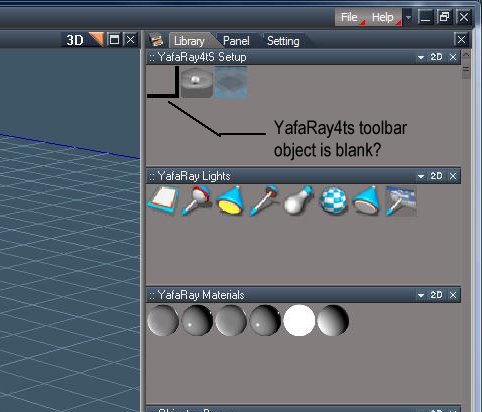
I also noticed that the yafaray4ts toolbar is blank. If I try to drag it to the link editor it will
disappear after about a fracton of a second.
See attached image.
-----------------------------------------------------------------------------------------
Also you said that "The YafaRay4ts Installer, installs two YafaRay4tS panels.
One in trueSpace's System/Yafaray Folder and another in the current scene.
This is how it has worked since day one."
If I load an older file set up using yafaray_v060 , the only panel I see in link editor is for v060. If I load the installer, and click on install, it replaces the older version panel with the v75?
------------------------------------------------------------------------
1. I decided to start from a clean install of TS_Workside version only.
2. I used the new default opening blank scene.
3. I installed YafaRay4tsv075 by loading YafaRay4ts_Installer.RsObj from directory indicated below.
(C:\truespaceStandAlone\YafaRay4tsv075)
This install added directories to my C:\truespaceStandAlone\RsMain Libraries for :
: YafaRay Lights; YafaRay Materials; YafaRay4ts Setup
4. I added 4 spheres and applied Yafaray materials to each.
5. I adjusted setting to use the C:\yafaray\bin\yafaray-xml.exe (64bit version) to render scene.
6. Scene is ok except objects are faceted.
See attached image.
I also noticed that the yafaray4ts toolbar is blank. If I try to drag it to the link editor it will
disappear after about a fracton of a second.
See attached image.
-----------------------------------------------------------------------------------------
Also you said that "The YafaRay4ts Installer, installs two YafaRay4tS panels.
One in trueSpace's System/Yafaray Folder and another in the current scene.
This is how it has worked since day one."
If I load an older file set up using yafaray_v060 , the only panel I see in link editor is for v060. If I load the installer, and click on install, it replaces the older version panel with the v75?
------------------------------------------------------------------------
- Attachments
-
-

-
trueBlue
- Captain
- Posts: 5548
- Joined: 06 Jul 2009, 22:50
- Type the number ten into the box: 10
Re: YafaRay4tS version 0.7.5
Can you post your scene?FHembree wrote:Scene is ok except objects are faceted.
Yes the YafaRa4tS toolbar icon is blank but you can add your own icon by right clicking it. When you Load that script it will Load the toolbar (if it is not present) and then delete itself.FHembree wrote:I also noticed that the yafaray4ts toolbar is blank. If I try to drag it to the link editor it will
disappear after about a fracton of a second.
No, but why would you want to reinstall it? Just use the Yafaray4tS toolbar as said earlier. Nevertheless it still does not remove the 060 version. The Yaf(a)Ray4tS version 060 uses a different name. As of YafaRay4tS075 everything has been changed. Materials, Lights, and the YafaRay4tS panel. So if you load an older scene the Materials, Lights, and the YafaRay4tS panel needs to be replaced.FHembree wrote: If I load an older file set up using yafaray_v060 , the only panel I see in link editor is for v060. If I load the installer, and click on install, it replaces the older version panel with the v75?
Try and remember that when you save your YafaRay4tS scenes the modified YafaRay4tS panel is saved with it.
-
FHembree
- Master Chief Petty Officer
- Posts: 337
- Joined: 21 Feb 2011, 17:43
- Type the number ten into the box: 9
Re: YafaRay4tS version 0.7.5
I have determined that the faceted result occurs if I am processing using C:\yafaray\bin\yafaray-xml.exe : (this is the v1.5 64 bit)
version of yafaray. If I process using c:\program files (x86)\yafaray\yafaray-xml.exe it renders smooth: (this is ver 0.1.1-win32)
I think if I were to install the yafaray4tSv076 it will fix this but I did not want to use this as I think you said it is a work in progress.
I believe this because the facets did not occur in the standalone version that I had installed 076, which I deleted so I could start with a fresh install.
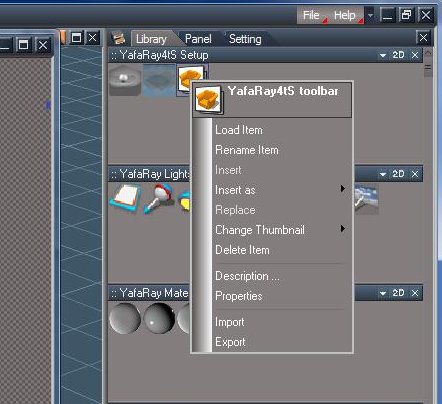
I don't know how to add a new panel from the toolbar. I have tried all of the options but can't find the right one. See attached image.
The insert option is grayed out.
version of yafaray. If I process using c:\program files (x86)\yafaray\yafaray-xml.exe it renders smooth: (this is ver 0.1.1-win32)
I think if I were to install the yafaray4tSv076 it will fix this but I did not want to use this as I think you said it is a work in progress.
I believe this because the facets did not occur in the standalone version that I had installed 076, which I deleted so I could start with a fresh install.
I don't know how to add a new panel from the toolbar. I have tried all of the options but can't find the right one. See attached image.
The insert option is grayed out.
- Attachments
-

Last edited by FHembree on 13 Feb 2014, 04:30, edited 1 time in total.
-
clintonman
- Captain
- Posts: 5659
- Joined: 21 May 2009, 21:08
- Type the number ten into the box: 0
- Location: California
Re: YafaRay4tS version 0.7.5
Yep, you got it. So far the only reason for the 76 version of yafaray4ts is because of smoothing problem with yafaray 1.5.FHembree wrote:I have determined that the faceted result occurs if I am processing using C:\yafaray\bin\yafaray-xml.exe : (this is the v1.5 64 bit)
version of yafaray. If I process using c:\program files (x86)\yafaray\yafaray-xml.exe it renders smooth: (this is ver 0.1.1-win32)
I think if I were to install the yafaray4tSv076 it will fix this but I did not want to use this as I think you said it is a work in progress.
I believe this because the facets did not occur in the standalone version that I deleted so I could start with a fresh install.
-
FHembree
- Master Chief Petty Officer
- Posts: 337
- Joined: 21 Feb 2011, 17:43
- Type the number ten into the box: 9
Re: YafaRay4tS version 0.7.5
I don't know how to add a new panel from the toolbar. I have tried all of the options but can't find the right one. See attached image.
The insert option is grayed out.
The insert option is grayed out.
- Attachments
-
-
trueBlue
- Captain
- Posts: 5548
- Joined: 06 Jul 2009, 22:50
- Type the number ten into the box: 10
Re: YafaRay4tS version 0.7.5
Well that explains it, I thought you were still using yafaray01.1 with YafaRay4tS075, like you said.FHembree wrote:I have determined that the faceted result occurs if I am processing using C:\yafaray\bin\yafaray-xml.exe : (this is the v1.5 64 bit)
version of yafaray. If I process using c:\program files (x86)\yafaray\yafaray-xml.exe it renders smooth: (this is ver 0.1.1-win32)
I think if I were to install the yafaray4tSv076 it will fix this but I did not want to use this as I think you said it is a work in progress.
I believe this because the facets did not occur in the standalone version that I had installed 076, which I deleted so I could start with a fresh install.
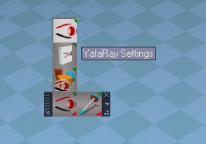
Do you have the yafaRay4tS toolbar installed?
- Capture.PNG (26.05 KiB) Viewed 17974 times
-
FHembree
- Master Chief Petty Officer
- Posts: 337
- Joined: 21 Feb 2011, 17:43
- Type the number ten into the box: 9
Re: YafaRay4tS version 0.7.5
trueBlue wrote:Well that explains it, I thought you were still using yafaray01.1 with YafaRay4tS075, like you said.FHembree wrote:I have determined that the faceted result occurs if I am processing using C:\yafaray\bin\yafaray-xml.exe : (this is the v1.5 64 bit)
version of yafaray. If I process using c:\program files (x86)\yafaray\yafaray-xml.exe it renders smooth: (this is ver 0.1.1-win32)
I think if I were to install the yafaray4tSv076 it will fix this but I did not want to use this as I think you said it is a work in progress.
I believe this because the facets did not occur in the standalone version that I had installed 076, which I deleted so I could start with a fresh install.
Do you have the yafaRay4tS toolbar installed? Both the YafaRay4tS Settings and Export/Render icons loads a YafaRay4tS panel into the scene if it not present.
Ok, I decided to update to YafaRay4tSv076. When I did that I was able to add multilple panels from the toolbar.
I think I've got it now. Thanks
-
MikomDude

- Captain
- Posts: 1930
- Joined: 04 Oct 2010, 11:12
- Type the number ten into the box: 0
- Location: The Hague, Netherlands
Re: YafaRay4tS version 0.7.5
I figured I'd give this a try as well. You guys could use some better organization for your download files and especially while stating which version of YafaRay4tS can be used with which version of YafaRay.
Can't say I got anywhere though. After installing the plugin, Yafaray 1.5 and the fix for Yafaray v1.5 I still couldn't get it to render. It's simply a blank panel. I made sure I created a new scene with only the YafaRay4tS materials and lights.
After that I tried the older versions, v.1.1 and v1.2 Beta, still got stuck on that very same problem.
Any idea what it might be?
Can't say I got anywhere though. After installing the plugin, Yafaray 1.5 and the fix for Yafaray v1.5 I still couldn't get it to render. It's simply a blank panel. I made sure I created a new scene with only the YafaRay4tS materials and lights.
After that I tried the older versions, v.1.1 and v1.2 Beta, still got stuck on that very same problem.
Any idea what it might be?
-
trueBlue
- Captain
- Posts: 5548
- Joined: 06 Jul 2009, 22:50
- Type the number ten into the box: 10
Re: YafaRay4tS version 0.7.5
I would be willing to help you but need more information from you.
I would first start by making sure you install YafaRay correctly by reading the installing instructions @ http://www.yafaray.org/node/210"
Make sure you have the correct Python version installed.
If you are going to install more then one version of YafaRay, I would recommend naming your install folder with it's version information, like YafaRay015 or YafaRay012Beta2 to better help you when you enter your Install path into YafaRay4tS's Setup as shown here:
It's important to understand that YafaRay4tS installs 2 YafaRay4tS panels into trueSpace761. One in your current scene and one in System/YafaRay Folder. The one in the System/YafaRay Folder is used for adding to any scene from the YafaRay4tS toolbar. The one in the scene is used to Export/Render with your settings and is saved with your scene. As mentioned in the instructions you should select the Save Settings button after you enter the path to the YafaRay version you want to render with.
I would first start by making sure you install YafaRay correctly by reading the installing instructions @ http://www.yafaray.org/node/210"
Make sure you have the correct Python version installed.
If you are going to install more then one version of YafaRay, I would recommend naming your install folder with it's version information, like YafaRay015 or YafaRay012Beta2 to better help you when you enter your Install path into YafaRay4tS's Setup as shown here:

-
FHembree
- Master Chief Petty Officer
- Posts: 337
- Joined: 21 Feb 2011, 17:43
- Type the number ten into the box: 9
Re: YafaRay4tS version 0.7.5
MikomDude wrote:I figured I'd give this a try as well. You guys could use some better organization for your download files and especially while stating which version of YafaRay4tS can be used with which version of YafaRay.
Can't say I got anywhere though. After installing the plugin, Yafaray 1.5 and the fix for Yafaray v1.5 I still couldn't get it to render. It's simply a blank panel. I made sure I created a new scene with only the YafaRay4tS materials and lights.
After that I tried the older versions, v.1.1 and v1.2 Beta, still got stuck on that very same problem.
Any idea what it might be?
After fooling with Yafaray for truespace and the trying to get it to work with yafaray 1.5 64 bit version
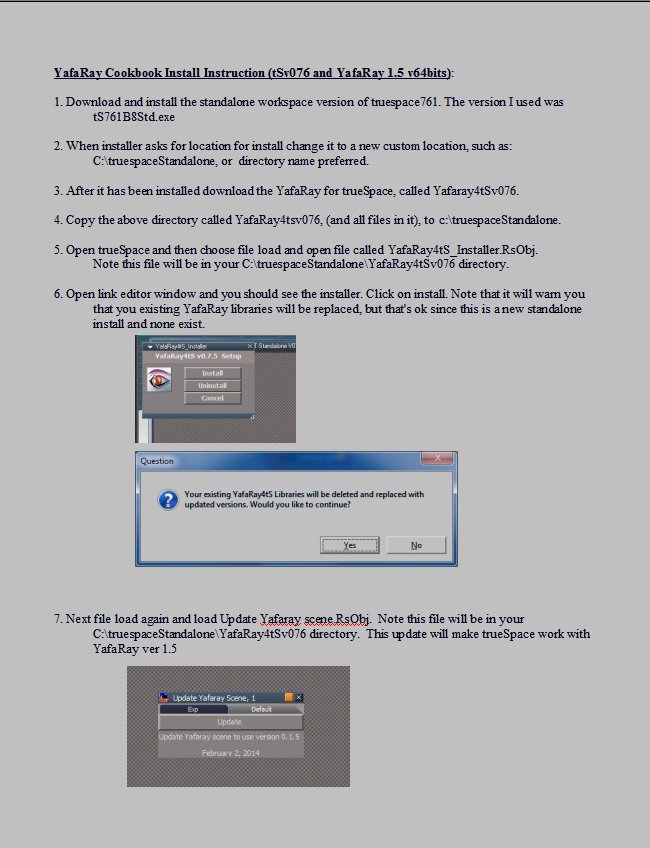
I decided to make my self a cookbook of instructions on how I installed it (In case I need to install again later
on, as I have found my memory isn't all that great).
Note that the install directory for yafaRay needs to be C:\yafaray as this is where the registry key points to that is created in step 8.
Hope this will help
I made some comparasions and found that yafaray 1.5 64 bit versions processes about 30percent faster.
I decided to also install a new standalone version of truespace so that it will not effect my current installation
of truespace, and this iinstall only uses about 300 megabytes.
Cookbook install instructions are attached in 3 images ( couldn't load pdf).
- Attachments
-
-
-
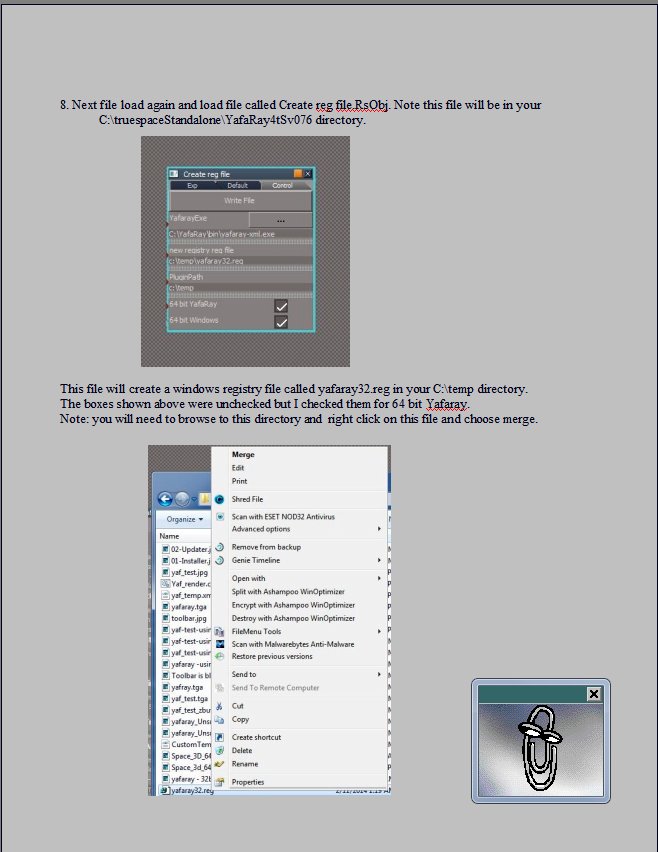
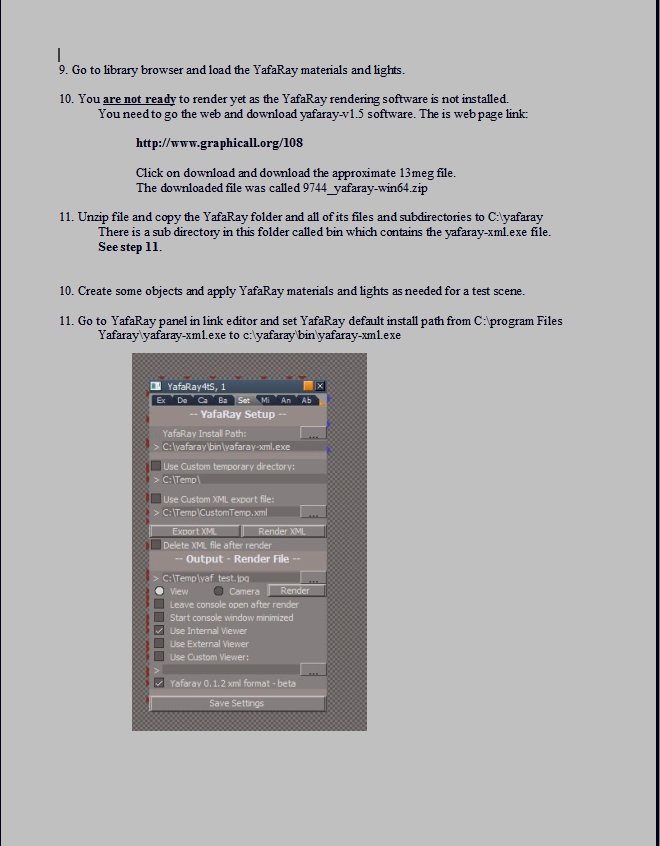
-
clintonman
- Captain
- Posts: 5659
- Joined: 21 May 2009, 21:08
- Type the number ten into the box: 0
- Location: California
Re: YafaRay4tS version 0.7.5
Looks good. I didn't know about the "merge" in the context menu. I just double clicked the file. I think when we make an installer we should make the yafaray exe selection part of the process so it doesn't have to be set twice, once in the setup and once in the "make reg" script.FHembree wrote:MikomDude wrote:I figured I'd give this a try as well. You guys could use some better organization for your download files and especially while stating which version of YafaRay4tS can be used with which version of YafaRay.
Can't say I got anywhere though. After installing the plugin, Yafaray 1.5 and the fix for Yafaray v1.5 I still couldn't get it to render. It's simply a blank panel. I made sure I created a new scene with only the YafaRay4tS materials and lights.
After that I tried the older versions, v.1.1 and v1.2 Beta, still got stuck on that very same problem.
Any idea what it might be?
After fooling with Yafaray for truespace and the trying to get it to work with yafaray 1.5 64 bit version
I decided to make my self a cookbook of instructions on how I installed it (In case I need to install again later
on, as I have found my memory isn't all that great).
Note that the install directory for yafaRay needs to be C:\yafaray as this is where the registry key points to that is created in step 8.
Hope this will help
I made some comparasions and found that yafaray 1.5 64 bit versions processes about 30percent faster.
I decided to also install a new standalone version of truespace so that it will not effect my current installation
of truespace, and this iinstall only uses about 300 megabytes.
Cookbook install instructions are attached in 3 images ( couldn't load pdf).
-
trueBlue
- Captain
- Posts: 5548
- Joined: 06 Jul 2009, 22:50
- Type the number ten into the box: 10
Re: YafaRay4tS version 0.7.5
@Clinton" I noticed in the Registry for the YafRay Team/YafRay that the BlenderExporterPath is different then the above. Not sure if this would be an issue for a Blender user using YafaRay version 015. Thinking it would better to keep it the same? YafaRay4tS could use the Temp folder.clintonman wrote:Here's an image of the 2 utility scripts used for YafaRay 0.1.5
It shows the settings I used to setup the registry file for 32 bit windows and 32 bit yafaray.
The reg file that is generated from it64 bit windows and 32bit yafaray registry file looks like this:Code: Select all
Windows Registry Editor Version 5.00 [HKEY_LOCAL_MACHINE\SOFTWARE\YafaRay Team] [HKEY_LOCAL_MACHINE\SOFTWARE\YafaRay Team\YafaRay] "InstallDir"="D:\\9743_yafaray-win32\\yafaray\\bin" "BlenderExporterPath"="c:\\temp"Code: Select all
Windows Registry Editor Version 5.00

[HKEY_LOCAL_MACHINE\SOFTWARE\Wow6432Node\YafaRay Team]

[HKEY_LOCAL_MACHINE\SOFTWARE\Wow6432Node\YafaRay Team\YafaRay]
"InstallDir"="D:\\9743_yafaray-win32\\yafaray\\bin"
"BlenderExporterPath"="c:\\temp"
- Attachments
-

- Capture.PNG (5.39 KiB) Viewed 17888 times
-
clintonman
- Captain
- Posts: 5659
- Joined: 21 May 2009, 21:08
- Type the number ten into the box: 0
- Location: California
Re: YafaRay4tS version 0.7.5
I don't think Blender/Yafaray 1.5 reads the registry unless you use the export to xml option and that just reads the install path. Maybe that's why there's no windows installer for it, because it renders in Blender without it. Bottom line is we can make it match.
BTW on my system it says "C:\Program Files (x86)\Blender Foundation\Blender\.blender\scripts" and I don't even have a Blender Foundation folder. Maybe that happens when you install Blender. I always get the zip version so there is no installation on my system.
BTW on my system it says "C:\Program Files (x86)\Blender Foundation\Blender\.blender\scripts" and I don't even have a Blender Foundation folder. Maybe that happens when you install Blender. I always get the zip version so there is no installation on my system.
-
trueBlue
- Captain
- Posts: 5548
- Joined: 06 Jul 2009, 22:50
- Type the number ten into the box: 10
Re: YafaRay4tS version 0.7.5
Okay cool!
Edit: Changing that key to match caused YafaRay to crash. I changed it back the way you had it in your Reg Edit script.
Edit: Changing that key to match caused YafaRay to crash. I changed it back the way you had it in your Reg Edit script.