Hi all , i decided to make a last version of tS 7.6 Modelside, the new name will be "tS76 MS Legacy edition V1.2" and this will be my latest release, i don't make new version in the future, i think i have reached the bottom of internet to grab new files to include in this release.
Updated setup file: 12/30/2020
Here the last change for the next update 1.2:
-Improved setup installation menu, more information for the users about the choice of the installation path and last steps to do (at the beginning and ending of the setup installation process).
-Added serial code for "gameSpace" in the serial dialog box, just read it and type the code in the "Serial" field, "Name" and "Company" fields can be what you want.
-Added "Cityblock 1.8" and "Randomosity 1.0" plugins made by Bill Crowe.
-Added new library materials shaders "tS4_Rivera_book_shaders.mtl", i created this library from the "Inside trueSpace 4 by Frank Rivera" book (from the page 607 "Shading Formulas" by Frank Rivera).
-Added the "FreeBASIC-0.23.0-win32.zip" file zip version for the freebasic SDK. (not tested with the most recent FreeBASIC release.)
-Added "tsx modules definition API" for Borland C++ by Roberto Gómez Torres.
-Added some new shaders for shadermagic.
-Added some new python scripts.
-Added the "tsxpython" tutorial writed by Darren L. Waschow (aka Skwerm).
-Added the python help 1.5.2 chm help file to match the embedded python version in trueSpace modelside.
-Added french python 1.5.2 help html files.
-Added the free python pdf book "thinkpython"(python 2) and thinkCSpy (python 2) by Allen B. Downey (https://greenteapress.com/wp/think-python/, https://greenteapress.com/wp/learning-with-python/).
-Added the free python pdf book "Building Skills in Python" (python 2) by Steven F. Lott (http://www.itmaybeahack.com/homepage/books/python.html).
-Added the free python pdf french book "Apprendre à programmer Python2" by Gérard Swinnen (https://inforef.be/swi/python.htm).
-Added the free python pdf book " Introduction To Python2 Programming" by Phil Spector (https://www.stat.berkeley.edu/~spector/).
-Added usage information for the Quickpoly plugin.
-Added some 3d objects files in the objects library from trueSpace 2.0 version and trueSpace 1.04 version.
-Added "simple.mlb" file material library from trueSpace 4.3 version.
-Added "Hair fur" shader for Vray (Workspace side). (thanks to Prodigy and trueBlue)
-Fixed and improved the toolbars and layout. (thanks to trueBlue for these fixes, forum member of "http://united3dartists.com")
-Fixed the Vray library wrong path in the Workspace menu (for the default path installation).
-Fixed "trueSpace76_MS_Legacy_Edition_V1.2.txt" file icon missing in the group menu programs.
-Tweaked some plugins and shaders documentation pages to have a grey background color.
-Restored some files (libraries) for the Workspace side.
-Removed some duplicated files.
/////////////////////////////////////////////////////////////////////////
Here the 1.1 version of trueSpace76 MS Legacy Edition V1.1
-Fixed "trueSpace76_MS_Legacy_Edition_V1.1.txt" file link from the group menu programs.
-Updated "SimbiontTS.tss" shader, the file is a more recent file in date (from gameSpace version), (new changes i don't know).
-Updated "DistanceBM25" plugin, made by Stan.
-Added TSfiretut tutorial using python script, made by Jonathan Koehn - Spacekdet.com.
-Added Candle tutorial using python script. (from "FX/trueSpace" Book)
-Added Galactic documentation for the galactic python scripts. (from 3Dfuel.com)
-Added "Caligari gameSpace 1.6" full version
Updates for gameSpace:
-Patched with the last patches (1.6 version).
-Patched the gameSpace executable file with 4gb patch to unlock the memory usage for modern PC.
-Added the new icons from trueSpace 7.6 modelside. (old icons are in "tscommon.dll.bak" file).
-Added gameSpace group menu and gameSpace desktop icon.
-Added gameSpace sdk files, pdf manual files and some tutorials files.
Download: tS76_MS_Legacy_Edition_V1.2.exe , it's better to uninstall the 1.0,1.1 version in first before installing 1.2 version, also don't forget to save your project files made under the 1.0, 1.1 version.
tS7.6 MS Legacy Edition V1.2 [AVAILABLE]
-
Cellulo

- Lieutenant
- Posts: 927
- Joined: 27 Sep 2012, 07:48
- Type the number ten into the box: 9
- Location: France
tS7.6 MS Legacy Edition V1.2 [AVAILABLE]
Last edited by Cellulo on 30 Dec 2020, 13:49, edited 21 times in total.
-
Draise

- Captain
- Posts: 3200
- Joined: 21 Sep 2009, 19:33
- Type the number ten into the box: 0
- Location: Bogota, Colombia
Re: tS7.6 MS Legacy Edition V1.0 [W.I.P]
What.. would be the difference of 2.1 and this one be? I have lost track of all the new features.
-
Cellulo
- Lieutenant
- Posts: 927
- Joined: 27 Sep 2012, 07:48
- Type the number ten into the box: 9
- Location: France
Re: tS7.6 MS Legacy Edition V1.0 [W.I.P]
Hi Draise, it's only some fixes and new adds, i know it's better to make a patch for the 2.1 for this little content but as it's my latest release anymore, i prefer to make a new release with new name.
If someone on the forum have new plugins or shaders to share, it's ok for me i will include them, you can check the big list of plugins and shaders that i have made for the 2.1 : trueSpace76_Modelside_Edition_V2.1.txt to compare with what you have and what you want share with the community, thanks in advance.
If someone on the forum have new plugins or shaders to share, it's ok for me
i will include them, you can check the big list of plugins and shaders that i have made for the 2.1 : trueSpace76_Modelside_Edition_V2.1.txt to compare with what you have and what you want share with the community, thanks in advance.-
Cellulo
- Lieutenant
- Posts: 927
- Joined: 27 Sep 2012, 07:48
- Type the number ten into the box: 9
- Location: France
Re: tS7.6 MS Legacy Edition V1.0 [W.I.P]
Last add:
-Added the MayaBoxWidgetDeluxe plugin, made by Stan.
-Added the "yamirror" plugin, made by GopherCG. This plugin turn all faces selected, ex: take a cube, select it, click yamirror plugin and all faces are turned inside it's useful to make a room or a level for a game.
-Added chm help files for "infinity2" plugin, "Fcreator333" plugin, "Meshforge 5.0" plugin, "Skin_from_sections_1.01" plugin, "Object_merging_1.01" plugin and "vcTEK2" plugin, see in "tsx/modeling" and "tsx" folders.
-Added "FbEdit_1078a_Cherry" new IDE editor for the SDK.
-Fixed minor things in the dialog box of "Meltmeshle" plugin, "Fusion" plugin, "Pointclone" plugin, "ObjRow" plugin, "MagneticVertex" plugin, "ShapeClone" plugin, "ClothMotion" plugin, "CopyEx" plugin and "trueDisplacement" plugin.
-Moved "ercsm.tsx" plugin from "tsx/Import_export" folder to "tsx" root folder, now the plugin work fine.
The long task for me it's some new tutorials that i want to add for the Help.
-Added the MayaBoxWidgetDeluxe plugin, made by Stan.
-Added the "yamirror" plugin, made by GopherCG. This plugin turn all faces selected, ex: take a cube, select it, click yamirror plugin and all faces are turned inside it's useful to make a room or a level for a game.
-Added chm help files for "infinity2" plugin, "Fcreator333" plugin, "Meshforge 5.0" plugin, "Skin_from_sections_1.01" plugin, "Object_merging_1.01" plugin and "vcTEK2" plugin, see in "tsx/modeling" and "tsx" folders.
-Added "FbEdit_1078a_Cherry" new IDE editor for the SDK.
-Fixed minor things in the dialog box of "Meltmeshle" plugin, "Fusion" plugin, "Pointclone" plugin, "ObjRow" plugin, "MagneticVertex" plugin, "ShapeClone" plugin, "ClothMotion" plugin, "CopyEx" plugin and "trueDisplacement" plugin.
-Moved "ercsm.tsx" plugin from "tsx/Import_export" folder to "tsx" root folder, now the plugin work fine.
The long task for me it's some new tutorials that i want to add for the Help.
-
the_ant

- Chief Petty Officer
- Posts: 155
- Joined: 02 Jun 2009, 09:26
- Type the number ten into the box: 0
- Location: Perugia - Italy
Re: tS7.6 MS Legacy Edition V1.0 [W.I.P]

-
Cellulo
- Lieutenant
- Posts: 927
- Joined: 27 Sep 2012, 07:48
- Type the number ten into the box: 9
- Location: France
Re: tS7.6 MS Legacy Edition V1.0 [W.I.P]
Last add:
-Added chm help files for "Python help", see in "tS/SDK-tS66/Python_SDK/PythonHelp" folder.
-Added "Animate with trueSpace - Usage of CLIPS" tutorial, made by Emmanuel (english and french version).
-Added a tutorial for the mapper plugin.
-Added chm help files for "Python help", see in "tS/SDK-tS66/Python_SDK/PythonHelp" folder.
-Added "Animate with trueSpace - Usage of CLIPS" tutorial, made by Emmanuel (english and french version).
-Added a tutorial for the mapper plugin.
-
Cellulo
- Lieutenant
- Posts: 927
- Joined: 27 Sep 2012, 07:48
- Type the number ten into the box: 9
- Location: France
Re: tS7.6 MS Legacy Edition V1.0 [W.I.P]
Last add:
-Added the "NScale" plugin, made by Quantum Chamaeleon. (thanks Emmanuel to share this plugin.)
-Added the "Firepower" plugin, made by PCSS.
-Added the "tSxView" plugin, made by stan.
-Added some new shaders files for Darktree Simbiont.
-Added the missing "Geometry Paint" pdf file with the new icons, see the ts76_manual.html page.
-Added "Animation chapter 27" pdf file different version, see the ts76_manual.html page.
-Added "trueSpace for Illustrators" tutorial, made by Paul Woodward, see the ts76_manual.html page.
-Added some python scripts from the CD of the "trueSpace F/X creation" book.
-Added the "NScale" plugin, made by Quantum Chamaeleon. (thanks Emmanuel to share this plugin.)
-Added the "Firepower" plugin, made by PCSS.
-Added the "tSxView" plugin, made by stan.
-Added some new shaders files for Darktree Simbiont.
-Added the missing "Geometry Paint" pdf file with the new icons, see the ts76_manual.html page.
-Added "Animation chapter 27" pdf file different version, see the ts76_manual.html page.
-Added "trueSpace for Illustrators" tutorial, made by Paul Woodward, see the ts76_manual.html page.
-Added some python scripts from the CD of the "trueSpace F/X creation" book.
-
Engelskrieger79
- Petty Officer First Class
- Posts: 69
- Joined: 26 Mar 2012, 09:35
- Type the number ten into the box: 9
Re: tS7.6 MS Legacy Edition V1.0 [W.I.P]
Sorry if I missed it, but is this version already downloadable?
-
Cellulo
- Lieutenant
- Posts: 927
- Joined: 27 Sep 2012, 07:48
- Type the number ten into the box: 9
- Location: France
Re: tS7.6 MS Legacy Edition V1.0 [W.I.P]
Not yet, but you can download the 2.1 version here : viewtopic.php?t=5111, the legacy edition version will have more tutorials and will be more polished, as you can see my recents posts, but files are unchanged between the 2.1 version and legacy edition version, it's always in work in progress until is ready to be distribued.
-
Engelskrieger79
- Petty Officer First Class
- Posts: 69
- Joined: 26 Mar 2012, 09:35
- Type the number ten into the box: 9
Re: tS7.6 MS Legacy Edition V1.0 [W.I.P]
Thanks for the quick answer, happily using the current version but really looking forward to the Legacy Edition 
-
Cellulo
- Lieutenant
- Posts: 927
- Joined: 27 Sep 2012, 07:48
- Type the number ten into the box: 9
- Location: France
Re: tS7.6 MS Legacy Edition V1.0 [W.I.P]
I will release tS7.6 MS Legacy Edition V1.0 this week-end on my homepage.
-
Cellulo
- Lieutenant
- Posts: 927
- Joined: 27 Sep 2012, 07:48
- Type the number ten into the box: 9
- Location: France
Re: tS7.6 MS Legacy Edition V1.0 [AVAILABLE]
tS7.6 MS Legacy Edition V1.0 is available on my homepage see the first topic to download, happy modeling 
-
the_ant
- Chief Petty Officer
- Posts: 155
- Joined: 02 Jun 2009, 09:26
- Type the number ten into the box: 0
- Location: Perugia - Italy
Re: tS7.6 MS Legacy Edition V1.0 [AVAILABLE]

-
Cellulo
- Lieutenant
- Posts: 927
- Joined: 27 Sep 2012, 07:48
- Type the number ten into the box: 9
- Location: France
Re: tS7.6 MS Legacy Edition V1.0 [AVAILABLE]
Here the 1.1 version of trueSpace76 MS Legacy Edition V1.1
-Fixed "trueSpace76_MS_Legacy_Edition_V1.1.txt" file link from the group menu programs.
-Updated "SimbiontTS.tss" shader, the file is a more recent file in date (from gameSpace version), (new changes i don't know).
-Updated "DistanceBM25" plugin, made by Stan.
-Added TSfiretut tutorial using python script, made by Jonathan Koehn - Spacekdet.com.
-Added Candle tutorial using python script. (from "FX/trueSpace" Book)
-Added Galactic documentation for the galactic python scripts. (from 3Dfuel.com)
-Added "Caligari gameSpace 1.6" full version
Updates for gameSpace:
-Patched with the last patches (1.6 version).
-Patched the gameSpace executable file with 4gb patch to unlock the memory usage for modern PC.
-Added the new icons from trueSpace 7.6 modelside. (old icons are in "tscommon.dll.bak" file).
-Added gameSpace group menu and gameSpace desktop icon.
-Added gameSpace sdk files, pdf manual files and some tutorials files.
Happy modeling all
-Fixed "trueSpace76_MS_Legacy_Edition_V1.1.txt" file link from the group menu programs.
-Updated "SimbiontTS.tss" shader, the file is a more recent file in date (from gameSpace version), (new changes i don't know).
-Updated "DistanceBM25" plugin, made by Stan.
-Added TSfiretut tutorial using python script, made by Jonathan Koehn - Spacekdet.com.
-Added Candle tutorial using python script. (from "FX/trueSpace" Book)
-Added Galactic documentation for the galactic python scripts. (from 3Dfuel.com)
-Added "Caligari gameSpace 1.6" full version
Updates for gameSpace:
-Patched with the last patches (1.6 version).
-Patched the gameSpace executable file with 4gb patch to unlock the memory usage for modern PC.
-Added the new icons from trueSpace 7.6 modelside. (old icons are in "tscommon.dll.bak" file).
-Added gameSpace group menu and gameSpace desktop icon.
-Added gameSpace sdk files, pdf manual files and some tutorials files.
Happy modeling all
-
the_ant
- Chief Petty Officer
- Posts: 155
- Joined: 02 Jun 2009, 09:26
- Type the number ten into the box: 0
- Location: Perugia - Italy
Re: tS7.6 MS Legacy Edition V1.1 [AVAILABLE]

-
clintonman

- Captain
- Posts: 5659
- Joined: 21 May 2009, 21:08
- Type the number ten into the box: 0
- Location: California
Re: tS7.6 MS Legacy Edition V1.1 [AVAILABLE]
downloading now. do we uninstall 1.0 version first?
-
Cellulo
- Lieutenant
- Posts: 927
- Joined: 27 Sep 2012, 07:48
- Type the number ten into the box: 9
- Location: France
Re: tS7.6 MS Legacy Edition V1.1 [AVAILABLE]
Yes it's better to uninstall the 1.0 version in first but save your project files or 3d objects before do that.
Last edited by Cellulo on 06 Jul 2020, 17:48, edited 1 time in total.
-
the_ant
- Chief Petty Officer
- Posts: 155
- Joined: 02 Jun 2009, 09:26
- Type the number ten into the box: 0
- Location: Perugia - Italy
Re: tS7.6 MS Legacy Edition V1.1 [AVAILABLE]
Hi Cellulo...no words for your beautiful job...
only a question: is it possible installing your LE1.1 on a custom directroy or must leave the name you suggest?

only a question: is it possible installing your LE1.1 on a custom directroy or must leave the name you suggest?
-
Cellulo
- Lieutenant
- Posts: 927
- Joined: 27 Sep 2012, 07:48
- Type the number ten into the box: 9
- Location: France
Re: tS7.6 MS Legacy Edition V1.1 [AVAILABLE]
Yes you can choose a custom directory, but you need to edit the "Simbiont.cfg" file from "Configs" folder to add your new directory path and have working Darksim shaders again, there is also the "plugin.ini" file from "tS" folder to edit but maybe it's not important for this one because it's for Objectsnap plugin for a specific configuration of trueSpace, you need to do the same thing for gameSpace, it's all normally.
-
trueBlue

- Captain
- Posts: 5548
- Joined: 06 Jul 2009, 22:50
- Type the number ten into the box: 10
Re: tS7.6 MS Legacy Edition V1.1 [AVAILABLE]
What are the instructions on how to install this?
Does trueSpace 7.6 need to be installed first?
What happens when tS7.6 MS Legacy Edition V1.1 is installed?
Is there any additional setup needed?
How does gameSpace work with trueSpace 7.6?
 Are these separate programs or combined into one program?
What time is it?
Does trueSpace 7.6 need to be installed first?
What happens when tS7.6 MS Legacy Edition V1.1 is installed?
Is there any additional setup needed?
How does gameSpace work with trueSpace 7.6?
Are these separate programs or combined into one program? What time is it?
-
clintonman
- Captain
- Posts: 5659
- Joined: 21 May 2009, 21:08
- Type the number ten into the box: 0
- Location: California
Re: tS7.6 MS Legacy Edition V1.1 [AVAILABLE]
It installs just like any other version of trueSpace. He has some notes available after it is installed.
-
Cellulo
- Lieutenant
- Posts: 927
- Joined: 27 Sep 2012, 07:48
- Type the number ten into the box: 9
- Location: France
Re: tS7.6 MS Legacy Edition V1.1 [AVAILABLE]
Hi trueBlue, as Clintonman say it's the same thing like any other previous version of trueSpace that i released previously, it's all-in-one setup file bundled with gameSpace, no need to run 7.6 installation in first it's already included.
After the installation, there is only the 3dlight render and dribble that need to run their setup installation for use this render.
For GameSpace it's installed in the "tS7.6 MS Legacy Edition V1.1" folder at the side of "tS"folder for easy install/uninstall, and it have his own icon on the desktop and group menu for help to use it like Ms Legacy Edition, the only thing to add for gameSpace is the tsx plugins from "tS7.6 MS Legacy Edition V1.1" tsx folder, it's in charge of the user to choose what plugins he want to use in gameSpace. I don't put all plugins from Ms Legacy edition in gameSpace because this grow up the size of the final installation setup and not all plugins are necessary in gameSpace due to his limitations.
Of course if you uninstall tS7.6 MS Legacy Edition V1.1 from your computer this uninstall also gameSpace.
All things is explained in the "trueSpace76_MS_Legacy_Edition_V1.1.txt" file at end of the installation.
After the installation, there is only the 3dlight render and dribble that need to run their setup installation for use this render.
For GameSpace it's installed in the "tS7.6 MS Legacy Edition V1.1" folder at the side of "tS"folder for easy install/uninstall, and it have his own icon on the desktop and group menu for help to use it like Ms Legacy Edition, the only thing to add for gameSpace is the tsx plugins from "tS7.6 MS Legacy Edition V1.1" tsx folder, it's in charge of the user to choose what plugins he want to use in gameSpace. I don't put all plugins from Ms Legacy edition in gameSpace because this grow up the size of the final installation setup and not all plugins are necessary in gameSpace due to his limitations.
Of course if you uninstall tS7.6 MS Legacy Edition V1.1 from your computer this uninstall also gameSpace.
All things is explained in the "trueSpace76_MS_Legacy_Edition_V1.1.txt" file at end of the installation.
-
trueBlue
- Captain
- Posts: 5548
- Joined: 06 Jul 2009, 22:50
- Type the number ten into the box: 10
Re: tS7.6 MS Legacy Edition V1.1 [AVAILABLE]
Thank you Cellulo
-
the_ant
- Chief Petty Officer
- Posts: 155
- Joined: 02 Jun 2009, 09:26
- Type the number ten into the box: 0
- Location: Perugia - Italy
Re: tS7.6 MS Legacy Edition V1.1 [AVAILABLE]
Hi Cellulo
i'd installed all and change paths in config files where needed...but when launch GameSpace it ask me Serial Number (i don't have)..is it normal?
NB. i really don't need it but only to know if it's regular...
i'd installed all and change paths in config files where needed...but when launch GameSpace it ask me Serial Number (i don't have)..is it normal?
NB. i really don't need it but only to know if it's regular...
-
Cellulo
- Lieutenant
- Posts: 927
- Joined: 27 Sep 2012, 07:48
- Type the number ten into the box: 9
- Location: France
Re: tS7.6 MS Legacy Edition V1.1 [AVAILABLE]
This happen to me one time but when i relaunch gameSpace it don't ask me the serial anymore, if you go in the help menu of gameSpace you can call the "About" dialog box windows normally you can see the serial at lower left of the image, this mean it's registered, if no and ask again the serial this mean gameSpace don't like the custom path installation of the tS MS Legacy edition, let me know if it's ok for you now.
-
trueBlue
- Captain
- Posts: 5548
- Joined: 06 Jul 2009, 22:50
- Type the number ten into the box: 10
Re: tS7.6 MS Legacy Edition V1.1 [AVAILABLE]
@ Cellulo
Finally took your tS7.6 MS Legacy Edition V1.1 for a spin.
I am not able to open gameSpace either. No serial number
Can you copy the serial number in the About window?
Several of your Libraries do not have any objects or scenes.
There is a couple of issues I notice with your toolbars and layouts too.
If you Reset the Model File Menu toolbar, it will reset to the the Default toolbar because there is no prototypes saved.
If you replace these included files in your installer, it should fix them.
Finally took your tS7.6 MS Legacy Edition V1.1 for a spin.
I am not able to open gameSpace either. No serial number
Can you copy the serial number in the About window?
Several of your Libraries do not have any objects or scenes.

- MissingLibraryObjects.png (9.13 KiB) Viewed 9282 times
If you Reset the Model File Menu toolbar, it will reset to the the Default toolbar because there is no prototypes saved.
If you replace these included files in your installer, it should fix them.
- Attachments
-
- Caligari trueSpace 7.6 MS Legacy Edition V1.1FIX.zip
- (492.5 KiB) Downloaded 278 times
-
Cellulo
- Lieutenant
- Posts: 927
- Joined: 27 Sep 2012, 07:48
- Type the number ten into the box: 9
- Location: France
Re: tS7.6 MS Legacy Edition V1.1 [AVAILABLE]
Hi trueBlue, thanks for the fix , i will do the update with your files after test it, i don't know if you see it but there is the Spline polygon tool for the modeler (first icon in lower right of the screen) and the new menu in top of the screen in the Workspace UI ,your update remove this tool and the new menu ? or no ?
For the gameSpace serial code i can enter the code in the serial dialog box as a text, the user only need to read and type the code in the box, in fact serials code for all old trueSpace (tS6, gS, tSi etc..) are stored in two files, in the "C:\Windows\Caligari.ini" file and "C:\Users\YOURNAME\AppData\Local\VirtualStore\Windows\Caligari.ini" file, this last file is never uninstalled by the uninstaller setup, it's for this reason when i test gameSpace launch after the installation, it always found the serial code, i tought it's ok for all users using tS MS LE 1.1 but no until i found this hidden file recently. i don't know if i can make my setup to detect the user name and copy the caligari.ini file in the Users folder, i think it's better to use the first solution with the code in the serial dialog box.
Also for information all old trueSpace version share the same file (Caligari.ini) to store their serial code respectivly.
For the missing files about libraries i remember deleted some of them to win space as they are for Workspace only but i will reinsert them in the new setup file with your fix.
trueBlue for the "Toolbars.rsobj" file where i move it ?, i found "tS76 Toolbars.RsObj" file in "\tS\Rs Main Libraries\Objects - tS7.6 Update objects" folder, it's the same file ?
, i will do the update with your files after test it, i don't know if you see it but there is the Spline polygon tool for the modeler (first icon in lower right of the screen) and the new menu in top of the screen in the Workspace UI ,your update remove this tool and the new menu ? or no ?For the gameSpace serial code i can enter the code in the serial dialog box as a text, the user only need to read and type the code in the box, in fact serials code for all old trueSpace (tS6, gS, tSi etc..) are stored in two files, in the "C:\Windows\Caligari.ini" file and "C:\Users\YOURNAME\AppData\Local\VirtualStore\Windows\Caligari.ini" file, this last file is never uninstalled by the uninstaller setup, it's for this reason when i test gameSpace launch after the installation, it always found the serial code, i tought it's ok for all users using tS MS LE 1.1 but no until i found this hidden file recently. i don't know if i can make my setup to detect the user name and copy the caligari.ini file in the Users folder, i think it's better to use the first solution with the code in the serial dialog box.
Also for information all old trueSpace version share the same file (Caligari.ini) to store their serial code respectivly.
For the missing files about libraries i remember deleted some of them to win space as they are for Workspace only but i will reinsert them in the new setup file with your fix.
trueBlue for the "Toolbars.rsobj" file where i move it ?, i found "tS76 Toolbars.RsObj" file in "\tS\Rs Main Libraries\Objects - tS7.6 Update objects" folder, it's the same file ?
Last edited by Cellulo on 30 Jul 2020, 11:40, edited 1 time in total.
-
trueBlue
- Captain
- Posts: 5548
- Joined: 06 Jul 2009, 22:50
- Type the number ten into the box: 10
Re: tS7.6 MS Legacy Edition V1.1 [AVAILABLE]
Yep, they are included.Cellulo wrote: 30 Jul 2020, 07:04 Hi trueBlue, thanks for the fix
default_layout.rsl in the ts folder
Toolbars.rsobj in the preobjects folder
Modelside_Edition_V2.rsl, WS_Default.rsl, and WS_Expanded.rsl in the Layouts - Configurations folder
If you are replacing these files where you installed it, you need to Reset to Default Context
Can you share the serial number?Cellulo wrote: 30 Jul 2020, 07:04 For the gameSpace serial code i can enter the code in the serial dialog box as a text, the user only need to read and type the code in the box, in fact serials code for all old trueSpace (tS6, gS, tSi etc..) are stored in two files, in the "C:\Windows\Caligari.ini" file and "C:\Users\YOURNAME\AppData\Local\VirtualStore\Windows\Caligari.ini" file, this last file is never uninstalled by the uninstaller setup, it's for this reason when i test gameSpace launch after the installation, it always found the serial code, i tought it's ok for all users using tS MS LE 1.1 but no until i found this hidden file recently. i don't know if i can make my setup to detect the user name and copy the caligari.ini file in the Users folder, i think it's better to use the first solution with the code in the serial dialog box.
-
Cellulo
- Lieutenant
- Posts: 927
- Joined: 27 Sep 2012, 07:48
- Type the number ten into the box: 9
- Location: France
Re: tS7.6 MS Legacy Edition V1.1 [AVAILABLE]
Thanks for the explanation, i will update my files, for the serial code of gameSpace i send you a PM, soon i will make a new setup installation file for all users.
-
trueBlue
- Captain
- Posts: 5548
- Joined: 06 Jul 2009, 22:50
- Type the number ten into the box: 10
Re: tS7.6 MS Legacy Edition V1.1 [AVAILABLE]
Here is another option you may or may not want to consider.
This is a Modelspace layout that does not include the Stack and Workspace toolbars.
Workspace File menu includes a Bridge button that opens the Bridge preferences in a floating panel.
Also right clicking the Model's Render Scene button opens the Vray preferences in a floating panel
Edit: Updated the file
This is a Modelspace layout that does not include the Stack and Workspace toolbars.
Workspace File menu includes a Bridge button that opens the Bridge preferences in a floating panel.
Also right clicking the Model's Render Scene button opens the Vray preferences in a floating panel

- Attachments
-
- Caligari trueSpace 7.6 MS Legacy Edition V1.1FIX2.zip
- (576.46 KiB) Downloaded 283 times
-
Cellulo
- Lieutenant
- Posts: 927
- Joined: 27 Sep 2012, 07:48
- Type the number ten into the box: 9
- Location: France
Re: tS7.6 MS Legacy Edition V1.1 [AVAILABLE]
Thanks again trueBlue  , i will use your files because it's more comfortable for the user that use the modelside only, one question if i right-click the render scene icon i can still select the lightworks engine ? also i need to click the reset to context icon ? , Workspace side is not my cup of tea .
, i will use your files because it's more comfortable for the user that use the modelside only, one question if i right-click the render scene icon i can still select the lightworks engine ? also i need to click the reset to context icon ? , Workspace side is not my cup of tea .-
trueBlue
- Captain
- Posts: 5548
- Joined: 06 Jul 2009, 22:50
- Type the number ten into the box: 10
Re: tS7.6 MS Legacy Edition V1.1 [AVAILABLE]
Note that I updated these files so you should download the new files and yes after replacing all of the files, you need to Reset to Default Context.
This does not affect using the Lightworks render engine.
This does not affect using the Lightworks render engine.
-
Cellulo
- Lieutenant
- Posts: 927
- Joined: 27 Sep 2012, 07:48
- Type the number ten into the box: 9
- Location: France
Re: tS7.6 MS Legacy Edition V1.1 [AVAILABLE]
I made the update with the update fix2, it's work fine, but there is one thing missing it's the description tool in bottom left of the screen when the cursor fly over the icons, i have the bubble description of the icons but not the sentence.
-
trueBlue
- Captain
- Posts: 5548
- Joined: 06 Jul 2009, 22:50
- Type the number ten into the box: 10
Re: tS7.6 MS Legacy Edition V1.1 [AVAILABLE]
The Model Status Line should show once you restart trueSpace.
If not I can share a onnewscene.xml file you could add to your installer
How do you stop the MemCheck version 2.73 log?
If not I can share a onnewscene.xml file you could add to your installer
How do you stop the MemCheck version 2.73 log?
-
Cellulo
- Lieutenant
- Posts: 927
- Joined: 27 Sep 2012, 07:48
- Type the number ten into the box: 9
- Location: France
Re: tS7.6 MS Legacy Edition V1.1 [AVAILABLE]
trueBlue it's ok now the model status line come back at the bottom left screen when restarting trueSpace a second time after the reset to default context.
For the MemCheck version 2.73 log file (tS7_MemCheck.log), i don't understand what you say about stopping this file, in fact i never do anything about this file, i only put this file in my installer setup because i remember having some crash with trueSpace and it generate this file, it's only to have better uninstall files process by the uninstaller setup, maybe if the "tS7_MemCheck.log" file is already present in the tS folder this stop the file to be generate, normally it must be overwrited if there is a new trueSpace crash or i'm wrong.
Thanks for your fixes it's really better in the modelside now, i will make the release this week end, this will be "tS7.6 MS Legacy Edition V1.1a" version.
For the MemCheck version 2.73 log file (tS7_MemCheck.log), i don't understand what you say about stopping this file, in fact i never do anything about this file, i only put this file in my installer setup because i remember having some crash with trueSpace and it generate this file, it's only to have better uninstall files process by the uninstaller setup, maybe if the "tS7_MemCheck.log" file is already present in the tS folder this stop the file to be generate, normally it must be overwrited if there is a new trueSpace crash or i'm wrong.
Thanks for your fixes it's really better in the modelside now, i will make the release this week end, this will be "tS7.6 MS Legacy Edition V1.1a" version.
-
trueBlue
- Captain
- Posts: 5548
- Joined: 06 Jul 2009, 22:50
- Type the number ten into the box: 10
Re: tS7.6 MS Legacy Edition V1.1 [AVAILABLE]
What is the name of the file that creates this log file?
-
Cellulo
- Lieutenant
- Posts: 927
- Joined: 27 Sep 2012, 07:48
- Type the number ten into the box: 9
- Location: France
Re: tS7.6 MS Legacy Edition V1.1 [AVAILABLE]
I think it's the "tS7.exe" file that create the log file, in the "tS7_MemCheck.log" there is nothing about how it created itself.
-
Cellulo
- Lieutenant
- Posts: 927
- Joined: 27 Sep 2012, 07:48
- Type the number ten into the box: 9
- Location: France
Re: tS7.6 MS Legacy Edition V1.1 [AVAILABLE]
Here some information about MemCheck "http://v.mahon.free.fr/pro/freeware/memcheck/", i think it's coded in the "tS7.exe" file for debugging.
-
trueBlue
- Captain
- Posts: 5548
- Joined: 06 Jul 2009, 22:50
- Type the number ten into the box: 10
Re: tS7.6 MS Legacy Edition V1.1 [AVAILABLE]
I do not think that memcheck is incorporated into the tS7.exe as I have used trueSpace7.6 for many years and have never seen this before.
I tested replacing your tS7.exe with the Caligari original tS7.exe and the tS7_MemCheck.log file is still being created and in use.
Still can not find which file is the culprit. Thought it might be the Texture Bench scene, but I did not see anything abnormal.
I do notice that you have several duplicated files in the tS folder, that are not needed and you could save 22.4 MB of space if you remove these files from your installer.
Also notice that the scene is empty with no lights or camera.
I do not remember but I think it is because there was no truespace.tsp file? Not sure.
I tested replacing your tS7.exe with the Caligari original tS7.exe and the tS7_MemCheck.log file is still being created and in use.
Still can not find which file is the culprit. Thought it might be the Texture Bench scene, but I did not see anything abnormal.
I do notice that you have several duplicated files in the tS folder, that are not needed and you could save 22.4 MB of space if you remove these files from your installer.
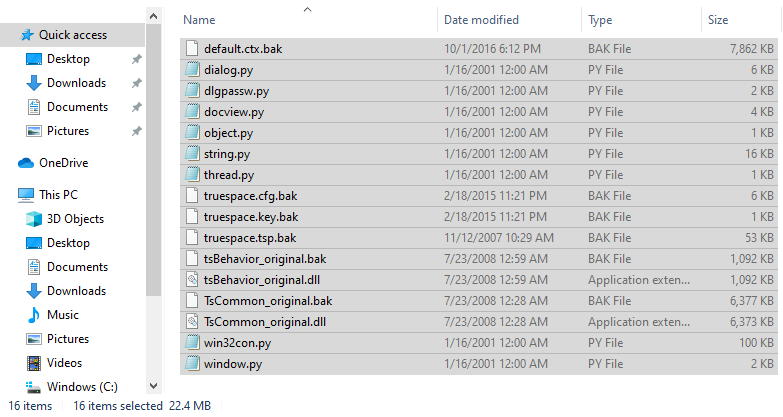
I do not remember but I think it is because there was no truespace.tsp file? Not sure.
-
Cellulo
- Lieutenant
- Posts: 927
- Joined: 27 Sep 2012, 07:48
- Type the number ten into the box: 9
- Location: France
Re: tS7.6 MS Legacy Edition V1.1 [AVAILABLE]
We can't do nothing about the tS7_MemCheck.log file it's updated when there is memory leak errors. I remember having some memory errors with error dialog box in trueSpace but it was under the Windows XP.
For the files with *.bak extension it was for the users that want back to the original files of trueSpac but i can delete them to win space as you say.
I already fix the problem with the default scene without lights and camera, i don't know why i modified this default scene.
About the tS7_MemCheck.log file generated automatically you can try this method (for the moment i don't test it):
1) Go here and download the program simple program debugger: https://www.nirsoft.net/utils/simple_pr ... ugger.html, you can choose the 32 bit version as trueSpace is in 32bits.
2) Launch trueSpace.
3) Launch Simple program debugger (maybe in administrator mode) and catch the trueSpace executable file (tS7.exe).
4) Use trueSpace at the moment it generate the log file.
5) Check the debugging events in simple program debugger to track what files are in use and where they are writed.
This is the only way i found, maybe it's good or bad. For information i used "simple program debugger" program to fix Hexagreat 3D under Windows 10 but i failed. Simple program debugger in 64bits working bad with Hexagreat3D but the 32bits version have fixed the problem as Hexagreat is a 32bit program.
For the files with *.bak extension it was for the users that want back to the original files of trueSpac but i can delete them to win space as you say.
I already fix the problem with the default scene without lights and camera, i don't know why i modified this default scene.
About the tS7_MemCheck.log file generated automatically you can try this method (for the moment i don't test it):
1) Go here and download the program simple program debugger: https://www.nirsoft.net/utils/simple_pr ... ugger.html, you can choose the 32 bit version as trueSpace is in 32bits.
2) Launch trueSpace.
3) Launch Simple program debugger (maybe in administrator mode) and catch the trueSpace executable file (tS7.exe).
4) Use trueSpace at the moment it generate the log file.
5) Check the debugging events in simple program debugger to track what files are in use and where they are writed.
This is the only way i found, maybe it's good or bad. For information i used "simple program debugger" program to fix Hexagreat 3D under Windows 10 but i failed. Simple program debugger in 64bits working bad with Hexagreat3D but the 32bits version have fixed the problem as Hexagreat is a 32bit program.
-
Cellulo
- Lieutenant
- Posts: 927
- Joined: 27 Sep 2012, 07:48
- Type the number ten into the box: 9
- Location: France
Re: tS7.6 MS Legacy Edition V1.1 [AVAILABLE]
I have some problems with the default scene, the lights and camera are gone now everytime i relaunch trueSpace, my scene is empty, the trueSpace.tsp is always overwrited when closing trueSpace. I believe its fixed but no  .
.
Other problem it's the new dialog box Photorender for render settings it's not sync with the icons from the UI also when i change the render to another this do nothing until i open the original render menu in preferences button.
I tested Vray render but all scenes are rendered in grey color, i tried my old trueSpace legacy version 1.0, i encounter the same problem but after a time i can render some scenes perfectly, i don't know what is unblock the render, not all examples files from Vray library work, the vray render work randomly with some scenes, maybe it's a bug or i doing something wrong.
.Other problem it's the new dialog box Photorender for render settings it's not sync with the icons from the UI also when i change the render to another this do nothing until i open the original render menu in preferences button.
I tested Vray render but all scenes are rendered in grey color, i tried my old trueSpace legacy version 1.0, i encounter the same problem but after a time i can render some scenes perfectly, i don't know what is unblock the render, not all examples files from Vray library work, the vray render work randomly with some scenes, maybe it's a bug or i doing something wrong.
-
trueBlue
- Captain
- Posts: 5548
- Joined: 06 Jul 2009, 22:50
- Type the number ten into the box: 10
Re: tS7.6 MS Legacy Edition V1.1 [AVAILABLE]
The Photorender panel is useless except for changing the Background. It is a trueSpace thang!
Best to use Model's icons for the render settings and Preferences for changing the Renderer.
It's a known issue!
Best to use Model's icons for the render settings and Preferences for changing the Renderer.
It's a known issue!
-
trueBlue
- Captain
- Posts: 5548
- Joined: 06 Jul 2009, 22:50
- Type the number ten into the box: 10
Re: tS7.6 MS Legacy Edition V1.1 [AVAILABLE]
I found the problem.
It is your truespace.tsp file
I replaced your truespace.tsp with the Caligari trueSpace7.6 original truespace.tsp and so far I have not seen the tS7_MemCheck.log
I also checked AutoLoad in the Preferences panel.
Edit: Loaded your MS Legacy Edition V1.0 config and the tS7_MemCheck.log is back
It is your truespace.tsp file
I replaced your truespace.tsp with the Caligari trueSpace7.6 original truespace.tsp and so far I have not seen the tS7_MemCheck.log
I also checked AutoLoad in the Preferences panel.
Edit: Loaded your MS Legacy Edition V1.0 config and the tS7_MemCheck.log is back
-
Cellulo
- Lieutenant
- Posts: 927
- Joined: 27 Sep 2012, 07:48
- Type the number ten into the box: 9
- Location: France
Re: tS7.6 MS Legacy Edition V1.1 [AVAILABLE]
Hi trueblue I will keep your fix1 for the next release of tS MS legacy edition, with the fix2 Vray won't work for unknown reason i have always a grey render area on the whole scene when rendering any vray scene file from the vray library with render portion or render scene method, with the fix1 i have the same problem but it disappear after a moment and it's random from vray scene file to another vray scene file, i don't find where is the problem, i have modified the plugin.xml file with the good installation path of Vray plugin but still don't render with the fix2.
-
trueBlue
- Captain
- Posts: 5548
- Joined: 06 Jul 2009, 22:50
- Type the number ten into the box: 10
Re: tS7.6 MS Legacy Edition V1.1 [AVAILABLE]
You mean the ModelSpace layout?
I think I know what is happening.
If you switch layouts with the Bridge Off, I have seen Vray render all gray.
So I have been following these steps
Bridge On
Switch Layouts
Bridge OFF
So far Vray has been working correctly
I think I know what is happening.
If you switch layouts with the Bridge Off, I have seen Vray render all gray.
So I have been following these steps
Bridge On
Switch Layouts
Bridge OFF
So far Vray has been working correctly
-
Cellulo
- Lieutenant
- Posts: 927
- Joined: 27 Sep 2012, 07:48
- Type the number ten into the box: 9
- Location: France
Re: tS7.6 MS Legacy Edition V1.1 [AVAILABLE]
Yes it's in the modelspace side, i will try your advice and reapply your fix2, thanks.
-
trueBlue
- Captain
- Posts: 5548
- Joined: 06 Jul 2009, 22:50
- Type the number ten into the box: 10
Re: tS7.6 MS Legacy Edition V1.1 [AVAILABLE]
I just noticed a few issues
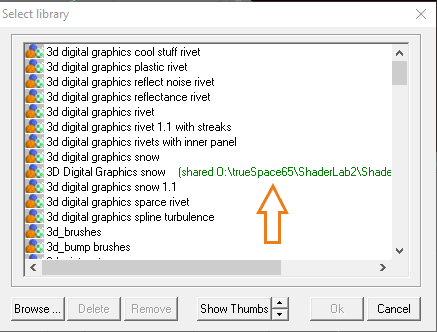
1.) A wrong path for a library
2.) When rendering Vray Animation images from Modeler, the Bridge needs to be set to On or Auto
1.) A wrong path for a library
- Library.png (10.6 KiB) Viewed 9059 times
-
Cellulo
- Lieutenant
- Posts: 927
- Joined: 27 Sep 2012, 07:48
- Type the number ten into the box: 9
- Location: France
Re: tS7.6 MS Legacy Edition V1.1 [AVAILABLE]
Thanks to report the issue trueBlue,
1) It's fixed now in fact it was a shortcut file of the same mtl filename only 1 ko i don't know why this shortcut file was here, after delete it, this fix the error.
2) I will set the bridge auto by default for the next update of the legacy edition version.
1) It's fixed now in fact it was a shortcut file of the same mtl filename only 1 ko i don't know why this shortcut file was here, after delete it, this fix the error.
2) I will set the bridge auto by default for the next update of the legacy edition version.
-
trueBlue
- Captain
- Posts: 5548
- Joined: 06 Jul 2009, 22:50
- Type the number ten into the box: 10
Re: tS7.6 MS Legacy Edition V1.1 [AVAILABLE]
From the VRay.pdf
There is one important aspect where V-Ray support differs from other trueSpace render engines - even
though the user interface is fully integrated into the Modeler aspect, V-Ray support is based on the
contents of the Workspace in trueSpace. The scene description (geometry, lights, and materials) is
taken from the Workspace scene graph, so rendering relies on the Bridge between the Modeler and the
Workspace for scene synchronization.
With regards to your instructions on the missing workspace libraries which does not seem to work per your instructions
The quickest way to fix this:
1) Reset to Default Context
or
2)LMB select/open the workspace's Library Browser icon
RMB select the Main Library Place icon and select Close
RMB select inside the Library Browser and select Create Library Place
Name = Main Library Place
Path = C:\trueSpace76_MS_Legacy_Edition_V1.1\tS\Rs Main Libraries
Select OK
Here is the missing textures for the vray Room.scn
There is one important aspect where V-Ray support differs from other trueSpace render engines - even
though the user interface is fully integrated into the Modeler aspect, V-Ray support is based on the
contents of the Workspace in trueSpace. The scene description (geometry, lights, and materials) is
taken from the Workspace scene graph, so rendering relies on the Bridge between the Modeler and the
Workspace for scene synchronization.
With regards to your instructions on the missing workspace libraries which does not seem to work per your instructions
The quickest way to fix this:
1) Reset to Default Context
or
2)LMB select/open the workspace's Library Browser icon
RMB select the Main Library Place icon and select Close
RMB select inside the Library Browser and select Create Library Place
Name = Main Library Place
Path = C:\trueSpace76_MS_Legacy_Edition_V1.1\tS\Rs Main Libraries
Select OK
Here is the missing textures for the vray Room.scn
- Attachments
-
- Textures.zip
- (607.11 KiB) Downloaded 290 times
-
Cellulo
- Lieutenant
- Posts: 927
- Joined: 27 Sep 2012, 07:48
- Type the number ten into the box: 9
- Location: France
Re: tS7.6 MS Legacy Edition V1.1 [AVAILABLE]
Thanks but i already found the missing textures in your tS76.3 update file previously released.
The only problem with the legacy edition is if the user want to use a custom path installation other than the default path installation, some files need to be set with the new custom path installation to have a modelside working without problems, i will write the steps for custom path installation at the start of the setup installation file maybe in the license file or if i can add a new txt filz in the setup installation file.
The only problem with the legacy edition is if the user want to use a custom path installation other than the default path installation, some files need to be set with the new custom path installation to have a modelside working without problems, i will write the steps for custom path installation at the start of the setup installation file maybe in the license file or if i can add a new txt filz in the setup installation file.
-
Cellulo
- Lieutenant
- Posts: 927
- Joined: 27 Sep 2012, 07:48
- Type the number ten into the box: 9
- Location: France
Re: tS7.6 MS Legacy Edition V1.1 [AVAILABLE] & V1.2 [WIP]
-Added the release note (not final) for the 1.2 version that is in work in progress.
-
trueBlue
- Captain
- Posts: 5548
- Joined: 06 Jul 2009, 22:50
- Type the number ten into the box: 10
Re: tS7.6 MS Legacy Edition V1.1 [AVAILABLE] & V1.2 [WIP]
Just noticed that the Plugins.xml has the wrong path for the Vray_ts.rsx
Default installation directory
C:\trueSpace76_MS_Legacy_Edition_V1.1
Plugins.xml
C:\trueSpace76_MS_Edition_V2\Vray_ts.rsx
Default installation directory
C:\trueSpace76_MS_Legacy_Edition_V1.1
Plugins.xml
C:\trueSpace76_MS_Edition_V2\Vray_ts.rsx
-
Cellulo
- Lieutenant
- Posts: 927
- Joined: 27 Sep 2012, 07:48
- Type the number ten into the box: 9
- Location: France
Re: tS7.6 MS Legacy Edition V1.1 [AVAILABLE] & V1.2 [WIP]
Thanks trueBlue, i have already fixed this wrong path for the plugin.xml file.
-
Cellulo
- Lieutenant
- Posts: 927
- Joined: 27 Sep 2012, 07:48
- Type the number ten into the box: 9
- Location: France
Re: tS7.6 MS Legacy Edition V1.2 [AVAILABLE]
trueSpace 7.6 MS Legacy Edition V1.2 is available on my homepage.
Merry Christmas all
Merry Christmas all
-
the_ant
- Chief Petty Officer
- Posts: 155
- Joined: 02 Jun 2009, 09:26
- Type the number ten into the box: 0
- Location: Perugia - Italy
Re: tS7.6 MS Legacy Edition V1.2 [AVAILABLE]
Thanks Cellulo
Have nice holidays!!!
Have nice holidays!!!
-
the_ant
- Chief Petty Officer
- Posts: 155
- Joined: 02 Jun 2009, 09:26
- Type the number ten into the box: 0
- Location: Perugia - Italy
Re: tS7.6 MS Legacy Edition V1.2 [AVAILABLE]
Hi Cellulo
downloaded your LE1.2 and installed following instructions (my custom folder is C:\truespace_MS_L12 instead of your default)
it's all right for Gamespace
but when launch tSp it remain indefinetly on startup screen without any activity so i must terminate it
edited Dec.28th : give a 2nd chance with default folder install and same issue (tsp won't start)
downloaded your LE1.2 and installed following instructions (my custom folder is C:\truespace_MS_L12 instead of your default)
it's all right for Gamespace
but when launch tSp it remain indefinetly on startup screen without any activity so i must terminate it
edited Dec.28th : give a 2nd chance with default folder install and same issue (tsp won't start)
-
Cellulo
- Lieutenant
- Posts: 927
- Joined: 27 Sep 2012, 07:48
- Type the number ten into the box: 9
- Location: France
Re: tS7.6 MS Legacy Edition V1.2 [AVAILABLE]
Hi Ant It's strange i tested the 1.2 version and works fine before i put it on my homepage, i recently swap my hard disk with a SSD disk, maybe something goes wrong when compiling the setup on this new disk, i have cloned my old hard disk with samsung tool, i will check on my pc.
EDIT: Ok i think i found the problem, before i compiled the setup of the 1.2 version, i have patched a last dll file (View3D.dll) with the 4 gb patch but without testing trueSpace, this is my fault this have broken trueSpace, for this reason i have removed all DLL patched with 4gb patch and put the original files to avoid problems, the only file patched with 4gbpatch that will stay is the executable of trueSpace because we have really got performance with this change, i will upload the new file soon on my homepage after testing it. Thanks Ant for the report .
EDIT2: i have uploaded the new file fixed on my homepage, now all works fine.
EDIT: Ok i think i found the problem, before i compiled the setup of the 1.2 version, i have patched a last dll file (View3D.dll) with the 4 gb patch but without testing trueSpace, this is my fault
this have broken trueSpace, for this reason i have removed all DLL patched with 4gb patch and put the original files to avoid problems, the only file patched with 4gbpatch that will stay is the executable of trueSpace because we have really got performance with this change, i will upload the new file soon on my homepage after testing it. Thanks Ant for the report .EDIT2: i have uploaded the new file fixed on my homepage, now all works fine.
-
trueBlue
- Captain
- Posts: 5548
- Joined: 06 Jul 2009, 22:50
- Type the number ten into the box: 10
Re: tS7.6 MS Legacy Edition V1.2 [AVAILABLE]
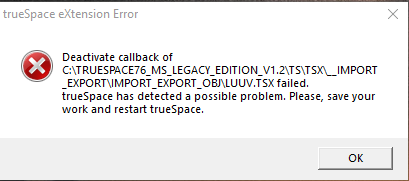
I think there is a problem with LUUV where you have it installed
tS76 has it installed in tsx/luuv folder
-
Cellulo
- Lieutenant
- Posts: 927
- Joined: 27 Sep 2012, 07:48
- Type the number ten into the box: 9
- Location: France
Re: tS7.6 MS Legacy Edition V1.2 [AVAILABLE]
Hi trueBlue i tested the luuv export and i don't have this problem, when trueSpace start with the plugin i don't have error message same thing when i use it to save in obj format, i will make more test, thanks for report it.