Question about extruded spline

Legacy tS 6.6
compPanda
Senior Chief Petty Officer
Posts: 275
Joined: 21 May 2009, 21:15
Type the number ten into the box: 0

Question about extruded spline

Post by compPanda »

Hi

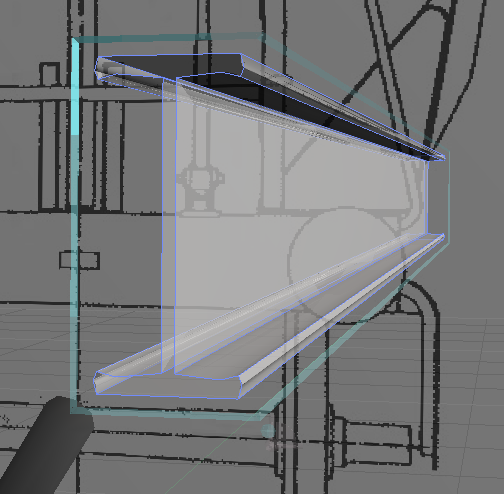
I have a question - how do I create a face at the end of this extruded spline?
Currently it is hollow, but I don't want it to be hollow - I want it to appear solid....
So I guess I need a face in each end but how do I make that? I found a button that transformed it to a polyhedron but the hole remained, which I found strange.
hole.png
User avatar
spacekdet
Captain
Posts: 1810
Joined: 27 May 2009, 15:00
Type the number ten into the box: 10
Location: On the day shift at the Utility Muffin Research Kitchen

Re: Question about extruded spline

Post by spacekdet »

There are two ways to go:
Convert a copy of the closed shape to polyhedron first, then use normal sweep.

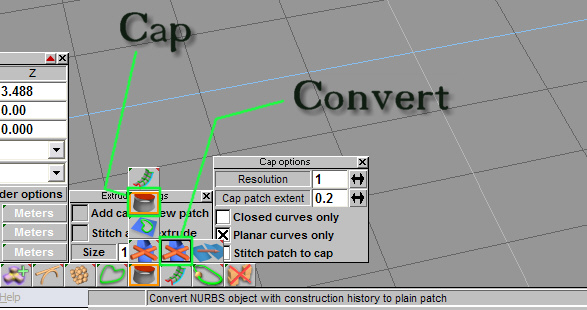
Or- if you want to keep it NURBS, extrude and then 'convert to plain patch'.
Now find the 'Cap Tool' and right click to open options; set them as desired (You'll probably want to stitch cap to patch).
Left click to activate it, then select the 'open' end and a new surface patch is created.
This will create a hierarchy, use down arrow button to access/edit each part.
cappr_minitut.jpg
User avatar
Finis
Captain
Posts: 5410
Joined: 21 May 2009, 18:26
Type the number ten into the box: 0
Location: America!

Re: Question about extruded spline

Post by Finis »

There is also a tool on the point edit menu for polygonal objects, model side, to turn a hole into a face.
I prefer dangerous freedom over peaceful servitude. -- Thomas Jefferson/Jean Jacques Rousseau
compPanda
Senior Chief Petty Officer
Posts: 275
Joined: 21 May 2009, 21:15
Type the number ten into the box: 0

Re: Question about extruded spline

Post by compPanda »

Finis wrote:There is also a tool on the point edit menu for polygonal objects, model side, to turn a hole into a face.
Thank you both for your answers. =)